ignition Peugeot Boxer Dag 2010 User Guide
[x] Cancel search | Manufacturer: PEUGEOT, Model Year: 2010, Model line: Boxer Dag, Model: Peugeot Boxer Dag 2010Pages: 167, PDF Size: 4.33 MB
Page 65 of 167
67
3
EASE OF USE AND COMFORT
Practical information
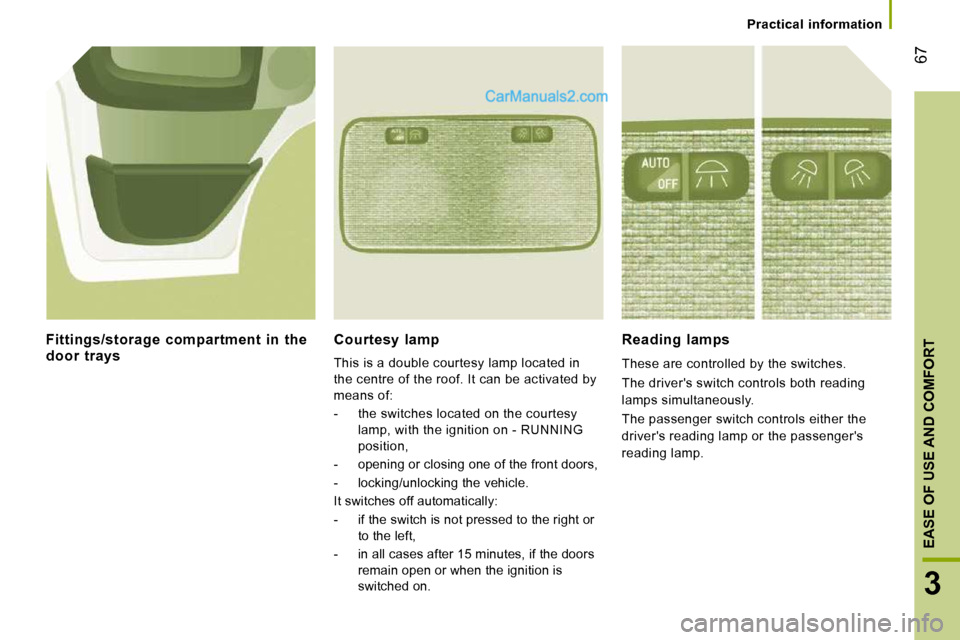
Courtesy lamp
This is a double courtesy lamp located in
the centre of the roof. It can be activated by
means of:
- the switches located on the courtesy lamp, with the ignition on - RUNNING
position,
- opening or closing one of the front doors,
- locking/unlocking the vehicle.
It switches off automatically:
- if the switch is not pressed to the right or to the left,
- in all cases after 15 minutes, if the doors remain open or when the ignition is
switched on.
Reading lamps
These are controlled by the switches.
The driver's switch controls both reading
lamps simultaneously.
The passenger switch controls either the
driver's reading lamp or the passenger's
reading lamp.
Fittings/storage compartment in the door trays
Page 69 of 167
71
3
EASE OF USE AND COMFORT
Mirrors and windows
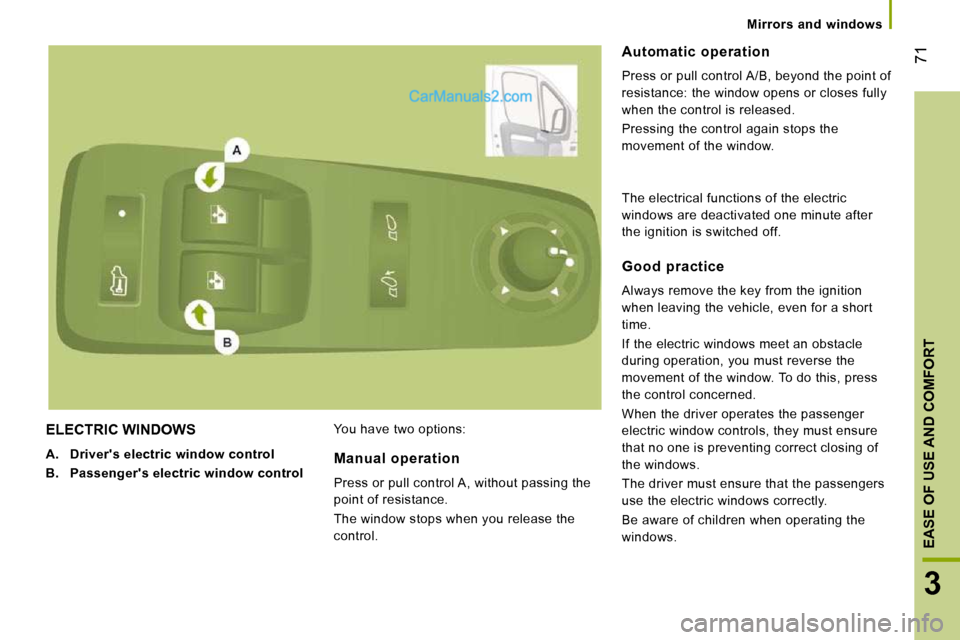
ELECTRIC WINDOWS
A. Driver's electric window control
B. Passenger
's
electric window control You have two options:
Automatic operation
Press or pull control A/B , beyond the point of
resistance: the window opens or closes fully
when the control is released.
Pressing the control again stops the
movement of the window.
Manual operation
Press or pull control A , without passing the
point of resistance.
The window stops when you release the
control.
Good practice
Always remove the key from the ignition
when leaving the vehicle, even for a short
time.
If the electric windows meet an obstacle
during operation, you must reverse the
movement of the window. To do this, press
the control concerned.
When the driver operates the passenger
electric window controls, they must ensure
that no one is preventing correct closing of
the windows.
The driver must ensure that the passengers
use the electric windows correctly.
Be aware of children when operating the
windows.
The electrical functions of the electric
windows are deactivated one minute after
the ignition is switched off.
Page 70 of 167
72
Trip computer
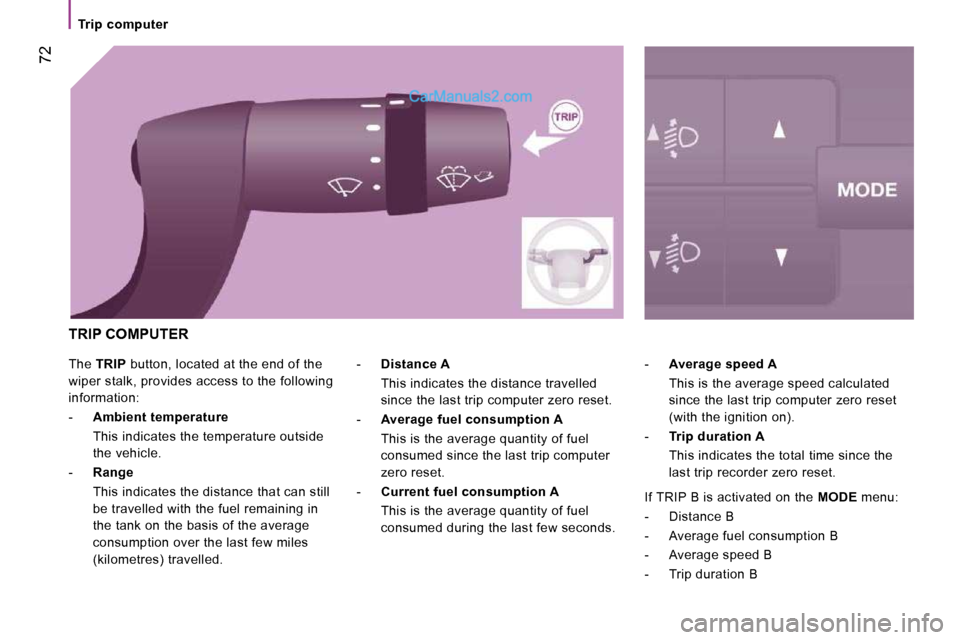
The TRIP button, located at the end of the
wiper stalk, provides access to the following
information:
- Ambient
temperature
This indicates the temperature outside the vehicle.
- Range
This indicates the distance that can still be travelled with the fuel remaining in
the tank on the basis of the average
consumption over the last few miles
(kilometres) travelled. -
Average speed A
This is the average speed calculated since the last trip computer zero reset
(with the ignition on).
- Trip duration A
This indicates the total time since the last trip recorder zero reset.
-
Distance A
This indicates the distance travelled since the last trip computer zero reset.
- Average
fuel
consumption A
This is the average quantity of fuel consumed since the last trip computer
zero reset.
- Current
fuel
consumption A
This is the average quantity of fuel consumed during the last few seconds.
TRIP COMPUTER
If TRIP B is activated on the MODE menu:
- Distance B
- Average fuel consumption B
- Average speed B
- Trip duration B
Page 71 of 167
73
4
TECHNOLOGY ON BOARD
Mode
MODE
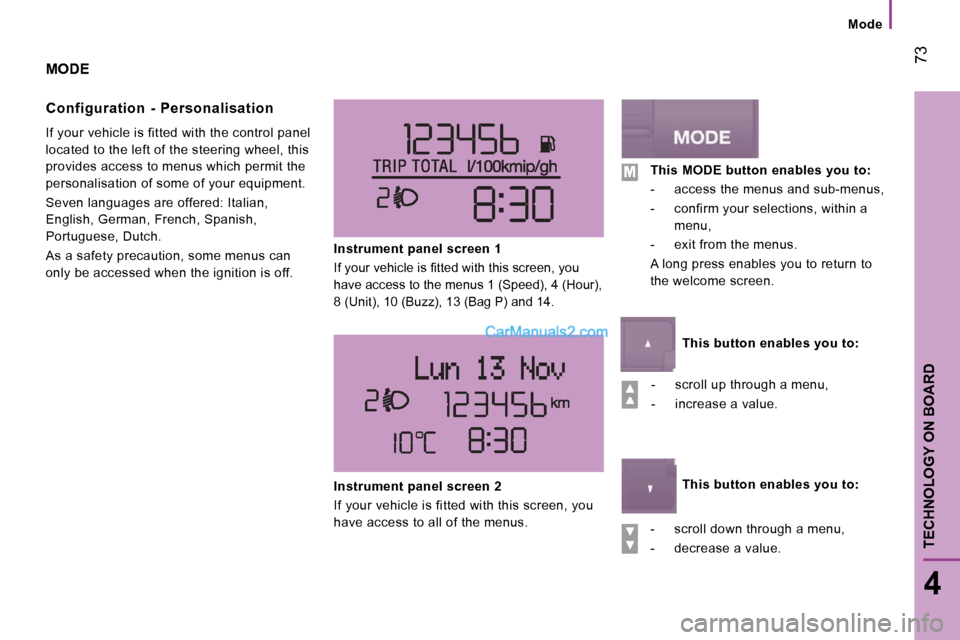
Configuration - Personalisation
If your vehicle is fitted with the control panel
located to the left of the steering wheel, this
provides access to menus which permit the
personalisation of some of your equipment.
Seven languages are offered: Italian,
English, German, French, Spanish,
Portuguese, Dutch.
As a safety precaution, some menus can
only be accessed when the ignition is off. Instrument panel screen 1
If your vehicle is fi tted with this screen, you
have access to the menus 1 (Speed), 4 (Hour),
8 (Unit), 10 (Buzz), 13 (Bag P) and 14.
- scroll up through a menu,
- increase a value.
- scroll down through a menu,
- decrease a value.
Instrument panel screen 2
If your vehicle is fitted with this screen, you
have access to all of the menus.
This MODE button enables you to:
- access the menus and sub-menus,
- confirm your selections, within a menu,
- exit from the menus.
A long press enables you to return to
the welcome screen.
This button enables you to:
This button enables you to:
Page 83 of 167
4
TECHNOLOGY ON BOARD
Audio equipment
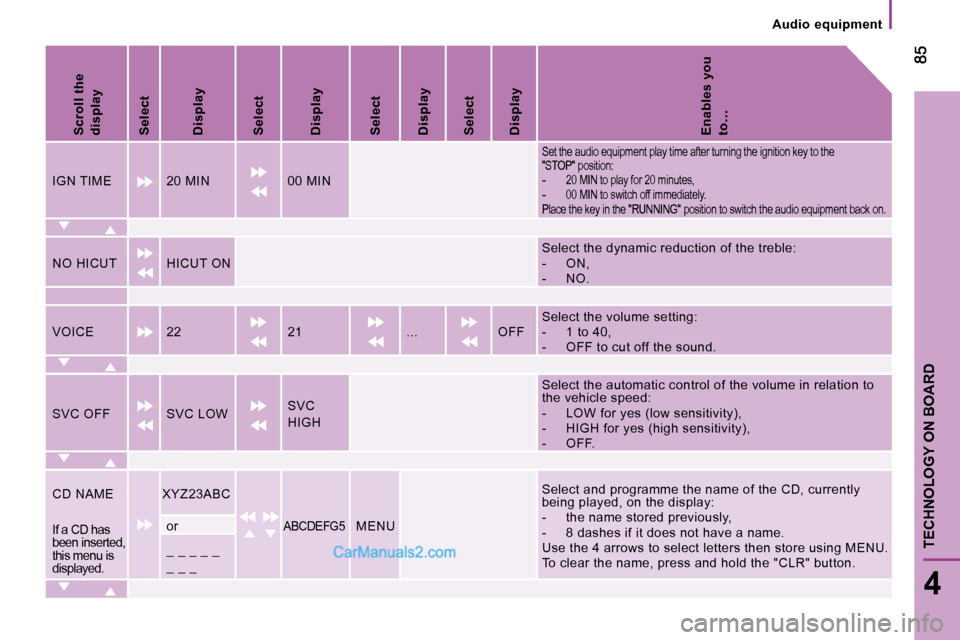
Scroll the
display
Select
Display
Select
Display
Select
Display
Select
Display
Enables you
to…
IGN TIME 20 MIN 00 MIN
Set the audio equipment play time after turning th e ignition key to the
"STOP" position:
- 20 MIN to play for 20 minutes,
- 00 MIN to switch off immediately.
Place the key in the "RUNNING" position to switch the audio equipment back on.
NO HICUT HICUT ON Select the dynamic reduction of the treble:
- ON,
- NO.
VOICE 22 21 ... OFF Select the volume setting:
- 1 to 40,
- OFF to cut off the sound.
SVC OFF SVC LOW
SVC
HIGH
Select the automatic control of the volume in rela
tion to
the vehicle speed:
- LOW for yes (low sensitivity),
- HIGH for yes (high sensitivity),
- OFF.
CD NAME
XYZ23ABC
ABCDEFG5 MENU
Select and programme the name of the CD, currently
being played, on the display:
- the name stored previously,
- 8 dashes if it does not have a name.
Use the 4 arrows to select letters then store usin g MENU.
To clear the name, press and hold the "CLR" button .
If a CD has
been inserted,
this menu is
displayed. or
_ _ _ _ _
_ _ _
Page 90 of 167
Mobile telephone with hands-free function
92
When prompted by the telephone, enter the
PIN displayed on the instrument panel.
If the pairing has been successful, the
system announces "Connecting".
The name of the telephone identified
appears on the instrument panel display,
pairing is confirmed.
Blue indicator lamp on
"Settings"\wait for a response\
"Pairing".
PIN
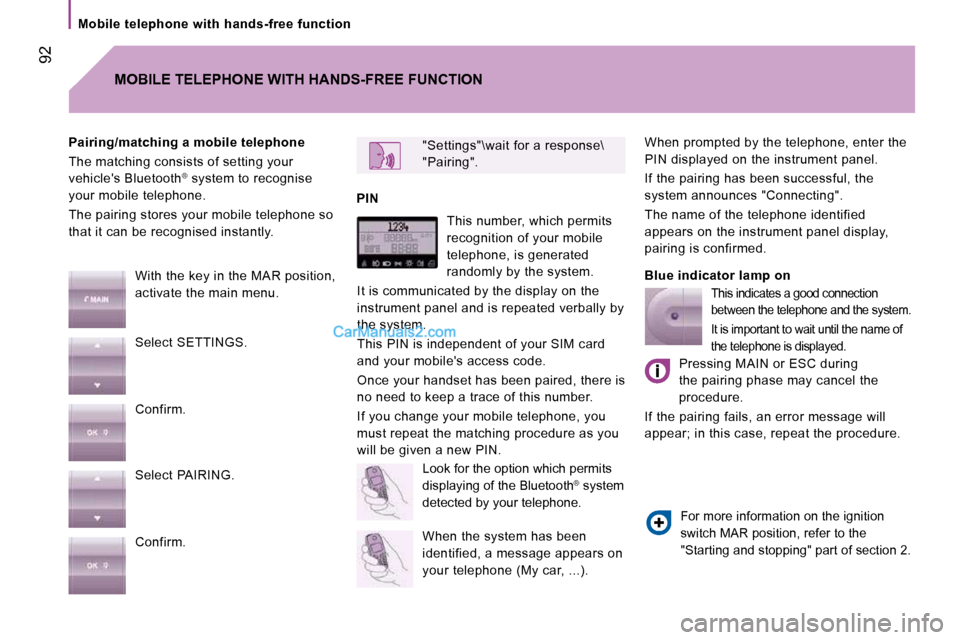
Pairing/matching a mobile telephone
The matching consists of setting your
vehicle's Bluetooth
®
system to recognise
your mobile telephone.
The pairing stores your mobile telephone so
that it can be recognised instantly.
MOBILE TELEPHONE WITH HANDS-FREE FUNCTION
With the key in the MAR position,
activate the main menu.
Select SETTINGS.
Confirm.
Select PAIRING.
Confirm. This number, which permits
recognition of your mobile
telephone, is generated
randomly by the system.
It is communicated by the display on the
instrument panel and is repeated verbally by
the system.
This PIN is independent of your SIM card
and your mobile's access code.
Once your handset has been paired, there is
no need to keep a trace of this number.
If you change your mobile telephone, you
must repeat the matching procedure as you
will be given a new PIN. Look for the option which permits
displaying of the Bluetooth ®
system
detected by your telephone.
When the system has been
identified, a message appears on
your telephone (My car, ...).
This indicates a good connection
between the telephone and the system.
It is important to wait until the name of
the telephone is displayed.
Pressing MAIN or ESC during
the pairing phase may cancel the
procedure.
If the pairing fails, an error message will
appear; in this case, repeat the procedure.
For more information on the ignition
switch MAR position, refer to the
"Starting and stopping" part of section 2.
Page 93 of 167
95
4
TECHNOLOGY ON BOARD
Mobile telephone with hands-free function
Transferring an active call
There are 2 options:
1 - From the mobile telephone to the hands-
free system
Turning the key to the ignition switch MAR
position activates the recognition connection
between the mobile telephone and the
vehicle's audio equipment.
Confirm this recognition using the keypad on
the mobile telephone.
The call can then be transferred.
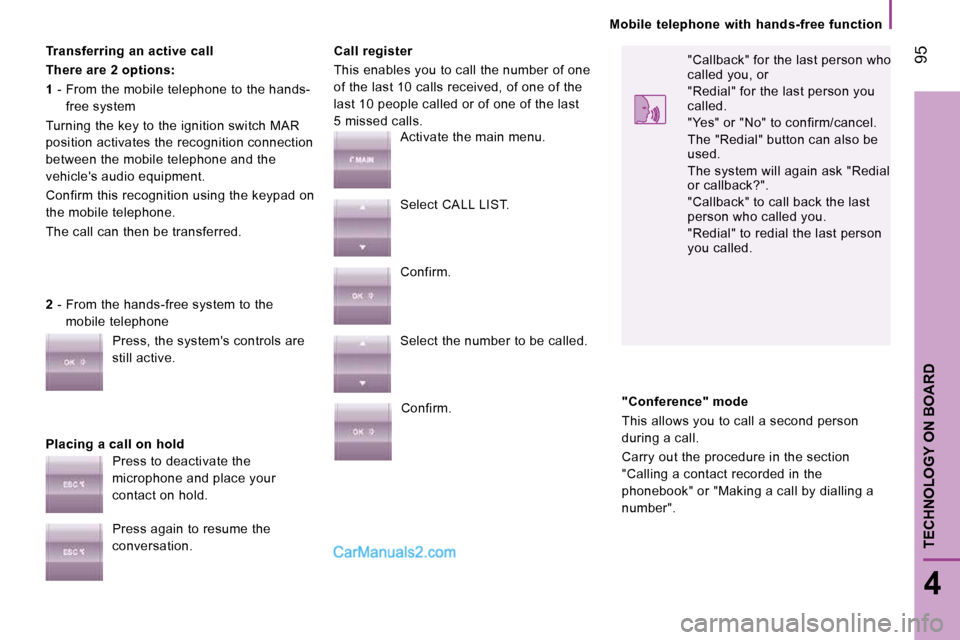
Placing a call on hold Call register
This enables you to call the number of one
of the last 10 calls received, of one of the
last 10 people called or of one of the last
5 missed calls.
2 - From the hands-free system to the
mobile telephone
Press, the system's controls are
still active.
Press to deactivate the
microphone and place your
contact on hold.
Press again to resume the
conversation. Activate the main menu.
Select CALL LIST.
Confirm.
Select the number to be called.
Confirm. "Callback" for the last person who
called you, or
"Redial" for the last person you
called.
"Yes" or "No" to confirm/cancel.
The "Redial" button can also be
used.
The system will again ask "Redial
or callback?".
"Callback" to call back the last
person who called you.
"Redial" to redial the last person
you called.
"Conference" mode
This allows you to call a second person
during a call.
Carry out the procedure in the section
"Calling a contact recorded in the
phonebook" or "Making a call by dialling a
number".
Page 94 of 167
Portable equipment audio player
96
Audio files in .mp3, .wma, .wav format
and for the lists of files (library) with the
extensions .wpl, .m3u are recognised by the
system. Selecting files
PORTABLE EQUIPMENT AUDIO PLAYER
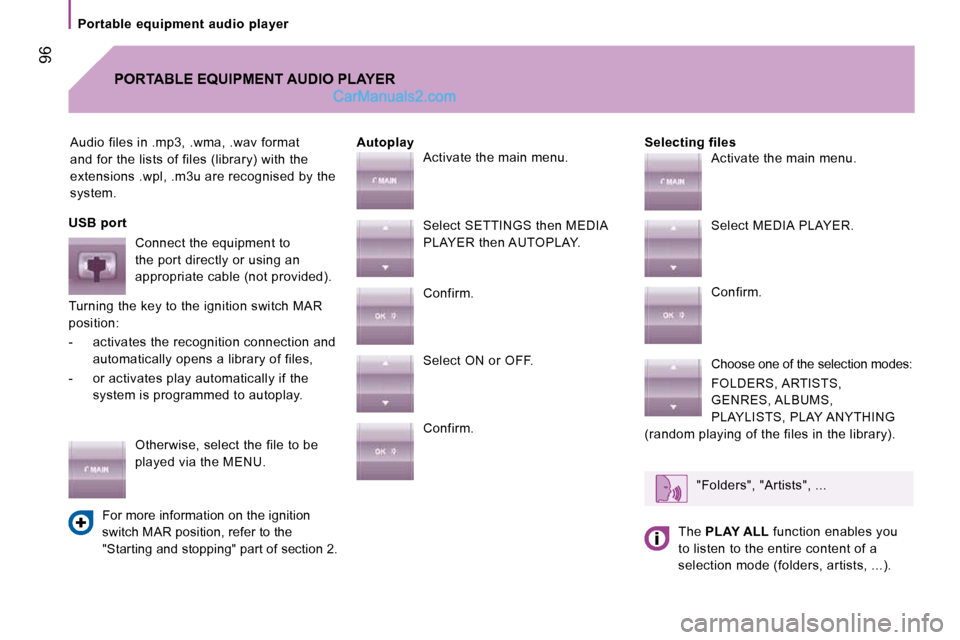
Autoplay
USB port Connect the equipment to
the port directly or using an
appropriate cable (not provided).
Turning the key to the ignition switch MAR
position:
- activates the recognition connection and automatically opens a library of files,
- or activates play automatically if the system is programmed to autoplay.
Otherwise, select the file to be
played via the MENU.
For more information on the ignition
switch MAR position, refer to the
"Starting and stopping" part of section 2. Activate the main menu.
Select SETTINGS then MEDIA
PLAYER then AUTOPLAY.
Confirm.
Select ON or OFF.
Confirm.
Activate the main menu.
Select MEDIA PLAYER.
Confirm.
Choose one of the selection modes:
FOLDERS, ARTISTS,
GENRES, ALBUMS,
PLAYLISTS, PLAY ANYTHING
(random playing of the files in the library).
"Folders", "Artists", ...
The PLAY ALL function enables you
to listen to the entire content of a
selection mode (folders, artists, ...).
Page 100 of 167
102
Driving safety
DRIVING SAFELY
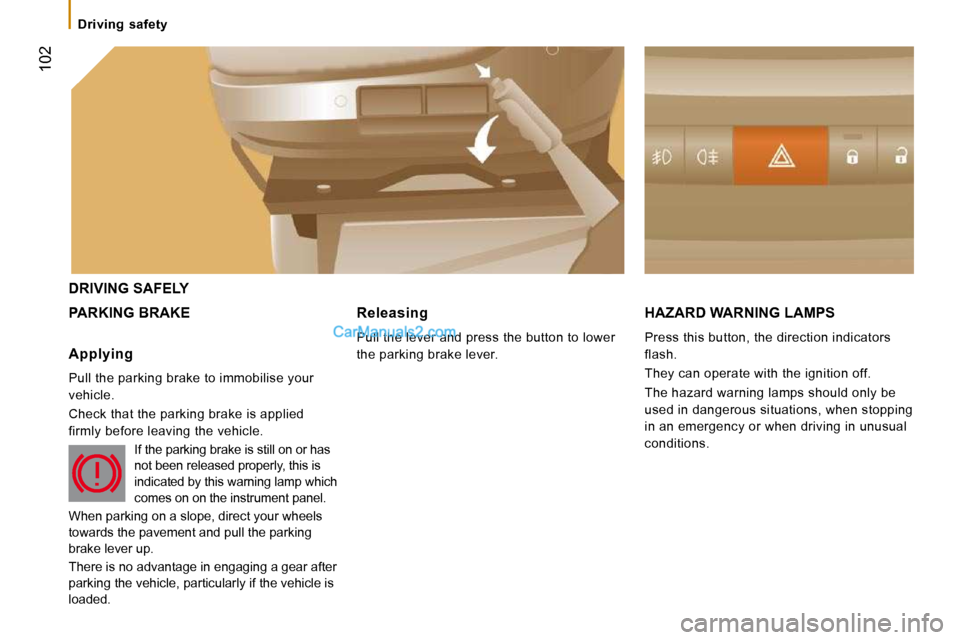
PARKING BRAKE HAZARD WARNING LAMPS
Press this button, the direction indicators
flash.
They can operate with the ignition off.
The hazard warning lamps should only be
used in dangerous situations, when stopping
in an emergency or when driving in unusual
conditions.
Applying
Pull the parking brake to immobilise your
vehicle.
Check that the parking brake is applied
firmly before leaving the vehicle.
If the parking brake is still on or has
not been released properly, this is
indicated by this warning lamp which
comes on on the instrument panel.
When parking on a slope, direct your wheels
towards the pavement and pull the parking
brake lever up.
There is no advantage in engaging a gear after
parking the vehicle, particularly if the vehicle is
loaded.
Releasing
Pull the lever and press the button to lower
the parking brake lever.
Page 106 of 167
Seat belts
107
5
SAFETY
The force limiter reduces the pressure of the
seat belt against the body of the occupants.
The pretensioning seat belts are active when
the ignition is switched on.
The inertia reels are fitted with a device
which automatically locks the strap in the
event of a collision or emergency braking or
if the vehicle rolls over.
You can unfasten the seat belt by pressing
the red button on the buckle. Guide the seat
belt after unfastening. Good practice
The driver must ensure that passengers use
the seat belts correctly and that they are all
strapped in securely before moving off.
Wherever you are seated in the vehicle, always
fasten your seat belt, even for short journeys.
The seat belts are fitted with an inertia reel
which automatically adjusts the length of
the strap to your size.
Do not use accessories (clothes pegs, clips,
safety pins, etc.) which permit a clearance
with the seat belt straps.
Ensure that the seat belt has reeled in
correctly after use.
After folding or moving a seat or a rear
bench seat, ensure that the seat belt has
reeled in correctly and that the buckle is
ready to accommodate the tongue.
Depending on the nature and seriousness
of any impact, the pretensioning device may
be triggered before and independently of
inflation of the airbags. It instantly tightens
the seat belts against the body of the
occupants.
Triggering of the pretensioners is
accompanied by a slight discharge of
harmless smoke and a noise, due to the
activation of the pyrotechnic cartridge
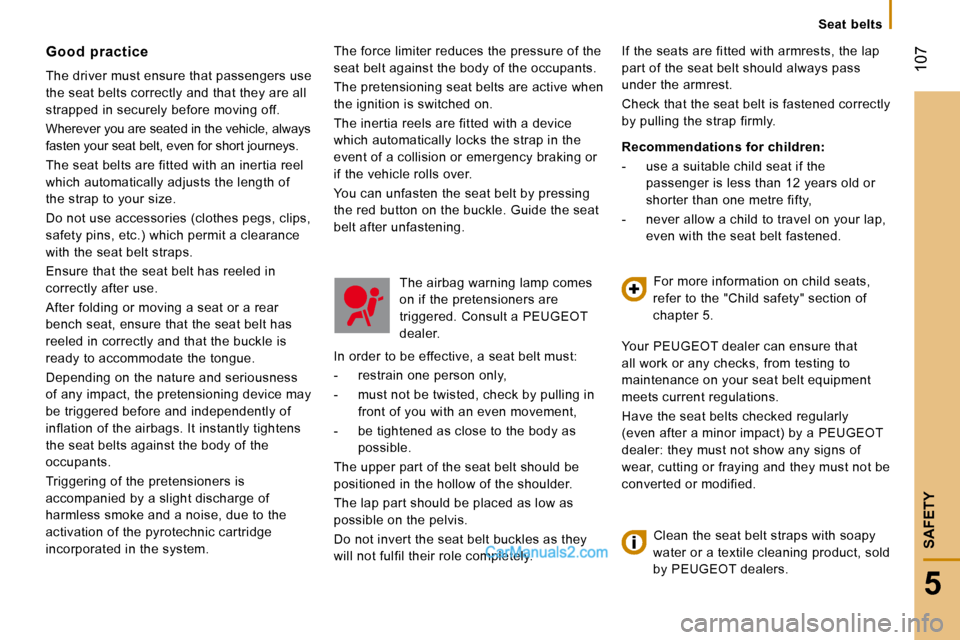
incorporated in the system. The airbag warning lamp comes
on if the pretensioners are
triggered. Consult a PEUGEOT
dealer.
In order to be effective, a seat belt must:
- restrain one person only,
- must not be twisted, check by pulling in front of you with an even movement,
- be tightened as close to the body as possible.
The upper part of the seat belt should be
positioned in the hollow of the shoulder.
The lap part should be placed as low as
possible on the pelvis.
Do not invert the seat belt buckles as they
will not fulfil their role completely. If the seats are fitted with armrests, the lap
part of the seat belt should always pass
under the armrest.
Check that the seat belt is fastened correctly
by pulling the strap firmly.
Recommendations for children:
- use a suitable child seat if the
passenger is less than 12 years old or
shorter than one metre fifty,
- never allow a child to travel on your lap, even with the seat belt fastened.
For more information on child seats,
refer to the "Child safety" section of
chapter 5.
Your PEUGEOT dealer can ensure that
all work or any checks, from testing to
maintenance on your seat belt equipment
meets current regulations.
Have the seat belts checked regularly
(even after a minor impact) by a PEUGEOT
dealer: they must not show any signs of
wear, cutting or fraying and they must not be
converted or modified.
Clean the seat belt straps with soapy
water or a textile cleaning product, sold
by PEUGEOT dealers.