reset PEUGEOT EXPERT 2018 User Guide
[x] Cancel search | Manufacturer: PEUGEOT, Model Year: 2018, Model line: EXPERT, Model: PEUGEOT EXPERT 2018Pages: 416, PDF Size: 14.12 MB
Page 225 of 416
223
Fatigue detection system
It is recommended that you take a break as
soon as you feel tired or at least every two
hours.The system cannot in any circumstances
replace the need for vigilance on the part
of the driver.
Do not take the wheel if you are tired.
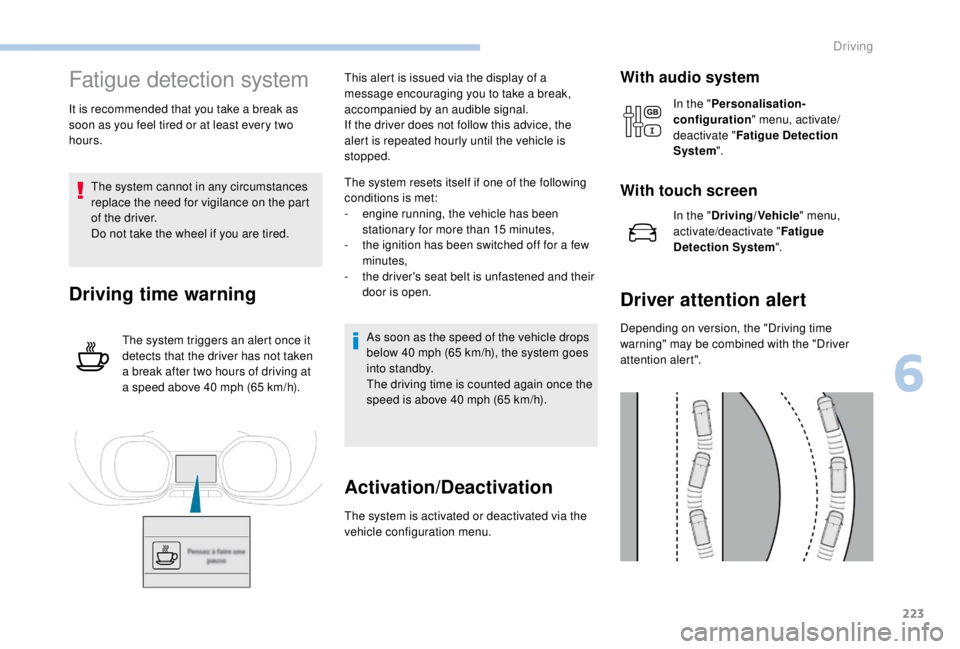
Driving time warning
The system triggers an alert once it
detects that the driver has not taken
a break after two hours of driving at
a speed above 40
mph (65 km/h).This alert is issued via the display of a
message encouraging you to take a break,
accompanied by an audible signal.
If the driver does not follow this advice, the
alert is repeated hourly until the vehicle is
stopped.
The system resets itself if one of the following
conditions is met:
-
e
ngine running, the vehicle has been
stationary for more than 15
minutes,
-
t
he ignition has been switched off for a few
minutes,
-
t
he driver's seat belt is unfastened and their
door is open.
As soon as the speed of the vehicle drops
below 40 mph (65 km/h), the system goes
into standby.
The driving time is counted again once the
speed is above 40
mph (65 km/h).
Activation/Deactivation
The system is activated or deactivated via the
vehicle configuration menu.
With audio system
In the "Personalisation-
configuration " menu, activate/
deactivate " Fatigue Detection
System ".
With touch screen
In the "Driving/Vehicle " menu,
activate/deactivate " Fatigue
Detection System ".
Driver attention alert
Depending on version, the "Driving time
warning" may be combined with the "Driver
attention alert".
6
Driving
Page 293 of 416
291
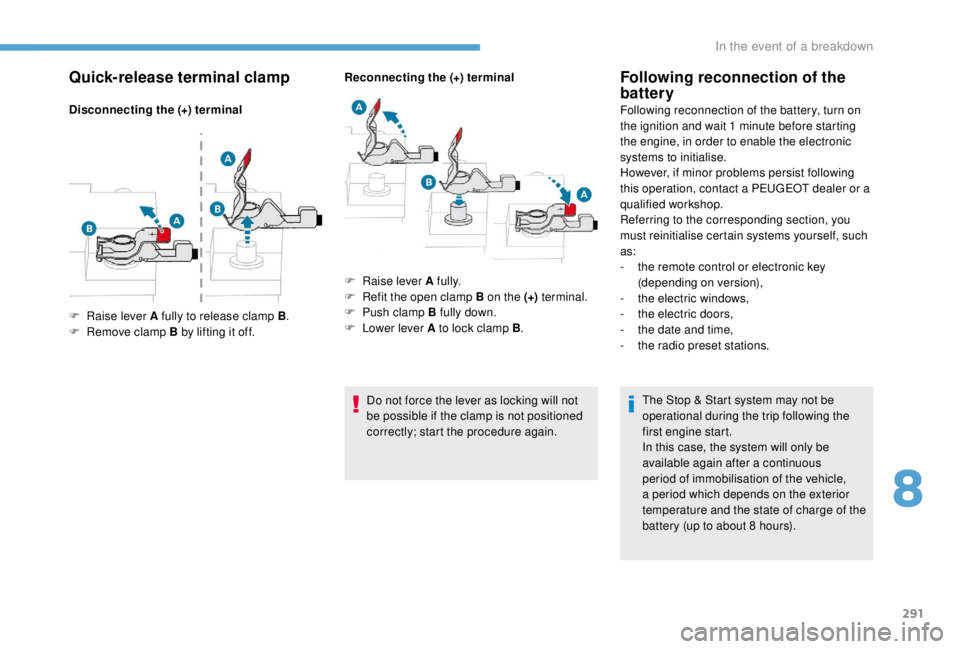
Quick-release terminal clamp
Disconnecting the (+) terminalReconnecting the (+) terminal
Do not force the lever as locking will not
be possible if the clamp is not positioned
correctly; start the procedure again.
Following reconnection of the
battery
Following reconnection of the battery, turn on
the ignition and wait 1 minute before starting
the engine, in order to enable the electronic
systems to initialise.
However, if minor problems persist following
this operation, contact a PEUGEOT dealer or a
qualified workshop.
Referring to the corresponding section, you
must reinitialise certain systems yourself, such
as:
-
t
he remote control or electronic key
(depending on version),
-
t
he electric windows,
-
t
he electric doors,
-
t
he date and time,
-
t
he radio preset stations.The Stop & Start system may not be
operational during the trip following the
first engine start.
In this case, the system will only be
available again after a continuous
period of immobilisation of the vehicle,
a period which depends on the exterior
temperature and the state of charge of the
battery (up to about 8
hours).
F
Ra
ise lever A fully to release clamp B .
F
R
emove clamp B by lifting it off. F
Ra
ise lever A fully.
F
R
efit the open clamp B on the (+) terminal.
F
P
ush clamp B fully down.
F
L
ower lever A to lock clamp B .
8
In the event of a breakdown
Page 311 of 416
3
In the "Settings" menu you can create
a profile for just one person or a group
of people with common points, with the
possibility of entering a multitude of
settings (radio presets, audio settings,
navigation history, contact favourites,
etc.); these settings are taken into account
automatically.
In very hot conditions, the volume may
be limited to protect the system. It may go
into standby (screen and sound off) for at
least 5
minutes.
The return to normal takes place when
the temperature in the passenger
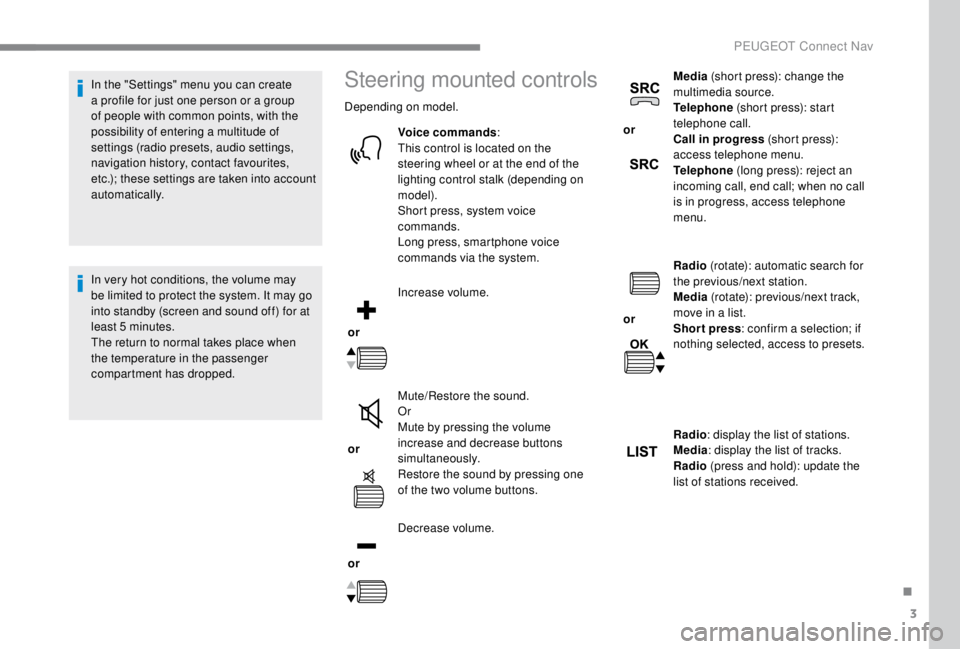
compartment has dropped.Steering mounted controls
Depending on model.
Voice commands :
This control is located on the
steering wheel or at the end of the
lighting control stalk (depending on
model).
Short press, system voice
commands.
Long press, smartphone voice
commands via the system.
or Increase volume.
or Mute/Restore the sound.
Or
Mute by pressing the volume
increase and decrease buttons
simultaneously.
Restore the sound by pressing one
of the two volume buttons.
or Decrease volume. or
Media
(short press): change the
multimedia source.
Telephone (short press): start
telephone call.
Call in progress (short press):
access telephone menu.
Telephone (long press): reject an
incoming call, end call; when no call
is in progress, access telephone
menu.
or Radio
(rotate): automatic search for
the previous/next station.
Media (rotate): previous/next track,
move in a list.
Short press : confirm a selection; if
nothing selected, access to presets.
Radio : display the list of stations.
Media : display the list of tracks.
Radio (press and hold): update the
list of stations received.
.
PEUGEOT Connect Nav
Page 317 of 416
9
Voice commandsHelp messages
Tune to channel <...> You can pick a radio station by saying "tune
to" and the station name or frequency. For
example "tune to channel Talksport" or "tune to
98.5
FM". To listen to a preset radio station, say
"tune to preset number". For example "tune to
preset number five".
What's playing To display the details of the current "track",
"artist" and "album", you can say " What's
playing".
Play song <...> Use the command "play" or "listen to" to select
the type of music you'd like to hear. You can
pick by "song", "artist", or "album". Just say
something like "play artist, Madonna", "play
song, Hey Jude", or "play album, Thriller".
Play ar tist <...>
Play album <...>
Media voice commands are available only
for a USB connection."Telephone" voice
commands
If a telephone is connected to the system,
these voice commands can be issued
from any main screen page after pressing
the "Telephone" button on the steering
wheel, as long as there is no telephone
call in progress.
If there is no telephone connected by
Bluetooth, a voice message announces:
"Please first connect a telephone" and the
voice session will be closed.
.
PEUGEOT Connect Nav
Page 320 of 416
12
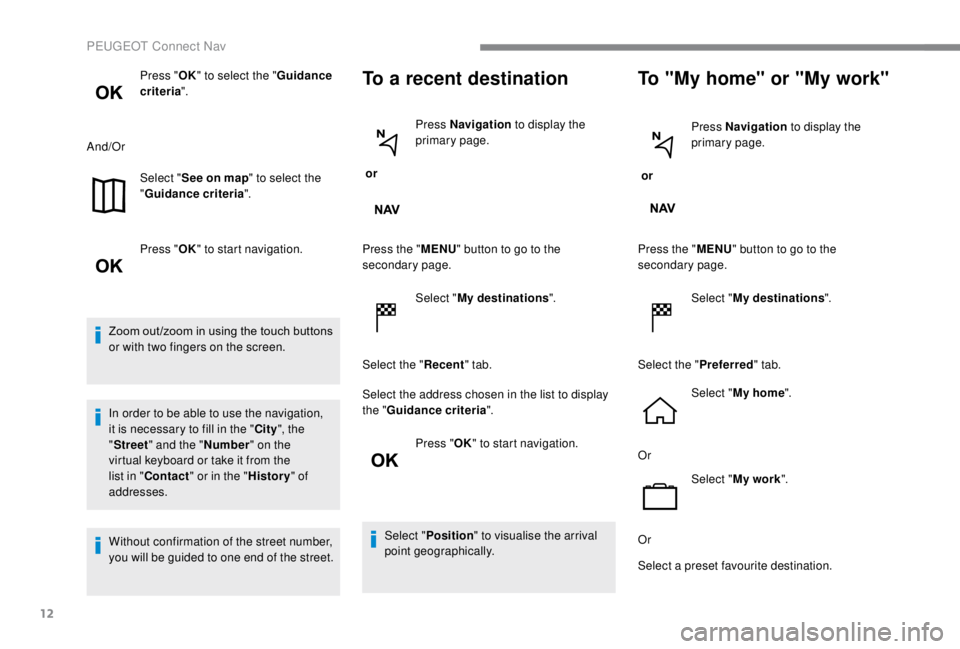
Press "OK" to select the " Guidance
criteria ".
And/Or Select "See on map " to select the
" Guidance criteria ".
Press " OK" to start navigation.
Zoom out /zoom in using the touch buttons
or with two fingers on the screen.
In order to be able to use the navigation,
it is necessary to fill in the " City", the
" Street " and the " Number" on the
virtual keyboard or take it from the
list in " Contact " or in the " History" of
addresses.
Without confirmation of the street number,
you will be guided to one end of the street.To a recent destination
or Press Navigation
to display the
primary page.
Press the " MENU" button to go to the
secondary page.
Select "My destinations ".
Select the " Recent" tab.
Select the address chosen in the list to display
the " Guidance criteria ".
Press " OK" to start navigation.
Select " Position " to visualise the arrival
point geographically.
To "My home" or "My work"
or Press Navigation
to display the
primary page.
Press the " MENU" button to go to the
secondary page.
Select "My destinations ".
Select the " Preferred" tab.
Select " My home ".
Or Select "My work ".
Or
Select a preset favourite destination.
PEUGEOT Connect Nav
Page 324 of 416
16
The ser vices offered with connected
navigation are as follows.
A Connected Services pack:
-
Weather,
-
F
illing stations,
-
C
ar park,
-
Tr a f f i c ,
-
P
OI local search.
A Danger zone pack (option).
The principles and standards
are constantly changing; for the
communication process between the
smartphone and the system to work
correctly, we recommend that you
update the operating system of the
smar tphone as well as the date and
time of the smar tphone and the
system.Settings specific to
connected navigation
In the "Settings" menu you can create
a profile for just one person or a group
of people with common points, with the
possibility of entering a multitude of
settings (radio presets, audio settings,
navigation history, contact favourites, etc.);
these settings are taken into account
automatically.
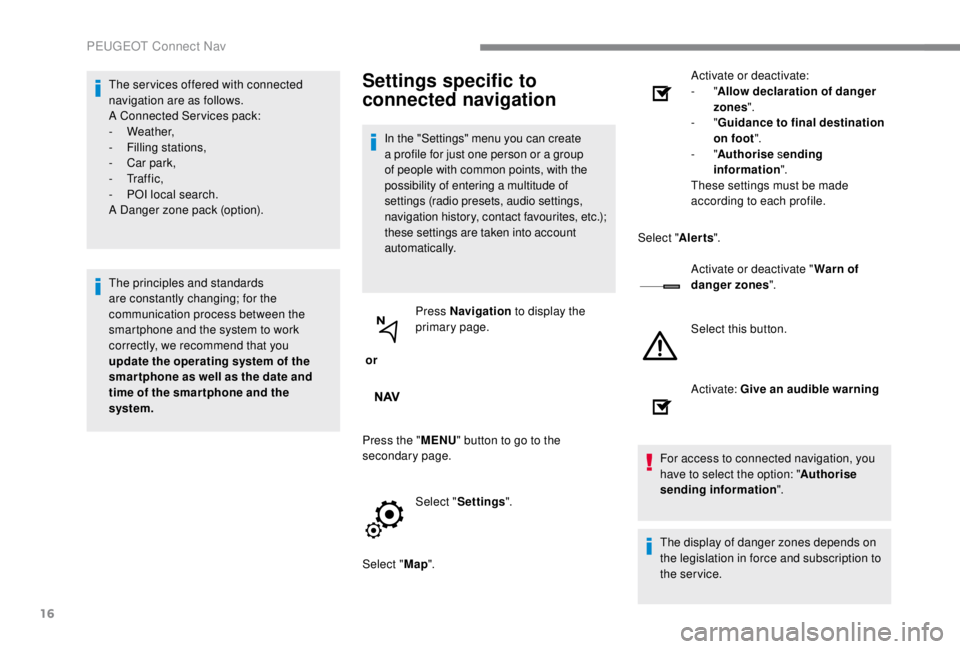
or Press Navigation
to display the
primary page.
Press the " MENU" button to go to the
secondary page.
Select "Settings ".
Select " Map". Activate or deactivate:
-
"
Allow declaration of danger
zones ".
- "
Guidance to final destination
on foot ".
- "Authorise sending
information ".
These settings must be made
according to each profile.
Select " Alerts".
Activate or deactivate " Warn of
danger zones ".
Select this button.
Activate: Give an audible warning
For access to connected navigation, you
have to select the option: " Authorise
sending information ".
The display of danger zones depends on
the legislation in force and subscription to
the service.
PEUGEOT Connect Nav
Page 332 of 416
24
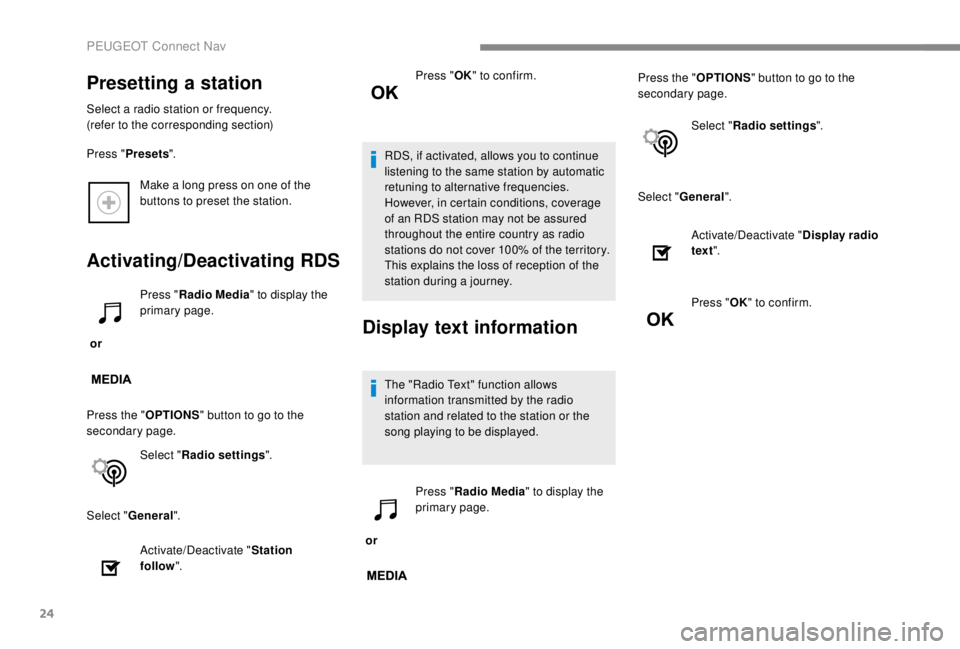
Make a long press on one of the
buttons to preset the station.
Activating/Deactivating RDS
or Press "
Radio Media " to display the
primary page.
Press the " OPTIONS" button to go to the
secondary page.
Select "Radio settings ".
Select " General ".
Activate/Deactivate " Station
follow ". Press "
OK" to confirm.
RDS, if activated, allows you to continue
listening to the same station by automatic
retuning to alternative frequencies.
However, in certain conditions, coverage
of an RDS station may not be assured
throughout the entire country as radio
stations do not cover 100% of the territory.
This explains the loss of reception of the
station during a journey.Display text information
The "Radio Text" function allows
information transmitted by the radio
station and related to the station or the
song playing to be displayed.
or Press "
Radio Media " to display the
primary page. Press the "
OPTIONS" button to go to the
secondary page.
Select "Radio settings ".
Select " General ".
Presetting a station
Select a radio station or frequency.
(refer to the corresponding section)
Press "Presets ".
Activate/Deactivate "Display radio
text ".
Press " OK" to confirm.
PEUGEOT Connect Nav
Page 350 of 416
42
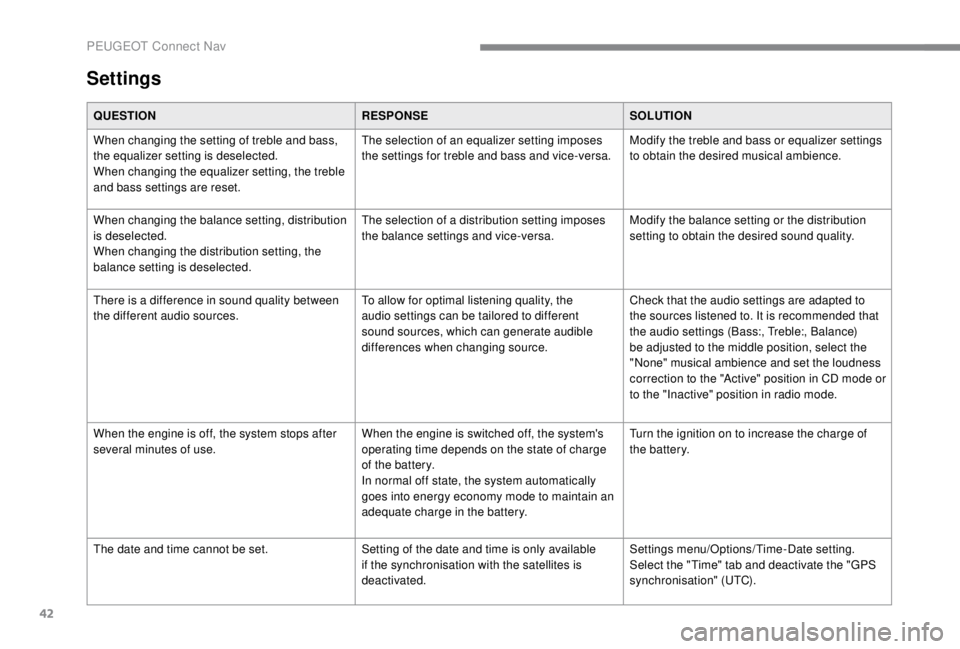
Settings
QUESTIONRESPONSESOLUTION
When changing the setting of treble and bass,
the equalizer setting is deselected.
When changing the equalizer setting, the treble
and bass settings are reset. The selection of an equalizer setting imposes
the settings for treble and bass and vice-versa.
Modify the treble and bass or equalizer settings
to obtain the desired musical ambience.
When changing the balance setting, distribution
is deselected.
When changing the distribution setting, the
balance setting is deselected. The selection of a distribution setting imposes
the balance settings and vice-versa.
Modify the balance setting or the distribution
setting to obtain the desired sound quality.
There is a difference in sound quality between
the different audio sources. To allow for optimal listening quality, the
audio settings can be tailored to different
sound sources, which can generate audible
differences when changing source.Check that the audio settings are adapted to
the sources listened to. It is recommended that
the audio settings (Bass:, Treble:, Balance)
be adjusted to the middle position, select the
"None" musical ambience and set the loudness
correction to the "Active" position in CD mode or
to the "Inactive" position in radio mode.
When the engine is off, the system stops after
several minutes of use. When the engine is switched off, the system's
operating time depends on the state of charge
of the battery.
In normal off state, the system automatically
goes into energy economy mode to maintain an
adequate charge in the battery.Turn the ignition on to increase the charge of
the battery.
The date and time cannot be set. Setting of the date and time is only available
if the synchronisation with the satellites is
deactivated.Settings menu/Options/Time-Date setting.
Select the "Time" tab and deactivate the "GPS
synchronisation" (UTC).
PEUGEOT Connect Nav
Page 356 of 416
2
First steps
With the engine running, a press
mutes the sound.
With the ignition off, a press turns
the system on.
Adjustment of the volume.
Use the buttons either side of or below the
touch screen for access to the menus, then
press the virtual buttons in the touch screen.
Depending on the model, use the "Source" or
"Menu" buttons either side of the touch screen
for access to the menus, then press the virtual
buttons in the touch screen.
You can display the menu at any time by
pressing the screen briefly with three fingers.
All of the touch areas of the screen are white.
Press in the grey zone to go back a level or
confirm.
Press the back arrow to go back a level or
confirm. The touch screen is of the "capacitive"
type.
To clean the screen, use a soft, non-
abrasive cloth (e.g. spectacles cloth) with
no additional product.
Do not use sharp objects on the screen.
Do not touch the screen with wet hands.
*
D
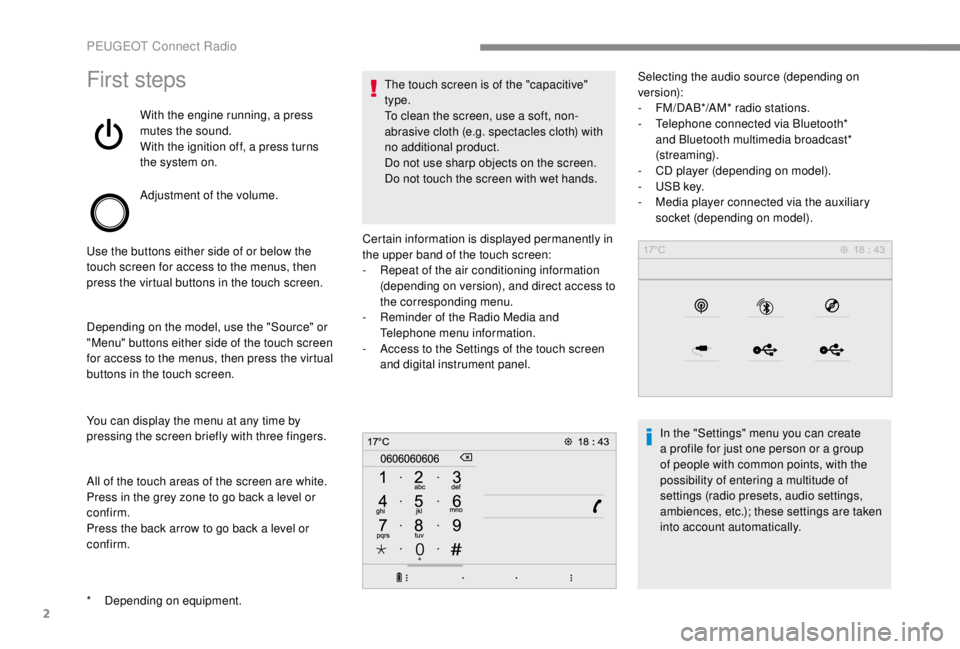
epending on equipment. Certain information is displayed permanently in
the upper band of the touch screen:
-
R
epeat of the air conditioning information
(depending on version), and direct access to
the corresponding menu.
-
R
eminder of the Radio Media and
Telephone menu information.
-
A
ccess to the Settings of the touch screen
and digital instrument panel. Selecting the audio source (depending on
version):
-
F M/DAB*/AM* radio stations.
- T elephone connected via Bluetooth*
and Bluetooth multimedia broadcast*
(streaming).
-
C
D player (depending on model).
-
U
SB key.
-
M
edia player connected via the auxiliary
socket (depending on model).
In the "Settings" menu you can create
a profile for just one person or a group
of people with common points, with the
possibility of entering a multitude of
settings (radio presets, audio settings,
ambiences, etc.); these settings are taken
into account automatically.
PEUGEOT Connect Radio
Page 357 of 416
3
In very hot conditions, the volume may
be limited to protect the system. It may go
into standby (screen and sound off) for at
least 5
minutes.
The return to normal takes place when
the temperature in the passenger
compartment has dropped.Steering mounted controls
Steering mounted
controls – Type 1
Radio:
Select the previous/next preset radio
station.
Select the previous/next item in a
menu or a list.
Media:
Select the previous/next track.
Select the previous/next item in a
menu or a list.
Radio:
Short press: display the list of radio
stations.
Long press: update the list.
Media:
Short press: display the list of
folders.
Long press: display the available
sorting options.
Change audio source (radio; USB;
AUX if equipment connected; CD;
streaming). Confirm a selection.
Increase volume.
Decrease volume.
Mute/Restore sound by
simultaneously pressing the
increase and decrease volume
buttons.
Steering mounted
controls – Type 2
Depending on model.
Voice commands :
This control is located on the
steering wheel or at the end of the
lighting control stalk (depending on
model).
Short press, smartphone voice
commands via the system.
.
PEUGEOT Connect Radio