ECO mode PEUGEOT EXPERT 2018 Owner's Manual
[x] Cancel search | Manufacturer: PEUGEOT, Model Year: 2018, Model line: EXPERT, Model: PEUGEOT EXPERT 2018Pages: 416, PDF Size: 14.12 MB
Page 202 of 416
200
The system reactivates automatically
every time the engine is started by the
driver.
Opening the bonnet
Driving on flooded roadsOperating fault
Depending on your vehicle's equipment:In the event of a fault with the
system, this warning lamp flashes in
the instrument panel.
The indicator lamp in this button
flashes and a message appears,
accompanied by an audible signal.
Have it checked by a PEUGEOT dealer or a
qualified workshop.
If a fault occurs in STOP mode, the vehicle may
stall.
All of the instrument panel warning lamps come
on.
Depending on version, an alert message may
also be displayed, asking you to place the gear
lever in position N and put your foot on the
brake pedal.
With the vehicle stationary, you must switch off
the ignition and then start the engine again.
Head-up display
System which projects various information onto
a blade in the driver's field of vision so that they
do not have to take their eyes off the road.
Displays during operation
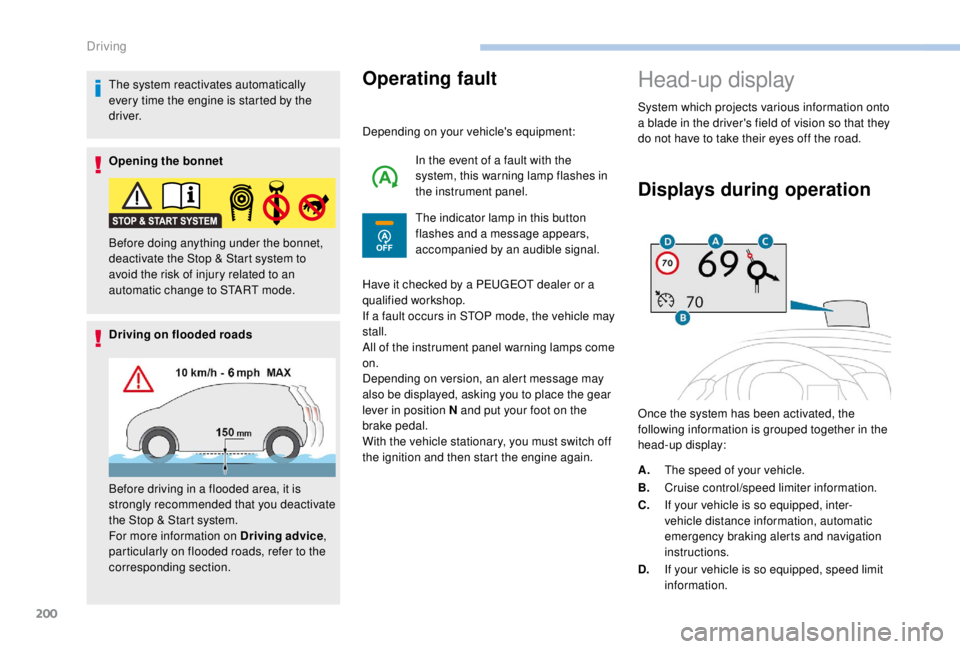
Once the system has been activated, the
following information is grouped together in the
head-up display:
Before doing anything under the bonnet,
deactivate the Stop & Start system to
avoid the risk of injury related to an
automatic change to START mode.
Before driving in a flooded area, it is
strongly recommended that you deactivate
the Stop & Start system.
For more information on Driving advice
,
particularly on flooded roads, refer to the
corresponding section. A.
The speed of your vehicle.
B. Cruise control/speed limiter information.
C. If your vehicle is so equipped, inter-
vehicle distance information, automatic
emergency braking alerts and navigation
instructions.
D. If your vehicle is so equipped, speed limit
information.
Driving
Page 207 of 416
205
Display on the instrument panelHead-up display
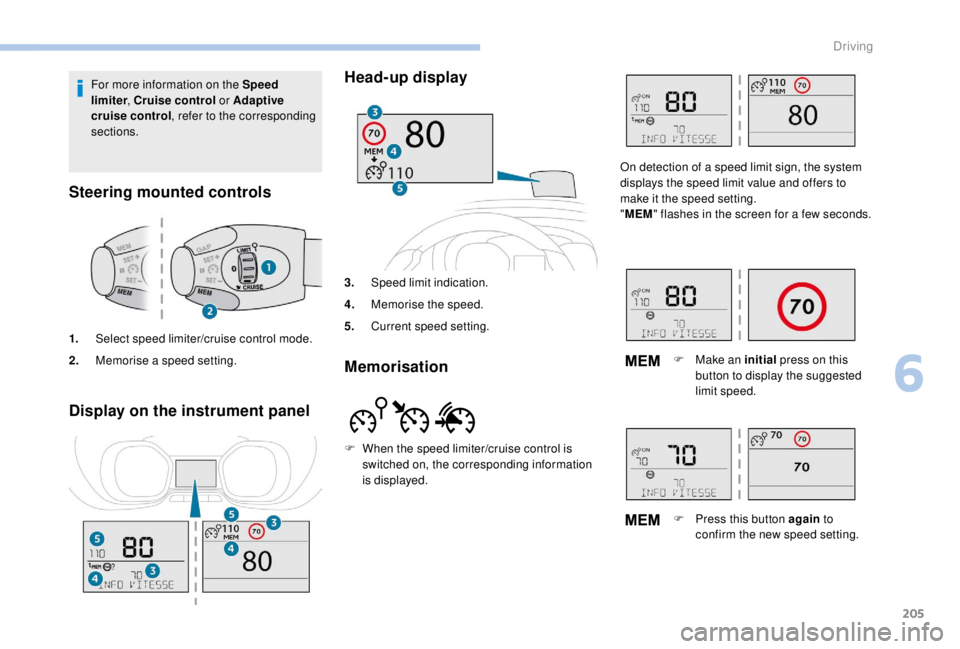
3.
Speed limit indication.
4. Memorise the speed.
5. Current speed setting.
Memorisation
For more information on the Speed
limiter , Cruise control or Adaptive
cruise control , refer to the corresponding
sections.
Steering mounted controls
1. Select speed limiter/cruise control mode.
2. Memorise a speed setting.
F
W
hen the speed limiter/cruise control is
switched on, the corresponding information
is displayed. On detection of a speed limit sign, the system
displays the speed limit value and offers to
make it the speed setting.
"
MEM " flashes in the screen for a few seconds.
F
M
ake an initial press on this
button to display the suggested
limit speed.
F
P
ress this button again to
confirm the new speed setting.
6
Driving
Page 208 of 416
206
Speed limiter ("LIMIT")
System which prevents the
vehicle from exceeding the speed
programmed by the driver.
Once the programmed speed limit is reached,
additional pressure on the accelerator pedal
has no effect.
The speed setting value is stored when
the ignition is switched off.
For more information on this
button and the Dynamic
cruise control , refer to the
corresponding section.
For more information on
Memorising speeds , refer to the
corresponding section.
For more information on Speed limit
recognition and memorising them in
particular, refer to the corresponding
section.
Steering mounted controls Display on the instrument panel
Head-up display
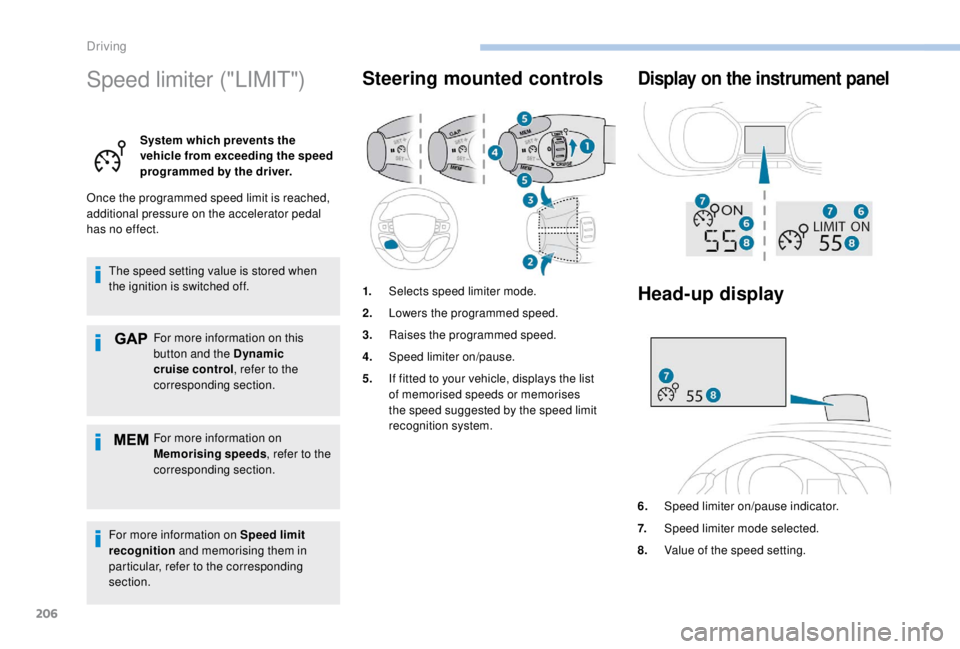
6. Speed limiter on/pause indicator.
7. Speed limiter mode selected.
8. Value of the speed setting.
1.
Selects speed limiter mode.
2. Lowers the programmed speed.
3. Raises the programmed speed.
4. Speed limiter on/pause.
5. If fitted to your vehicle, displays the list
of memorised speeds or memorises
the speed suggested by the speed limit
recognition system.
Driving
Page 211 of 416
209
Cruise control ("CRUISE")
System which automatically
maintains the speed of the
vehicle at the value programmed
by the driver, without any action
on the accelerator pedal.
Switching off the ignition cancels any
programmed speed setting.
For more information on
Memorising speeds , refer to the
corresponding section.
For more information on Speed
limit recognition , refer to the
corresponding section.
Steering mounted controls Display on the instrument
panel
Head-up display
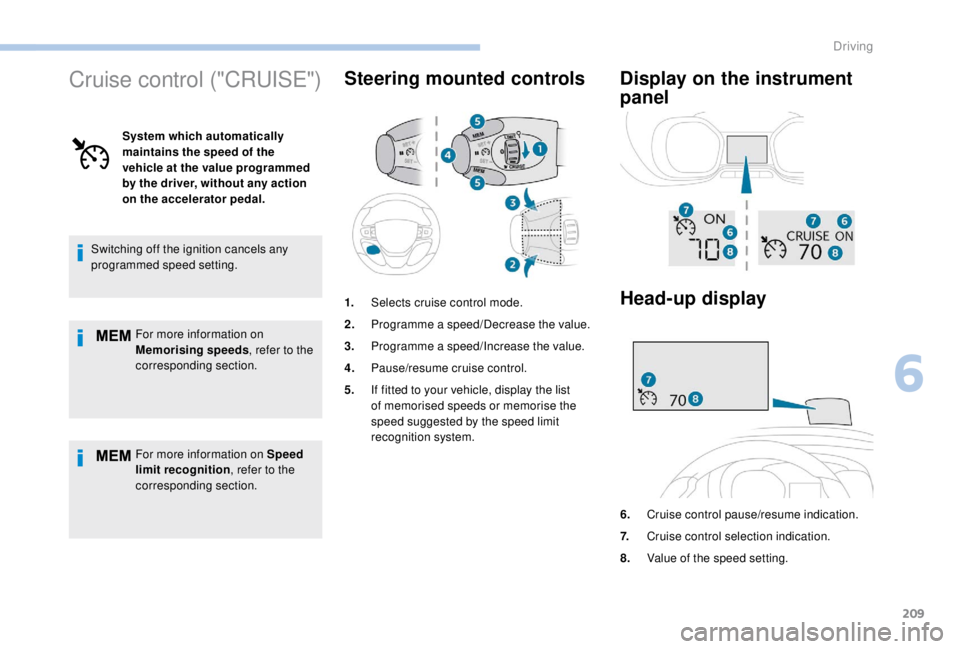
1. Selects cruise control mode.
2. Programme a speed/Decrease the value.
3. Programme a speed/Increase the value.
4. Pause/resume cruise control.
5. If fitted to your vehicle, display the list
of memorised speeds or memorise the
speed suggested by the speed limit
recognition system.
6.Cruise control pause/resume indication.
7. Cruise control selection indication.
8. Value of the speed setting.
6
Driving
Page 212 of 416
210
Switching on
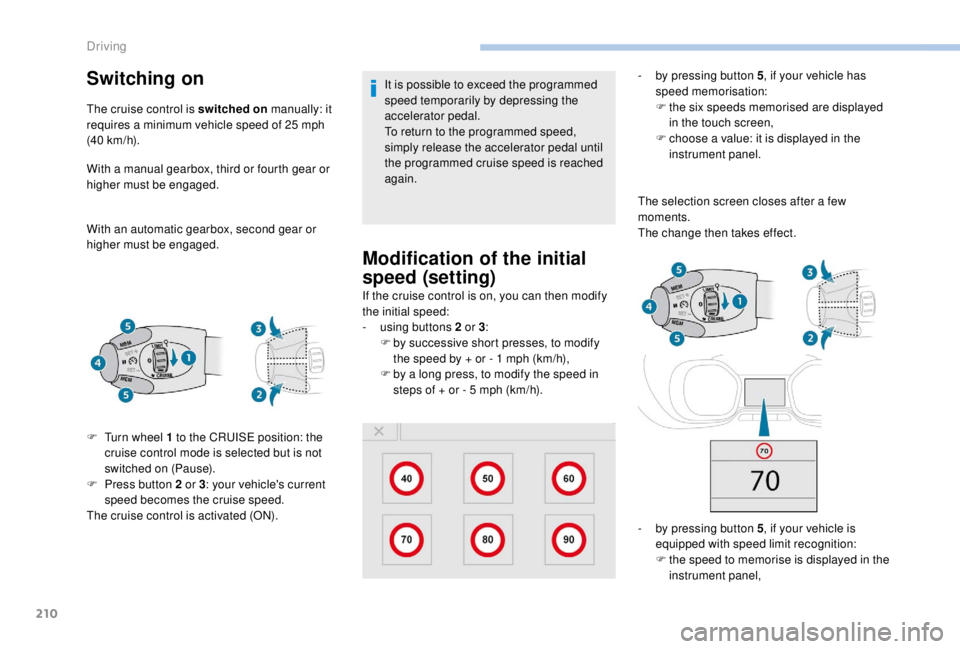
The cruise control is switched on manually: it
requires a minimum vehicle speed of 25 mph
(40
km/h).
With a manual gearbox, third or fourth gear or
higher must be engaged.
With an automatic gearbox, second gear or
higher must be engaged. It is possible to exceed the programmed
speed temporarily by depressing the
accelerator pedal.
To return to the programmed speed,
simply release the accelerator pedal until
the programmed cruise speed is reached
again.
Modification of the initial
speed (setting)
If the cruise control is on, you can then modify
the initial speed:
-
u
sing buttons 2 or 3:
F
b
y successive short presses, to modify
the speed by + or - 1
mph (km/h),
F
b
y a long press, to modify the speed in
steps of + or - 5
mph (km/h). -
b
y pressing button 5
, if your vehicle has
speed memorisation:
F
t
he six speeds memorised are displayed
in the touch screen,
F
c
hoose a value: it is displayed in the
instrument panel.
The selection screen closes after a few
moments.
The change then takes effect.
-
b
y pressing button 5, if your vehicle is
equipped with speed limit recognition:
F
t
he speed to memorise is displayed in the
instrument panel,
F
T
urn wheel 1
to the CRUISE position: the
cruise control mode is selected but is not
switched on (Pause).
F
P
ress button 2
or 3 : your vehicle's current
speed becomes the cruise speed.
The cruise control is activated (ON).
Driving
Page 214 of 416
212
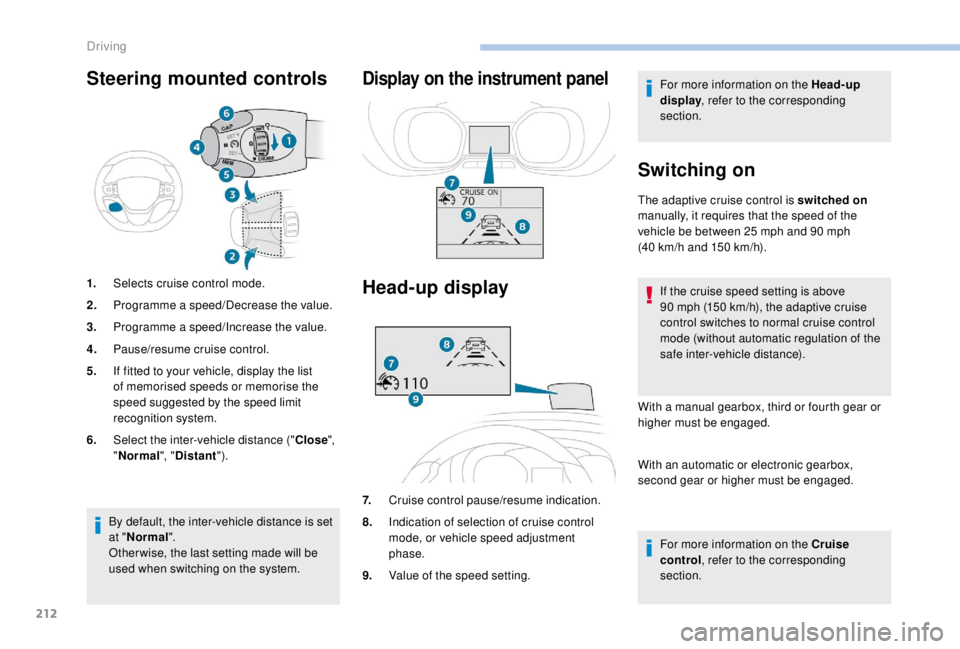
Steering mounted controls
1.Selects cruise control mode.
2. Programme a speed/Decrease the value.
3. Programme a speed/Increase the value.
4. Pause/resume cruise control.
5. If fitted to your vehicle, display the list
of memorised speeds or memorise the
speed suggested by the speed limit
recognition system.
6. Select the inter-vehicle distance (" Close",
" Normal ", "Distant ").
Display on the instrument panel
Head-up display
7.Cruise control pause/resume indication.
8. Indication of selection of cruise control
mode, or vehicle speed adjustment
phase.
9. Value of the speed setting. For more information on the Head-up
display
, refer to the corresponding
section.
Switching on
The adaptive cruise control is switched on
manually, it requires that the speed of the
vehicle be between 25
mph and 90 mph
(40
km/h and 150 km/h).
If the cruise speed setting is above
90
mph (150 km/h), the adaptive cruise
control switches to normal cruise control
mode (without automatic regulation of the
safe inter-vehicle distance).
With a manual gearbox, third or fourth gear or
higher must be engaged.
With an automatic or electronic gearbox,
second gear or higher must be engaged.
For more information on the Cruise
control , refer to the corresponding
section.
By default, the inter-vehicle distance is set
at "
Normal ".
Other wise, the last setting made will be
used when switching on the system.
Driving
Page 215 of 416
213
The adaptive cruise control must be selected in
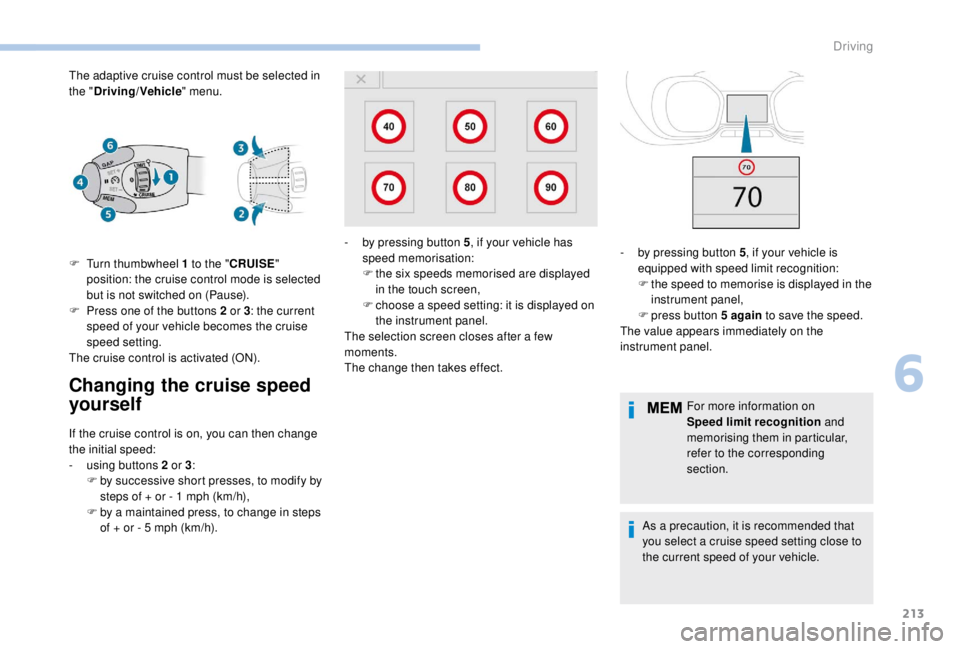
the "Driving/Vehicle " menu.
Changing the cruise speed
yourself
F Turn thumbwheel 1 to the "CRUISE "
position: the cruise control mode is selected
but is not switched on (Pause).
F
P
ress one of the buttons 2 or 3: the current
speed of your vehicle becomes the cruise
speed setting.
The cruise control is activated (ON).
If the cruise control is on, you can then change
the initial speed:
-
u
sing buttons 2 or 3:
F
b
y successive short presses, to modify by
steps of + or - 1
mph (km/h),
F
b
y a maintained press, to change in steps
of + or - 5
mph (km/h). For more information on
Speed limit recognition
and
memorising them in particular,
refer to the corresponding
section.
As a precaution, it is recommended that
you select a cruise speed setting close to
the current speed of your vehicle.
-
b
y pressing button 5
, if your vehicle has
speed memorisation:
F t he six speeds memorised are displayed
in the touch screen,
F
c
hoose a speed setting: it is displayed on
the instrument panel.
The selection screen closes after a few
moments.
The change then takes effect. -
b y pressing button 5
, if your vehicle is
equipped with speed limit recognition:
F
t
he speed to memorise is displayed in the
instrument panel,
F
press button 5
again to save the speed.
The value appears immediately on the
instrument panel.
6
Driving
Page 220 of 416
218
The system does not act on the braking
system, but works only with engine
braking.
The regulation range is limited: there will
no longer be any adjustment of speed if
the difference between the programmed
speed setting and the speed of the vehicle
in front becomes too high.
If the difference between the programmed
speed setting and the speed of the
vehicle in front is too great, the speed
cannot be adjusted: the cruise control is
automatically deactivated.
Collision Risk Alert and
Active Safety BrakeConditions for operation
The Collision Risk Alert system only
operates:
-
w
ith a vehicle pointing in the same direction,
moving or stationary,
-
w
ith pedestrians,
-
a
bove 4 mph (7 km/h) (and deactivates at
3
mph (5 km/h)).
The Active Safety Brake system only
operates:
-
b
etween 3 and 87 mph (5 and 140 km/h), in
the case of a moving vehicle,
-
a
t a speed below 50 mph (80 km/h), in the
case of a stationary vehicle,
-
a
t a speed below 37 mph (60 km/h), in the
case of a pedestrian,
-
i
f the passenger seat belts are fastened,
-
i
f the vehicle is not accelerating sharply,
-
i
f the vehicle is not in a tight corner.
The Active Safety Brake system does not
operate:
-
i
f the front bumper is damaged,
-
i
f the system has been triggered in the last
10
seconds,
-
i
f the electronic stability control system has
a fault.
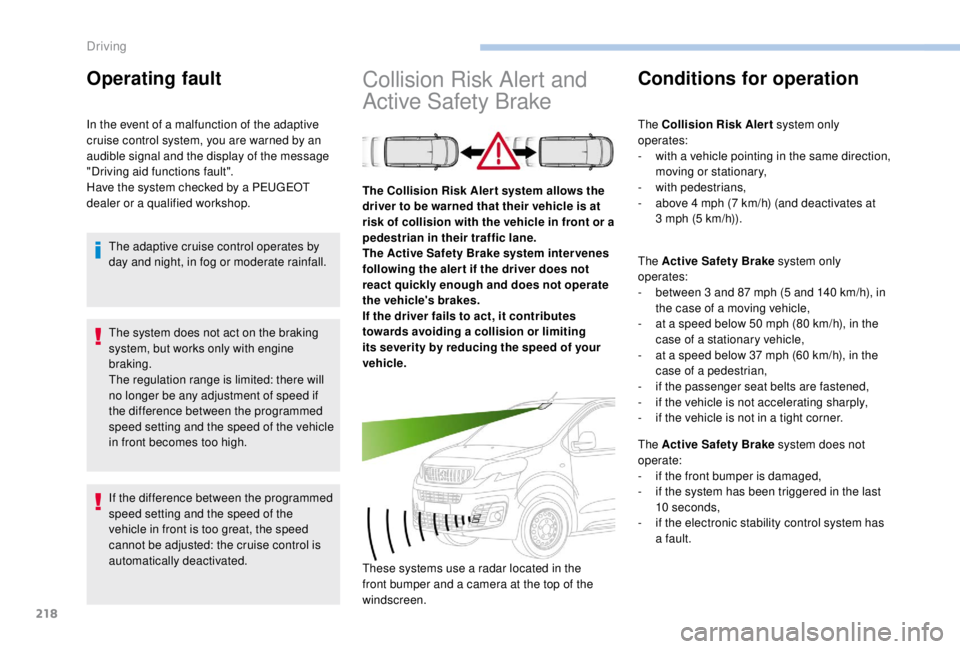
The Collision Risk Aler t system allows the
driver to be warned that their vehicle is at
risk of collision with the vehicle in front or a
pedestrian in their traffic lane.
The Active Safety Brake system inter venes
following the aler t if the driver does not
react quickly enough and does not operate
the vehicle's brakes.
If the driver fails to act, it contributes
towards avoiding a collision or limiting
its severity by reducing the speed of your
vehicle.
These systems use a radar located in the
front bumper and a camera at the top of the
windscreen.
Operating fault
In the event of a malfunction of the adaptive
cruise control system, you are warned by an
audible signal and the display of the message
"Driving aid functions fault".
Have the system checked by a PEUGEOT
dealer or a qualified workshop.
The adaptive cruise control operates by
day and night, in fog or moderate rainfall.
Driving
Page 233 of 416
231
Principle of operation
The images provided by the cameras may
be distorted by the environment (external
conditions, driving mode, etc.).
The presence of areas in shadow, bright
sunlight, or poor lighting conditions may
make the image dark and reduce contrast.
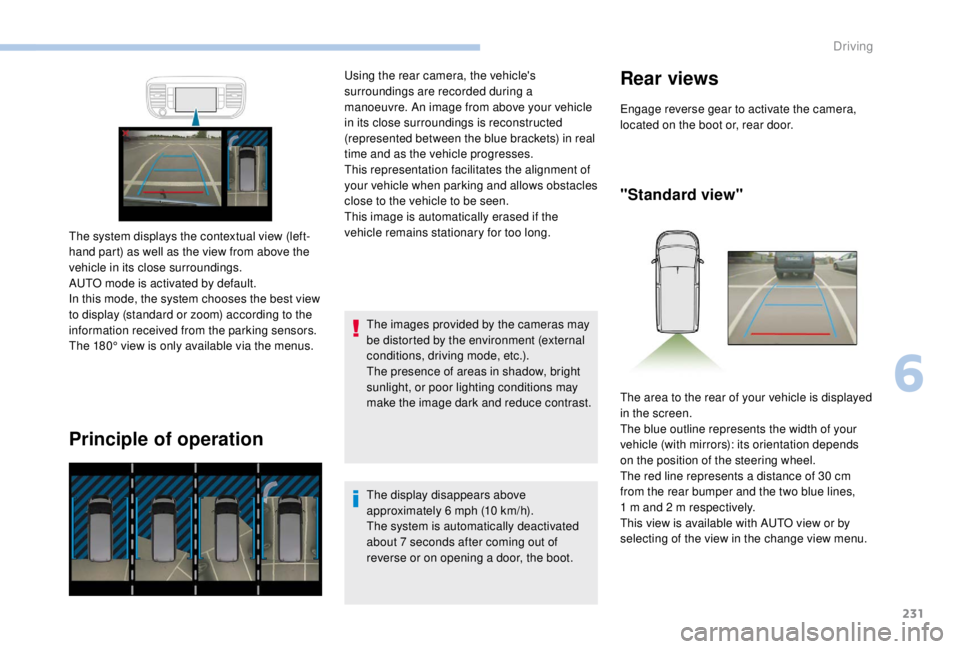
The system displays the contextual view (left-
hand part) as well as the view from above the
vehicle in its close surroundings.
AUTO mode is activated by default.
In this mode, the system chooses the best view
to display (standard or zoom) according to the
information received from the parking sensors.
The 180° view is only available via the menus. Using the rear camera, the vehicle's
surroundings are recorded during a
manoeuvre. An image from above your vehicle
in its close surroundings is reconstructed
(represented between the blue brackets) in real
time and as the vehicle progresses.
This representation facilitates the alignment of
your vehicle when parking and allows obstacles
close to the vehicle to be seen.
This image is automatically erased if the
vehicle remains stationary for too long.
The display disappears above
approximately 6 mph (10 km/h).
The system is automatically deactivated
about 7
seconds after coming out of
reverse or on opening a door, the boot.
Rear views
Engage reverse gear to activate the camera,
located on the boot or, rear door.
"Standard view"
The area to the rear of your vehicle is displayed
in the screen.
The blue outline represents the width of your
vehicle (with mirrors): its orientation depends
on the position of the steering wheel.
The red line represents a distance of 30
cm
from the rear bumper and the two blue lines,
1
m and 2 m respectively.
This view is available with AUTO view or by
selecting of the view in the change view menu.
6
Driving
Page 234 of 416
232
"180° view""Zoom view"
The rear parking sensors also provide
information on the vehicle's surroundings.
Obstacles may appear further away than
they actually are in reality.
It is important to check the side views
using the mirrors during the manoeuvre.
"AUTO mode"
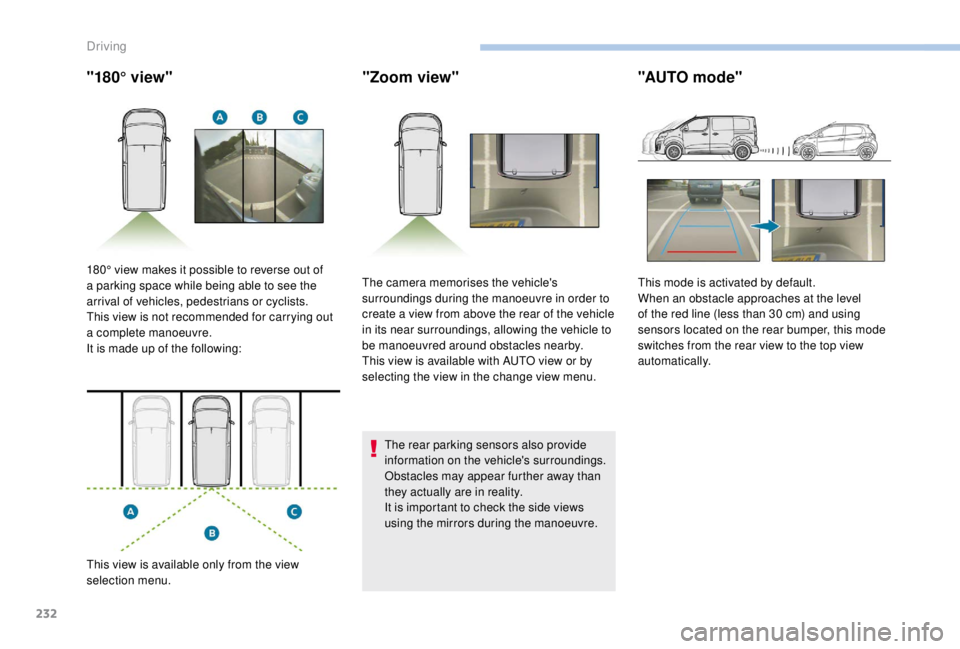
180° view makes it possible to reverse out of
a parking space while being able to see the
arrival of vehicles, pedestrians or cyclists.
This view is not recommended for carrying out
a complete manoeuvre.
It is made up of the following:
This view is available only from the view
selection menu. The camera memorises the vehicle's
surroundings during the manoeuvre in order to
create a view from above the rear of the vehicle
in its near surroundings, allowing the vehicle to
be manoeuvred around obstacles nearby.
This view is available with AUTO view or by
selecting the view in the change view menu.
This mode is activated by default.
When an obstacle approaches at the level
of the red line (less than 30
cm) and using
sensors located on the rear bumper, this mode
switches from the rear view to the top view
automatically.
Driving