display PEUGEOT EXPERT 2018 Owner's Manual
[x] Cancel search | Manufacturer: PEUGEOT, Model Year: 2018, Model line: EXPERT, Model: PEUGEOT EXPERT 2018Pages: 416, PDF Size: 14.12 MB
Page 62 of 416
60
Changing the battery
Battery type: CR2032 / 3 volts.
T his replacement battery is available from a
PEUGEOT dealer or a qualified workshop.
A message is displayed in the instrument panel
screen when replacement of the battery is
needed.
Do not throw the remote control
batteries away, they contain metals
which are harmful to the environment.
Take them to an approved collection
point.
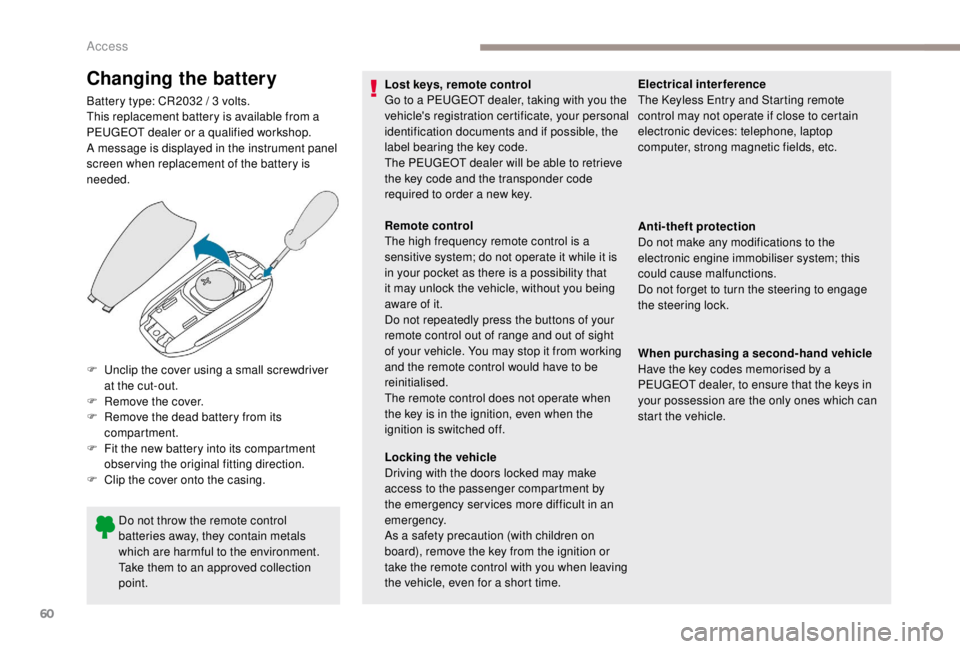
F
U
nclip the cover using a small screwdriver
at the cut-out.
F
R
emove the cover.
F
R
emove the dead battery from its
compartment.
F
F
it the new battery into its compartment
observing the original fitting direction.
F
C
lip the cover onto the casing. Lost keys, remote control
Go to a PEUGEOT dealer, taking with you the
vehicle's registration certificate, your personal
identification documents and if possible, the
label bearing the key code.
The PEUGEOT dealer will be able to retrieve
the key code and the transponder code
required to order a new key.
Remote control
The high frequency remote control is a
sensitive system; do not operate it while it is
in your pocket as there is a possibility that
it may unlock the vehicle, without you being
aware of it.
Do not repeatedly press the buttons of your
remote control out of range and out of sight
of your vehicle. You may stop it from working
and the remote control would have to be
reinitialised.
The remote control does not operate when
the key is in the ignition, even when the
ignition is switched off.
Locking the vehicle
Driving with the doors locked may make
access to the passenger compartment by
the emergency ser vices more difficult in an
emergency.
As a safety precaution (with children on
board), remove the key from the ignition or
take the remote control with you when leaving
the vehicle, even for a short time.Electrical interference
The
K eyless Entry and Starting remote
control may not operate if close to certain
electronic devices: telephone, laptop
computer, strong magnetic fields, etc.
Anti-theft protection
Do not make any modifications to the
electronic engine immobiliser system; this
could cause malfunctions.
Do not forget to turn the steering to engage
the steering lock.
When purchasing a second-hand vehicle
Have the key codes memorised by a
PEUGEOT dealer, to ensure that the keys in
your possession are the only ones which can
start the vehicle.
Access
Page 113 of 416
111
12 V accessory socket(s)
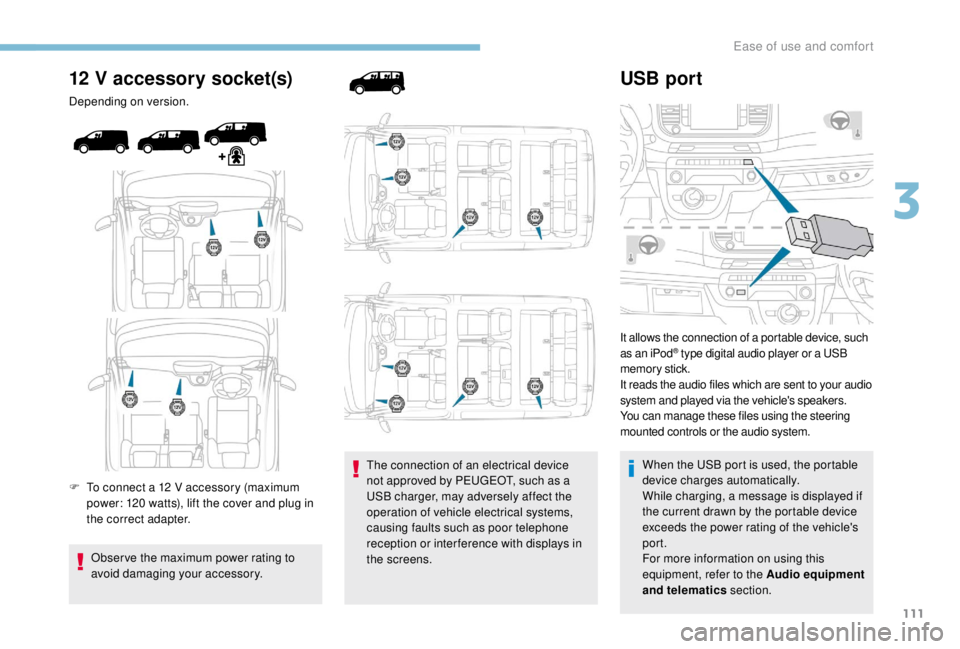
Depending on version.
F
T
o connect a 12 V accessory (maximum
power: 120
watts), lift the cover and plug in
the correct adapter.
Obser ve the maximum power rating to
avoid damaging your accessory. The connection of an electrical device
not approved by PEUGEOT, such as a
USB charger, may adversely affect the
operation of vehicle electrical systems,
causing faults such as poor telephone
reception or inter ference with displays in
the screens.
USB port
It allows the connection of a portable device, such
as an iPod® type digital audio player or a USB
memory stick.
It reads the audio files which are sent to your audio
system and played via the vehicle's speakers.
You can manage these files using the steering
mounted controls or the audio system.
When the USB port is used, the portable
device charges automatically.
While charging, a message is displayed if
the current drawn by the portable device
exceeds the power rating of the vehicle's
port.
For more information on using this
equipment, refer to the Audio equipment
and telematics section.
3
Ease of use and comfort
Page 119 of 416
117
Dual-zone automatic air conditioning
Automatic comfort mode
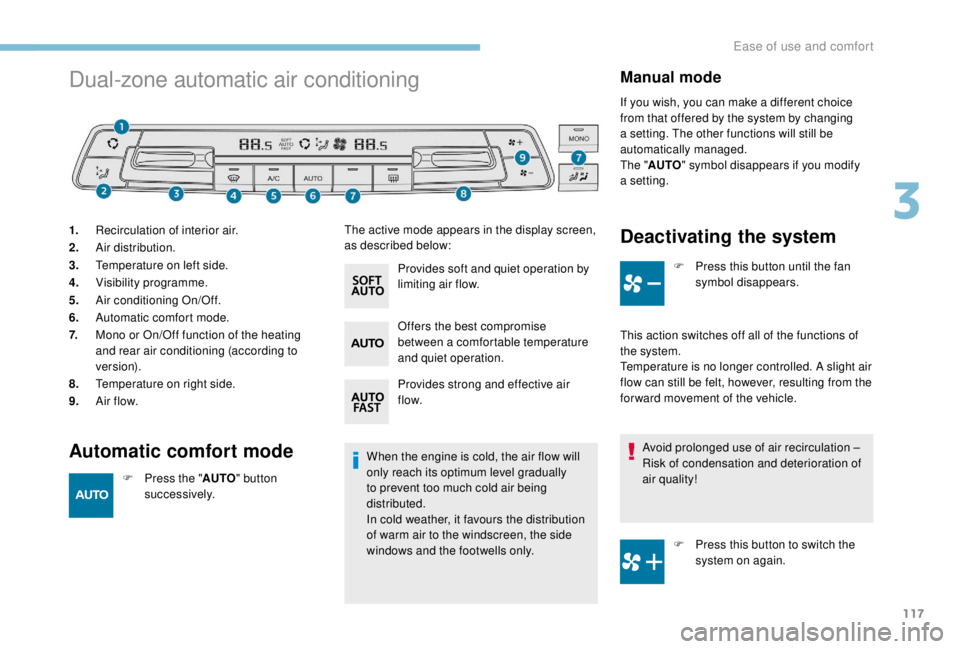
1.Recirculation of interior air.
2. Air distribution.
3. Temperature on left side.
4. Visibility programme.
5. Air conditioning On/Off.
6. Automatic comfort mode.
7. Mono or On/Off function of the heating
and rear air conditioning (according to
ve r s i o n).
8. Temperature on right side.
9. A ir f low.
When the engine is cold, the air flow will
only reach its optimum level gradually
to prevent too much cold air being
distributed.
In cold weather, it favours the distribution
of warm air to the windscreen, the side
windows and the footwells only.
Manual mode
If you wish, you can make a different choice
from that offered by the system by changing
a setting. The other functions will still be
automatically managed.
The "AUTO " symbol disappears if you modify
a setting.
F
P
ress the " AUTO" button
su c c e s s i ve l y. Provides soft and quiet operation by
limiting air flow.
Offers the best compromise
between a comfortable temperature
and quiet operation.
Provides strong and effective air
f low.
Deactivating the system
F Press this button until the fan
symbol disappears.
This action switches off all of the functions of
the system.
Temperature is no longer controlled. A slight air
flow can still be felt, however, resulting from the
for ward movement of the vehicle. Avoid prolonged use of air recirculation –
Risk of condensation and deterioration of
air quality!
F
P
ress this button to switch the
system on again.
The active mode appears in the display screen,
as described below:
3
Ease of use and comfort
Page 120 of 416
118
Temperature
The driver and front passenger can each set
the temperature to suit their requirements.
The value shown on the display is a level
of comfort, not a temperature in Celsius or
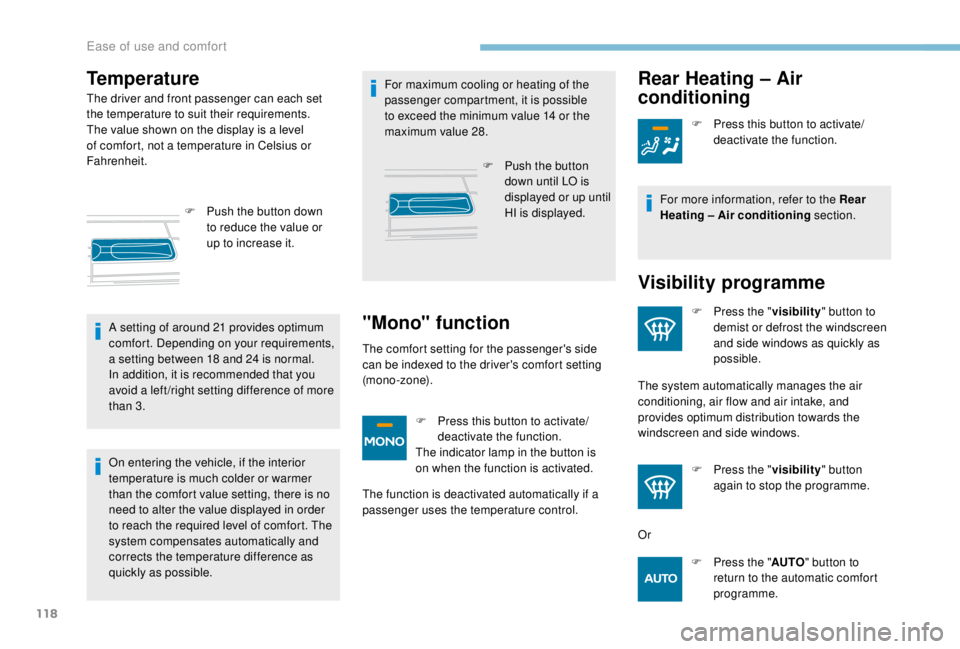
Fahrenheit.F
P
ush the button down
to reduce the value or
up to increase it.
A setting of around 21
provides optimum
comfort. Depending on your requirements,
a setting between 18
and 24 is normal.
In addition, it is recommended that you
avoid a left /right setting difference of more
than 3.
On entering the vehicle, if the interior
temperature is much colder or warmer
than the comfort value setting, there is no
need to alter the value displayed in order
to reach the required level of comfort. The
system compensates automatically and
corrects the temperature difference as
quickly as possible. For maximum cooling or heating of the
passenger compartment, it is possible
to exceed the minimum value 14
or the
maximum value 28.
F
P
ush the button
down until LO is
displayed or up until
HI is displayed.
"Mono" function
The comfort setting for the passenger's side
can be indexed to the driver's comfort setting
(mono-zone).
F
P
ress this button to activate/
deactivate the function.
The indicator lamp in the button is
on when the function is activated.
The function is deactivated automatically if a
passenger uses the temperature control.
Rear Heating – Air
conditioning
F Press this button to activate/ deactivate the function.
For more information, refer to the Rear
Heating – Air conditioning section.
Visibility programme
F Press the " visibility" button to
demist or defrost the windscreen
and side windows as quickly as
possible.
The system automatically manages the air
conditioning, air flow and air intake, and
provides optimum distribution towards the
windscreen and side windows.
F
P
ress the " visibility" button
again to stop the programme.
Or F
P
ress the " AUTO" button to
return to the automatic comfort
programme.
Ease of use and comfort
Page 135 of 416

133
Switching on
F Turn the ring to the AUTO position. Activation of the function is associated with
the display of a message.
Switching off
F Turn the ring to another position. Deactivation of the function is accompanied
by the display of a message.
Malfunction
In the event of a malfunction of the
sunshine sensor, the lighting comes
on, this warning lamp is displayed
on the instrument panel, associated
with an audible signal and/or a
message.
Contact a PEUGEOT dealer or a qualified
workshop. In fog or snow, the sunshine sensor may
detect sufficient light. In this case, the
lighting will not come on automatically.
Do not cover the sunshine sensor
combined with the rain sensor and located
at the top of the windscreen behind the
rear view mirror; the associated functions
would no longer be controlled.
Manual guide-me-home
lighting
Temporarily keeping the dipped beam
headlamps on after the vehicle's ignition has
been switched off makes the driver's exit easier
when the light is poor.
Switching on
Switching off
Manual guide-me-home lighting goes off
automatically at the end of a given period of
time.
Automatic guide-me-home
lighting
F With the ignition off, "flash" the headlamps
using the lighting control stalk.
F
A f
urther "headlamp flash" switches the
function off.
When the automatic illumination of headlamps
is activated, if the ambient light level is
low, the dipped beam headlamps come on
automatically when switching off the ignition.
4
Lighting and visibility
Page 140 of 416

138
Model with manual wiping
(intermittent)
Model with AUTO wipingFront windscreen wipers
Raise or lower the control to the desired
position to change the wiping speed.
Fast wiping (heavy rain).
Normal wiping (moderate rain).
Intermittent wiping (proportional to
the speed of the vehicle).
Of f.
Single wipe (press downwards or
pull the stalk briefly towards you,
then release).
Or Automatic wiping (press down,
then release).
Single wipe (pull the stalk briefly
towards you).
Automatic windscreen
wipers
The windscreen wipers operate automatically
once rainfall is detected (sensor behind the
rear view mirror), adapting their speed to the
intensity of the rainfall without any action on the
part of the driver.
Switching on
Give a short downwards push to the
control.
A wiping cycle confirms that the
instruction has been accepted.
This warning lamp comes on in the
instrument panel and a message is
displayed.
Lighting and visibility
Page 141 of 416

139
Switching off
Give the control stalk a brief push
downwards or shift the control stalk
to a different position (Int, 1 or 2).
This warning lamp goes off in the
instrument panel and a message is
displayed.
The automatic rain sensitive windscreen
wipers must be reactivated by pushing the
control stalk downwards, if the ignition has
been off for more than one minute.
Operating fault
If a fault occurs with the automatic rain
sensitive wipers, the wipers will operate in
intermittent mode.
Have the system checked by a PEUGEOT
dealer or a qualified workshop. Do not cover the rain sensor combined
with the sunshine sensor and located at the
top of the windscreen behind the rear view
m i r r o r.
When using an automatic car wash, switch
off the automatic rain sensitive wipers.
In winter, it is advisable to wait until the
windscreen is completely clear of ice before
activating the automatic rain sensitive
wipers.
Rear wiper
Of f.
Intermittent wipe.
Wash-wipe (set duration).
Reverse gear
When reverse gear is engaged, the rear wiper
will come into operation automatically if the
windscreen wipers are operating.
Activation/Deactivation
The system is activated or deactivated via the
vehicle configuration menu. This system is activated by default.
If a significant accumulation of snow or ice
is present, or when using a bicycle carrier
on the boot, deactivate the automatic rear
w i p e r.
With audio system
In the "
Personalisation-
configuration " menu, activate/
deactivate " Rear wipe in reverse
gear ".
With touch screen
In the " Driving/Vehicle " menu,
activate/deactivate " Rear wiper in
reverse ".
4
Lighting and visibility
Page 162 of 416
160
Deactivation
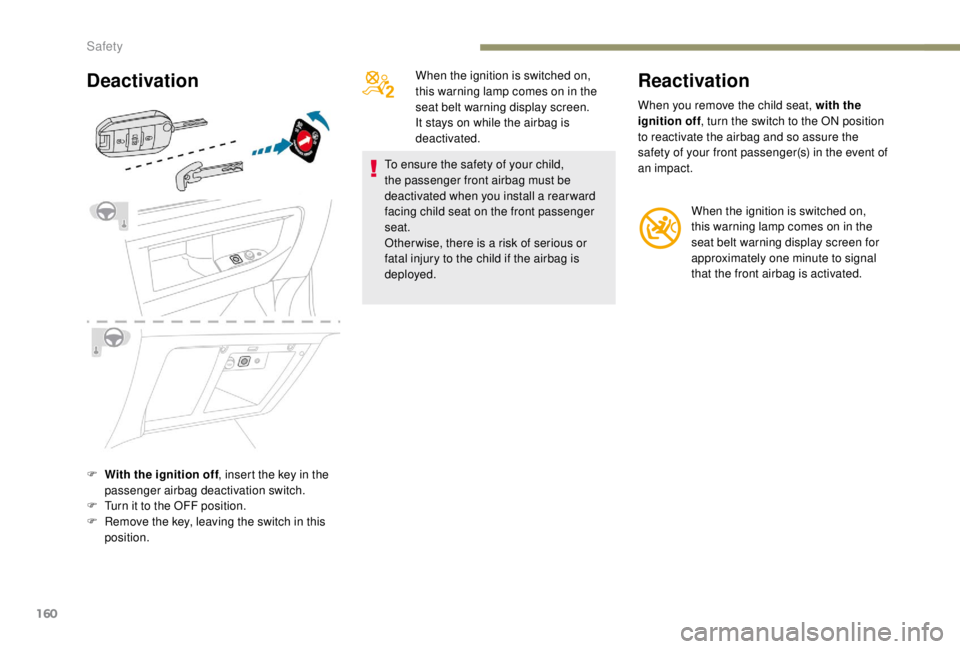
F With the ignition off, insert the key in the
passenger airbag deactivation switch.
F
T
urn it to the OFF position.
F
R
emove the key, leaving the switch in this
position. When the ignition is switched on,
this warning lamp comes on in the
seat belt warning display screen.
It stays on while the airbag is
deactivated.
To ensure the safety of your child,
the passenger front airbag must be
deactivated when you install a rear ward
facing child seat on the front passenger
seat.
Other wise, there is a risk of serious or
fatal injury to the child if the airbag is
deployed.
Reactivation
When you remove the child seat, with the
ignition off , turn the switch to the ON position
to reactivate the airbag and so assure the
safety of your front passenger(s) in the event of
an impact.
When the ignition is switched on,
this warning lamp comes on in the
seat belt warning display screen for
approximately one minute to signal
that the front airbag is activated.
Safety
Page 183 of 416
181
When leaving the vehicle, remove the key
and lock the doors.
As a safety measure (children on board),
never leave the vehicle without your
remote control with you, even for a short
period.
Switching off the engine leads to a loss of
braking assistance.
Avoid attaching heavy objects to the key,
which would weigh down on its blade
in the ignition switch and could cause a
malfunction.
Key left in the ignition
When opening the driver's door, an alert
message is displayed, accompanied by
an audible signal, to remind you that the
key is still in the ignition switch at position
1
(Stop) .
If the key has been left in the ignition
switch at position 2
(Ignition on), the
ignition will be switched off automatically
after one hour.
To switch the ignition back on, turn the key
to position 1
(Stop), then back to
position 2
(Ignition on) .
Starting/switching off the
engine,
K
eyless Entry and
Starting
Starting
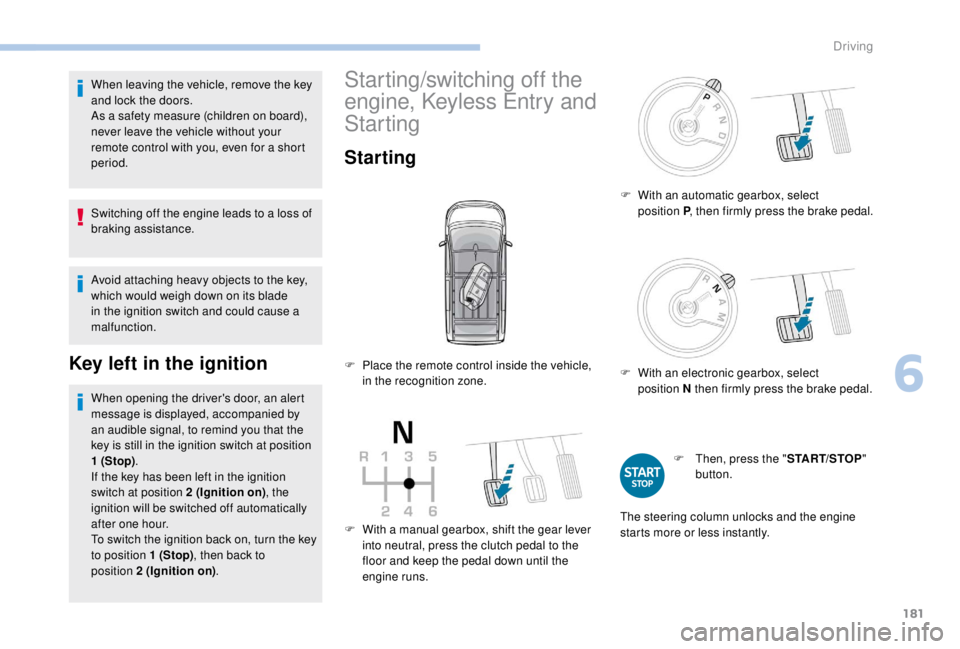
F With a manual gearbox, shift the gear lever
into neutral, press the clutch pedal to the
floor and keep the pedal down until the
engine runs. F
W
ith an automatic gearbox, select
position P, then firmly press the brake pedal.
F
W
ith an electronic gearbox, select
position N then firmly press the brake pedal.
F
T
hen, press the "
START/STOP"
button.
F
P
lace the remote control inside the vehicle,
in the recognition zone.
The steering column unlocks and the engine
starts more or less instantly.
6
Driving
Page 184 of 416
182
The indicator lamp does not come on
if the engine is hot. In some climatic
conditions, it is advised to follow the
recommendations below:
-
I
n temperate conditions, do not leave
the engine at idle to warm up but move
off straight away and drive at moderate
speed.
-
I
n wintry conditions, the pre-heater
warning lamp will stay on for a longer
period after switching on the ignition;
wait until it goes off before starting.
-
In very severe wintry conditions
(temperature below -23°C), to ensure
the correct operation and durability of
the mechanical components of your
vehicle (engine and gearbox), leave
the engine running for 4
minutes
before moving off.
Never leave the engine running in
an enclosed area without adequate
ventilation: internal combustion engines
emit toxic exhaust gases, such as carbon
monoxide. Risk of intoxication and death. For Diesel vehicles
, in sub-zero
temperatures the engine will not
start until the pre-heater warning
lamp has gone off.
If this warning lamp comes on
after pressing the "START/
STOP" button, press down on
the brake or clutch pedal until the
warning lamp goes off, without
pressing the "START/STOP"
button again, until the engine
starts and runs.
The presence in the recognition zone of
the remote control of the
K
eyless Entry
and Starting system is essential.
Never leave the vehicle with the engine
running and with the remote control on
your person.
If the remote control leaves the
recognition zone, a message is displayed.
Move the remote control into the zone to
be able to start the engine. If one of the starting conditions is not met,
a message appears on the instrument
panel. In some cases, it is necessary to
operate the steering wheel while pressing
the "START/STOP" button to help unlock
the steering column, a message appears.
Switching off
F Immobilise the vehicle.
F
W
ith the remote control in the
recognition zone, press the
" START/STOP " button.
The engine stops and the steering column is
locked.
If the vehicle is not immobilised, the
engine will not stop.
Driving