mirror Peugeot Expert 2019 Owner's Guide
[x] Cancel search | Manufacturer: PEUGEOT, Model Year: 2019, Model line: Expert, Model: Peugeot Expert 2019Pages: 324, PDF Size: 13.07 MB
Page 182 of 324
180
Malfunction
Reversing camera with
display in the interior
mirror
Refer to the General recommendations on
the use of driving and manoeuvring aids.
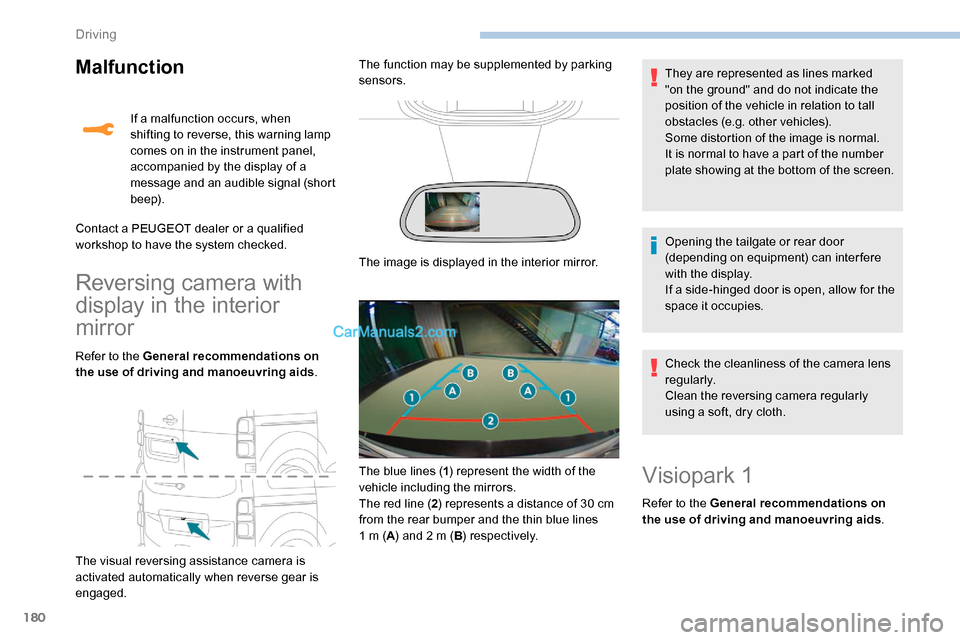
The visual reversing assistance camera is
activated automatically when reverse gear is
engaged. If a malfunction occurs, when
shifting to reverse, this warning lamp
comes on in the instrument panel,
accompanied by the display of a
message and an audible signal (short
b e e p).
Contact a PEUGEOT dealer or a qualified
workshop to have the system checked. The function may be supplemented by parking
sensors.
The image is displayed in the interior mirror. They are represented as lines marked
"on the ground" and do not indicate the
position of the vehicle in relation to tall
obstacles (e.g. other vehicles).
Some distortion of the image is normal.
It is normal to have a part of the number
plate showing at the bottom of the screen.
Opening the tailgate or rear door
(depending on equipment) can interfere
with the display.
If a side-hinged door is open, allow for the
space it occupies.
The blue lines ( 1) represent the width of the
vehicle including the mirrors.
The red line ( 2) represents a distance of 30 cm
from the rear bumper and the thin blue lines
1
m (A) and 2 m ( B) respectively. Check the cleanliness of the camera lens
regularly.
Clean the reversing camera regularly
using a soft, dry cloth.
Visiopark 1
Refer to the General recommendations on
the use of driving and manoeuvring aids
.
Driving
Page 184 of 324
182
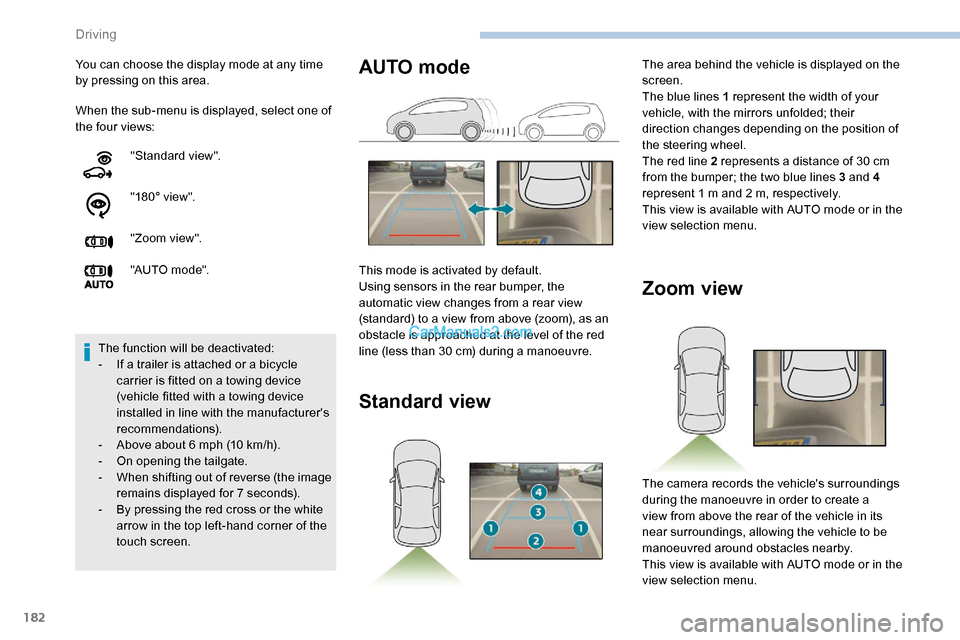
When the sub-menu is displayed, select one of
the four views: You can choose the display mode at any time
by pressing on this area."Standard view".
"180° view".
"Zoom view".
"AUTO m o de".
The function will be deactivated:
-
I
f a trailer is attached or a bicycle
carrier is fitted on a towing device
(vehicle fitted with a towing device
installed in line with the manufacturer's
recommendations).
-
A
bove about 6 mph (10 km/h).
-
O
n opening the tailgate.
-
W
hen shifting out of reverse (the image
remains displayed for 7 seconds).
-
B
y pressing the red cross or the white
arrow in the top left-hand corner of the
touch screen.
Zoom view
The camera records the vehicle's surroundings
during the manoeuvre in order to create a
view from above the rear of the vehicle in its
near surroundings, allowing the vehicle to be
manoeuvred around obstacles nearby.
This view is available with AUTO mode or in the
view selection menu.
AUTO mode
This mode is activated by default.
Using sensors in the rear bumper, the
automatic view changes from a rear view
(standard) to a view from above (zoom), as an
obstacle is approached at the level of the red
line (less than 30 cm) during a manoeuvre.
Standard view
The area behind the vehicle is displayed on the
screen.
The blue lines 1 represent the width of your
vehicle, with the mirrors unfolded; their
direction changes depending on the position of
the steering wheel.
The red line 2 represents a distance of 30 cm
from the bumper; the two blue lines 3 and 4
represent 1 m and 2 m, respectively.
This view is available with AUTO mode or in the
view selection menu.
Driving
Page 185 of 324
183
180° view
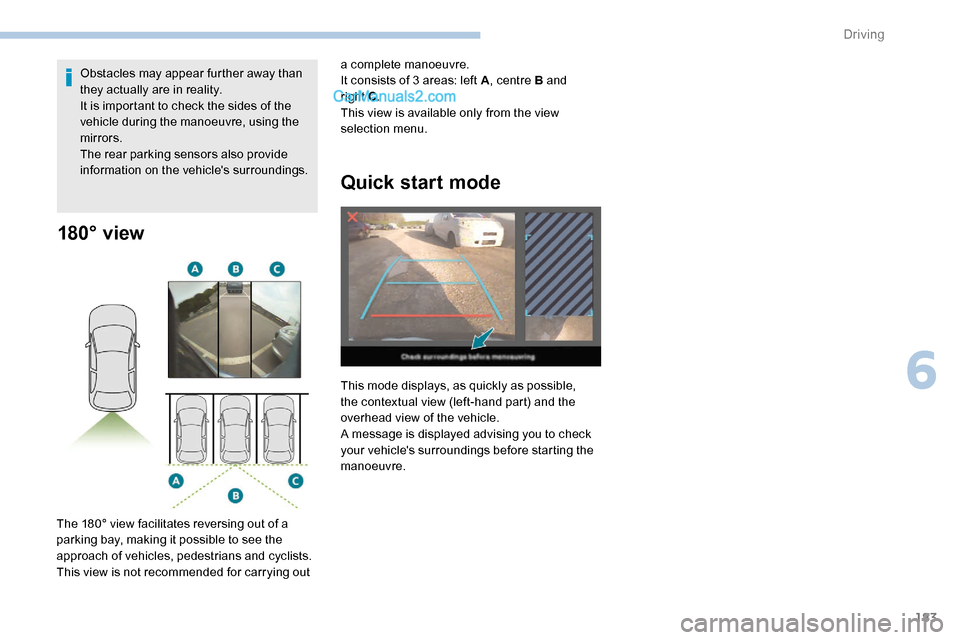
The 180° view facilitates reversing out of a
parking bay, making it possible to see the
approach of vehicles, pedestrians and cyclists.
This view is not recommended for carrying out Obstacles may appear further away than
they actually are in reality.
It is important to check the sides of the
vehicle during the manoeuvre, using the
mirrors.
The rear parking sensors also provide
information on the vehicle's surroundings.
Quick start mode
This mode displays, as quickly as possible,
the contextual view (left-hand part) and the
overhead view of the vehicle.
A message is displayed advising you to check
your vehicle's surroundings before starting the
manoeuvre. a complete manoeuvre.
It consists of 3 areas: left A
, centre B and
right C
.
This view is available only from the view
selection menu.
6
Driving
Page 230 of 324
228
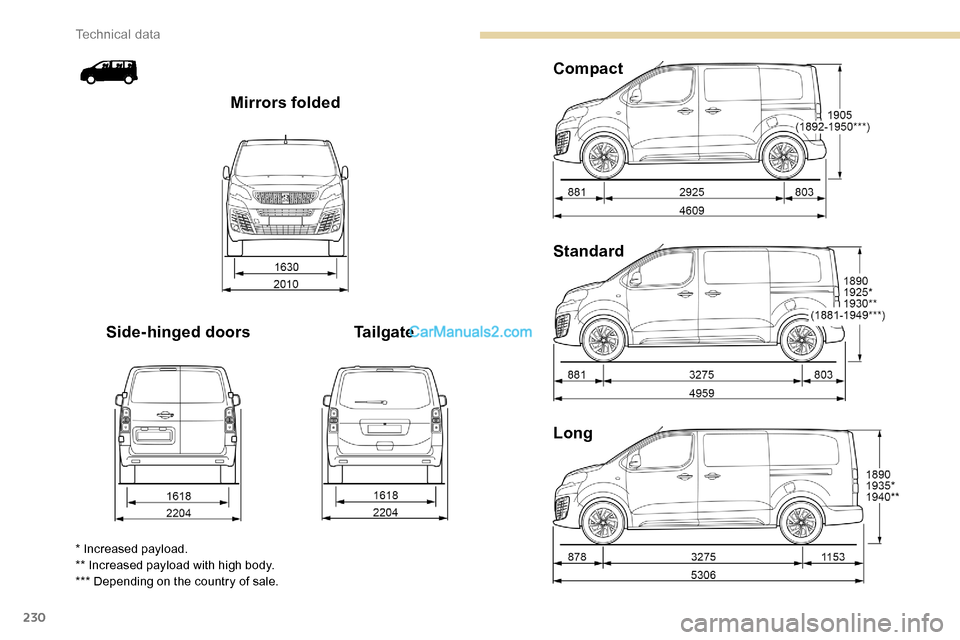
Dimensions (mm)
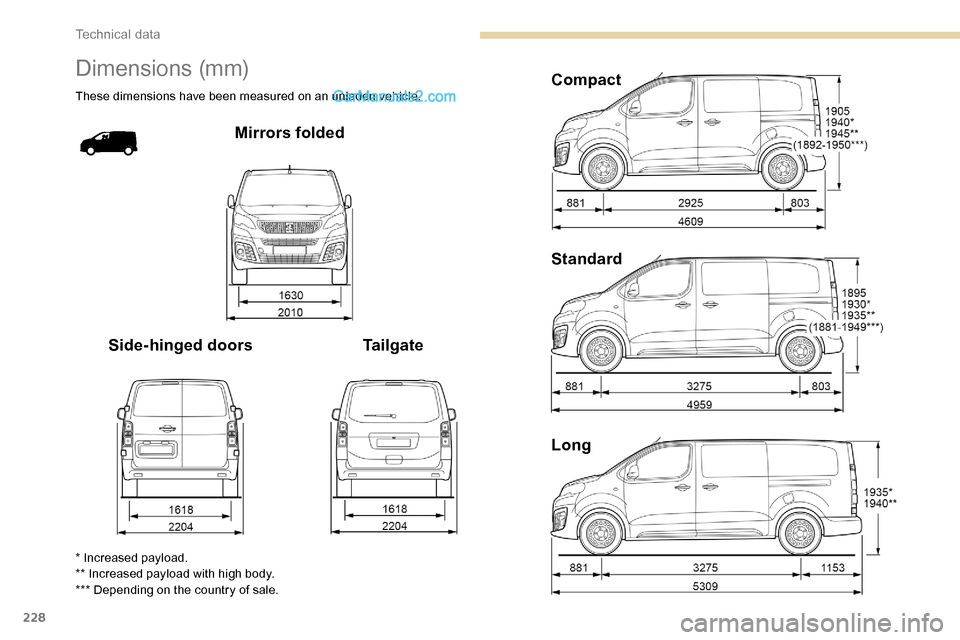
These dimensions have been measured on an unladen vehicle.
Mirrors folded
Side-hinged doors TailgateCompact
Standard
Long
* Increased payload.
** Increased payload with high body.
*** Depending on the country of sale.
Technical data
Page 232 of 324
230
Long Standard Compact
Tailgate
Side-hinged doors Mirrors folded
* Increased payload.
** Increased payload with high body.
*** Depending on the country of sale.
Technical data
Page 253 of 324
1
PEUGEOT Connect
Radio
Multimedia audio system -
Applications - Bluetooth®
telephone
Contents
First steps
1
S
teering mounted controls
2
M
enus
3
A
pplications
5
R
adio
5
D
AB radio (Digital Audio Broadcasting)
7
M
edia
8
T
elephone
1
0
Settings
1
4
Frequently asked questions
1
6
The various functions and settings
described differ according to the version
and configuration of the vehicle. For safety reasons and because they
require continued attention on the part of
the driver, the following operations must
be carried out with the vehicle stationary
and the ignition on:
-
Us
ing a smartphone.
-
P
airing a Bluetooth mobile phone to
the hands-free Bluetooth system of the
car radio.
-
Sm
artphone connection operations for
CarPlay
®, MirrorLinkTM or Android Auto
(certain applications interrupt their
display when the vehicle starts to move
again).
-
T
he configuration of profiles.
The system is protected in such a way that
it will only operate in the vehicle.
The display of the message Energy
Economy Mode signals that a change to
standby is imminent.
The link below gives access to the OSS
(Open Source Software) code for the
system.
https://www.groupe-psa.com/fr/oss/
https://www.groupe-psa.com/en/oss/
First steps
With the engine running, a press
mutes the sound.
With the ignition off, a press turns
the system on.
Increase or decrease the volume using
the wheel or the "plus" or "minus" buttons
(depending on the equipment).
Use the buttons on either side of or below the
touch screen for access to the menus, then
press the virtual buttons in the touch screen.
Depending on the model, use the "Source" or
"Menu" buttons on the left of the touch screen
for access to the menus, then press the virtual
buttons in the touch screen.
At all times it is possible to display the rolling
menus by pressing the screen briefly with three
fingers.
All of the touch areas of the screen are white.
For pages with multiple tabs at the bottom of
the screen, it is possible to switch between
pages either by tapping the tab for the desired
page, or by using a finger, sliding the pages to
the left or to the right.
Press in the grey zone to go back up a level or
to confirm.
.
PEUGEOT Connect Radio
Page 256 of 324
4
21,518,5
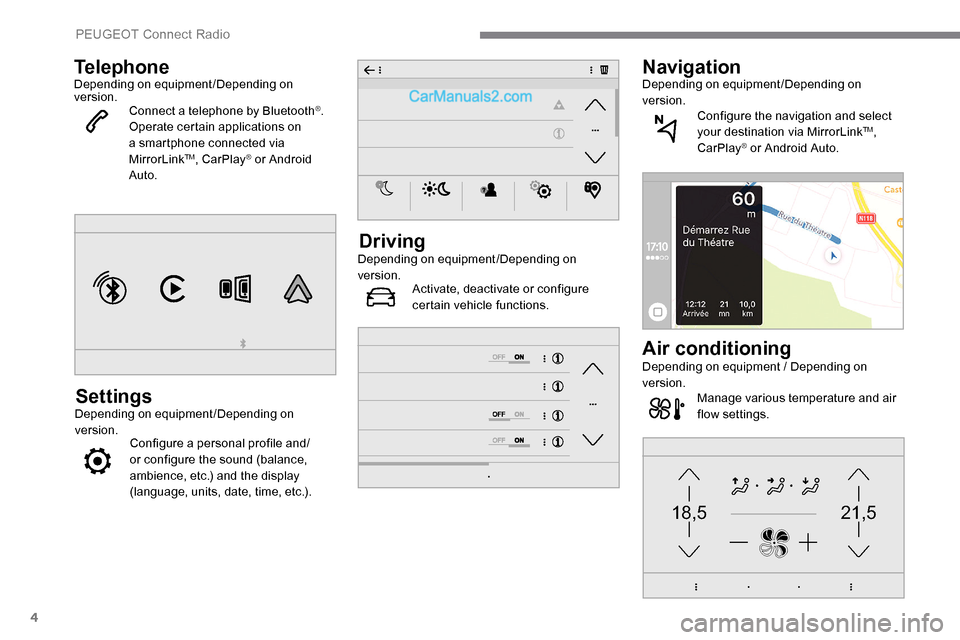
TelephoneDepending on equipment/Depending on
version.Connect a telephone by Bluetooth
®.
Operate certain applications on
a smartphone connected via
MirrorLink
TM, CarPlay® or Android
Auto.
SettingsDepending on equipment/Depending on
version. Configure a personal profile and/
or configure the sound (balance,
ambience, etc.) and the display
(language, units, date, time, etc.).
DrivingDepending on equipment/Depending on
version.
Activate, deactivate or configure
certain vehicle functions.
NavigationDepending on equipment/Depending on
version.
Configure the navigation and select
your destination via MirrorLink
TM,
CarPlay® or Android Auto.
Air conditioningDepending on equipment / Depending on
version. Manage various temperature and air
flow settings.
PEUGEOT Connect Radio
Page 262 of 324
10
It is recommended that file names are less
than 20 characters long and do not contain
any special characters (e.g. « » ? . ; ù) so as to
avoid any reading or display problems.
Use only USB memory sticks in FAT32 format
(File Allocation Table).
It is recommended that the original USB
cable for the portable device be used.
In order to be able to play a burned CDR or
CDRW, select standards ISO 9660 level 1, 2, or
Joliet, if possible, when burning the CD.
If the disc is burned in another format, it may
not be played correctly.
It is recommended that the same burning
standard be always used on an individual disc,
with the lowest speed possible (4x maximum)
for the best acoustic quality.
In the particular case of a multi-session CD, the
Joliet standard is recommended.
TelephoneMirrorLinkTM smartphone
connection
The "MirrorLinkTM" function requires a
compatible smartphone and applications.
Telephone not connected by
Bluetooth®
Connect a USB cable. The
smartphone charges when
connected by the USB cable.
From the system, press
" Telephone " to display the primary
page.
Press " MirrorLink
TM" to start the
application in the system.
Depending on the smartphone, it may be
necessary to activate the " MirrorLink
TM"
function. During the procedure, several
screen pages relating to certain
functions are displayed.
Accept to start and complete the
connection. When connecting a smartphone
to the system, it is recommended
that Bluetooth
® be started on the
smartphone.
Telephone connected by
Bluetooth®
From the system, press
" Telephone " to display the primary
page.
USB sockets
Depending on equipment, for more information
on the USB sockets compatible with the
CarPlay
®, MirrorLinkTM or Android Auto
applications, refer to the "Ease of use and
comfort" section. The synchronisation of a smartphone
allows users to display applications
adapted to the CarPlay
®, MirrorLinkTM
or Android Auto
technology of the
smartphone on the vehicle screen. For
the CarPlay
® technology, the CarPlay®
function must be activated on the
smartphone beforehand.
For the communication process between
the smartphone and the system to
work, it is essential in all cases that the
smartphone is unlocked.
As the principles and standards are
constantly changing, it is recommended
that you keep the smar tphone's
operating system up-to- date, as well
as the date and time of the smar tphone
and of the system .
For the list of eligible smartphones, go to
the Brand's national website.
Connect a USB cable. The
smartphone charges when
connected by the USB cable.
PEUGEOT Connect Radio
Page 263 of 324
11
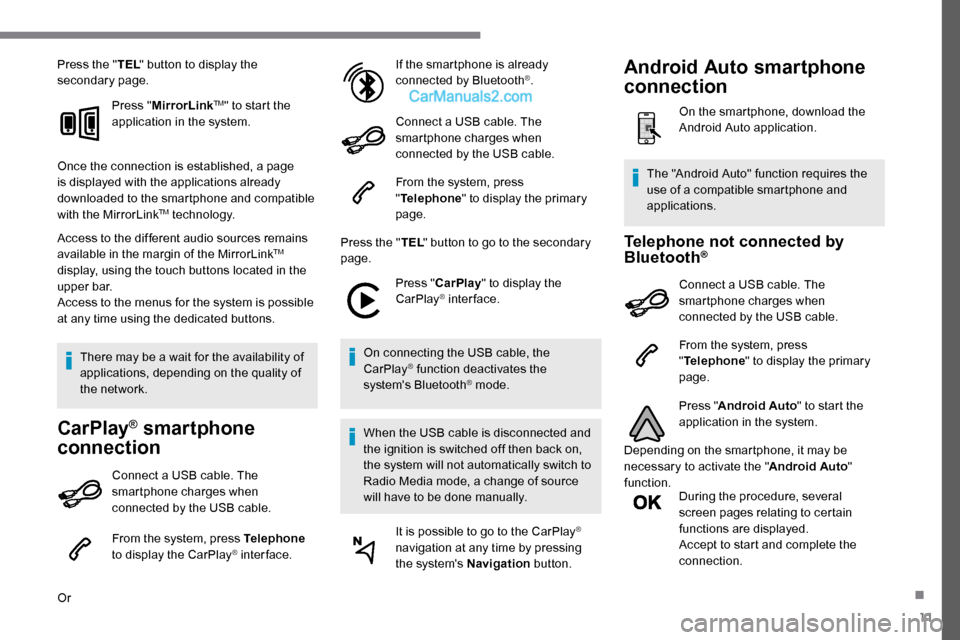
Press the "TEL" button to display the
secondary page.
Press "MirrorLink
TM" to start the
application in the system.
Once the connection is established, a page
is displayed with the applications already
downloaded to the smartphone and compatible
with the MirrorLink
TM technology.
Access to the different audio sources remains
available in the margin of the MirrorLink
TM
display, using the touch buttons located in the
u p p e r b a r.
Access to the menus for the system is possible
at any time using the dedicated buttons.
There may be a wait for the availability of
applications, depending on the quality of
the network.
CarPlay® smartphone
connection
Connect a USB cable. The
smartphone charges when
connected by the USB cable.
From the system, press Telephone
to display the CarPlay
® inter face.
Or If the smartphone is already
connected by Bluetooth
®.
Connect a USB cable. The
smartphone charges when
connected by the USB cable.
From the system, press
" Telephone " to display the primary
page.
Press the " TEL" button to go to the secondary
page.
Press "CarPlay " to display the
CarPlay
® inter face.
On connecting the USB cable, the
CarPlay
® function deactivates the
system's Bluetooth® mode.
When the USB cable is disconnected and
the ignition is switched off then back on,
the system will not automatically switch to
Radio Media mode, a change of source
will have to be done manually. It is possible to go to the CarPlay
®
navigation at any time by pressing
the system's Navigation button.
Telephone not connected by
Bluetooth®
Connect a USB cable. The
smartphone charges when
connected by the USB cable.
From the system, press
"Telephone " to display the primary
page.
Press " Android Auto " to start the
application in the system.
Depending on the smartphone, it may be
necessary to activate the " Android Auto"
function. During the procedure, several
screen pages relating to certain
functions are displayed.
Accept to start and complete the
connection.
The "Android Auto" function requires the
use of a compatible smartphone and
applications.
Android Auto smartphone
connection
On the smartphone, download the
Android Auto application.
.
Page 273 of 324
1
PEUGEOT Connect Nav
GPS navigation -
Applications - Multimedia
audio system - Bluetooth
®
telephone
Contents
First steps
1
S
teering mounted controls
2
M
enus
3
V
oice commands
4
N
avigation
1
2
Connected navigation
1
4
Applications
1
7
Radio
2
0
DAB radio (Digital Audio Broadcasting)
2
2
Media
2
2
Telephone
2
4
Settings
2
8
Frequently asked questions
3
0The various functions and settings
described differ according to the version
and configuration of the vehicle.
For safety reasons and because they
require continued attention on the part of
the driver, the following operations must
be carried out with the vehicle stationary
and the ignition switched off:
-
Us
ing a smartphone.
-
P
airing a Bluetooth mobile phone to
the hands-free Bluetooth system of the
audio system.
-
Sm
artphone connection operations for
CarPlay
®, MirrorLinkTM or Android Auto
(certain applications interrupt their
display when the vehicle starts to move
again).
-
W
atching a video (the video stops
when the vehicle starts to move again).
-
T
he configuration of profiles.
The system is protected in such a way that
it will only operate in the vehicle.
The display of the message Energy
Economy Mode signals that a change to
standby is imminent. The link below gives access to the OSS
(Open Source Software) code for the
system.
https://www.groupe-psa.com/fr/oss/
https://www.groupe-psa.com/en/oss/
First steps
With the engine running, a press
mutes the sound.
With the ignition off, a press turns
the system on.
Increase or decrease the volume using
the wheel or the "plus" or "minus" buttons
(depending on the equipment).
Use the menu buttons on either side of or
below the touch screen for access to the
menus, then press the virtual buttons in the
touch screen.
Depending on the model, use the "Source" or
"Menu" buttons to access the rolling menus,
then press the virtual buttons in the touch
screen.
Display the rolling menus at any time by
pressing the screen briefly with three fingers.
All of the touch areas of the screen are white.
Press the back arrow to go back a level.
Press "OK" to confirm.
.
PEUGEOT Connect Nav