lights PEUGEOT EXPERT 2023 User Guide
[x] Cancel search | Manufacturer: PEUGEOT, Model Year: 2023, Model line: EXPERT, Model: PEUGEOT EXPERT 2023Pages: 348, PDF Size: 12 MB
Page 147 of 348
145
Driving
6Invalid value during manual
operation
This symbol is displayed if a gear is not engaged correctly (gear selector between
two positions).
►
Place the selector "correctly" at a position.
Switching off the vehicle
Before switching off the engine, select position
P then apply the parking brake to immobilise
the vehicle, unless this is set to automatic mode
(with electric parking brake).
Check that mode
P has been engaged and that
the electric parking brake has been applied
automatically; if not, apply it manually.
The corresponding indicator lamps in the
selector and the electric parking brake control
lever must be on, as well as those on the
instrument panel.
A point of resistance may be noticed when moving to position P.
If the selector is not in position P, when the
driver's door is opened or approximately 45
seconds after the ignition is switched off,
an audible signal sounds and a message
appears.
►
Return the drive selector to position P
;
the audible signal stops and the message
disappears.
When positioned on a steep slope with a
loaded vehicle, depress the brake
pedal, select position P, apply the parking
brake, unless it is set to automatic mode (with
electric parking brake), then release the brake
pedal.
In all circumstances, ensure that the
selector is in position P before leaving
your vehicle.
Malfunction
When the ignition is on, a message appears on
the instrument panel to indicate a fault with the
gearbox.
In this case, the gearbox goes into back-up
mode and is locked in 3
rd gear. You may feel a
significant jolt (without risk to the gearbox) when
changing from
P
to R and from N to R.
Do not exceed 62 mph (100
km/h), local speed
restrictions permitting.
Have it checked by a PEUGEOT dealer or a
qualified workshop.
There is a risk of damaging the gearbox: – If the accelerator and brake pedals are
depressed simultaneously
.
–
In the event of a battery failure, forcing the
selector from position P
to another position.
If your vehicle has an automatic gearbox,
do not try to start the engine by pushing
the vehicle.
Drive selector (Electric)
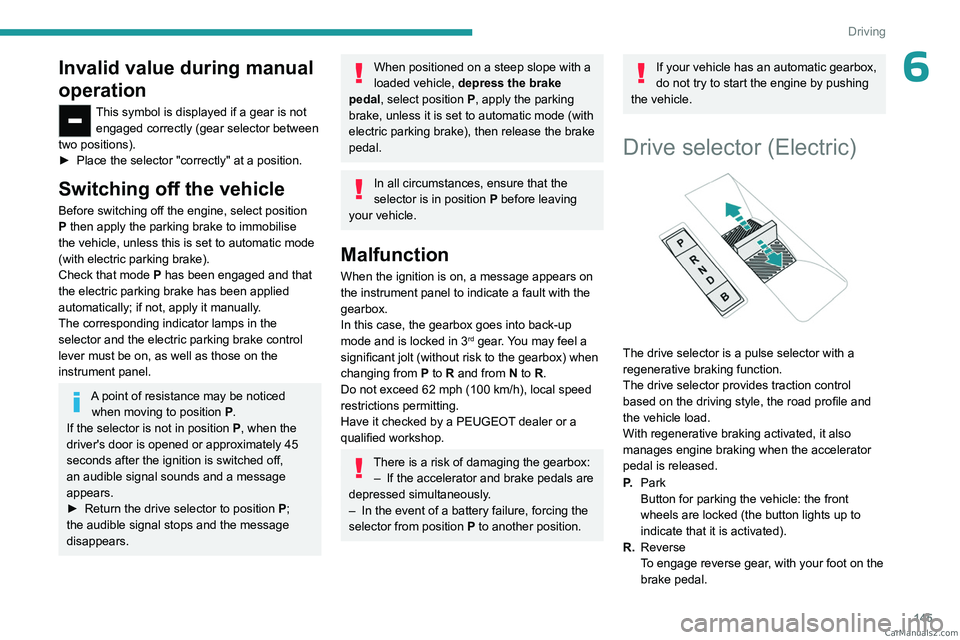
The drive selector is a pulse selector with a
regenerative braking function.
The drive selector provides traction control
based on the driving style, the road profile and
the vehicle load.
With regenerative braking activated, it also
manages engine braking when the accelerator
pedal is released.
P. Park
Button for parking the vehicle: the front
wheels are locked (the button lights up to
indicate that it is activated).
R. Reverse
To engage reverse gear, with your foot on the
brake pedal. CarM an uals 2 .c o m
Page 148 of 348
146
Driving
N.Neutral
To move the vehicle with the ignition off and
so allow it to free-wheel.
For more information on Free-wheeling, refer
to the corresponding section.
D. Drive (automatic forward gear)
B. Brake (regenerative braking)
Regenerative braking (the button lights up to
indicate its activation).
Information displayed on
the instrument panel
When the ignition is switched on, the drive
selector status is displayed on the instrument
panel:
P : Park.
R : Reverse.
N : Neutral.
D : Drive (automatic forward gear).
B : Brake (regenerative braking activated).
Operation
► Move the selector by pressing it forwards
( N or R) or rearwards (N or D) once or twice,
passing the point of resistance if necessary.
For example, to change from
P to R (with your
foot on the brake pedal), either push forwards
twice without passing the point of resistance or
push just once, passing the point of resistance.
Regenerative braking
With the Brake function and when
decelerating
The Brake function emulates engine braking,
slowing the vehicle with no need to depress the
brake pedal. The vehicle slows more quickly
when the driver releases the accelerator pedal.
The energy recovered when the accelerator
pedal is released is then used to partially
recharge the traction battery, thereby increasing
the vehicle's driving range.
The resulting deceleration of the vehicle does not cause the brake lamps to come
on.
►
From mode
D, press button B to activate/
deactivate the function (the button lights up when
the function is activated).
D on the instrument panel is replaced with B.
The status of the function is saved when the
ignition is switched off.
In some situations (e.g. battery full,
extreme temperatures), the amount of
regenerative braking may be temporarily
limited, resulting in less deceleration.
The driver must remain alert to traffic
conditions and must always be ready to use
the brake pedal.
With the brake pedal
When the brake pedal is depressed, the
intelligent braking system automatically recovers
some of the energy and uses it to recharge the
traction battery.
This energy recovery also reduces use of the
brake pads, thereby limiting their wear.
The driver may experience a different sensation when depressing the brake
pedal compared to a vehicle without
regenerative braking.
Driving modes (Electric)
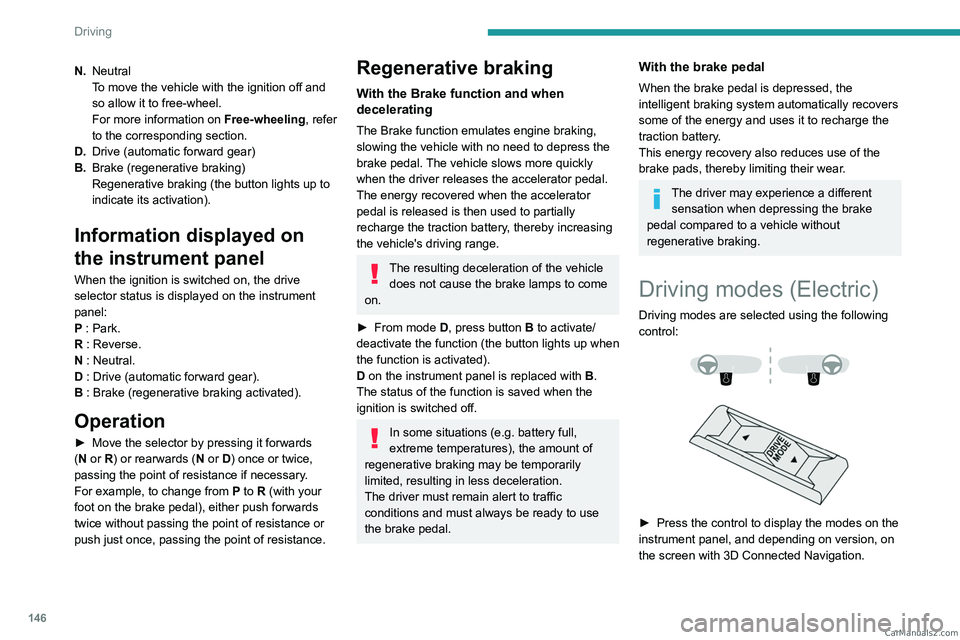
Driving modes are selected using the following
control:
► Press the control to display the modes on the
instrument panel, and depending on version, on
the screen with 3D Connected Navigation. CarM an uals 2 .c o m
Page 149 of 348
147
Driving
6When starting the vehicle, no mode can be
selected until the READY indicator lamp is
displayed.
When the message disappears, the selected
mode is activated and remains indicated on the
instrument panel (except Normal mode).
Each time the ignition is switched on, Normal
mode is selected by default.
Normal
This optimises the driving range and dynamic
performance.
To obtain maximum torque and power, depress
the accelerator pedal fully.
Eco
Optimises energy consumption, by reducing
the output of the heating and air conditioning
(without actually deactivating them) and limiting
both motor torque and power.
Power
Provides equivalent vehicle performance when
fully laden (GVW) to when the vehicle is in
Normal mode and when unladen.
Stop & Start
The Stop & Start function puts the engine temporarily into standby - STOP mode - during
phases when the vehicle is stationary (e.g.
red
lights, traffic jams). The engine automatically
restarts - START mode - as soon as the driver
indicates the intention of moving off again.
Primarily designed for urban use, the function
is intended to reduce fuel consumption and
exhaust emissions as well as the noise level
when stationary.
The function does not affect the functionalities of
the vehicle, in particular the braking.
Deactivation/Reactivation
With audio system
► To deactivate or reactivate the system, press
this button.
The indicator lamp is on when the system is
deactivated.
With touch screen
The settings are changed via the vehicle configuration menu.
If the system has been deactivated in
STOP mode, the engine restarts
immediately.
The system is reactivated automatically whenever the engine is started by the
driver.
Driving on flooded roads
Before entering into a flooded area, it is
strongly recommended that you deactivate
the Stop & Start system.
For more information on Driving
recommendations, particularly on flooded
roads, refer to the corresponding section.
Operation
Main conditions for operation
– The driver ’s door must be closed.
– The sliding side door must be closed.
–
The driver's seat belt must be fastened.
–
The level of charge in the battery must be
sufficient.
–
The temperature of the engine must be within
its nominal operating range.
–
The outside temperature must be between
0°C and 35°C.
Putting the engine into standby
(STOP mode)
The engine automatically enters standby mode
as soon as the driver indicates their intention to
stop:
With a manual gearbox: at speeds below 12
mph (20
km/h) or with the vehicle stationary CarM an uals 2 .c o m
Page 165 of 348
163
Driving
6Seat belts fastened for all passengers.
Stabilised speed on roads with no or low
curvature.
This warning lamp lights up on the instrument panel without any additional
message, to indicate that the automatic braking
system is not available.
This is a normal behavior indicating that a
condition is not fulfilled and which does not
request the support of a workshop.
In any situations with ignition on where automatic
braking presents a risk, deactivating the
system via the vehicle's configuration menu is
recommended, for instance:
–
T
owing a trailer (particularly a trailer without its
own braking system).
–
Carrying long objects on roof bars or roof rack.
–
Driving with snow chains.
–
Using an automatic car wash.
–
Performing any maintenance (e.g.
changing a
wheel, working inside the engine compartment).
–
Placing the vehicle on a rolling bench in a
workshop.
–
T
owing the vehicle.
–
Following a front bumper deformation.
–
Following a damage of the windscreen close
to the detection camera.
In case the detection is degraded or
temporarily unavailable by environment
conditions, then a driver indication is not
displayed (because a driver action is not
requested).
It can be dangerous to drive if the brake
lamps are not in perfect working order.
The driver must not overload the vehicle (keep within the GVW limit and load
height limits for roof bars).
Collision Risk Alert
This function warns the driver if there is a risk
of collision with the preceding vehicle, or with a
pedestrian or cyclist.
Modifying the alert trigger threshold
This trigger threshold determines the sensitivity
with which the function warns of the risk of
collision.
The threshold is set via the vehicle configuration menu with the audio
system or touch screen.
►
Select one of the three pre-defined
thresholds: "
Far", "Normal" or "Close".
The last threshold selected is memorised when
the ignition is switched off.
Operation
Depending on the collision risk detected by the
system and the alert trigger threshold chosen
by the driver, different levels of alert may be
triggered and displayed on the instrument panel.
The system takes into account the vehicle
dynamics, the difference speed of the own
vehicle and the object identified for the
collision risk, and the operation of the vehicle
(e.g. actions on the pedals, steering wheel) to
trigger the alert at the most relevant moment.
(orange)
Level 1: visual alert only, warning that the
preceding vehicle is very close.
The message "Vehicle close" is displayed.
(red)
Level 2: visual and audible alert, warning
that a collision is imminent.
The message "Brake! " is displayed.
While approaching a vehicle too quickly,
the level 2 alert may be displayed
directly.
Important: the level 1 alert depends on the
trigger threshold selected. It reacts only on
moving vehicles. It is disabled automatically
at lower speed.
It is possible that collision warnings are
not given, are given too late or seem
unjustified.
The driver must always stay in control of the
vehicle and be prepared to react at any time
to avoid an accident.
Intelligent emergency
braking assistance (iEBA)
This function increases vehicle deceleration
if the driver does not brake enough to avoid a
collision. CarM an uals 2 .c o m
Page 166 of 348
164
Driving
This assistance is only provided if the driver
presses the brake pedal.
Active Safety Brake
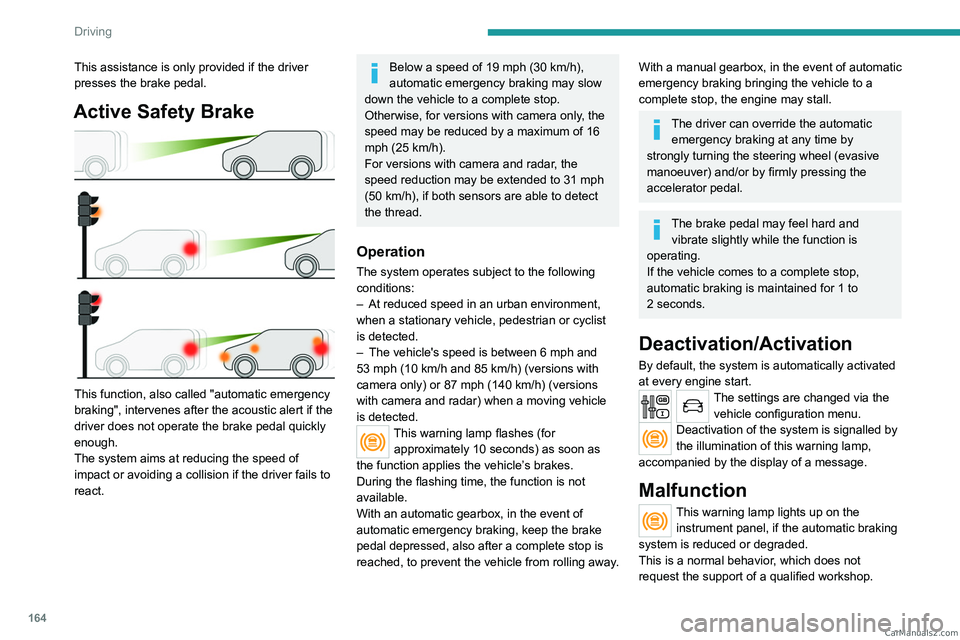
This function, also called "automatic emergency
braking", intervenes after the acoustic alert if the
driver does not operate the brake pedal quickly
enough.
The system aims at reducing the speed of
impact or avoiding a collision if the driver fails to
react.
Below a speed of 19 mph (30 km/h),
automatic emergency braking may slow
down the vehicle to a complete stop.
Otherwise, for versions with camera only
, the
speed may be reduced by a maximum of 16
mph (25
km/h).
For versions with camera and radar, the
speed reduction may be extended to 31 mph
(50
km/h), if both sensors are able to detect
the thread.
Operation
The system operates subject to the following
conditions:
–
At reduced speed in an urban environment,
when a stationary vehicle, pedestrian or cyclist
is detected.
–
The vehicle's speed is between 6 mph and
53 mph (10
km/h and 85 km/h) (versions with
camera only) or 87 mph (140 km/h) (versions
with camera and radar) when a moving vehicle
is detected.
This warning lamp flashes (for approximately 10 seconds) as soon as
the function applies the vehicle’s brakes.
During the flashing time, the function is not
available.
With an automatic gearbox, in the event of
automatic emergency braking, keep the brake
pedal depressed, also after a complete stop is
reached, to prevent the vehicle from rolling away.
With a manual gearbox, in the event of automatic
emergency braking bringing the vehicle to a
complete stop, the engine may stall.
The driver can override the automatic emergency braking at any time by
strongly turning the steering wheel (evasive
manoeuver) and/or by firmly pressing the
accelerator pedal.
The brake pedal may feel hard and vibrate slightly while the function is
operating.
If the vehicle comes to a complete stop,
automatic braking is maintained for 1 to
2
seconds.
Deactivation/Activation
By default, the system is automatically activated
at every engine start.
The settings are changed via the vehicle configuration menu.
Deactivation of the system is signalled by
the illumination of this warning lamp,
accompanied by the display of a message.
Malfunction
This warning lamp lights up on the instrument panel, if the automatic braking
system is reduced or degraded.
This is a normal behavior, which does not
request the support of a qualified workshop. CarM an uals 2 .c o m
Page 167 of 348
165
Driving
6This may be caused by a reduced visibility
(e.g. rain, fog, snow, blinding by low sun) or by
a real sensor blockage. In this case, stop the
vehicle and verify if the front camera or the front
radar is covered by dirt, snow, ice or anything
preventing the sensing.
In the event of a malfunction, this warning
lamp lights up on the instrument panel,
accompanied by the display of a message and
an audible signal.
Have it checked by a PEUGEOT dealer or a
qualified workshop.
If these warning lamps come on after the
engine has been switched off and then
restarted, contact a PEUGEOT dealer or a
qualified workshop to have the system checked.
These warning lamps light up on the instrument panel and/or in the
warning lamp display for seat belts and front
passenger airbag to indicate that the driver's
and/or front passenger's seat belt is not fastened
(depending on version). The automatic braking
system is deactivated until the seat belts are
fastened.
Lane departure warning
For more information, refer to the
General recommendations on the use
of driving and manoeuvring aids .
This system, using a camera which recognises
solid or broken lines, detects the involuntary
crossing of longitudinal traffic lane markings on
the ground.
If the direction indicator is not used at speeds
above 50 mph (80
km/h) and there is a risk of
one of these lines on the road surface being
crossed, the system triggers the alert.
This system is particularly useful on motorways
and main roads.
Detection - Alert
You are alerted by the flashing of this warning lamp in the instrument panel,
accompanied by an audible signal.
No warning is transmitted while the
direction indicator is active and for
approximately 20 seconds after the direction
indicator is switched off.
Activation/Deactivation
With audio system
► To activate or deactivate the system, press
this button.
The indicator lamp is on when the system is
activated.
With touch screen
The settings are changed via the vehicle configuration menu.
Malfunction
Depending on the vehicle’s equipment:The indicator lamp in this button flashes.
or
/The button flashes and a fault appears.
Consult a PEUGEOT dealer or a qualified
workshop. CarM an uals 2 .c o m
Page 172 of 348
170
Driving
Malfunction
In the event of a malfunction when
changing into reverse gear, this warning
lamp lights up on the instrument panel,
accompanied by the display of a message and
an audible signal (short beep).
Have it checked by a PEUGEOT dealer or a
qualified workshop.
Visiopark 1
For more information, refer to the
General recommendations on the use
of driving and manoeuvring aids .
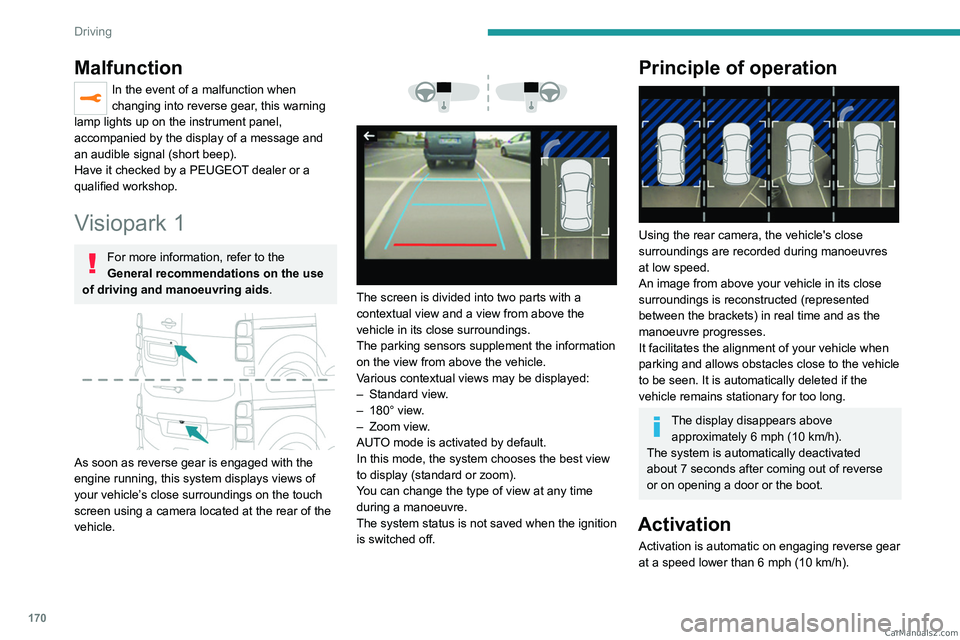
As soon as reverse gear is engaged with the
engine running, this system displays views of
your vehicle’s close surroundings on the touch
screen using a camera located at the rear of the
vehicle.
The screen is divided into two parts with a
contextual view and a view from above the
vehicle in its close surroundings.
The parking sensors supplement the information
on the view from above the vehicle.
Various contextual views may be displayed:
–
Standard view
.
–
180° view
.
–
Zoom view
.
AUTO mode is activated by default.
In this mode, the system chooses the best view
to display
(standard or zoom).
You can change the type of view at any time
during a manoeuvre.
The system status is not saved when the ignition
is switched off.
Principle of operation
Using the rear camera, the vehicle's close
surroundings are recorded during manoeuvres
at low speed.
An image from above your vehicle in its close
surroundings is reconstructed (represented
between the brackets) in real time and as the
manoeuvre progresses.
It facilitates the alignment of your vehicle when
parking and allows obstacles close to the vehicle
to be seen. It is automatically deleted if the
vehicle remains stationary for too long.
The display disappears above approximately 6 mph (10 km/h).
The system is automatically deactivated
about 7 seconds after coming out of reverse
or on opening a door or the boot.
Activation
Activation is automatic on engaging reverse gear
at a speed lower than 6 mph (10 km/h).
CarM an uals 2 .c o m
Page 176 of 348
174
Practical information
Compatibility of fuels
Diesel fuels conforming to the EN590, EN16734
and EN16709 standards and containing up to
7%, 10%, 20% and 30% fatty acid methyl ester
respectively. The use of B20 or B30 fuels, even
occasionally, imposes special maintenance
conditions referred to as "Arduous conditions".
Paraffinic Diesel fuel conforming to the EN15940
standard.
The use of any other type of (bio) fuel (e.g. pure or diluted vegetable or animal
oils, domestic fuel) is strictly prohibited - risk
of damaging the engine and fuel system!
The only Diesel fuel additives authorised for use are those that meet the B715000
standard.
Diesel at low temperature
At temperatures below 0 °C (+32 °F), the
formation of paraffins in summer-type Diesel
fuels could prevent the engine from operating
correctly
. In these temperature conditions, use
winter-type Diesel fuel and keep the fuel tank
more than 50
% full.
At temperatures below -15 °C (+5 °F) to avoid
problems starting, it is best to park the vehicle
under shelter (heated garage).
Travelling abroad
Certain fuels could damage your vehicle’s
engine.
In certain countries, the use of a particular
fuel may be required (specific octane rating,
specific trade name, etc.) to ensure correct
operation of the engine.
For all additional information, consult a dealer.
Refuelling
Fuel tank capacity: approximately 69 litres.
Reserve level: approximately 6 litres.
Low fuel level
When the low fuel level is reached,
one of these warning lamps lights
up on the instrument panel, accompanied by the
display of a message and an audible signal.
When it first comes on, about 8 litres of fuel
remain.
You must refuel as soon as possible to avoid
running out of fuel.
For more information on Running out of fuel
(Diesel), refer to the corresponding section.
A small arrow by the warning lamp indicates which side of the vehicle the
fuel filler flap is located on.
Stop & Start
Never refuel with the engine in STOP
mode; you must switch off the ignition.
Refuelling
At least 8 litres of fuel must be added, in order to
be registered by the fuel gauge.
Opening the filler cap may create a noise caused
by an inrush of air. This is entirely normal and
results from the sealing of the fuel system.
To refuel in complete safety:
►
Always switch off the engine.
►
Unlock the vehicle using the Keyless Entry
and Start.
► Open the fuel filler flap. CarM an uals 2 .c o m
Page 211 of 348
209
In the event of a breakdown
8► Progressively return the wheel to the carrier
by pushing alternately at the left and right until it
is clear of the hook fixing area.
►
Engage the carrier on the hook, then tighten
the bolt using the wheelbrace
until the bolt is fully
tightened.
Tyre in the carrier
You can change the size of the tyre on the spare
wheel by following the instructions below.
Original
tyre size Standard Long
215/65 R16 Placing a 225 wheel in the carrier is prohibited. There is no
restriction.
215/60 R17
215/60 R17
M&S
225/55 R17 Placing a 215 wheel in the
carrier is not
recommended (risk of noise).
A punctured tyre of size 215 or 225 can be placed in the carrier.
Removing a wheel
Parking the vehicle
Immobilise the vehicle where it does
not obstruct traffic: the ground must be level,
stable and non-slippery.
With a manual gearbox, engage first gear
then switch off the ignition to block the
wheels.
With an automatic gearbox, place the gear
selector in position P then switch off the
ignition to block the wheels.
With a drive selector, place the gear selector
in position P then switch off the ignition to
block the wheels.
Apply the parking brake, unless it is
programmed to automatic mode (for an
electric parking brake), and check that the
indicator lamp lights up on
the instrument
panel.
Ensure that the occupants have left the
vehicle and are located in a safe place.
Never go underneath a vehicle raised using a
jack; use an axle stand.
With an electric parking brake, place a chock
against the wheel diagonally opposite to the
one being replaced.
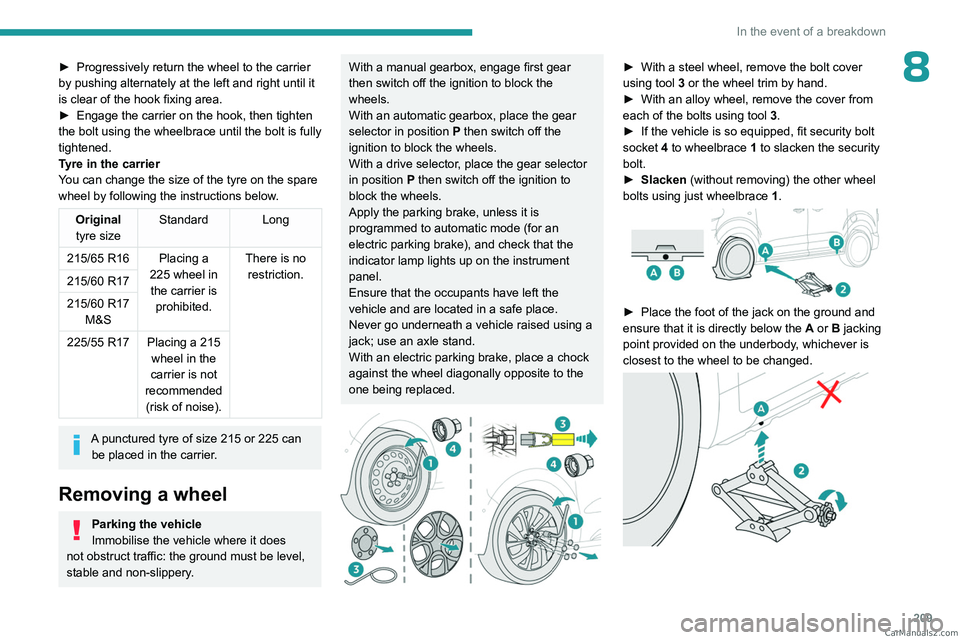
► With a steel wheel, remove the bolt cover
using tool 3
or the wheel trim by hand.
►
With an alloy wheel, remove the cover from
each of the bolts using tool 3
.
►
If the vehicle is so equipped, fit security bolt
socket
4 to wheelbrace 1 to slacken the security
bolt.
►
Slacken
(without removing) the other wheel
bolts using just wheelbrace 1.
► Place the foot of the jack on the ground and
ensure that it is directly below the A
or B jacking
point provided on the underbody, whichever is
closest to the wheel to be changed.
CarM an uals 2 .c o m
Page 302 of 348
10 Instruments and controls
Instruments and
controls
Warning lights, gauges and indi‐ cators ........................................... 10
Instrument cluster ......................10
Hydrogen gauge ........................10
Hydrogen leakage .....................11
Fuel cell system fault .................11
Displays ....................................... 11
Driver Information Centre ..........11 Warning lights, gauges
and indicators
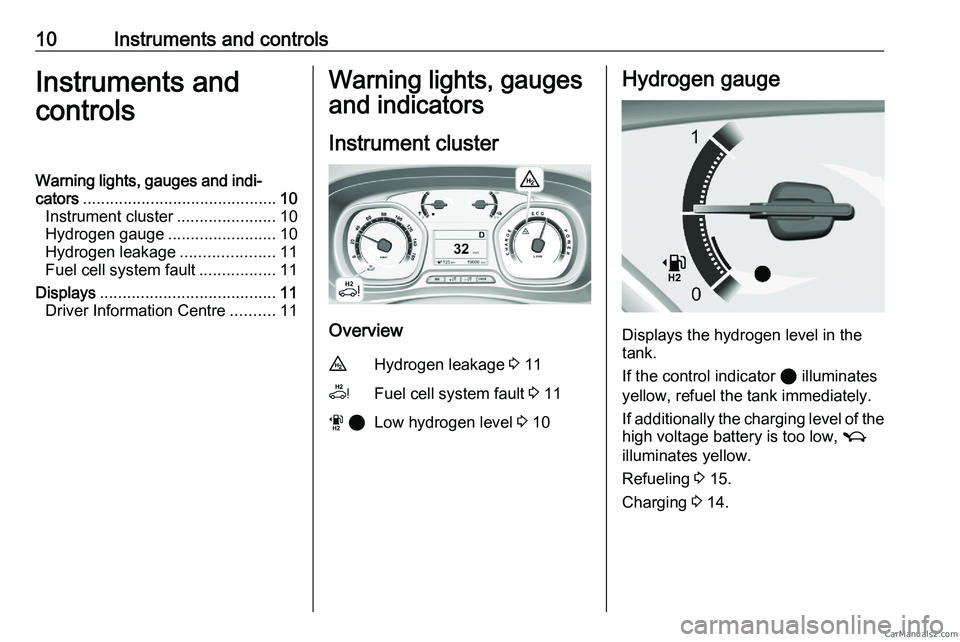
Instrument cluster Overview
u
Hydrogen leakage 3 11
v Fuel cell system fault 3 11
w 2 Low hydrogen level 3
10 Hydrogen gauge
Displays the hydrogen level in the
tank.
If the control indicator 2 illuminates
yellow, refuel the tank immediately.
If
additionally the charging level of the
high voltage battery is too low, M
illuminates yellow.
Refueling 3 15.
Charging 3 14.CarM an uals 2 .c o m