service Peugeot Expert Tepee 2011 User Guide
[x] Cancel search | Manufacturer: PEUGEOT, Model Year: 2011, Model line: Expert Tepee, Model: Peugeot Expert Tepee 2011Pages: 268, PDF Size: 9.78 MB
Page 119 of 268
Checks
CHECK
S
6
CHECKS
Battery
At the start of winter, have your battery
checked by a PEUGEOT dealer or a
qualified workshop.
Brake pads
Brake pad wear depends on the style of
driving, in particular for vehicles which are
used in town, over short distances. It may
be necessary to check the thickness of the
pads, even between services.
Unless there is a leak in the system, a drop
in the brake fluid level indicates that the
brake pads are worn.
Brake disc/drum wear
For any information on checking the brake
disc/drum wear, contact a PEUGEOT dealer
or a qualified workshop.
Parking brake
Where the parking brake travel is too great
or there is a reduction in the performance
of the system, the parking brake should be
adjusted, even between services.
Have the system checked by a PEUGEOT
dealer or a qualified workshop.
Oil filter
Change the filter regularly, in accordance
with the servicing schedule.
Carbon filter and passenger compartment filter
The carbon filter permits continuous and
effective filtering of dust.
If the passenger compartment filter becomes
clogged, this may reduce the performance
of the air conditioning system and generate
unpleasant odours.
We recommend the use of a combined
passenger compartment filter. By means of
its second special active filter, it contributes
to the purification of the air breathed by
the occupants and the cleanness of the
passenger compartment (reduction of
allergic symptoms, unpleasant odours and
greasy deposits).
Refer to the servicing booklet to find out the
replacement interval for these components.
Depending on the environment (dusty
atmosphere...) and the use of the vehicle
(urban driving...), change them twice as
often if necessary.
Particle emission filter (Diesel)
This filter actively contributes
to the preservation of air quality
by trapping unburnt polluting
particles. It is controlled
completely and automatically by the engine
management system.
This warning lamp comes on if there is a risk
of blockage of the filter.
This alert signals the start of saturation of
the particle emissions filter (exceptionally
prolonged driving in urban conditions:
reduced speed, traffic jams…).
If this alert persists, contact a PEUGEOT
dealer or a qualified workshop.
On acceleration after the vehicle has been
running for a prolonged period at very low
speed or at idle, you may, in exceptional
circumstances, notice the emission of water
vapour at the exhaust. This water vapour
does not have any adverse effect on vehicle
handling or the environment.
To regenerate the filter, it is recommended
that as soon as driving conditions permit,
you drive at a speed of at least 36 mph
(60 km/h) for at least 5 minutes (until the
warning lamp goes off and/or the message
disappears).
Refer to "Under the bonnet" in section 6.
Page 121 of 268
11 9
Maintenance with TOTAL
CHECK
S
6
RECOMMENDS
Innovation at the service of performance
The TOTAL Research and Development
teams develop lubricants for PEUGEOT which
satisfy the requirements of the latest technical
innovations incorporated in PEUGEOT vehicles.
This ensures that you obtain the best
performance and the maximum engine life.
Reduced exhaust emissions
TOTAL lubricants are formulated to optimise the
efficiency of engines and the protection of the
emissions post-treatment systems. It is crucial to
observe the servicing recommendations made by
PEUGEOT to ensure correct operation.
Page 144 of 268
142
Having your vehicle towed
General recommendations
Observe the legislation in force in your
country.
Ensure that the weight of the towing vehicle
is higher than that of the towed vehicle.
The driver must stay at the wheel of the
towed vehicle.
Driving on motorways and fast roads is
prohibited when towing.
When towing a vehicle with all four wheels
on the ground, always use an approved
towing bar; rope and straps are prohibited.
When towing a vehicle with the engine off,
there is no longer any power assistance for
braking or steering.
In the following cases, you must always call
on a professional recovery service:
- vehicle broken down on a motorway or
fast road,
- when it is not possible to put the
gearbox into neutral, unlock the
steering, or release the parking brake,
- towing with only two wheels on
the ground,
- where there is no approved towing bar
available...
Page 145 of 268
143
Environment
QUICK HELP
7
ENVIRONMENT
With you, PEUGEOT acts to protect the
environment.
We invite you to visit the www.peugeot.com
website. As the driver, you also can contribute to
protecting the environment by following
certain rules:
- adopt a preventive style of driving,
without frequent and harsh acceleration,
- observe the service intervals; we
recommend that services are carried out
by a PEUGEOT dealer, authorised to
collect used batteries and fluids,
- in order to preserve the reliability of the
engine and emission control systems,
do not use engine oil additives. Refer to information in this handbook
on eco-driving (at the end of section 1).
Page 151 of 268
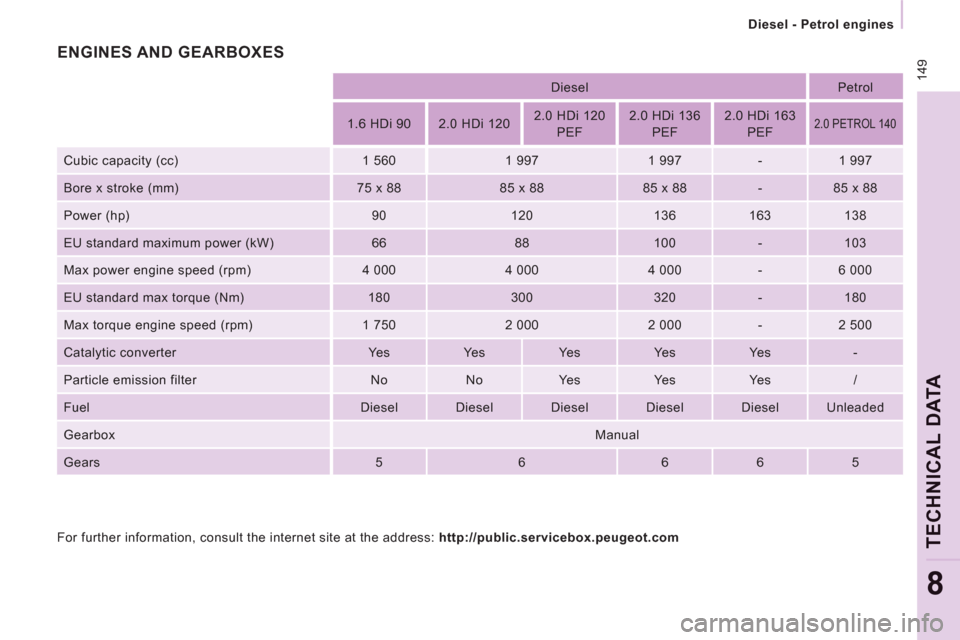
14
9
Diesel - Petrol engines
TECHNICAL DAT
A
8
Diesel
Petrol
1.6 HDi 90
2.0 HDi 120
2.0 HDi 120
PEF
2.0 HDi 136
PEF
2.0 HDi 163
PEF
2.0 PETROL 140
Cubic capacity (cc)
1 560
1 997
1 997
-
1 997
Bore x stroke (mm)
75 x 88
85 x 88
85 x 88
-
85 x 88
Power (hp)
90
120
136
163
138
EU standard maximum power (kW)
66
88
100
-
103
Max power engine speed (rpm)
4 000
4 000
4 000
-
6 000
EU standard max torque (Nm)
180
300
320
-
180
Max torque engine speed (rpm)
1 750
2 000
2 000
-
2 500
Catalytic converter
Ye s
Ye s
Ye s
Ye s
Ye s
-
Particle emission filter
No
No
Ye s
Ye s
Ye s
/
Fuel
Diesel
Diesel
Diesel
Diesel
Diesel
Unleaded
Gearbox
Manual
Gears
5
6
6
6
5
For further information, consult the internet site at the address: http://public.servicebox.peugeot.com
ENGINES AND GEARBOXES
Page 154 of 268
9.2
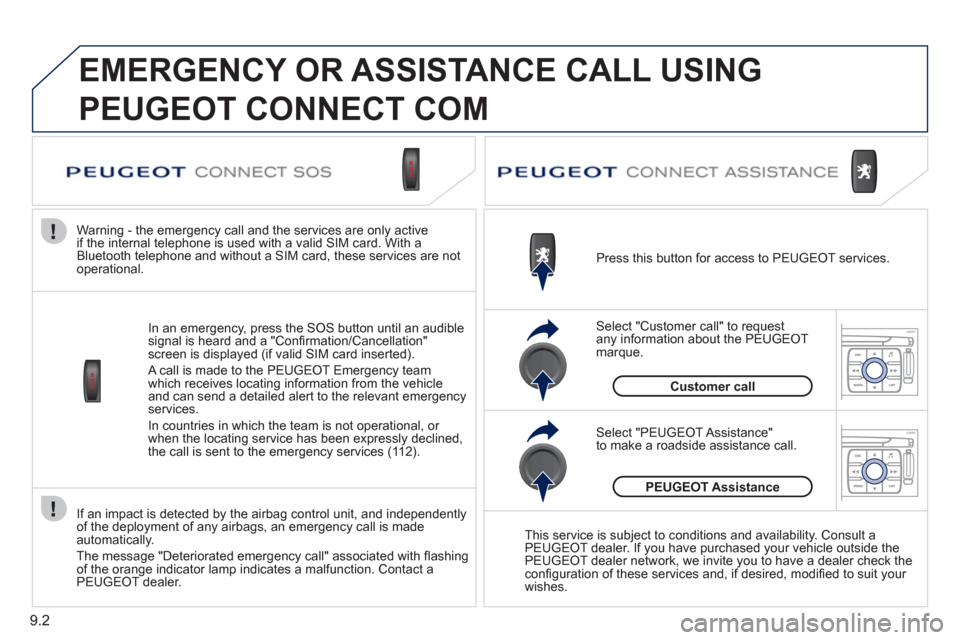
If an impact is detected by the airbag control unit, and independently
of the deployment of any airbags, an emergency call is made automatically.
The messa
ge "Deteriorated emergency call" associated with fl ashing
of the orange indicator lamp indicates a malfunction. Contact a
PEUGEOT dealer.
In an emer
gency, press the SOS button until an audible
signal is heard and a "Confi rmation/Cancellation"
screen is displayed (if valid SIM card inserted).
A call is made to the PEU
GEOT Emergency team
which receives locating information from the vehicleand can send a detailed alert to the relevant emergency services.
In countries in which the team is not operational, or
when the locatin
g service has been expressly declined,
the call is sent to the emergency services (11 2). Warning - the emergency call and the services are only active
i
f the internal telephone is used with a valid SIM card. With a
Bluetooth telephone and without a SIM card, these services are not
operational. Press this button for access to PEUGEOT services.
Customer call Select "Customer call" to request
an
y information about the PEUGEOT marque.
Select "PEUGEOT Assistance"
to make a roadside assistance call.
PEUGEOT Assistance
This service is subject to conditions and availability. Consult a
PEUGEOT dealer. If you have purchased your vehicle outside the
PEUGEOT dealer network, we invite you to have a dealer check theconfi guration of these services and, if desired, modifi ed to suit your
wishes.
EMERGENCY OR ASSISTANCE CALL USING
PEUGEOT CONNECT COM
Page 156 of 268
9.4
01
2
8
16
18 17
71114 3
59
4 1512 13
61
10
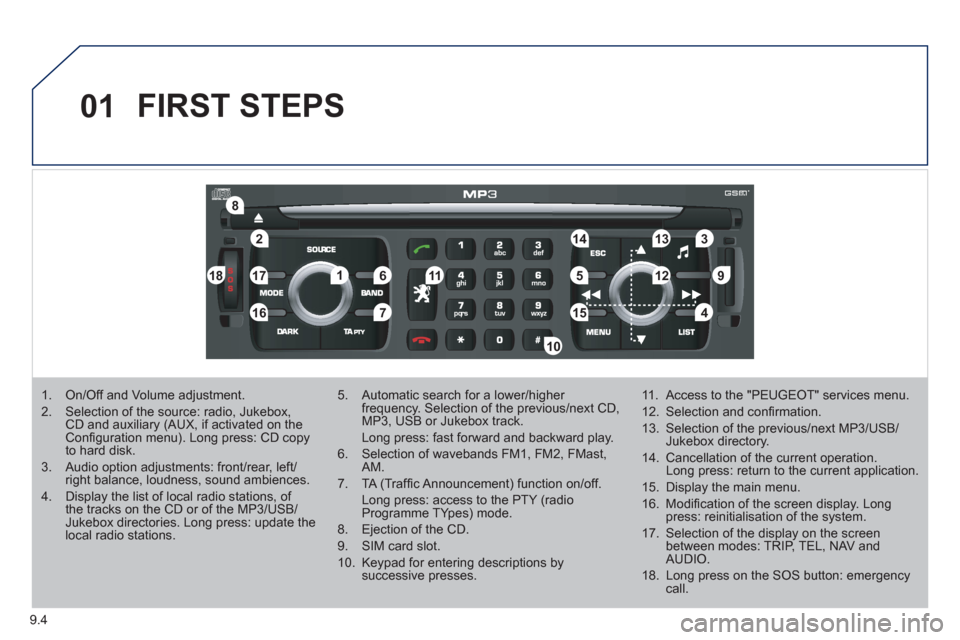
FIRST STEPS
1. On/Off and Volume adjustment.
2. Selection of the source: radio, Jukebox, CD and auxiliary (AUX, if activated on the Confi guration menu). Long press: CD copyto hard disk.
3. Audio option adjustments: front/rear, left/right balance, loudness, sound ambiences.
4. Display the list of local radio stations, of the tracks on the CD or of the MP3/USB/Jukebox directories. Long press: update the local radio stations.
5. Automatic search for a lower/higher frequency. Selection of the previous/next CD, MP3, USB or Jukebox track.
Long press: fast forward and backward play.
6. Selection of wavebands FM1, FM2, FMast,AM.
7. TA (Traffi c Announcement) function on/off.
Long press: access to the PTY (radioProgramme TYpes) mode.
8. Ejection of the CD.
9. SIM card slot.
10. Keypad for entering descriptions by successive presses.
11. Access to the "PEUGEOT" services menu.
12. Selection and confi rmation.
13. Selection of the previous/next MP3/USB/Jukebox directory.
14. Cancellation of the current operation. Long press: return to the current application.
15. Display the main menu.
16. Modifi cation of the screen display. Longpress: reinitialisation of the system.
17. Selection of the display on the screen between modes: TRIP, TEL, NAV and AUDIO.
18. Long press on the SOS button: emergency call.
Page 159 of 268
9.7
03
°
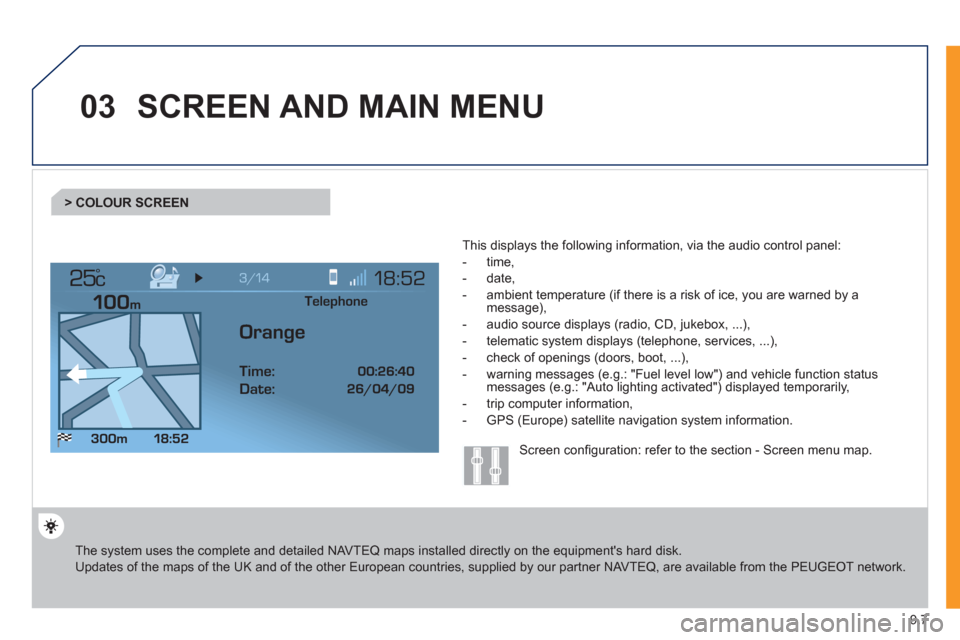
SCREEN AND MAIN MENU
The system uses the complete and detailed NAVTEQ maps installed directly on the equipment's hard disk.
Updates of the maps of the UK and of the other European countries, supplied by our partner NAVTEQ, are available from the PEUGEOT network.
This displa
ys the following information, via the audio control panel:
- time,
- date,
- ambient temperature
(if there is a risk of ice, you are warned by amessage),
- audio source displa
ys (radio, CD, jukebox, ...),
- telematic system displays
(telephone, services, ...),
- check o
f openings (doors, boot, ...),
- warnin
g messages (e.g.: "Fuel level low") and vehicle function statusmessages (e.g.: "Auto lighting activated") displayed temporarily,
- trip computer information,
- GPS
(Europe) satellite navigation system information.
> COLOUR SCREEN
Telephone
Orange
Time:
Date:
Screen confi guration: refer to the section - Screen menu map.
Page 164 of 268
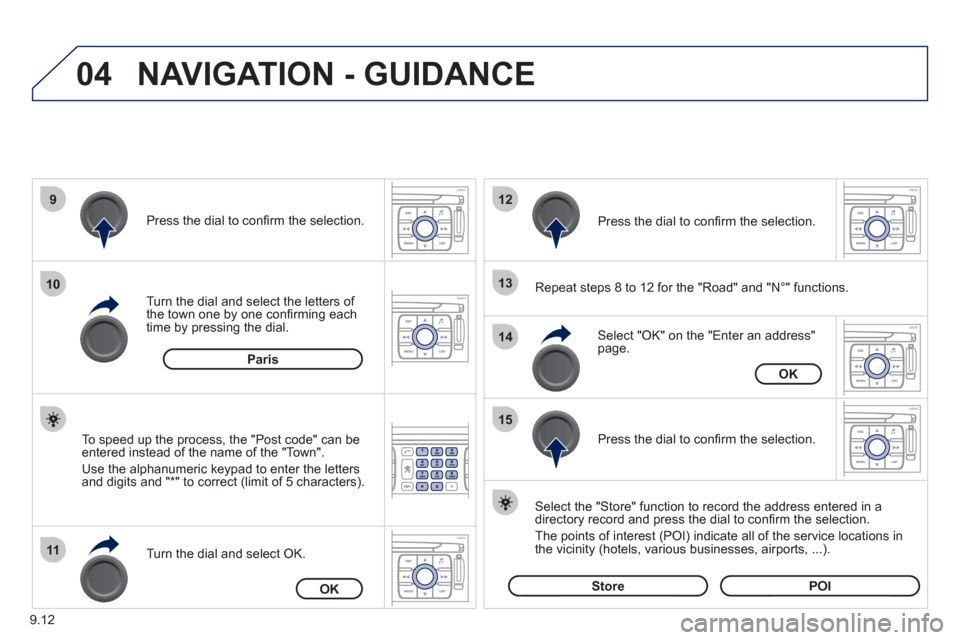
9.12
04
9
10
11
12
13
14
15
NAVIGATION - GUIDANCE
Repeat steps 8 to 12 for the "Road" and "N°" functions.
Turn the dial and select the letters of
the town one by one confi rming each
time by pressing the dial.
Select the "Store" function to record the address entered in a
directory record and press the dial to confi rm the selection.
The points o
f interest (POI) indicate all of the service locations in
the vicinity (hotels, various businesses, airports, ...).
Select "OK" on the "Enter an address" page. Pr
ess the dial to confi rm the selection.
Turn the dial and select
OK.
To speed up the process, the "Post code" can beentered instead of the name of the "Town".
Use the alphanumeric ke
ypad to enter the letters
and digits and "*" to correct (limit of 5 characters).
Pr
ess the dial to confi rm the selection.
Pr
ess the dial to confi rm the selection.
Paris
OK
OK
StorePOI
Page 168 of 268
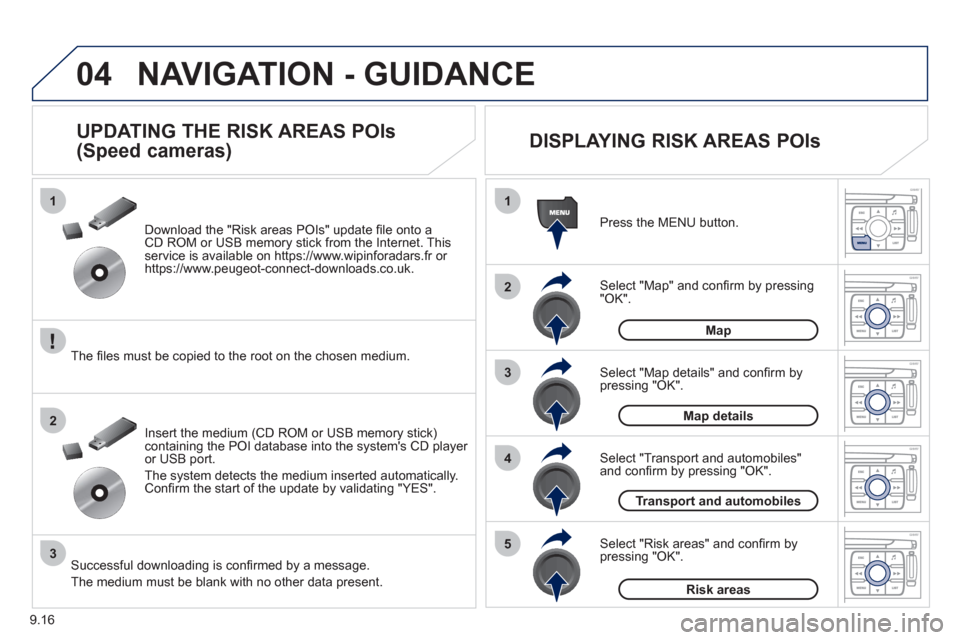
9.16
04
1
2
3
5
4
1
2
3
NAVIGATION - GUIDANCE
Select "Map" and confi rm by pressing"OK". Press the MEN
U button.
Select "Transport and automobiles"and confi rm by pressing "OK". Select "Map details" and confi rm b
y
pressing "OK". Download the "Risk areas P
OIs" update fi le onto aCD ROM or USB memory stick from the Internet. This service is available on https://www.wipinforadars.fr or
https://www.peugeot-connect-downloads.co.uk.
UPDATING THE RISK AREAS POIs
(Speed cameras)
DISPLAYING RISK AREAS POIs
Select "Risk areas" and confi rm by
pressing "OK".
Map
Map details
Transport and automobiles
Risk areas The fi les must be co
pied to the root on the chosen medium.
Insert the medium
(CD ROM or USB memory stick)containing the POI database into the system's CD player
or USB port.
The s
ystem detects the medium inserted automatically.Confi rm the start of the update by validating "YES".
Successful downloading is confi rmed by a message.
The medium must be blank with no other data present.