ECO mode Peugeot Expert VU 2012 User Guide
[x] Cancel search | Manufacturer: PEUGEOT, Model Year: 2012, Model line: Expert VU, Model: Peugeot Expert VU 2012Pages: 268, PDF Size: 9.73 MB
Page 175 of 268
9.25
06
1
2
4
3
1
2
4
3
AUDIO / VIDEO
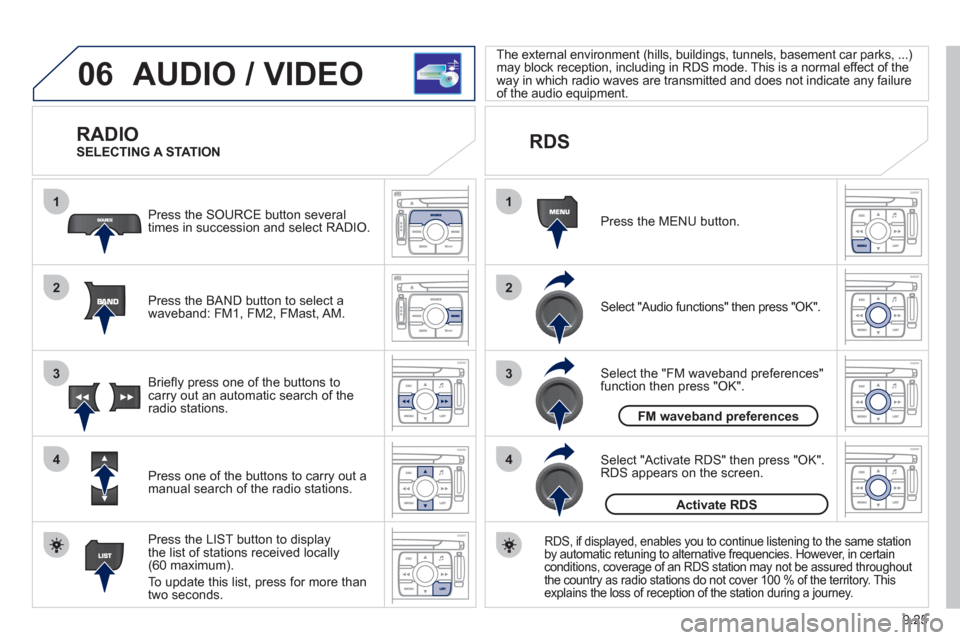
RADIO
Press the BAND button to select awaveband: FM1, FM2, FMast, AM. Pr
ess the SOURCE button several
times in succession and select RADIO.
Press the LIST button to displa
ythe list of stations received locally(60 maximum).
To update this list, press for more than
tw
o seconds.
Press one of the buttons to carr
y out a
manual search of the radio stations. Brie
fl y press one of the buttons tocarry out an automatic search of the radio stations.
RDS
Select "Audio functions" then press "OK".
Press the MENU button.
RDS, if displayed, enables you to continue listening to the same station
by automatic retuning to alternative frequencies. However, in certain conditions, coverage of an RDS station may not be assured throughout
the country as radio stations do not cover 100 % of the territory. This explains the loss of reception of the station during a journey.
Select "Activate RDS" then press "OK". RDS appears on the screen.
Select the "FM waveband preferences" function then press "OK". The external environment
(hills, buildings, tunnels, basement car parks, ...)
may block reception, including in RDS mode. This is a normal effect of the
way in which radio waves are transmitted and does not indicate any failure
of the audio equipment.
SELECTING A STATION
FM waveband preferences
Activate RDS
Page 185 of 268
9.35
07
1
2
3
4
BLUETOOTH® TELEPHONE®
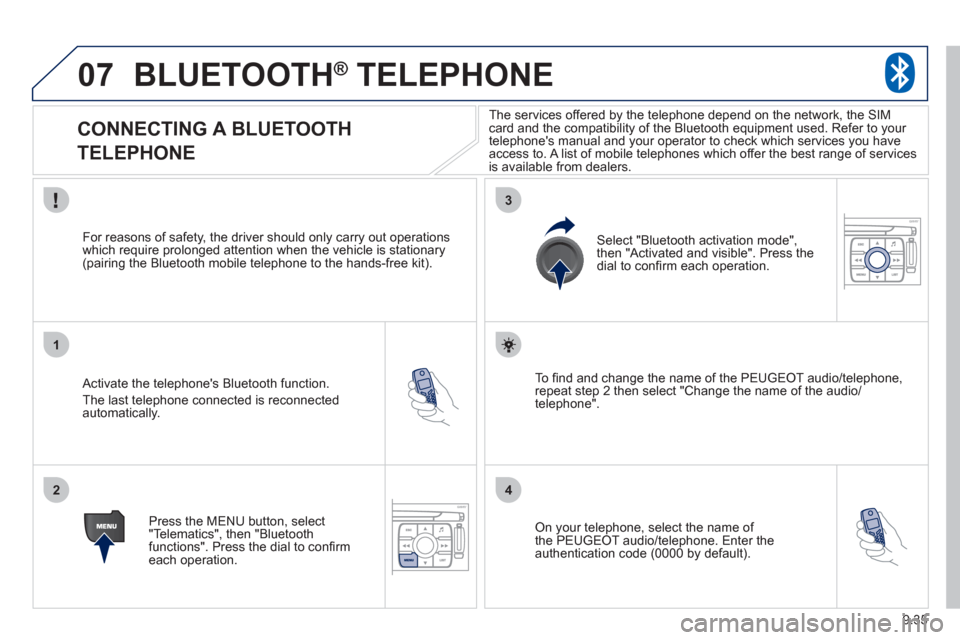
CONNECTING A BLUETOOTH
TELEPHONE
Activate the telephone's Bluetooth function.
The last telephone connected is reconnectedautomatically.
For reasons o
f safety, the driver should only carry out operations
which require prolonged attention when the vehicle is stationary (pairing the Bluetooth mobile telephone to the hands-free kit).
Press the MENU button, select
"Telematics", then "Bluetoothfunctions". Press the dial to confi rmeach operation.
To fi nd and chan
ge the name of the PEUGEOT audio/telephone,
repeat step 2 then select "Change the name of the audio/
telephone".
Select "Bluetooth activation mode"
,
then "Activated and visible". Press thedial to confi rm each operation.
On your telephone, select the name of
the PEUGEOT audio/telephone. Enter the
authentication code (0000 by default).
The services offered b
y the telephone depend on the network, the SIM card and the compatibility of the Bluetooth equipment used. Refer to your
telephone's manual and your operator to check which services you have
access to. A list of mobile telephones which offer the best range of services
is available from dealers.
Page 187 of 268
9.37
07
1
2
4
3
6
5
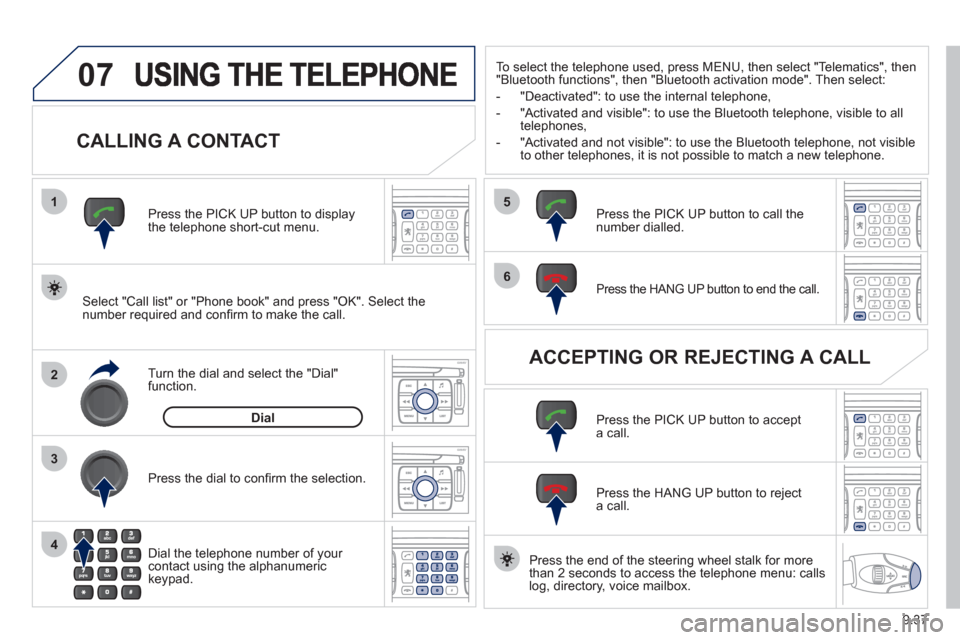
CALLING A CONTACT
Select "Call list" or "Phone book" and press "OK". Select thenumber required and confi rm to make the call. Press the PICK UP button to displa
ythe telephone short-cut menu.
Dial the telephone number of
your contact using the alphanumeric keypad. Pr
ess the dial to confi rm the selection.
Press the HANG UP button to end the call.
Press the PICK UP button to call thenumber dialled.
Press the HANG UP button to re
ject a call.
Press the PI
CK UP button to accept a call.
ACCEPTING OR REJECTING A CALL Turn the dial and select the "Dial" function.
Dial
To select the telephone used, press MENU, then select "Telematics", then
"Bluetooth functions", then "Bluetooth activation mode". Then select:
-
"Deactivated": to use the internal telephone,
- "Activated and visible": to use the Bluetooth telephone, visible to all
telephones,
- "Activated and not visible": to use the Bluetooth tele
phone, not visible
to other telephones, it is not possible to match a new telephone.
Press the end of the steerin
g wheel stalk for more
than 2 seconds to access the telephone menu: calls
log, directory, voice mailbox.
Page 194 of 268
9.44
10
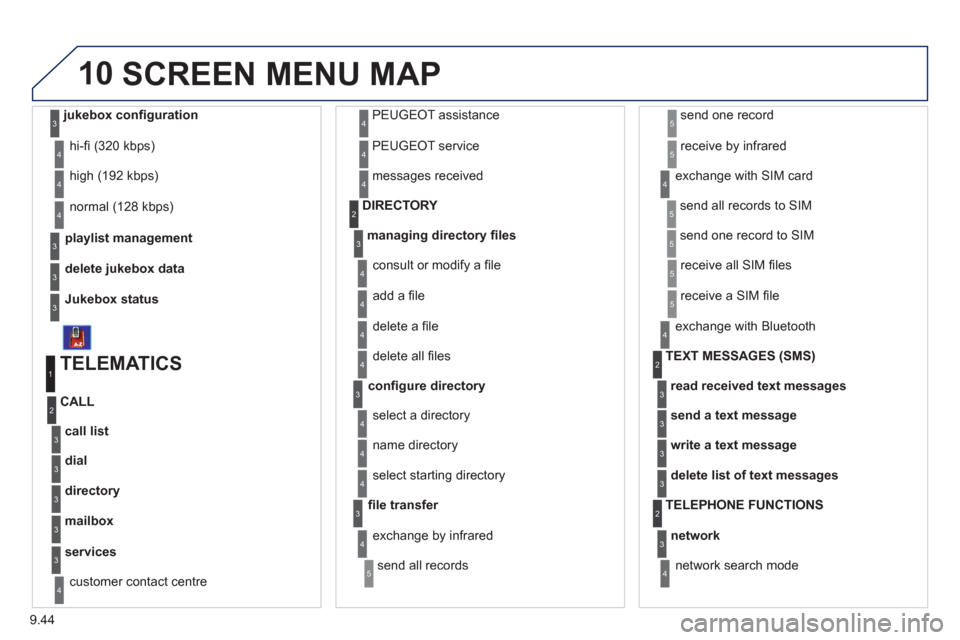
playlist management
hi-fi (320 kbps)
delete
jukebox data
Jukebox status
high (192 kbps)
normal
(128 kbps)
3
3
3
4
4
4
TELEMATICS
call list
CALL
1
2
3
dial3
directory3
mailbox3
services3
customer contact centre4
PEUGEOT assistance
PE
UGEOT service
messa
ges received
4
4
4
managing directory fi les3
DIRECTORY 2
consult or modify a fi le
add a fi le
delete a fi le
4
4
4
confi gure directory
delete all fi les
3
4
select a directory
name director
y 4
4
fi le transfer select startin
g directory
3
4
exchange by infrared
send all records
send one record
receive by infrared
5
5
5
4
exchange with SIM card
send all records to
SIM
send one record to SIM
5
5
4
receive all SIM fi les
receive a
SIM fi le
5
5
exchange with Bluetooth
4
read received text messages
TEXT MESSAGES
(SMS)2
3
send a text message3
write a text message3
delete list of text messages3
network
TELEPHONE FUNCTIONS 2
3
network search mode 4
SCREEN MENU MAP
jukebox confi guration3
Page 196 of 268
9.46
10
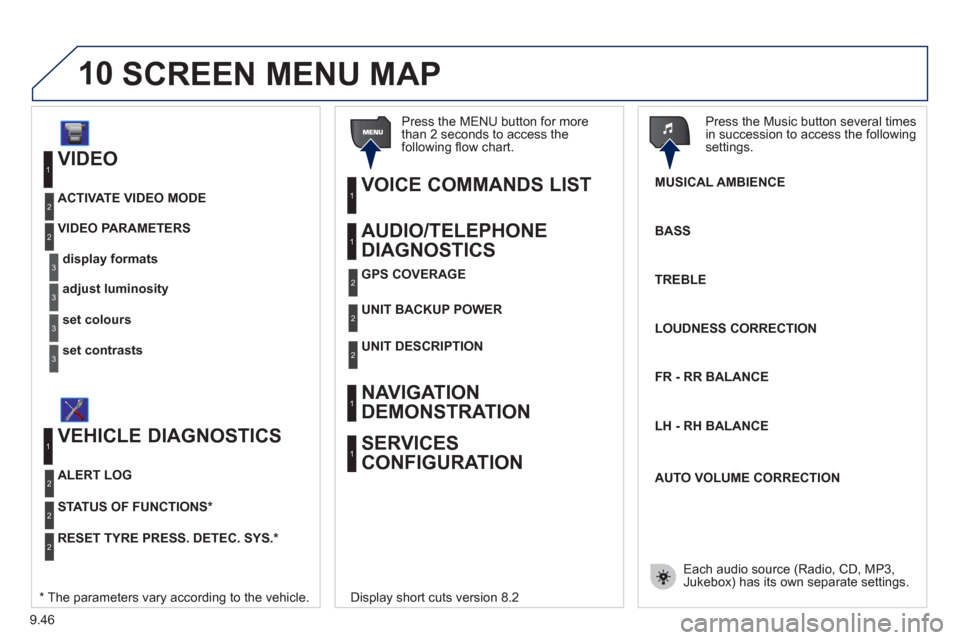
VIDEO
display formats
VIDEO PARAMETERS
1
2
3
adjust luminosity3
set colours3
set contrasts3
ACTIVATE VIDEO MODE 2
VEHICLE DIAGNOSTICS
STATUS OF FUNCTIONS *
1
2
ALERT LOG 2
RESET TYRE PRESS. DETEC. SYS. *2
AUDIO/TELEPHONE
DIAGNOSTICS
UNIT BACKUP POWE R
1
2
GPS COVERAGE2
UNIT DESCRIPTION2
VOICE COMMANDS LIST 1
SERVICES
CONFIGURATION 1
NAVIGATION
DEMONSTRATION
1
Press the MENU button for more
than 2 seconds to access the following fl ow chart.
Press the Music button several times
in succession to access the followingsettings.
MUSICAL AMBIENCE
SCREEN MENU MAP
BASS
TREBLE
LOUDNESS CORRECTION
FR - RR BALAN
CE
Displa
y short cuts version 8.2
LH - RH BALAN
CE
AUTO VOLUME CORRECTION
Each audio source
(Radio, CD, MP3,Jukebox) has its own separate settings.* The parameters vary according to the vehicle.
Page 197 of 268
9.47
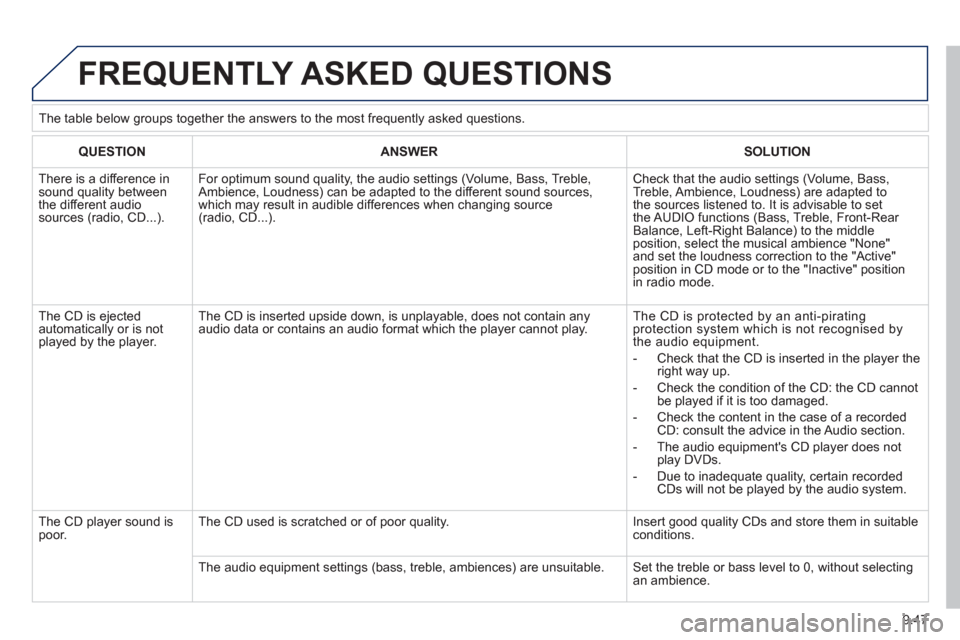
FREQUENTLY ASKED QUESTIONS
QUESTIONANSWERSOLUTION
There is a difference in sound quality betweenthe different audiosources (radio, CD...).
For optimum sound quality, the audio settings (Volume, Bass, Treble, Ambience, Loudness) can be adapted to the different sound sources,which may result in audible differences when changing source (radio, CD...).
Check that the audio settings (Volume, Bass, Treble, Ambience, Loudness) are adapted tothe sources listened to. It is advisable to setthe AUDIO functions (Bass, Treble, Front-Rear Balance, Left-Right Balance) to the middle position, select the musical ambience "None" and set the loudness correction to the "Active" position in CD mode or to the "Inactive" positionin radio mode.
The CD is ejected automatically or is not played by the player.
The CD is inserted upside down, is unplayable, does not contain any audio data or contains an audio format which the player cannot play.
The CD is protected by an anti-pirating protection system which is not recognised by the audio equipment.
- Check that the CD is inserted in the player the right way up.
- Check the condition of the CD: the CD cannot be played if it is too damaged.
- Check the content in the case of a recordedCD: consult the advice in the Audio section.
- The audio equipment's CD player does notplay DVDs.
- Due to inadequate quality, certain recordedCDs will not be played by the audio system.
The CD player sound ispoor.The CD used is scratched or of poor quality.
Insert good quality CDs and store them in suitable conditions.
The audio equipment settings (bass, treble, ambiences) are unsuitable. Set the treble or bass level to 0, without selectingan ambience. The table below
groups together the answers to the most frequently asked questions.
Page 198 of 268
9.48
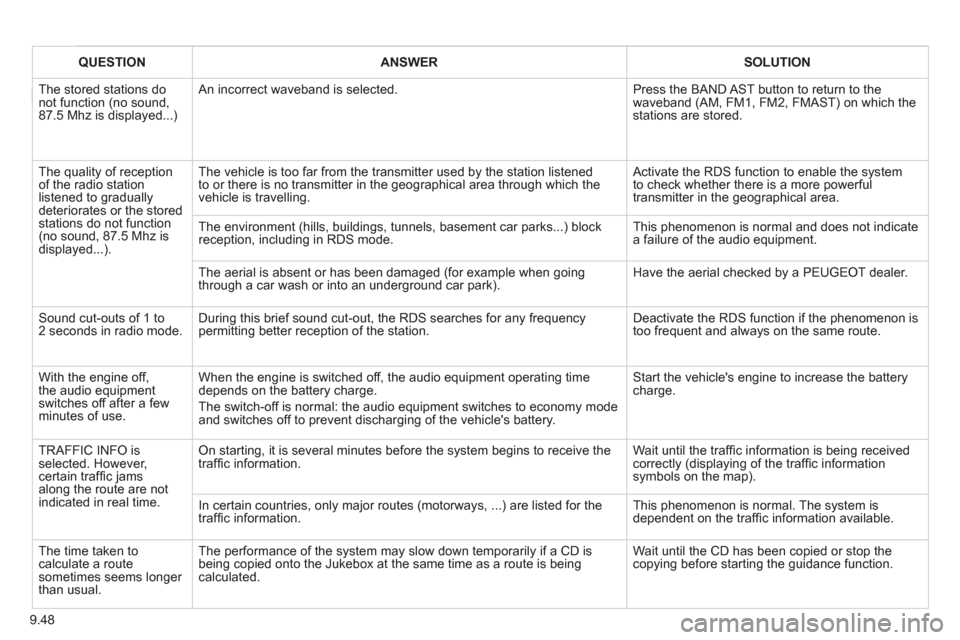
QUESTIONANSWERSOLUTION
The stored stations donot function (no sound, 87.5 Mhz is displayed...)
An incorrect waveband is selected. Press the BAND AST button to return to the waveband (AM, FM1, FM2, FMAST) on which thestations are stored.
The quality of receptionof the radio station listened to graduallydeteriorates or the stored stations do not function(no sound, 87.5 Mhz is displayed...).
The vehicle is too far from the transmitter used by the station listenedto or there is no transmitter in the geographical area through which the vehicle is travelling.
Activate the RDS function to enable the system to check whether there is a more powerful transmitter in the geographical area.
The environment (hills, buildings, tunnels, basement car parks...) block reception, including in RDS mode.
This phenomenon is normal and does not indicate a failure of the audio equipment.
The aerial is absent or has been damaged (for example when goingthrough a car wash or into an underground car park).
Have the aerial checked by a PEUGEOT dealer.
Sound cut-outs of 1 to2 seconds in radio mode.During this brief sound cut-out, the RDS searches for any frequency permitting better reception of the station.
Deactivate the RDS function if the phenomenon is too frequent and always on the same route.
With the engine off, the audio equipment switches off after a few minutes of use.
When the engine is switched off, the audio equipment operating timedepends on the battery charge.
The switch-off is normal: the audio equipment switches to economy mode and switches off to prevent discharging of the vehicle's battery.
Start the vehicle's engine to increase the batterycharge.
TRAFFIC INFO is selected. However,certain traffi c jams along the route are notindicated in real time.
On starting, it is several minutes before the system begins to receive thetraffi c information.
Wait until the traffi c information is being received correctly (displaying of the traffi c information symbols on the map).
In certain countries, only major routes (motorways, ...) are listed for thetraffi c information.
This phenomenon is normal. The system isdependent on the traffi c information available.
The time taken to calculate a route sometimes seems longer than usual.
The performance of the system may slow down temporarily if a CD isbeing copied onto the Jukebox at the same time as a route is being calculated.
Wait until the CD has been copied or stop the copying before starting the guidance function.
Page 201 of 268
9.51
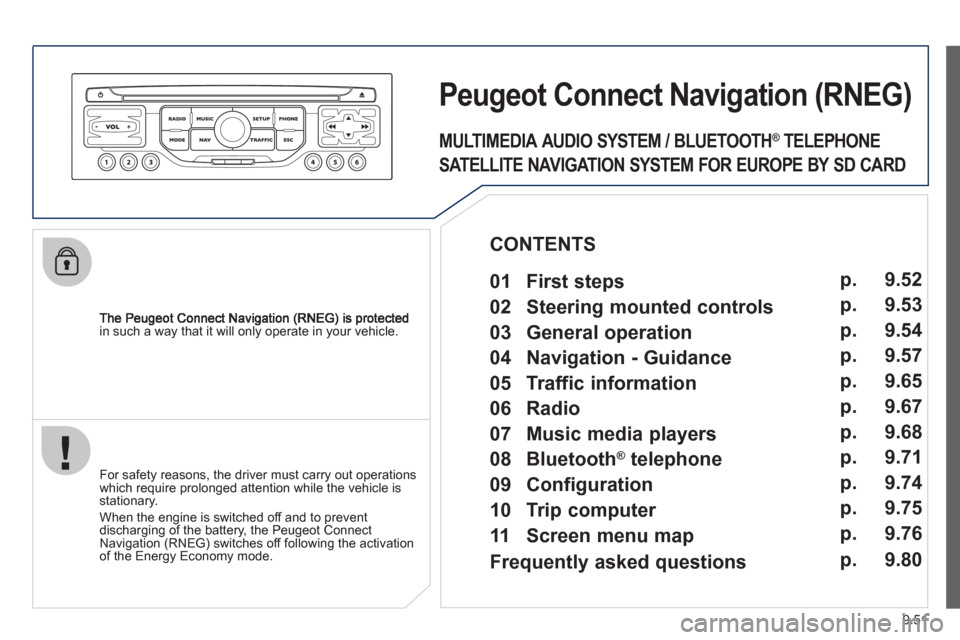
in such a way that it will only operate in your vehicle.
PeugeotCtonnectNtavigation(RNEG)
For safety reasons, the driver must carry out operations which require prolonged attention while the vehicle is stationary.
When the en
gine is switched off and to prevent
discharging of the battery, the Peugeot Connect
Navigation (RNEG) switches off following the activation of the Energy Economy mode.
MULTIMEDIA AUDIO SYSTEM / BLUETOOTH ®
TELEPHONE
SATELLITE NAVIGATION SYSTEM FOR EUROPE BY SD CARD
01 First steps
CONTENTS
02 Steering mounted controls
03 General operation
04 Navigation - Guidance
05 Traffic information
06 Radio
07 Music media players
08 Bluetooth
®
telephone
09 Configuration
10 Trip computer p.
p.
p.
p.
p.
p.
p.
p.
p.
p.
11 Screen menu mapp. 9.52
9.53
9.54
9.57
9.65
9.67
9.68
9.71
9.74
9.75
9.76
Frequently asked questions p. 9.80
Page 204 of 268
9.54
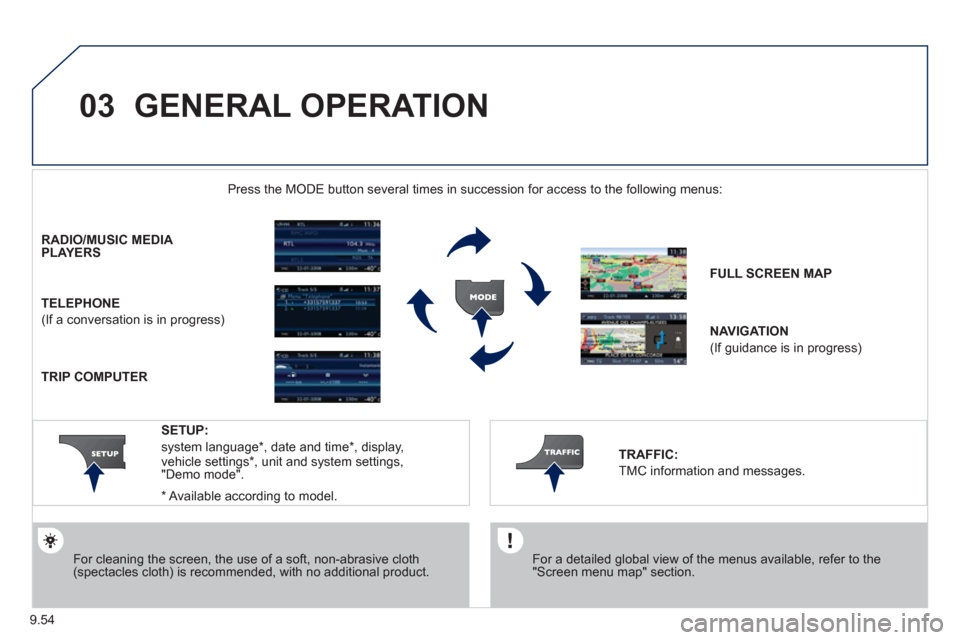
03 GENERAL OPERATION
For a detailed global view of the menus available, refer to the"Screen menu map" section.
Press the M
ODE button several times in succession for access to the following menus:
For cleaning the screen, the use of a soft, non-abrasive cloth (spectacles cloth) is recommended, with no additional product. RADIO / MUSIC MEDI
A PLAYERS
TELEPHONE
(If a conversation is in progress)
FULL SCREEN MA
P
NAVIGATION
(If guidance is in progress)
SETUP:
system language *
, date and time *
, display,
vehicle settings * , unit and system settings,
"Demo mode".
TRAFFIC:
TMC information and messages.
*
Available accordin
g to model.
TRIP COMPUTER
Page 217 of 268
9.67
06
3 2 1 1
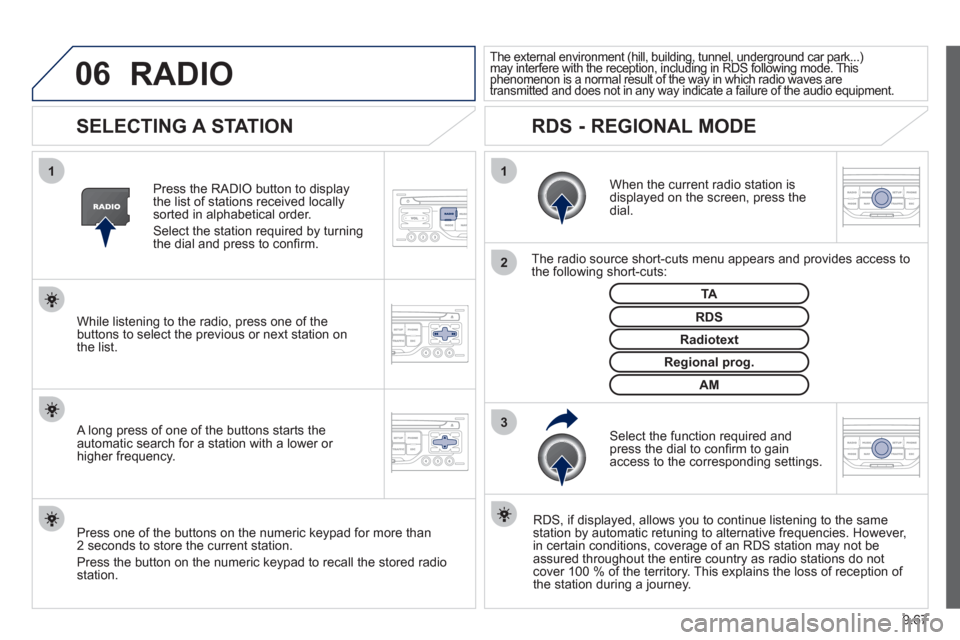
SELECTING A STATION
When the current radio station isdisplayed on the screen, press thedial.
The radio source short-cuts menu appears and provides access to
the following short-cuts:
Select the function re
quired and press the dial to confi rm to gain
access to the corresponding settings.
TA
RDS, if displayed, allows you to continue listening to the same station by automatic retuning to alternative frequencies. However,
in certain conditions, coverage of an RDS station may not be
assured throughout the entire country as radio stations do notcover 100 % of the territory. This explains the loss of reception of
the station during a journey.
The external environment (hill, building, tunnel, underground car park...)may interfere with the reception, including in RDS following mode. This(g gp(, g, , g p
phenomenon is a normal result of the way in which radio waves are ypggyp,g
transmitted and does not in any way indicate a failure of the audio equipment.pypy
RDS - REGIONAL MODE
Press the RADIO button to display
the list of stations received locally sorted in alphabetical order.
Select the station required by turningthe dial and press to confi rm.
Re
gional prog.
Radiotext
RDSWhile listening to the radio, press one of the
buttons to select the previous or next station on
the list.
Press one o
f the buttons on the numeric keypad for more than
2 seconds to store the current station.
Press the button on the numeric keypad to recall the stored radio
station.
AM
A long press of one of the buttons starts theautomatic search for a station with a lower or
higher frequency.
RADIO