key Peugeot Expert VU 2012 Owner's Guide
[x] Cancel search | Manufacturer: PEUGEOT, Model Year: 2012, Model line: Expert VU, Model: Peugeot Expert VU 2012Pages: 268, PDF Size: 9.73 MB
Page 187 of 268
9.37
07
1
2
4
3
6
5
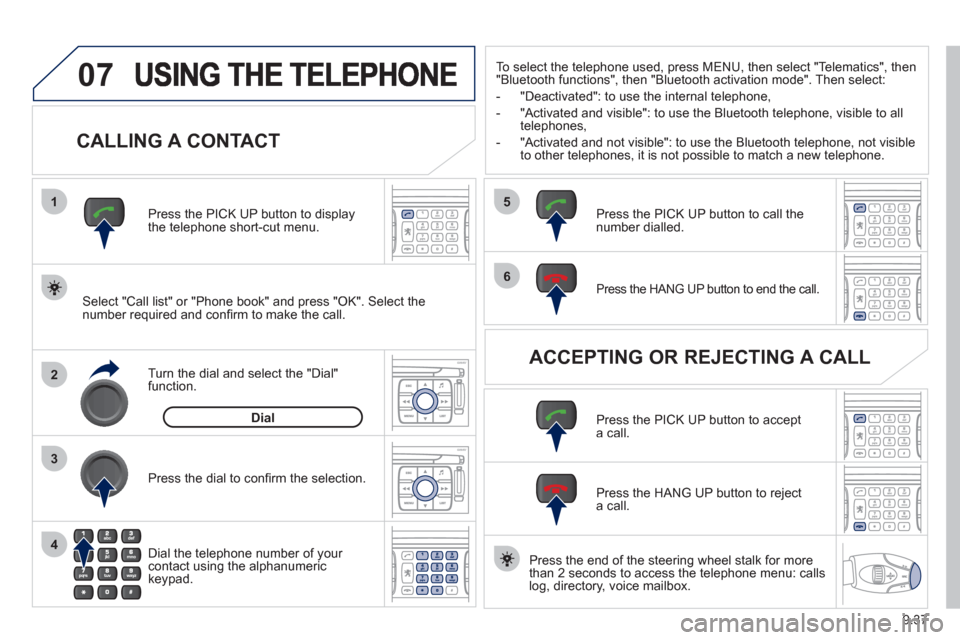
CALLING A CONTACT
Select "Call list" or "Phone book" and press "OK". Select thenumber required and confi rm to make the call. Press the PICK UP button to displa
ythe telephone short-cut menu.
Dial the telephone number of
your contact using the alphanumeric keypad. Pr
ess the dial to confi rm the selection.
Press the HANG UP button to end the call.
Press the PICK UP button to call thenumber dialled.
Press the HANG UP button to re
ject a call.
Press the PI
CK UP button to accept a call.
ACCEPTING OR REJECTING A CALL Turn the dial and select the "Dial" function.
Dial
To select the telephone used, press MENU, then select "Telematics", then
"Bluetooth functions", then "Bluetooth activation mode". Then select:
-
"Deactivated": to use the internal telephone,
- "Activated and visible": to use the Bluetooth telephone, visible to all
telephones,
- "Activated and not visible": to use the Bluetooth tele
phone, not visible
to other telephones, it is not possible to match a new telephone.
Press the end of the steerin
g wheel stalk for more
than 2 seconds to access the telephone menu: calls
log, directory, voice mailbox.
Page 207 of 268
9.57
04
1
2
3
5
6
4
NAVIGATION - GUIDANCE
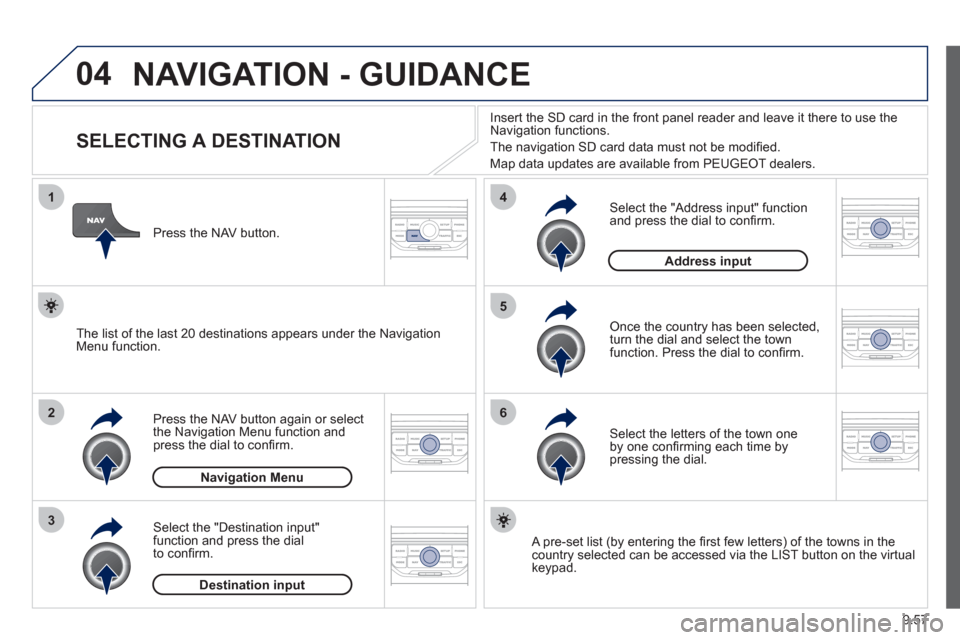
SELECTING A DESTINATION
Press the NAV button again or select
the Navigation Menu function and
press the dial to confi rm.
Select the "Destination in
put"
function and press the dial
t
o confi rm. Pr
ess the NAV button.
Select the letters of the town one
by one confi rming each time by pressing the dial.
Once the country has been selected,
turn the dial and select the townfunction. Press the dial to confi rm. Insert the
SD card in the front panel reader and leave it there to use the
Navigation functions.
The navi
gation SD card data must not be modifi ed.
Map data updates are available
from PEUGEOT dealers.
A pre-set list (by entering the fi rst few letters) of the towns in thecountry selected can be accessed via the LIST button on the virtual
keypad.
Select the "Address input" function
and press the dial to confi rm.
The list o
f the last 20 destinations appears under the NavigationMenu function.
Navigation Menu
Destination input
Address input
Page 212 of 268
9.62
04
8
6
7
4
3
5
2
1
NAVIGATION - GUIDANCE
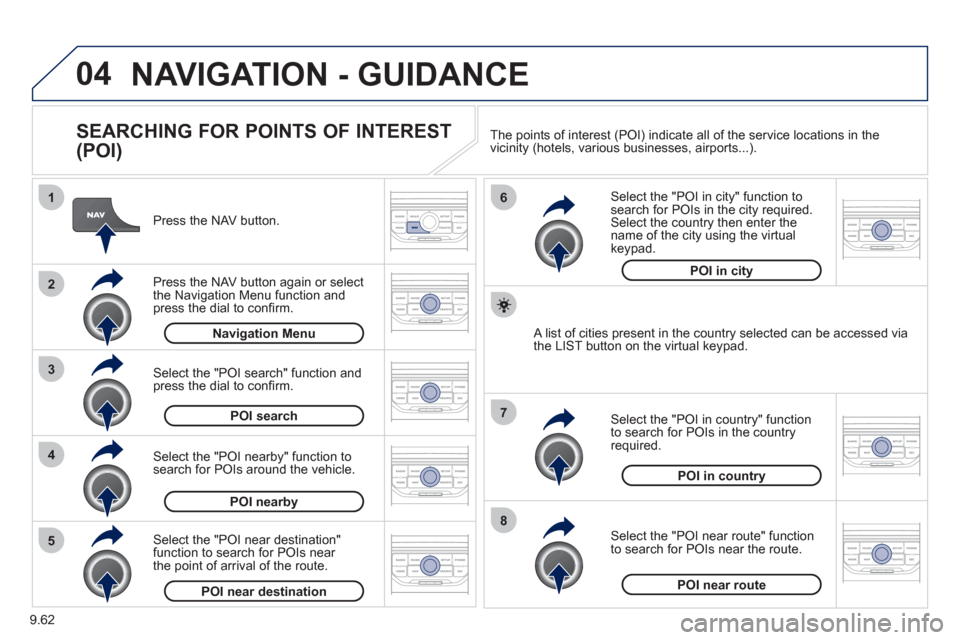
SEARCHING FOR POINTS OF INTEREST
(POI)
Press the NAV button.
Press the NAV button again or select
the Navigation Menu function and press the dial to confi rm.
Select the "POI nearby" function to search for POIs around the vehicle.
Select the "POI search" function and press the dial to confi rm. Navigation Menu
POI search
POI nearby
Select the "POI in city" function tosearch for POIs in the city required.Select the country then enter the name of the city using the virtual
keypad.
Select the "POI near route" function
to search for POIs near the route.
Select the "P
OI in country" function
to search for POIs in the country
required.
Select the "POI near destination"function to search for POIs near
the point of arrival of the route.
POI near destinationPOI near route
POI in country
POI in city
A list of cities present in the country selected can be accessed via
the LIST button on the virtual keypad. The points o
f interest (POI) indicate all of the service locations in the
vicinity (hotels, various businesses, airports...).
Page 217 of 268
9.67
06
3 2 1 1
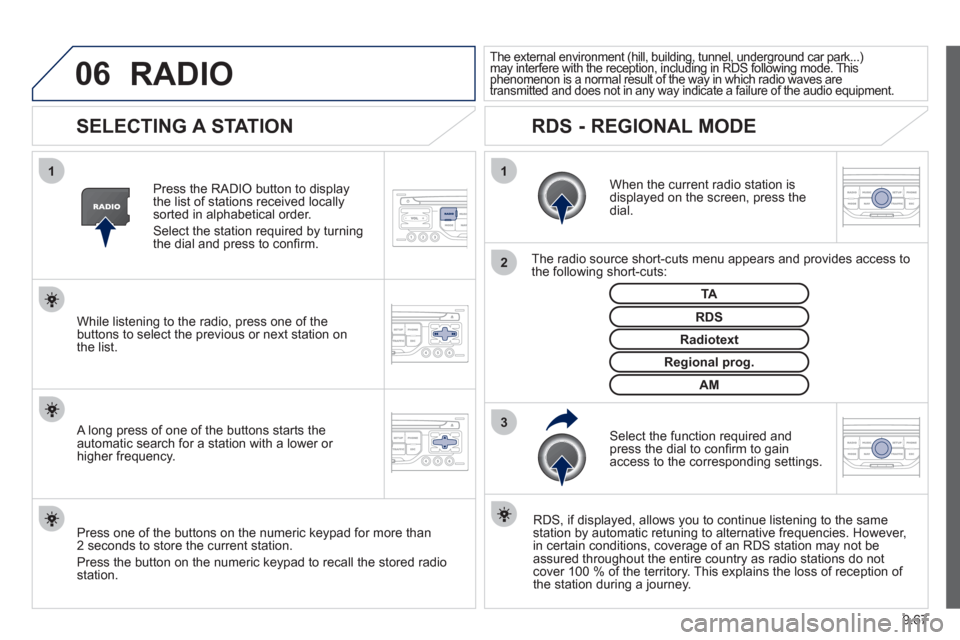
SELECTING A STATION
When the current radio station isdisplayed on the screen, press thedial.
The radio source short-cuts menu appears and provides access to
the following short-cuts:
Select the function re
quired and press the dial to confi rm to gain
access to the corresponding settings.
TA
RDS, if displayed, allows you to continue listening to the same station by automatic retuning to alternative frequencies. However,
in certain conditions, coverage of an RDS station may not be
assured throughout the entire country as radio stations do notcover 100 % of the territory. This explains the loss of reception of
the station during a journey.
The external environment (hill, building, tunnel, underground car park...)may interfere with the reception, including in RDS following mode. This(g gp(, g, , g p
phenomenon is a normal result of the way in which radio waves are ypggyp,g
transmitted and does not in any way indicate a failure of the audio equipment.pypy
RDS - REGIONAL MODE
Press the RADIO button to display
the list of stations received locally sorted in alphabetical order.
Select the station required by turningthe dial and press to confi rm.
Re
gional prog.
Radiotext
RDSWhile listening to the radio, press one of the
buttons to select the previous or next station on
the list.
Press one o
f the buttons on the numeric keypad for more than
2 seconds to store the current station.
Press the button on the numeric keypad to recall the stored radio
station.
AM
A long press of one of the buttons starts theautomatic search for a station with a lower or
higher frequency.
RADIO
Page 223 of 268
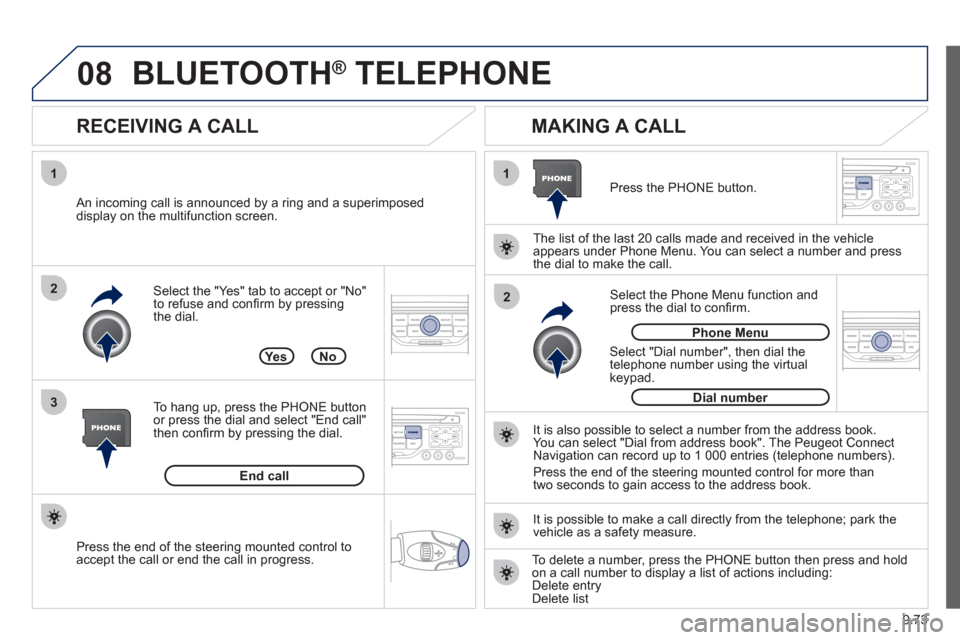
9.73
08
1
3 2
2 1Select the "Yes" tab to accept or "No"
to refuse and confi rm by pressing
the dial.
RECEIVING A CALL
MAKING A CALL
An incoming call is announced by a ring and a superimposed
display on the multifunction screen.
Yes
To han
g up, press the PHONE button
or press the dial and select "End call"then confi rm by pressing the dial.
End callPress the PH
ONE button.
Select "Dial number"
, then dial the
telephone number using the virtualkeypad.
Select the Phone Menu function and
press the dial to confi rm.
The list of the last 2
0 calls made and received in the vehicle
appears under Phone Menu. You can select a number and press
the dial to make the call.
No
It is also possible to select a number from the address book. You can select "Dial from address book". The Peugeot Connect
Navigation can record up to 1 000 entries (telephone numbers).
Press the end o
f the steering mounted control for more than
two seconds to gain access to the address book.
Phone Menu
Dial number
It is possible to make a call directl
y from the telephone; park the
vehicle as a safety measure.
BLUETOOTH ® TELEPHONE ®
Press the end of the steering mounted control to
accept the call or end the call in progress.
To delete a number, press the PHONE button then press and hold
on a call number to display a list of actions including:Delete entryDelete list
Page 246 of 268
9.96
06
2
1
2
1
OK
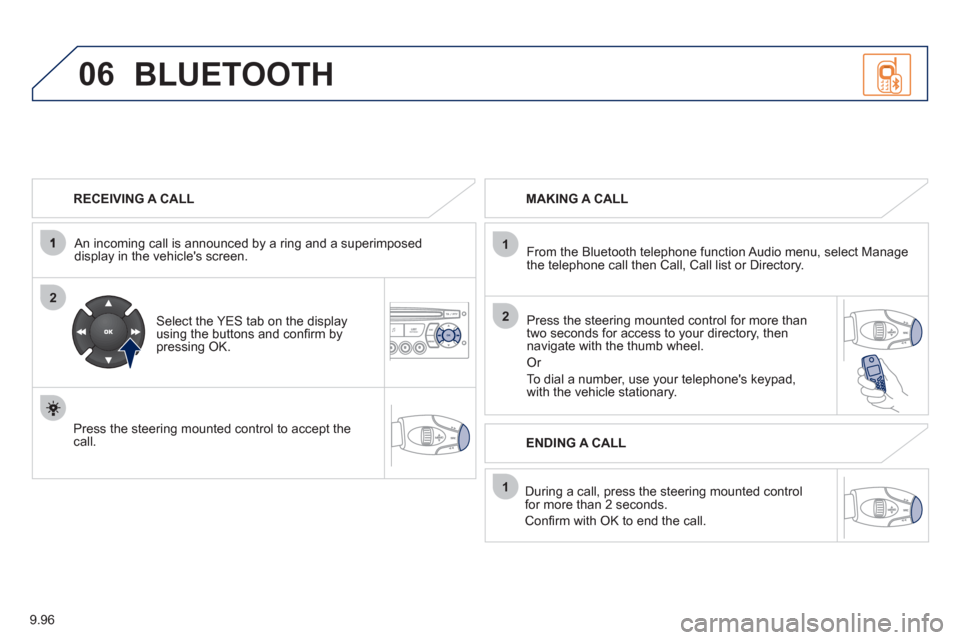
RECEIVING A CALL
An incomin
g call is announced by a ring and a superimposed
display in the vehicle's screen.
Select the YES tab on the display
using the buttons and confi rm bypressing OK.
Press the steering mounted control to accept thecall.
MAKING A CALL
From the Bluetooth telephone
function Audio menu, select Manage
the telephone call then Call, Call list or Directory.
Press the steerin
g mounted control for more than
two seconds for access to your directory, then navigate with the thumb wheel.
Or
To dial a number, use your telephone's keypad,with the vehicle stationary.
Durin
g a call, press the steering mounted control
for more than 2 seconds.
Confi rm with OK to end the call.
BLUETOOTH
ENDING A CALL
Page 247 of 268
9.97
1
2
3
SOURCE
06
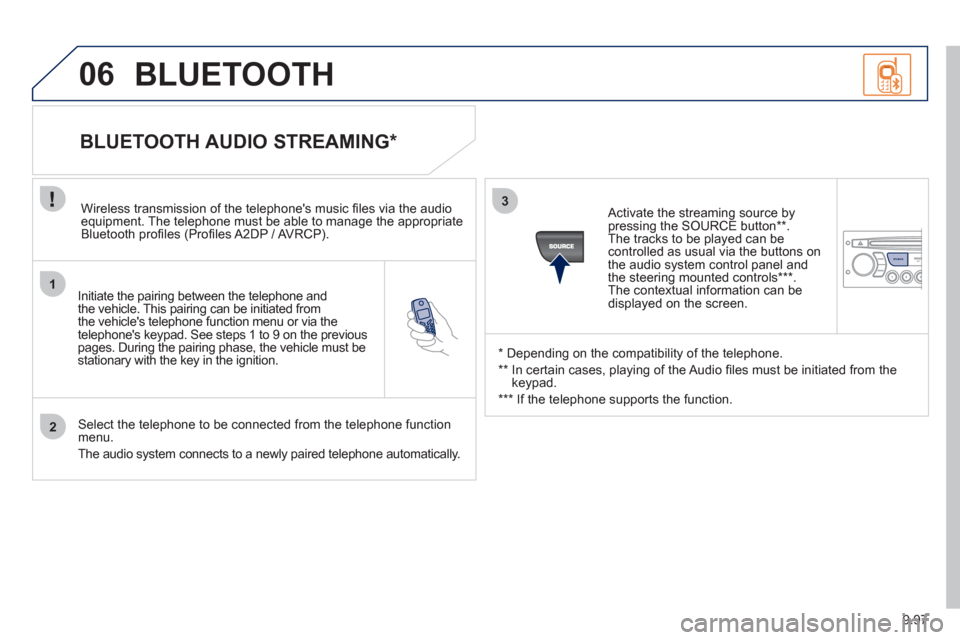
Initiate the pairing between the telephone and
the vehicle. This pairing can be initiated from
the vehicle's telephone function menu or via the
telephone's ke
ypad. See steps 1 to 9 on the previouspages. During the pairing phase, the vehicle must bestationary with the key in the ignition.
Select the telephone to be connected from the telephone functionmenu.
The audio s
ystem connects to a newly paired telephone automatically.
BLUETOOTH AUDIO STREAMING *
Wireless transmission of the telephone's music fi les via the audioequipment. The telephone must be able to manage the appropriate
Bluetooth profi les (Profi les A2DP / AV RCP).
*
Depending on the compatibility of the telephone.
**
In certain cases, playing of the Audio fi les must be initiated from the
keypad.
***
If the tele
phone supports the function.
Activate the streamin
g source by
pressing the SOURCE button ** .The tracks to be played can becontrolled as usual via the buttons on
the audio system control panel andthe steering mounted controls *** .
The contextual information can bedisplayed on the screen.
BLUETOOTH
Page 259 of 268
14
9
Exterior
VISUAL SEARCH
10
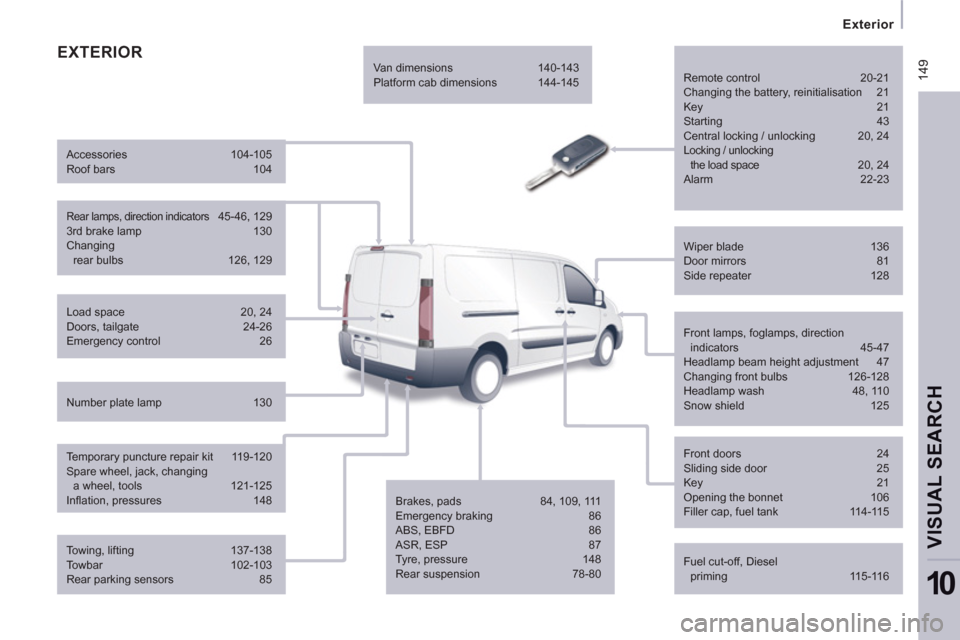
EXTERIOR
Remote control 20-21
Changing the battery, reinitialisation 21
Key 21
Starting 43
Central locking / unlocking 20, 24
Locking / unlocking
the load space 20, 24
Alarm 22-23
Fuel cut-off, Diesel
priming 115-116 Wiper blade 136
Door mirrors 81
Side repeater 128
Front lamps, foglamps, direction
indicators 45-47
Headlamp beam height adjustment 47
Changing front bulbs 126-128
Headlamp wash 48, 110
Snow shield 125
Front doors 24
Sliding side door 25
Key 21
Opening the bonnet 106
Filler cap, fuel tank 114-115
Towing, lifting 137-138
Towbar 102-103
Rear parking sensors 85 Load space 20, 24
Doors, tailgate 24-26
Emergency control 26
Temporary puncture repair kit 119-120
Spare wheel, jack, changing
a wheel, tools 121-125
Infl ation, pressures 148
Rear lamps, direction indicators 45-46, 129
3rd brake lamp 130
Changing
rear bulbs 126, 129 Accessories 104-105
Roof bars 104
Number plate lamp 130 Van dimensions 140-143
Platform cab dimensions 144-145
Brakes, pads 84, 109, 111
Emergency braking 86
ABS, EBFD 86
ASR, ESP 87
Tyre, pressure 148
Rear suspension 78-80