ignition Peugeot Expert VU 2013 Owner's Guide
[x] Cancel search | Manufacturer: PEUGEOT, Model Year: 2013, Model line: Expert VU, Model: Peugeot Expert VU 2013Pages: 248, PDF Size: 9.37 MB
Page 121 of 248
Battery
QUICK HELP
7
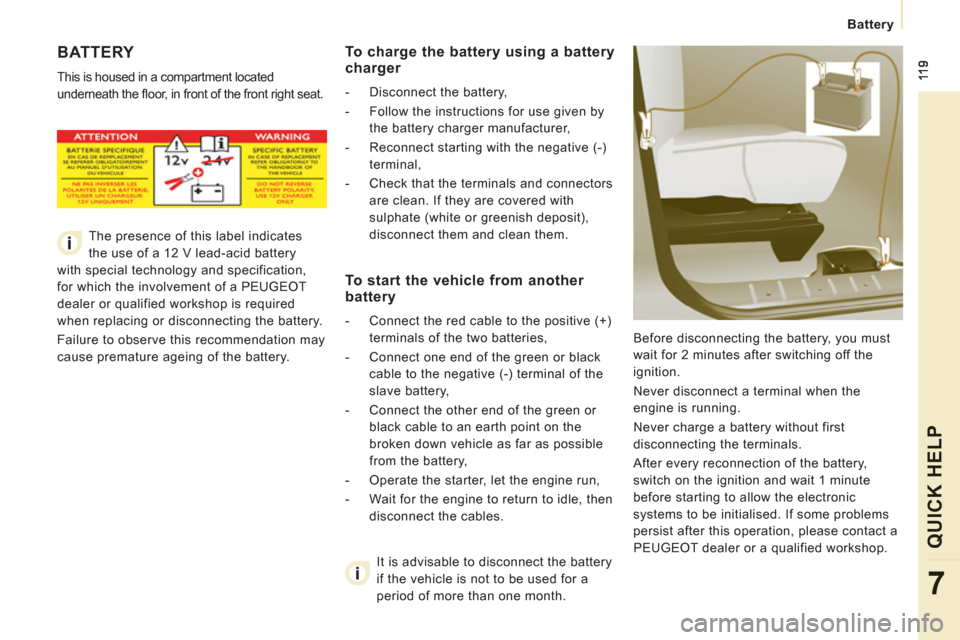
BATTERY
This is housed in a compartment located
underneath the fl oor, in front of the front right seat.
Before disconnecting the battery, you must
wait for 2 minutes after switching off the
ignition.
Never disconnect a terminal when the
engine is running.
Never charge a battery without first
disconnecting the terminals.
After every reconnection of the battery,
switch on the ignition and wait 1 minute
before starting to allow the electronic
systems to be initialised. If some problems
persist after this operation, please contact a
PEUGEOT dealer or a qualified workshop.
It is advisable to disconnect the battery
if the vehicle is not to be used for a
period of more than one month.
To charge the battery using a battery
charger
- Disconnect the battery,
- Follow the instructions for use given by
the battery charger manufacturer,
- Reconnect starting with the negative (-) terminal,
- Check that the terminals and connectors are clean. If they are covered with
sulphate (white or greenish deposit),
disconnect them and clean them.
To start the vehicle from another
battery
- Connect the red cable to the positive (+)
terminals of the two batteries,
- Connect one end of the green or black cable to the negative (-) terminal of the
slave battery,
- Connect the other end of the green or black cable to an earth point on the
broken down vehicle as far as possible
from the battery,
- Operate the starter, let the engine run,
- Wait for the engine to return to idle, then disconnect the cables.
The presence of this label indicates
the use of a 12 V lead-acid battery
with special technology and specification,
for which the involvement of a PEUGEOT
dealer or qualified workshop is required
when replacing or disconnecting the battery.
Failure to observe this recommendation may
cause premature ageing of the battery.
Page 122 of 248
120
Battery
ECONOMY MODE
After the engine has stopped, with the key
in the ignition position, certain functions
(windscreen wiper, electric windows, courtesy
lamps, audio equipment, etc.) can only
be used for a cumulative duration of thirty
minutes, to prevent discharging of the battery.
Once the thirty minutes are over, the active
functions are put on standby and the battery
warning lamp flashes accompanied by a
message in the screen.
To resume the use of these functions
immediately, start the engine and let it run
for a few minutes.
The time available will then be double the
time for which the engine was left running.
However, this time will always be between
five and thirty minutes.
A flat battery will prevent the engine from
starting.
Page 123 of 248
12
1
Repairing a wheel
QUICK HELP
7
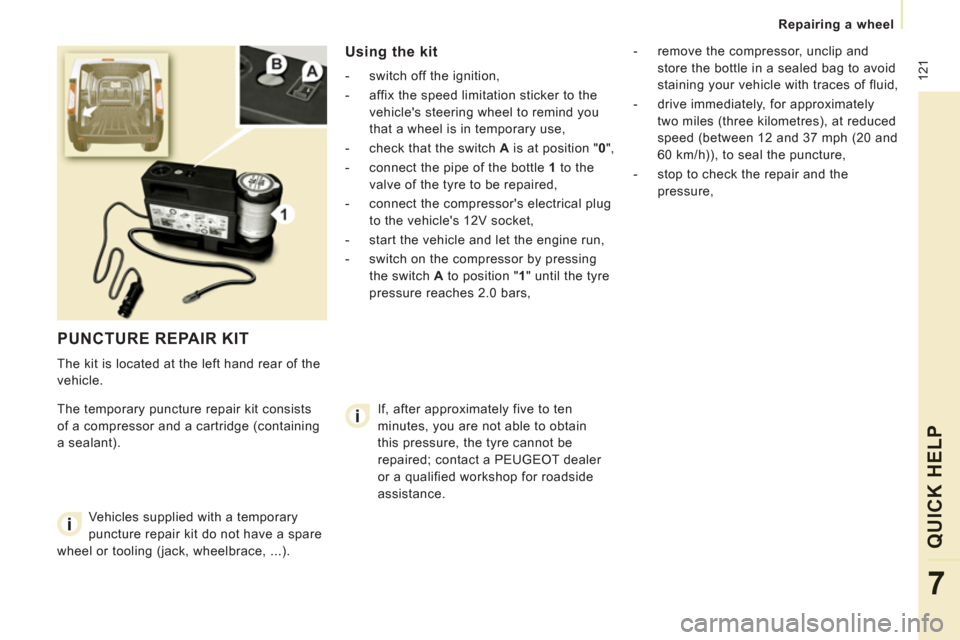
PUNCTURE REPAIR KIT
The kit is located at the left hand rear of the
vehicle.
The temporary puncture repair kit consists
of a compressor and a cartridge (containing
a sealant).
Using the kit
- switch off the ignition,
- affix the speed limitation sticker to the
vehicle's steering wheel to remind you
that a wheel is in temporary use,
- check that the switch A
is at position " 0
",
- connect the pipe of the bottle 1
to the
valve of the tyre to be repaired,
- connect the compressor's electrical plug to the vehicle's 12V socket,
- start the vehicle and let the engine run,
- switch on the compressor by pressing the switch A
to position " 1
" until the tyre
pressure reaches 2.0 bars,
- remove the compressor, unclip and
store the bottle in a sealed bag to avoid
staining your vehicle with traces of fluid,
- drive immediately, for approximately two miles (three kilometres), at reduced
speed (between 12 and 37 mph (20 and
60 km/h)), to seal the puncture,
- stop to check the repair and the pressure,
Vehicles supplied with a temporary
puncture repair kit do not have a spare
wheel or tooling (jack, wheelbrace, ...). If, after approximately five to ten
minutes, you are not able to obtain
this pressure, the tyre cannot be
repaired; contact a PEUGEOT dealer
or a qualified workshop for roadside
assistance.
Page 125 of 248
12
3
Changing a wheel
QUICK HELP
7
CHANGING A WHEEL
If your vehicle is equipped with a spare
wheel located underneath the vehicle, follow
these instructions.
1. PARKING THE VEHICLE
- You must ensure that the occupants
get out of the vehicle and wait in a safe
location.
- If possible, park the vehicle on level,
stable and non-slippery ground.
- Apply the parking brake, switch off the ignition and engage first or reverse gear.
- If available, place a chock under the wheel diagonally opposite the one to be
changed.
On certain types of ground and/or if heavy
loads are being transported, the vehicle
must be raised in order to disengage
the spare wheel from the carrier. Call a
PEUGEOT dealer or a qualified workshop. If your vehicle is fitted with suspension
with pneumatic height correction,
please deactivate the system. Refer to the
"Rear suspension" section of chapter 3.
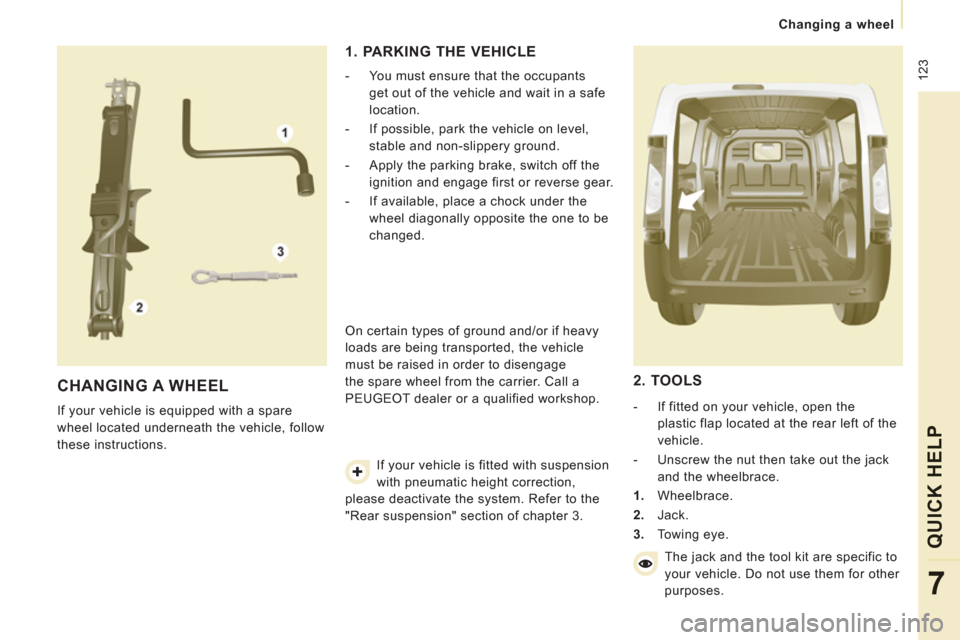
2. TOOLS
- If fitted on your vehicle, open the
plastic flap located at the rear left of the
vehicle.
- Unscrew the nut then take out the jack and the wheelbrace.
1. Wheelbrace.
2. Jack.
3. Towing eye.
The jack and the tool kit are specific to
your vehicle. Do not use them for other
purposes.
Page 137 of 248
135
Changing a fuse
QUICK HELP
7
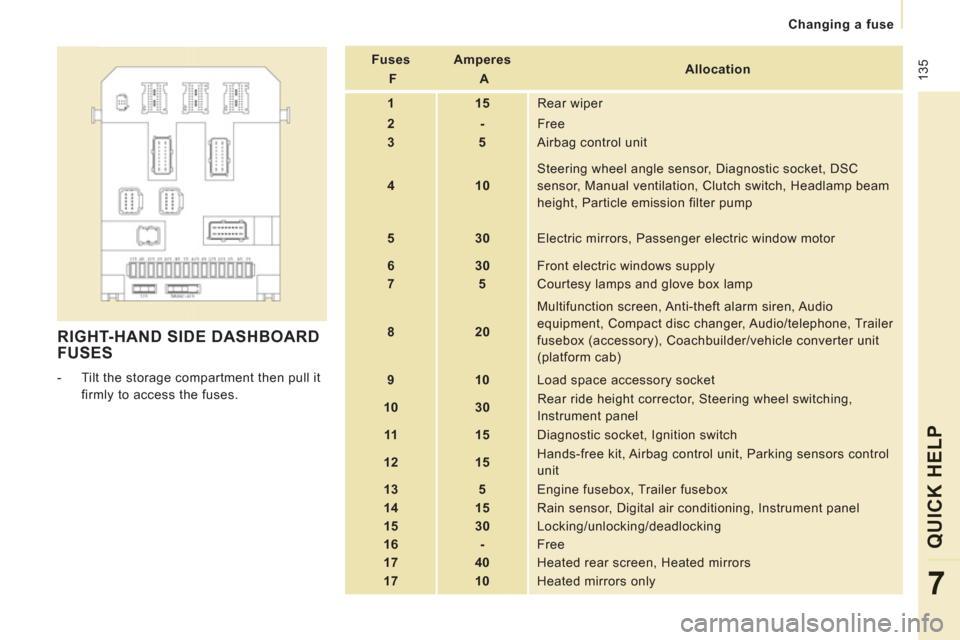
RIGHT-HAND SIDE DASHBOARD
FUSES
- Tilt the storage compartment then pull it
firmly to access the fuses.
Fuses
F
Amperes
A
Allocation
1
15 Rear wiper
2
- Free
3
5 Airbag control unit
4
10
Steering wheel angle sensor, Diagnostic socket, DSC
sensor, Manual ventilation, Clutch switch, Headlamp beam
height, Particle emission filter pump
5
30 Electric mirrors, Passenger electric window motor
6
30 Front electric windows supply
7
5 Courtesy lamps and glove box lamp
8
20
Multifunction screen, Anti-theft alarm siren, Audio
equipment, Compact disc changer, Audio/telephone, Trailer
fusebox (accessory), Coachbuilder/vehicle converter unit
(platform cab)
9
10 Load space accessory socket
10
30
Rear ride height corrector, Steering wheel switching,
Instrument panel
11
15 Diagnostic socket, Ignition switch
12
15
Hands-free kit, Airbag control unit, Parking sensors control
unit
13
5 Engine fusebox, Trailer fusebox
14
15 Rain sensor, Digital air conditioning, Instrument panel
15
30 Locking/unlocking/deadlocking
16
- Free
17
40 Heated rear screen, Heated mirrors
17
10 Heated mirrors only
Page 140 of 248
138
Changing a fuse
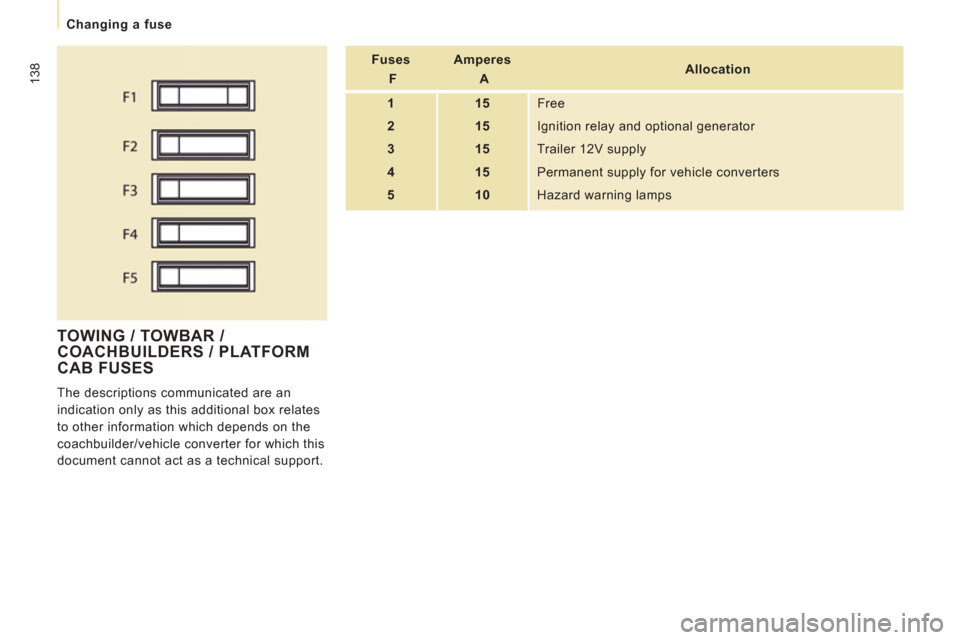
TOWING / TOWBAR /
COACHBUILDERS / PLATFORM
CAB FU
SES
The descriptions communicated are an
indication only as this additional box relates
to other information which depends on the
coachbuilder/vehicle converter for which this
document cannot act as a technical support. Fuses
F
Amperes
A
Allocation
1
15 Free
2
15 Ignition relay and optional generator
3
15 Trailer 12V supply
4
15 Permanent supply for vehicle converters
5
10 Hazard warning lamps
Page 141 of 248
139
Changing a wiper blade
QUICK HELP
7
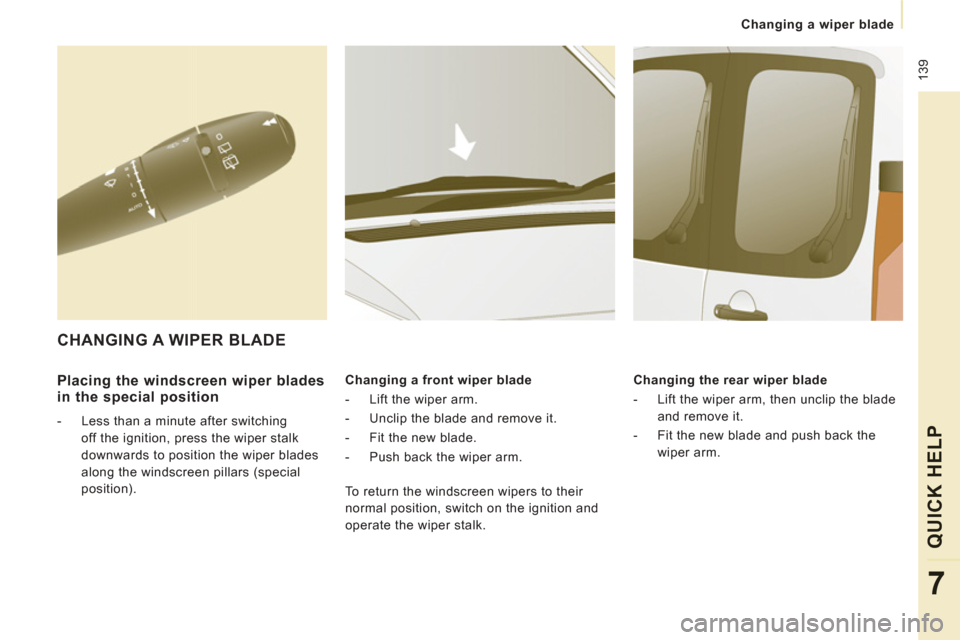
Placing the windscreen wiper blades
in the special position
- Less than a minute after switching
off the ignition, press the wiper stalk
downwards to position the wiper blades
along the windscreen pillars (special
position). Changing a front wiper blade
- Lift the wiper arm.
- Unclip the blade and remove it.
- Fit the new blade.
-
Push back the wiper arm.
Changing the rear wiper blade
- Lift the wiper arm, then unclip the blade
and remove it.
- Fit the new blade and push back the wiper arm.
CHANGING A WIPER BLADE
To return the windscreen wipers to their
normal position, switch on the ignition and
operate the wiper stalk.
Page 154 of 248
9.2
EMERGENCY OR ASSISTANCE CALL
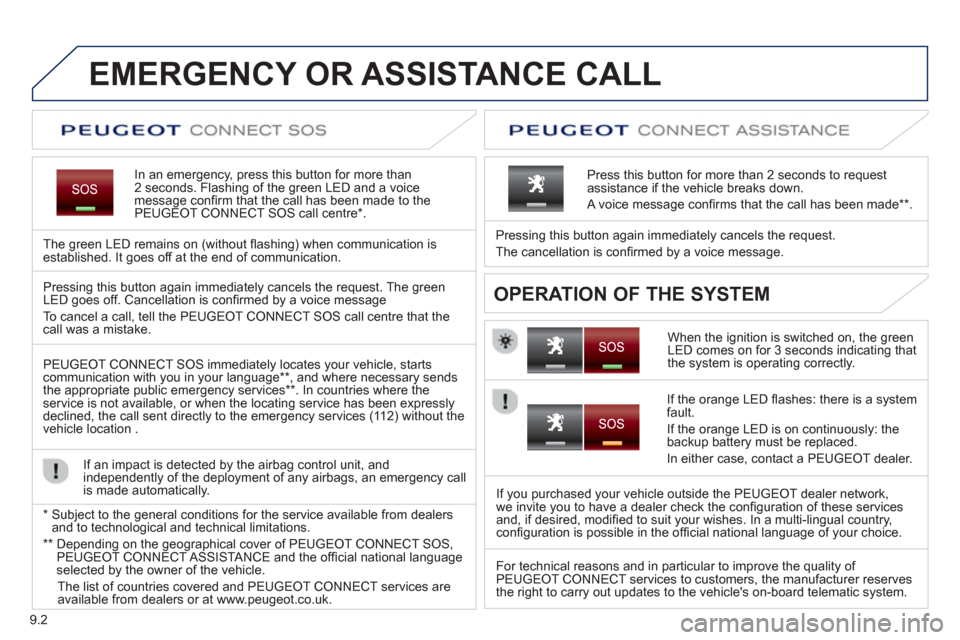
In an emergency, press this button for more than2 seconds. Flashing of the green LED and a voice
message confi rm that the call has been made to the
PEUGEOT CONNECT SOS call centre * .
The
green LED remains on (without fl ashing) when communication is established. It goes off at the end of communication.
When the ignition is switched on, the green
LED comes on for 3 seconds indicating that
the system is operating correctly. Pressin
g this button again immediately cancels the request.
The cancellation is confi rmed b
y a voice message.
Press this button for more than 2 seconds to request
assistance if the vehicle breaks down.
A voice message confi rms that the call has been made **
.
OPERATION OF THE SYSTEM Pressing this button again immediately cancels the request. The green LED goes off. Cancellation is confi rmed by a voice message
To cancel a call, tell the PEUGE
OT CONNECT SOS call centre that thecall was a mistake.
PEUGE
OT CONNECT SOS immediately locates your vehicle, starts communication with you in your language ** , and where necessary sends
the appropriate public emergency services ** . In countries where theservice is not available, or when the locating service has been expresslydeclined, the call sent directly to the emergency services (11 2) without the
vehicle location .
If an impact is detected b
y the airbag control unit, and
independently of the deployment of any airbags, an emergency call
is made automatically.
*
Sub
ject to the general conditions for the service available from dealersand to technological and technical limitations.
**
Depending on the geographical cover of PEUGEOT CONNECT SOS,
PEUGEOT CONNECT ASSISTA NCE and the offi cial national languageselected by the owner of the vehicle.
Th
e list of countries covered and PEUGEOT CONNECT services are available from dealers or at www.peugeot.co.uk.
If the oran
ge LED fl ashes: there is a system
fault.
If the oran
ge LED is on continuously: the backup battery must be replaced.
In either case, contact a PEU
GEOT dealer.
I
f you purchased your vehicle outside the PEUGEOT dealer network,
we invite you to have a dealer check the confi guration of these services
and, if desired, modifi ed to suit your wishes. In a multi-lingual country,confi guration is possible in the offi cial national language of your choice.
For technical reasons and in particular to improve the qualit
y of PEUGEOT CONNECT services to customers, the manufacturer reserves
the right to carry out updates to the vehicle's on-board telematic system.
Page 181 of 248
9.29
07
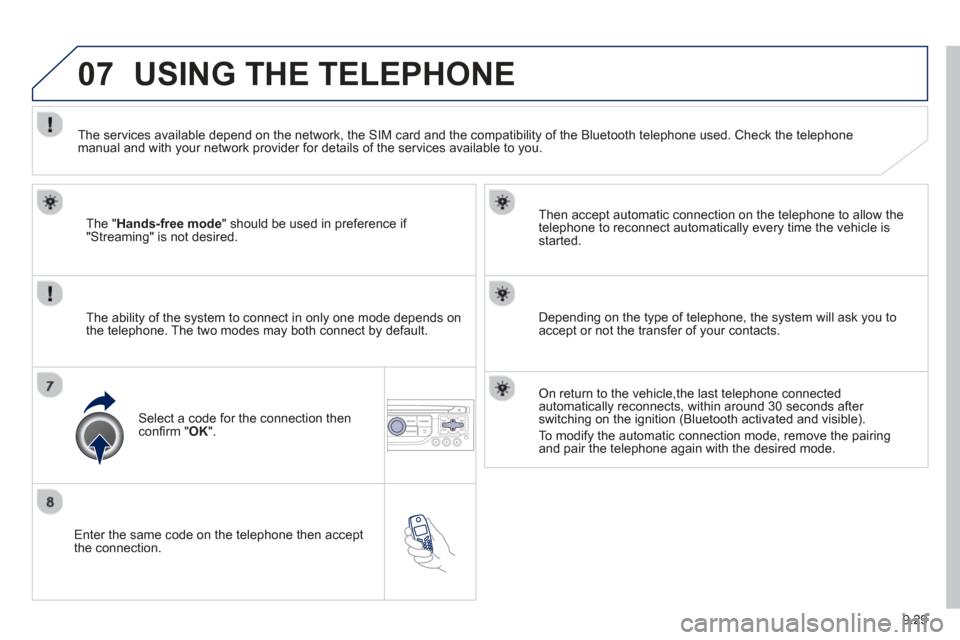
Enter the same code on the telephone then accept
the connection. Then accept automatic connection on the telephone to allow the
te
lephone to reconnect automatically every time the vehicle is started.
The abilit
y of the system to connect in only one mode depends on
the telephone. The two modes may both connect by default.
USING THE TELEPHONE
The "Hands-free mode " should be used in preference if "Streaming" is not desired.
The services available depend on the network, the
SIM card and the compatibility of the Bluetooth telephone used. Check the telephone manual and with your network provider for details of the services available to you.
Select a code for the connection thenconfi
rm "OK".
Depending on the type of telephone, the system will ask you to
accept or not the transfer of your contacts.
On return to the vehicle,the last telephone connected
automatically reconnects, within around 30 seconds after switching on the ignition (Bluetooth activated and visible).
To modif
y the automatic connection mode, remove the pairingand pair the telephone again with the desired mode.
Page 196 of 248
9.44
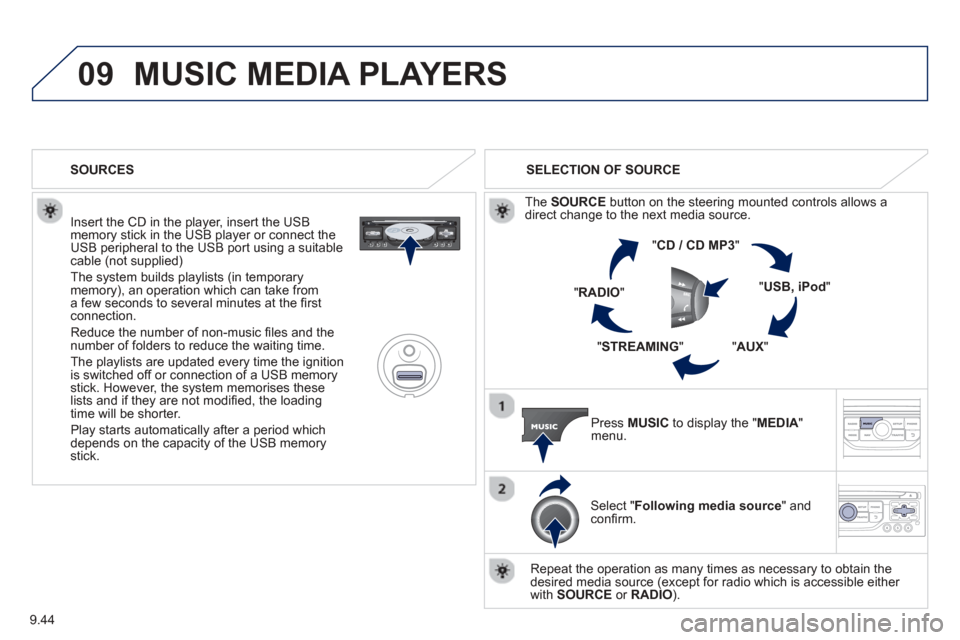
09MUSIC MEDIA PLAYERS
Insert the CD in the player, insert the USBmemory stick in the USB player or connect theUSB peripheral to the USB port using a suitablecable (not supplied)
The system builds playlists (in temporarymemory), an operation which can take froma few seconds to several minutes at the fi rstconnection.
R
educe the number of non-music fi les and the number of folders to reduce the waiting time.
The pla
ylists are updated every time the ignition
is switched off or connection of a USB memory stick. However, the system memorises these
lists and if they are not modifi ed, the loadingtime will be shorter.
Pla
y starts automatically after a period which
depends on the capacity of the USB memory stick. SELECTION OF SOURCE
Th
e SOURCE button on the steering mounted controls allows a
direct change to the next media source.
" CD / CD MP
3 "
"
USB, iPod "
"AUX " "STREAMING "
"RADIO "
Press MUSICto display the "MEDIA " menu.
Select "Following media source " and confi rm.
Repeat the operation as man
y times as necessary to obtain the
desired media source (except for radio which is accessible either
with SOURCE or RADIO).
SOURCES