reset Peugeot Expert VU 2016 Owner's Guide
[x] Cancel search | Manufacturer: PEUGEOT, Model Year: 2016, Model line: Expert VU, Model: Peugeot Expert VU 2016Pages: 599, PDF Size: 13.14 MB
Page 505 of 599
503
Expert_en_Chap10d_RD6_ed01-2016
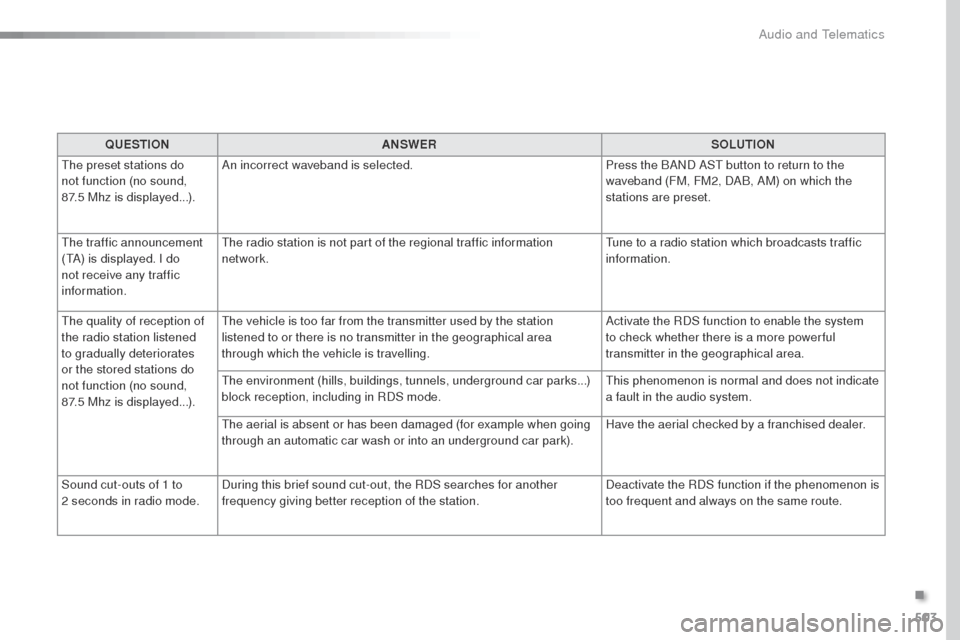
QUESTIONANSWER SOLUTION
th
e preset stations do
not function (no sound,
87.5
Mhz is displayed...). An incorrect waveband is selected.
Press the BAND AS
t
button to return to the
waveband (FM, FM2, DAB, AM) on which the
stations are preset.
the
traffic announcement
(
tA
) is displayed. I do
not receive any traffic
information.
th
e radio station is not part of the regional traffic information
network.
tu
ne to a radio station which broadcasts traffic
information.
th
e quality of reception of
the radio station listened
to gradually deteriorates
or the stored stations do
not function (no sound,
87.5
Mhz is displayed...).
th
e vehicle is too far from the transmitter used by the station
listened to or there is no transmitter in the geographical area
through which the vehicle is travelling. Activate the RDS function to enable the system
to check whether there is a more power ful
transmitter in the geographical area.
the
environment (hills, buildings, tunnels, underground car parks...)
block reception, including in RDS mode.
th
is phenomenon is normal and does not indicate
a fault in the audio system.
th
e aerial is absent or has been damaged (for example when going
through an automatic car wash or into an underground car park). Have the aerial checked by a franchised dealer.
Sound cut-outs of 1 to
2
seconds in radio mode. During this brief sound cut-out, the RDS searches for another
frequency giving better reception of the station. Deactivate the RDS function if the phenomenon is
too frequent and always on the same route.
.
Audio and telematics
Page 512 of 599
510
Expert_en_Chap11_index-alpha_ed01-2016
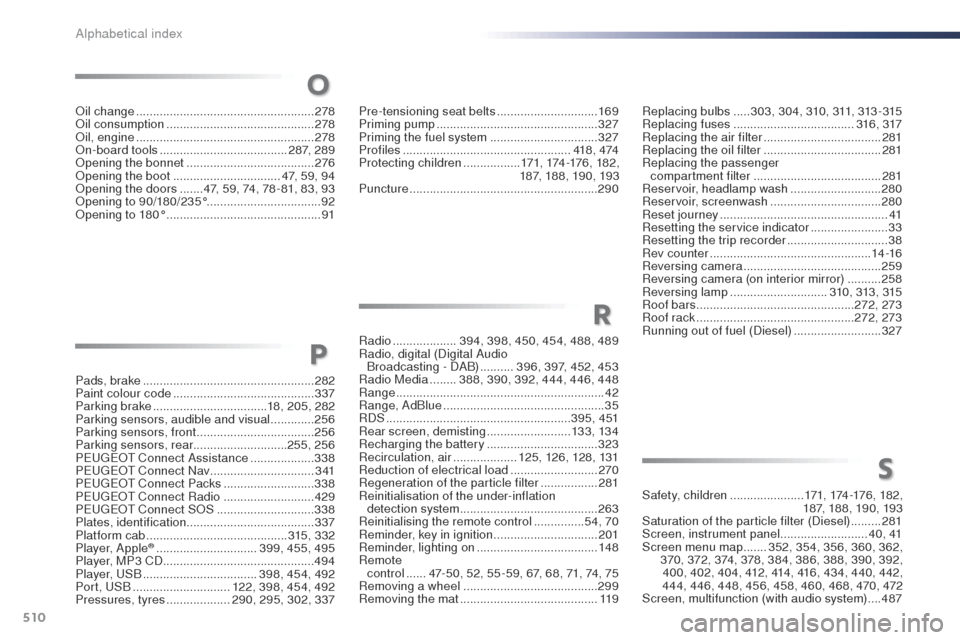
Pads, brake ................................................... 282
Paint colour code .......................................... 337
Parking brake
.................................. 18, 205, 282
Parking sensors, audible and visual
.............256
Parking sensors, front
...................................256
Parking sensors, rear ............................255, 256
PE
u
g
Eo
t Connect Assistance ...................338
PE
u
g
Eo
t Connect Nav
...............................3
41
P
Eu
g
Eot C
onnect Packs
...........................338
PE
u
g
Eo
t Connect Radio ...........................429
P
Eu
g
Eot C
onnect S
oS ............................. 33
8
Plates, identification ...................................... 337
Platform cab
.......................................... 3
15, 332
Player, Apple
® .............................. 3 99, 455, 495
Player, MP3 CD ............................................. 494
Player,
u
S
B
.................................. 398, 454, 492
Port,
u
S
B
............................. 1
22, 398, 454, 492
Pressures, tyres
................... 290, 295, 302, 337 Pre-tensioning seat belts
..............................
169
Priming pump
................................................
327
Priming the fuel system ................................
327
Profiles
..................................................
418 , 474
Protecting children
.................
171, 174 -176 , 18 2 ,
187, 188, 190, 193
Puncture
........................................................
290
Radio
...................
394, 398, 450, 454, 488, 489
Radio, digital (Digital Audio Broadcasting - DAB)
..........
396, 397, 452, 453
Radio Media
........
388, 390, 392, 444, 446, 448
Range
..............................................................
42
Range, AdBlue
................................................
35
RDS
.......................................................
3 9 5 , 4 51
Rear screen, demisting
.........................
13 3, 13 4
Recharging the battery
................................. 32
3
Recirculation, air
...................
125, 126, 128, 131
Reduction of electrical load
..........................
270
Regeneration of the particle filter
.................
2
81
Reinitialisation of the under-inflation detection system .........................................
263
Reinitialising the remote control
............... 5
4, 70
Reminder, key in ignition ...............................
201
Reminder, lighting on ....................................
148
Remote control
...... 4
7-50, 52, 55 -59, 67, 68, 71, 74, 75
Removing a wheel
........................................299
Removing the mat
.........................................11 9Safety, children
......................
17
1, 174 -176 , 18 2 ,
187, 188, 190, 193
Saturation of the particle filter (Diesel)
.........
2
81
Screen, instrument panel ..........................
4 0 , 41
Screen menu map .......
352, 354, 356, 360, 362,
370, 372, 374, 378, 384, 386, 388, 390, 392, 400, 402, 404, 412, 414, 416, 434, 440, 442,
444, 446, 448, 456, 458, 460, 468, 470, 472
Screen, multifunction (with audio system)
....487
P
R
S
Replacing bulbs .....3 03, 3 0 4, 310, 311, 313 - 315
Replacing fuses .............................. ......316, 317
Replacing the air filter
...................................281
Replacing the oil filter
................................... 2
81
Replacing the passenger compartment filter
...................................... 281
Reservoir, headlamp wash
...........................280
Reservoir, screenwash
................................. 28
0
Reset journey
.................................................. 41
Resetting the service indicator
.......................33
Resetting the trip recorder
..............................38
Rev counter
................................................ 14 -16
Reversing camera
......................................... 259
Reversing camera (on interior mirror)
..........258
Reversing lamp
............................. 31
0, 313, 315
Roof bars
............................................... 2
72, 273
Roof rack
............................................... 2
72, 273
Running out of fuel (Diesel)
..........................3
27oi
l change
..................................................... 278oi
l consumption
............................................ 278
oi
l, engine
...............................
...................... 278
on
-board tools
...................................... 287, 289
op
ening the bonnet
...................................... 2
76
op
ening the boot
..............................
.. 47, 59, 94
op
ening the doors
....... 4
7, 59, 74, 78 - 81, 83, 93
op
ening to 90/180/235°
.................................. 92
op
ening to 180°
.............................................. 91
O
Alphabetical index
Page 522 of 599
154
First steps
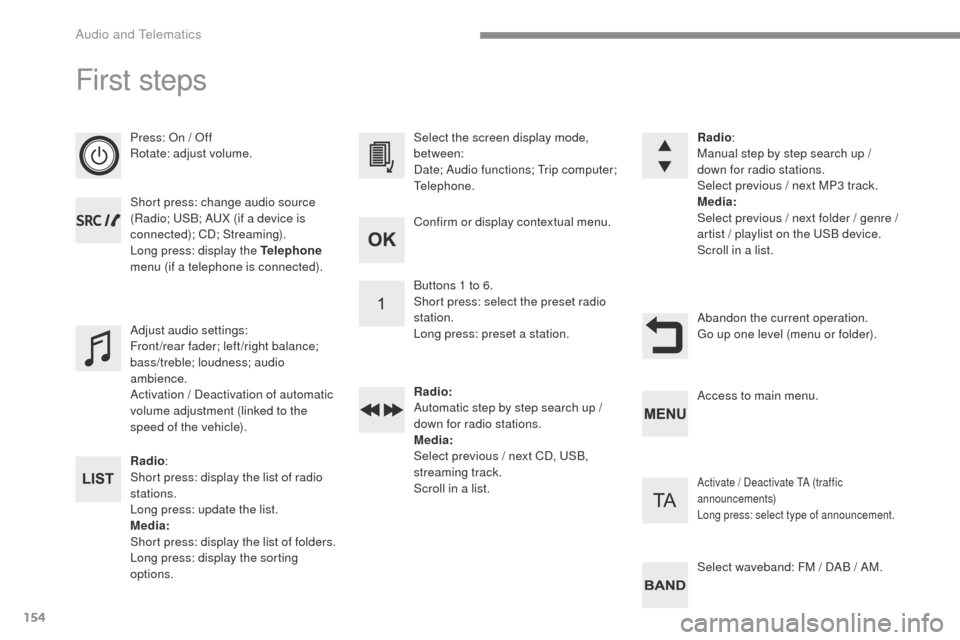
Press: On / Off
Rotate: adjust volume.
Short press: change audio source
(Radio; USB; AUX (if a device is
connected); CD; Streaming).
Long press: display the Telephone
menu (if a telephone is connected).
Radio :
Short press: display the list of radio
stations.
Long press: update the list.
Media:
Short press: display the list of folders.
Long press: display the sorting
options. Select the screen display mode,
between:
Date; Audio functions; Trip computer;
Telephone.
Adjust audio settings:
Front/rear fader; left/right balance;
bass/treble; loudness; audio
ambience.
Activation / Deactivation of automatic
volume adjustment (linked to the
speed of the vehicle). Radio
:
Manual step by step search up /
down for radio stations.
Select previous / next MP3 track.
Media:
Select previous / next folder / genre /
artist
/ playlist on the USB device.
Scroll in a list.
Abandon the current operation.
Go up one level (menu or folder).
Confirm or display contextual menu.
Buttons 1 to 6.
Short press: select the preset radio
station.
Long press: preset a station.
Radio:
Automatic step by step search up /
down for radio stations.
Media:
Select previous / next CD, USB,
streaming track.
Scroll in a list.
Access to main menu.
Activate / Deactivate TA (traffic
announcements)
Long press: select type of announcement.
Select waveband: FM / DAB / AM.
Audio and Telematics
Page 523 of 599
155
Transversal-Peugeot_en_Chap03_RD6_ed01-2016
Steering mounted controls - Type 1
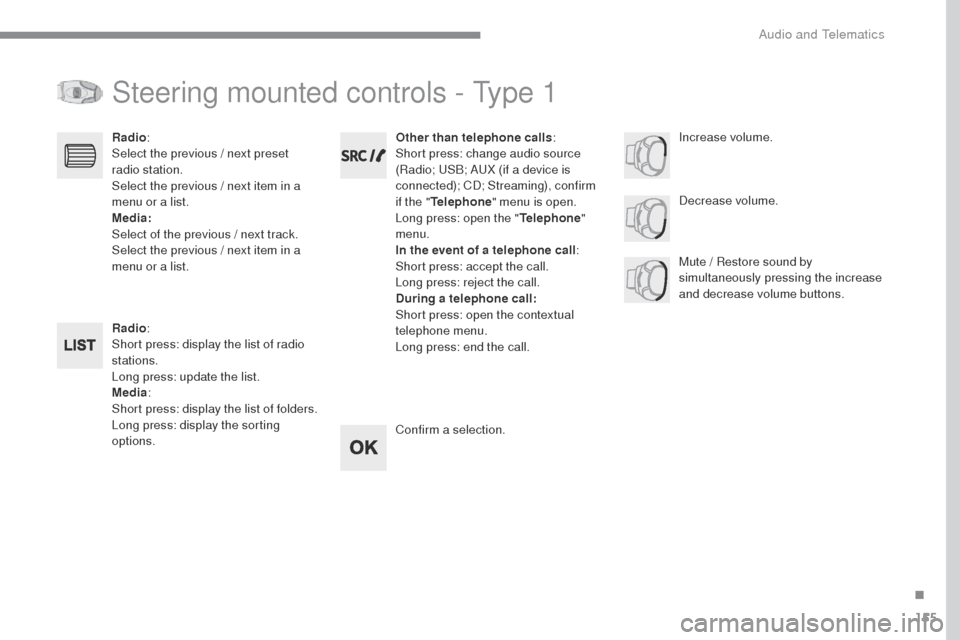
Radio:
Short press: display the list of radio
stations.
Long press: update the list.
Media :
Short press: display the list of folders.
Long press: display the sorting
options. Decrease volume.
Radio
:
Select the previous / next preset
radio station.
Select the previous / next item in a
menu or a list.
Media:
Select of the previous / next track.
Select the previous / next item in a
menu or a list. Mute / Restore sound by
simultaneously pressing the increase
and decrease volume buttons.
Other than telephone calls
:
Short press: change audio source
(Radio; USB; AUX (if a device is
connected); CD; Streaming), confirm
if the " Telephone " menu is open.
Long press: open the " Telephone"
menu.
In the event of a telephone call :
Short press: accept the call.
Long press: reject the call.
During a telephone call:
Short press: open the contextual
telephone menu.
Long press: end the call.
Confirm a selection. Increase volume.
.
Audio and Telematics
Page 524 of 599
156
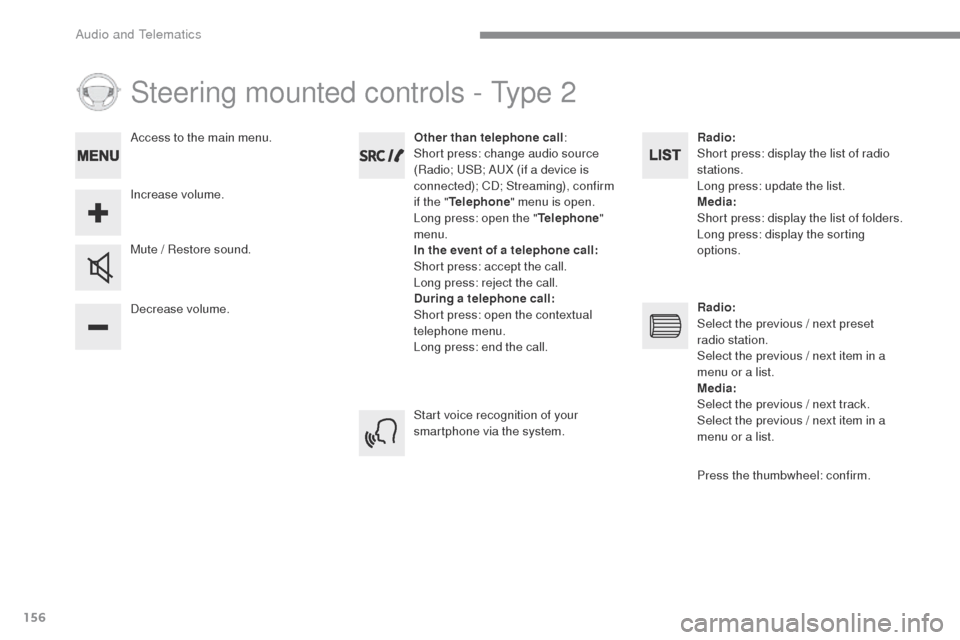
Steering mounted controls - Type 2
Decrease volume. Mute / Restore sound.Other than telephone call
:
Short press: change audio source
(Radio; USB; AUX (if a device is
connected); CD; Streaming), confirm
if the " Telephone " menu is open.
Long press: open the " Telephone"
menu.
In the event of a telephone call:
Short press: accept the call.
Long press: reject the call.
During a telephone call:
Short press: open the contextual
telephone menu.
Long press: end the call.
Increase volume. Access to the main menu.
Start voice recognition of your
smartphone via the system.Radio:
Short press: display the list of radio
stations.
Long press: update the list.
Media:
Short press: display the list of folders.
Long press: display the sorting
options.
Radio:
Select the previous / next preset
radio station.
Select the previous / next item in a
menu or a list.
Media:
Select the previous / next track.
Select the previous / next item in a
menu or a list.
Press the thumbwheel: confirm.
Audio and Telematics
Page 528 of 599
160
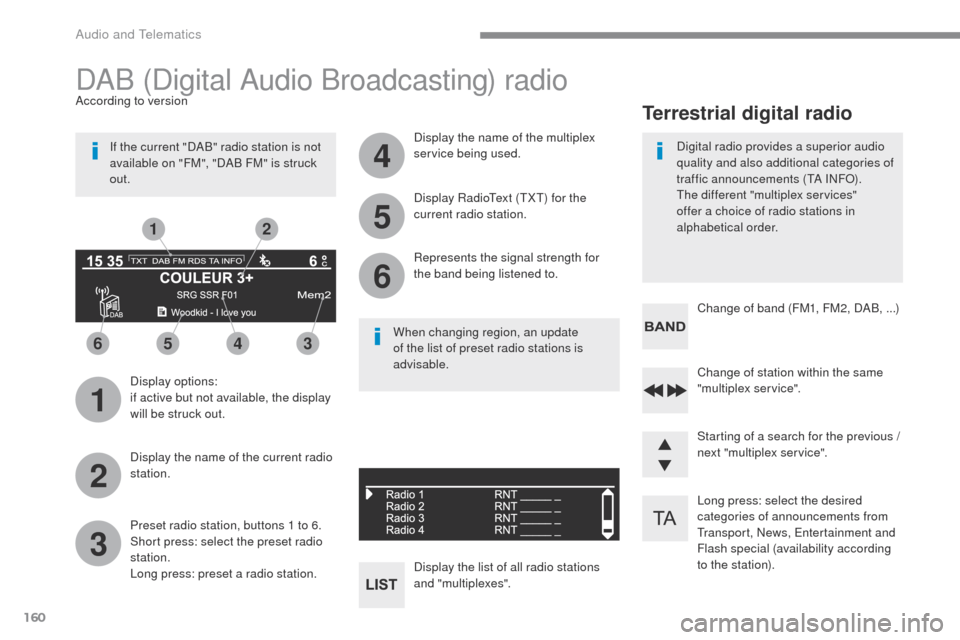
1
3
5
2
4
6
6543
21
Long press: select the desired
categories of announcements from
Transport, News, Entertainment and
Flash special (availability according
to the station). Change of station within the same
"multiplex service".
Starting of a search for the previous /
next "multiplex service". Change of band (FM1, FM2, DAB, ...)
Digital radio provides a superior audio
quality and also additional categories of
traffic announcements (TA INFO).
The different "multiplex services"
offer a choice of radio stations in
alphabetical order.
Terrestrial digital radio
DAB (Digital Audio Broadcasting) radio
Display options:
if active but not available, the display
will be struck out.
According to version
Preset radio station, buttons 1 to 6.
Short press: select the preset radio
station.
Long press: preset a radio station. Display the name of the multiplex
service being used.
Display the list of all radio stations
and "multiplexes". Represents the signal strength for
the band being listened to. Display RadioText (TXT) for the
current radio station.
Display the name of the current radio
station.
If the current "DAB" radio station is not
available on "FM", "DAB FM" is struck
out.
When changing region, an update
of the list of preset radio stations is
advisable.
Audio and Telematics
Page 541 of 599
173
Transversal-Peugeot_en_Chap03_RD6_ed01-2016
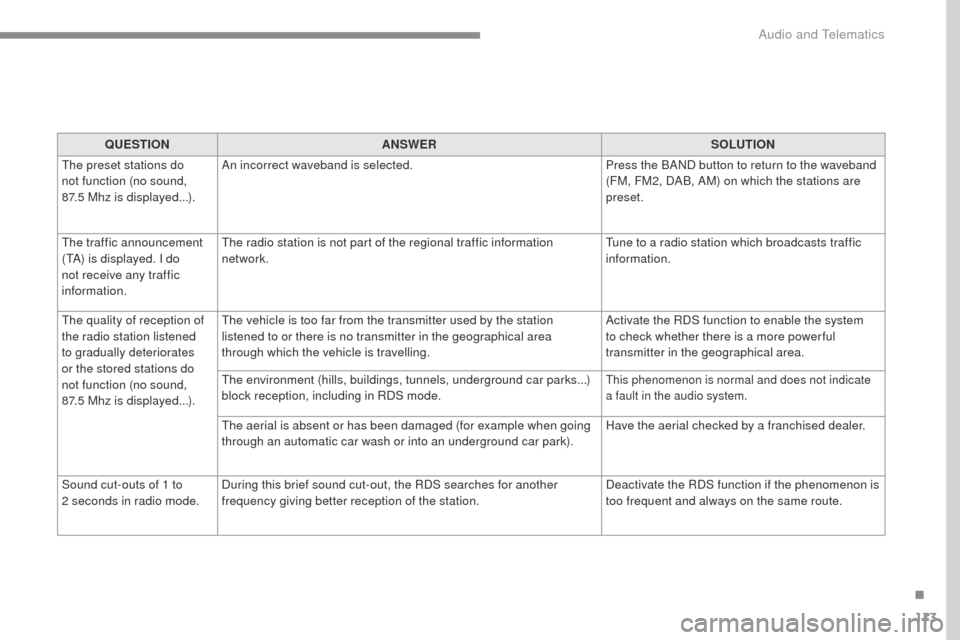
QUESTIONANSWER SOLUTION
The preset stations do
not function (no sound,
87.5
Mhz is displayed...). An incorrect waveband is selected.
Press the BAND button to return to the waveband
(FM, FM2, DAB, AM) on which the stations are
preset.
The traffic announcement
(TA) is displayed. I do
not receive any traffic
information. The radio station is not part of the regional traffic information
network.
Tune to a radio station which broadcasts traffic
information.
The quality of reception of
the radio station listened
to gradually deteriorates
or the stored stations do
not function (no sound,
87.5
Mhz is displayed...). The vehicle is too far from the transmitter used by the station
listened to or there is no transmitter in the geographical area
through which the vehicle is travelling.
Activate the RDS function to enable the system
to check whether there is a more power ful
transmitter in the geographical area.
The environment (hills, buildings, tunnels, underground car parks...)
block reception, including in RDS mode.
This phenomenon is normal and does not indicate
a fault in the audio system.
The aerial is absent or has been damaged (for example when going
through an automatic car wash or into an underground car park). Have the aerial checked by a franchised dealer.
Sound cut-outs of 1 to
2
seconds in radio mode. During this brief sound cut-out, the RDS searches for another
frequency giving better reception of the station. Deactivate the RDS function if the phenomenon is
too frequent and always on the same route.
.
Audio and Telematics
Page 546 of 599
99
Transversal-Peugeot_en_Chap02_RCC-2-2-0_ed01-2016
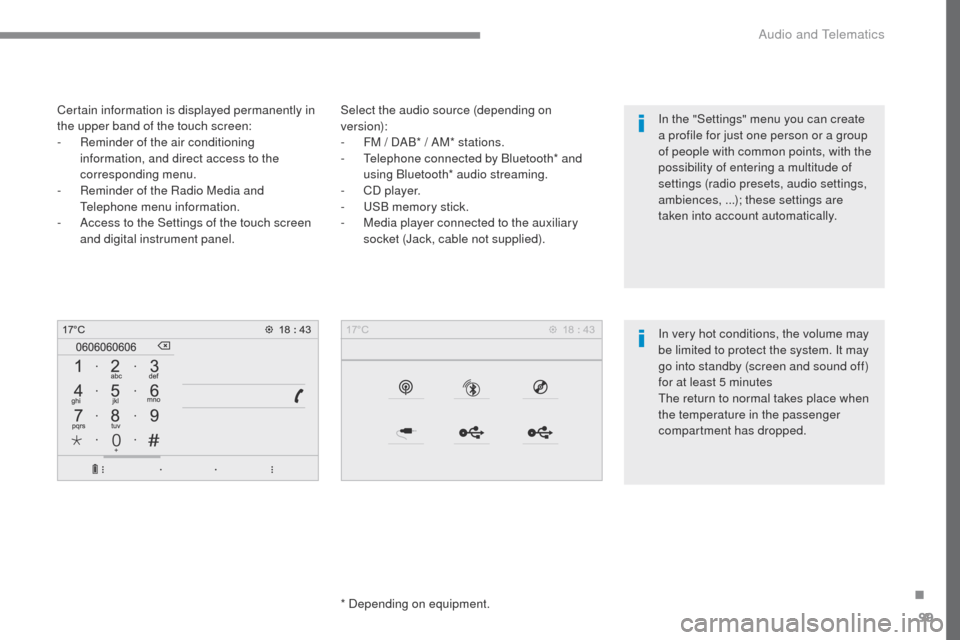
Select the audio source (depending on
version):
-
F
M / DAB* / AM* stations.
-
T
elephone connected by Bluetooth* and
using Bluetooth* audio streaming.
-
C
D player.
-
U
SB memory stick.
-
M
edia player connected to the auxiliary
socket (Jack, cable not supplied).
*
Depending on equipment.
Certain information is displayed permanently in
the upper band of the touch screen:
-
R
eminder of the air conditioning
information, and direct access to the
corresponding menu.
-
R
eminder of the Radio Media and
Telephone menu information.
-
A
ccess to the Settings of the touch screen
and digital instrument panel.
In very hot conditions, the volume may
be limited to protect the system. It may
go into standby (screen and sound off)
for at least 5 minutes
The return to normal takes place when
the temperature in the passenger
compartment has dropped. In the "Settings" menu you can create
a profile for just one person or a group
of people with common points, with the
possibility of entering a multitude of
settings (radio presets, audio settings,
ambiences, ...); these settings are
taken into account automatically.
.
Audio and Telematics
Page 547 of 599
100
Transversal-Peugeot_en_Chap02_RCC-2-2-0_ed01-2016
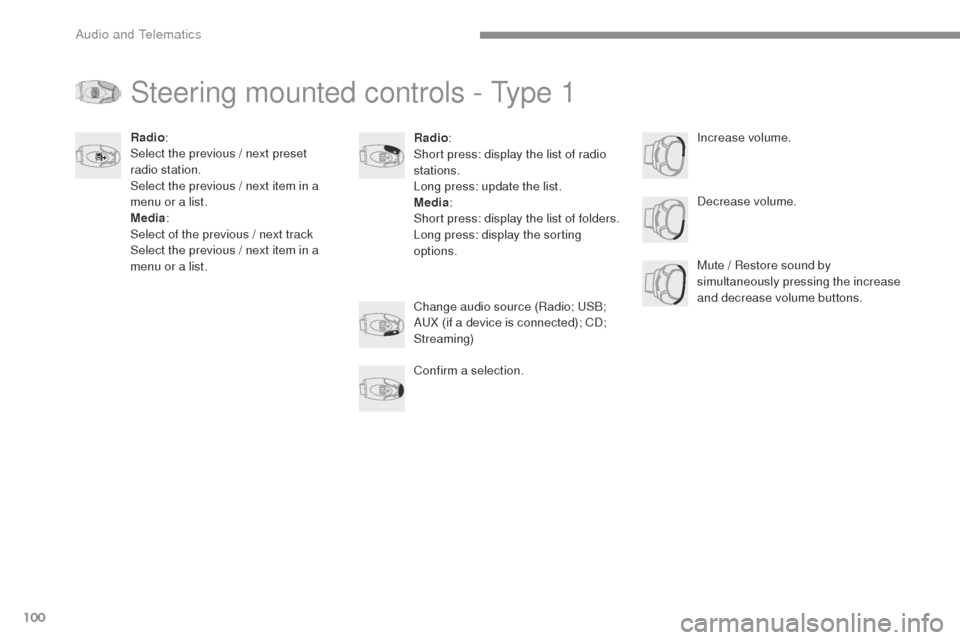
Steering mounted controls - Type 1
Radio:
Short press: display the list of radio
stations.
Long press: update the list.
Media :
Short press: display the list of folders.
Long press: display the sorting
options. Decrease volume.
Radio
:
Select the previous / next preset
radio station.
Select the previous / next item in a
menu or a list.
Media :
Select of the previous / next track
Select the previous / next item in a
menu or a list. Mute / Restore sound by
simultaneously pressing the increase
and decrease volume buttons.
Change audio source (Radio; USB;
AUX (if a device is connected); CD;
Streaming)
Confirm a selection. Increase volume.
Audio and Telematics
Page 548 of 599
101
Transversal-Peugeot_en_Chap02_RCC-2-2-0_ed01-2016
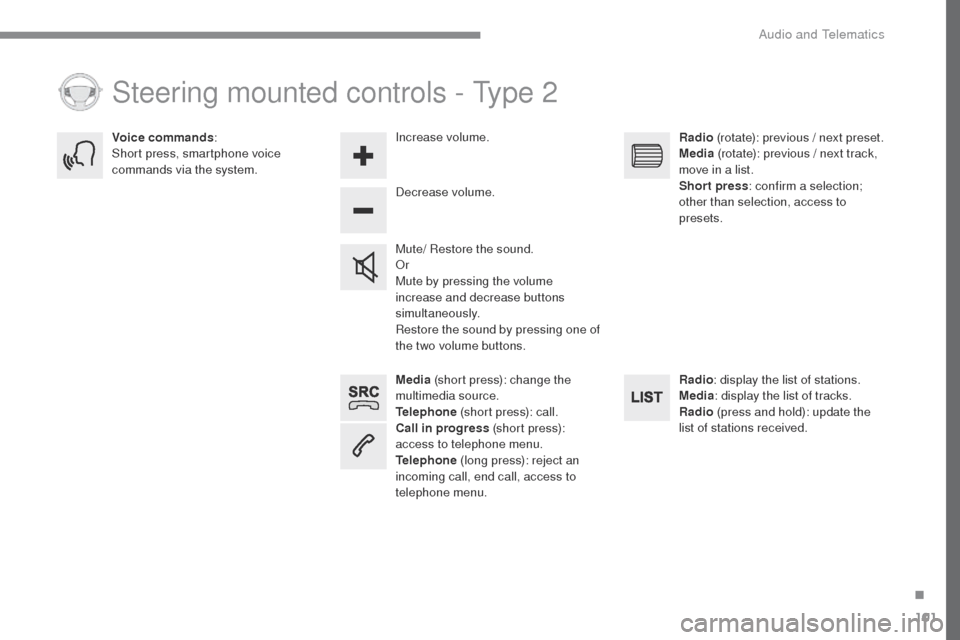
Media (short press): change the
multimedia source.
Telephone (short press): call.
Call in progress (short press):
access to telephone menu.
Telephone (long press): reject an
incoming call, end call, access to
telephone menu. Decrease volume.
Voice commands
:
Short press, smartphone voice
commands via the system.
Mute/ Restore the sound.
Or
Mute by pressing the volume
increase and decrease buttons
simultaneously.
Restore the sound by pressing one of
the two volume buttons.Radio
(rotate): previous / next preset.
Media (rotate): previous / next track,
move in a list.
Short press : confirm a selection;
other than selection, access to
presets.
Radio : display the list of stations.
Media : display the list of tracks.
Radio (press and hold): update the
list of stations received.
Increase volume.
Steering mounted controls - Type 2
.
Audio and Telematics