navigation Peugeot Partner 2013 User Guide
[x] Cancel search | Manufacturer: PEUGEOT, Model Year: 2013, Model line: Partner, Model: Peugeot Partner 2013Pages: 236, PDF Size: 9.04 MB
Page 156 of 236
9.14
05
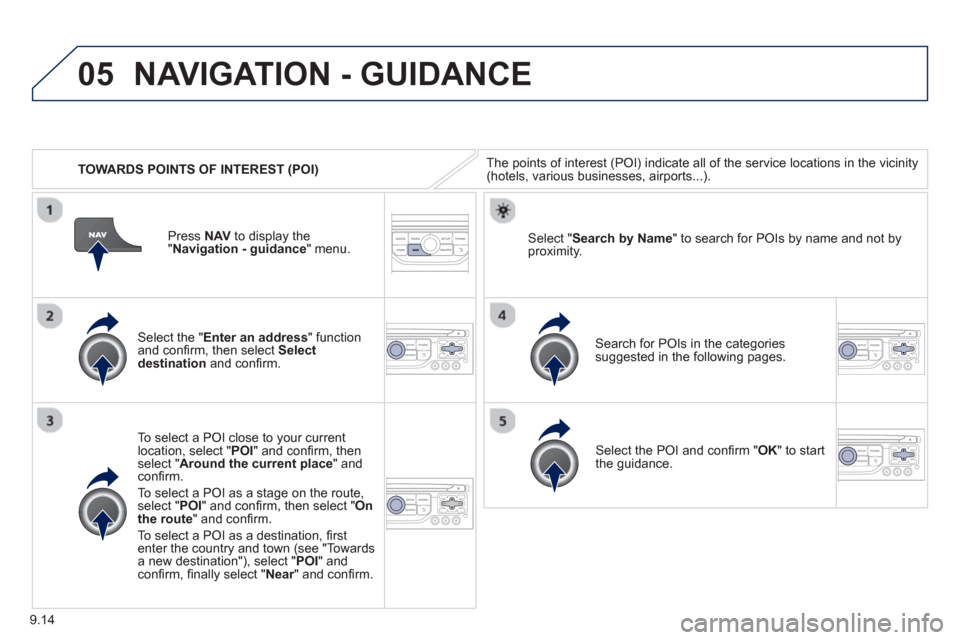
TOWARDS POINTS OF INTEREST (POI)
NAVIGATION - GUIDANCE
The points of interest (POI) indicate all of the service locations in the vicinity(hotels, various businesses, airports...).
Select the " Enter an address " function
and confi rm, then select Select
destinationand confi rm.
To select a P
OI close to your currentlocation, select "POI" and confi rm, thenselect " Around the current place " and confi rm.
To select a P
OI as a stage on the route,select " POI" and confi rm, then select " On
the route" and confi rm.
To select a P
OI as a destination, fi rst enter the country and town (see "Towards
a new destination"), select "POI" andconfi rm, fi nally select "Near" and confi rm.r
Search for POIs in the categories
suggested in the following pages.
Select "
Search by Name " to search for POIs by name and not byproximity.
Select the POI and confi rm " OK" to start
the guidance.
Pr
ess
NAV to display the
"Navigation - guidance" menu.
Page 157 of 236
9.15
05
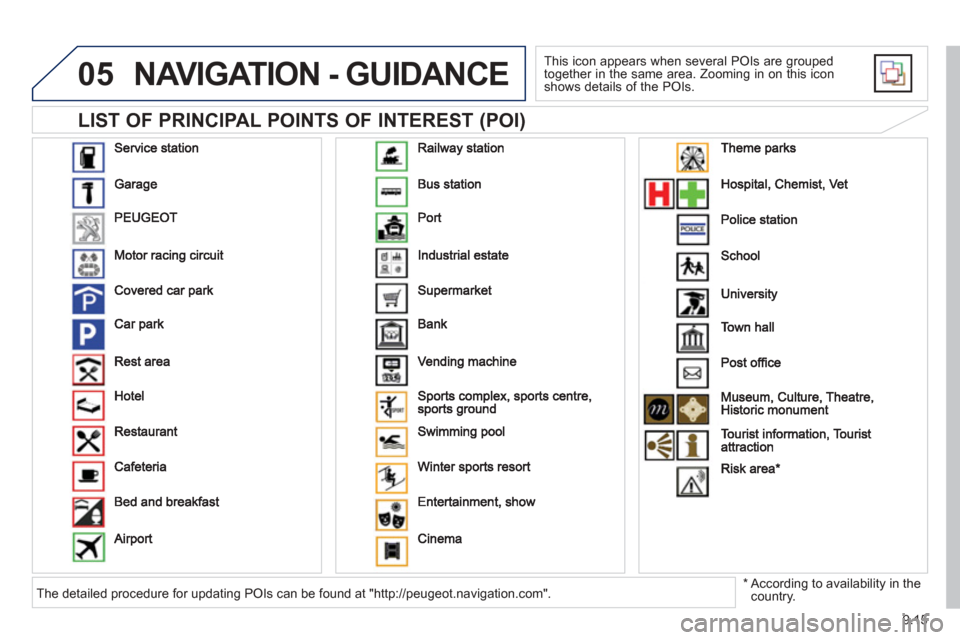
LIST OF PRINCIPAL POINTS OF INTEREST (POI)
NAVIGATION - GUIDANCE
This icon appears when several POIs are grouped
together in the same area. Zooming in on this icon shows details of the POIs.
*
According to availability in the country. The detailed procedure for updating POIs can be found at "http://peugeot.navigation.com".
Page 158 of 236
9.16
05NAVIGATION - GUIDANCE
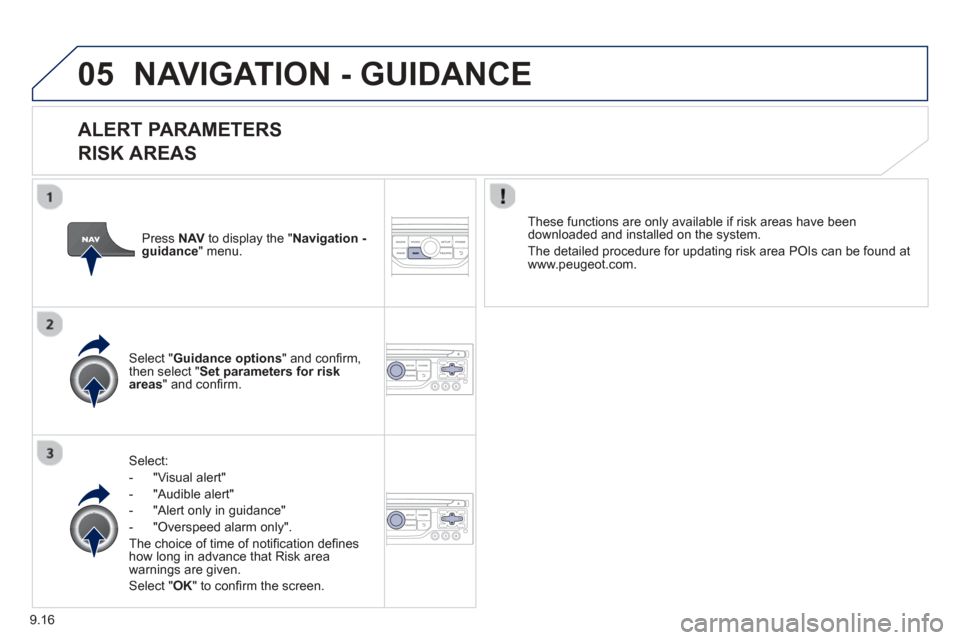
ALERT PARAMETERS
RISK AREAS
Select:
- "Vi
sual alert"
- "A
udible alert"
-
"Alert only in guidance"
- "
Overspeed alarm only".
Th
e choice of time of notifi cation defi nes how long in advance that Risk area
warnings are given.
Select " OK " to confi rm the screen.
Select " Guidance options " and confi rm,
then select "Set parameters for riskareas " and confi rm. These
functions are only available if risk areas have been
downloaded and installed on the system.
The detailed procedure for updatin
g risk area POIs can be found at
www.peugeot.com.
Press NAVto display the " Navigation - guidance" menu.
Page 159 of 236
9.17
05NAVIGATION - GUIDANCE
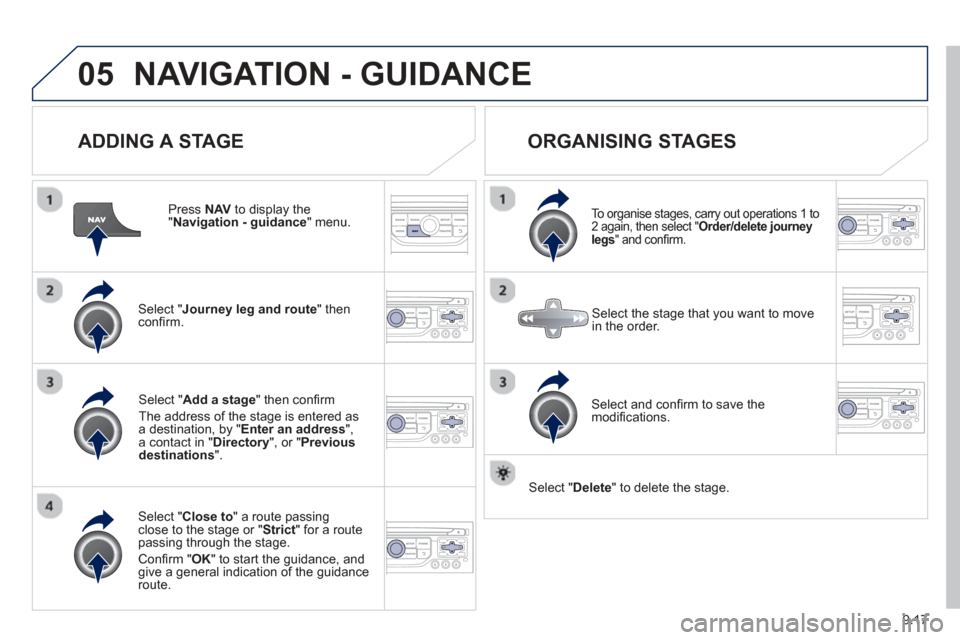
ADDING A STAGE
Press NAV to display the "Navigation - guidance
" menu.
Select " Journey leg and route
" then confi rm.
Select " Close to " a route passing close to the stage or " Strict
" for a routepassing through the stage.
Confi rm " OK " to start the guidance, andgive a general indication of the guidance
route.
Select "Add a stage
" then confi rm
The address o
f the stage is entered as
a destination, by "Enter an address",a contact in " Directory ", or " Previous destinations".
ORGANISING STAGES
To organise stages, carry out operations 1 to
2 again, then select "Order/delete journey legs " and confi rm.
Select and con fi rm to save the
modifi cations.
Select the stage that you want to move
in the order.
Select "Delete " to delete the stage.
Page 160 of 236
9.18
05NAVIGATION - GUIDANCE
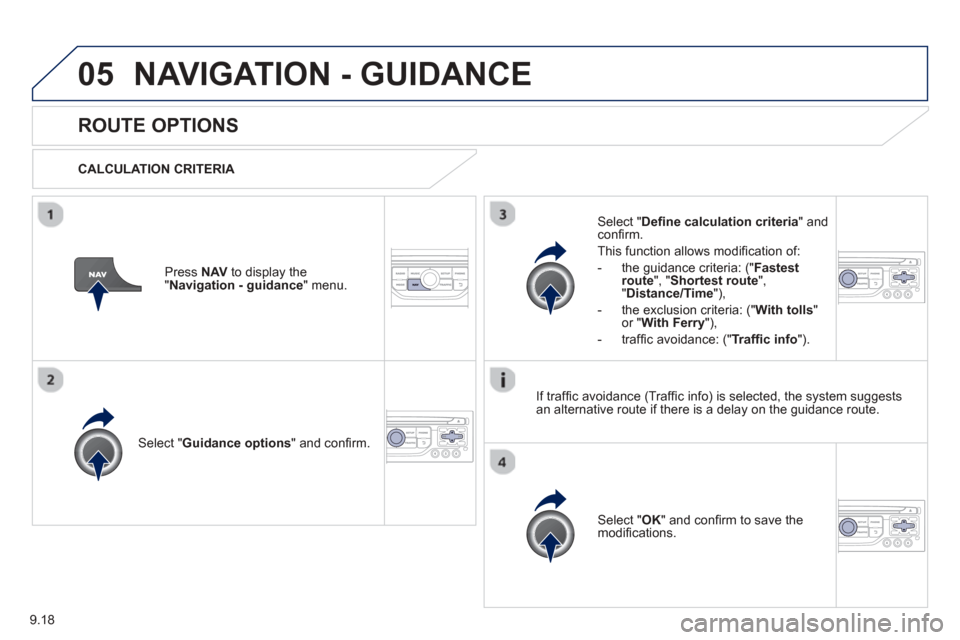
ROUTE OPTIONS
CALCULATION CRITERIA
Select " Guidance options " and confi rm.
Select " OK " and confi rm to save themodifi cations.
Select " Defi
ne calculation criteria" andconfi rm.
Thi
s function allows modifi cation of:
- the
guidance criteria: (" Fastest
route", " Shortest route", "Distance/Time "),
- the exclusion criteria:
(" With tolls "or "With Ferry "),
- traffi c avoidance:
(" Traffi c info ").
Press NAV to display the"Navigation - guidance" menu.
I
f traffi c avoidance (Traffi c info) is selected, the system suggests
an alternative route if there is a delay on the guidance route.
Page 161 of 236
9.19
05NAVIGATION - GUIDANCE
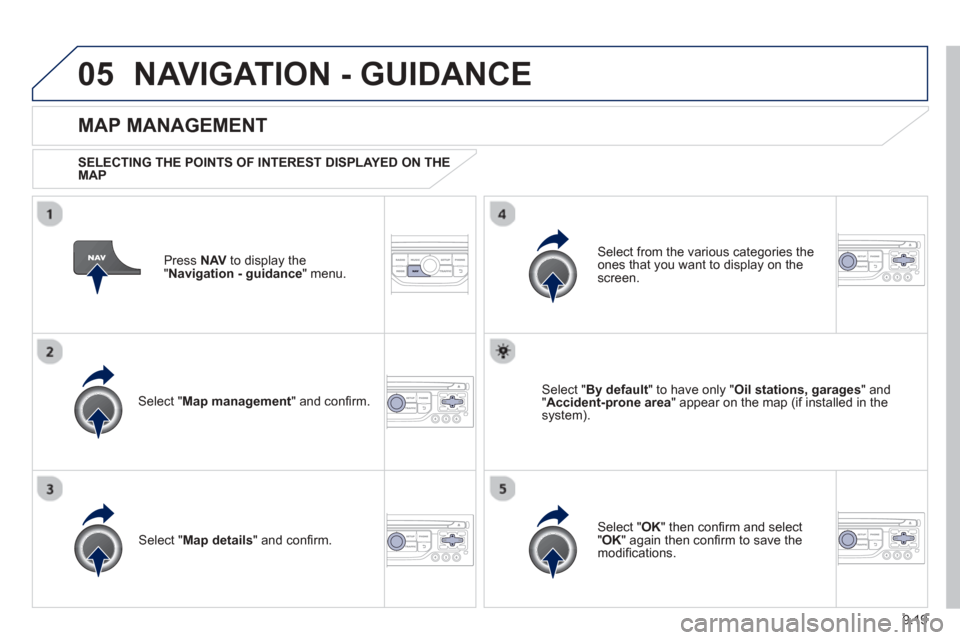
Press NAV to display the
"Navigation - guidance" menu.
MAP MANAGEMENT
SELECTING THE POINTS OF INTEREST DISPLAYED ON THE
MAP
Select " Map management " and confi rm.
Select from the various categories the
ones that you want to display on thescreen.
Select "Map details" and confi rm.
Select " By default" to have only "Oil stations, garages" and"Accident-prone area " appear on the map (if installed in the
system).
Select " OK " then confi rm and select "OK" again then confi rm to save the
modifi cations.
Page 162 of 236
9.20
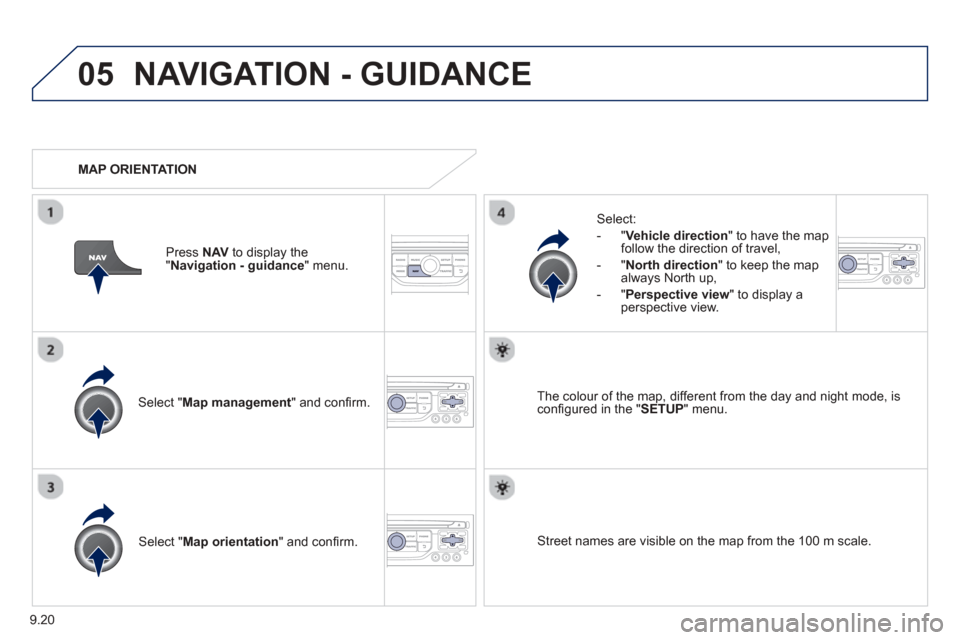
05NAVIGATION - GUIDANCE
Select " Map management " and confi rm.
Select:
-
"Vehicle direction" to have the map follow the direction of travel,
- " North direction " to keep the map
alwa
ys North up,
-" Perspective view " to displa
y aperspective view.
Select "Map orientation " and confi rm. The colour o
f the map, different from the day and night mode, is confi gured in the " SETUP" menu.
MAP ORIENTATION
Pr
ess NAV to display the
" Navigation - guidance" menu.
Street names are visible on the map from the 100 m scale.
Page 163 of 236
9.21
05NAVIGATION - GUIDANCE
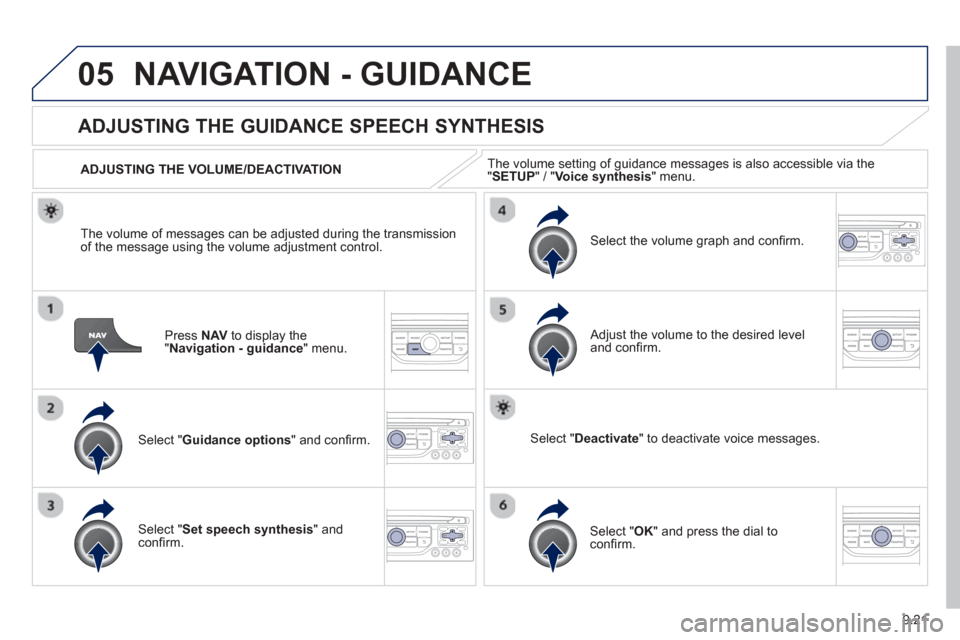
Press NAV to display the"Navigation - guidance" menu.
ADJUSTING THE GUIDANCE SPEECH SYNTHESIS
Select " Guidance options " and confi rm.
ADJUSTING THE VOLUME/DEACTIVATION
Select "
Set speech synthesis" andconfi rm.
Select the volume graph and confi rm.
Select "Deactivate " to deactivate voice messages.
Select " OK " and press the dial to confi rm.
Adjust the volume to the desired level and confi
rm.
The volume o
f messages can be adjusted during the transmissionof the message using the volume adjustment control.
The volume settin
g of guidance messages is also accessible via the "SETUP" / " Voice synthesis
" menu.
Page 164 of 236
9.22
05NAVIGATION - GUIDANCE
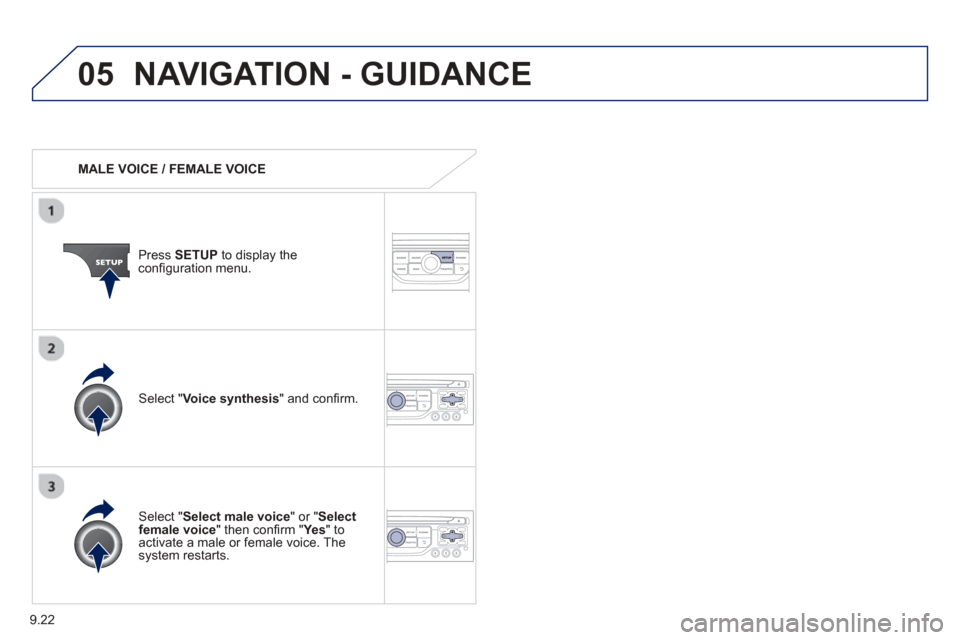
MALE VOICE / FEMALE VOICE
Press SETUP to display theconfi guration menu.
Select "Select male voice " or "Selectfemale voice" then confi rm " Ye s
" to activate a male or female voice. Thesystem restarts.
Select "Voice synthesis " and confi rm.
Page 166 of 236
9.24
06TRAFFIC INFORMATION
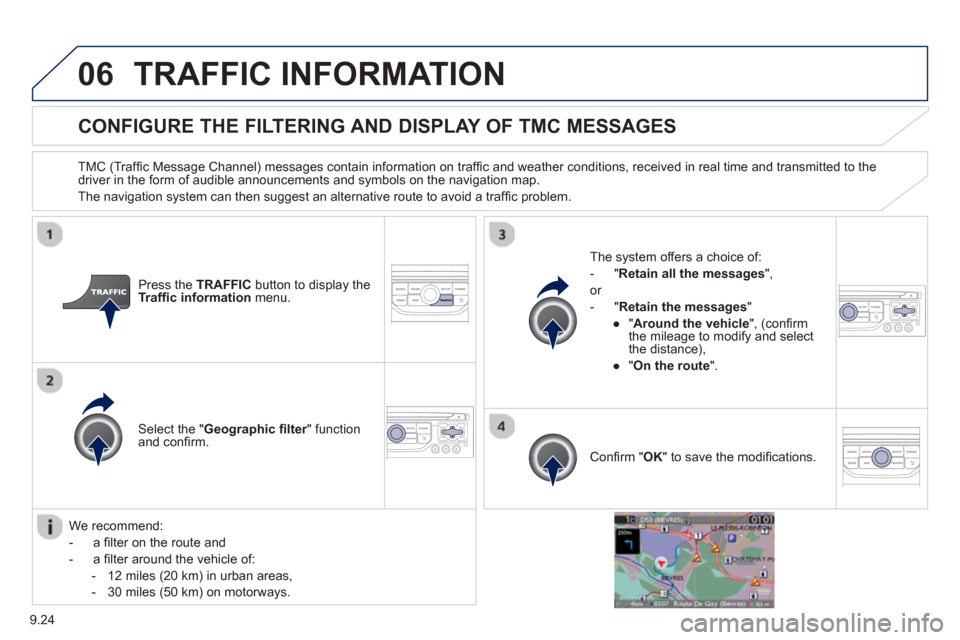
CONFIGURE THE FILTERING AND DISPLAY OF TMC MESSAGES
TMC (Traffi c Message Channel) messages contain information on traffi c and weather conditions, received in real time and transmitted to the
driver in the form of audible announcements and symbols on the navigation map.
The navi
gation system can then suggest an alternative route to avoid a traf fi c problem.
Pr
ess the TRAFFICbutton to display the Traffi c information menu.
Select the "Geographic fi lter" function rand confi rm. The s
ystem offers a choice of:
- " Retain all the messa
ges",
or
-" Retain the messa
ges"
●
"Around the vehicle
", (confi rm
the mileage to modify and select
the distance),
● " On the rout
e".
Confi rm " OK " to save the modifi cations.
We recommend:
-
a fi lter on the route and
-
a fi lter around the vehicle of:
- 12 miles
(20 km) in urban areas,
- 30 miles
(50 km) on motorways.