navigation Peugeot Partner 2013 Owner's Manual
[x] Cancel search | Manufacturer: PEUGEOT, Model Year: 2013, Model line: Partner, Model: Peugeot Partner 2013Pages: 236, PDF Size: 9.04 MB
Page 5 of 236
3
Contents
CONTENT
S
Emergency or assistance9.1
Peugeot Connect
Navigation (RT6) 9.3
Peugeot Connect Sound 9.63
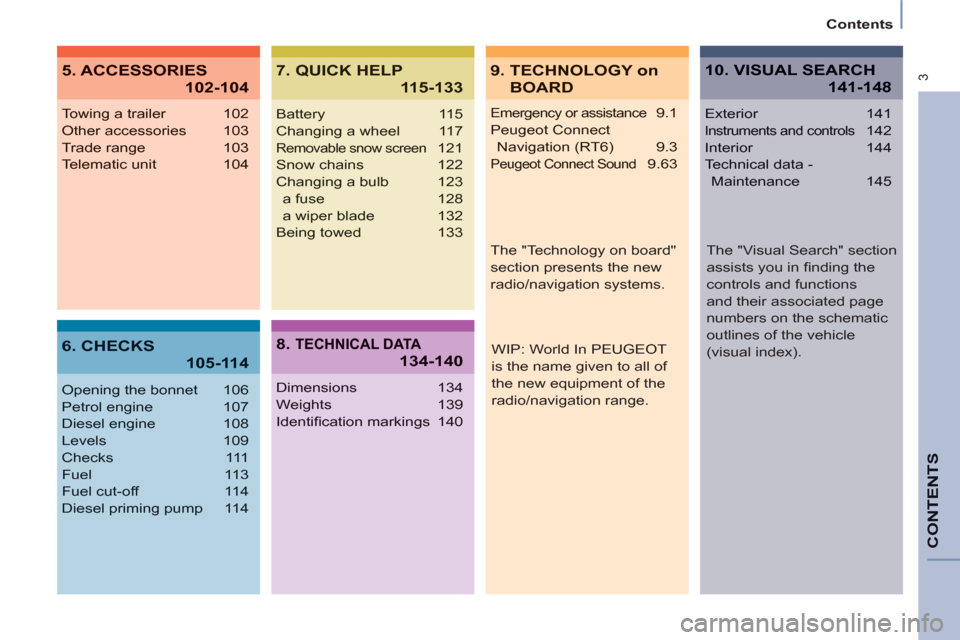
Towing a trailer 102
Other accessories 103
Trade range 103
Telematic unit 104
Opening the bonnet 106
Petrol engine 107
Diesel engine 108
Levels 109
Checks 111
Fuel 113
Fuel cut-off 114
Diesel priming pump 114
Battery 115
Changing a wheel 117
Removable snow screen121
Snow chains 122
Changing a bulb 123
a fuse 128
a wiper blade 132
Being towed 133
Dimensions 134
Weights 139
Identifi cation markings 140
Exterior 141
Instruments and controls142
Interior 144
Technical data -
Maintenance 145
9. TECHNOLOGY on
BOARD
5. ACCESSORIES
102-104
7. QUICK HELP
115-133
10. VISUAL SEARCH
141-148
6. CHECKS
105-114
8. TECHNICAL DATA
134-140
WIP: World In PEUGEOT
is the name given to all of
the new equipment of the
radio/navigation range.
The "Technology on board"
section presents the new
radio/navigation systems.
The "Visual Search" section
assists you in fi nding the
controls and functions
and their associated page
numbers on the schematic
outlines of the vehicle
(visual index).
Page 106 of 236
Equipment
104
Anti-theft alarm, window etching, fi rst
aid kit, high visibility vest, front and
rear parking sensors, warning triangle,
security bolts for alloy wheels
Front seat covers compatible with
airbags, bench, rubber mats, carpet
mats, snow chains, blind, tailgate
bicycle carrier,
Audio equipment, hands-free kit,
speakers, CD changer, satellite navigation
system, USB Box, Video kit, …
To prevent the mat from becoming
caught under the pedals:
- ensure that the mat and its fi xings
are positioned correctly,
- never fi t one mat on top of another.
Regardless of the audio and telematic
equipment offered on the market,
the technical constraints associated
with the fi tting of equipment of these
families of products mean that the
special features of the equipment and
its compatibility with the capacities of
the your vehicle's standard equipment
must be taken into account. Please
contact a PEUGEOT dealer for
more information before fi tting such
equipment.
Maximum weights on bars
- Roof rack: 120 Kg.
- Transverse bars on roof: 100 Kg.
- Transverse bars on longitudinal
bars: 75 Kg.
Installation of radiocommunication
transmitters
Before installing accessory
radiocommunication transmitters with
an external aerial on your vehicle, you
are advised to contact a representative
of the PEUGEOT marque.
The PEUGEOT dealer network will
inform you of the specifi cations
(frequency band, maximum output
power, aerial position, specifi c
installation conditions) of the
transmitters which can be fi tted, in
accordance with the Motor Vehicle
Electromagnetic Compatibility Directive
(2004/104/CE).
Front mud fl aps, rear mud fl aps,
15/17 inch alloy wheels, wheelarch
trim, leather steering wheel, …
Screenwash, interior and exterior
cleaning and maintenance products,
replacement bulbs, …
The fi tting of electrical equipment
or accessories which are not
recommended by Automobiles
PEUGEOT may result in the failure of your
vehicle's electronic system. Please note
this specifi c warning. You are advised to
contact a representative of the Marque
to be shown the range of recommended
equipment and accessories.
Depending on the country in which
the vehicle is sold or operated, it is
compulsory to have a high visibility
safety jacket, warning triangle and
replacement bulbs available in the
vehicle.
"Active Fleet Data" Telematic unit
Connected directly to the heart of the
vehicle ("Full CAN" multiplexed network),
as part of a comprehensive service, the
telematic unit allows the sending in real
time of information such as:
- distance travelled,
- distance remaining before the next
service,
- warnings and faults (oil level,
coolant level, oil temperature,
coolant temperature, etc…).
This enables Fleet managers
to optimise the monitoring and
management of their business vehicles.
Availability according to country; contact
a PEUGEOT dealer for more information.
Page 145 of 236
9.3
The system is protected in such a way that it will onlyoperate in your vehicle.
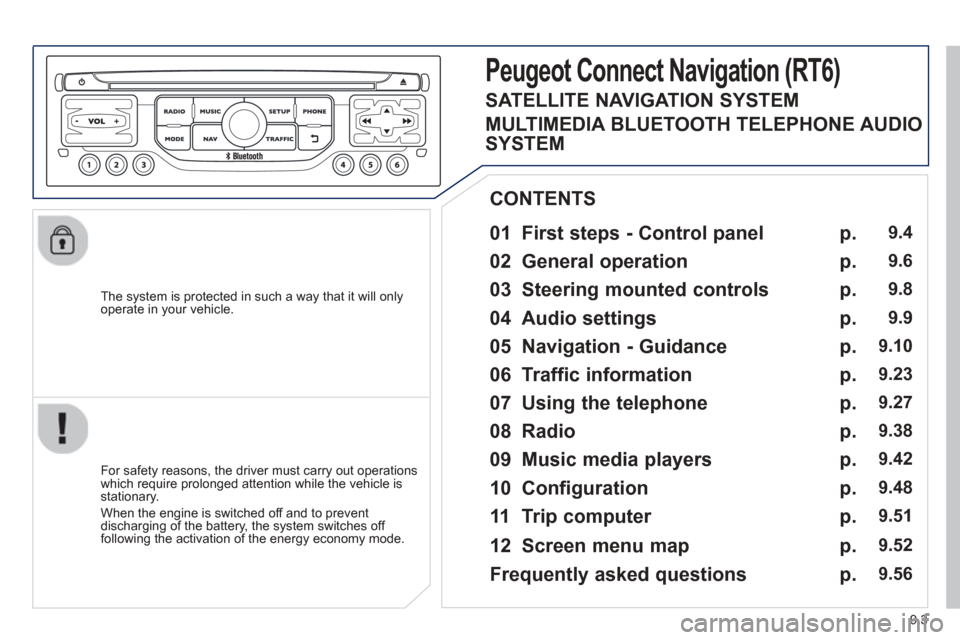
01 First steps - Control panel
For safety reasons, the driver must carry out operations
which require prolonged attention while the vehicle is stationary.
When the en
gine is switched off and to prevent
discharging of the battery, the system switches off following the activation of the energy economy mode.
CONTENTS
02 General o
peration
03 Steerin
g mounted controls
04 Audio settin
gs
05 Navi
gation - Guidance
06 Traffic information
07 Usin
g the telephone
0
8 Radio
09 Music media pla
yers
10 Confi
guration
11 Tr i
p computer
p.
p.
p.
p.
p.
p.
p.
p.
p.
p.
p.
9.4
9.6
9.8
9.9
9.10
9.23
9.27
9.
38
9.42
9.48
9.51
Peugeot Connect Navigation (RT6)
12 Screen menu map p. 9.52
Frequently asked questions p. 9.56
SATELLITE NAVIGATION SYSTEM
MULTIMEDIA BLUETOOTH TELEPHONE AUDIO
SYSTEM
Page 146 of 236
9.4
01 FIRST STEPS
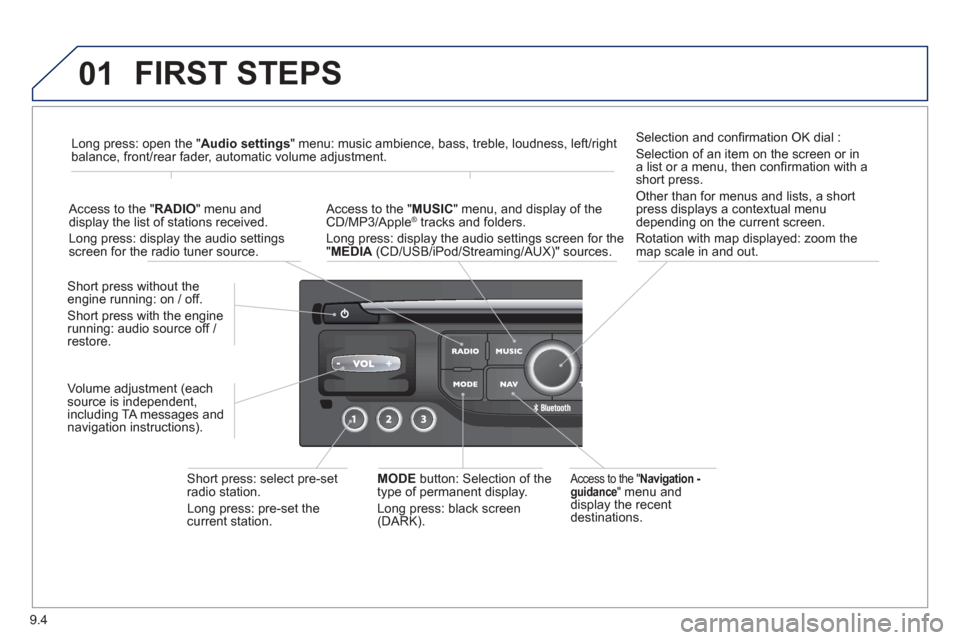
Access to the "Navigation -
guidance " menu and
display the recentdestinations.
Short
press without the engine running: on / off.
Short press with the engine
running: audio source off /
restore.
Short press: select pre-setradio station.
Lon
g press: pre-set the current station. MODE button:
Selection of the
type of permanent display.
Lon
g press: black screen(DARK).
A
ccess to the " MUSIC" menu, and display of the CD/MP3/Apple® tracks and folders. ®
Long press: display the audio settings screen for the"MEDIA (CD/USB/iPod/Streaming/AUX)" sources.
Long press: open the "Audio settings" menu: music ambience, bass, treble, loudness, left/right
balance, front/rear fader, automatic volume adjustment.
A
ccess to the " RADIO " menu anddisplay the list of stations received.
Lon
g press: display the audio settingsscreen for the radio tuner source.
Selection and con fi rmation OK dial :
Selection of an item on the screen or in a list or a menu, then confi rmation with a short press.
Other than for menus and lists, a short
press displays a contextual menu
depending on the current screen.
Rotation with map displa
yed: zoom the
map scale in and out.
Volume ad
justment (each
source is independent,
includin
g TA messages and
navigation instructions).
Page 147 of 236
9.5
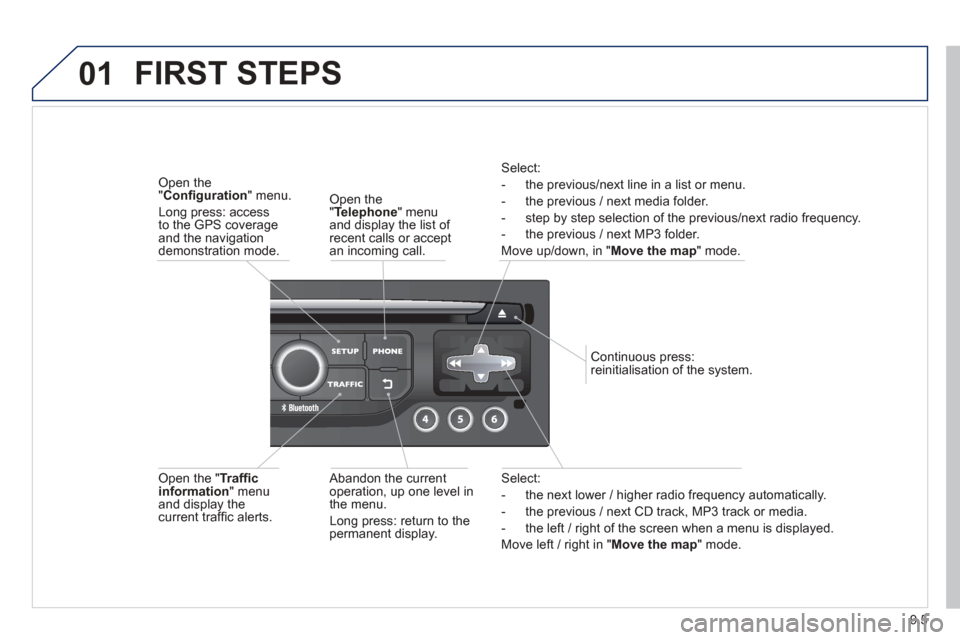
01
Select:
- the next lower / hi
gher radio frequency automatically.
- the previous
/ next CD track, MP3 track or media.
- the le
ft / right of the screen when a menu is displayed.
Move le
ft / right in "Move the map
" mode.
Abandon the current
operation, up one level in
t
he menu.
Long press: return to thepermanent display. Continuous
press:
reinitialisation of the system.
Open the" Telephone" menu
and display the list of recent calls or accept
an incoming call.
Open the "Confi guration " menu.
Long press: access
to the GPS coverageand the navigation demonstration mode.
Open the "Traffi c information " menuand display thecurrent traffi c alerts.
Select:
- the previous
/next line in a list or menu.
- the previous
/ next media folder.
- step b
y step selection of the previous/next radio frequency.
- the previous / next MP3 folder.
Move up/down, in "
Move the map " mode.
FIRST STEPS
Page 148 of 236
9.6
02
For a detailed global view of the menus available, refer to the
"Screen menu map" section.
For cleaning the screen, the use of a soft, non-abrasive cloth (spectacles cloth) is recommended, with no additional product.
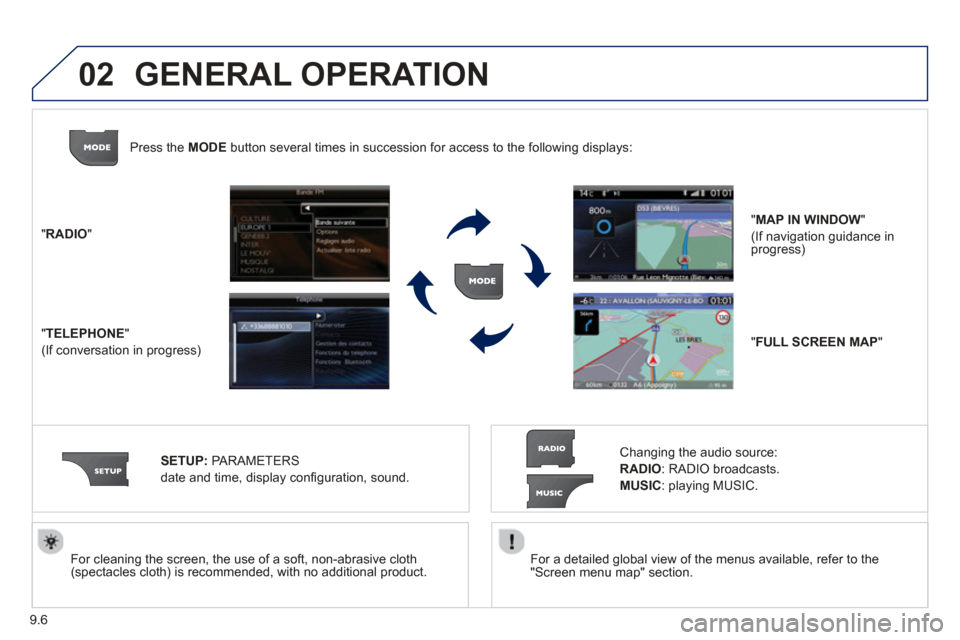
"RADIO "
"
TELEPHONE"
(If conversation in progress)
SETUP
: PARAMETERS
date and time, display con
fi guration, sound.
Changing the audio source:
RADIO: RADIO broadcasts.
MUSIC: playing MUSIC.
Pr
ess the MODE button several times in succession for access to the following displays:
GENERAL OPERATION
"FULL SCREEN MAP"
"MAP IN WINDOW"
(If navigation guidance in progress)
Page 152 of 236
9.10
05
""""""""""""ggggggggggNavigation guidanceNavigation guidanceNavigation guidanceNavigation guidanceNavigation guidanceNavigation - guidanceNavigation - guidanceNavigation - guidanceNavigation - guidanceNavigation guidanceNavigation guidanceNavigation guidanceNavigation guidanceN i ti idN i ti idN i ti idN i ti idN i ti idN i ti idN i ti idN i ti idN i ti idNi i id""""""""""""
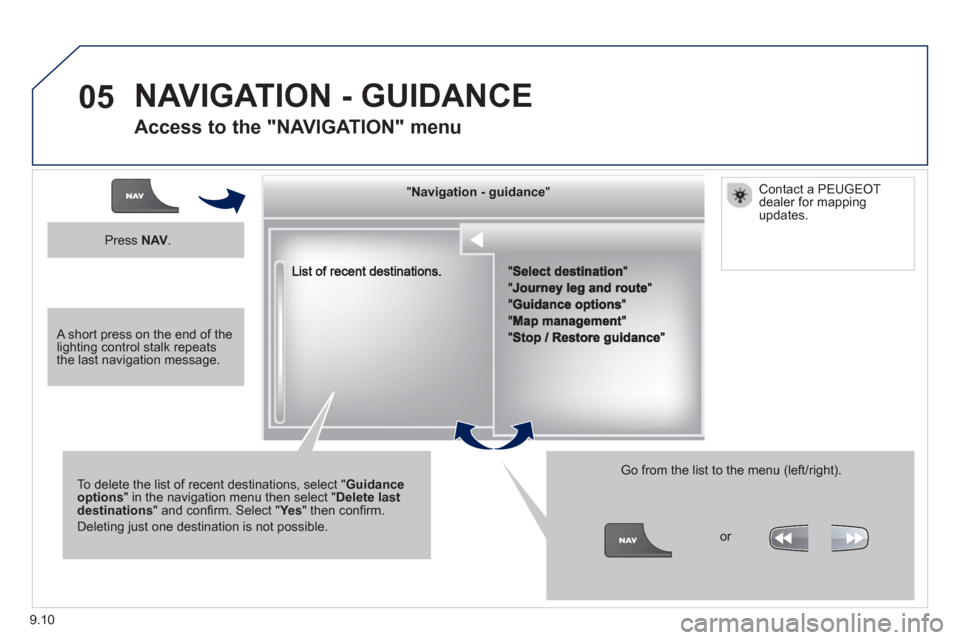
To delete the list of recent destinations, select "Guidance options" in the navigation menu then select "Delete last destinations" and confi rm. Select "Ye s" then confi rm.
Deleting just one destination is not possible.
Go from the list to the menu (left/right).
NAVIGATION - GUIDANCE
Access to the "NAVIGATION" menu
Press NAV.
or
Contact a PEUGEOT
dealer for mappingupdates.
A short press on the end of thelighting control stalk repeats the last navigation message.
Page 153 of 236
9.11
05
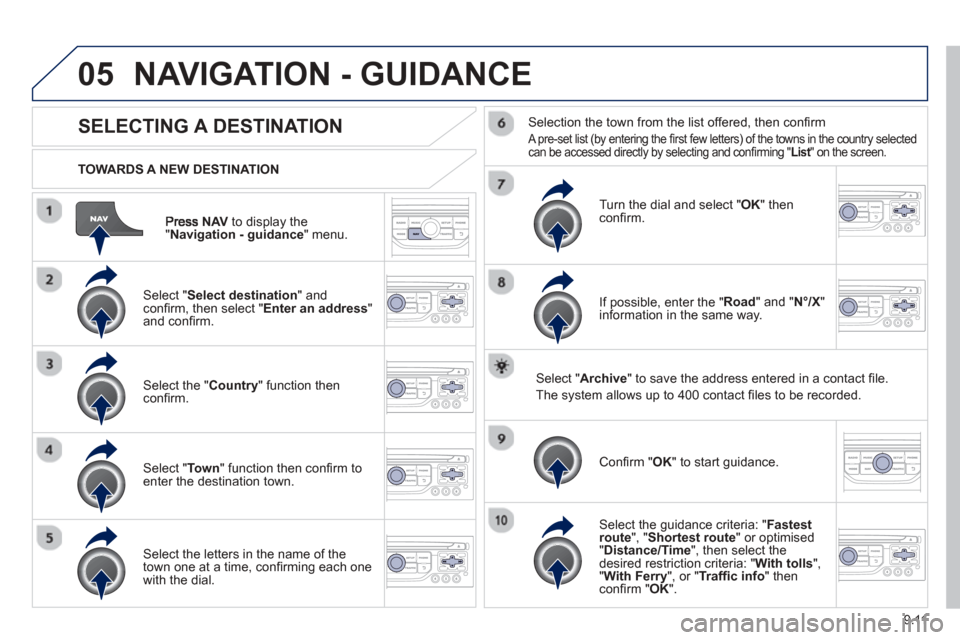
NAVto display the"Navigation - guidance " menu.
TOWARDS A NEW DESTINATION
NAVIGATION - GUIDANCE
SELECTING A DESTINATION
Select "Select destination " and confi
rm, then select " Enter an address"and confi rm.
Select the " Country " function then confi rm.
Select "Town " function then confi rm to enter the destination town.
Select the letters in the name of the
town one at a time, confi rming each one
with the dial.
Selection the town from the list offered, then confi rm
A pre-set list (by entering the fi rst few letters) of the towns in the country selectedcan be accessed directly by selecting and confi rming " List" on the screen. t
Turn the dial and select "OK" thenconfi rm.
If possible, enter the "
Road " and "N°/X"
information in the same way.
Select "Archive
" to save the address entered in a contact fi le.
The s
ystem allows up to 400 contact fi les to be recorded.
Confi rm " OK " to start guidance.
Select the guidance criteria: "Fastest
route", " Shortest route" or optimised "Distance/Time ", then select thedesired restriction criteria: "With tolls ","With Ferry", or "Traffi c info " thenconfi rm "OK".
Page 154 of 236
9.12
05
SELECTING A DESTINATION
NAVIGATION - GUIDANCE
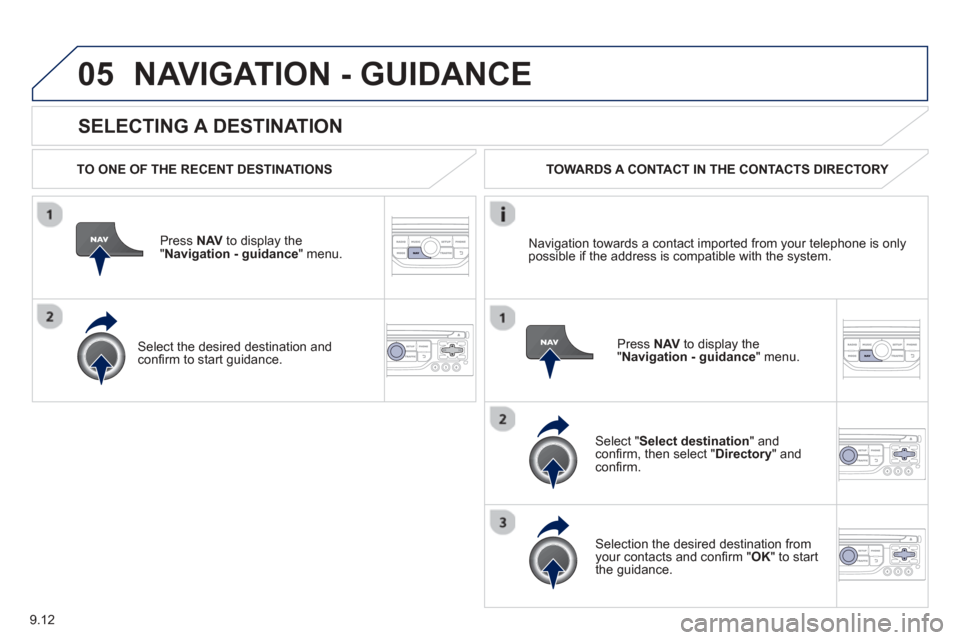
TO ONE OF THE RECENT DESTINATIONS
Press NAV to display the"Navigation - guidance" menu.
Select the desired destination and confi rm to start guidance. TOWARDS A CONTACT IN THE CONTACTS DIRECTORY
Select " Select destination" andconfi rm, then select " Directory " and confi rm.
Selection the desired destination from your contacts and con fi rm " OK " to start
the guidance.
Pr
ess
NAV to display the"Navigation - guidance
" menu.
Navi
gation towards a contact imported from your telephone is only
possible if the address is compatible with the system.
Page 155 of 236
9.13
05
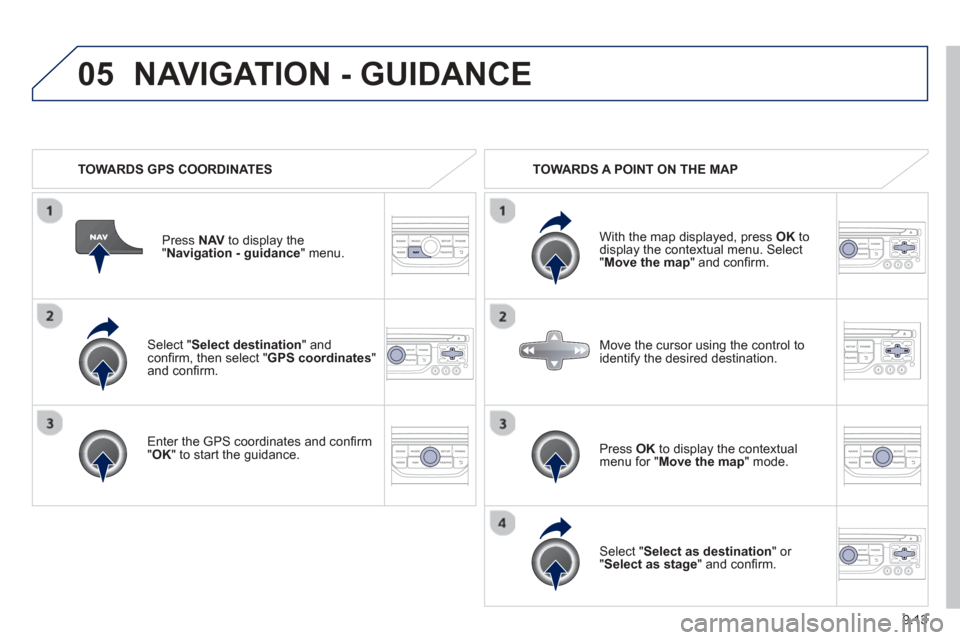
Select "Select destination" andconfi rm, then select " GPS coordinates " and confi rm.
Enter the
GPS coordinates and con fi rm "OK " to start the guidance.
Pr
ess
NAV to display the
"Navigation - guidance" menu.
NAVIGATION - GUIDANCE
TOWARDS GPS COORDINATES TOWARDS A POINT ON THE MAP
With the map displa
yed, press OKto
display the contextual menu. Select"Move the map " and confi rm.
Pr
ess OK to display the contextual
menu for " Move the map
" mode.
Select " Select as destination " or "Select as stage" and confi rm.
Move the cursor usin
g the control to
identify the desired destination.