instrument panel PEUGEOT PARTNER 2014 User Guide
[x] Cancel search | Manufacturer: PEUGEOT, Model Year: 2014, Model line: PARTNER, Model: PEUGEOT PARTNER 2014Pages: 244, PDF Size: 10.39 MB
Page 46 of 244
44
Partner-2-VU_en_Chap03_Pret-a-partir_ed02-2014Partner-2-VU_en_Chap03_Pret-a-partir_ed02-2014
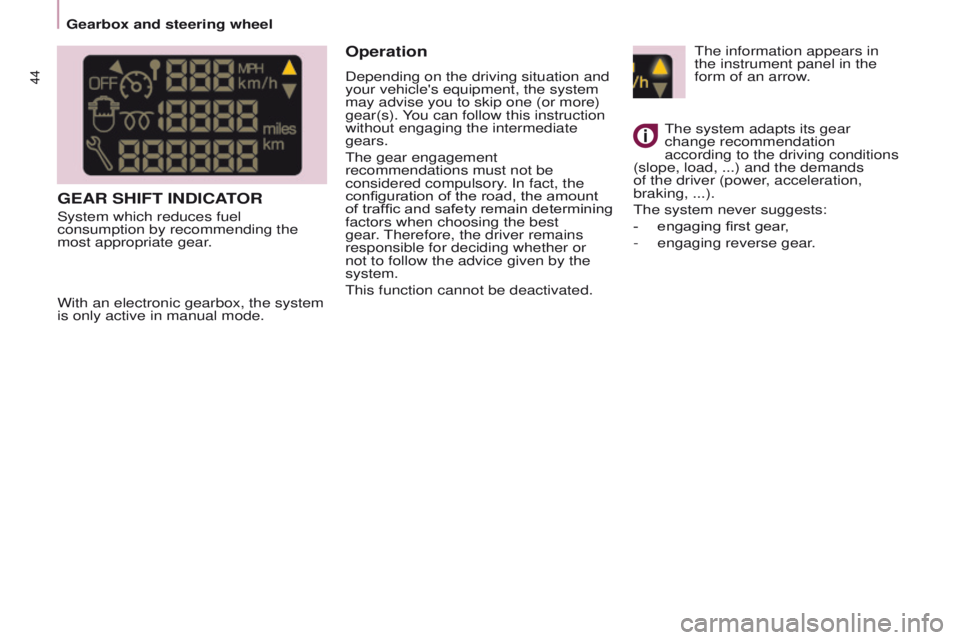
GEAR SHIFT INDICATOR
System which reduces fuel
consumption by recommending the
most appropriate gear.
Operation
Depending on the driving situation and
your vehicle's equipment, the system
may advise you to skip one (or more)
gear(s). You can follow this instruction
without engaging the intermediate
gears.
The gear engagement
recommendations must not be
considered compulsory. In fact, the
configuration of the road, the amount
of traffic and safety remain determining
factors when choosing the best
gear. Therefore, the driver remains
responsible for deciding whether or
not to follow the advice given by the
system.
This function cannot be deactivated.
With an electronic gearbox, the system
is only active in manual mode. The system adapts its gear
change recommendation
according to the driving conditions
(slope, load,
...) and the demands
of the driver (power, acceleration,
braking,
...).
The system never suggests:
-
engaging first gear
,
-
engaging reverse gear
.
The information appears in
the instrument panel in the
form of an arrow.
Gearbox and steering wheel
Page 47 of 244
45
Partner-2-VU_en_Chap03_Pret-a-partir_ed02-2014
Moving off
- To start the engine, the gear selector must be in position N.
-
Press firmly on the brake pedal.
-
Operate the starter
.
-
When the engine is running, place
the gear selector on
R, A or M as
desired.
-
Release the brake pedal and
accelerate.
If the gear selector is not in position N,
and/or if the brake pedal is not pressed,
the engine will not start. Repeat the
above procedure.
Reverse gear Engaging reverse gear
Move the gear selector to R.
Only attempt to select reverse gear
when the vehicle is stationary.
Neutral Changing to neutral
Move the gear selector to N. If the
vehicle is moving, do not select this
position even momentarily.
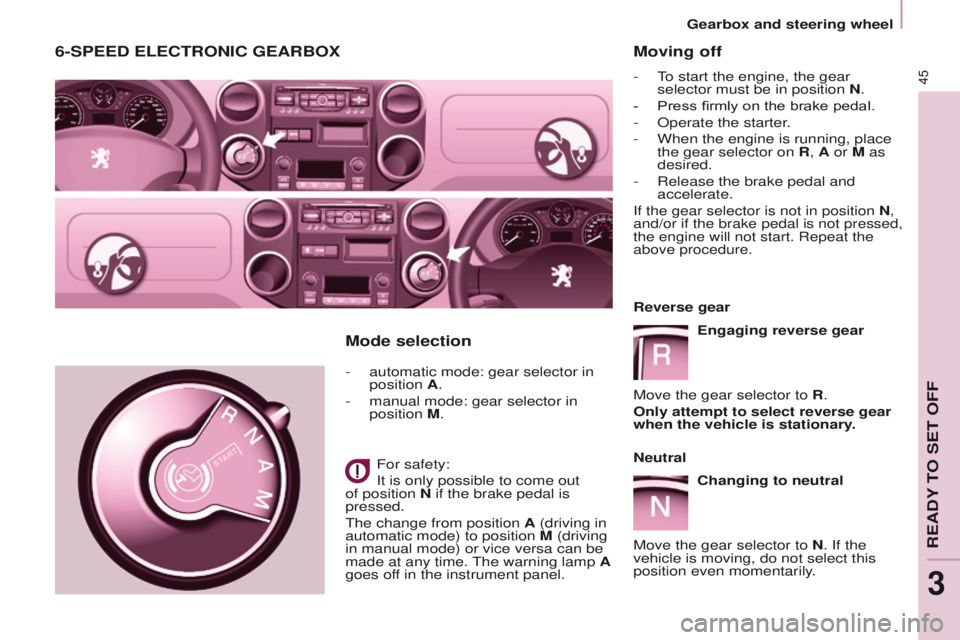
6-SPEED ELECTRONIC GEARBOX
- automatic mode: gear selector in
position A.
-
manual mode: gear selector in
position
M.
For safety:
It is only possible to come out
of position N if the brake pedal is
pressed.
The change from position A (driving in
automatic mode) to position M (driving
in manual mode) or vice versa can be
made at any time. The warning lamp A
goes off in the instrument panel.
Mode selection
READY TO SET OFF
3
Gearbox and steering wheel
Page 48 of 244
46
Partner-2-VU_en_Chap03_Pret-a-partir_ed02-2014Partner-2-VU_en_Chap03_Pret-a-partir_ed02-2014
Manual modeChanging to manual mode
Move the gear selector to M.
Automatic mode
Changing to automatic
mode
Move the gear selector to A.
The gearbox then operates in
automatic mode, without any action on
your part.
It constantly selects the gear that is
best suited to the following conditions:
-
driving style,
-
road profile,
-
optimum fuel consumption.
Vehicle stationary, with
the
engine running
In the event of a prolonged stop with
the engine running, the gearbox
changes automatically to neutral N.
Stopping the vehicle
Before stopping the engine, put the
gear selector in position N.
In all cases, it is essential to apply
the parking brake. Check that the
parking brake warning lamp is on in the
instrument panel.
Before doing anything in the
engine compartment, check that
the gear selector is in neutral N.
Acceleration
For optimum acceleration (e.g. to
overtake another vehicle), simply
press the pedal beyond the point of
resistance at the end of its travel, by
pressing down firmly.
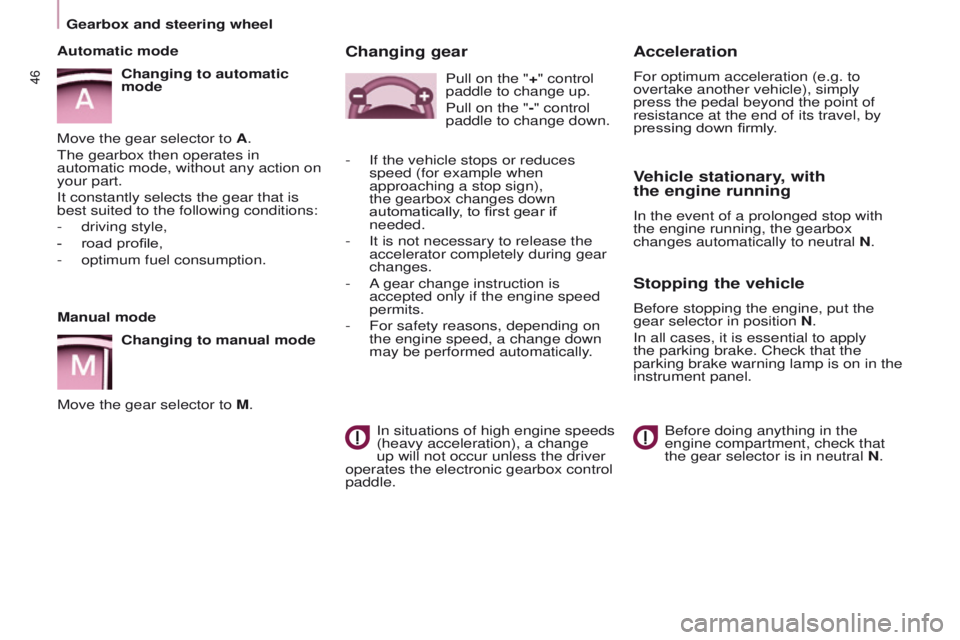
Changing gear
In situations of high engine speeds
(heavy acceleration), a change
up will not occur unless the driver
operates the electronic gearbox control
paddle. Pull on the "+" control
paddle to change up.
Pull on the "-" control
paddle to change down.
-
If the vehicle stops or reduces
speed (for example when
approaching a stop sign),
the gearbox changes down
automatically
, to first gear if
needed.
-
It is not necessary to release the
accelerator completely during gear
changes.
-
A
gear change instruction is
accepted only if the engine speed
permits.
-
For safety reasons, depending on
the engine speed, a change down
may be performed automatically
.
Gearbox and steering wheel
Page 49 of 244
47
Partner-2-VU_en_Chap03_Pret-a-partir_ed02-2014
STOP & START
The Stop & Start system puts the
engine temporarily on standby - ST OP
mode - during stops in the traffic (red
lights, traffic jams, or other...). The
engine restarts automatically - START
mode - as soon as you want to move
off. The restart takes place instantly,
quickly and silently.
Perfect for urban use, the Stop & Start
system reduces fuel consumption and
exhaust emissions as well as the noise
level when stationary.
Operation
Going into engine STOP mode
The "ECO" warning lamp
comes on in the instrument
panel and the engine goes into
standby:
-
with a manual gearbox
, at speeds
below 12 mph (20 km/h), when you
put the gear lever into neutral and
release the clutch pedal,
-
with the 6-speed electronic gear
control gearbox
, at a speed below
5 mph (8 km/h), when you press
the brake pedal or put the gear
lever into position N. If your vehicle is fitted with the system,
a time counter calculates the sum of
the periods in STOP mode during a
journey. It rests itself to zero every time
the ignition is switched on with the key.
With the automatic gearbox
system, for your comfort during
parking manoeuvres, STOP mode
is not available for a few seconds after
coming out of reverse gear.
STOP mode does not affect the
functionality of the vehicle, such as
braking, power steering, for example.
Never refuel with the engine in
STOP mode; you must switch off
the ignition with the key. Special cases: STOP mode
unavailable
STOP mode is not invoked when:
-
the driver's door is open,
-
the driver's seat belt is not
fastened,
-
the vehicle has not exceeded
6
mph (10 km/h) since the last
engine start using the key,
-
the engine is needed to maintain
a comfortable temperature in the
passenger compartment,
-
demisting is on,
-
some special conditions (battery
charge, engine temperature,
braking assistance, ambient
temperature...) where the engine
is needed to assure control of a
system.
In this case, the
"ECO"
warning lamp flashes for a
few seconds, then goes off.
This operation is perfectly normal.
READY TO SET OFF
3
Stop & Start
Page 51 of 244
49
Partner-2-VU_en_Chap03_Pret-a-partir_ed02-2014
Reactivation
Press the "ECO OFF" switch again.
The system is active again; this is
confirmed by the switch warning
lamp going off and a message in the
instrument panel.The system is reactivated
automatically at every new start
using the key.
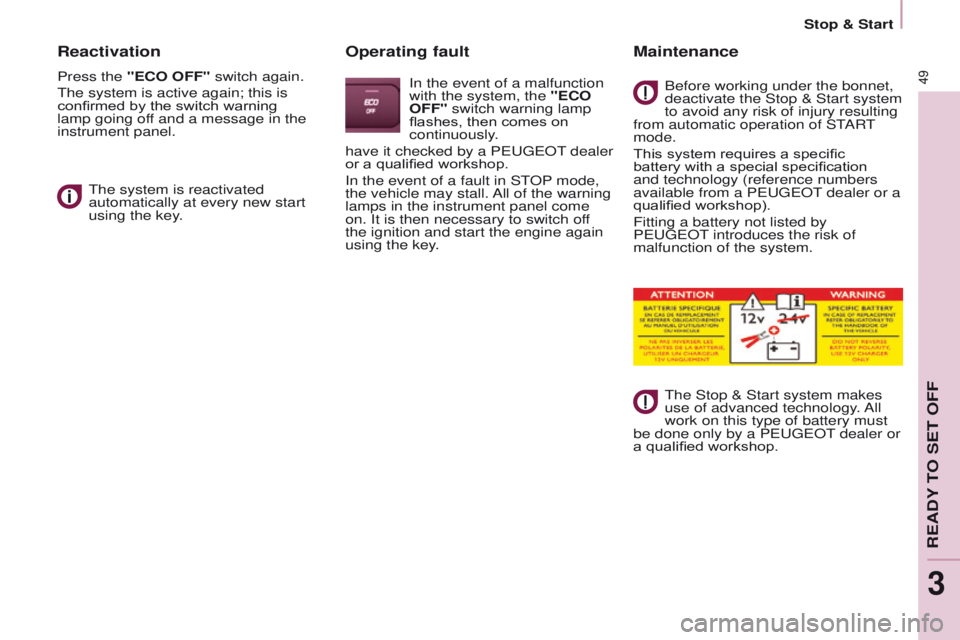
Operating fault
In the event of a malfunction
with the system, the "ECO
OFF" switch warning lamp
flashes, then comes on
continuously.
have it checked by a PEUGEOT dealer
or a qualified workshop.
In the event of a fault in STOP mode,
the vehicle may stall. All of the warning
lamps in the instrument panel come
on. It is then necessary to switch off
the ignition and start the engine again
using the key.
Maintenance
Before working under the bonnet,
deactivate the Stop & Start system
to avoid any risk of injury resulting
from automatic operation of START
mode.
This system requires a specific
battery with a special specification
and technology (reference numbers
available from a PEUGEOT dealer or a
qualified workshop).
Fitting a battery not listed by
PEUGEOT
introduces the risk of
malfunction of the system.
The Stop & Start system makes
use of advanced technology. All
work on this type of battery must
be done only by a PEUGEOT dealer or
a qualified workshop.
READY TO SET OFF
3
Stop & Start
Page 54 of 244
52
Partner-2-VU_en_Chap04_Ergonomie_ed02-2014
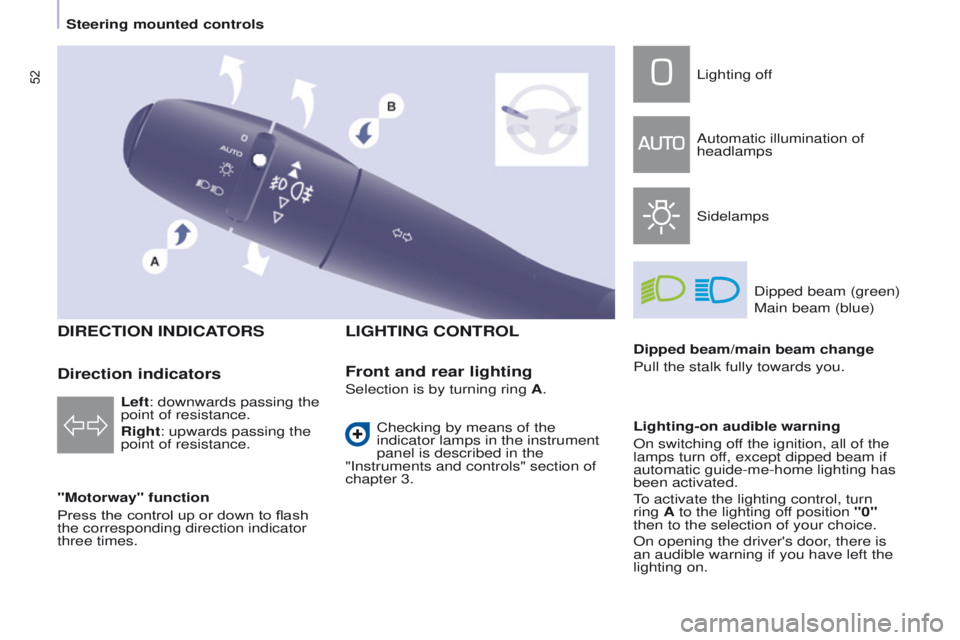
DIRECTION INDICATORS
"Motorway" function
Press the control up or down to flash
the corresponding direction indicator
three times.
LIGHTING CONTROL
Left: downwards passing the
point of resistance.
Right: upwards passing the
point of resistance.
Front and rear lighting
Lighting off
Automatic illumination of
headlamps
SidelampsDipped beam (green)
Main beam (blue)
Dipped beam/main beam change
Pull the stalk fully towards you.
Lighting-on audible warning
On switching off the ignition, all of the
lamps turn off, except dipped beam if
automatic guide-me-home lighting has
been activated.
To activate the lighting control, turn
ring A to the lighting off position "0"
then to the selection of your choice.
On opening the driver's door, there is
an audible warning if you have left the
lighting on.
Checking by means of the
indicator lamps in the instrument
panel is described in the
"Instruments and controls" section of
chapter 3.
Direction indicatorsSelection is by turning ring A.
Steering mounted controls
Page 55 of 244
53
Partner-2-VU_en_Chap04_Ergonomie_ed02-2014
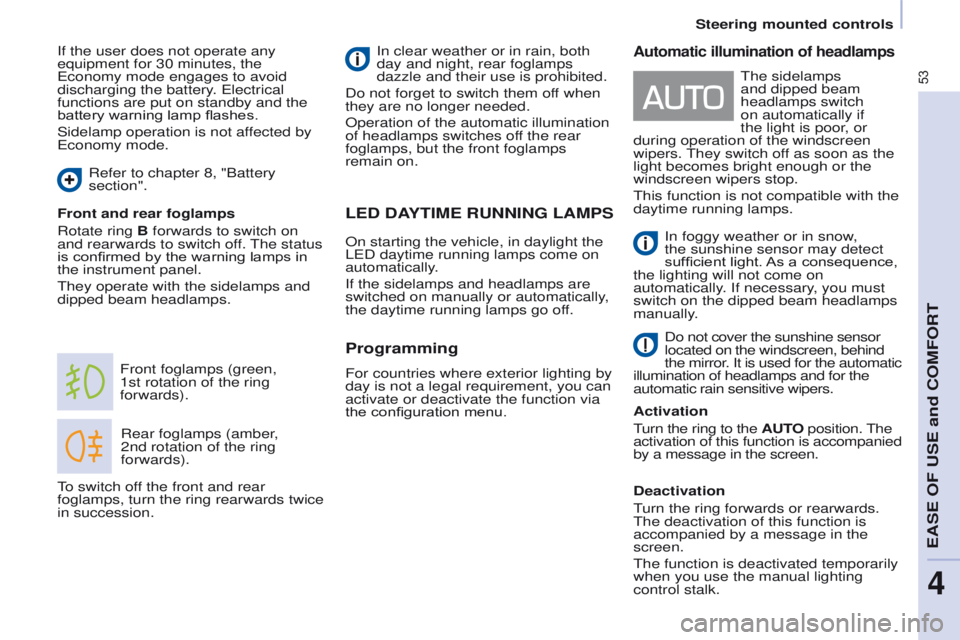
LED DAYTIME RUNNING LAMPS
Rear foglamps (amber,
2nd rotation of the ring
forwards).
Front foglamps (green,
1st
rotation of the ring
forwards).
Front and rear foglamps
Rotate ring B forwards to switch on
and rearwards to switch off. The status
is confirmed by the warning lamps in
the instrument panel.
They operate with the sidelamps and
dipped beam headlamps. In clear weather or in rain, both
day and night, rear foglamps
dazzle and their use is prohibited.
Do not forget to switch them off when
they are no longer needed.
Operation of the automatic illumination
of headlamps switches off the rear
foglamps, but the front foglamps
remain on.
Programming
For countries where exterior lighting by
day is not a legal requirement, you can
activate or deactivate the function via
the configuration menu.
To switch off the front and rear
foglamps, turn the ring rearwards twice
in succession.
Automatic illumination of headlamps
In foggy weather or in snow,
the sunshine sensor may detect
sufficient light. As a consequence,
the lighting will not come on
automatically. If necessary, you must
switch on the dipped beam headlamps
manually.
Do not cover the sunshine sensor
located on the windscreen, behind
the mirror. It is used for the automatic
illumination of headlamps and for the
automatic rain sensitive wipers.
Activation
Turn the ring to the AUTO position. The
activation of this function is accompanied
by a message in the screen.
Deactivation
Turn the ring forwards or rearwards.
The deactivation of this function is
accompanied by a message in the
screen.
The function is deactivated temporarily
when you use the manual lighting
control stalk. The sidelamps
and dipped beam
headlamps switch
on automatically if
the light is poor, or
during operation of the windscreen
wipers. They switch off as soon as the
light becomes bright enough or the
windscreen wipers stop.
This function is not compatible with the
daytime running lamps.
If the user does not operate any
equipment for 30 minutes, the
Economy mode engages to avoid
discharging the battery. Electrical
functions are put on standby and the
battery warning lamp flashes.
Sidelamp operation is not affected by
Economy mode.
On starting the vehicle, in daylight the
LED daytime running lamps come on
automatically.
If the sidelamps and headlamps are
switched on manually or automatically,
the daytime running lamps go off.
Refer to chapter 8, "Battery
section".
Steering mounted controls
EASE OF USE and COMFORT
4
Page 59 of 244
57
Partner-2-VU_en_Chap04_Ergonomie_ed02-2014
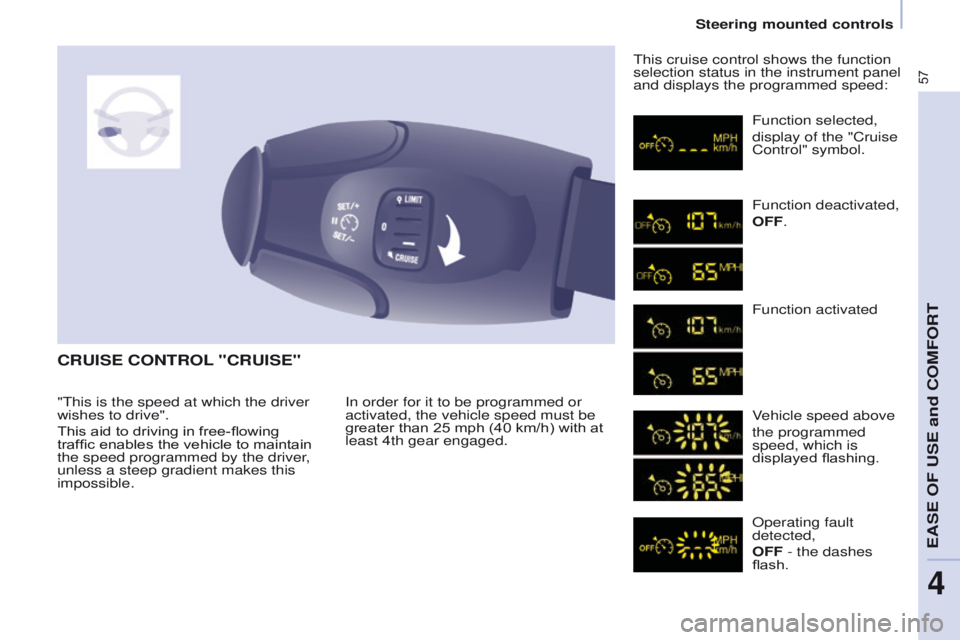
CRUISE CONTROL "CRUISE"
In order for it to be programmed or
activated, the vehicle speed must be
greater than 25 mph (40 km/h) with at
least 4th gear engaged.This cruise control shows the function
selection status in the instrument panel
and displays the programmed speed:
Function selected,
display of the "Cruise
Control" symbol.
Function deactivated,
OFF.
Function activated
Vehicle speed above
the programmed
speed, which is
displayed flashing.
Operating fault
detected,
OFF - the dashes
flash.
"This is the speed at which the driver
wishes to drive".
This aid to driving in free-flowing
traffic enables the vehicle to maintain
the speed programmed by the driver,
unless a steep gradient makes this
impossible.
Steering mounted controls
EASE OF USE and COMFORT
4
Page 62 of 244
60
Partner-2-VU_en_Chap04_Ergonomie_ed02-2014
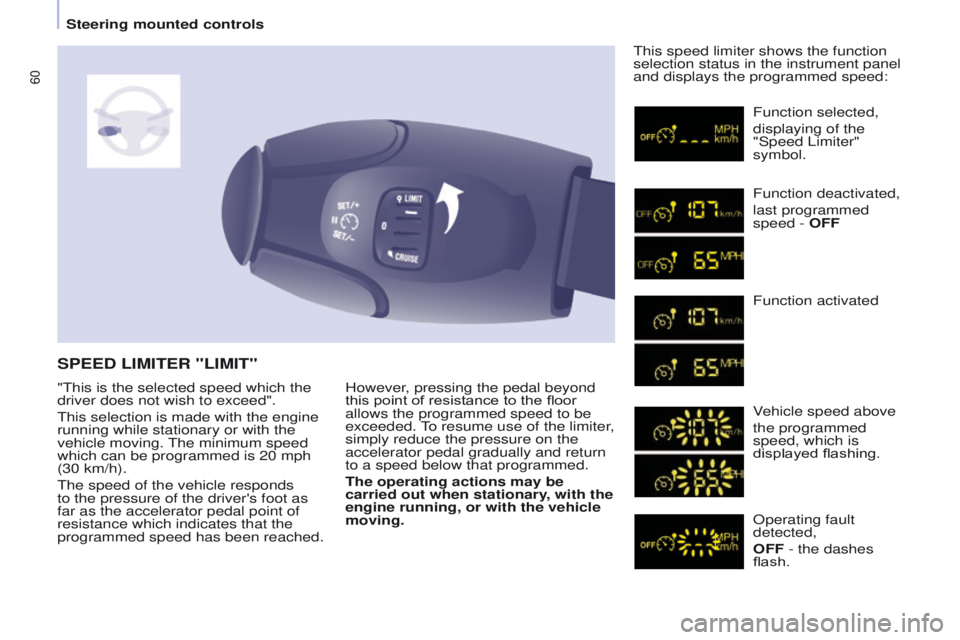
However, pressing the pedal beyond
this point of resistance to the floor
allows the programmed speed to be
exceeded. To resume use of the limiter,
simply reduce the pressure on the
accelerator pedal gradually and return
to a speed below that programmed.
The operating actions may be
carried out when stationary, with the
engine running, or with the vehicle
moving.This speed limiter shows the function
selection status in the instrument panel
and displays the programmed speed:
SPEED LIMITER "LIMIT"
Function selected,
displaying of the
"Speed Limiter"
symbol.
Function deactivated,
last programmed
speed - OFF
Function activated
Vehicle speed above
the programmed
speed, which is
displayed flashing.
Operating fault
detected,
OFF - the dashes
flash.
"This is the selected speed which the
driver does not wish to exceed".
This selection is made with the engine
running while stationary or with the
vehicle moving. The minimum speed
which can be programmed is 20 mph
(30 km/h).
The speed of the vehicle responds
to the pressure of the driver's foot as
far as the accelerator pedal point of
resistance which indicates that the
programmed speed has been reached.
Steering mounted controls
Page 77 of 244
75
Partner-2-VU_en_Chap04_Ergonomie_ed02-2014
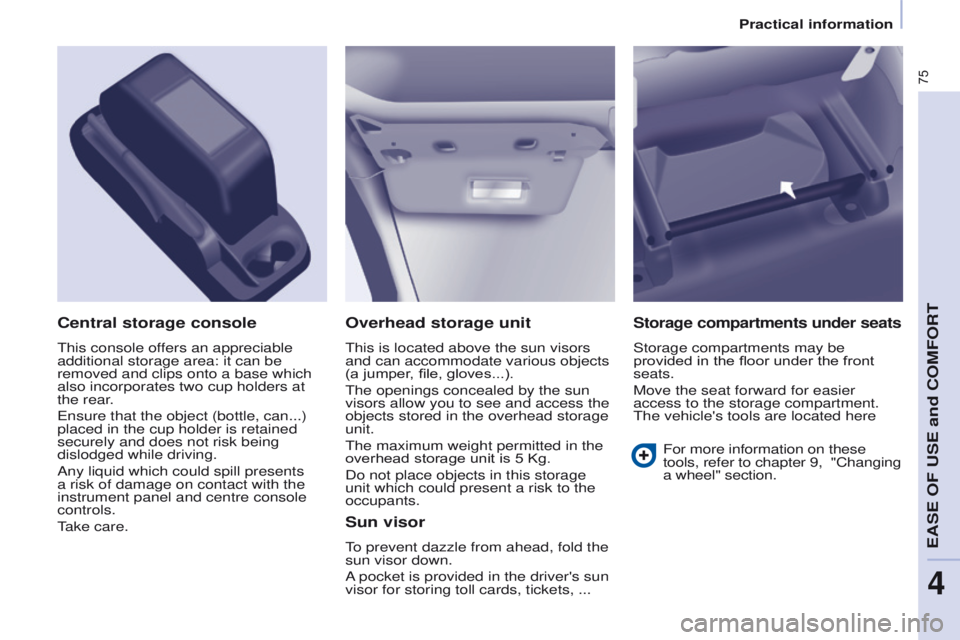
Overhead storage unit
This is located above the sun visors
and can accommodate various objects
(a jumper, file, gloves...).
The openings concealed by the sun
visors allow you to see and access the
objects stored in the overhead storage
unit.
The maximum weight permitted in the
overhead storage unit is 5 Kg.
Do not place objects in this storage
unit which could present a risk to the
occupants.
Central storage console
This console offers an appreciable
additional storage area: it can be
removed and clips onto a base which
also incorporates two cup holders at
the rear.
Ensure that the object (bottle, can...)
placed in the cup holder is retained
securely and does not risk being
dislodged while driving.
Any liquid which could spill presents
a risk of damage on contact with the
instrument panel and centre console
controls.
Take care.
Sun visor
To prevent dazzle from ahead, fold the
sun visor down.
A pocket is provided in the driver's sun
visor for storing toll cards, tickets, ...
Storage compartments under seats
Storage compartments may be
provided in the floor under the front
seats.
Move the seat forward for easier
access to the storage compartment.
The vehicle's tools are located here
For more information on these
tools, refer to chapter
9, "Changing
a wheel" section.
EASE OF USE and COMFORT
4
Practical information