battery Peugeot Partner 2016 Owner's Guide
[x] Cancel search | Manufacturer: PEUGEOT, Model Year: 2016, Model line: Partner, Model: Peugeot Partner 2016Pages: 260, PDF Size: 8.83 MB
Page 151 of 260
149
Partner-2-Vu_en_Chap08_Aide-rapide_ed02-2015
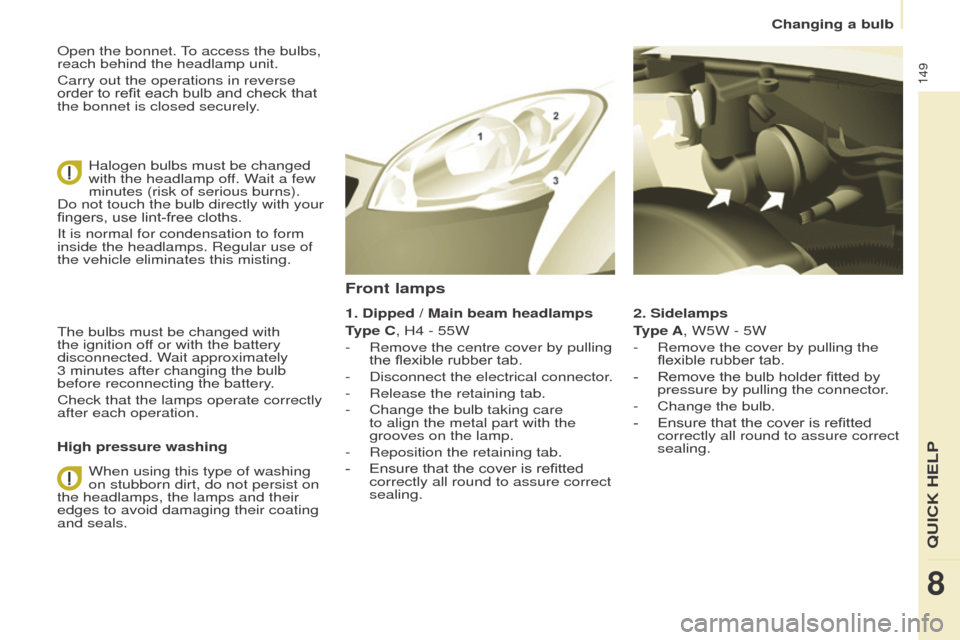
Open the bonnet. To access the bulbs,
reach behind the headlamp unit.
Carry out the operations in reverse
order to refit each bulb and check that
the bonnet is closed securely.Halogen bulbs must be changed
with the headlamp off. Wait a few
minutes (risk of serious burns).
Do not touch the bulb directly with your
fingers, use lint-free cloths.
It is normal for condensation to form
inside the headlamps. Regular use of
the vehicle eliminates this misting.
The bulbs must be changed with
the ignition off or with the battery
disconnected. Wait approximately
3
minutes after changing the bulb
before reconnecting the battery.
Check that the lamps operate correctly
after each operation.
High pressure washing
When using this type of washing
on stubborn dirt, do not persist on
the headlamps, the lamps and their
edges to avoid damaging their coating
and seals. 2. Sidelamps
Type A, W5W - 5W
-
Remove the cover by pullin
g the
flexible rubber tab.
-
Remove the bulb holder fitted by
pressure by pullin
g the connector.
-
Change the bulb.
-
Ensure that the cover is refitted
correctly all round to assure correct
sealing.
Front lamps
1. Dipped / Main beam headlamps
T ype C, H4 - 55W
-
Remove the centre cover by pullin
g
the flexible rubber tab.
-
Disconnect the electrical connector
.
-
Release the retaining tab.
-
Change the bulb taking care
to align the metal part with the
grooves on the lamp.
-
Reposition the retaining tab.
-
Ensure that the cover is refitted
correctly all round to assure correct
sealing.
QUICK HELP
8
Changing a bulb
Page 156 of 260
154
Partner-2-Vu_en_Chap08_Aide-rapide_ed02-2015
CHANGING A FUSE
The fuseboxes are located:
-
in the lower dashboard on the left-
hand side (behind the cover),
-
under the bonnet (near the battery).
If fitted on your vehicle, an additional
fusebox is used for towing, the
towbar and the connections for
the coachbuilder and platform cab
modifications. It is located on the right
behind the load retaining partition.
The indications communicated
are only those fuses which can be
changed by the user using the tweezer
,
located behind the dashboard storage
compartment on the right-hand side.
For any other work, visit a PEUGEOT
dealer or a qualified workshop.
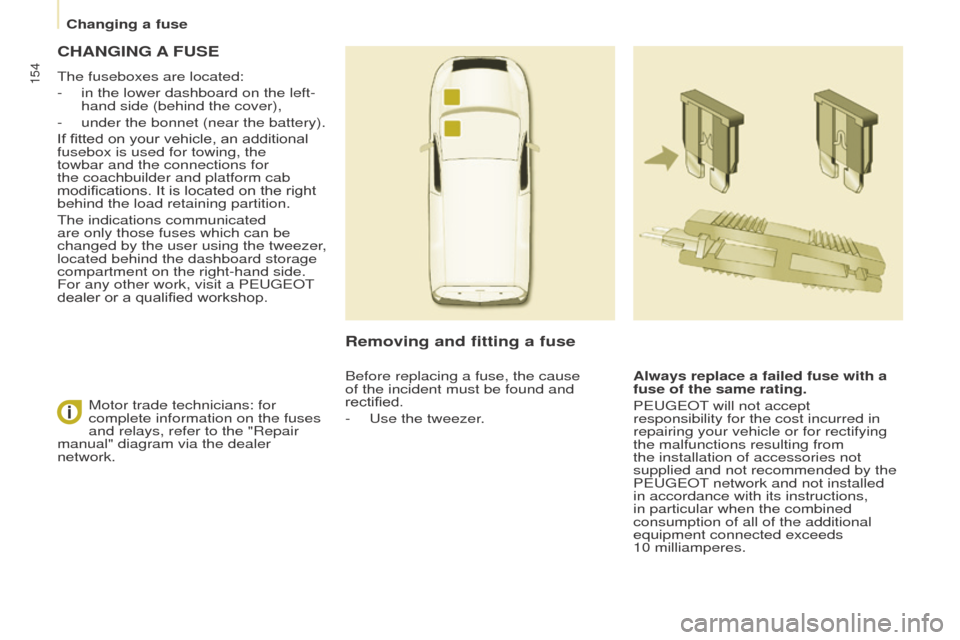
Removing and fitting a fuse
Always replace a failed fuse with a
fuse of the same rating.
PEUGEOT will not accept
responsibility for the cost incurred in
repairing your vehicle or for rectifying
the malfunctions resulting from
the installation of accessories not
supplied and not recommended by the
PEUGEOT network and not installed
in accordance with its instructions,
in particular when the combined
consumption of all of the additional
equipment connected exceeds
10
milliamperes.
Motor trade technicians: for
complete information on the fuses
and relays, refer to the "Repair
manual" diagram via the dealer
network. Before replacing a fuse, the cause
of the incident must be found and
rectified.
-
Use the tweezer
.
Changing a fuse
Page 237 of 260
235
Partner-2-Vu_en_Chap10a_SMEGplus_ed02-2015
QUESTIONANSWER SOLUTION
There is a difference in
sound quality between the
different audio sources. For optimum sound quality, the audio settings for Volume, Bass,
Treble, Equalizer and Loudness can be adapted to the different
sound sources, which may result in audible differences when
changing source. Check that the audio settings for (Volume, Bass,
Treble, Equalizer, Loudness) are adapted to the
sources listened to. It is advisable to set the
audio functions (Bass, Treble, Fr-Re balance,
Le-Ri balance) to the middle position, select the
"Linear", musical ambience and set the loudness
correction to the "Inactive" position in radio
mode.
With the engine off, the
system switches off after a
few minutes of use. When the engine is switched off, the system's operating time
depends on the state of charge of the battery.
The switch-off is normal: the system switches to economy mode
and switches off to prevent discharging of the vehicle's battery. Start the vehicle's engine to increase the battery
charge.
Audio and Telematics
TECHNOLOGY on BOARD
10
Page 239 of 260
Audio and Telematics
237
Partner-2-Vu_en_Chap10b_RD45_ed02-2015
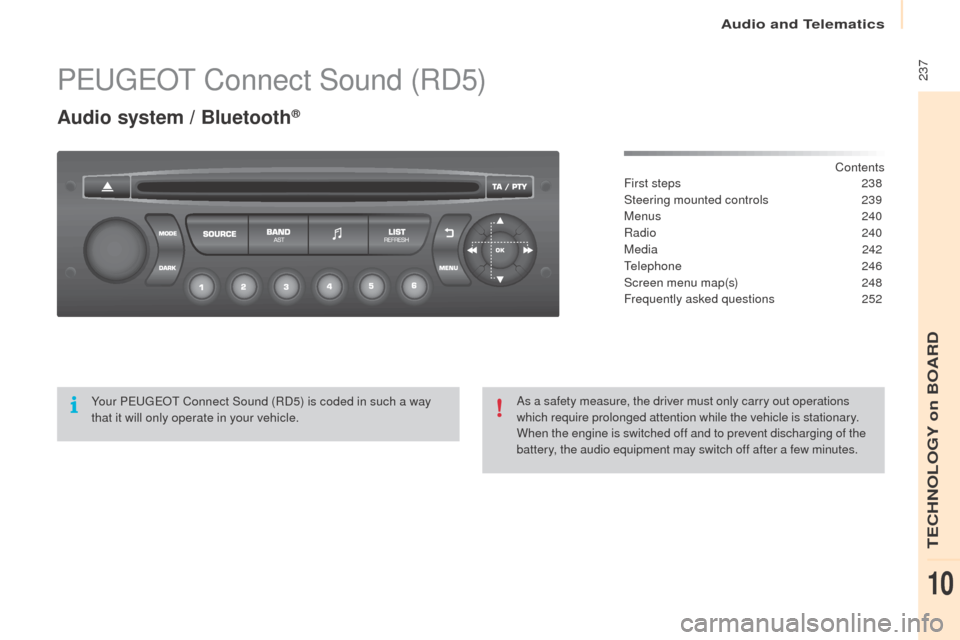
PEUGEOT Connect Sound (RD5)
Audio system / Bluetooth®
Contents
First steps
2 38
Steering mounted controls
23
9
Menus
240
Radio
240
Media
242
Telephone
246
Screen menu map(s)
2
48
Frequently asked questions
2
52
Yo u r P
E
UGEOT
C
onnect Sound (RD5) is coded in such a way
that it will only operate in your vehicle. As a safety measure, the driver must only carry out operations
which require prolonged attention while the vehicle is stationary.
When the engine is switched off and to prevent discharging of the
battery, the audio equipment may switch off after a few minutes.
TECHNOLOGY on BOARD
10
Page 254 of 260
Audio and Telematics
252
Partner-2-Vu_en_Chap10b_RD45_ed02-2015
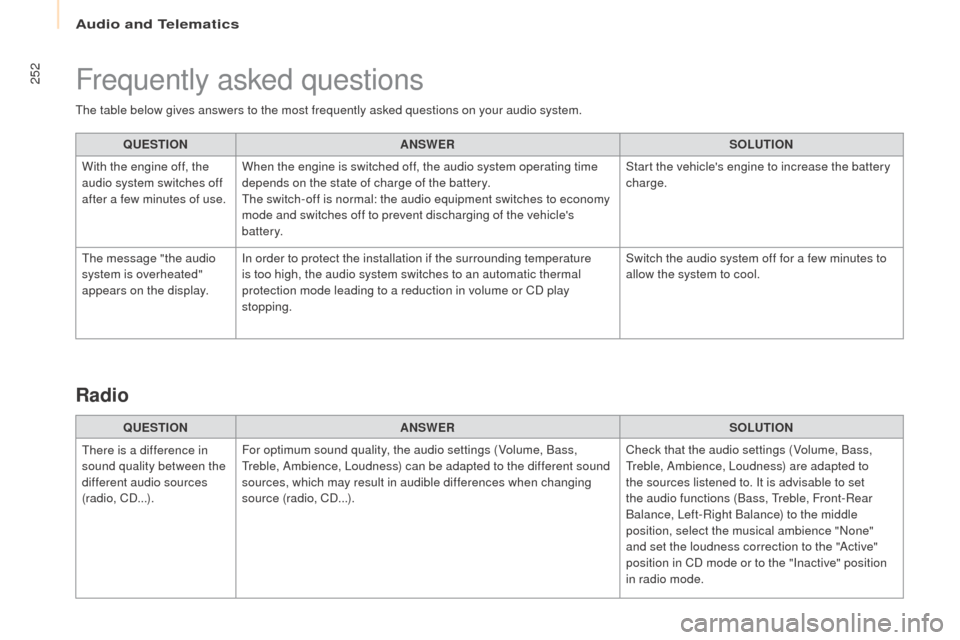
The table below gives answers to the most frequently asked questions on your audio system.QUESTION ANSWER SOLUTION
With the engine off, the
audio system switches off
after a few minutes of use. When the engine is switched off, the audio system operating time
depends on the state of charge of the battery.
The switch-off is normal: the audio equipment switches to economy
mode and switches off to prevent discharging of the vehicle's
battery. Start the vehicle's engine to increase the battery
charge.
The message "the audio
system is overheated"
appears on the display. In order to protect the installation if the surrounding temperature
is too high, the audio system switches to an automatic thermal
protection mode leading to a reduction in volume or CD play
stopping. Switch the audio system off for a few minutes to
allow the system to cool.
Frequently asked questions
QUESTION
ANSWER SOLUTION
There is a difference in
sound quality between the
different audio sources
(radio, CD...). For optimum sound quality, the audio settings (Volume, Bass,
Treble, Ambience, Loudness) can be adapted to the different sound
sources, which may result in audible differences when changing
source (radio, CD...). Check that the audio settings (Volume, Bass,
Treble, Ambience, Loudness) are adapted to
the sources listened to. It is advisable to set
the audio functions (Bass, Treble, Front-Rear
Balance, Left-Right Balance) to the middle
position, select the musical ambience "None"
and set the loudness correction to the "Active"
position in CD mode or to the "Inactive" position
in radio mode.
Radio
Page 256 of 260
Audio and Telematics
254
Partner-2-Vu_en_Chap10b_RD45_ed02-2015
Media
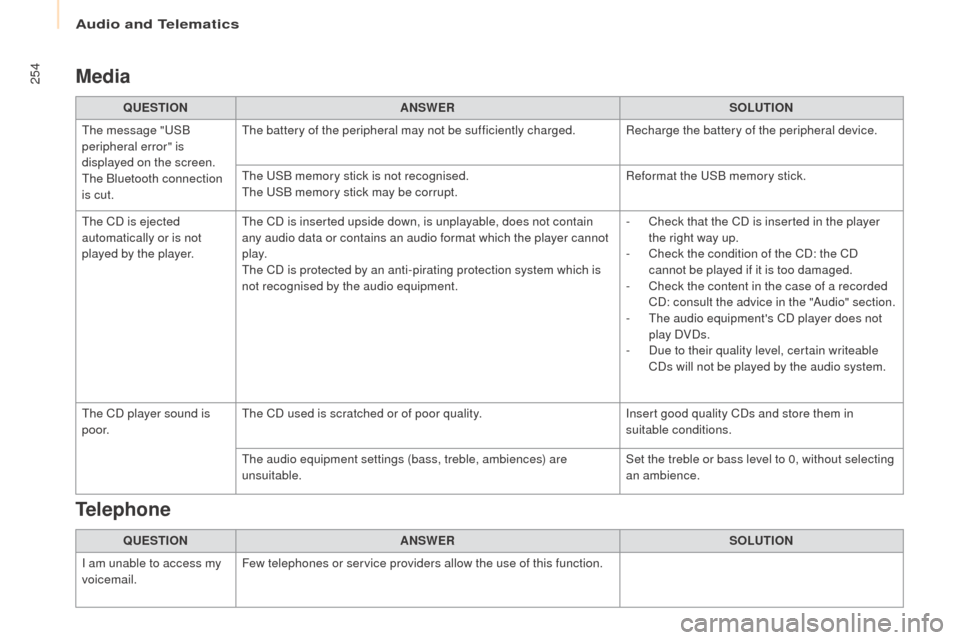
QUESTIONANSWER SOLUTION
The message "USB
peripheral error" is
displayed on the screen.
The Bluetooth connection
is cut. The battery of the peripheral may not be sufficiently charged. Recharge the battery of the peripheral device.
The USB memory stick is not recognised.
The USB memory stick may be corrupt.
Reformat the USB memory stick.
The CD is ejected
automatically or is not
played by the player. The CD is inserted upside down, is unplayable, does not contain
any audio data or contains an audio format which the player cannot
p l ay.
The CD is protected by an anti-pirating protection system which is
not recognised by the audio equipment. -
C
heck that the CD is inserted in the player
the right way up.
-
C
heck the condition of the CD: the CD
cannot be played if it is too damaged.
-
C
heck the content in the case of a recorded
CD: consult the advice in the "Audio" section.
-
T
he audio equipment's CD player does not
play DVDs.
-
D
ue to their quality level, certain writeable
CDs will not be played by the audio system.
The CD player sound is
p o o r. The CD used is scratched or of poor quality.
Insert good quality CDs and store them in
suitable conditions.
The audio equipment settings (bass, treble, ambiences) are
unsuitable. Set the treble or bass level to 0, without selecting
an ambience.
QUESTION ANSWER SOLUTION
I am unable to access my
voicemail. Few telephones or service providers allow the use of this function.
Telephone