radio Peugeot Partner 2016 Owner's Manual
[x] Cancel search | Manufacturer: PEUGEOT, Model Year: 2016, Model line: Partner, Model: Peugeot Partner 2016Pages: 260, PDF Size: 8.83 MB
Page 5 of 260
3
Contents
Partner-2-Vu_en_Chap00a_Sommaire_ed02-2015
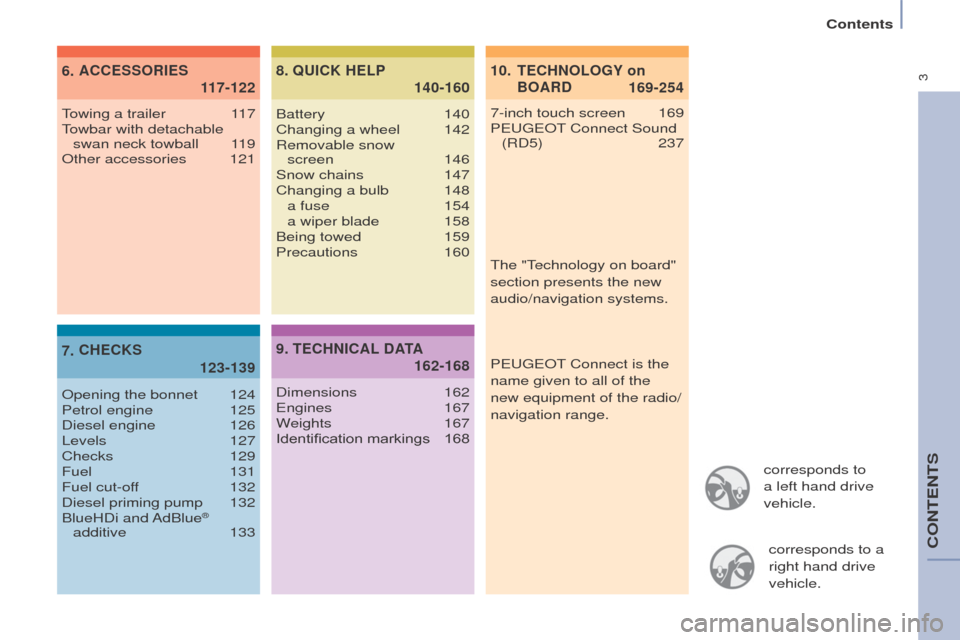
corresponds to
a left hand drive
vehicle.corresponds to a
right hand drive
vehicle.
10.
169-254
TECHNOLOGY
on
BOARD
6.
1
17-122
ACCESSORIES
7.
123-139
CHECKS 8
.
140-160
QUICK HELP
7-inch touch screen 169
P EUGEOT Connect Sound
(RD5)
237
Towing a trailer
1
17
Towbar with detachable swan neck towball
1
19
Other accessories
121
Opening the bonnet
124
Petrol engine
125
Diesel engine
126
Levels
127
Checks
129
Fuel
131
Fuel cut-off
132
Diesel priming pump
132
BlueHDi
and AdBlue
®
additive
133 Battery
140
Changing a wheel
142
Removable snow
screen 146
Snow chains
147
Changing a bulb
148 a fuse
154 a wiper blade
158
Being towed
159
Precautions
160
9.
162-168
TECHNICAL
DATA
Dimensions 162
Engines 167
Weights
167
Identification markings
168The "T
echnology on board"
section presents the new
audio/navigation systems.
P EUGEOT
Connect is the
name given to all of the
new equipment of the radio/
navigation range.
CONTENTS
Page 123 of 260
121
Partner-2-Vu_en_Chap06_Accessoire_ed02-2015
Audio equipment, hands-free kit,
speakers, CD changer, satellite
navigation system, USB Box, video kit, ...
Regardless of the audio and telematic
equipment offered on the market,
the technical constraints associated
with the fitting of equipment of these
families of products mean that the
special features of the equipment and
its compatibility with the capacities of
the your vehicle's standard equipment
must be taken into account. Please
contact a PEUGEOT dealer for
more information before fitting such
equipment. To prevent the mat from becoming
caught under the pedals:
-
ensure that the mat and its fixings
are positioned correctly
,
-
never fit one mat on top of another
.
Maximum weights on bars
-
Roof rack: 120 kg.
-
T
ransverse bars on roof: 100 kg.
-
T
ransverse bars on longitudinal
bars: 75 kg. Installation of radiocommunication
transmitters
Before installing accessory
radiocommunication transmitters with
an external aerial on your vehicle, you
are advised to contact a PEUGEOT
dealer.
A PEUGEOT dealer can inform you
of the specifications (frequency band,
maximum output power, aerial position,
specific installation conditions) of the
transmitters which can be fitted, in
accordance with the Motor Vehicle
Electromagnetic Compatibility
Directive
(2004/104/CE).
Front mud flaps, rear mud flaps,
15/17 inch alloy wheels, wheelarch
trim, leather steering wheel, .... Screenwash, interior and exterior
cleaning and maintenance products,
replacement bulbs, ...
Anti-theft alarm, window etching, first
aid kit, high visibility vest, front and
rear parking sensors, warning triangle,
security bolts for alloy wheels, ... Front seat covers compatible with
airbags, bench, rubber mats, carpet
mats, snow chains, blind, tailgate
bicycle carrier.
Other accessories
These accessories and parts, having been
tested and approved for reliability and
safety, are all adapted to your vehicle. A
wide range of recommended accessories
and genuine parts is available.
Range of trade equipment
The parts department publishes an
accessory catalogue offering various
equipment and fittings, such as:
Load retainers (all models).
Loading roller.
Towbar, towbar harness: trailer towbar
which should preferably be fitted by a
PEUGEOT dealer.
Separation partitions and grilles,
smooth, planed wood protective liner
with non-slip floor.
Protective grilles.
Another range is also available,
structured around comfort, leisure and
maintenance:
ACCESSORIES
6
Equipment
Page 171 of 260
169
Partner-2-Vu_en_Chap10a_SMEGplus_ed02-2015
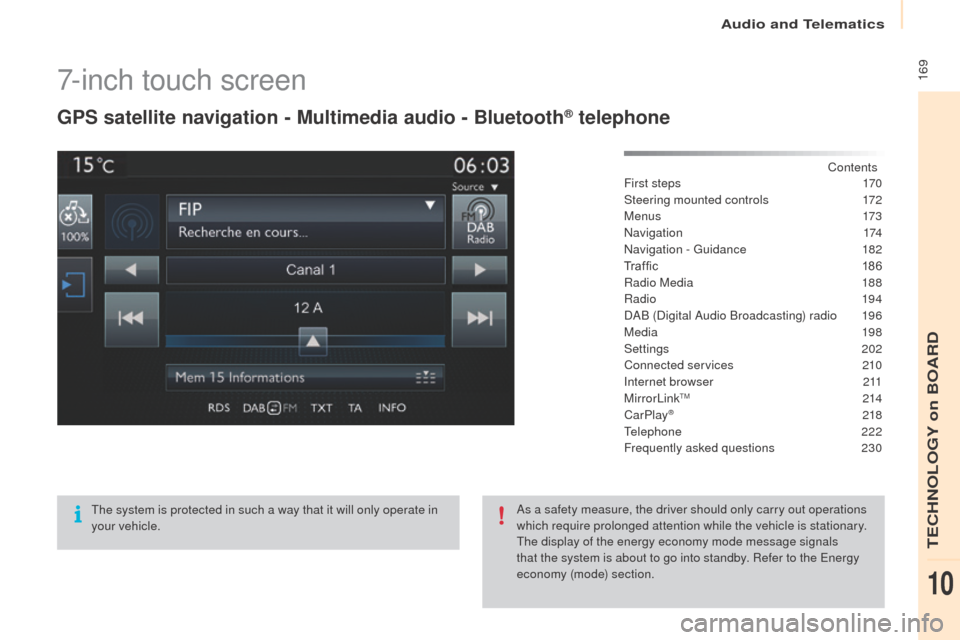
7-inch touch screen
GPS satellite navigation - Multimedia audio - Bluetooth® telephone
Contents
First steps
1 70
Steering mounted controls
1
72
M e n u s
173
Navigation
174
Navigation - Guidance
1
82
Tr a f fi c
1
8 6
Radio Media
1
88
Radio
19 4
DAB (Digital Audio Broadcasting) radio
1
96
Media
19
8
Settings
202
Connected services
2
10
Internet browser
2
11
MirrorLink
TM 2 14
CarPlay® 218
T
elephone
222
Frequently asked questions
23
0
The system is protected in such a way that it will only operate in
your vehicle. As a safety measure, the driver should only carry out operations
which require prolonged attention while the vehicle is stationary.
The display of the energy economy mode message signals
that the system is about to go into standby. Refer to the Energy
economy (mode) section.
Audio and Telematics
TECHNOLOGY on BOARD
10
Page 174 of 260
172
Partner-2-Vu_en_Chap10a_SMEGplus_ed02-2015
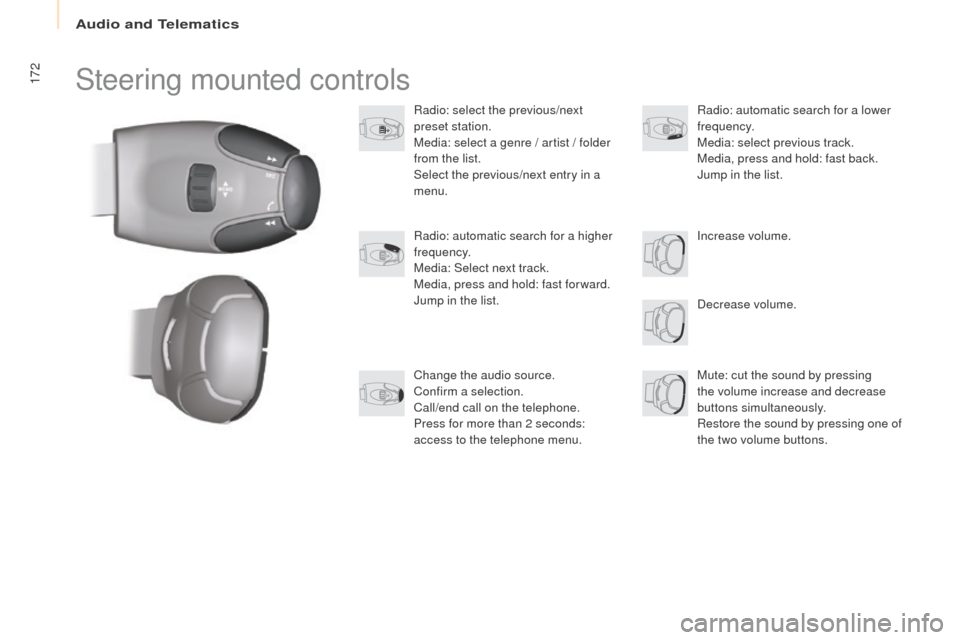
Steering mounted controls
Radio: select the previous/next
preset station.
Media: select a genre / artist / folder
from the list.
Select the previous/next entry in a
menu.Decrease volume.
Radio: automatic search for a higher
frequency.
Media: Select next track.
Media, press and hold: fast for ward.
Jump in the list.
Mute: cut the sound by pressing
the volume increase and decrease
buttons simultaneously.
Restore the sound by pressing one of
the two volume buttons. Radio: automatic search for a lower
frequency.
Media: select previous track.
Media, press and hold: fast back.
Jump in the list.
Change the audio source.
Confirm a selection.
Call/end call on the telephone.
Press for more than 2 seconds:
access to the telephone menu. Increase volume.
Audio and Telematics
Page 175 of 260
173
Partner-2-Vu_en_Chap10a_SMEGplus_ed02-2015
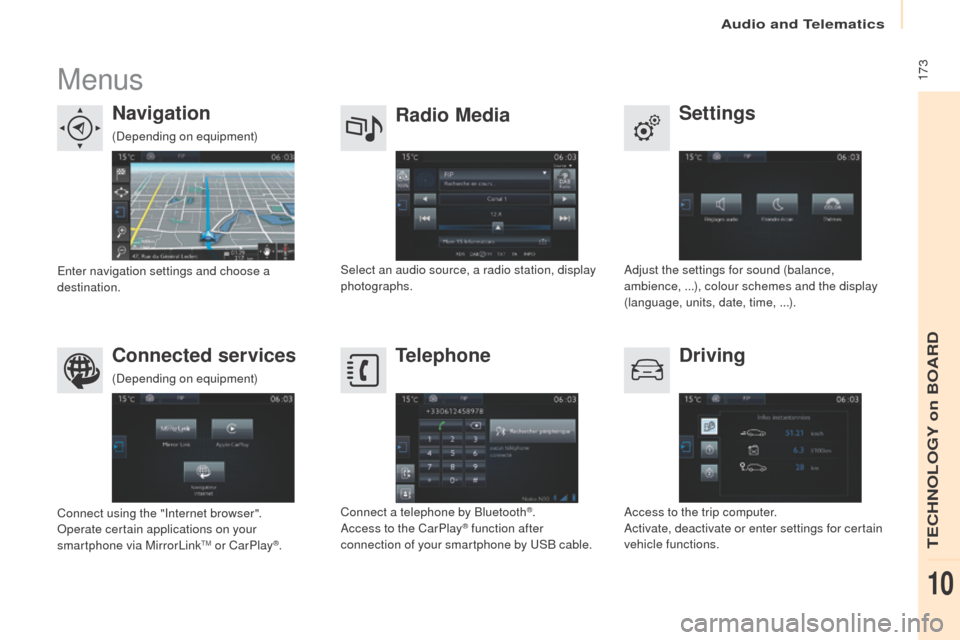
Menus
Settings
Radio Media
Navigation
Driving
Connected services Telephone
Adjust the settings for sound (balance,
ambience,
...), colour schemes and the display
(language, units, date, time,
...).
Select an audio source, a radio station, display
photographs.
Enter navigation settings and choose a
destination.
Access to the trip computer.
Activate, deactivate or enter settings for certain
vehicle functions.
Connect using the "Internet browser".
Operate certain applications on your
smartphone via MirrorLink
TM or CarPlay®. Connect a telephone by Bluetooth
®.
Access to the CarPlay® function after
connection of your smartphone by USB cable.
(Depending on equipment)
(Depending on equipment)
Audio and Telematics
TECHNOLOGY on BOARD
10
Page 189 of 260
187
Partner-2-Vu_en_Chap10a_SMEGplus_ed02-2015
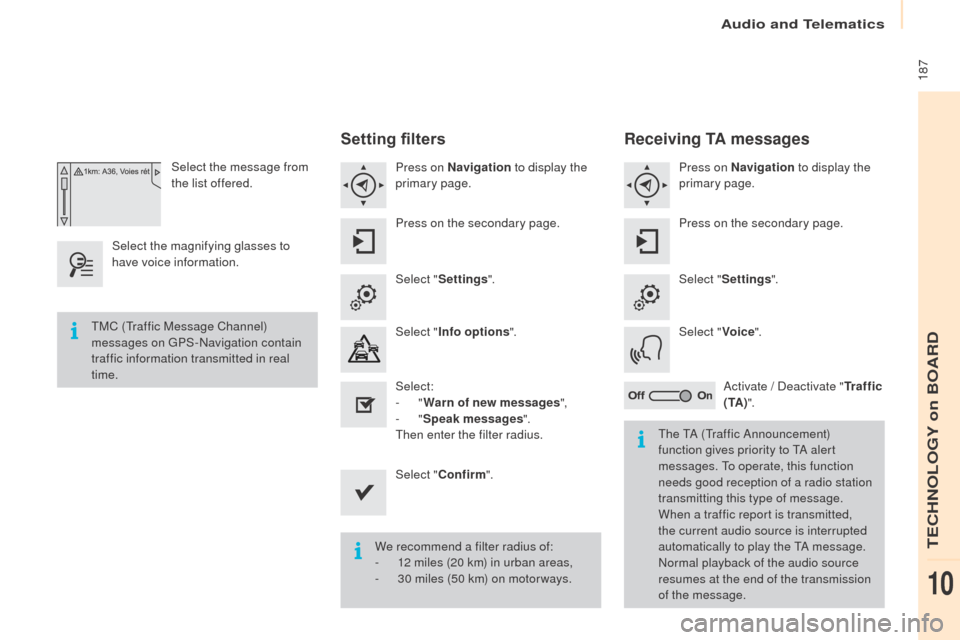
Select the message from
the list offered.
Select the magnifying glasses to
have voice information.
Setting filters
Press on Navigation to display the
primary page.
Press on the secondary page.
Select " Settings ".
Select " Info options ".
Select:
-
"Warn of new messages ",
-
"Speak messages ".
Then enter the filter radius.
Select " Confirm ".
We recommend a filter radius of:
-
1
2 miles (20 km) in urban areas,
-
3
0 miles (50 km) on motor ways.
TMC (Traffic Message Channel)
messages on GPS-Navigation contain
traffic information transmitted in real
time.
The TA (Traffic Announcement)
function gives priority to TA alert
messages. To operate, this function
needs good reception of a radio station
transmitting this type of message.
When a traffic report is transmitted,
the current audio source is interrupted
automatically to play the TA message.
Normal playback of the audio source
resumes at the end of the transmission
of the message.
Receiving TA messages
Press on Navigation to display the
primary page.
Press on the secondary page.
Select " Settings ".
Select " Voice".
Activate / Deactivate " Tr a f f i c
( TA ) ".
Audio and Telematics
TECHNOLOGY on BOARD
10
Page 190 of 260
188
Partner-2-Vu_en_Chap10a_SMEGplus_ed02-2015
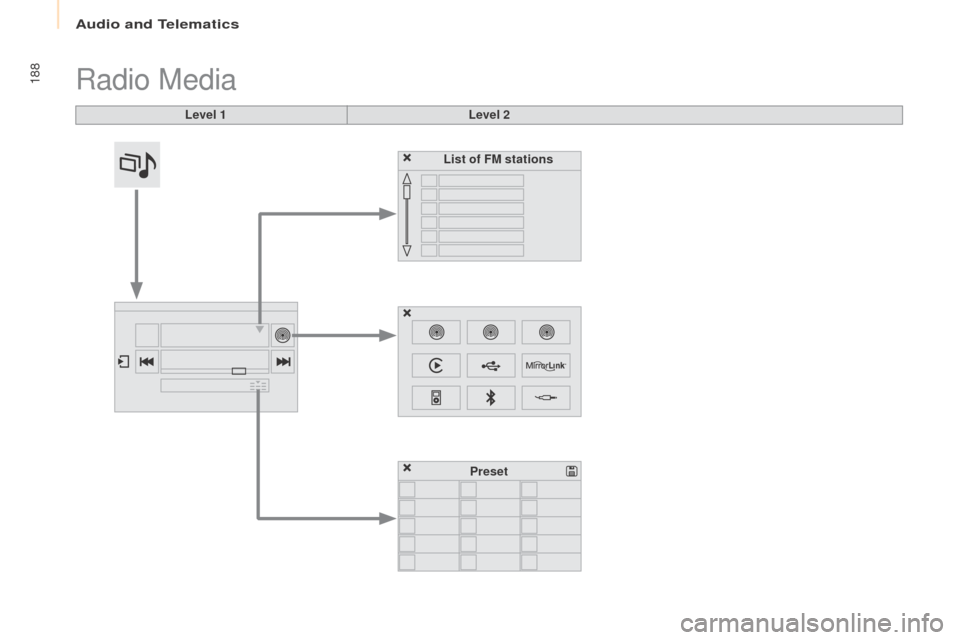
Radio Media
Level 1Level 2
List of FM stations
Preset
Audio and Telematics
Page 191 of 260
189
Partner-2-Vu_en_Chap10a_SMEGplus_ed02-2015
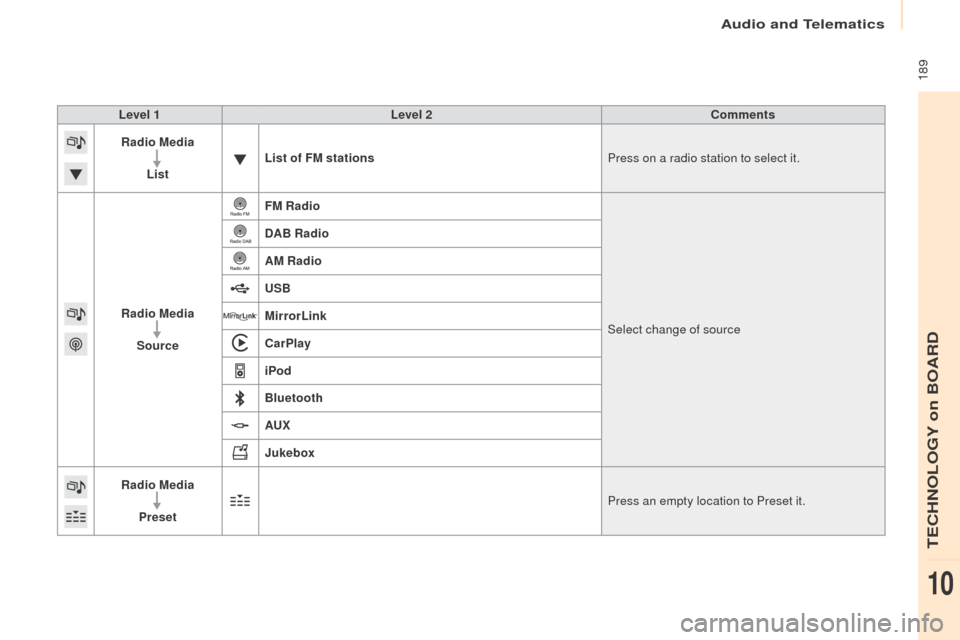
Level 1Level 2 Comments
Radio Media
List List of FM stations
Press on a radio station to select it.
Radio Media Source FM Radio
Select change of source
DAB Radio
AM Radio
USB
MirrorLink
CarPlay
iPod
Bluetooth
AU
x
J
ukebox
Radio Media
Preset Press an empty location to Preset it.
Audio and Telematics
TECHNOLOGY on BOARD
10
Page 193 of 260
191
Partner-2-Vu_en_Chap10a_SMEGplus_ed02-2015
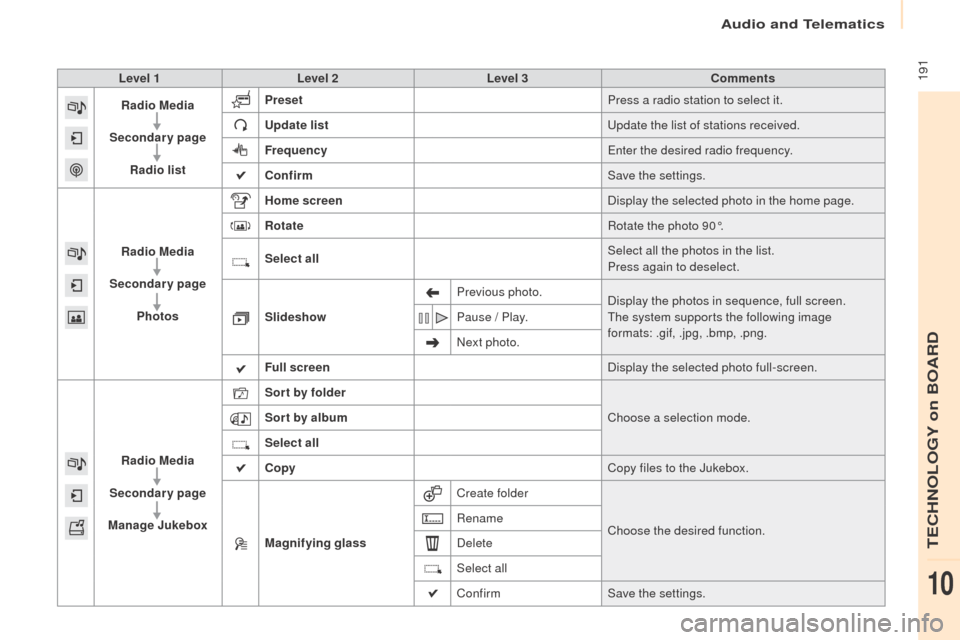
Level 1Level 2 Level 3 Comments
Radio Media
Secondary page Radio list Preset
Press a radio station to select it.
Update list Update the list of stations received.
Frequency Enter the desired radio frequency.
Confirm Save the settings.
Radio Media
Secondary page Photos Home screen
Display the selected photo in the home page.
Rotate Rotate the photo 90°.
Select all Select all the photos in the list.
Press again to deselect.
Slideshow Previous photo.
Display the photos in sequence, full screen.
The system supports the following image
formats: .gif, .jpg, .bmp, .png.
Pause / Play.
Next photo.
Full screen Display the selected photo full-screen.
Radio Media
Secondary page
Manage Jukebox Sor t by folder
Choose a selection mode.
Sor t by album
Select all
Copy Copy files to the Jukebox.
Magnifying glass Create folder
Choose the desired function.
Rename
Delete
Select all
Confirm
Save the settings.
Audio and Telematics
TECHNOLOGY on BOARD
10
Page 195 of 260
193
Partner-2-Vu_en_Chap10a_SMEGplus_ed02-2015
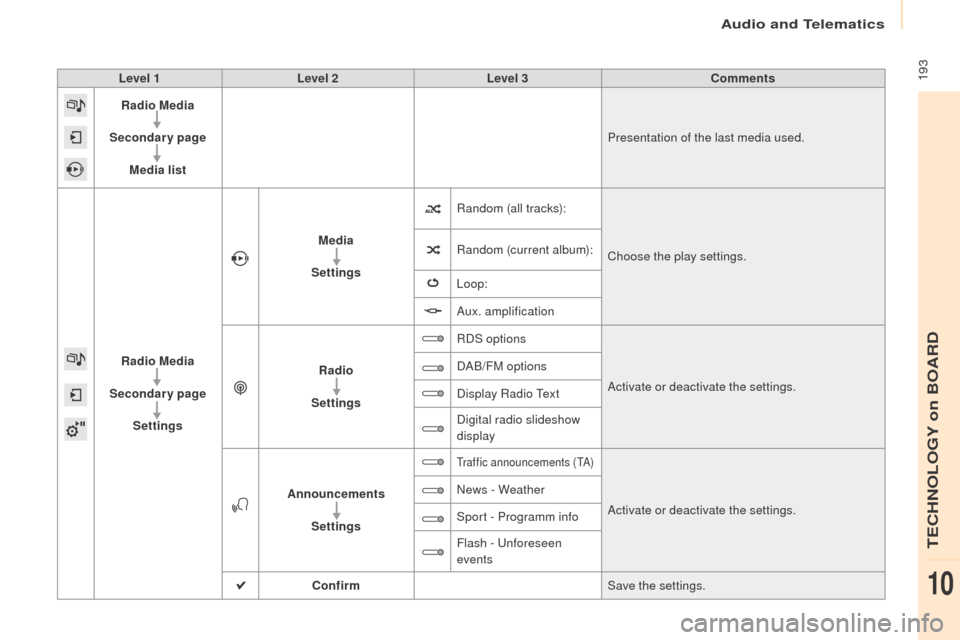
Level 1Level 2 Level 3 Comments
Radio Media
Secondary page Media list Presentation of the last media used.
Radio Media
Secondary page Settings Media
Settings Random (all tracks):
Choose the play settings.
Random (current album):
Loop:
Aux. amplification
Radio
Settings RDS options
Activate or deactivate the settings.
DAB/FM options
Display Radio Text
Digital radio slideshow
display
Announcements Settings
Traffic announcements (TA)
Activate or deactivate the settings.
News - Weather
Sport - Programm info
Flash - Unforeseen
events
Confirm Save the settings.
Audio and Telematics
TECHNOLOGY on BOARD
10