light Peugeot Partner 2017 Owner's Guide
[x] Cancel search | Manufacturer: PEUGEOT, Model Year: 2017, Model line: Partner, Model: Peugeot Partner 2017Pages: 260, PDF Size: 9.05 MB
Page 143 of 260
141
Partner-2-VU_en_Chap07_Verification_ed02-2016
AdBlue®
Keep AdBlue® out of the reach
of children, in its original
container.
Never transfer AdBlue
® to another
container: it would loose its purity.
Never dilute the fluid with water.
Never pour the fluid into the Diesel
fuel tank.
Recommendations on storage
Never store containers or bottles of
AdBlue® in your vehicle.
Freezing of the AdBlue
®
AdBlue® freezes at about -11°C (12.2° F)
and deteriorates above 25°C (77°F).
It is recommended that containers and
bottles be stored in a cool area and
protected from direct sunlight.
Under these conditions, the fluid can
be kept for at least a year
.
Additive that has been frozen can
be used once it has thawed out in
ambient
air. The SCR system includes an
AdBlue
® tank heater that ensures
operation of the vehicle in normal
conditions.
In exceptional situations, such as when
the vehicle is kept at temperatures
below -15°C (5°F) for a long period,
there may be an emission fault alert
related to freezing of the AdBlue
®
additive.
Park the vehicle in an area at a more
moderate temperature for a few hours
until the AdBlue
® becomes a fluid
again.
The emissions warning lamp does not
go off immediately, but does so after a
few miles of driving.
CHECKS
7
Page 146 of 260
144
Partner-2-VU_en_Chap08_Aide-rapide_ed02-2016
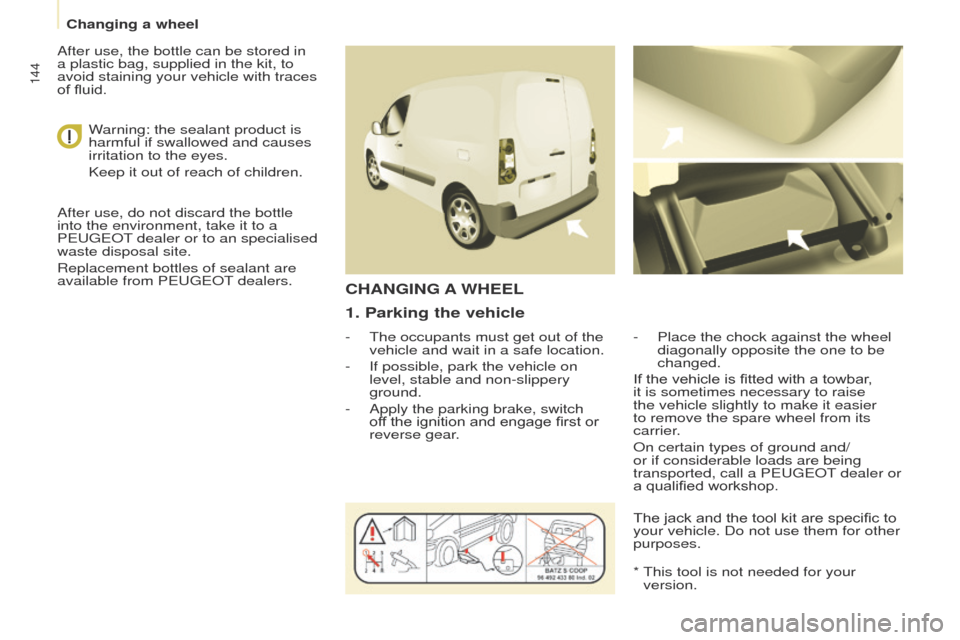
1. Parking the vehicle
- The occupants must get out of the
vehicle and wait in a safe location.
-
If possible, park the vehicle on
level, stable and non-slippery
ground.
-
Apply the parking brake, switch
of
f the ignition and engage first or
reverse gear. -
Place the chock against the wheel
diagonally opposite the one to be
changed.
CHANGING A WHEEL
If the vehicle is fitted with a towbar,
it is sometimes necessary to raise
the vehicle slightly to make it easier
to remove the spare wheel from its
carrier.
On certain types of ground and/
or if considerable loads are being
transported, call a PEUGEOT dealer or
a qualified workshop.
*
This tool is not needed for your
version.
The jack and the tool kit are specific to
your vehicle. Do not use them for other
purposes.
W
arning: the sealant product is
harmful if swallowed and causes
irritation to the eyes.
Keep it out of reach of children.
After use, do not discard the bottle
into the environment, take it to a
PEUGEOT dealer or to an specialised
waste disposal site.
Replacement bottles of sealant are
available from PEUGEOT dealers. After use, the bottle can be stored in
a plastic bag, supplied in the kit, to
avoid staining your vehicle with traces
of fluid.
Changing a wheel
Page 152 of 260
150
Partner-2-VU_en_Chap08_Aide-rapide_ed02-2016
CHANGING A BULB
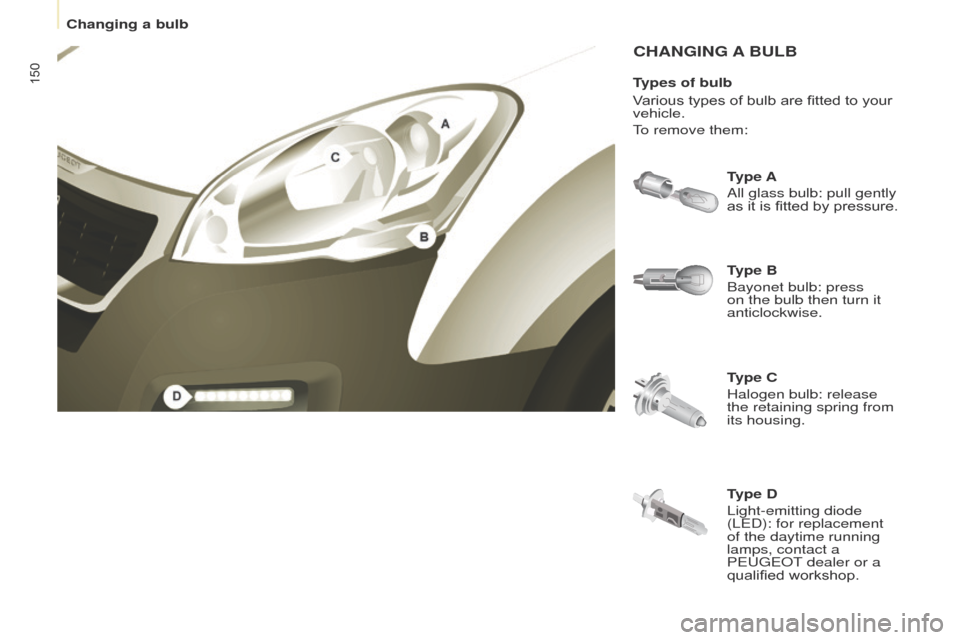
Type B
Bayonet bulb: press
on the bulb then turn it
anticlockwise. Type A
All glass bulb: pull gently
as it is fitted by pressure.
Type C
Halogen bulb: release
the retaining spring from
its housing.
Types of bulb
Various types of bulb are fitted to your
vehicle.
To remove them:
Type D
Light-emitting diode
(LED): for replacement
of the daytime running
lamps, contact a
PEUGEOT dealer or a
qualified workshop.
Changing a bulb
Page 154 of 260
152
Partner-2-VU_en_Chap08_Aide-rapide_ed02-2016
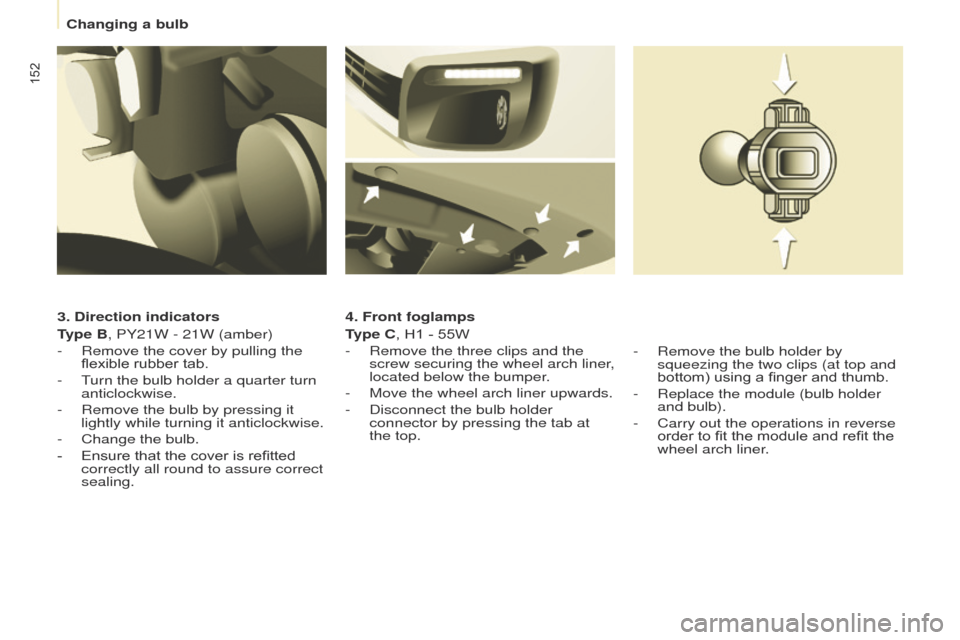
3. Direction indicators
Type B, PY21W - 21W (amber)
-
Remove the cover by pullin
g the
flexible rubber tab.
-
T
urn the bulb holder a quarter turn
anticlockwise.
-
Remove the bulb by pressing it
lightly while turning it anticlockwise.
-
Change the bulb.
-
Ensure that the cover is refitted
correctly all round to assure correct
sealing. 4. Front foglamps
T
ype C, H1 - 55W
-
Remove the three clips and the
screw securing the wheel arch liner
,
located below the bumper.
-
Move the wheel arch liner upwards.
-
Disconnect the bulb holder
connector by pressing the tab at
the top.-
Remove the bulb holder by
squeezing the two clips (at top and
bottom) using a finger and thumb.
-
Replace the module (bulb holder
and bulb).
-
Carry out the operations in reverse
order to fit the module and refit the
wheel arch liner
.
Changing a bulb
Page 156 of 260
154
Partner-2-VU_en_Chap08_Aide-rapide_ed02-2016
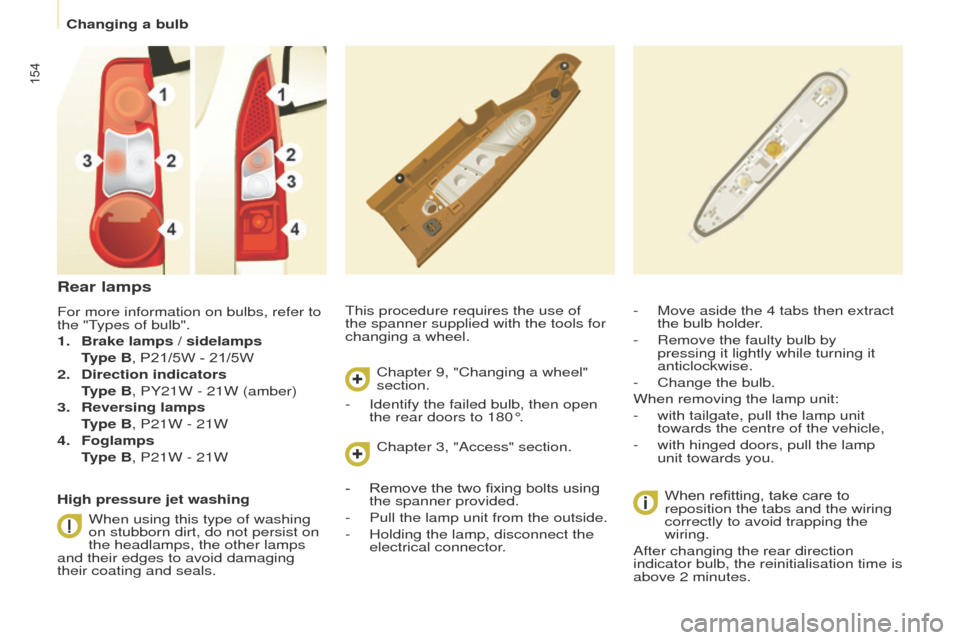
This procedure requires the use of
the spanner supplied with the tools for
changing a wheel.-
Move aside the 4 tabs then extract
the bulb holder
.
-
Remove the faulty bulb by
pressing it lightly while turning it
anticlockwise.
-
Change the bulb.
When removing the lamp unit:
-
with tailgate, pull the lamp unit
towards the centre of the vehicle,
-
with hinged doors, pull the lamp
unit towards you.When refitting, take care to
reposition the tabs and the wiring
correctly to avoid trapping the
wiring.
After changing the rear direction
indicator bulb, the reinitialisation time is
above 2 minutes.
Rear lamps
For more information on bulbs, refer to
the "Types of bulb".
1.
Brake lamps / sidelamps
T
ype B, P21/5W - 21/5W
2.
Direction indicators
T
ype B, PY21W - 21W (amber)
3.
Reversing lamps
T
ype B, P21W - 21W
4.
Foglamps
T
ype B, P21W - 21W
High pressure jet washing When using this type of washing
on stubborn dirt, do not persist on
the headlamps, the other lamps
and their edges to avoid damaging
their coating and seals. Chapter 9, "Changing a wheel"
section.
Chapter 3, "Access" section.
-
Identify the failed bulb, then open
the rear doors to 180°.
-
Remove the two fixing bolts using
the spanner provided.
-
Pull the lamp unit from the outside.
-
Holding the lamp, disconnect the
electrical connector
.
Changing a bulb
Page 171 of 260
169
Partner-2-VU_en_Chap09_Caract-technique_ed02-2016
WEIGHTS AND TOWED LOADS
These values, expressed in kg, can be
found on the manufacturer's VIN plate
or label.
The maximum weights and towed
loads for your vehicle can be found on
the vehicle's registration certificate. The recommended nose weight is
the downward force on the towball
(removable with or without tools).
In each country, it is imperative that
the maximum towed loads authorised
by local legislation are complied
with. To find out your vehicle's towing
capacities and its gross train weight,
consult a PEUGEOT dealer.
The kerb weight is equal to the weight
without load + driver (75 kg) + fuel tank
filled to 90%.
The GTW and towed load values
indicated are valid up to a maximum
altitude of 1000 metres. The value of
the towed load mentioned must be
reduced by 10 % for each additional
1000 metres.
With load transfer, the braked trailer
weight can be increased, on condition
that the equivalent of this load is
removed from the vehicle so that the
GTW is not exceeded. High ambient temperatures
may result in a reduction in the
performance of the vehicle in
order to protect the engine. When
the ambient temperature is higher
than 37 °C, limit the towed weight.
The location of the manufacturer's
plate is given in chapter 9,
"Identification markings" section.
ENGINE CHARACTERISTICS
The engine characteristics (capacity,
maximum power, maximum power
speed, fuel, CO
2 emissions...) for your
vehicle are given in the registration
certificate.
These characteristics correspond
to the values type-approved
on a test bed, under conditions
defined in European legislation
(Directive
1999/99/EC).
For more information, refer to the
manufacturer's website or sales
brochure for the model. Contact
a PEUGEOT dealer or a qualified
workshop. GVW: gross vehicle weight, the
maximum authorised weight.
GTW: gross train weight, the maximum
weight for vehicle plus trailer.
Towing with a lightly loaded
vehicle can adversely affect road
holding.
Towing a trailer increases braking
distances.
When towing, the maximum permitted
speed is reduced (comply with the
legislation in force in the country).
TECHNICAL DATA
9
Weights
Page 213 of 260
Audio and Telematics
2 11
Partner-2-VU_en_Chap10a_SMEGplus_ed02-2016
As a safety measure and because it
requires sustained attention by the
driver, using a smartphone when
driving is prohibited.
All operations must be done with the
vehicle stationary.
The synchronisation of a smartphone
allows applications on a smartphone
that are adapted to the MirrorLink
TM
technology to be displayed in the
vehicle's screen.
The principles and standards
are constantly evolving. For the
communication process between the
smartphone and the system to work
correctly, the smartphone must be
unlocked; update the operating system
of your smartphone as well as the date
and time in the smartphone and the
system.
For the list of eligible smartphones,
connect to the brand's internet website
in your country. As a safety measure, applications
can only be viewed with the vehicle
stationary; display is interrupted once
the vehicle is moving.
When connecting a smartphone to
the system, it is recommended that
Bluetooth
® be started on the smartphone
Start the application on the
smartphone (optional, depending
on the smartphone and operating
syste m).
Access to the different audio sources remains
accessible in the margin of the MirrorLink
TM
display, using touch buttons in the upper bar.
Access to the menus for the system is possible
at any time using the dedicated buttons During the procedure, several screen
pages relating to certain functions
are displayed.
Accept to start and end the
connection.
Connect a USB cable. The
smartphone charges when
connected by a USB cable. Press on " MirrorLink
TM" to
start the application in the
system. Once connection is established, an page
is displayed with the applications already
downloaded to your smartphone and adapted
to MirrorLink
TM technology.
If only one application has been downloaded to
the smartphone, it starts automatically.
MirrorLinkTM smartphone
connection
Press the end of the lighting control stalk to
start voice recognition of your smartphone via
the system.
Voice recognition requires a compatible
smartphone connected to the vehicle by
Bluetooth
®.
Voice recognition
Please note:
-
i f your smartphone is supported, to
make it "MirrorLink
TM" compatible,
some phone manufacturers
nevertheless invite you to first
download a dedicated application.
From the system, press on
" Connected services " to display the
primary page.
TECHNOLOGY on BOARD
10
Page 217 of 260
Audio and Telematics
215
Partner-2-VU_en_Chap10a_SMEGplus_ed02-2016
As a safety measure and because it
requires sustained attention by the
driver, using a smartphone when
driving is prohibited.
All operations must be done with the
vehicle stationary.
As a safety measure, applications
can only be viewed with the vehicle
stationary; display is interrupted once
the vehicle is moving. The synchronisation of a
smartphone allows applications on a
smartphone that are adapted to the
CarPlay
® technology to be displayed on
t
he vehicle's screen.
As the principles and standards are
constantly evolving, it is recommended
that you update the operating system of
your smartphone.
For the list of eligible smartphones,
connect to the brand's internet website
in your country. On connecting the USB cable, the
"
Telephone " function changes to
" CarPlay " in the menu carousel.
Press on " CarPlay" to display the
CarPlay
® inter face.
Press on " CarPlay" to display the
CarPlay
® inter face.
Connect a USB cable. The
smartphone charges when
connected by a USB cable.
Press the end of the lighting control stalk to
start voice recognition of your smartphone via
the system.
CarPlay® smartphone
connection
During the procedure, one or more
screen pages relating to certain
functions are displayed on connection. From the system, press on
"
Connected services " to display the
primary page. Connect the USB cable. The
smartphone is charged while
connected by the USB cable.
Or
Voice recognition
When the telephone menu is displayed,
connection of the USB cable causes the
display to automatically change to CarPlay
mode.
When another menu is displayed, on
connection of a USB cable a message is
displayed in the upper bar, indicating that
CarPlay
mode has been activated.
Press Open to display CarPlay mode.
TECHNOLOGY on BOARD
10
Page 246 of 260
Audio and Telematics
244
Partner-2-VU_en_Chap10b_RD45_ed02-2016
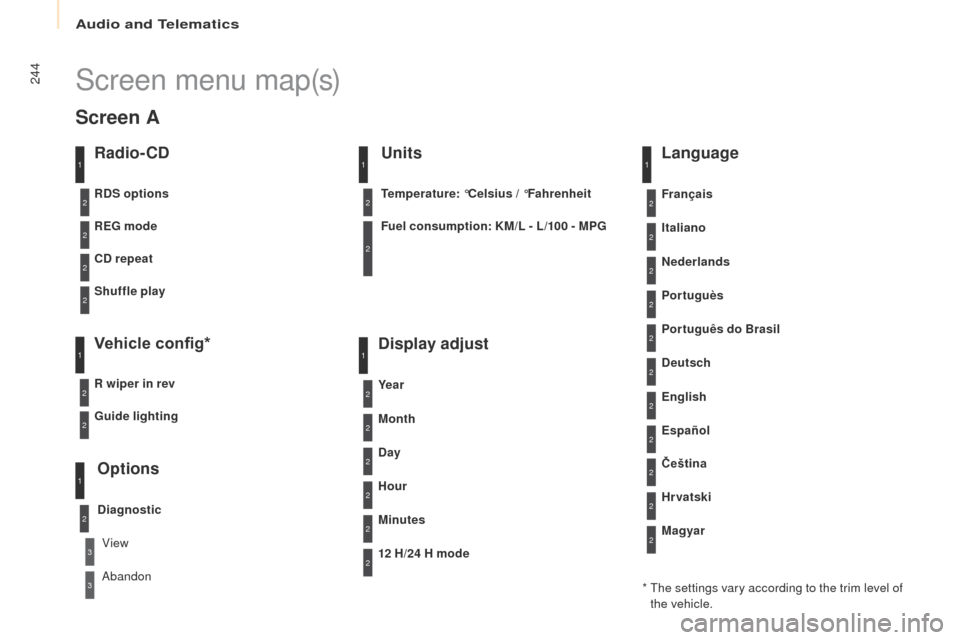
Screen menu map(s)
Radio- CD
REG mode
CD repeat
Shuffle play
Vehicle config*
R wiper in rev
Options
Diagnostic
RDS options
View
Abandon
1
2
3
3
1
2
2
2
2
1
2
Screen A
* The settings vary according to the trim level of the vehicle.
Guide lighting
2
Units
Temperature: °Celsius / °Fahrenheit
Fuel consumption: KM/L - L/100 - MPG
1
2
2
Display adjust
Month
Day
Hour
Minutes Ye a r
12 H/24 H mode
Language
Italiano
Nederlands
Portuguès
Português do Brasil Français
Deutsch
Čeština English
Hr vatski Español
Magyar
1
2
2
2
2
2
2
2
1
2
2
2
2
2
2
2
2
2
2