controls Peugeot Partner 2019 User Guide
[x] Cancel search | Manufacturer: PEUGEOT, Model Year: 2019, Model line: Partner, Model: Peugeot Partner 2019Pages: 312, PDF Size: 9.56 MB
Page 68 of 312
66
AC 220V
50Hz120W
220 V/50 Hz power socket
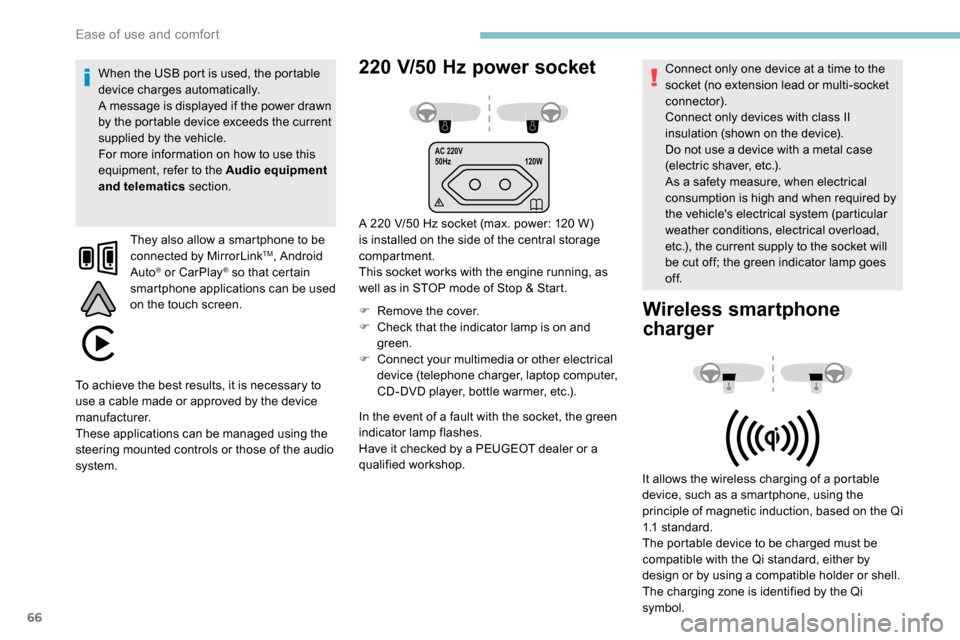
A 220 V/50 Hz socket (max. power: 120 W)
i s installed on the side of the central storage
compartment.
This socket works with the engine running, as
well as in STOP mode of Stop & Start.
F
R
emove the cover.
F
C
heck that the indicator lamp is on and
green.
F
C
onnect your multimedia or other electrical
device (telephone charger, laptop computer,
CD-DVD player, bottle warmer, etc.).
When the USB port is used, the portable
device charges automatically.
A message is displayed if the power drawn
by the portable device exceeds the current
supplied by the vehicle.
For more information on how to use this
equipment, refer to the Audio equipment
and telematics
section.
They also allow a smartphone to be
connected by MirrorLink
TM, Android
Auto® or CarPlay® so that certain
smartphone applications can be used
on the touch screen.
In the event of a fault with the socket, the green
indicator lamp flashes.
Have it checked by a PEUGEOT dealer or a
qualified workshop. Connect only one device at a time to the
socket (no extension lead or multi-socket
connector).
Connect only devices with class II
insulation (shown on the device).
Do not use a device with a metal case
(electric shaver, etc.).
As a safety measure, when electrical
consumption is high and when required by
the vehicle's electrical system (particular
weather conditions, electrical overload,
etc.), the current supply to the socket will
be cut off; the green indicator lamp goes
of f.
Wireless smartphone
charger
It allows the wireless charging of a portable
device, such as a smartphone, using the
principle of magnetic induction, based on the Qi
1.1 standard.
The portable device to be charged must be
compatible with the Qi standard, either by
design or by using a compatible holder or shell.
The charging zone is identified by the Qi
symbol.
To achieve the best results, it is necessary to
use a cable made or approved by the device
manufacturer.
These applications can be managed using the
steering mounted controls or those of the audio
system.
Ease of use and comfort
Page 80 of 312
78
Front demist – defrost
These markings on the control panel
indicate the control positions for
rapid demisting or defrosting of the
windscreen and side windows.
Heating or manual air
conditioning
F For air conditioning, press this button; its indicator lamp comes
on.
Dual-zone automatic air
conditioning
F Press this button to demist or defrost the windscreen and side
windows as quickly as possible.
The system automatically manages the air
conditioning, air flow and air intake, and
provides optimum distribution towards the
windscreen and side windows. F
T
o turn it off, press this button
again or press " AUTO".
The system is reactivated with the values prior
to the deactivation.
F
P
ut the air flow, temperature and distribution
controls to the appropriately marked
position.
Heated windscreen and washer jets
For more information on the Wiper
control stalk and in particular the heated
windscreen and washer jets, refer to the
corresponding section. With Stop & Start, when demisting
has been activated, STOP mode is not
available.
Heated windscreen
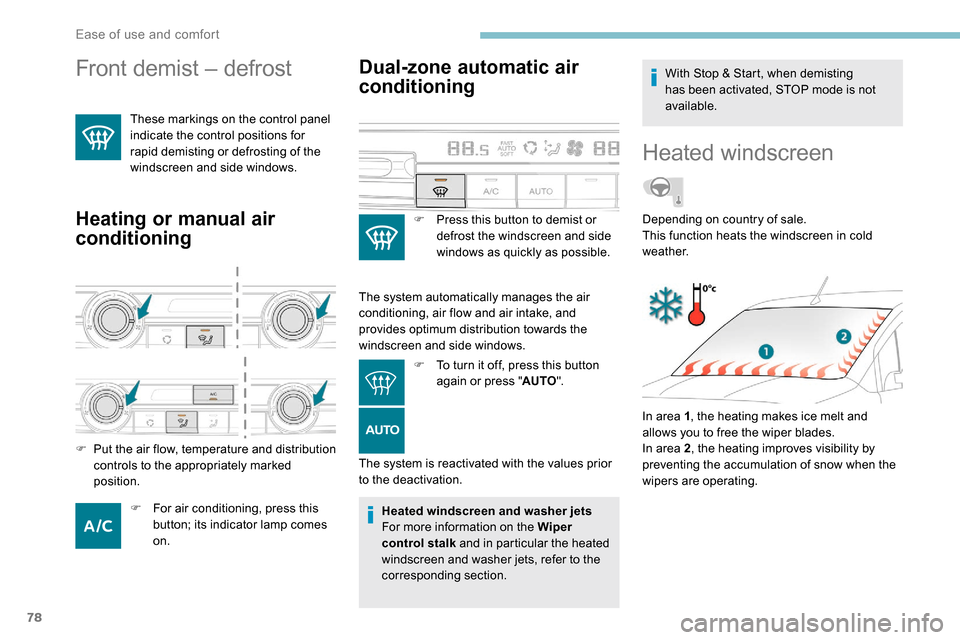
In area 1
, the heating makes ice melt and
allows you to free the wiper blades.
In area 2 , the heating improves visibility by
preventing the accumulation of snow when the
wipers are operating. Depending on country of sale.
This function heats the windscreen in cold
weather.
Ease of use and comfort
Page 93 of 312
91
Programming
The system is activated or
deactivated via the vehicle
configuration menu.
This system is activated by default.
Headlamp beam height
adjustment
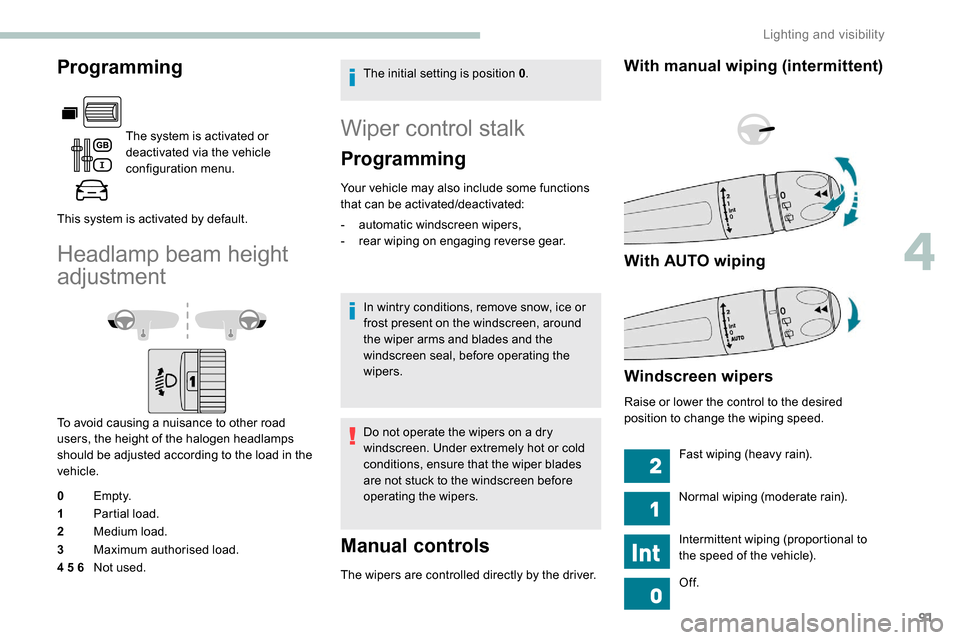
To avoid causing a nuisance to other road
users, the height of the halogen headlamps
should be adjusted according to the load in the
vehicle.
0 Em pt y.
1 Partial load.
2 Medium load.
3 Maximum authorised load.
4 5 6 Not used. The initial setting is position 0
.
Wiper control stalk
Programming
Your vehicle may also include some functions
that can be activated/deactivated:
-
a
utomatic windscreen wipers,
-
r
ear wiping on engaging reverse gear.
In wintry conditions, remove snow, ice or
frost present on the windscreen, around
the wiper arms and blades and the
windscreen seal, before operating the
wipers.
Do not operate the wipers on a dry
windscreen. Under extremely hot or cold
conditions, ensure that the wiper blades
are not stuck to the windscreen before
operating the wipers.
Manual controls
The wipers are controlled directly by the driver.
With manual wiping (intermittent)
With AUTO wiping
Windscreen wipers
Raise or lower the control to the desired
position to change the wiping speed. Fast wiping (heavy rain).
Normal wiping (moderate rain).
Intermittent wiping (proportional to
the speed of the vehicle).
Of f.
4
Lighting and visibility
Page 116 of 312
114
Manual child lock
Mechanical system to prevent opening of the
sliding side door using its interior lever.
Locking
Turn the control on the edge of the
side door upwards.
Unlocking
Turn the control on the edge of the
side door downwards.
Electric child lock
Remote control system to prevent opening of
the rear doors (sliding side door(s), side-hinged
rear doors or tailgate) using their interior
controls.
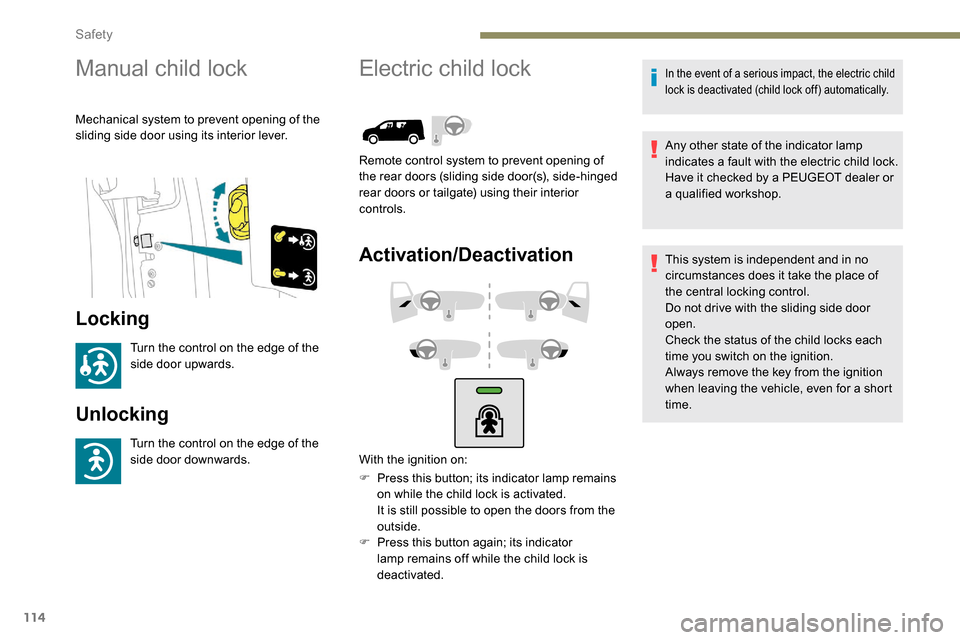
Activation/Deactivation
F Press this button; its indicator lamp remains on while the child lock is activated.
It is still possible to open the doors from the
outside.
F
P
ress this button again; its indicator
lamp remains off while the child lock is
deactivated.
In the event of a serious impact, the electric child
lock is deactivated (child lock off) automatically.
Any other state of the indicator lamp
indicates a fault with the electric child lock.
Have it checked by a PEUGEOT dealer or
a qualified workshop.
This system is independent and in no
circumstances does it take the place of
the central locking control.
Do not drive with the sliding side door
open.
Check the status of the child locks each
time you switch on the ignition.
Always remove the key from the ignition
when leaving the vehicle, even for a short
time.
With the ignition on:
Safety
Page 128 of 312
126
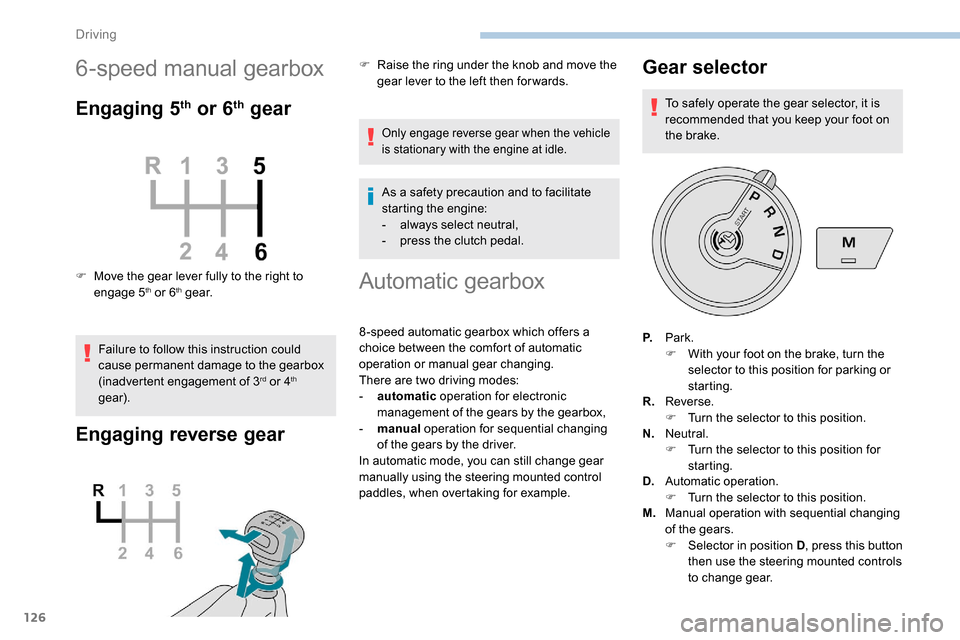
6-speed manual gearbox
Engaging 5th or 6th gear
F Move the gear lever fully to the right to engage 5th or 6th g e a r.
Failure to follow this instruction could
cause permanent damage to the gearbox
(inadvertent engagement of 3
rd or 4th
gear).
Engaging reverse gear
F Raise the ring under the knob and move the gear lever to the left then for wards.
Only engage reverse gear when the vehicle
is stationary with the engine at idle.
As a safety precaution and to facilitate
starting the engine:
-
a
lways select neutral,
-
p
ress the clutch pedal.
Automatic gearbox
8 -speed automatic gearbox which offers a
choice between the comfort of automatic
operation or manual gear changing.
There are two driving modes:
-
a
utomatic operation for electronic
management of the gears by the gearbox,
-
man
ual operation for sequential changing
of the gears by the driver.
In automatic mode, you can still change gear
manually using the steering mounted control
paddles, when overtaking for example.
Gear selector
To safely operate the gear selector, it is
recommended that you keep your foot on
the brake.
P. Park.
F
W
ith your foot on the brake, turn the
selector to this position for parking or
starting.
R. Reverse.
F
T
urn the selector to this position.
N. Neutral.
F
T
urn the selector to this position for
starting.
D. Automatic operation.
F
T
urn the selector to this position.
M. Manual operation with sequential changing
of the gears.
F
Sel
ector in position D , press this button
then use the steering mounted controls
to change gear.
Driving
Page 129 of 312
127
Position N can be used in traffic jams or in
a washing tunnel.
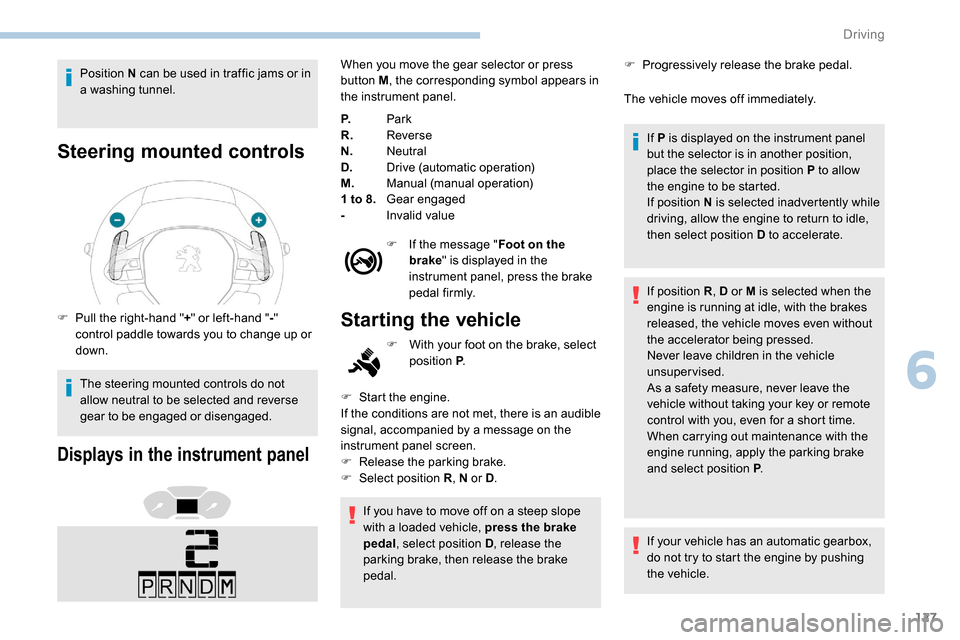
Steering mounted controls
F Pull the right-hand "+" or left-hand " -"
control paddle towards you to change up or
down.
The steering mounted controls do not
allow neutral to be selected and reverse
gear to be engaged or disengaged.
Displays in the instrument panel
When you move the gear selector or press
button M , the corresponding symbol appears in
the instrument panel.
P. Park
R. Reverse
N. Neutral
D. Drive (automatic operation)
M. Manual (manual operation)
1 to 8. Gear engaged
- Invalid value
F
I
f the message " Foot on the
brake " is displayed in the
instrument panel, press the brake
pedal firmly.
Starting the vehicle
F Start the engine.
If the conditions are not met, there is an audible
signal, accompanied by a message on the
instrument panel screen.
F
R
elease the parking brake.
F
Sel
ect position R , N or D.
F
W
ith your foot on the brake, select
position P .
If you have to move off on a steep slope
with a loaded vehicle, press the brake
pedal , select position D , release the
parking brake, then release the brake
pedal. F
P
rogressively release the brake pedal.
The vehicle moves off immediately.
If P is displayed on the instrument panel
but the selector is in another position,
place the selector in position P to allow
the engine to be started.
If position N is selected inadvertently while
driving, allow the engine to return to idle,
then select position D to accelerate.
If position R , D or M is selected when the
engine is running at idle, with the brakes
released, the vehicle moves even without
the accelerator being pressed.
Never leave children in the vehicle
unsupervised.
As a safety measure, never leave the
vehicle without taking your key or remote
control with you, even for a short time.
When carrying out maintenance with the
engine running, apply the parking brake
and select position P .
If your vehicle has an automatic gearbox,
do not try to start the engine by pushing
the vehicle.
6
Driving
Page 130 of 312
128
Automatic operation
F Select position D for automatic
changing of the six gears.
Never select position N while the vehicle
is moving.
Never select position P or R unless the
vehicle is completely stationary.
Temporary manual control
of gear changes
You can temporarily take over control of gear
changes using the “ +” and “ -” steering mounted
controls. If the engine speed allows, the gear
change is carried out.
This function allows you to anticipate certain
situations, such as overtaking another vehicle
or approaching a bend in the road.
After a few moments with no action on the
control paddles, the gearbox returns to
automatic operation.
Self-sufficient traction (moving
without using the accelerator)
This function facilitates manoeuvring of the
vehicle at low speed (when parking, in traffic
jams, etc.).
With the engine at idle, parking brake released
and position D , M or R selected, the vehicle
moves
as soon as you take your foot off
the brake pedal (even without pressing the
accelerator).
As a safety measure (children on board),
never leave the vehicle with the engine
running and the doors closed.
The gearbox then operates in auto-adaptive
mode, without any inter vention on the part
of the driver. It continuously selects the most
suitable gear according to the style of driving,
the profile of the road and the load in the
vehicle.
For maximum acceleration without
touching the selector, press the
accelerator fully (kick-down). The
gearbox changes down automatically
or holds the gear selected until the
maximum engine speed is reached.
When braking, the gearbox changes down
automatically to provide effective engine
braking.
For better safety, the gearbox will not shift up if
you release the accelerator sharply.
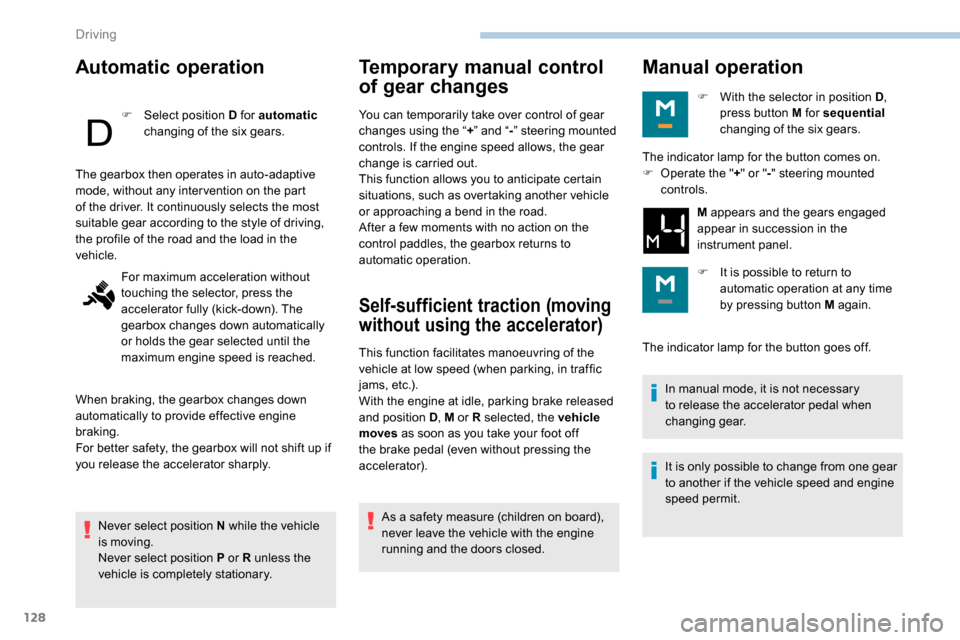
Manual operation
F With the selector in position D ,
press button M for sequential
changing of the six gears.
The indicator lamp for the button goes off. In manual mode, it is not necessary
to release the accelerator pedal when
changing gear.
It is only possible to change from one gear
to another if the vehicle speed and engine
speed permit.
The indicator lamp for the button comes on.
F
O
perate the " +" or " -" steering mounted
controls.
M appears and the gears engaged
appear in succession in the
instrument panel.
F
I
t is possible to return to
automatic operation at any time
by pressing button M again.
Driving
Page 138 of 312
136
- obsolete or incorrect mapping,
- h idden road signs (other vehicles,
vegetation, snow),
-
s
peed limit signs that do not conform to the
standard, are damaged or distorted.
If an app on your smart phone is used
via Mirror Screen, the sign displayed by
the system may be temporarily hidden. It
will be redisplayed as soon as you pass
another sign.
Recommendation
For more information on the Speed
limiter , Cruise control or Adaptive
cruise control , refer to the corresponding
sections.
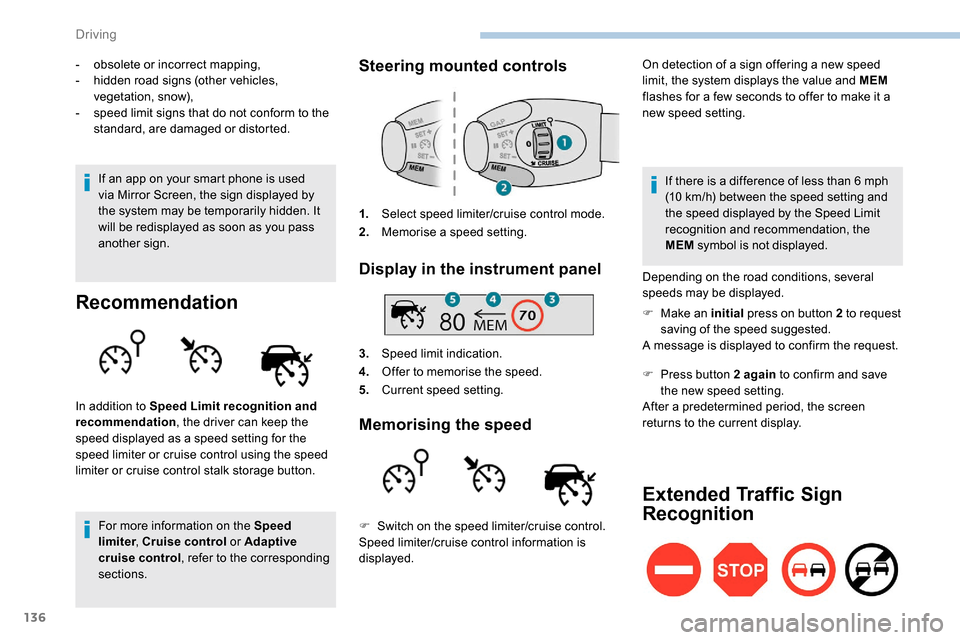
Steering mounted controls
1. Select speed limiter/cruise control mode.
2. Memorise a speed setting.
Display in the instrument panel
3.Speed limit indication.
4. Offer to memorise the speed.
5. Current speed setting.
Memorising the speed
On detection of a sign offering a new speed
limit, the system displays the value and MEM
flashes for a few seconds to offer to make it a
new speed setting.
In addition to Speed Limit recognition and
recommendation , the driver can keep the
speed displayed as a speed setting for the
speed limiter or cruise control using the speed
limiter or cruise control stalk storage button. If there is a difference of less than 6
mph
(10
km/h) between the speed setting and
the speed displayed by the Speed Limit
recognition and recommendation, the
MEM symbol is not displayed.
Depending on the road conditions, several
speeds may be displayed.
F
M
ake an initial press on button 2 to request
saving of the speed suggested.
A message is displayed to confirm the request.
F
P
ress button 2 again to confirm and save
the new speed setting.
After a predetermined period, the screen
returns to the current display.
Extended Traffic Sign
Recognition
F Switch on the speed limiter/cruise control.
Speed limiter/cruise control information is
displayed.
Driving
Page 188 of 312
186
Advice on care
General recommendations on the care and maintenance of your vehicle are given in the warranty
and maintenance record.Observe the following recommendations to
avoid damaging your vehicle:
-
D
o not clean your headlamps with a dry
or abrasive cloth, nor with detergent or
solvent products. Use a sponge and
soapy water or a pH neutral product.
-
W
hen using a high-pressure washer on
stubborn dirt, avoid prolonged use on the
headlamps, the lamps and their edges to
avoid damaging their lacquer finish and
seals.
-
N
ever use an abrasive sponge to clean
persistent dirt, as this may scratch the
paint sur face. Use a soft cloth with soapy
water instead.
-
W
hen washing your vehicle, never clean
the interior with a water jet.
-
W
hen washing your vehicle in an
automatic roller-brush car wash, be sure
to lock your doors and, depending on
version, remove the key. -
N
ever use high-pressure washing to
clean the engine compartment, in order
to avoid damaging the electrical units.
-
L
iquids carried in an open vessel (e.g.
a cup or mug) could be spilt, presenting
a risk of damage on contact with the
controls in the dashboard and centre
console. Be careful.
Depending on version, in order to avoid
damaging or unpeeling the stickers on the
bodywork, you are strongly advised against
using high-pressure cleaners to wash your
vehicle. It is recommended that you wash
it using a high-flow water jet and rinse the
vehicle down using demineralised water.
Only a microfibre cloth is recommended for
wiping your vehicle; it must be clean and
used gently.
It is always preferable to have paint repairs carried out by a PEUGEOT dealer or a qualified
workshop.
Practical information
Page 204 of 312
202
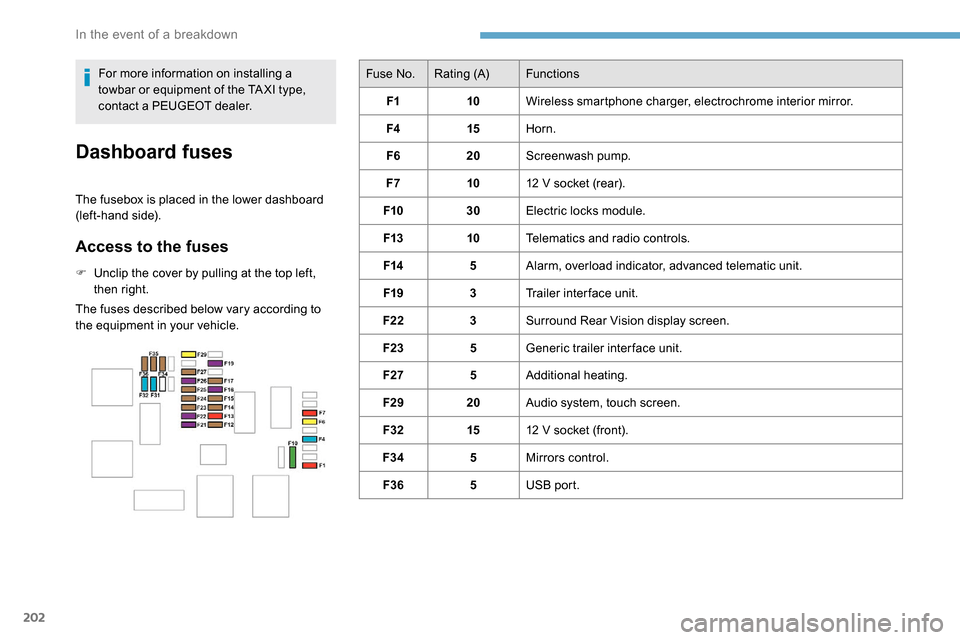
Fuse No.Rating (A) Functions
F1 10Wireless smartphone charger, electrochrome interior mirror.
F4 15Horn.
F6 20Screenwash pump.
F7 1012
V socket (rear).
F10 30Electric locks module.
F13 10Telematics and radio controls.
F14 5Alarm, overload indicator, advanced telematic unit.
F19 3Trailer inter face unit.
F22 3Surround Rear Vision display screen.
F23 5Generic trailer interface unit.
F27 5Additional heating.
F29 20Audio system, touch screen.
F32 1512
V socket (front).
F34 5Mirrors control.
F36 5USB port.
For more information on installing a
towbar or equipment of the TA XI type,
contact a PEUGEOT dealer.
Dashboard fuses
The fusebox is placed in the lower dashboard
(left-hand side).
Access to the fuses
F Unclip the cover by pulling at the top left,
then right.
The fuses described below vary according to
the equipment in your vehicle.
In the event of a breakdown