Ad blue Peugeot Partner 2019 Owner's Guide
[x] Cancel search | Manufacturer: PEUGEOT, Model Year: 2019, Model line: Partner, Model: Peugeot Partner 2019Pages: 312, PDF Size: 9.56 MB
Page 187 of 312
185
cannot be discounted: do not inhale the fluid.
Ammonia vapour has an irritant effect on mucous
membranes (eyes, nose and throat).
Keep AdBlue® out of reach of children, in
its original container or bottle.
Procedure
Before starting the top up procedure, ensure
that the vehicle is parked on a flat and level
sur face.
In winter, check that the temperature of the
vehicle is above -11°C. If not, due to freezing,
the AdBlue
® cannot be poured into the tank.
Park your vehicle somewhere warmer for a few
hours before topping up.
In the event of an AdBlue
® breakdown,
confirmed by the message "Add AdBlue:
Starting impossible", you must top up with
at least 5
litres.
Never pour AdBlue
® into the Diesel fuel
tank. If any AdBlue
® is splashed, or if there are
any spillages on the side of the body, rinse
immediately with cold water or wipe with a
damp cloth.
If the fluid has crystallised, clean it off
using a sponge and hot water.
Access to the AdBlue® tank
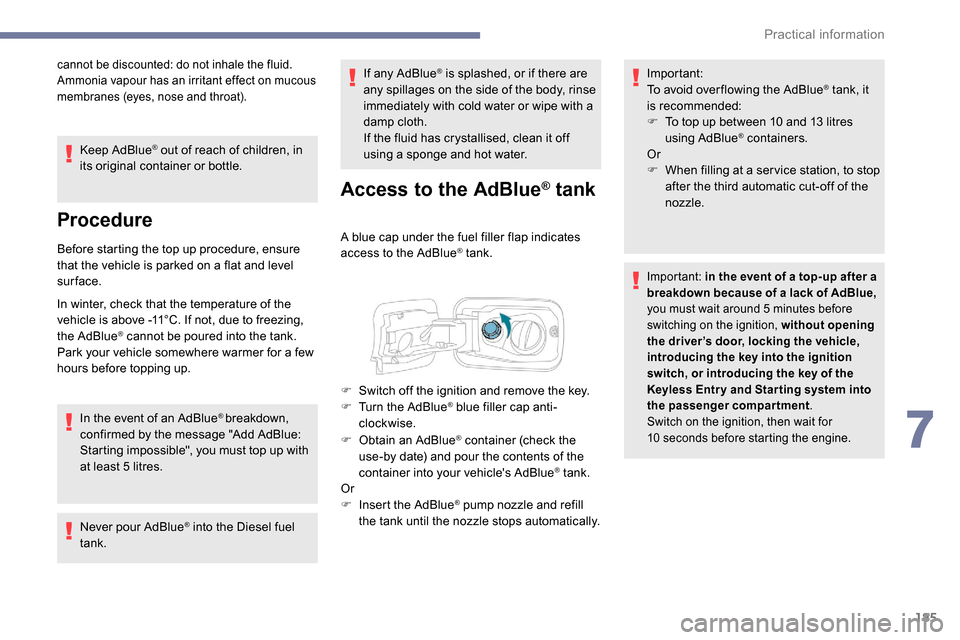
A blue cap under the fuel filler flap indicates
access to the AdBlue® tank.
F
O
btain an AdBlue
® container (check the
use-by date) and pour the contents of the
container into your vehicle's AdBlue
® tank.
Or
F
I
nsert the AdBlue
® pump nozzle and refill
the tank until the nozzle stops automatically. Important:
To avoid over flowing the AdBlue
® tank, it
i
s recommended:
F
T
o top up between 10 and 13
litres
using AdBlue
® containers.
Or
F
W
hen filling at a ser vice station, to stop
after the third automatic cut-off of the
nozzle.
Important: in the event of a top-up after a
breakdown because of a lack of AdBlue,
you must wait around 5
minutes before
switching on the ignition, without opening
the driver’s door, locking the vehicle,
introducing the key into the ignition
switch, or introducing the key of the
K
eyless Entr y and Star ting system into
the passenger compartment.
Switch on the ignition, then wait for
10
seconds before starting the engine.
F Switch off the ignition and remove the key.
F T urn the AdBlue® blue filler cap anti-
clockwise.
7
Practical information
Page 189 of 312
187
Running out of fuel
(Diesel)
On vehicles fitted with Diesel engines, the fuel
system must be primed if you run out of fuel.
If the engine does not start first time, do not
keep trying, but start the procedure again from
the beginning.For more information on Misfuel
prevention (Diesel) , refer to the
corresponding section.
With 1.5 BlueHDi (Euro 6.2)
F Fill the fuel tank with at least 5 litres of
Diesel.
F
S
witch on the ignition (without starting the
engine).
Other engines
F Fill the fuel tank with at least five litres of diesel.
F
O
pen the engine bonnet.
F
I
f necessary, unclip the style cover to
access the priming pump.
F
O
perate the priming pump
repeatedly until resistance is felt
(there may be resistance on the
first press).
F
O
perate the starter to start the engine (if the
engine does not start at the first attempt,
wait around 15
seconds before trying
again).
F
I
f the engine does not start after a few
attempts, operate the priming pump again
then start the engine.
F
P
ut the style cover in place and clip it in.
F
C
lose the bonnet again.
Tool kit
With 1.6 BlueHDi (Euro 6 .1)
F Fill the fuel tank with at least 5 litres of
Diesel.
F
S
witch on the ignition (without starting the
engine).
F
W
ait around 6 seconds and switch off the
ignition.
F
R
epeat the last two operations 10 times.
F
O
perate the starter to start the engine. F
W
ait around 1 minute and switch off the
ignition.
F
O
perate the starter to start the engine.
If the engine does not start, repeat the
procedure. F
F
or easier access, move the seat(s)
forward.
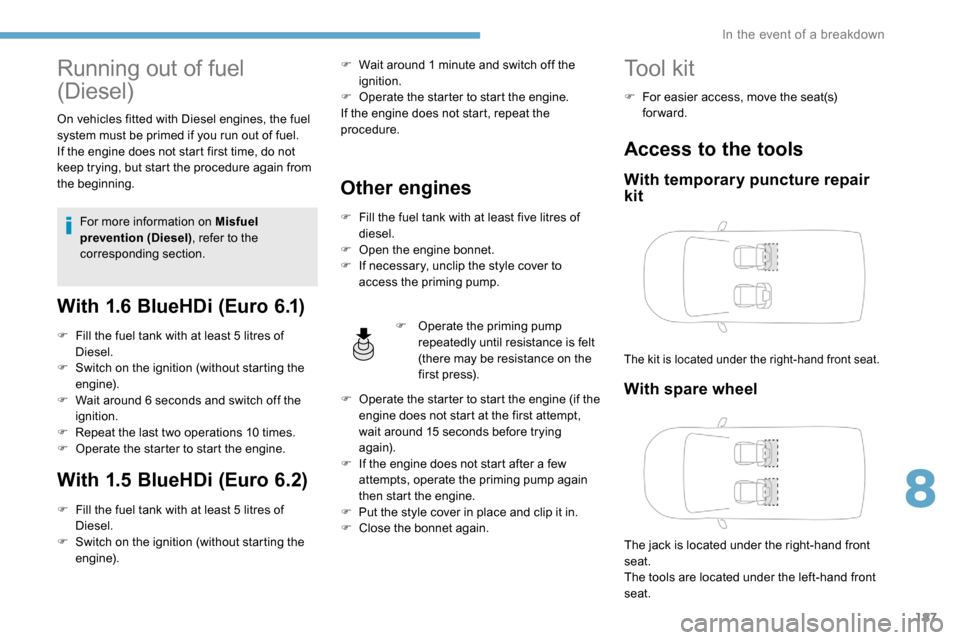
Access to the tools
With temporary puncture repair
kit
The kit is located under the right-hand front seat.
With spare wheel
The jack is located under the right-hand front
seat.
The tools are located under the left-hand front
seat.
8
In the event of a breakdown
Page 216 of 312
214
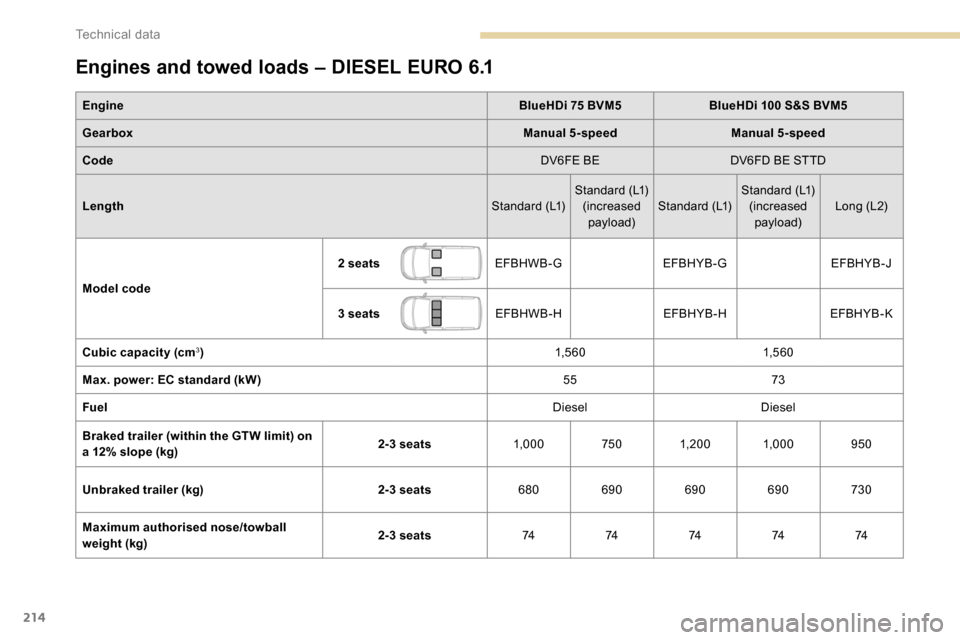
Engines and towed loads – DIESEL EURO 6.1
EngineBlueHDi 75 BVM5BlueHDi 100 S&S BVM5
Gearbox Manual 5-speedManual 5-speed
Code DV6FE BEDV6FD BE STTD
Length Standard (L1)Standard (L1)
(increased payload) Standard (L1) Standard (L1)
(increased payload) Long (L2)
Model code 2 seats
EFBHWB-G EFBHYB-G EFBHYB-J
3 seats EFBHWB-H EFBHYB-HEFBHYB-K
Cubic capacity (cm
3) 1,5 6 01,5 6 0
Max. power: EC standard (kW) 5573
Fuel DieselDiesel
Braked trailer (within the GTW limit) on
a 12% slope (kg) 2-3 seats
1,0007501, 20 0 1,000 950
Unbraked trailer (kg) 2-3 seats680690 690690 730
Maximum authorised nose/towball
weight (kg) 2-3 seats
7474747474
Technical data
Page 217 of 312
215
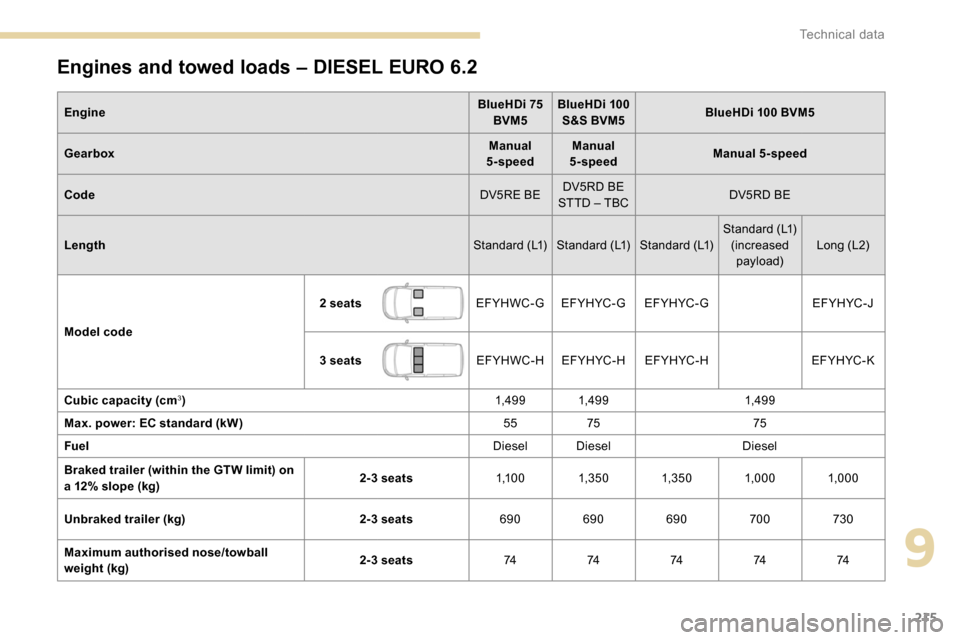
Engines and towed loads – DIESEL EURO 6.2
EngineBlueHDi 75
BVM5 BlueHDi 100
S&S BVM5 BlueHDi 100 BVM5
Gearbox Manual
5-speed Manual
5-speed Manual 5-speed
Code DV5RE BEDV5RD BE
STTD – TBC DV5RD BE
Length Standard (L1) Standard (L1) Standard (L1)Standard (L1)
(increased payload) Long (L2)
Model code 2 seats
EFYHWC-GEF YH YC - G EF YH YC - G EFYHYC-J
3 seats EFYHWC-HEF YH YC - H EF YH YC - H EF YH YC - K
Cubic capacity (cm
3) 1,49 9 1,49 91,49 9
Max. power: EC standard (kW) 5575 75
Fuel Diesel DieselDiesel
Braked trailer (within the GTW limit) on
a 12% slope (kg) 2-3 seats
1,1 0 01,3 5 0 1,3 5 0 1,000 1,000
Unbraked trailer (kg) 2-3 seats690690690 700730
Maximum authorised nose/towball
weight (kg) 2-3 seats
7474747474
9
Technical data
Page 218 of 312
216
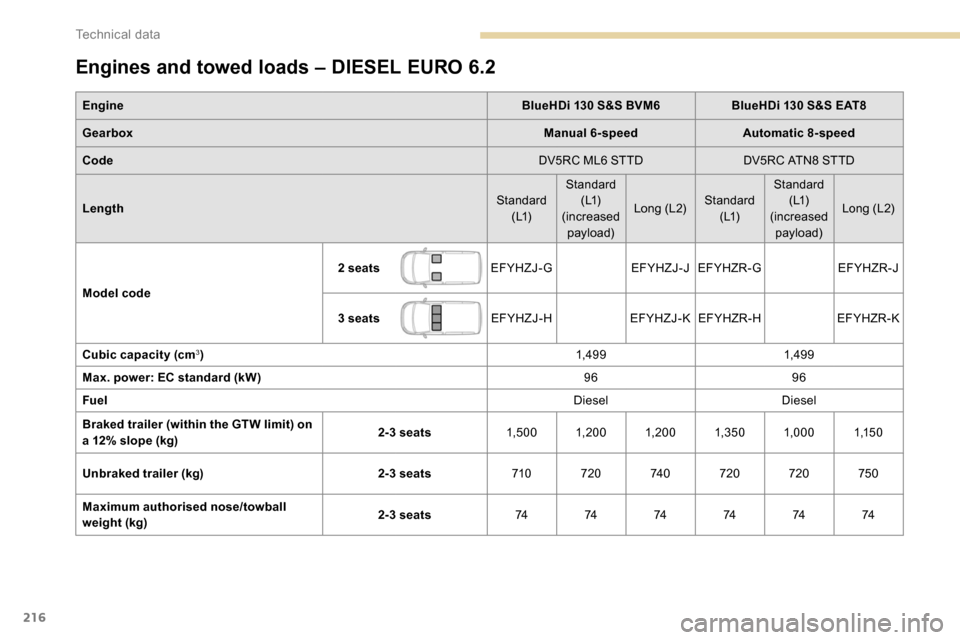
Engines and towed loads – DIESEL EURO 6.2
EngineBlueHDi 130 S&S BVM6BlueHDi 130 S&S EAT8
Gearbox Manual 6-speedAutomatic 8-speed
Code DV5RC ML6 STTDDV5RC ATN8 STTD
Length Standard
( L1) Standard
( L1)
(increased payload) Long (L2)
Standard
( L1) Standard
( L1)
(increased payload) Long (L2)
Model code 2 seats
EFYHZJ-GEFYHZJ-JEFYHZR-G EFYHZR-J
3 seats EFYHZJ-HEFYHZJ-K EFYHZR-H EFYHZR-K
Cubic capacity (cm
3) 1,49 91,49 9
Max. power: EC standard (kW) 9696
Fuel DieselDiesel
Braked trailer (within the GTW limit) on
a 12% slope (kg) 2-3 seats
1,5 0 0 1, 20 0 1, 20 0 1,3 5 0 1,0001,1 5 0
Unbraked trailer (kg) 2-3 seats710720 74 0720 720 750
Maximum authorised nose/towball
weight (kg) 2-3 seats
74 74 74 74 74 74
Technical data
Page 221 of 312
1
Bluetooth® audio system
Contents
First steps
2
S
teering mounted controls
2
M
enus
4
R
adio 4
DAB radio (Digital Audio Broadcasting)
6
M
edia 7
Telephone
10
Frequently asked questions
1
4 The different functions and settings
described vary according to the version
and configuration of your vehicle.
As a safety measure and because it
requires sustained attention by the
driver, the pairing of a Bluetooth mobile
telephone with the Bluetooth hands-free
system of your audio system must be
done with the vehicle stationary
and the
ignition on.
Your audio system is coded in such a way
that it will only operate in your vehicle.
All work on the system must be
carried out exclusively by a dealer or
qualified workshop, to avoid any risk of
electrocution, fire or mechanical faults.
To avoid discharging the battery, the audio
system may switch off after a few minutes
if the engine is not running.
.
Bluetooth® audio system
Page 222 of 312
2
First steps
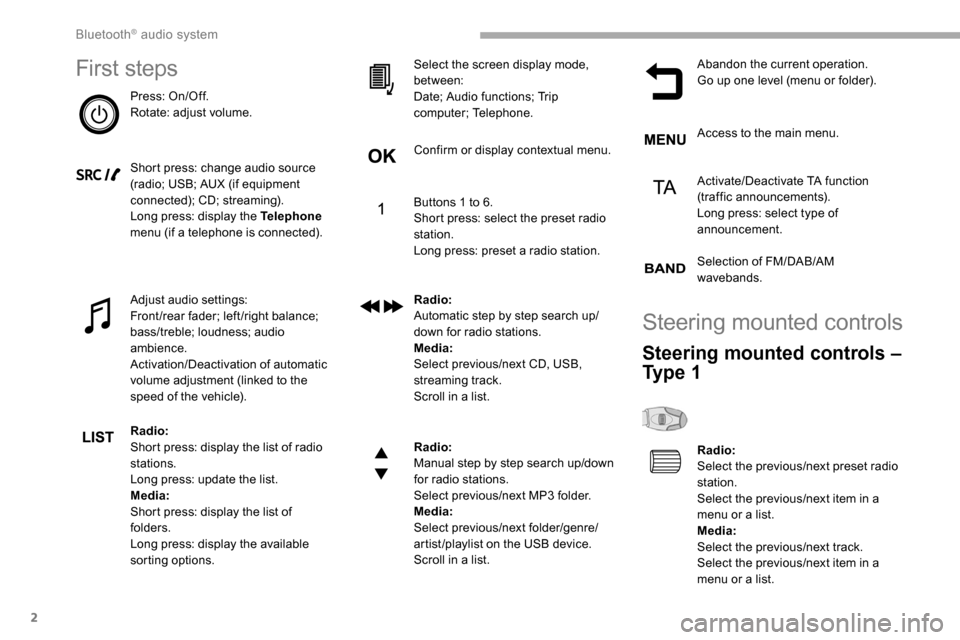
Press: On/Off.
Rotate: adjust volume.
Short press: change audio source
(radio; USB; AUX (if equipment
connected); CD; streaming).
Long press: display the Telephone
menu (if a telephone is connected).
Adjust audio settings:
Front/rear fader; left/right balance;
bass/treble; loudness; audio
ambience.
Activation/Deactivation of automatic
volume adjustment (linked to the
speed of the vehicle).
Radio:
Short press: display the list of radio
stations.
Long press: update the list.
Media:
Short press: display the list of
folders.
Long press: display the available
sorting options. Select the screen display mode,
between:
Date; Audio functions; Trip
computer; Telephone.
Confirm or display contextual menu.
Buttons 1 to 6.
Short press: select the preset radio
station.
Long press: preset a radio station.
Radio:
Automatic step by step search up/
down for radio stations.
Media:
Select previous/next CD, USB,
streaming track.
Scroll in a list.
Radio:
Manual step by step search up/down
for radio stations.
Select previous/next MP3 folder.
Media:
Select previous/next folder/genre/
artist/playlist on the USB device.
Scroll in a list.
Abandon the current operation.
Go up one level (menu or folder).
Access to the main menu.
Activate/Deactivate TA function
(traffic announcements).
Long press: select type of
announcement.
Selection of FM/DAB/AM
wavebands.
Steering mounted controls
Steering mounted controls –
Ty p e 1
Radio:
Select the previous/next preset radio
station.
Select the previous/next item in a
menu or a list.
Media:
Select the previous/next track.
Select the previous/next item in a
menu or a list.
Bluetooth® audio system
Page 223 of 312
3
Radio:
Short press: display the list of radio
stations.
Long press: update the list.
Media:
Short press: display the list of
folders.
Long press: display the available
sorting options.
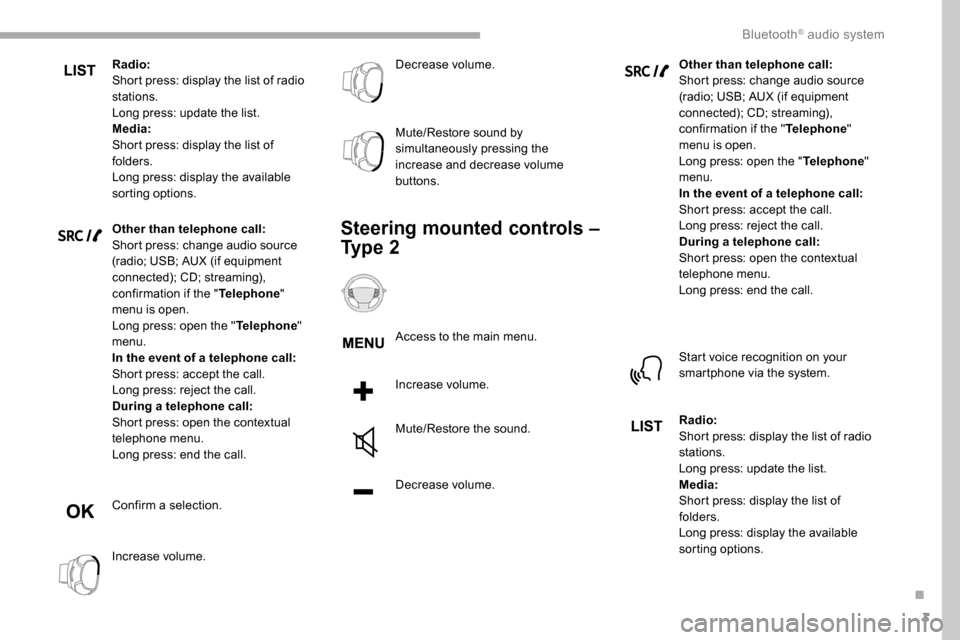
Other than telephone call:
Short press: change audio source
(radio; USB; AUX (if equipment
connected); CD; streaming),
confirmation if the "Telephone"
menu is open.
Long press: open the " Telephone"
menu.
In the event of a telephone call:
Short press: accept the call.
Long press: reject the call.
During a telephone call:
Short press: open the contextual
telephone menu.
Long press: end the call.
Confirm a selection.
Increase volume. Decrease volume.
Mute/Restore sound by
simultaneously pressing the
increase and decrease volume
buttons.
Steering mounted controls –
Ty p e 2
Access to the main menu.
Increase volume.
Mute/Restore the sound.
Decrease volume.
Other than telephone call:
Short press: change audio source
(radio; USB; AUX (if equipment
connected); CD; streaming),
confirmation if the "
Telephone"
menu is open.
Long press: open the " Telephone"
menu.
In the event of a telephone call:
Short press: accept the call.
Long press: reject the call.
During a telephone call:
Short press: open the contextual
telephone menu.
Long press: end the call.
Start voice recognition on your
smartphone via the system.
Radio:
Short press: display the list of radio
stations.
Long press: update the list.
Media:
Short press: display the list of
folders.
Long press: display the available
sorting options.
.
Bluetooth® audio system
Page 224 of 312
4
Radio:
Select the previous/next preset radio
station.
Select the previous/next item in a
menu or a list.
Media:
Select the previous/next track.
Select the previous/next item in a
menu or a list.
Press the thumbwheel: confirm.
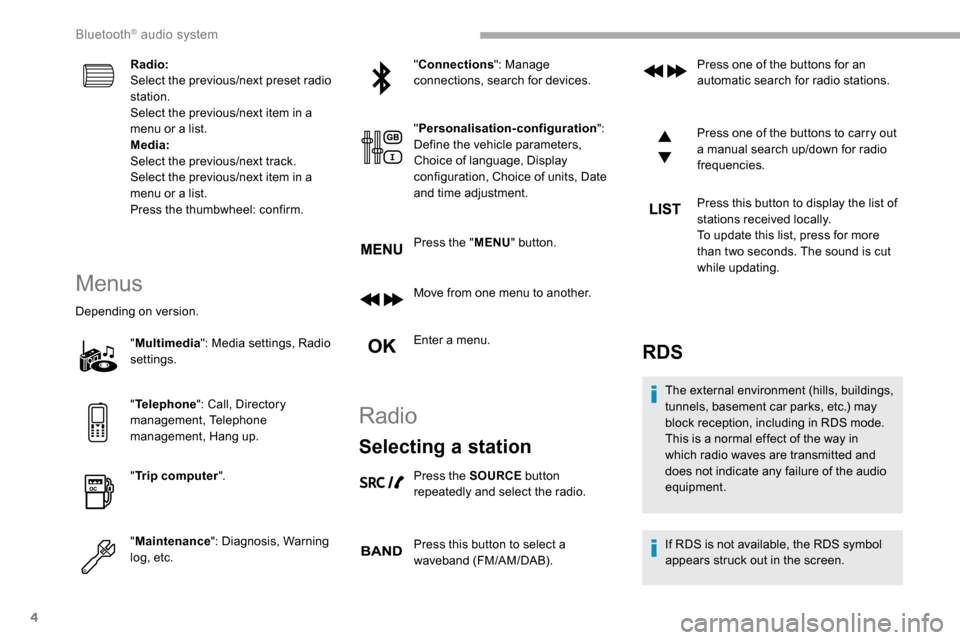
Menus
Depending on version."Multimedia ": Media settings, Radio
settings.
" Telephone ": Call, Directory
management, Telephone
management, Hang up.
" Trip computer ".
" Maintenance ": Diagnosis, Warning
log, etc. "
Connections ": Manage
connections, search for devices.
" Personalisation-configuration ":
Define the vehicle parameters,
Choice of language, Display
configuration, Choice of units, Date
and time adjustment.
Press the " MENU" button.
Move from one menu to another.
Enter a menu.
Radio
Selecting a station
Press the SOURCE button
repeatedly and select the radio.
Press this button to select a
waveband (FM/AM/DAB). Press one of the buttons for an
automatic search for radio stations.
Press one of the buttons to carry out
a manual search up/down for radio
frequencies.
Press this button to display the list of
stations received locally.
To update this list, press for more
than two seconds. The sound is cut
while updating.
RDS
The external environment (hills, buildings,
tunnels, basement car parks, etc.) may
block reception, including in RDS mode.
This is a normal effect of the way in
which radio waves are transmitted and
does not indicate any failure of the audio
equipment.
If RDS is not available, the RDS symbol
appears struck out in the screen.
Bluetooth® audio system
Page 225 of 312
5
The RDS, if activated, enables you to continue
listening to the same station by automatic
retuning to alternative frequencies. However,
in certain conditions, coverage of an RDS
station may not be assured throughout the
entire country as radio stations do not cover
100% of the territory. This explains the loss of
reception of the station during a journey.
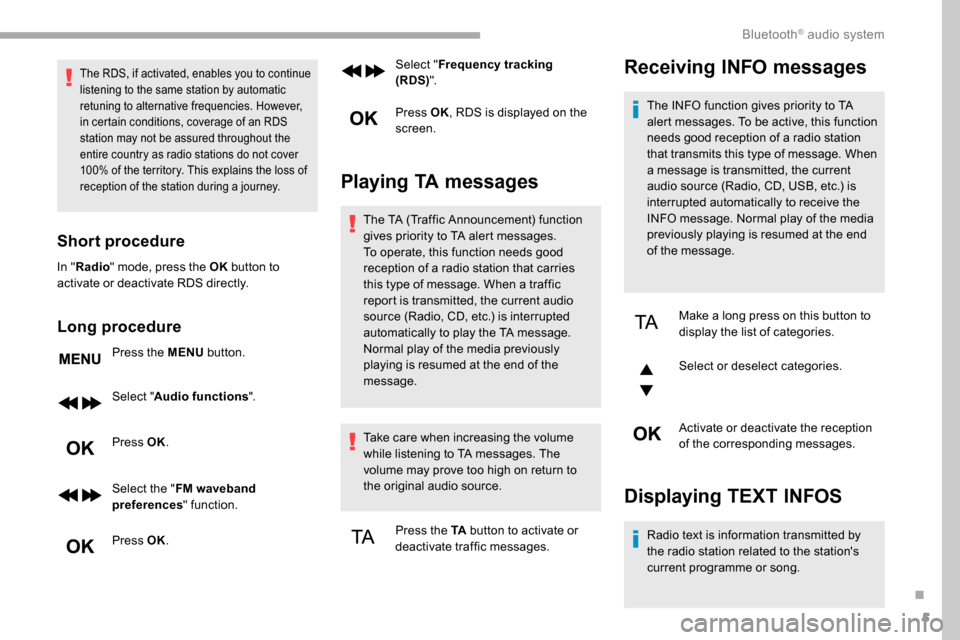
Short procedure
In "Radio " mode, press the OK button to
activate or deactivate RDS directly.
Long procedure
Press the MENU button.
Select " Audio functions ".
Press OK.
Select the " FM waveband
preferences " function.
Press OK. Select "
Frequency tracking
(RDS) ".
Press OK , RDS is displayed on the
screen.
Playing TA messages
The TA (Traffic Announcement) function
gives priority to TA alert messages.
To operate, this function needs good
reception of a radio station that carries
this type of message. When a traffic
report is transmitted, the current audio
source (Radio, CD, etc.) is interrupted
automatically to play the TA message.
Normal play of the media previously
playing is resumed at the end of the
message.
Take care when increasing the volume
while listening to TA messages. The
volume may prove too high on return to
the original audio source.
Press the TA button to activate or
deactivate traffic messages.
Receiving INFO messages
The INFO function gives priority to TA
alert messages. To be active, this function
needs good reception of a radio station
that transmits this type of message. When
a message is transmitted, the current
audio source (Radio, CD, USB, etc.) is
interrupted automatically to receive the
INFO message. Normal play of the media
previously playing is resumed at the end
of the message.
Make a long press on this button to
display the list of categories.
Select or deselect categories.
Activate or deactivate the reception
of the corresponding messages.
Displaying TEXT INFOS
Radio text is information transmitted by
the radio station related to the station's
current programme or song.
.
Bluetooth® audio system