range Peugeot Partner 2019 Owner's Guide
[x] Cancel search | Manufacturer: PEUGEOT, Model Year: 2019, Model line: Partner, Model: Peugeot Partner 2019Pages: 312, PDF Size: 9.56 MB
Page 157 of 312
155
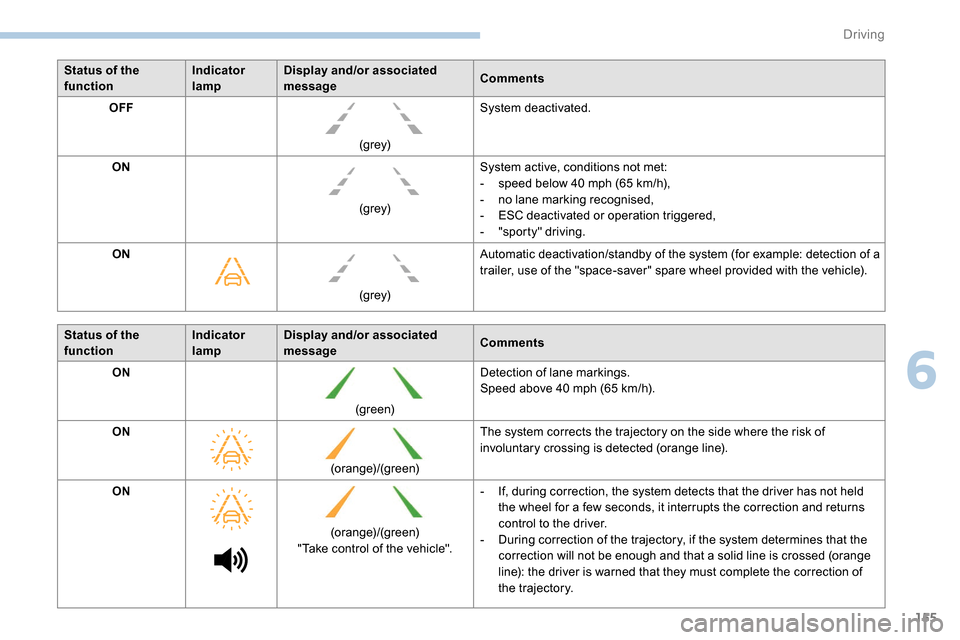
Status of the
functionIndicator
lampDisplay and/or associated
message
Comments
OFF
(grey)System deactivated.
ON (grey)System active, conditions not met:
-
s
peed below 40 mph (65 km/h),
-
n
o lane marking recognised,
-
E
SC deactivated or operation triggered,
-
"
sporty" driving.
ON
(grey)Automatic deactivation/standby of the system (for example: detection of a
trailer, use of the "space-saver" spare wheel provided with the vehicle).
Status of the
function Indicator
lampDisplay and/or associated
message
Comments
ON
(green)Detection of lane markings.
Speed above 40
mph (65 km/h).
ON (orange)/(green)The system corrects the trajectory on the side where the risk of
involuntary crossing is detected (orange line).
ON (orange)/(green)
"Take control of the vehicle". -
I
f, during correction, the system detects that the driver has not held
the wheel for a few seconds, it interrupts the correction and returns
control to the driver.
-
D
uring correction of the trajectory, if the system determines that the
correction will not be enough and that a solid line is crossed (orange
line): the driver is warned that they must complete the correction of
the trajectory.
6
Driving
Page 163 of 312
161
Adjusting the audible signalOn versions equipped with
PEUGEOT Connect Radio,
pressing this button opens the
audible signal volume adjustment
window.
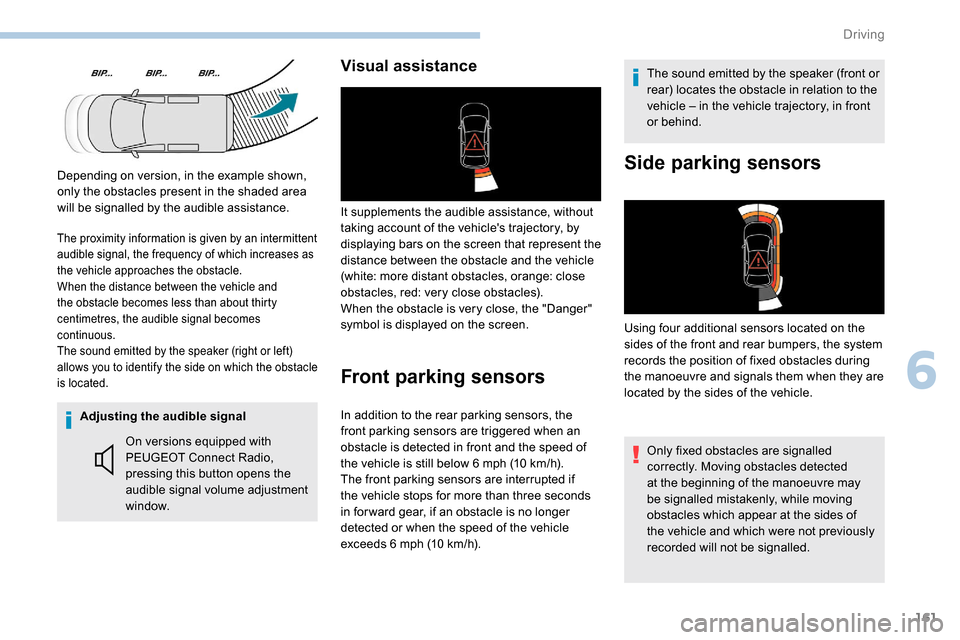
Visual assistance
It supplements the audible assistance, without
taking account of the vehicle's trajectory, by
displaying bars on the screen that represent the
distance between the obstacle and the vehicle
(white: more distant obstacles, orange: close
obstacles, red: very close obstacles).
When the obstacle is very close, the "Danger"
symbol is displayed on the screen.
Front parking sensors
The sound emitted by the speaker (front or
rear) locates the obstacle in relation to the
vehicle – in the vehicle trajectory, in front
or behind.
In addition to the rear parking sensors, the
front parking sensors are triggered when an
obstacle is detected in front and the speed of
the vehicle is still below 6
mph (10
km/h).
The front parking sensors are interrupted if
the vehicle stops for more than three seconds
in for ward gear, if an obstacle is no longer
detected or when the speed of the vehicle
exceeds 6
mph (10
km/h).
Side parking sensors
Using four additional sensors located on the
sides of the front and rear bumpers, the system
records the position of fixed obstacles during
the manoeuvre and signals them when they are
located by the sides of the vehicle.
The proximity information is given by an intermittent
audible signal, the frequency of which increases as
the vehicle approaches the obstacle.
When the distance between the vehicle and
the obstacle becomes less than about thirty
centimetres, the audible signal becomes
continuous.
The sound emitted by the speaker (right or left)
allows you to identify the side on which the obstacle
is located.
Only fixed obstacles are signalled
correctly. Moving obstacles detected
at the beginning of the manoeuvre may
be signalled mistakenly, while moving
obstacles which appear at the sides of
the vehicle and which were not previously
recorded will not be signalled.
Depending on version, in the example shown,
only the obstacles present in the shaded area
will be signalled by the audible assistance.
6
Driving
Page 166 of 312
164
Maintenance
recommendations
In bad or wintry weather, ensure that the
camera is not covered by mud, frost or snow.
Check the cleanliness of the camera lens
regularly.
If necessary, clean the camera with a soft, dry
cloth.
When washing the vehicle using a high-
pressure jet, keep the spray directed at least
30 cm away from the camera.
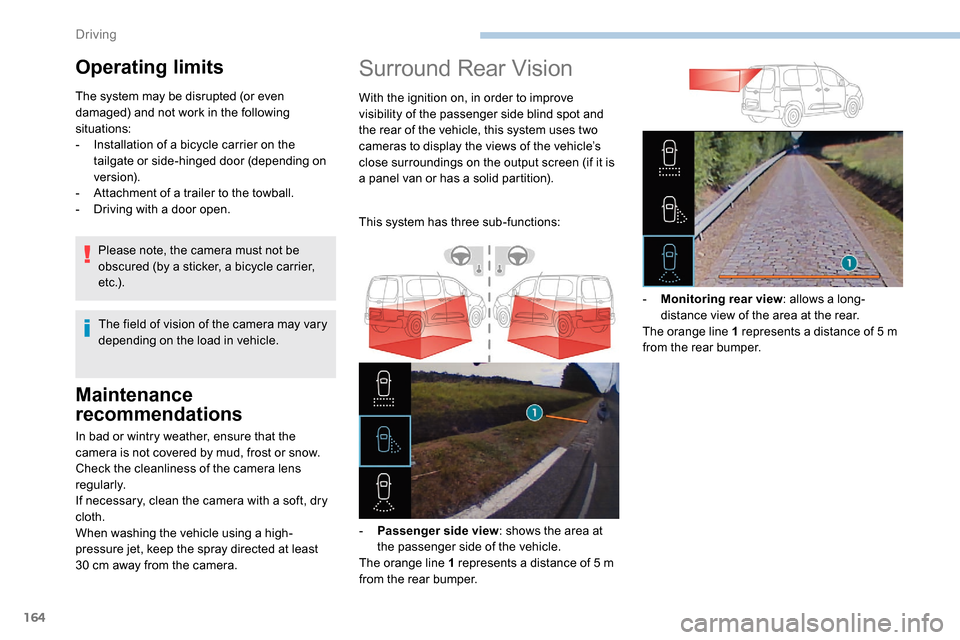
Surround Rear Vision
With the ignition on, in order to improve
visibility of the passenger side blind spot and
the rear of the vehicle, this system uses two
cameras to display the views of the vehicle’s
close surroundings on the output screen (if it is
a panel van or has a solid partition).
This system has three sub-functions:
-
P
assenger side view : shows the area at
the passenger side of the vehicle.
The orange line 1 represents a distance of 5
m
from the rear bumper. -
M
onitoring rear view: allows a long-
distance view of the area at the rear.
The orange line 1 represents a distance of 5
m
from the rear bumper.
Operating limits
The system may be disrupted (or even
damaged) and not work in the following
situations:
-
I
nstallation of a bicycle carrier on the
tailgate or side-hinged door (depending on
ve r s i o n).
-
A
ttachment of a trailer to the towball.
-
D
riving with a door open.
The field of vision of the camera may vary
depending on the load in vehicle.
Please note, the camera must not be
obscured (by a sticker, a bicycle carrier,
e t c .) .
Driving
Page 167 of 312
165
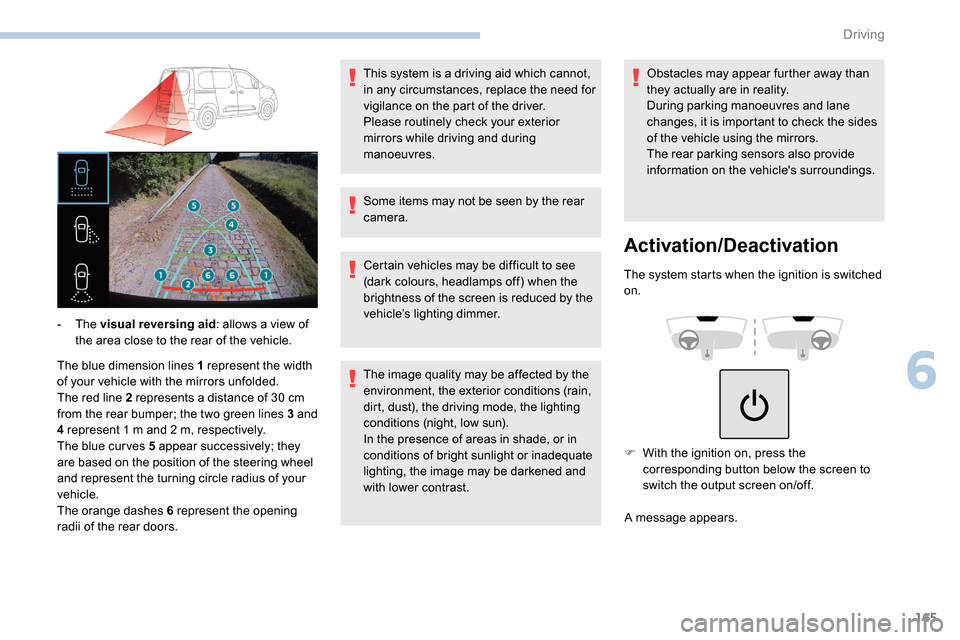
The blue dimension lines 1 represent the width
of your vehicle with the mirrors unfolded.
The red line 2 represents a distance of 30 cm
from the rear bumper; the two green lines 3 and
4 represent 1
m and 2 m, respectively.
The blue cur ves 5 appear successively; they
are based on the position of the steering wheel
and represent the turning circle radius of your
vehicle.
The orange dashes 6 represent the opening
radii of the rear doors. - The
visual reversing aid : allows a view of
the area close to the rear of the vehicle. Some items may not be seen by the rear
camera.
Certain vehicles may be difficult to see
(dark colours, headlamps off) when the
brightness of the screen is reduced by the
vehicle’s lighting dimmer.
The image quality may be affected by the
environment, the exterior conditions (rain,
dirt, dust), the driving mode, the lighting
conditions (night, low sun).
In the presence of areas in shade, or in
conditions of bright sunlight or inadequate
lighting, the image may be darkened and
with lower contrast.Obstacles may appear further away than
they actually are in reality.
During parking manoeuvres and lane
changes, it is important to check the sides
of the vehicle using the mirrors.
The rear parking sensors also provide
information on the vehicle's surroundings.
Activation/Deactivation
The system starts when the ignition is switched
on.
This system is a driving aid which cannot,
in any circumstances, replace the need for
vigilance on the part of the driver.
Please routinely check your exterior
mirrors while driving and during
manoeuvres.
F
W
ith the ignition on, press the
corresponding button below the screen to
switch the output screen on/off.
A message appears.
6
Driving
Page 179 of 312
177
Load reduction mode
System which manages the use of certain
functions according to the level of charge
remaining in the battery.
When the vehicle is being driven, the load
reduction function temporarily deactivates
certain functions, such as air conditioning,
heated rear screen, etc.
The deactivated functions are reactivated
automatically as soon as conditions permit.
Roof bars/Roof rack
Recommendations
Distribute the load uniformly, taking care
to avoid overloading one of the sides.
Arrange the heaviest part of the load as
close as possible to the roof.
Secure the load firmly.
Drive gently: the vehicle will be more
susceptible to the effects of side winds
and its stability may be affected.
Regularly check the security and tight
fastening of the roof bars and racks, at
least before each trip.As a safety measure and to avoid
damaging the roof, it is essential to use
the roof bars and racks approved for your
vehicle.
Obser ve the instructions on fitting and use
contained in the guide supplied with the
roof bars and racks. In the event of loading (
not exceeding
40 cm in height) on the roof, do not
exceed the following loads:
-
T
ransverse bars on longitudinal bars:
80 kg
.
-
T
wo transverse bars bolted to the roof:
100
kg
.
-
T
hree transverse bars bolted to the
roof: 15 0
kg
.
-
A
n aluminium rack: 120
kg
.
-
A s
teel rack: 115
k g
.
If the height exceeds 40 cm, adapt the
speed of the vehicle to the profile of the
road to avoid damaging the roof bars
or the roof rack and the fixings on the
vehicle.
Be sure to refer to national legislation in
order to comply with the regulations for
transporting objects which are longer than
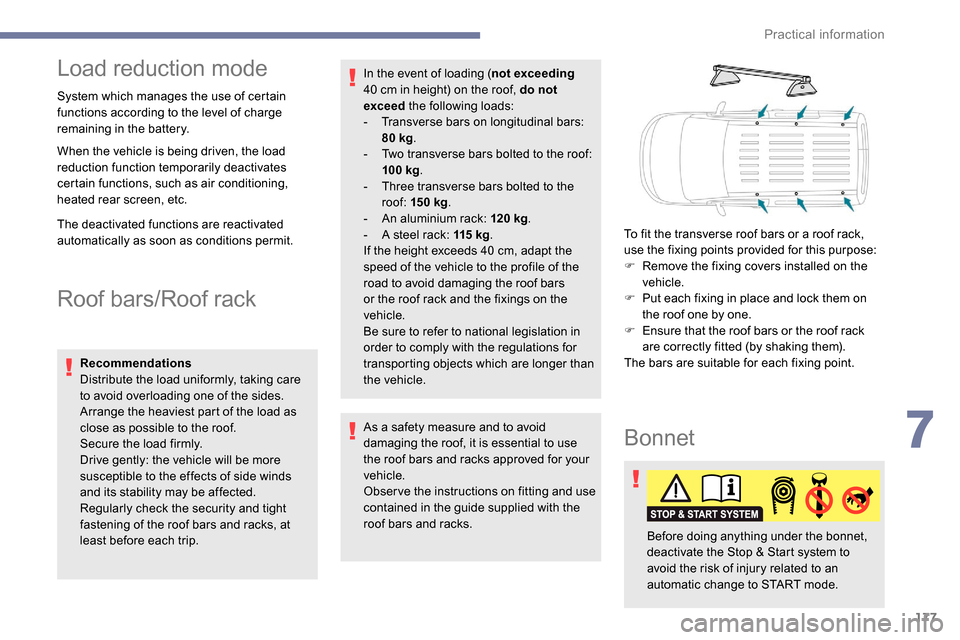
the vehicle. To fit the transverse roof bars or a roof rack,
use the fixing points provided for this purpose:
F
R
emove the fixing covers installed on the
vehicle.
F
P
ut each fixing in place and lock them on
the roof one by one.
F
E
nsure that the roof bars or the roof rack
are correctly fitted (by shaking them).
The bars are suitable for each fixing point.
Bonnet
Before doing anything under the bonnet,
deactivate the Stop & Start system to
avoid the risk of injury related to an
automatic change to START mode.
7
Practical information
Page 185 of 312
183
Automatic electronic
parking brake
This system does not require any
routine servicing. However, in case
of an issue, do not hesitate to have
the system checked by a PEUGEOT
dealer or a qualified workshop.
For more information on the Automatic
electronic parking brake , refer to the
corresponding section.
Wheels and tyres
The pressure must be checked on
all tyres, including the spare wheel,
when the tyres are "cold", at least
once a month and before a long
j o u r n ey. Driving with worn or damaged tyres reduces
braking efficiency and control of the vehicle's
steering. Regular inspections of the condition
of tyres (tread and sides) and rims are
recommended as well as making sure that
valves are fitted.
Using different size wheels and tyres from
those specified can affect the lifetime of tyres,
wheel rotation, ground clearance and the
speedometer reading and have an adverse
effect on road holding.
Fitting different tyres on the front and rear axles
can cause unwanted ESC regulation.
The pressures given on the tyre pressure label
are valid for "cold" tyres. If you have driven for
more than 10 minutes or more than 6 miles
(10
kilometres) at more than 31 mph (50 km/h),
0.3
bar (30 kPa) should be added to the values
given on the label.
Under-inflation increases fuel consumption.
Non-compliant tyre pressure causes premature
wear on tyres and has an adverse effect on the
vehicle's road holding – Risk of an accident! Only use products recommended by
PEUGEOT or products of equivalent
quality and specification.
In order to optimise the operation of
components as important as those in the
braking system, PEUGEOT selects and
offers very specific products.
After washing the vehicle, dampness, or
in wintry conditions, ice can form on the
brake discs and pads: braking efficiency
may be reduced. Make light brake
applications to dry and defrost the brakes.
AdBlue® (BlueHDi)
To respect the environment and ensure
compliance with the Euro 6 standard, without
adversely affecting the per formance or fuel
consumption of Diesel engines, PEUGEOT
has taken the decision to equip its vehicles
with a system that associates SCR (Selective
Catalytic Reduction) with a Diesel particle filter
(DPF) for the treatment of exhaust gases.
SCR system
Using a liquid called AdBlue® that contains
urea, a catalytic converter turns up to 85% of
the nitrogen oxides (NOx) into nitrogen and
water, which are harmless to health and the
environment.
The AdBlue
® is contained in
a special tank holding about
17
litres.
Its capacity allows a driving range of
approximately 5,600
miles (9,000 km), highly
dependent on your driving style.
An alert system is triggered automatically once
the reser ve level is reached: you can then drive
for a further 1,500
miles (2,400 km) before the
tank is empty.
7
Practical information
Page 186 of 312
184
For more information on the Warning
and indicator lamps and the associated
alerts, or the Indicators , refer to the
corresponding sections.
Freezing of the AdBlue
®
AdBlue® freezes at temperatures below
around -11°C.
The SCR system includes a heater for the
AdBlue
® tank, allowing you to continue
driving in very cold conditions.
Supply of AdBlue®
It is recommended that the AdBlue® is
topped up as soon as the first alert is
issued indicating that the reser ve level has
been reached.
In order to ensure that the SCR system
operates correctly:
-
U
se only AdBlue
® fluid that meets the
ISO 22241 standard.
-
N
ever transfer AdBlue
® to another
container: it would lose its purity.
-
N
ever dilute AdBlue
® with water.
You can obtain AdBlue
® from a PEUGEOT
dealer or a qualified workshop.
You can also visit a ser vice station
equipped with AdBlue
® pumps specially
designed for private vehicles.
Never top up from an AdBlue
® dispenser
reserved for heavy goods vehicles.
Recommendations on
storage
AdBlue® freezes at about -11°C and
deteriorates above 25°C. It should be stored in
a cool place and protected from direct sunlight.
Under these conditions, the fluid can be kept
for at least a year.
If the additive has frozen, it can be used once it
has completely thawed out.
Never keep containers or bottles of
AdBlue
® in your vehicle.
Precautions in use
AdBlue® is a urea-based solution. This fluid is
non-flammable, colourless and odourless (kept in
a cool area).
In the event of contact with the skin, wash the
affected area with soap and running water. In
the event of contact with the eyes, immediately
rinse the eyes with large amounts of water or
with an eye wash solution for at least 15
minutes.
If a burning sensation or irritation persists, get
medical attention.
If swallowed, immediately rinse the mouth with
clean water and then drink plenty of water.
In certain conditions (high ambient temperature,
for example), the risk of ammonia being released
Once the AdBlue® tank is empty, a system
r
equired by regulations prevents starting
of the engine.
If the SCR system is faulty, the level of
emissions from your vehicle will no longer
meet the Euro 6 standard: your vehicle
becomes polluting.
In the event of a confirmed fault with the
SCR system, you must go to a PEUGEOT
dealer or a qualified workshop as soon
as possible: after travelling a distance
of 685
miles (1,100 km), a system will be
triggered automatically to prevent engine
starting.
In either case, a range indicator gives you
the distance you can travel before the
vehicle is immobilised.
Practical information
Page 246 of 312
8
Press "Audio settings ".
Select the " To n e" or "Balance " or
" Sound " or "Voice " or "Ringtones "
tab to configure the audio settings.
Press the back arrow to confirm.
In the " To n e" tab, the Ambience audio
settings, as well as Bass , Medium and
Tr e b l e are different and independent for
each audio source.
In the " Balance " tab, the All passengers ,
Driver and Front only settings are
common to all sources.
In the " Sound" tab, activate or deactivate
" Volume linked to speed ", "Auxiliary
input " and " Touch tones ".
The balance/distribution (or spatialisation
with the Arkamys
© system) is audio
processing that allows the quality of the
sound to be adapted according to the
number of passengers in the vehicle. Onboard audio: Arkamys
© Sound Staging
optimises the distribution of sound in the
passenger compartment.
DAB (Digital Audio
Broadcasting) radio
Terrestrial Digital Radio
Digital radio provides higher quality
reception.
The different "multiplexes" offer a choice
of radio stations arranged in alphabetical
o r d e r.
Press Radio Media to display the
primary page.
Press the " OPTIONS" button to go to the
secondary page.
Press "Band" to select the " DAB
band ".
Press in the grey zone to confirm.
FM-DAB Tracking
"DAB" does not cover 100% of the
te r r i to r y.
When the digital radio signal is poor,
the "FM-DAB Tracking" allows you to
continue listening to the same station,
by automatically switching to the
corresponding FM analogue station (if
there is one).
Press Radio Media to display the
primary page.
Press the " OPTIONS" button to go to the
secondary page.
Activate/Deactivate " FM- DAB
Tracking ".
Press in the grey zone to confirm.
If "FM-DAB Tracking" is activated, there
is a difference of a few seconds when the
system switches to FM analogue radio
with sometimes a variation in volume.
Once the digital signal quality is restored,
the system automatically changes back
to " DA B ".
PEUGEOT Connect Radio
Page 284 of 312
24
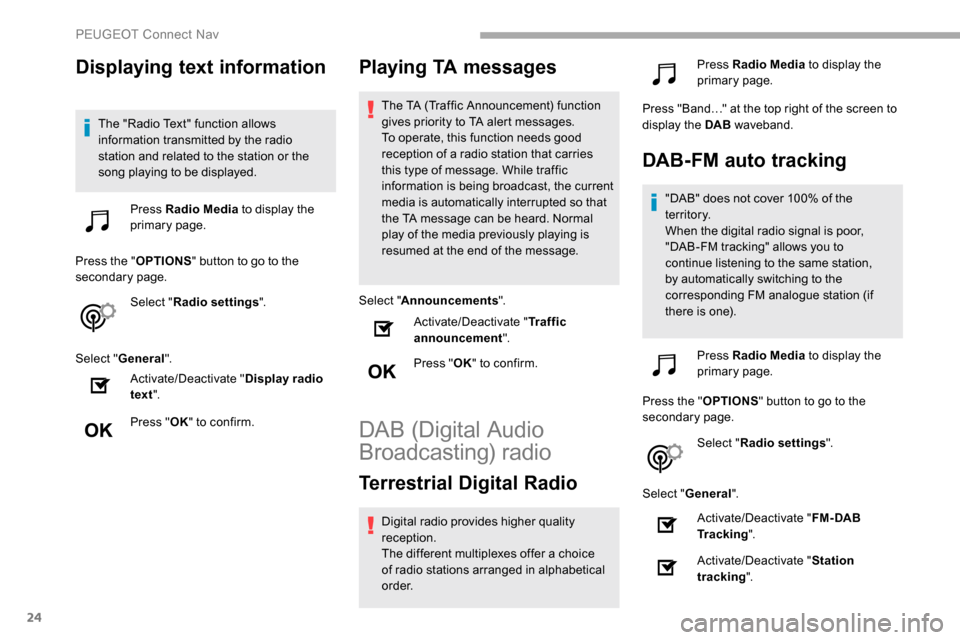
Displaying text information
The "Radio Text" function allows
information transmitted by the radio
station and related to the station or the
song playing to be displayed.Press Radio Media to display the
primary page.
Press the " OPTIONS" button to go to the
secondary page.
Select "Radio settings ".
Select " General ".
Activate/Deactivate " Display radio
text ".
Press " OK" to confirm.
Playing TA messages
The TA (Traffic Announcement) function
gives priority to TA alert messages.
To operate, this function needs good
reception of a radio station that carries
this type of message. While traffic
information is being broadcast, the current
media is automatically interrupted so that
the TA message can be heard. Normal
play of the media previously playing is
resumed at the end of the message.
Select " Announcements ".
Activate/Deactivate " Traffic
announcement ".
Press " OK" to confirm.
DAB (Digital Audio
Broadcasting) radio
Terrestrial Digital Radio
Digital radio provides higher quality
reception.
The different multiplexes offer a choice
of radio stations arranged in alphabetical
o r d e r. Press Radio Media
to display the
primary page.
Press "Band…" at the top right of the screen to
display the DAB waveband.
DAB-FM auto tracking
"DAB" does not cover 100% of the
te r r i to r y.
When the digital radio signal is poor,
"DAB-FM tracking" allows you to
continue listening to the same station,
by automatically switching to the
corresponding FM analogue station (if
there is one).
Press Radio Media to display the
primary page.
Press the " OPTIONS" button to go to the
secondary page.
Select "Radio settings ".
Select " General ".
Activate/Deactivate " FM- DAB
Tracking ".
Activate/Deactivate " Station
tracking ".
PEUGEOT Connect Nav
Page 303 of 312
221
Hill Assist Descent Control (HADC) ....26 , 102-103Hill Descent Control ...............................102-103
Hill start assist ........................................ 124 -125
Horn ................................................................. 97
IIdentification, vehicle .................................... 217
Ignition ................ .............................. 11 9 -12 0, 29
Ignition on ...................................................... 120
Immobiliser, electronic
......................44, 47 , 120
Indicator, AdBlue
® range ................................. 31
Indicator, coolant temperature ..................28-30
Indicator, engine oil level
................................ 30
Indicator lamps, operation
................... 1
5 -16, 85
Indicator lamps, status
.................................... 15
I
ndicators, direction
........................................ 86
Inflating tyres
................................................ 183
Inflating tyres and accessories (using the kit)
................................................. 189, 191
Instrument panel
............................................. 11
Instrument panels
........................................... 29
Internet browser
.............................................. 21
JJack .........................................................191, 25
Jump starting ................................................ 204
KKey ................................................ 37, 39 , 42, 47
Key, electronic ......................................... 37, 120
Keyless Entry and Starting .................
3 7- 4 0, 42, 44 , 47- 4 8 , 11 8 -11 9
Key with remote control
......................37,
42, 44
Kit, hands-free
..................... 1
0 -11, 13 -14 , 27-2 8
Kit, temporary puncture repair
....... 18
8 -189, 191
LLabels ................................................................ 4
Labels, identification ..................................... 217
Lamps, front
........................................... 197-19 9
Lamps, parking
............................................... 87
Lamps, rear
................................................... 19 9
Lane departure warning active
............... 20,
15 3
LEDs - Light-emitting diodes
..........................87
Level, brake fluid
........................................... 18 0
Level, Diesel additive
.............................181-182
Level, engine coolant
........................28-30, 18 0
Level, engine oil
.............................. 30, 179 -18 0
Levels and checks
..............................
...178 -181
Level, screenwash fluid
...................92,
18 0 -181
Light-emitting diodes - LEDs
..........................87
Lighting
............................................................ 85
Lighting, cornering
.................................... 90 -91
Lighting, directional
......................................... 90
Lighting, guide-me home
................................88
Lighting, welcome
........................................... 88
Loading
................................................... 68, 17 7
Load reduction mode
.................................... 17 7
Load restraint
...............................
...................67
Locating your vehicle
...................................... 44
Locking
...............................
.................37, 42 , 47
Locking from the inside
.............................48-49
Low fuel level
......................................... 17
1-172
Lumbar
............................................................ 60
MMarkings, identification .................................217
Mat .................................................... 64-65, 11 8
Memorising a speed
..............................1
4 9 -15 0
Menu
............................................................... 12
Menu, main
....................................................... 4
M
enus (audio) ........................................ 4-5, 4-5
Messages
........................................................ 30
Messages, quick
............................................. 3
0
Mirror, rear view
.............................................. 58
Mirrors, door ......................... 57- 5 8, 79, 157-15 8
Misfuel prevention
......................................... 172
MP3 CD
............................................................. 9
NNumber plate lamps ...................................... 200
OObstacle detection ........................................ 160
Oil change .............................................. 17
9 -18 0
Oil consumption
..................................... 179 -18 0
Oil, engine
.............................................. 179 -18 0
On-board tools
....................................... 187-188
Opening the bonnet
...............................17 7-178
Opening the boot
............................................ 37
Opening the doors
.......................................... 37
Opening the fuel filler flap
.............................171
Overhead storage
........................................... 65
O
verload indicator
........................................... 21
.
Alphabetical index