limit Peugeot Partner 2019 Workshop Manual
[x] Cancel search | Manufacturer: PEUGEOT, Model Year: 2019, Model line: Partner, Model: Peugeot Partner 2019Pages: 312, PDF Size: 9.56 MB
Page 215 of 312
213
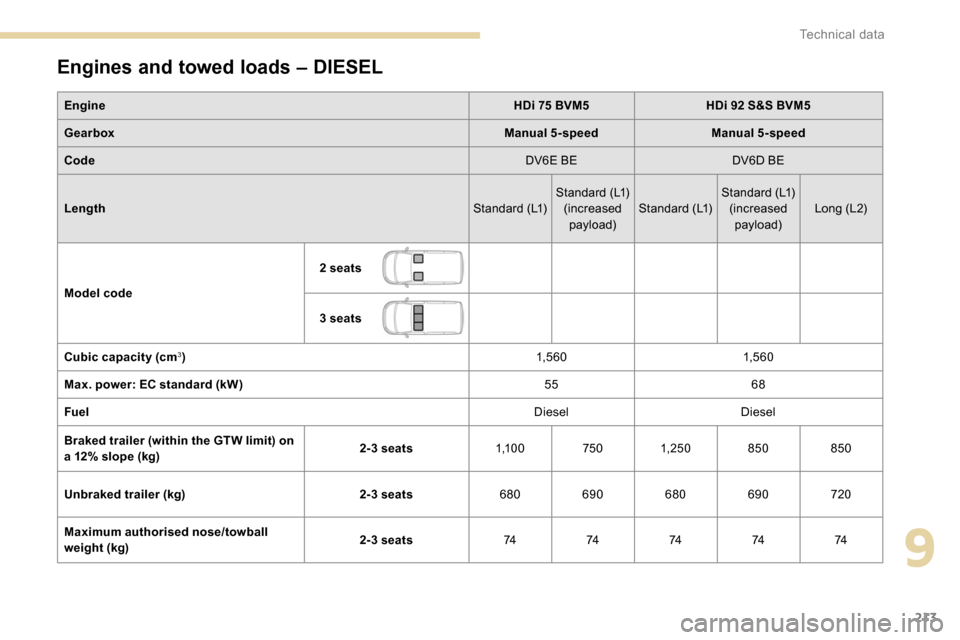
Engines and towed loads – DIESEL
EngineHDi 75 BVM5HDi 92 S&S BVM5
Gearbox Manual 5-speedManual 5-speed
Code DV6E BEDV6D BE
Length Standard (L1)Standard (L1)
(increased payload) Standard (L1) Standard (L1)
(increased payload) Long (L2)
Model code 2 seats
3 seats
Cubic capacity (cm
3) 1,5 6 01,5 6 0
Max. power: EC standard (kW) 5568
Fuel DieselDiesel
Braked trailer (within the GTW limit) on
a 12% slope (kg) 2-3 seats
1,1 0 07501, 25 0 850850
Unbraked trailer (kg) 2-3 seats680690 680690 720
Maximum authorised nose/towball
weight (kg) 2-3 seats
7474747474
9
Technical data
Page 216 of 312
214
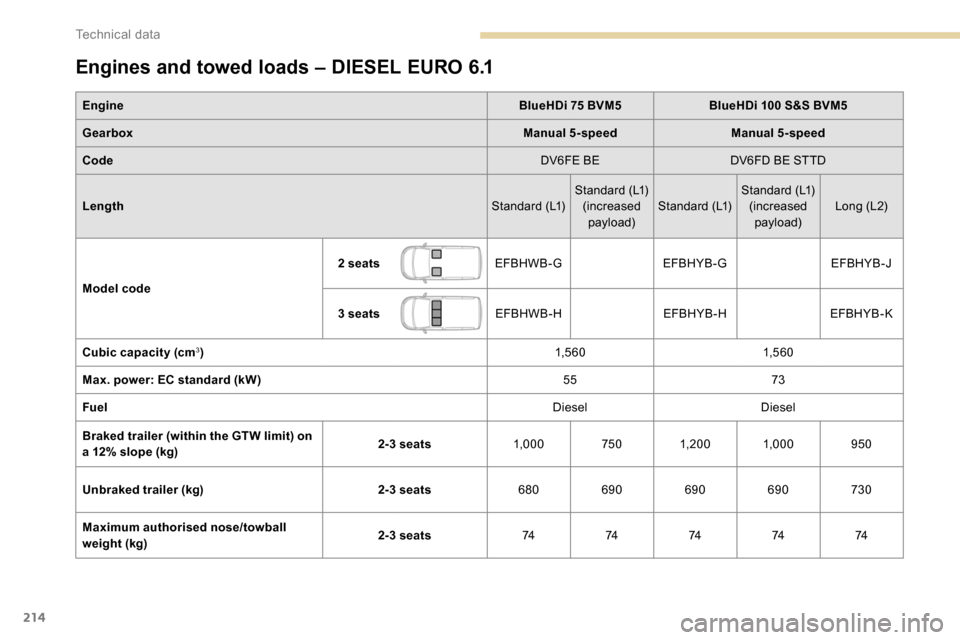
Engines and towed loads – DIESEL EURO 6.1
EngineBlueHDi 75 BVM5BlueHDi 100 S&S BVM5
Gearbox Manual 5-speedManual 5-speed
Code DV6FE BEDV6FD BE STTD
Length Standard (L1)Standard (L1)
(increased payload) Standard (L1) Standard (L1)
(increased payload) Long (L2)
Model code 2 seats
EFBHWB-G EFBHYB-G EFBHYB-J
3 seats EFBHWB-H EFBHYB-HEFBHYB-K
Cubic capacity (cm
3) 1,5 6 01,5 6 0
Max. power: EC standard (kW) 5573
Fuel DieselDiesel
Braked trailer (within the GTW limit) on
a 12% slope (kg) 2-3 seats
1,0007501, 20 0 1,000 950
Unbraked trailer (kg) 2-3 seats680690 690690 730
Maximum authorised nose/towball
weight (kg) 2-3 seats
7474747474
Technical data
Page 217 of 312
215
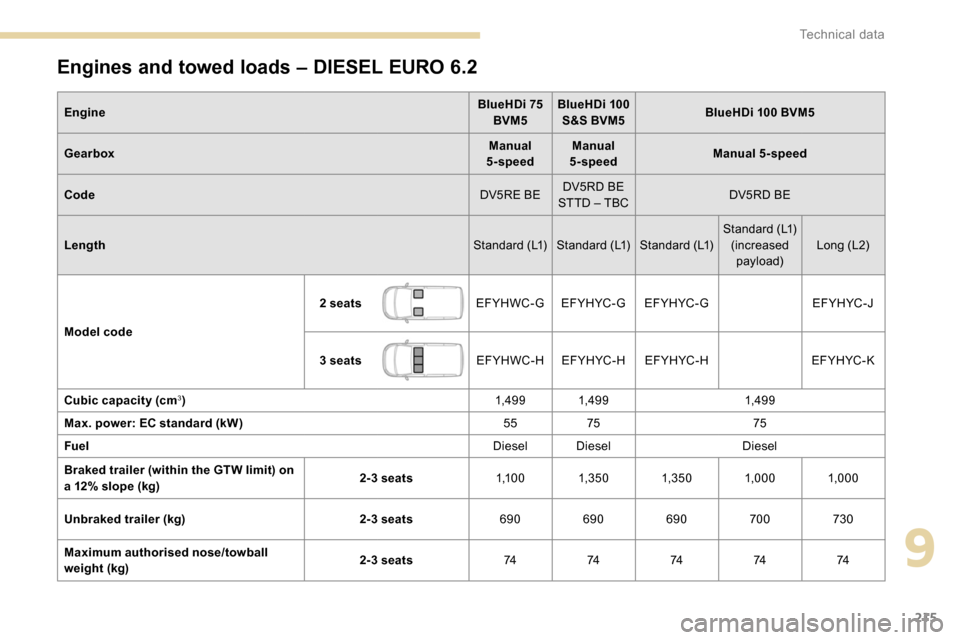
Engines and towed loads – DIESEL EURO 6.2
EngineBlueHDi 75
BVM5 BlueHDi 100
S&S BVM5 BlueHDi 100 BVM5
Gearbox Manual
5-speed Manual
5-speed Manual 5-speed
Code DV5RE BEDV5RD BE
STTD – TBC DV5RD BE
Length Standard (L1) Standard (L1) Standard (L1)Standard (L1)
(increased payload) Long (L2)
Model code 2 seats
EFYHWC-GEF YH YC - G EF YH YC - G EFYHYC-J
3 seats EFYHWC-HEF YH YC - H EF YH YC - H EF YH YC - K
Cubic capacity (cm
3) 1,49 9 1,49 91,49 9
Max. power: EC standard (kW) 5575 75
Fuel Diesel DieselDiesel
Braked trailer (within the GTW limit) on
a 12% slope (kg) 2-3 seats
1,1 0 01,3 5 0 1,3 5 0 1,000 1,000
Unbraked trailer (kg) 2-3 seats690690690 700730
Maximum authorised nose/towball
weight (kg) 2-3 seats
7474747474
9
Technical data
Page 218 of 312
216
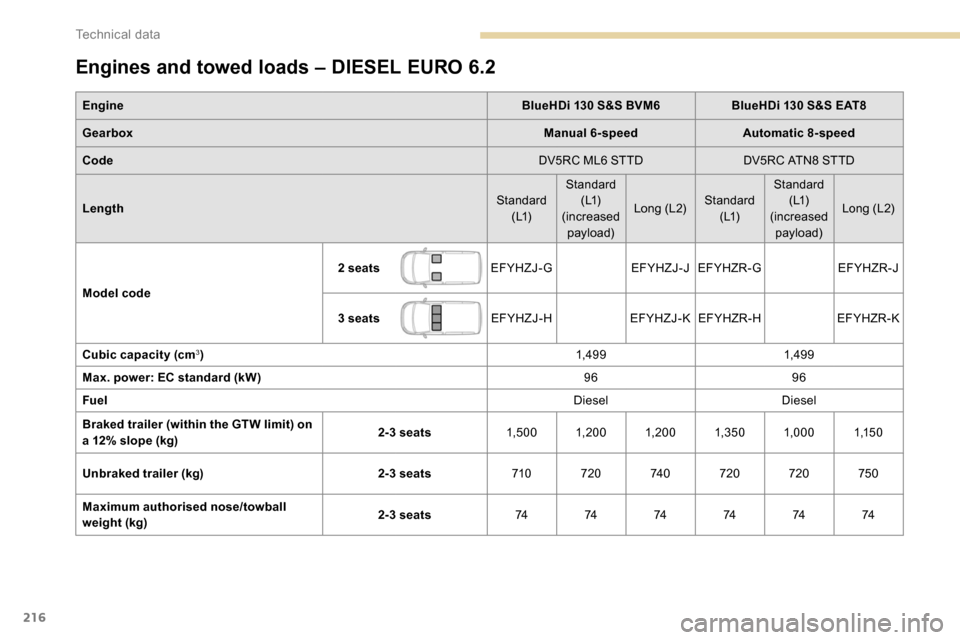
Engines and towed loads – DIESEL EURO 6.2
EngineBlueHDi 130 S&S BVM6BlueHDi 130 S&S EAT8
Gearbox Manual 6-speedAutomatic 8-speed
Code DV5RC ML6 STTDDV5RC ATN8 STTD
Length Standard
( L1) Standard
( L1)
(increased payload) Long (L2)
Standard
( L1) Standard
( L1)
(increased payload) Long (L2)
Model code 2 seats
EFYHZJ-GEFYHZJ-JEFYHZR-G EFYHZR-J
3 seats EFYHZJ-HEFYHZJ-K EFYHZR-H EFYHZR-K
Cubic capacity (cm
3) 1,49 91,49 9
Max. power: EC standard (kW) 9696
Fuel DieselDiesel
Braked trailer (within the GTW limit) on
a 12% slope (kg) 2-3 seats
1,5 0 0 1, 20 0 1, 20 0 1,3 5 0 1,0001,1 5 0
Unbraked trailer (kg) 2-3 seats710720 74 0720 720 750
Maximum authorised nose/towball
weight (kg) 2-3 seats
74 74 74 74 74 74
Technical data
Page 229 of 312
9
CD player
Insert circular compact discs only.
Some anti-pirating systems, on original discs
or CDs copied using a personal recorder, may
cause faults which are no reflection on the
quality of the original player.
Insert a CD in the player, play begins
automatically.External CD players connected via the
USB port are not recognised by the
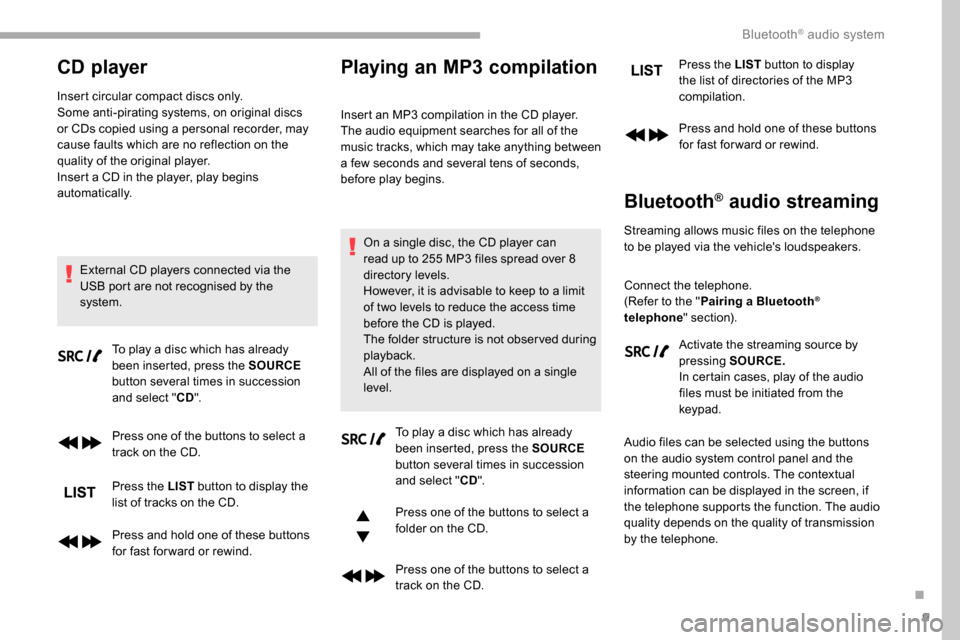
system. To play a disc which has already
been inserted, press the SOURCE
button several times in succession
and select " CD".
Press one of the buttons to select a
track on the CD.
Press the LIST button to display the
list of tracks on the CD.
Press and hold one of these buttons
for fast for ward or rewind.
Playing an MP3 compilation
Insert an MP3 compilation in the CD player.
The audio equipment searches for all of the
music tracks, which may take anything between
a few seconds and several tens of seconds,
before play begins.
On a single disc, the CD player can
read up to 255 MP3 files spread over 8
directory levels.
However, it is advisable to keep to a limit
of two levels to reduce the access time
before the CD is played.
The folder structure is not obser ved during
playback.
All of the files are displayed on a single
level. To play a disc which has already
been inserted, press the SOURCE
button several times in succession
and select " CD".
Press one of the buttons to select a
folder on the CD.
Press one of the buttons to select a
track on the CD. Press the LIST
button to display
the list of directories of the MP3
compilation.
Press and hold one of these buttons
for fast for ward or rewind.
Bluetooth® audio streaming
Streaming allows music files on the telephone
to be played via the vehicle's loudspeakers.
Connect the telephone.
(Refer to the " Pairing a Bluetooth
®
telephone " section).
Activate the streaming source by
pressing SOURCE.
In certain cases, play of the audio
files must be initiated from the
keypad.
Audio files can be selected using the buttons
on the audio system control panel and the
steering mounted controls. The contextual
information can be displayed in the screen, if
the telephone supports the function. The audio
quality depends on the quality of transmission
by the telephone.
.
Bluetooth® audio system
Page 241 of 312
3
In very hot conditions, the volume may
be limited to protect the system. It may go
into standby (screen and sound off) for at
least 5
minutes.
The return to normal takes place when
the temperature in the passenger
compartment has dropped.
Steering mounted controls
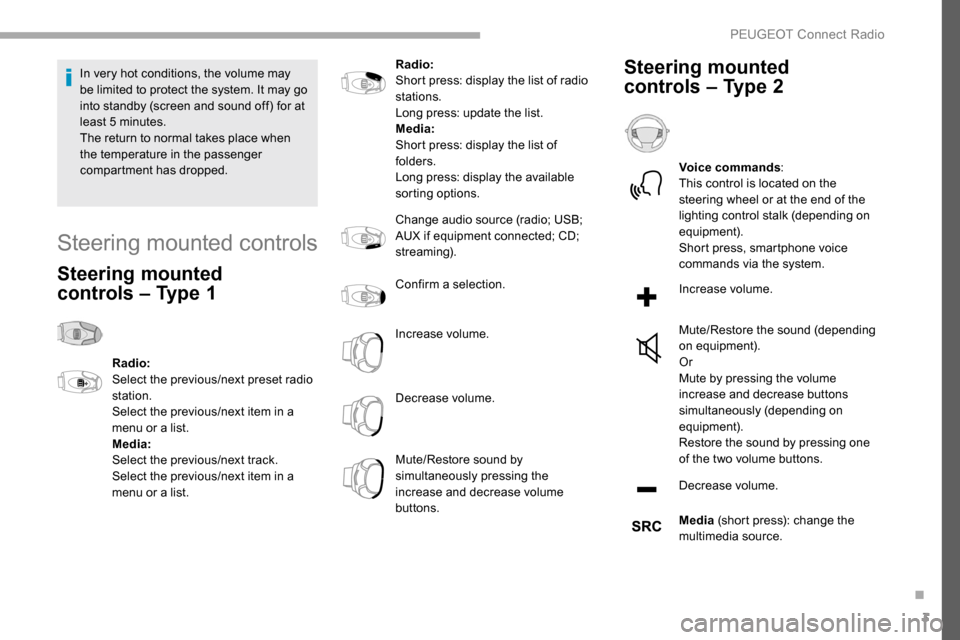
Steering mounted
controls – Type 1
Radio:
Select the previous/next preset radio
station.
Select the previous/next item in a
menu or a list.
Media:
Select the previous/next track.
Select the previous/next item in a
menu or a list. Radio:
Short press: display the list of radio
stations.
Long press: update the list.
Media:
Short press: display the list of
folders.
Long press: display the available
sorting options.
Change audio source (radio; USB;
AUX if equipment connected; CD;
streaming).
Confirm a selection.
Increase volume.
Decrease volume.
Mute/Restore sound by
simultaneously pressing the
increase and decrease volume
buttons.
Steering mounted
controls – Type 2
Voice commands
:
This control is located on the
steering wheel or at the end of the
lighting control stalk (depending on
equipment).
Short press, smartphone voice
commands via the system.
Increase volume.
Mute/Restore the sound (depending
on equipment).
Or
Mute by pressing the volume
increase and decrease buttons
simultaneously (depending on
equipment).
Restore the sound by pressing one
of the two volume buttons.
Decrease volume.
Media (short press): change the
multimedia source.
.
PEUGEOT Connect Radio
Page 258 of 312
20
Media
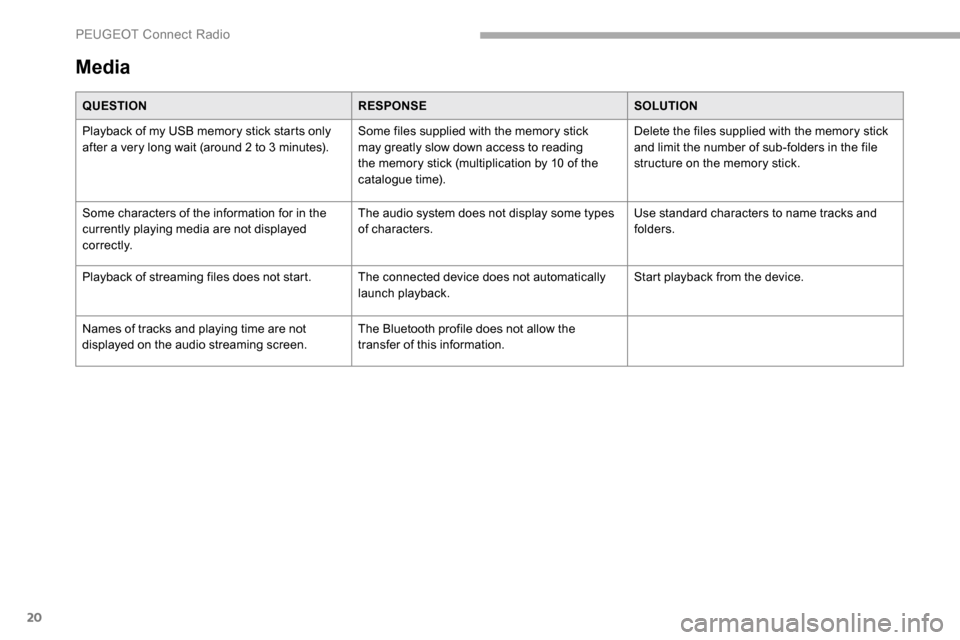
QUESTIONRESPONSESOLUTION
Playback of my USB memory stick starts only
after a very long wait (around 2 to 3
minutes).Some files supplied with the memory stick
may greatly slow down access to reading
the memory stick (multiplication by 10 of the
catalogue time). Delete the files supplied with the memory stick
and limit the number of sub-folders in the file
structure on the memory stick.
Some characters of the information for in the
currently playing media are not displayed
c o r r e c t l y. The audio system does not display some types
of characters.
Use standard characters to name tracks and
folders.
Playback of streaming files does not start. The connected device does not automatically launch playback.Start playback from the device.
Names of tracks and playing time are not
displayed on the audio streaming screen. The Bluetooth profile does not allow the
transfer of this information.
PEUGEOT Connect Radio
Page 263 of 312
3
In the "Settings" menu you can create
a profile for just one person or a group
of people with common points, with the
possibility of entering a multitude of
settings (radio presets, audio settings,
navigation history, contact favourites,
etc.); these settings are taken into account
automatically.
In very hot conditions, the volume may
be limited to protect the system. It may go
into standby (screen and sound off) for at
least 5
minutes.
The return to normal takes place when
the temperature in the passenger
compartment has dropped.
Steering mounted controls
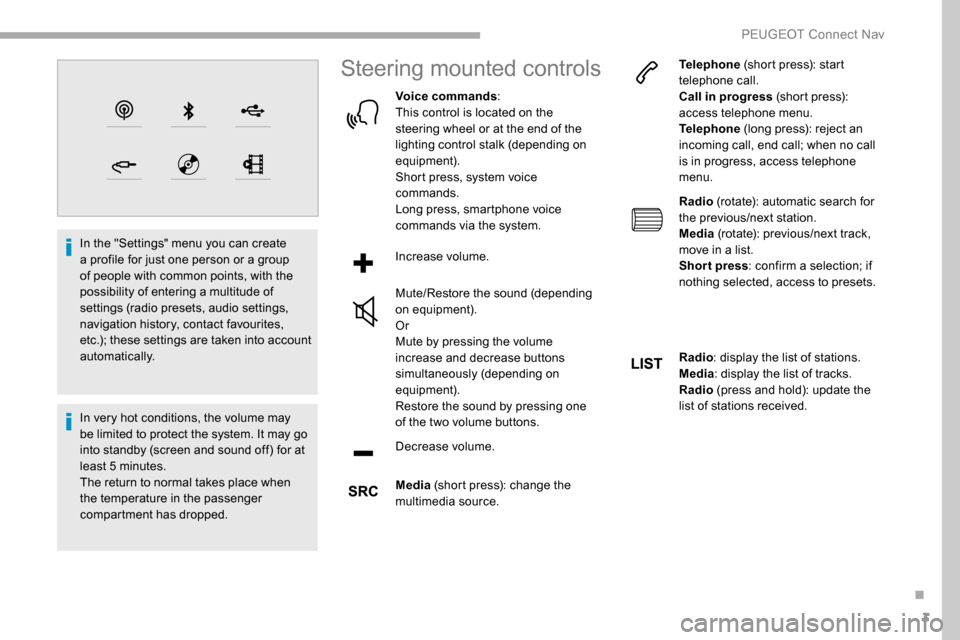
Voice commands :
This control is located on the
steering wheel or at the end of the
lighting control stalk (depending on
equipment).
Short press, system voice
commands.
Long press, smartphone voice
commands via the system.
Increase volume.
Mute/Restore the sound (depending
on equipment).
Or
Mute by pressing the volume
increase and decrease buttons
simultaneously (depending on
equipment).
Restore the sound by pressing one
of the two volume buttons.
Decrease volume.
Media (short press): change the
multimedia source. Telephone
(short press): start
telephone call.
Call in progress (short press):
access telephone menu.
Telephone (long press): reject an
incoming call, end call; when no call
is in progress, access telephone
menu.
Radio (rotate): automatic search for
the previous/next station.
Media (rotate): previous/next track,
move in a list.
Short press : confirm a selection; if
nothing selected, access to presets.
Radio : display the list of stations.
Media : display the list of tracks.
Radio (press and hold): update the
list of stations received.
.
PEUGEOT Connect Nav
Page 296 of 312
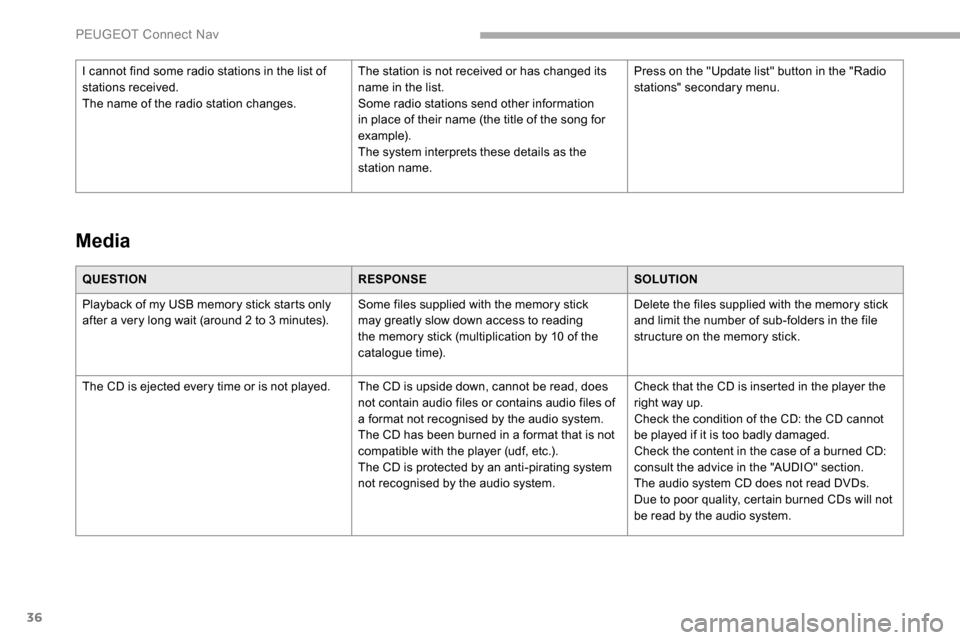
36
QUESTIONRESPONSESOLUTION
Playback of my USB memory stick starts only
after a very long wait (around 2 to 3
minutes).Some files supplied with the memory stick
may greatly slow down access to reading
the memory stick (multiplication by 10 of the
catalogue time). Delete the files supplied with the memory stick
and limit the number of sub-folders in the file
structure on the memory stick.
The CD is ejected every time or is not played. The CD is upside down, cannot be read, does not contain audio files or contains audio files of
a format not recognised by the audio system.
The CD has been burned in a format that is not
compatible with the player (udf, etc.).
The CD is protected by an anti-pirating system
not recognised by the audio system.Check that the CD is inserted in the player the
right way up.
Check the condition of the CD: the CD cannot
be played if it is too badly damaged.
Check the content in the case of a burned CD:
consult the advice in the "AUDIO" section.
The audio system CD does not read DVDs.
Due to poor quality, certain burned CDs will not
be read by the audio system.
Media
I cannot find some radio stations in the list of
stations received.
The name of the radio station changes.
The station is not received or has changed its
name in the list.
Some radio stations send other information
in place of their name (the title of the song for
example).
The system interprets these details as the
station name.Press on the "Update list" button in the "Radio
stations" secondary menu.
PEUGEOT Connect Nav
Page 301 of 312
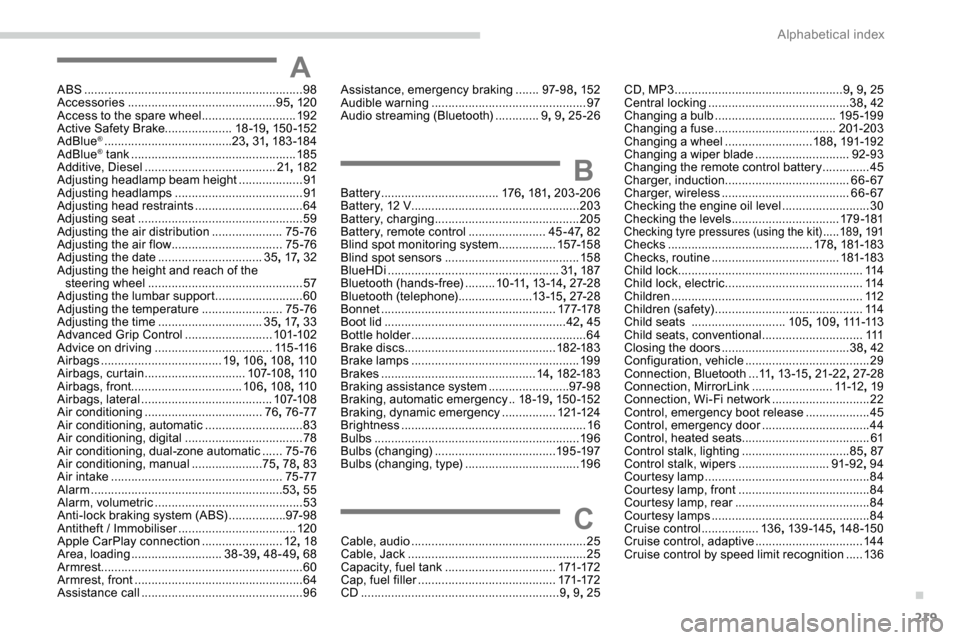
219
AABS .................................................................98
Accessories ............................................ 95, 120
Access to the spare wheel
............................192
Active Safety Brake.................... 18 -19, 15 0 -152
AdBlue
® ...................................... 23, 31, 183 -18 4
AdBlue® tank ................................................. 18 5
Additive, Diesel ....................................... 21, 182
Adjusting headlamp beam height
................... 91
A
djusting headlamps
...................................... 91
Adjusting head restraints
................................ 64
Adjusting seat
................................................. 59
Adjusting the air distribution
.....................75 -76
Adjusting the air flow
................................. 7
5 -76
Adjusting the date
............................... 35, 17 , 32
Adjusting the height and reach of the steering wheel
.............................................. 57
Adjusting the lumbar support
.......................... 60
A
djusting the temperature
........................75 -76
Adjusting the time
............................... 35, 17 , 33
Advanced Grip Control
.......................... 101-102
Advice on driving
................................... 115 -11 6
Airbags
...............................
.....19, 10 6 , 108, 11 0
Airbags, curtain
.............................. 107-108, 11 0
Airbags, front ................................. 10 6, 108 , 11 0
Airbags, lateral
....................................... 107-108
Air conditioning
................................... 76, 76 -77
Air conditioning, automatic
.............................83
Air conditioning, digital
................................... 78
Air conditioning, dual-zone automatic
......75 -76
Air conditioning, manual
..................... 75,
78, 83
Air intake
................................................... 75 -77
Alarm
......................................................... 53, 55
Alarm, volumetric
............................................ 53
Anti-lock braking system (ABS)
.................97- 9 8
Antitheft / Immobiliser
................................... 12
0
Apple CarPlay connection
........................12, 18
Area, loading
........................... 3
8-39, 48-49 , 68
Armrest
................
............................................ 60
Armrest, front
.................................................. 64
Assistance call
...............................
.................96
Assistance, emergency braking .......97- 9 8 , 152
Audible warning .............................................. 97
A
udio streaming (Bluetooth) .............9, 9 , 25 -26
BBattery ................................... 176, 181 , 203-206
Battery, 12 V ............................... ...................203
Battery, charging
........................................... 205
Battery, remote control
.......................45 - 47, 82
Blind spot monitoring system
.................157-15 8
Blind spot sensors
........................................ 15 8
BlueHDi
................................................... 31, 187
Bluetooth (hands-free)
.........1
0 -11, 13 -14 , 27-2 8
Bluetooth (telephone)
...................... 1
3 -15, 27-2 8
Bonnet
.................................................... 17 7-178
Boot lid
...................................................... 42, 45
Bottle holder
.................................................... 64
B
rake discs
............................................. 182-183
Brake lamps
...............................
...................19 9
Brakes
.............................................. 14, 182-183
Braking assistance system
........................97- 9 8
Braking, automatic emergency
..18 -19 , 15 0 -152
Braking, dynamic emergency
................121-124
Brightness
....................................................... 16
Bulbs
............................................................. 19 6
Bulbs (changing)
.................................... 195 -197
Bulbs (changing, type)
..................................19 6
C
Cable, audio .................................................... 25
Cable, Jack ..................................................... 25
Capacity, fuel tank
................................. 171-172
Cap, fuel filler
...............................
..........171-172
CD
........................................................... 9, 9 , 25 CD, MP3
..................................................
9, 9 , 25
Central locking
.......................................... 38,
42
Changing a bulb
.................................... 19
5 -19 9
Changing a fuse
.................................... 20
1-203
Changing a wheel
.......................... 18
8
, 191-192
Changing a wiper blade
............................ 9
2-93
Changing the remote control battery
..............
45
Charger, induction
.....................................
66- 67
Charger, wireless
...................................... 6
6- 67
Checking the engine oil level
..........................
30
Checking the levels
................................
179 -181
Checking tyre pressures (using the kit) .....18 9, 191Checks ........................................... 178, 181-183
Checks, routine ...................................... 181-183
Child lock
....................................................... 114
Child lock, electric
......................................... 114
Children
......................................................... 112
Children (safety)
............................................ 114
Child seats
............................ 10
5, 109 , 111 -113
Child seats, conventional
..............................111
Closing the doors
...................................... 38, 42
Configuration, vehicle
..................................... 29
C
onnection, Bluetooth
... 11 ,
13 -15, 21-22 , 27-2 8
Connection, MirrorLink
........................11 -12, 19
Connection, Wi-Fi network
.............................22
Control, emergency boot release
...................45
Control, emergency door
................................ 44
C
ontrol, heated seats
...................................... 61
Control stalk, lighting
................................85, 87
Control stalk, wipers
...........................91
-92, 94
Courtesy lamp
................................................. 84
Courtesy lamp, front
....................................... 84
Courtesy lamp, rear
........................................ 84
Courtesy lamps
............................................... 84
Cruise control
.................13 6, 13 9 -14 5 , 14 8 -15 0
Cruise control, adaptive
................................14 4
Cruise control by speed limit recognition
.....13 6
.
Alphabetical index