Rele Peugeot Partner 2019 Owner's Manual
[x] Cancel search | Manufacturer: PEUGEOT, Model Year: 2019, Model line: Partner, Model: Peugeot Partner 2019Pages: 312, PDF Size: 9.56 MB
Page 7 of 312
5
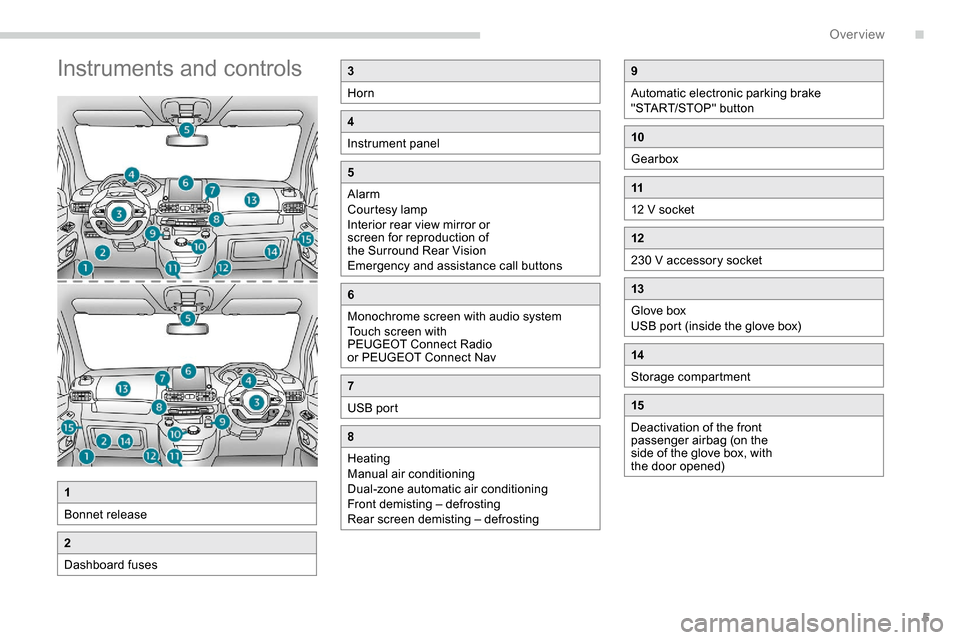
Instruments and controls3
Horn
4
Instrument panel
5
Alarm
Courtesy lamp
Interior rear view mirror or
screen for reproduction of
the Surround Rear Vision
Emergency and assistance call buttons
6
Monochrome screen with audio system
Touch screen with
PEUGEOT Connect Radio
or PEUGEOT Connect Nav
7
USB port
8
Heating
Manual air conditioning
Dual-zone automatic air conditioning
Front demisting – defrosting
Rear screen demisting – defrosting
1
Bonnet release
2
Dashboard fuses
9
Automatic electronic parking brake
"START/STOP" button
10
Gearbox
11
12 V socket
12
230 V accessory socket
13
Glove box
USB port (inside the glove box)
14
Storage compartment
15
Deactivation of the front
passenger airbag (on the
side of the glove box, with
the door opened)
.
Over view
Page 16 of 312
14
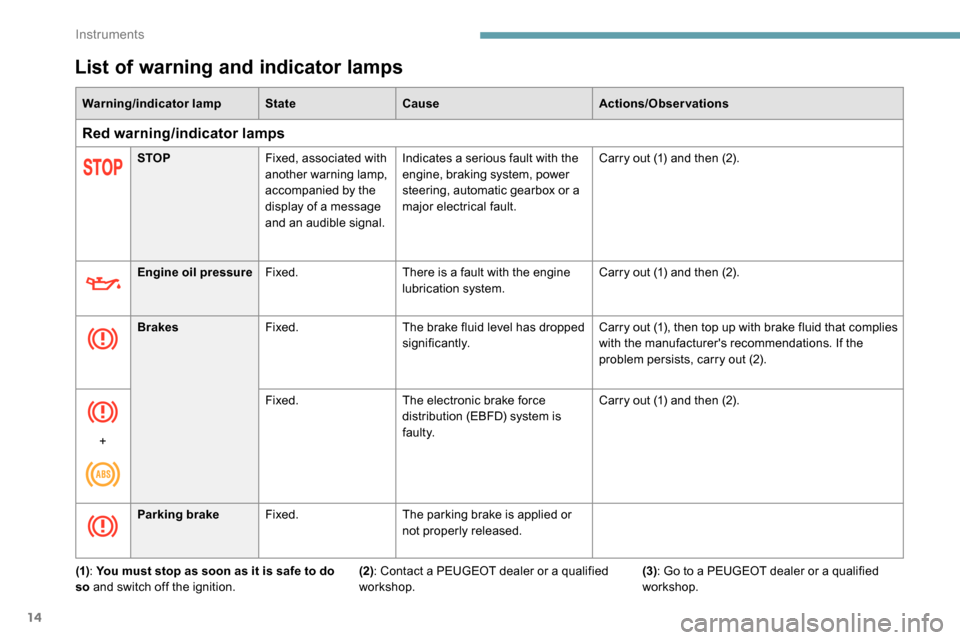
List of warning and indicator lamps
Warning/indicator lampStateCause Actions/Observations
Red warning/indicator lamps
STOPFixed, associated with
another warning lamp,
accompanied by the
display of a message
and an audible signal. Indicates a serious fault with the
engine, braking system, power
steering, automatic gearbox or a
major electrical fault.
Carry out (1) and then (2).
Engine oil pressure Fixed. There is a fault with the engine
lubrication system. Carry out (1) and then (2).
Brakes Fixed. The brake fluid level has dropped
significantly. Carry out (1), then top up with brake fluid that complies
with the manufacturer's recommendations. If the
problem persists, carry out (2).
+ Fixed.
The electronic brake force
distribution (EBFD) system is
faulty. Carry out (1) and then (2).
Parking brake Fixed. The parking brake is applied or
not properly released.
(1) : You must stop as soon as it is safe to do
so and switch off the ignition. (2): Contact a PEUGEOT dealer or a qualified
workshop. (3)
: Go to a PEUGEOT dealer or a qualified
workshop.
Instruments
Page 18 of 312
16
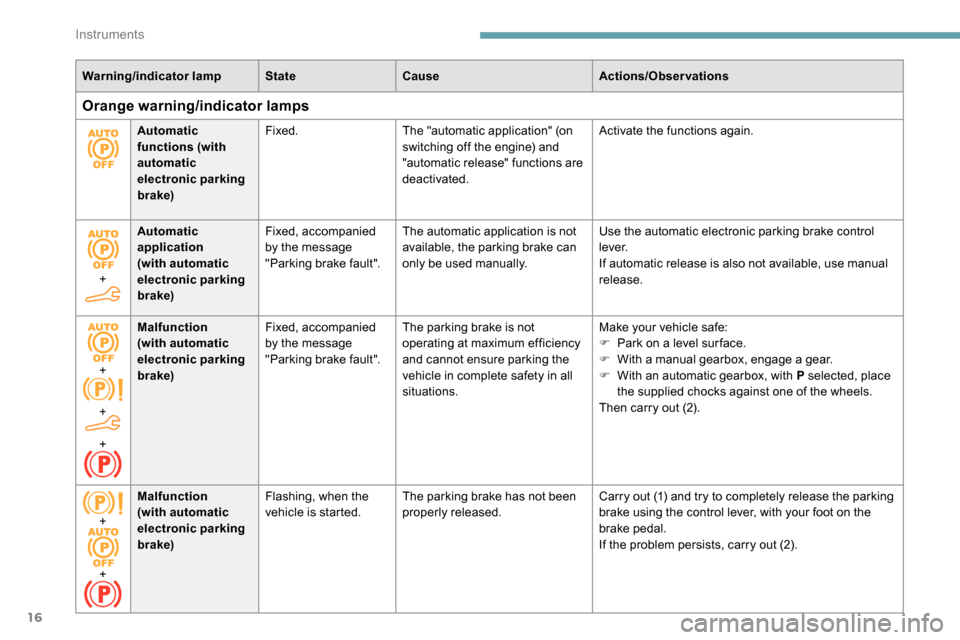
Warning/indicator lampStateCause Actions/Observations
Orange warning/indicator lamps
Automatic
functions (with
automatic
electronic parking
brake)Fixed.
The "automatic application" (on
switching off the engine) and
"automatic release" functions are
deactivated. Activate the functions again.
+ Automatic
application
(with automatic
electronic parking
brake) Fixed, accompanied
by the message
"Parking brake fault".
The automatic application is not
available, the parking brake can
only be used manually. Use the automatic electronic parking brake control
l eve r.
If automatic release is also not available, use manual
release.
+
+
+ Malfunction
(with automatic
electronic parking
brake)
Fixed, accompanied
by the message
"Parking brake fault".
The parking brake is not
operating at maximum efficiency
and cannot ensure parking the
vehicle in complete safety in all
situations. Make your vehicle safe:
F
P
ark on a level sur face.
F
W
ith a manual gearbox, engage a gear.
F
W
ith an automatic gearbox, with P selected, place
the supplied chocks against one of the wheels.
Then carry out (2).
+
+ Malfunction
(with automatic
electronic parking
brake)
Flashing, when the
vehicle is started.
The parking brake has not been
properly released. Carry out (1) and try to completely release the parking
brake using the control lever, with your foot on the
brake pedal.
If the problem persists, carry out (2).
Instruments
Page 22 of 312
20
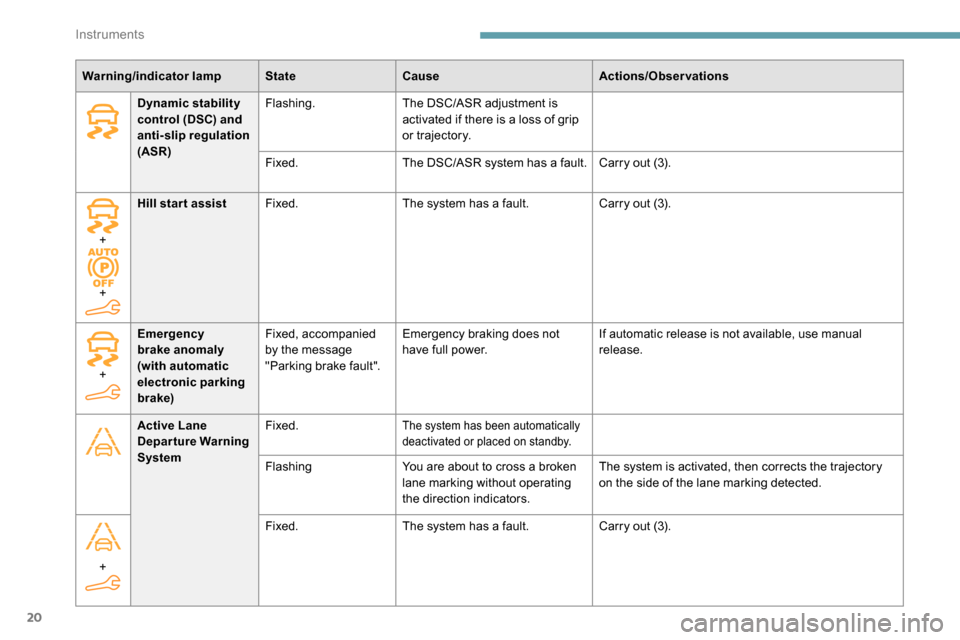
Warning/indicator lampStateCause Actions/Observations
Dynamic stability
control (DSC) and
anti-slip regulation
(ASR) Flashing.
The DSC/ASR adjustment is
activated if there is a loss of grip
or trajectory.
Fixed. The DSC/ASR system has a fault. Carry out (3).
+
+ Hill start assist
Fixed. The system has a fault. Carry out (3).
Active Lane
Departure Warning
System Fixed.
The system has been automatically
deactivated or placed on standby.
Flashing
You are about to cross a broken
lane marking without operating
the direction indicators. The system is activated, then corrects the trajectory
on the side of the lane marking detected.
+
Emergency
brake anomaly
(with automatic
electronic parking
brake) Fixed, accompanied
by the message
"Parking brake fault".
Emergency braking does not
have full power.
If automatic release is not available, use manual
release.
+ Fixed.
The system has a fault. Carry out (3).
Instruments
Page 26 of 312
24
Warning/indicator lampStateCause Actions/Observations
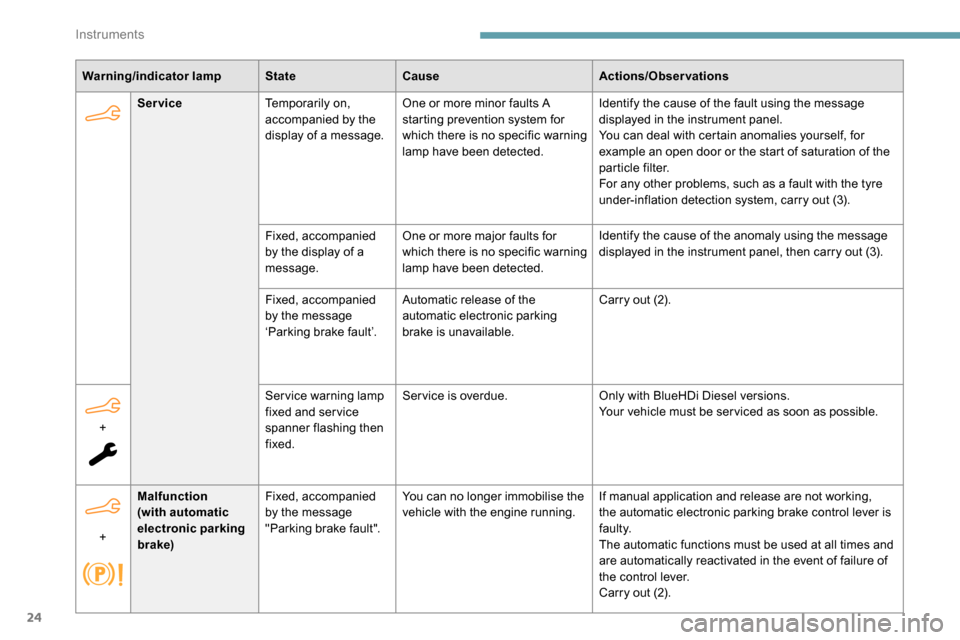
Service Temporarily on,
accompanied by the
display of a message. One or more minor faults A
starting prevention system for
which there is no specific warning
lamp have been detected. Identify the cause of the fault using the message
displayed in the instrument panel.
You can deal with certain anomalies yourself, for
example an open door or the start of saturation of the
particle filter.
For any other problems, such as a fault with the tyre
under-inflation detection system, carry out (3).
Fixed, accompanied
by the display of a
message. One or more major faults for
which there is no specific warning
lamp have been detected. Identify the cause of the anomaly using the message
displayed in the instrument panel, then carry out (3).
+ Service warning lamp
fixed and ser vice
spanner flashing then
fixed.Service is overdue.
Only with BlueHDi Diesel versions.
Your vehicle must be ser viced as soon as possible.
Fixed, accompanied
by the message
‘Parking brake fault’.
Automatic release of the
automatic electronic parking
brake is unavailable. Carry out (2).
+ Malfunction
(with automatic
electronic parking
brake) Fixed, accompanied
by the message
"Parking brake fault".
You can no longer immobilise the
vehicle with the engine running.
If manual application and release are not working,
the automatic electronic parking brake control lever is
faulty.
The automatic functions must be used at all times and
are automatically reactivated in the event of failure of
the control lever.
Carry out (2).
Instruments
Page 29 of 312
27
Warning/indicator lampStateCause Actions/Observations
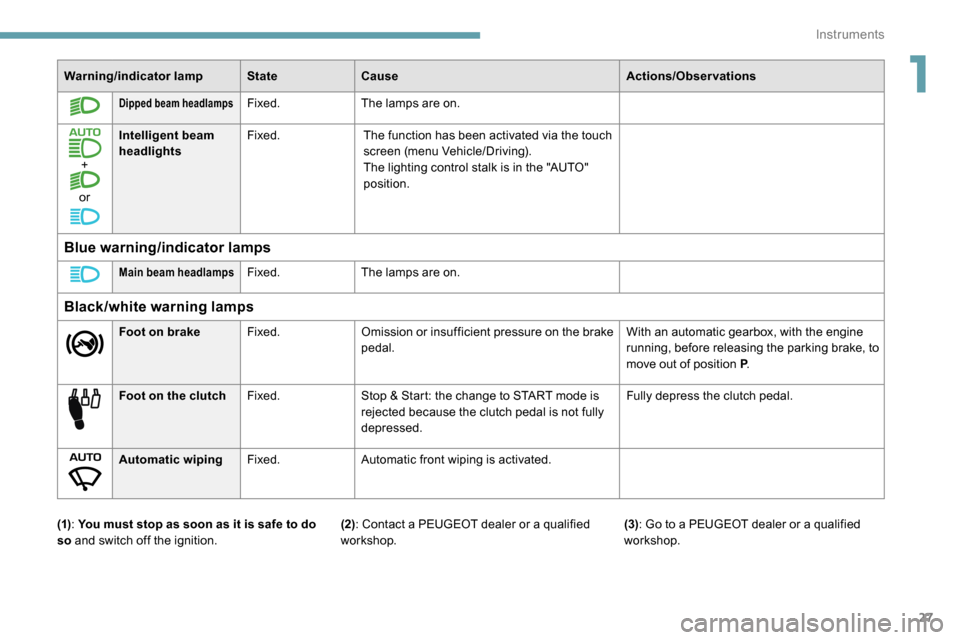
Dipped beam headlampsFixed.The lamps are on.
+
or Intelligent beam
headlights
Fixed.
The function has been activated via the touch
screen (menu Vehicle/Driving).
The lighting control stalk is in the "AUTO"
position.
Blue warning/indicator lamps
Main beam headlampsFixed.The lamps are on.
Black/white warning lamps
Foot on brake Fixed.Omission or insufficient pressure on the brake
pedal. With an automatic gearbox, with the engine
running, before releasing the parking brake, to
move out of position P
.
Foot on the clutch Fixed.Stop & Start: the change to START mode is
rejected because the clutch pedal is not fully
depressed. Fully depress the clutch pedal.
Automatic wiping Fixed.Automatic front wiping is activated.
(1) : You must stop as soon as it is safe to do
so and switch off the ignition. (3)
: Go to a PEUGEOT dealer or a qualified
workshop.
(2): Contact a PEUGEOT dealer or a qualified
workshop.
1
Instruments
Page 35 of 312
33
Lighting dimmer
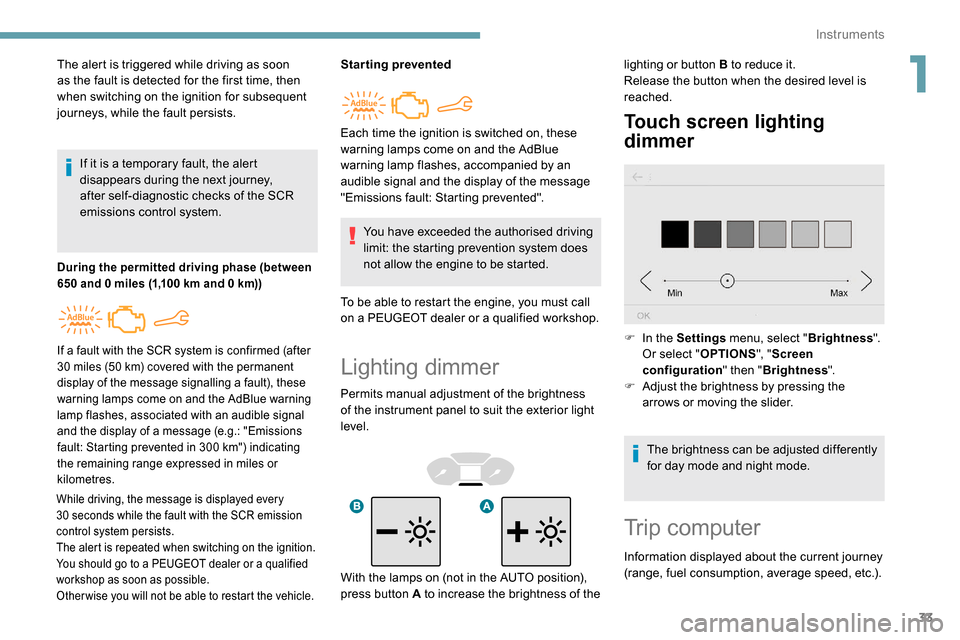
Permits manual adjustment of the brightness
of the instrument panel to suit the exterior light
level.
Touch screen lighting
dimmer
The alert is triggered while driving as soon
as the fault is detected for the first time, then
when switching on the ignition for subsequent
journeys, while the fault persists.If it is a temporary fault, the alert
disappears during the next journey,
after self-diagnostic checks of the SCR
emissions control system.
During the permitted driving phase (between
650 and 0 miles (1,100 km and 0 km))
While driving, the message is displayed every
30 seconds while the fault with the SCR emission
control system persists.
The alert is repeated when switching on the ignition.
You should go to a PEUGEOT dealer or a qualified
workshop as soon as possible.
Other wise you will not be able to restart the vehicle.
Starting prevented
You have exceeded the authorised driving
limit: the starting prevention system does
not allow the engine to be started.
To be able to restart the engine, you must call
on a PEUGEOT dealer or a qualified workshop.
If a fault with the SCR system is confirmed (after
30 miles (50 km) covered with the permanent
display of the message signalling a fault), these
warning lamps come on and the AdBlue warning
lamp flashes, associated with an audible signal
and the display of a message (e.g.: "Emissions
fault: Starting prevented in 300
km") indicating
the remaining range expressed in miles or
kilometres.
Each time the ignition is switched on, these
warning lamps come on and the AdBlue
warning lamp flashes, accompanied by an
audible signal and the display of the message
"Emissions fault: Starting prevented". lighting or button B to reduce it.
Release the button when the desired level is
reached.
F
I
n the Settings menu, select " Brightness".
Or select " OPTIONS", "Screen
configuration " then "Brightness ".
F
A
djust the brightness by pressing the
arrows or moving the slider.
The brightness can be adjusted differently
for day mode and night mode.
Trip computer
Information displayed about the current journey
(range, fuel consumption, average speed, etc.).
With the lamps on (not in the AUTO position),
press button A to increase the brightness of the
1
Instruments
Page 41 of 312
39
Programming
Without audio system
With audio system or touch screen
Activation or deactivation of the
selectivity between the driver's
door and the other doors and
the boot is done via the vehicle
configuration menu.
Complete unlocking
With the key
F To activate this selectivity
between cab and loading area
or to deactivate this selectivity
and return to total unlocking,
switch the ignition on and press
this button for more than two
seconds.
An audible signal and, depending on
equipment, a display message, confirm that the
request has been acknowledged. F
To
completely unlock the vehicle, insert the
key in the lock then turn it towards the front
of the vehicle.
F
T
hen pull the handle to open the door.
If fitted to your vehicle, the alarm is not
deactivated. Opening a door will trigger the
alarm, which can be stopped by switching the
ignition on.Using the remote control
F Press one of these buttons to unlock the vehicle.
If your vehicle is so equipped,
pressing and holding this button
allows the windows to be opened.
The window stops when you
release the control.
Unlocking is confirmed by rapid flashing
of the direction indicators for around
2
seconds.
At the same time, depending on your
version, the door mirrors unfold.
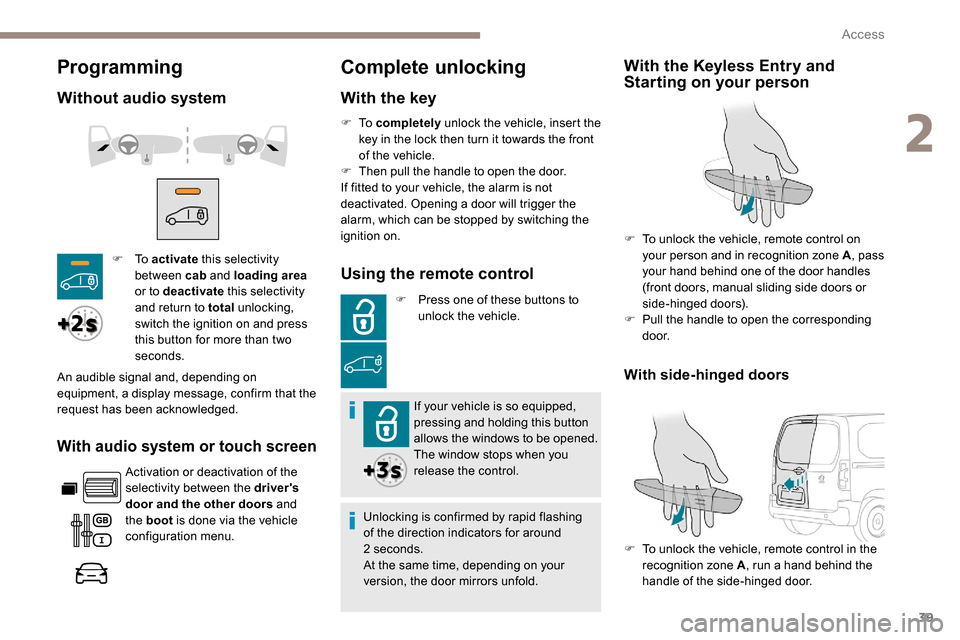
With the Keyless Entry and
Starting on your person
F To unlock the vehicle, remote control on your person and in recognition zone A , pass
your hand behind one of the door handles
(front doors, manual sliding side doors or
side-hinged doors).
F
P
ull the handle to open the corresponding
d o o r.
F
T
o unlock the vehicle, remote control in the
recognition zone A , run a hand behind the
handle of the side-hinged door.
With side-hinged doors
2
Access
Page 42 of 312
40
Selective unlocking
Using the remote control
F To unlock just the cab doors,
press this button once.
F
T
o unlock the doors of the
loading area (side and rear),
press this button a second time.
or F
P
ress this button on the remote
control to unlock only the
loading area .
If your vehicle is so equipped,
pressing and holding this
button allows the windows to be
opened. The window stops when
you release the control.
Unlocking is confirmed by rapid flashing
of the direction indicators for around
2
seconds.
At the same time, depending on your
version, the door mirrors unfold.
With Keyless Entry and Starting
on your person
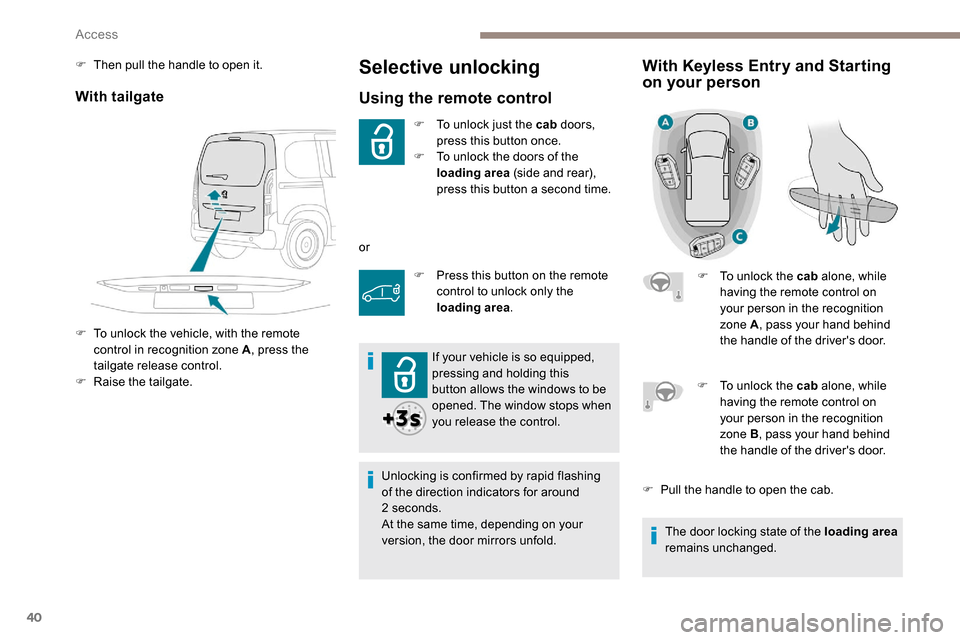
F To unlock the cab alone, while
having the remote control on
your person in the recognition
zone A , pass your hand behind
the handle of the driver's door.
With tailgate
F To unlock the vehicle, with the remote control in recognition zone A , press the
tailgate release control.
F
Ra
ise the tailgate.
F
T
hen pull the handle to open it.
F
T
o unlock the cab alone, while
having the remote control on
your person in the recognition
zone B , pass your hand behind
the handle of the driver's door.
F
P
ull the handle to open the cab.
The door locking state of the loading area
remains unchanged.
Access
Page 43 of 312
41
Depending on version, the door mirrors
unfold only when the cab is unlocked, and
the alarm is deactivated.
Unlocking
With the key
F To completely unlock the vehicle, insert the
key in the lock then turn it towards the front
of the vehicle.
F
T
hen pull the handle to open the door.
Using the remote control
F Press this button to unlock the vehicle.
If fitted to your vehicle, pressing
and holding this button opens
the windows. The window stops
when you release the control.
With the K eyless Entry and
Starting on your person
(front doors, manual sliding side doors or
side-hinged doors).
F
P
ull the handle to open the corresponding
d o o r.
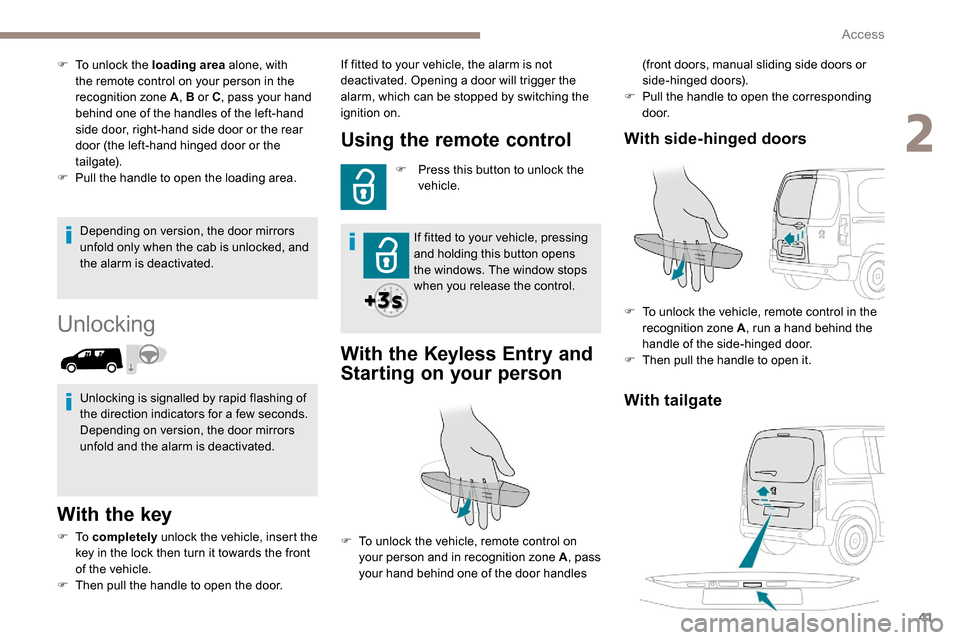
With tailgate
With side-hinged doors
F To unlock the vehicle, remote control in the
recognition zone A , run a hand behind the
handle of the side-hinged door.
F
T
hen pull the handle to open it.
F
T
o unlock the loading area
alone, with
the remote control on your person in the
recognition zone A , B or C, pass your hand
behind one of the handles of the left-hand
side door, right-hand side door or the rear
door (the left-hand hinged door or the
tailgate).
F
P
ull the handle to open the loading area.
Unlocking is signalled by rapid flashing of
the direction indicators for a few seconds.
Depending on version, the door mirrors
unfold and the alarm is deactivated. If fitted to your vehicle, the alarm is not
deactivated. Opening a door will trigger the
alarm, which can be stopped by switching the
ignition on.
F
T
o unlock the vehicle, remote control on
your person and in recognition zone A , pass
your hand behind one of the door handles
2
Access