cruise control Peugeot Partner 2019 Owner's Manual
[x] Cancel search | Manufacturer: PEUGEOT, Model Year: 2019, Model line: Partner, Model: Peugeot Partner 2019Pages: 312, PDF Size: 9.56 MB
Page 5 of 312
3
bit.ly/helpPSA
.
.
Driving recommendations 115
Starting/switching off the engine 1 16
Anti-theft protection
1
20
Manual parking brake
1
21
Automatic electronic parking brake
1
21
Hill start assist
1
24
5-speed manual gearbox
1
25
6-speed manual gearbox
1
26
Automatic gearbox
1
26
Gear efficiency indicator
1
30
Stop & Start
1
30
Speed Limit recognition and
recommendation
133
Speed limiter
1
37
Programmable cruise control
1
39
Dynamic cruise control
1
42
Memorising speeds
1
49
Active Safety Brake with Distance Alert
and Intelligent emergency braking
assistance
150
Active Lane Departure Warning System
1
53
Blind Spot Detection
1
57
Fatigue detection system
1
59
Parking sensors
1
60
Reversing camera
1
63
Surround Rear Vision
1
64
Under-inflation detection
1
67Compatibility of fuels 1
70
Fuel tank 1 71
Diesel misfuel prevention
1
72
Snow chains
1
73
Towing device
1
73
Overload indicator
1
75
Energy economy mode
1
76
Roof bars/Roof rack
1
77
B o n n et
17 7
Engines
1
78
Checking levels
1
79
Checks
181
AdBlue
® (BlueHDi) 1 83
Advice on care 1 86
Running out of fuel (Diesel)
1
87
Tool kit
1
87
Temporary puncture repair kit
1
89
Spare wheel
1
91
Changing a bulb
1
95
Changing a fuse
2
01
12
V battery
2
03
To w i n g
2 0 6Dimensions
208
Engine technical data and towed loads
2
10
Identification markings
2
17
Driving
Practical information
In the event of a breakdown Technical data
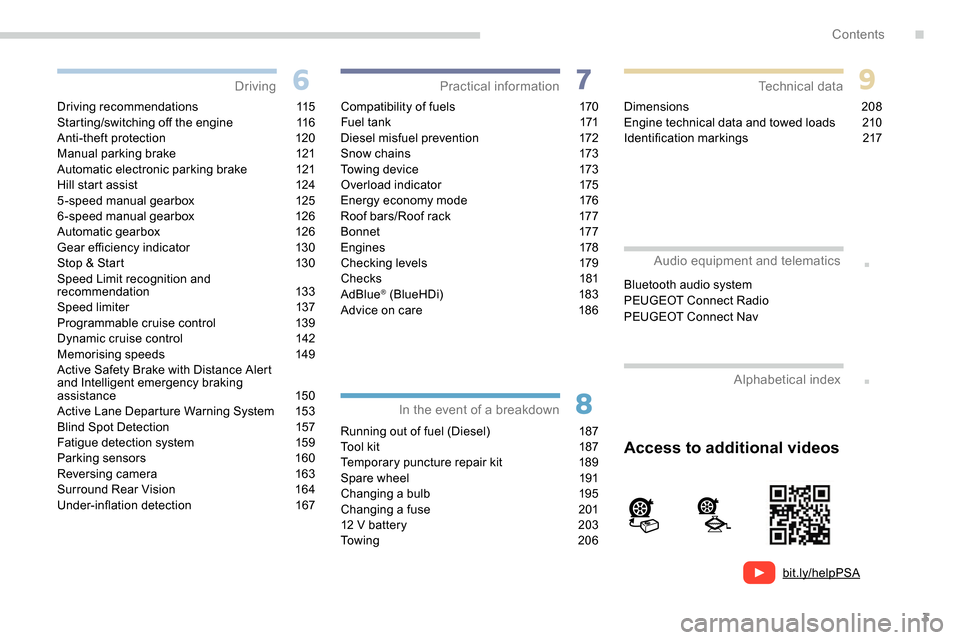
Access to additional videos
Alphabetical index
Audio equipment and telematics
Bluetooth audio system
PEUGEOT Connect Radio
PEUGEOT Connect Nav
.
Contents
Page 8 of 312
6
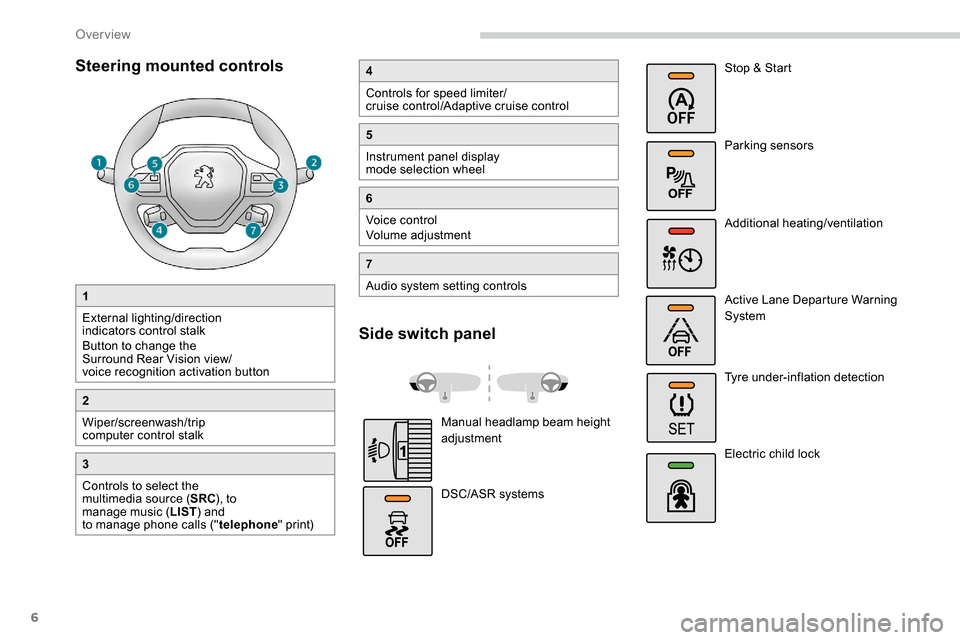
Steering mounted controls
1
External lighting/direction
indicators control stalk
Button to change the
Surround Rear Vision view/
voice recognition activation button
2
Wiper/screenwash/trip
computer control stalk
3
Controls to select the
multimedia source (SRC), to
manage music ( LIST) and
to manage phone calls (" telephone" print)
4
Controls for speed limiter/
cruise control/Adaptive cruise control
5
Instrument panel display
mode selection wheel
6
Voice control
Volume adjustment
7
Audio system setting controls
Side switch panel
Manual headlamp beam height
adjustment
DSC/ASR systems Stop & Start
Parking sensors
Additional heating/ventilation
Active Lane Departure Warning
System
Tyre under-inflation detection
Electric child lock
Over view
Page 10 of 312
8
As a passenger, if you avoid connecting your
multimedia devices (film, music, video game
etc.), you will contribute towards limiting the
consumption of electrical energy, and so of
fuel.
Disconnect your portable devices before
leaving the vehicle.
Eco- driving
Eco-driving is a range of everyday practices that allow the motorist to optimise their fuel consumption and CO2 emissions.
Optimise the use of your
gearbox
With a manual gearbox, move off gently and
change up without waiting. While accelerating,
change up early.
With an automatic gearbox, give preference
to automatic mode and avoid pressing the
accelerator pedal heavily or suddenly.
The gear shift indicator invites you to engage
the most suitable gear: as soon as the
indication is displayed in the instrument panel,
follow it straight away.
For vehicles fitted with an automatic gearbox,
this indicator appears only in manual mode.
Drive smoothly
Maintain a safe distance between vehicles,
use engine braking rather than the
brake pedal, and press the accelerator
progressively. These practices contribute
towards a reduction in fuel consumption and
CO
2 emissions and also help reduce the
background traffic noise.
If your vehicle has cruise control, make use of
the system at speeds above 18
mph (40 km/h)
when the traffic is flowing well.
Control the use of your electrical
equipment
Before moving off, if the passenger
compartment is too warm, ventilate it by opening
the windows and air vents before using the air
conditioning.
Above 31
mph (50 km/h), close the windows and
leave the air vents open.
Consider using equipment that can help keep
the temperature in the passenger compartment
down (sunroof blind and window blinds...).
Switch off the headlamps and front foglamps
when the ambient light level does not require
their use.
Avoid running the engine before moving off,
particularly in winter; your vehicle will warm up
much faster while driving.
Unless it has automatic regulation, switch off
the air conditioning as soon as the desired
temperature has been reached.
Switch off the demisting and defrosting controls,
if these are not automatically managed.
Switch off the heated seat as soon as possible.
Eco-driving
Page 13 of 312
11
Instrument panel
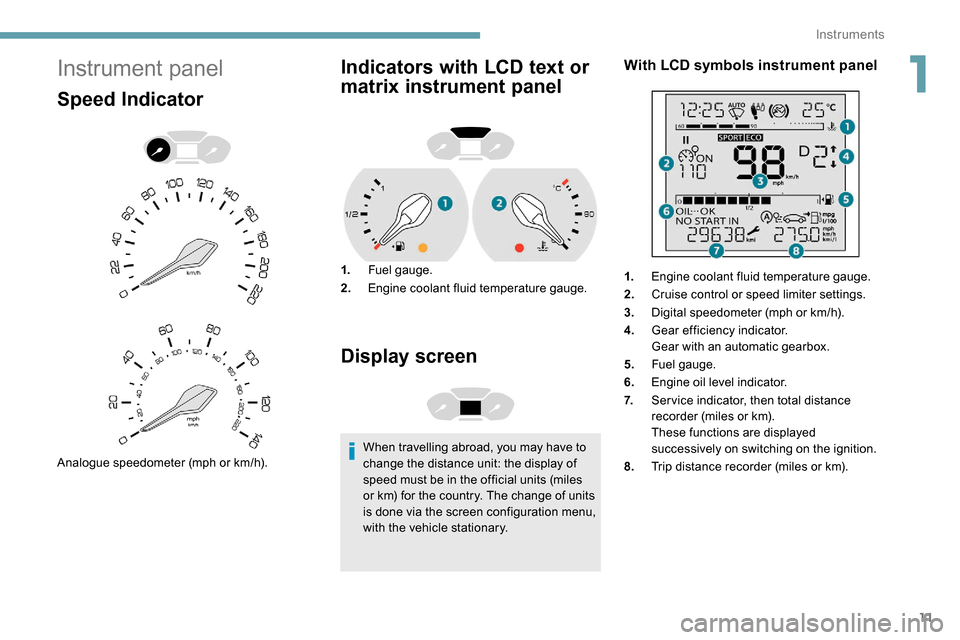
Speed Indicator
Analogue speedometer (mph or km/h).
Indicators with LCD text or
matrix instrument panel
1.Fuel gauge.
2. Engine coolant fluid temperature gauge.
Display screen
When travelling abroad, you may have to
change the distance unit: the display of
speed must be in the official units (miles
or km) for the country. The change of units
is done via the screen configuration menu,
with the vehicle stationary.
With LCD symbols instrument panel
1.Engine coolant fluid temperature gauge.
2. Cruise control or speed limiter settings.
3. Digital speedometer (mph or km/h).
4. Gear efficiency indicator.
Gear with an automatic gearbox.
5. Fuel gauge.
6. Engine oil level indicator.
7. Ser vice indicator, then total distance
recorder (miles or km).
These functions are displayed
successively on switching on the ignition.
8. Trip distance recorder (miles or km).
1
Instruments
Page 14 of 312
12
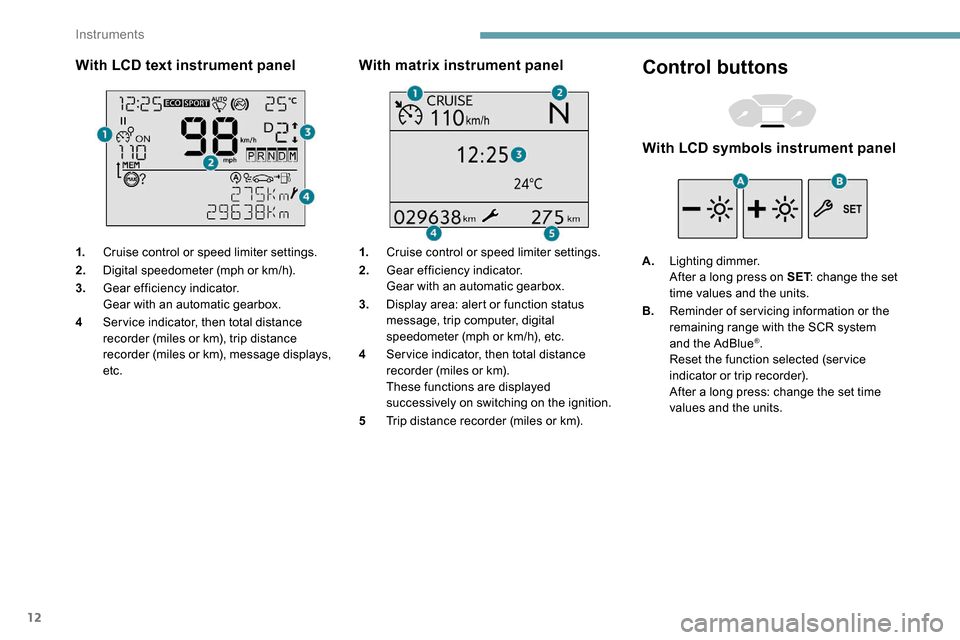
With LCD text instrument panel
1.Cruise control or speed limiter settings.
2. Digital speedometer (mph or km/h).
3. Gear efficiency indicator.
Gear with an automatic gearbox.
4 Ser vice indicator, then total distance
recorder (miles or km), trip distance
recorder (miles or km), message displays,
etc.
With matrix instrument panel
1.Cruise control or speed limiter settings.
2. Gear efficiency indicator.
Gear with an automatic gearbox.
3. Display area: alert or function status
message, trip computer, digital
speedometer (mph or km/h), etc.
4 Ser vice indicator, then total distance
recorder (miles or km).
These functions are displayed
successively on switching on the ignition.
5 Trip distance recorder (miles or km).
Control buttons
With LCD symbols instrument panel
A.Lighting dimmer.
After a long press on SET : change the set
time values and the units.
B. Reminder of servicing information or the
remaining range with the SCR system
and the AdBlue
®.
Reset the function selected (ser vice
indicator or trip recorder).
After a long press: change the set time
values and the units.
Instruments
Page 67 of 312
65
Refitting
To refit the mat on the driver's side:
F p osition the mat correctly,
F
r
eattach the fixings by pressing,
F
c
heck that the mat is secured correctly.
To avoid any risk of jamming the pedals:
-
o
nly use mats which are suited to the
fixings already present in the vehicle;
these fixings must be used.
-
n
ever place one mat on top of another.
The use of mats not approved by
PEUGEOT may inter fere with access to
the pedals and hinder the operation of the
cruise control/speed limiter.
The mats approved by PEUGEOT have
two fixings located below the seat.
Overhead storage unit
It is located above the sun visors and can be
used to store various objects.
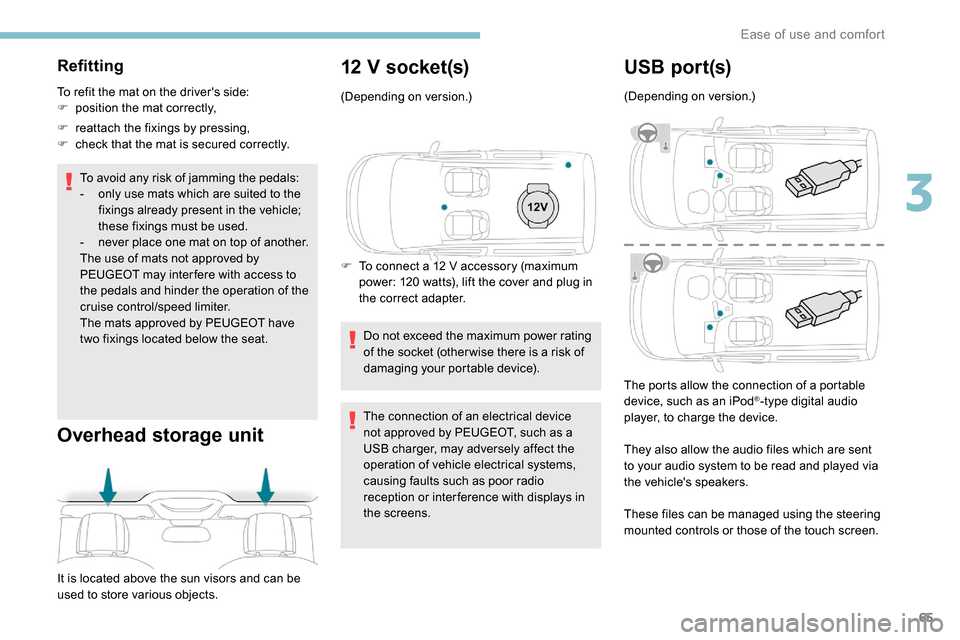
12 V socket(s)
(Depending on version.)
F
T
o connect a 12 V accessory (maximum
power: 120 watts), lift the cover and plug in
the correct adapter.
Do not exceed the maximum power rating
of the socket (other wise there is a risk of
damaging your portable device).
The connection of an electrical device
not approved by PEUGEOT, such as a
USB charger, may adversely affect the
operation of vehicle electrical systems,
causing faults such as poor radio
reception or inter ference with displays in
the screens.
USB por t(s)
(Depending on version.)
The ports allow the connection of a portable
device, such as an iPod
®-type digital audio
player, to charge the device.
They also allow the audio files which are sent
to your audio system to be read and played via
the vehicle's speakers.
These files can be managed using the steering
mounted controls or those of the touch screen.
3
Ease of use and comfort
Page 104 of 312
102
Sand
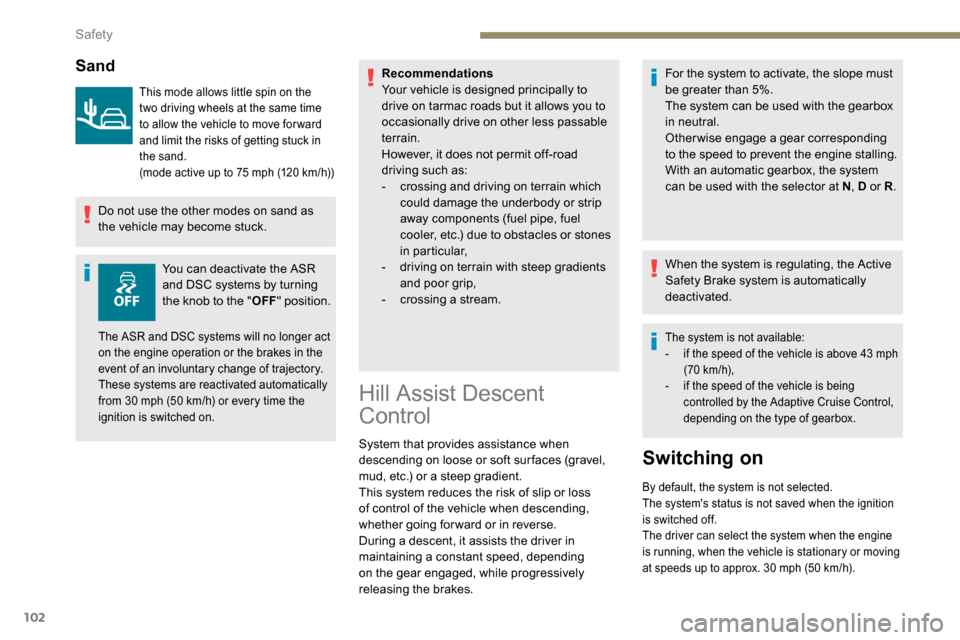
This mode allows little spin on the
two driving wheels at the same time
to allow the vehicle to move for ward
and limit the risks of getting stuck in
the sand.
(mode active up to 75 mph (120 km/h))
Do not use the other modes on sand as
the vehicle may become stuck.You can deactivate the ASR
and DSC systems by turning
the knob to the " OFF" position. Recommendations
Your vehicle is designed principally to
drive on tarmac roads but it allows you to
occasionally drive on other less passable
terrain.
However, it does not permit off-road
driving such as:
-
c
rossing and driving on terrain which
could damage the underbody or strip
away components (fuel pipe, fuel
cooler, etc.) due to obstacles or stones
in particular,
-
d
riving on terrain with steep gradients
and poor grip,
-
c
rossing a stream.
The ASR and DSC systems will no longer act
on the engine operation or the brakes in the
event of an involuntary change of trajectory.
These systems are reactivated automatically
from 30 mph (50 km/h) or every time the
ignition is switched on.
Hill Assist Descent
Control
System that provides assistance when
descending on loose or soft sur faces (gravel,
mud, etc.) or a steep gradient.
This system reduces the risk of slip or loss
of control of the vehicle when descending,
whether going forward or in reverse.
During a descent, it assists the driver in
maintaining a constant speed, depending
on the gear engaged, while progressively
releasing the brakes. For the system to activate, the slope must
be greater than 5%.
The system can be used with the gearbox
in neutral.
Otherwise engage a gear corresponding
to the speed to prevent the engine stalling.
With an automatic gearbox, the system
can be used with the selector at N
, D or R.
When the system is regulating, the Active
Safety Brake system is automatically
deactivated.
The system is not available:
- i f the speed of the vehicle is above 43 mph
(70
km/h),
-
i
f the speed of the vehicle is being
controlled by the Adaptive Cruise Control,
depending on the type of gearbox.
Switching on
By default, the system is not selected.
The system's status is not saved when the ignition
is switched off.
The driver can select the system when the engine
is running, when the vehicle is stationary or moving
at speeds up to approx. 30
mph (50 km/h).
Safety
Page 119 of 312
117
In certain circumstances, you may have to
turn the steering wheel firmly to move the
road wheels (if the wheels are against a
kerb, for example).
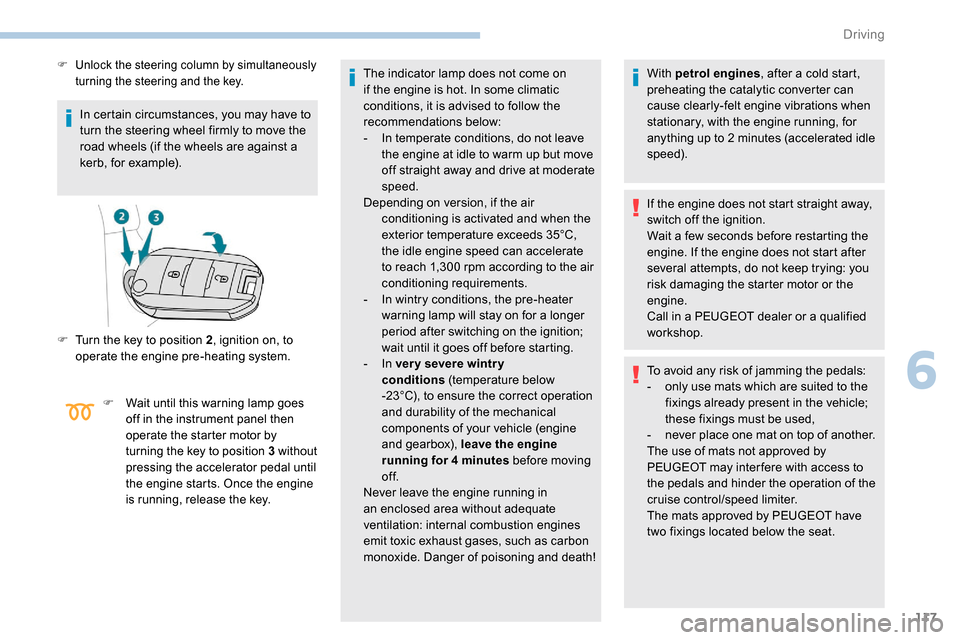
F Unlock the steering column by simultaneously turning the steering and the key.
F Turn the key to position 2 , ignition on, to
operate the engine pre-heating system.
F Wait until this warning lamp goes off in the instrument panel then
operate the starter motor by
turning the key to position 3 without
pressing the accelerator pedal until
the engine starts. Once the engine
is running, release the key.
The indicator lamp does not come on
if the engine is hot. In some climatic
conditions, it is advised to follow the
recommendations below:
-
I
n temperate conditions, do not leave
the engine at idle to warm up but move
off straight away and drive at moderate
speed.
Depending on version, if the air conditioning is activated and when the
exterior temperature exceeds 35°C,
the idle engine speed can accelerate
to reach 1,300
rpm according to the air
conditioning requirements.
-
I
n wintry conditions, the pre-heater
warning lamp will stay on for a longer
period after switching on the ignition;
wait until it goes off before starting.
-
In ver y severe wintr y
conditions
(temperature below
-23°C), to ensure the correct operation
and durability of the mechanical
components of your vehicle (engine
and gearbox), leave the engine
running for 4
minutes before moving
of f.
Never leave the engine running in
an enclosed area without adequate
ventilation: internal combustion engines
emit toxic exhaust gases, such as carbon
monoxide. Danger of poisoning and death! With petrol engines
, after a cold start,
preheating the catalytic converter can
cause clearly-felt engine vibrations when
stationary, with the engine running, for
anything up to 2
minutes (accelerated idle
speed).
If the engine does not start straight away,
switch off the ignition.
Wait a few seconds before restarting the
engine. If the engine does not start after
several attempts, do not keep trying: you
risk damaging the starter motor or the
engine.
Call in a PEUGEOT dealer or a qualified
workshop.
To avoid any risk of jamming the pedals:
-
o
nly use mats which are suited to the
fixings already present in the vehicle;
these fixings must be used,
-
n
ever place one mat on top of another.
The use of mats not approved by
PEUGEOT may inter fere with access to
the pedals and hinder the operation of the
cruise control/speed limiter.
The mats approved by PEUGEOT have
two fixings located below the seat.
6
Driving
Page 122 of 312
120
To avoid any risk of jamming the pedals:
- o nly use mats which are suited to the
fixings already present in the vehicle;
these fixings must be used,
-
n
ever place one mat on top of another.
The use of mats not approved by
PEUGEOT may inter fere with access to
the pedals and hinder the operation of the
cruise control/speed limiter.
The mats approved by PEUGEOT have
two fixings located below the seat.
Switching the ignition on
with
K
eyless Entry and
Starting
With the Keyless Entry and Starting
electronic key inside the vehicle,
pressing the " START/STOP " button,
without pressing any of the pedals ,
allows the ignition to be switched on.
F
P
ress the " START/STOP " button, the
instrument panel comes on but the engine
does not start.
F
P
ress this button again to switch off the
ignition and allow the vehicle to be locked. With the ignition on, the system
automatically goes into energy economy
mode to maintain an adequate state of
charge in the battery.
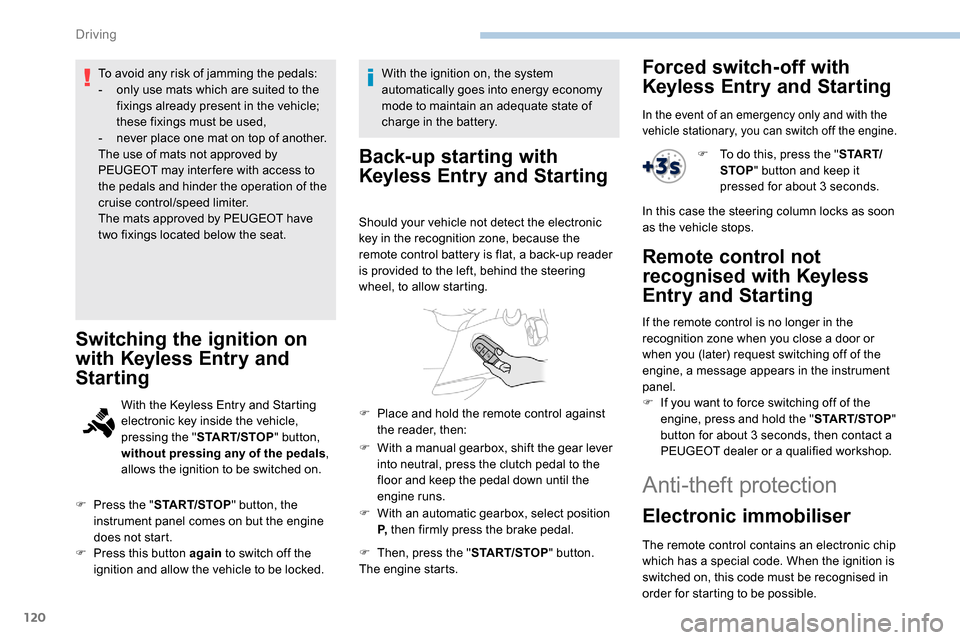
Back-up starting with
K
eyless Entry and Starting
Should your vehicle not detect the electronic
key in the recognition zone, because the
remote control battery is flat, a back-up reader
is provided to the left, behind the steering
wheel, to allow starting.
F
W
ith a manual gearbox, shift the gear lever
into neutral, press the clutch pedal to the
floor and keep the pedal down until the
engine runs.
F
W
ith an automatic gearbox, select position
P, then firmly press the brake pedal.
F
T
hen, press the " START/STOP" button.
The engine starts.
F
P
lace and hold the remote control against
the reader, then:
Forced switch-off with
Keyless Entry and Starting
In the event of an emergency only and with the
vehicle stationary, you can switch off the engine.
F To do this, press the " S TA R T/
STOP " button and keep it
pressed for about 3
seconds.
In this case the steering column locks as soon
as the vehicle stops.
Remote control not
recognised with
K
eyless
Entry and Starting
If the remote control is no longer in the
recognition zone when you close a door or
when you (later) request switching off of the
engine, a message appears in the instrument
panel.
F
I
f you want to force switching off of the
engine, press and hold the " START/STOP"
button for about 3
seconds, then contact a
PEUGEOT dealer or a qualified workshop.
Anti-theft protection
Electronic immobiliser
The remote control contains an electronic chip
which has a special code. When the ignition is
switched on, this code must be recognised in
order for starting to be possible.
Driving
Page 138 of 312
136
- obsolete or incorrect mapping,
- h idden road signs (other vehicles,
vegetation, snow),
-
s
peed limit signs that do not conform to the
standard, are damaged or distorted.
If an app on your smart phone is used
via Mirror Screen, the sign displayed by
the system may be temporarily hidden. It
will be redisplayed as soon as you pass
another sign.
Recommendation
For more information on the Speed
limiter , Cruise control or Adaptive
cruise control , refer to the corresponding
sections.
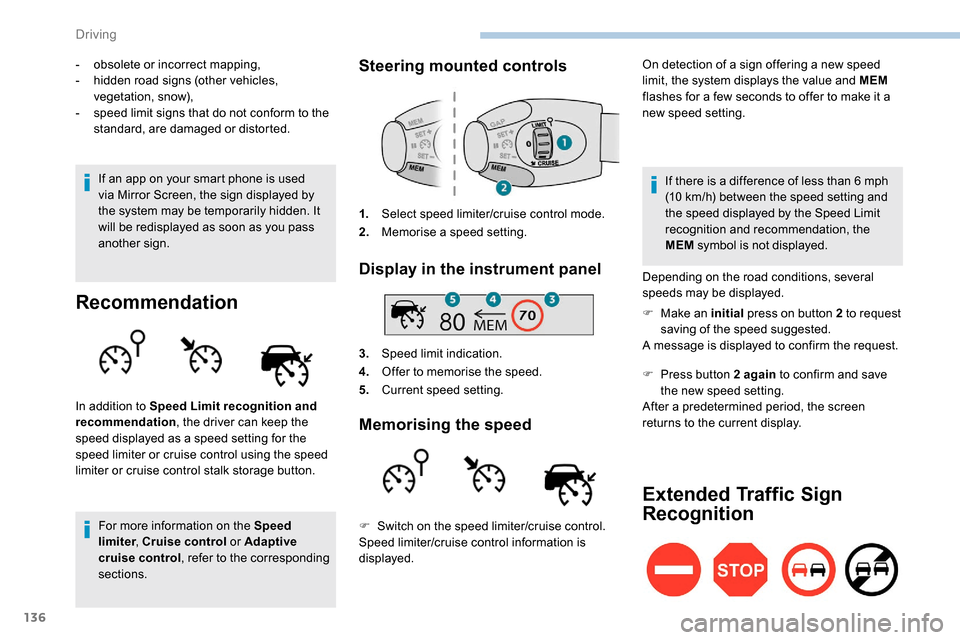
Steering mounted controls
1. Select speed limiter/cruise control mode.
2. Memorise a speed setting.
Display in the instrument panel
3.Speed limit indication.
4. Offer to memorise the speed.
5. Current speed setting.
Memorising the speed
On detection of a sign offering a new speed
limit, the system displays the value and MEM
flashes for a few seconds to offer to make it a
new speed setting.
In addition to Speed Limit recognition and
recommendation , the driver can keep the
speed displayed as a speed setting for the
speed limiter or cruise control using the speed
limiter or cruise control stalk storage button. If there is a difference of less than 6
mph
(10
km/h) between the speed setting and
the speed displayed by the Speed Limit
recognition and recommendation, the
MEM symbol is not displayed.
Depending on the road conditions, several
speeds may be displayed.
F
M
ake an initial press on button 2 to request
saving of the speed suggested.
A message is displayed to confirm the request.
F
P
ress button 2 again to confirm and save
the new speed setting.
After a predetermined period, the screen
returns to the current display.
Extended Traffic Sign
Recognition
F Switch on the speed limiter/cruise control.
Speed limiter/cruise control information is
displayed.
Driving