limit Peugeot Partner 2019 Owner's Manual
[x] Cancel search | Manufacturer: PEUGEOT, Model Year: 2019, Model line: Partner, Model: Peugeot Partner 2019Pages: 312, PDF Size: 9.56 MB
Page 5 of 312
3
bit.ly/helpPSA
.
.
Driving recommendations 115
Starting/switching off the engine 1 16
Anti-theft protection
1
20
Manual parking brake
1
21
Automatic electronic parking brake
1
21
Hill start assist
1
24
5-speed manual gearbox
1
25
6-speed manual gearbox
1
26
Automatic gearbox
1
26
Gear efficiency indicator
1
30
Stop & Start
1
30
Speed Limit recognition and
recommendation
133
Speed limiter
1
37
Programmable cruise control
1
39
Dynamic cruise control
1
42
Memorising speeds
1
49
Active Safety Brake with Distance Alert
and Intelligent emergency braking
assistance
150
Active Lane Departure Warning System
1
53
Blind Spot Detection
1
57
Fatigue detection system
1
59
Parking sensors
1
60
Reversing camera
1
63
Surround Rear Vision
1
64
Under-inflation detection
1
67Compatibility of fuels 1
70
Fuel tank 1 71
Diesel misfuel prevention
1
72
Snow chains
1
73
Towing device
1
73
Overload indicator
1
75
Energy economy mode
1
76
Roof bars/Roof rack
1
77
B o n n et
17 7
Engines
1
78
Checking levels
1
79
Checks
181
AdBlue
® (BlueHDi) 1 83
Advice on care 1 86
Running out of fuel (Diesel)
1
87
Tool kit
1
87
Temporary puncture repair kit
1
89
Spare wheel
1
91
Changing a bulb
1
95
Changing a fuse
2
01
12
V battery
2
03
To w i n g
2 0 6Dimensions
208
Engine technical data and towed loads
2
10
Identification markings
2
17
Driving
Practical information
In the event of a breakdown Technical data
Access to additional videos
Alphabetical index
Audio equipment and telematics
Bluetooth audio system
PEUGEOT Connect Radio
PEUGEOT Connect Nav
.
Contents
Page 8 of 312
6
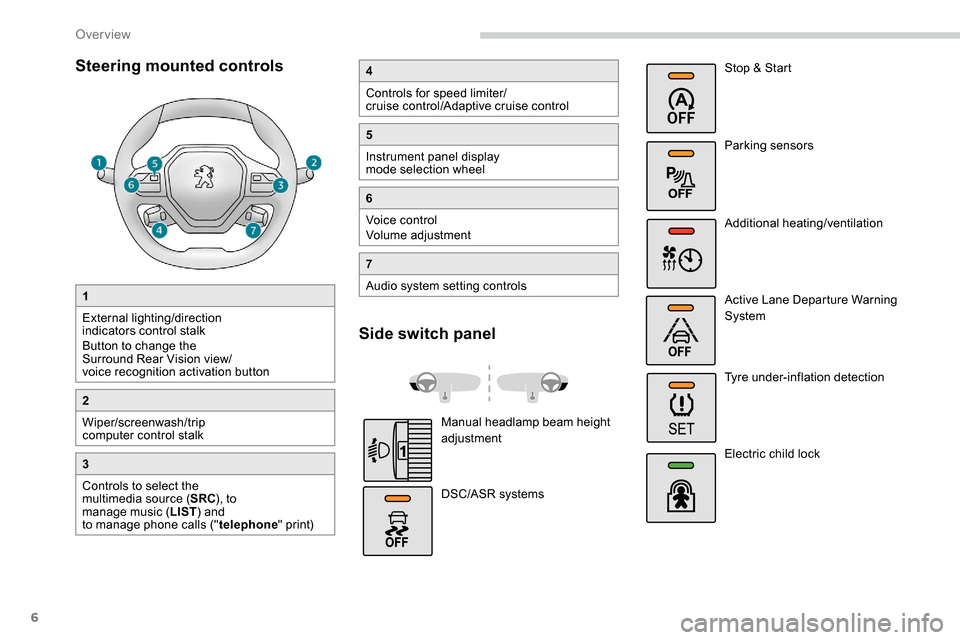
Steering mounted controls
1
External lighting/direction
indicators control stalk
Button to change the
Surround Rear Vision view/
voice recognition activation button
2
Wiper/screenwash/trip
computer control stalk
3
Controls to select the
multimedia source (SRC), to
manage music ( LIST) and
to manage phone calls (" telephone" print)
4
Controls for speed limiter/
cruise control/Adaptive cruise control
5
Instrument panel display
mode selection wheel
6
Voice control
Volume adjustment
7
Audio system setting controls
Side switch panel
Manual headlamp beam height
adjustment
DSC/ASR systems Stop & Start
Parking sensors
Additional heating/ventilation
Active Lane Departure Warning
System
Tyre under-inflation detection
Electric child lock
Over view
Page 10 of 312
8
As a passenger, if you avoid connecting your
multimedia devices (film, music, video game
etc.), you will contribute towards limiting the
consumption of electrical energy, and so of
fuel.
Disconnect your portable devices before
leaving the vehicle.
Eco- driving
Eco-driving is a range of everyday practices that allow the motorist to optimise their fuel consumption and CO2 emissions.
Optimise the use of your
gearbox
With a manual gearbox, move off gently and
change up without waiting. While accelerating,
change up early.
With an automatic gearbox, give preference
to automatic mode and avoid pressing the
accelerator pedal heavily or suddenly.
The gear shift indicator invites you to engage
the most suitable gear: as soon as the
indication is displayed in the instrument panel,
follow it straight away.
For vehicles fitted with an automatic gearbox,
this indicator appears only in manual mode.
Drive smoothly
Maintain a safe distance between vehicles,
use engine braking rather than the
brake pedal, and press the accelerator
progressively. These practices contribute
towards a reduction in fuel consumption and
CO
2 emissions and also help reduce the
background traffic noise.
If your vehicle has cruise control, make use of
the system at speeds above 18
mph (40 km/h)
when the traffic is flowing well.
Control the use of your electrical
equipment
Before moving off, if the passenger
compartment is too warm, ventilate it by opening
the windows and air vents before using the air
conditioning.
Above 31
mph (50 km/h), close the windows and
leave the air vents open.
Consider using equipment that can help keep
the temperature in the passenger compartment
down (sunroof blind and window blinds...).
Switch off the headlamps and front foglamps
when the ambient light level does not require
their use.
Avoid running the engine before moving off,
particularly in winter; your vehicle will warm up
much faster while driving.
Unless it has automatic regulation, switch off
the air conditioning as soon as the desired
temperature has been reached.
Switch off the demisting and defrosting controls,
if these are not automatically managed.
Switch off the heated seat as soon as possible.
Eco-driving
Page 11 of 312
9
Limit the causes of excess
consumption
Spread loads throughout the vehicle; place
the heaviest items in the bottom of the boot,
as close as possible to the rear seats.
Limit the loads carried in the vehicle and
reduce wind resistance (roof bars, roof rack,
bicycle carrier, trailer...). Preferably, use a roof
box.
Remove roof bars and roof racks after use.
At the end of winter, remove snow tyres and
refit your summer tyres.
Observe the recommendations
on maintenance
Check the tyre pressures regularly, when cold,
referring to the label in the door aperture,
driver's side.
Carry out this check in particular:
-
b
efore a long journey,
-
a
t each change of season,
-
a
fter a long period out of use.
Do not forget the spare wheel and the tyres on
any trailer or caravan.
Have your vehicle ser viced regularly (engine
oil, oil filter, air filter, cabin filter...) and
obser ve the schedule of operations in the
manufacturer's service schedule. When filling the tank, do not continue after the
3rd cut-off of the nozzle to avoid over flow.
At the wheel of your new vehicle, it is only
after the first 1,800
miles (3,000 kilometres)
that you will see the fuel consumption settle
down to a consistent average.
With a BlueHDi Diesel engine, if the SCR
system is faulty, your vehicle becomes
polluting. Visit a PEUGEOT dealer or a
qualified workshop as soon as possible to
bring your vehicle’s nitrogen oxides emissions
back in line with the regulations.
.
Eco-driving
Page 13 of 312
11
Instrument panel
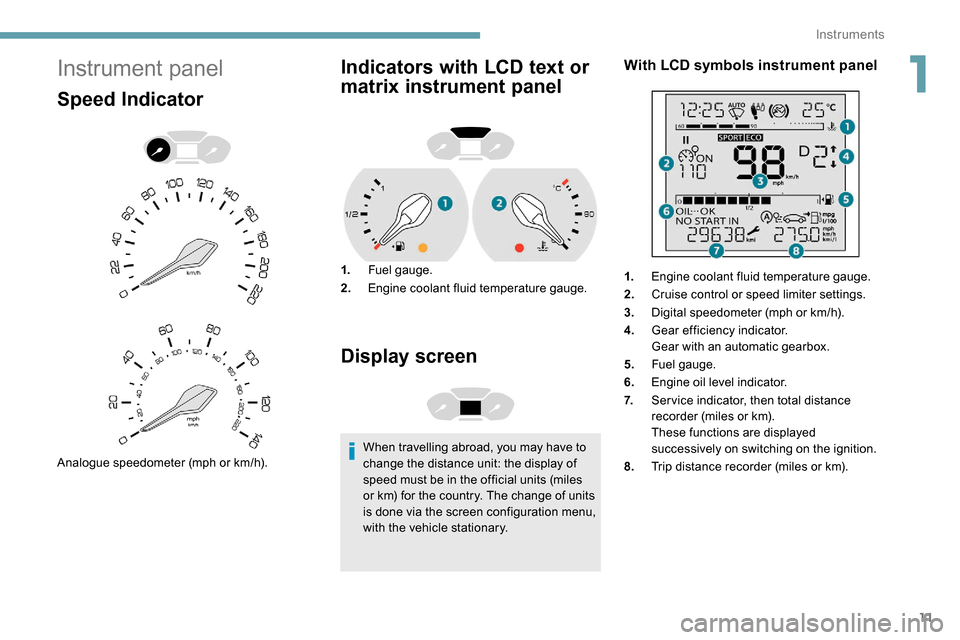
Speed Indicator
Analogue speedometer (mph or km/h).
Indicators with LCD text or
matrix instrument panel
1.Fuel gauge.
2. Engine coolant fluid temperature gauge.
Display screen
When travelling abroad, you may have to
change the distance unit: the display of
speed must be in the official units (miles
or km) for the country. The change of units
is done via the screen configuration menu,
with the vehicle stationary.
With LCD symbols instrument panel
1.Engine coolant fluid temperature gauge.
2. Cruise control or speed limiter settings.
3. Digital speedometer (mph or km/h).
4. Gear efficiency indicator.
Gear with an automatic gearbox.
5. Fuel gauge.
6. Engine oil level indicator.
7. Ser vice indicator, then total distance
recorder (miles or km).
These functions are displayed
successively on switching on the ignition.
8. Trip distance recorder (miles or km).
1
Instruments
Page 14 of 312
12
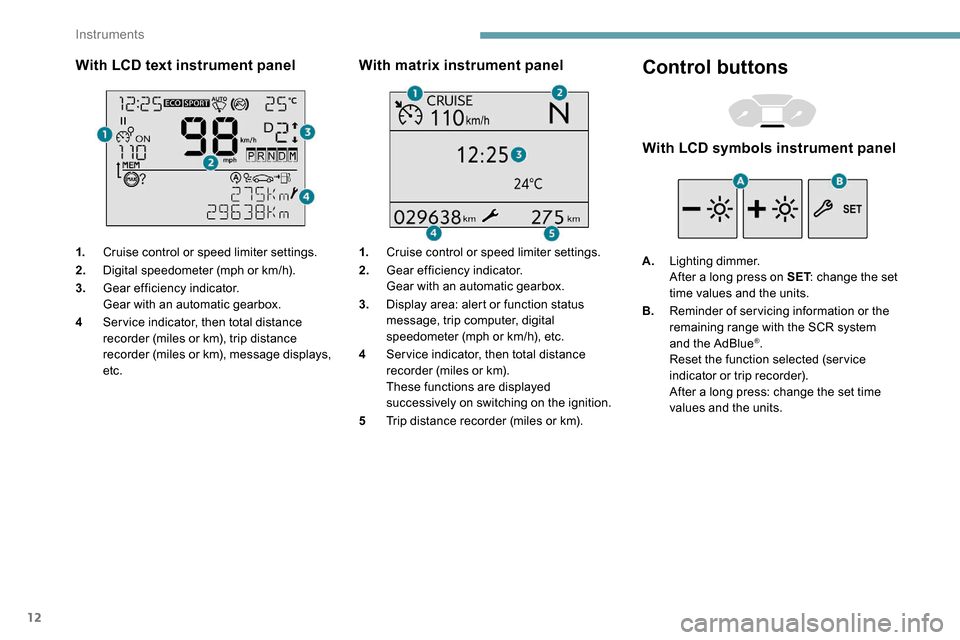
With LCD text instrument panel
1.Cruise control or speed limiter settings.
2. Digital speedometer (mph or km/h).
3. Gear efficiency indicator.
Gear with an automatic gearbox.
4 Ser vice indicator, then total distance
recorder (miles or km), trip distance
recorder (miles or km), message displays,
etc.
With matrix instrument panel
1.Cruise control or speed limiter settings.
2. Gear efficiency indicator.
Gear with an automatic gearbox.
3. Display area: alert or function status
message, trip computer, digital
speedometer (mph or km/h), etc.
4 Ser vice indicator, then total distance
recorder (miles or km).
These functions are displayed
successively on switching on the ignition.
5 Trip distance recorder (miles or km).
Control buttons
With LCD symbols instrument panel
A.Lighting dimmer.
After a long press on SET : change the set
time values and the units.
B. Reminder of servicing information or the
remaining range with the SCR system
and the AdBlue
®.
Reset the function selected (ser vice
indicator or trip recorder).
After a long press: change the set time
values and the units.
Instruments
Page 25 of 312
23
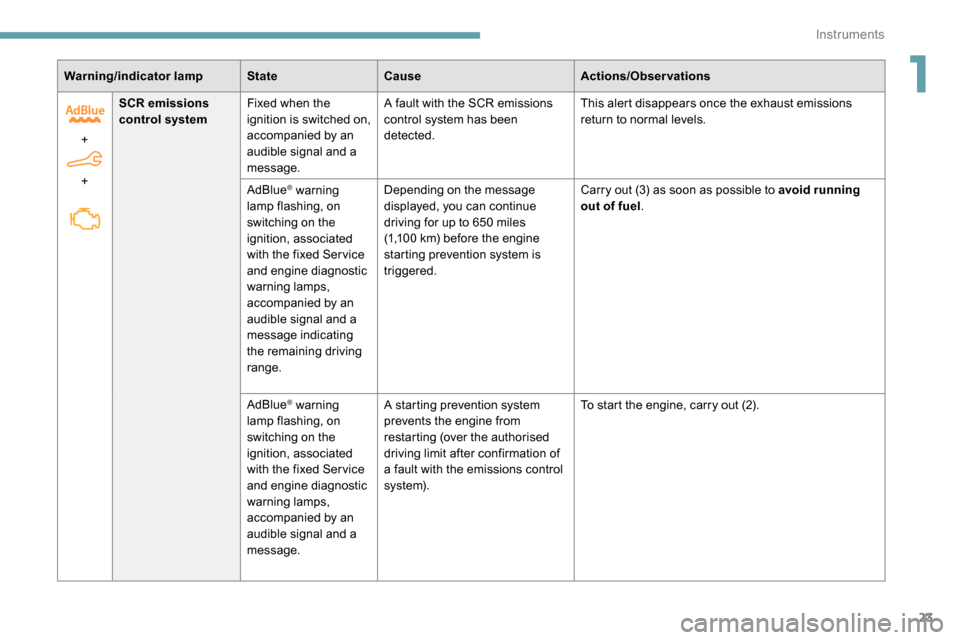
Warning/indicator lampStateCause Actions/Observations
+
+ SCR emissions
control system
Fixed when the
ignition is switched on,
accompanied by an
audible signal and a
message. A fault with the SCR emissions
control system has been
detected.
This alert disappears once the exhaust emissions
return to normal levels.
AdBlue
® warning
lamp flashing, on
switching on the
ignition, associated
with the fixed Ser vice
and engine diagnostic
warning lamps,
accompanied by an
audible signal and a
message indicating
the remaining driving
range. Depending on the message
displayed, you can continue
driving for up to 650
miles
(1,100
km) before the engine
starting prevention system is
triggered. Carry out (3) as soon as possible to avoid running
out of fuel
.
AdBlue
® warning
lamp flashing, on
switching on the
ignition, associated
with the fixed Ser vice
and engine diagnostic
warning lamps,
accompanied by an
audible signal and a
message. A starting prevention system
prevents the engine from
restarting (over the authorised
driving limit after confirmation of
a fault with the emissions control
syste m).
To start the engine, carry out (2).
1
Instruments
Page 35 of 312
33
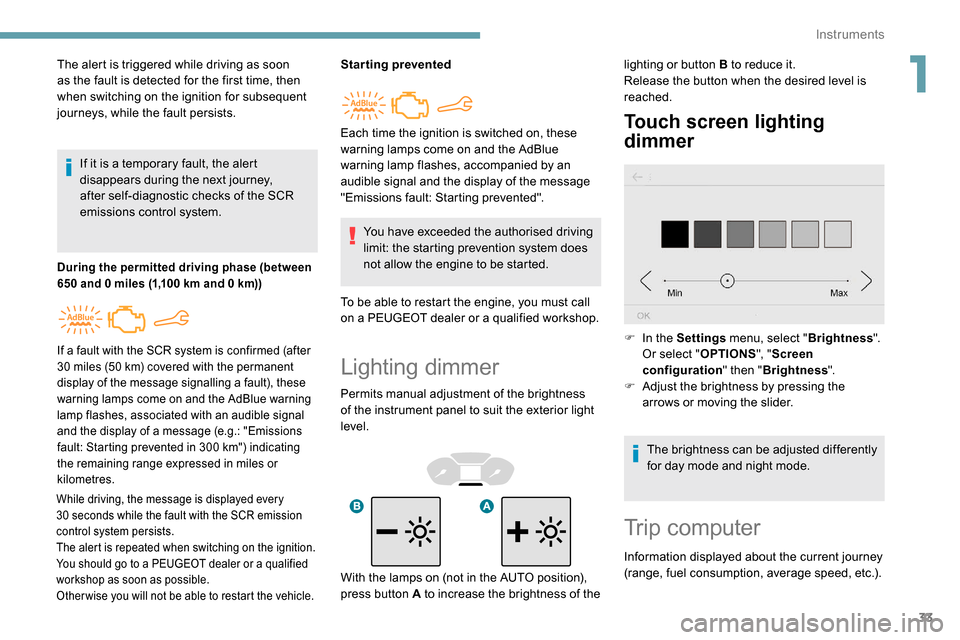
Lighting dimmer
Permits manual adjustment of the brightness
of the instrument panel to suit the exterior light
level.
Touch screen lighting
dimmer
The alert is triggered while driving as soon
as the fault is detected for the first time, then
when switching on the ignition for subsequent
journeys, while the fault persists.If it is a temporary fault, the alert
disappears during the next journey,
after self-diagnostic checks of the SCR
emissions control system.
During the permitted driving phase (between
650 and 0 miles (1,100 km and 0 km))
While driving, the message is displayed every
30 seconds while the fault with the SCR emission
control system persists.
The alert is repeated when switching on the ignition.
You should go to a PEUGEOT dealer or a qualified
workshop as soon as possible.
Other wise you will not be able to restart the vehicle.
Starting prevented
You have exceeded the authorised driving
limit: the starting prevention system does
not allow the engine to be started.
To be able to restart the engine, you must call
on a PEUGEOT dealer or a qualified workshop.
If a fault with the SCR system is confirmed (after
30 miles (50 km) covered with the permanent
display of the message signalling a fault), these
warning lamps come on and the AdBlue warning
lamp flashes, associated with an audible signal
and the display of a message (e.g.: "Emissions
fault: Starting prevented in 300
km") indicating
the remaining range expressed in miles or
kilometres.
Each time the ignition is switched on, these
warning lamps come on and the AdBlue
warning lamp flashes, accompanied by an
audible signal and the display of the message
"Emissions fault: Starting prevented". lighting or button B to reduce it.
Release the button when the desired level is
reached.
F
I
n the Settings menu, select " Brightness".
Or select " OPTIONS", "Screen
configuration " then "Brightness ".
F
A
djust the brightness by pressing the
arrows or moving the slider.
The brightness can be adjusted differently
for day mode and night mode.
Trip computer
Information displayed about the current journey
(range, fuel consumption, average speed, etc.).
With the lamps on (not in the AUTO position),
press button A to increase the brightness of the
1
Instruments
Page 36 of 312
34
Display of information
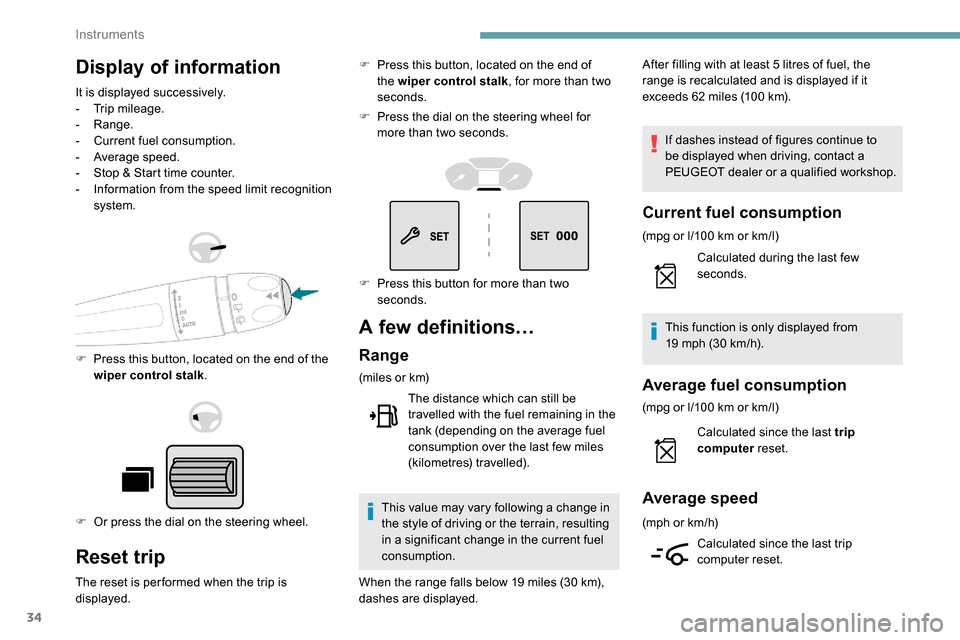
It is displayed successively.
- T rip mileage.
-
Range.
-
C
urrent fuel consumption.
-
A
verage speed.
-
S
top & Start time counter.
-
I
nformation from the speed limit recognition
system.
F
P
ress this button, located on the end of the
wiper control stalk .
F
O
r press the dial on the steering wheel.
Reset trip
The reset is per formed when the trip is
displayed. F
P
ress this button, located on the end of
the wiper control stalk , for more than two
seconds.
F
P
ress the dial on the steering wheel for
more than two seconds.
A few definitions…
Range
(miles or km)
The distance which can still be
travelled with the fuel remaining in the
tank (depending on the average fuel
consumption over the last few miles
(kilometres) travelled).
This value may vary following a change in
the style of driving or the terrain, resulting
in a significant change in the current fuel
consumption. After filling with at least 5
litres of fuel, the
range is recalculated and is displayed if it
exceeds 62 miles (100 km).
If dashes instead of figures continue to
be displayed when driving, contact a
PEUGEOT dealer or a qualified workshop.
Current fuel consumption
(mpg or l/100 km or km/l)
C alculated during the last few
seconds.
This function is only displayed from
19
mph (30 km/h).
Average fuel consumption
(mpg or l/100 km or km/l)
C alculated since the last trip
computer reset.
Average speed
(mph or km/h)
Calculated since the last trip
computer reset.
F
P
ress this button for more than two
seconds.
When the range falls below 19
miles (30
km),
dashes are displayed.
Instruments
Page 67 of 312
65
Refitting
To refit the mat on the driver's side:
F p osition the mat correctly,
F
r
eattach the fixings by pressing,
F
c
heck that the mat is secured correctly.
To avoid any risk of jamming the pedals:
-
o
nly use mats which are suited to the
fixings already present in the vehicle;
these fixings must be used.
-
n
ever place one mat on top of another.
The use of mats not approved by
PEUGEOT may inter fere with access to
the pedals and hinder the operation of the
cruise control/speed limiter.
The mats approved by PEUGEOT have
two fixings located below the seat.
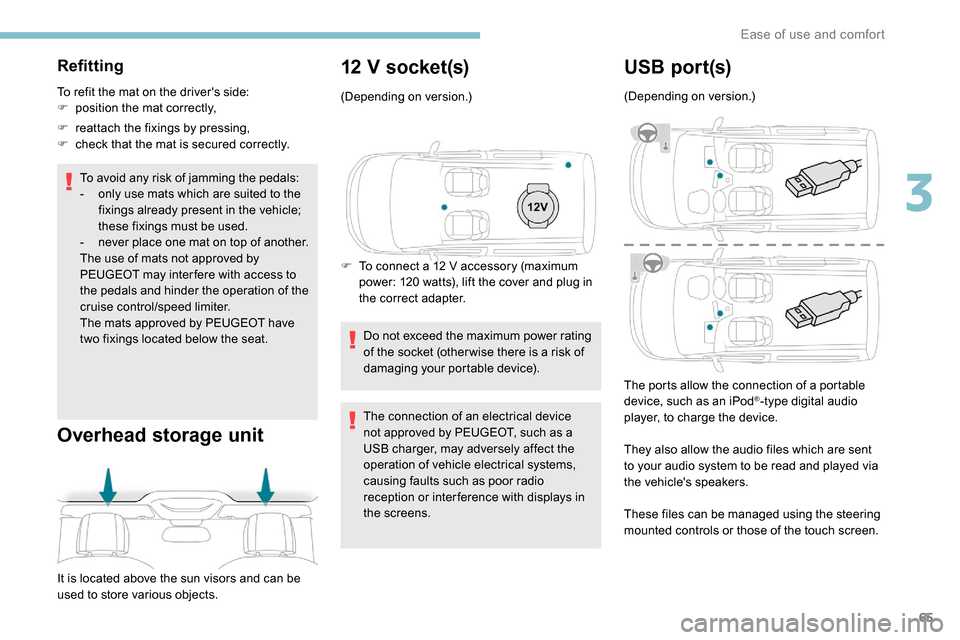
Overhead storage unit
It is located above the sun visors and can be
used to store various objects.
12 V socket(s)
(Depending on version.)
F
T
o connect a 12 V accessory (maximum
power: 120 watts), lift the cover and plug in
the correct adapter.
Do not exceed the maximum power rating
of the socket (other wise there is a risk of
damaging your portable device).
The connection of an electrical device
not approved by PEUGEOT, such as a
USB charger, may adversely affect the
operation of vehicle electrical systems,
causing faults such as poor radio
reception or inter ference with displays in
the screens.
USB por t(s)
(Depending on version.)
The ports allow the connection of a portable
device, such as an iPod
®-type digital audio
player, to charge the device.
They also allow the audio files which are sent
to your audio system to be read and played via
the vehicle's speakers.
These files can be managed using the steering
mounted controls or those of the touch screen.
3
Ease of use and comfort