roof Peugeot Partner 2020 User Guide
[x] Cancel search | Manufacturer: PEUGEOT, Model Year: 2020, Model line: Partner, Model: Peugeot Partner 2020Pages: 260, PDF Size: 7.76 MB
Page 120 of 260
11 8
Driving
save speed settings that will subsequently be
proposed for the purpose of configuring these
two systems.
You can memorise multiple speed settings for
each of the two systems.
By default, some speed settings are already
memorised.
As a safety measure, the driver must only change speed settings when stationary.
Changing a speed setting
In the Driving / Vehicle touch screen
menu, select "Driving functions " then
"Memorised speed settings".
"MEM" button
With this button, you can select a memorised
speed setting to use with the speed limiter or the
programmable cruise control.
For more information on the Speed limiter or
Programmable cruise control, refer to the
corresponding section.
Active Safety Brake with Distance Alert and
Intelligent emergency
braking assistance
Refer to the General recommendations on the
use of driving and manoeuvring aids .
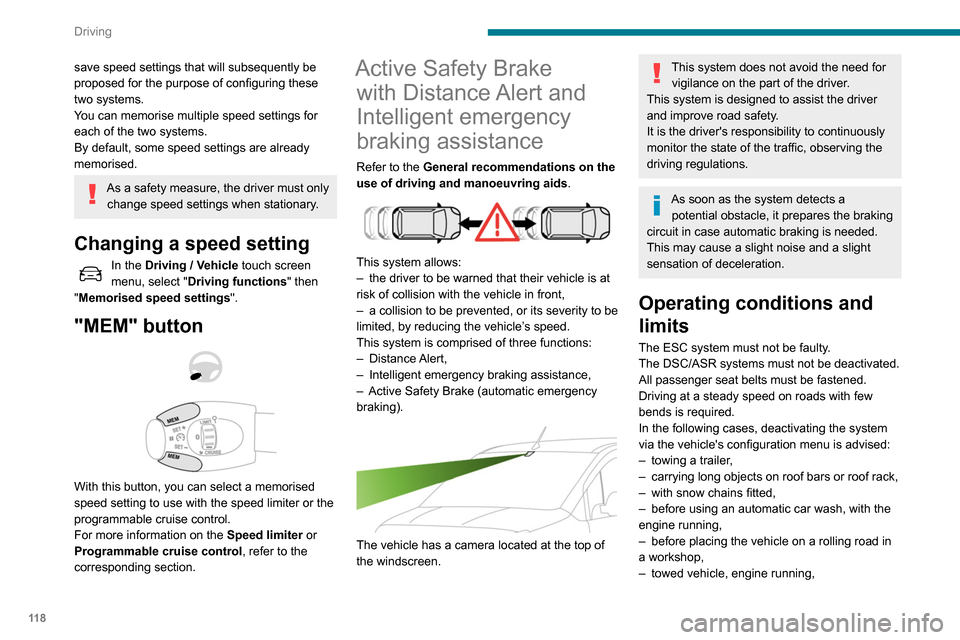
This system allows:
–
the driver to be warned that their vehicle is at
risk of collision with the vehicle in front,
–
a collision to be prevented, or its severity to be
limited, by reducing the vehicle’
s speed.
This system is comprised of three functions:
–
Distance Alert,
–
Intelligent emergency braking assistance,
–
Active Safety Brake (automatic emergency
braking).
The vehicle has a camera located at the top of
the windscreen.
This system does not avoid the need for vigilance on the part of the driver.
This system is designed to assist the driver
and improve road safety.
It is the driver's responsibility to continuously
monitor the state of the traffic, observing the
driving regulations.
As soon as the system detects a potential obstacle, it prepares the braking
circuit in case automatic braking is needed.
This may cause a slight noise and a slight
sensation of deceleration.
Operating conditions and
limits
The ESC system must not be faulty.
The DSC/ASR systems must not be deactivated.
All passenger seat belts must be fastened.
Driving at a steady speed on roads with few
bends is required.
In the following cases, deactivating the system
via the vehicle's configuration menu is advised:
–
towing a trailer
,
–
carrying long objects on roof bars or roof rack,
–
with snow chains fitted,
–
before using an automatic car wash, with the
engine running,
–
before placing the vehicle on a rolling road in
a workshop,
–
towed vehicle, engine running,
– Following an impact to the windscreen close to
the detection camera.
The system is automatically deactivated after the use of certain "space-saver"
type spare wheels is detected (smaller
diameter).
The system is automatically deactivated
after detection of a fault with the brake pedal
switch or with at least two brake lamps.
It is possible that warnings are not given,
are given too late or seem unjustified.
Consequently, always stay in control of your
vehicle and be prepared to react at any time
to avoid an accident.
After an impact, the function automatically stops operating. Contact a
PEUGEOT dealer or a qualified workshop to
have the system checked.
Distance Alert
It warns the driver that their vehicle is at risk of
collision with the vehicle in front or a pedestrian
present in their traffic lane.
Operation
Depending on the degree of risk of collision
detected by the system and the alert threshold
chosen by the driver, several different levels
Page 142 of 260
140
Practical information
► Put each fixing in place and lock them on the
roof one by one.
► Ensure that the roof bars or the roof rack are
correctly fitted (by shaking them).
The bars are adaptable for each fixing point.
Bonnet
Stop & Start
Before doing anything under the bonnet,
you must switch off the ignition to avoid any
risk of injury resulting from an automatic
change to START mode.
The location of the interior bonnet release lever prevents opening the
bonnet when the left-hand front door is
closed.
When the engine is hot, handle the
exterior safety catch and the bonnet stay
with care (risk of burns), using the protected
area.
When the bonnet is open, take care not to
damage the safety catch.
Do not open the bonnet under very windy
conditions.
If a telephone call is in progress at the
time, it will be maintained for around 10
minutes using your audio system’s hands-free
system.
Exiting the mode
These functions will be automatically reactivated
the next time the vehicle is used.
In order to restore the use of these functions
immediately, start the engine and let it run:
–
for less than 10 minutes, to use the equipment
for approximately 5 minutes,
–
for more than 10 minutes, to use the
equipment for approximately 30 minutes.
Let the engine run for the duration specified to
ensure that the battery charge is sufficient.
Do not repeatedly and continuously restart the
engine in order to charge the battery
.
A flat battery prevents the engine from starting.
For more information on the 12 V battery,
refer to the corresponding section.
Load reduction mode
System that manages the use of certain
functions according to the level of charge
remaining in the battery.
When the vehicle is being driven, the load
reduction function temporarily deactivates certain
functions, such as the air conditioning and the
heated rear screen.
The deactivated functions are reactivated
automatically as soon as conditions permit.
Roof bars / Roof rack
Recommendations
Distribute the load uniformly, taking care
to avoid overloading one of the sides.
Arrange the heaviest part of the load as close
as possible to the roof.
Secure the load firmly.
Drive gently: the vehicle will be more
susceptible to the effects of side winds and its
stability may be affected.
Regularly check the security and tight
fastening of the roof bars and racks, at least
before each trip.
In the event of loading ( not exceeding
40 cm in height) on the roof, do not
exceed the following loads:
–
T
ransverse bars on longitudinal bars:
80
kg.
–
T
wo transverse bars bolted to the roof:
100
kg.
–
Three transverse bars bolted to the roof:
150
kg.
–
An aluminium rack: 120
kg.
–
A
steel rack: 115 kg.
If the height exceeds 40 cm, adapt the speed
of the vehicle to the profile of the road to
avoid damaging the roof bars or the roof rack
and the fixings on the vehicle.
Refer to national legislation in order to comply
with the regulations for transporting objects
that are longer than the vehicle.
As a safety measure and to avoid damaging the roof, it is essential to use
the roof bars and racks approved for your
vehicle.
Observe the instructions on fitting and use
contained in the guide supplied with the roof
bars and racks.
To fit the transverse roof bars or a roof rack, use
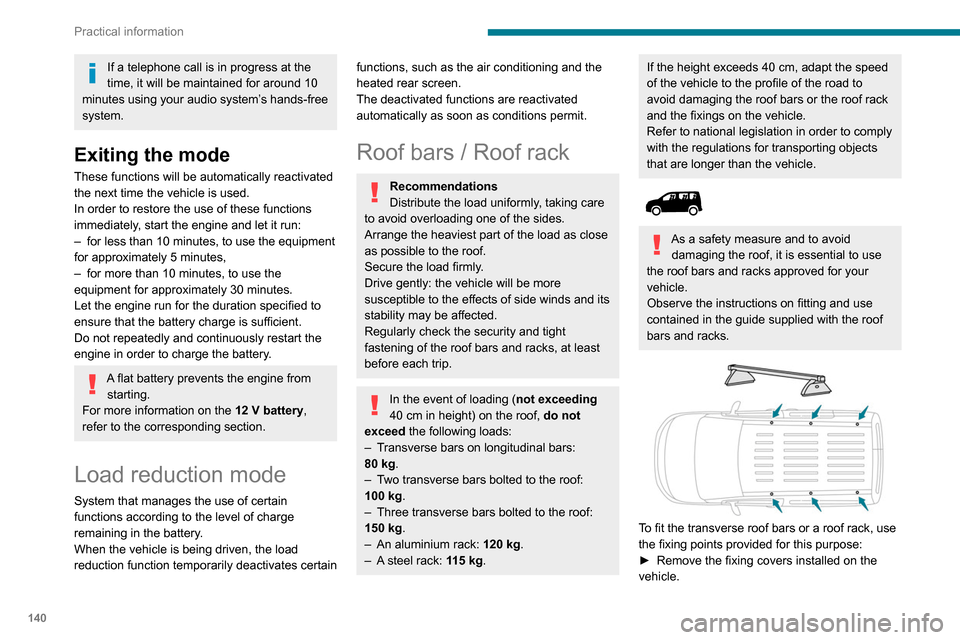
the fixing points provided for this purpose:
►
Remove the fixing covers installed on the
vehicle.
Page 143 of 260
141
Practical information
7► Put each fixing in place and lock them on the
roof one by one.
►
Ensure that the roof bars or the roof rack are
correctly fitted (by shaking them).
The bars are adaptable for each fixing point.
Bonnet
Stop & Start
Before doing anything under the bonnet,
you must switch off the ignition to avoid any
risk of injury resulting from an automatic
change to START mode.
The location of the interior bonnet release lever prevents opening the
bonnet when the left-hand front door is
closed.
When the engine is hot, handle the
exterior safety catch and the bonnet stay
with care (risk of burns), using the protected
area.
When the bonnet is open, take care not to
damage the safety catch.
Do not open the bonnet under very windy
conditions.
Cooling of the engine when stopped
The engine cooling fan may start after
the engine has been switched off.
Take care with objects or clothing that
could be caught in the blades of the fan!
Opening
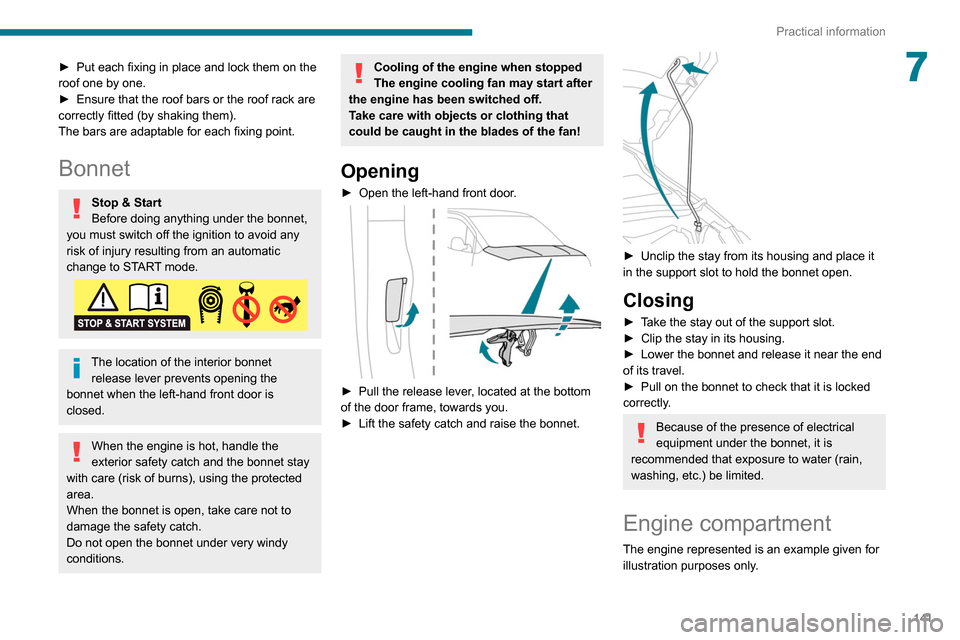
► Open the left-hand front door .
► Pull the release lever, located at the bottom
of the door frame, towards you.
►
Lift the safety catch and raise the bonnet.
► Unclip the stay from its housing and place it
in the support slot to hold the bonnet open.
Closing
► Take the stay out of the support slot.
► Clip the stay in its housing.
►
Lower the bonnet and release it near the end
of its travel.
►
Pull on the bonnet to check that it is locked
correctly
.
Because of the presence of electrical
equipment under the bonnet, it is
recommended that exposure to water (rain,
washing, etc.) be limited.
Engine compartment
The engine represented is an example given for
illustration purposes only.
Page 167 of 260
165
In the event of a breakdown
8To charge the vehicle's battery yourself, use only a charger compatible with
lead-acid batteries with a nominal voltage of
12
V.
Follow the instructions provided by the
manufacturer of the charger.
Never reverse polarities.
It is not necessary to disconnect the
battery.
►
Switch off the ignition.
►
Switch off all electrical consumers (audio
system, lighting, wipers, etc.).
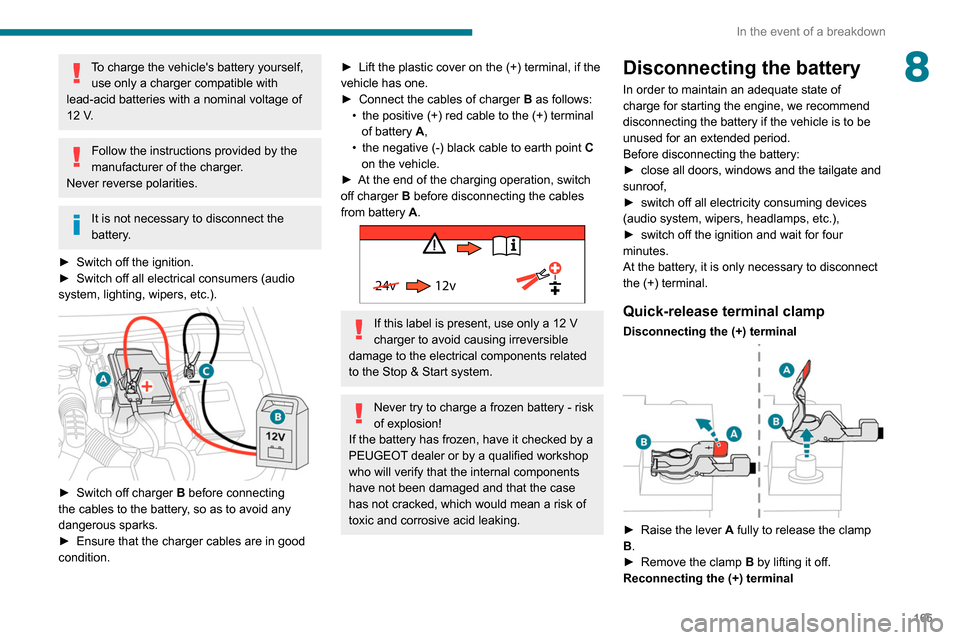
► Switch off charger B before connecting
the cables to the battery, so as to avoid any
dangerous sparks.
►
Ensure that the charger cables are in good
condition.
► Lift the plastic cover on the (+) terminal, if the
vehicle has one.
►
Connect the cables of charger B
as follows:
•
the positive (+) red cable to the (+) terminal
of battery
A,
•
the negative (-) black cable to earth point C
on the vehicle.
►
At the end of the charging operation, switch
off charger B
before disconnecting the cables
from battery A.
24v 12v
If this label is present, use only a 12 V
charger to avoid causing irreversible
damage to the electrical components related
to the Stop & Start system.
Never try to charge a frozen battery - risk
of explosion!
If the battery has frozen, have it checked by a
PEUGEOT dealer or by a qualified workshop
who will verify that the internal components
have not been damaged and that the case
has not cracked, which would mean a risk of
toxic and corrosive acid leaking.
Disconnecting the battery
In order to maintain an adequate state of
charge for starting the engine, we recommend
disconnecting the battery if the vehicle is to be
unused for an extended period.
Before disconnecting the battery:
►
close all doors, windows and the tailgate and
sunroof,
►
switch off all electricity consuming devices
(audio system, wipers, headlamps, etc.),
►
switch off the ignition and wait for four
minutes.
At the battery
, it is only necessary to disconnect
the (+) terminal.
Quick-release terminal clamp
Disconnecting the (+) terminal
► Raise the lever A fully to release the clamp
B.
►
Remove the clamp B
by lifting it off.
Reconnecting the (+) terminal
Page 172 of 260

170
Technical data
Vehicle length
J Maximum interior width Without sliding side door 1,733
With 1 sliding side door 1,630
With 2 sliding side doors 1,527
K Clear opening height With side-hinged doors 1,137
With tailgate 1,197
L Clear opening width 1 242
Vehicle length
Standard (L1) Long (L2)
M Clear opening height 1,072
N Interior load height
(varies depending on the angle of the floor and the curve
of the roof) 1,200 to 1,270
W Loading sill heightStandard version 548 to 588X
Standard version with
increased payload 568 to 578
561 to 565
Worksite version 602 to 610605 to 610
Vehicle length
B Overall height Standard version 1,796 to 1,8251,812 to 1,820
Worksite version 1,840 to 1,8601,849 to 1,860
C Wheelbase 2,7852,975
D Front overhang 892
E Rear overhang 726886
F Width inc. mirrors Folded 1,921
Unfolded 2,107
G Front track width 1,553/1,5631,553
H Rear track width 1,569/1,5771,549/1,568
Vehicle length
Standard (L1) Long (L2)
I Interior width between wheel arches 1,229
Page 173 of 260

171
Technical data
9Vehicle length
J Maximum interior width Without sliding side door 1,733
With 1 sliding side door 1,630
With 2 sliding side doors 1,527
K Clear opening height With side-hinged doors 1,137
With tailgate 1,197
L Clear opening width 1
242
Vehicle length
Standard (L1) Long (L2)
M Clear opening height 1,072
N Interior load height
(varies depending on the angle of the floor and the curve
of the roof) 1,200 to 1,270
W Loading sill heightStandard version 548 to 588X
Standard version with
increased payload 568 to 578
561 to 565
Worksite version 602 to 610605 to 610
Page 208 of 260
206
PEUGEOT Connect Nav
step. There's more information available in
"novice" mode. You can set the dialogue mode to
"expert" when you feel comfortable.
Global voice commands
Voice commands
Set dialogue mode as novice - expert
Select user 1 / Select profile John
Increase temperature
Decrease temperature
Help messages
There are lots of topics I can help you with.
You can say: "help with phone", "help with
navigation", "help with media" or "help with
radio". For an overview on how to use voice
controls, you can say "help with voice controls".
Say "yes" if I got that right. Otherwise, say "no"
and we'll start that again.
"Navigation" voice
commands
Voice commands
Navigate home
Navigate to work
Navigate to preferred address, Tennis club
Navigate to contact, John Miller
Navigate to address 11 regent street, London
Help messages
Voice commands
Steering wheel-mounted
controls
Voice commands:
Voice commands can be issued from any
screen page after a short press on the "Voice
commands" button located on the steering
wheel or at the end of the lighting control stalk
(depending on equipment), as long as there is no
telephone call in progress.
To ensure that voice commands are always recognised by the system, please
follow these recommendations:
–
use natural language in a normal tone
without breaking up words or raising your
voice.
–
always wait for the "beep" (audible signal)
before speaking.
–
for best results, closing the windows and
sunroof is recommended, to avoid extraneous
interference (depending on version).
–
before issuing a voice command, ask any
other passengers to refrain from speaking.
First steps
Example of a "voice command" for
navigation:
"Navigate to address 11 regent street,
London"
Example of a "voice command" for the radio and
media:
"Play artist Madonna"
Example of a "voice command" for the
telephone:
"Call David Miller"
The voice commands, with a choice of 17 languages (Arabic, Brazilian, Czech,
Danish, Dutch, English, Farsi, French,
German, Italian, Norwegian, Polish,
Portuguese, Russian, Spanish, Swedish,
Turkish), are made using the language
previously chosen and set in the system.
For some voice commands, there are
alternative synonyms.
Example: Guide to / Navigate to / Go to / ...
The voice commands in Arabic for: "Navigate
to address" and "Display POI in the city", are
not available.
Information - Using the
system
When voice commands are activated, by
briefly pressing the button, help is
displayed on the touch screen, offering various
menus and enabling voice-based interaction with
the system.
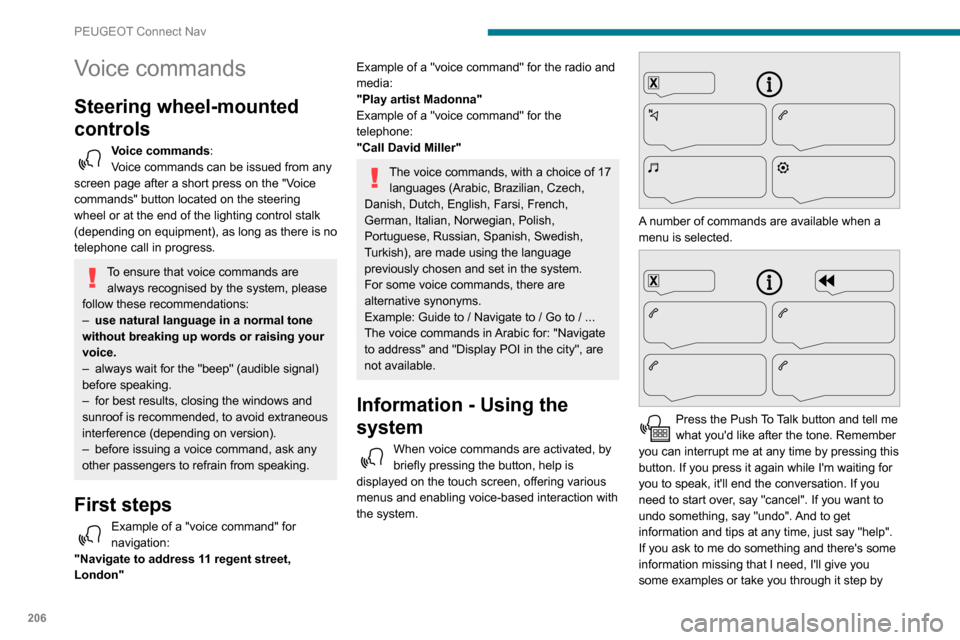
A number of commands are available when a
menu is selected.
Press the Push To Talk button and tell me
what you'd like after the tone. Remember
you can interrupt me at any time by pressing this
button. If you press it again while I'm waiting for
you to speak, it'll end the conversation. If you
need to start over, say "cancel". If you want to
undo something, say "undo". And to get
information and tips at any time, just say "help".
If you ask to me do something and there's some
information missing that I need, I'll give you
some examples or take you through it step by
Page 232 of 260
230
Alphabetical index
Fitting a wheel 154, 156
Fitting roof bars
140
Fittings, interior
47
Flap, fuel filler
134–135
Flap, removable
51
Flashing indicators
64–65, 160
Fluid, brake
143
Fluid, engine coolant
143
Foglamp, rear
160
Foglamps
159
Foglamps, front
63, 157
Foglamps, rear
63
Folding the rear seats
46
Frequency (radio)
218
Fuel
7, 134
Fuel consumption
7
Fuel tank
134–136
Fusebox, dashboard
161
Fusebox, engine compartment
161, 163
Fuses
161–163
G
Gauge, fuel 134–135
Gearbox, automatic
94, 98–103, 145
Gearbox, manual
98–99, 103, 145
Gear lever, automatic gearbox
99–101
Gear lever, manual gearbox
98–99
Gear shift indicator ~ Gear efficiency
indicator
102
Glove box
47
G.P.S. 2 11
H
Hazard warning lamps 74
headlamp adjustment
67
Headlamp adjustment
67
Headlamps, automatic dipping
65–66, 124
Headlamps, automatic illumination
64–65
Headlamps, dipped beam
63, 157–158
Headlamps, halogen
157
Headlamps, main beam
63, 157, 159
Head restraints, front
46
Head restraints, rear
46
Heating
55–56, 58, 60–61
Heating, additional
37, 60–61
Heating, programmable
37, 60–61
Hill Assist Descent Control (HADC)
78–79
Hill Descent Control
78–79
Hill start assist
97–98
Horn
75
I
Ignition 94, 222
Ignition on
94
Immobiliser, electronic
91
Indicator, coolant temperature
16
Indicator lamps, operation
63
Indicators, direction
64
Inflating tyres 145, 176
Inflating tyres and accessories
(using the kit)
151, 153
Infrared camera
106
Instrument panel
9, 107
Internet browser
212, 216
J
Jack 153, 219
Jump starting
164
K
Key 24–27, 29–30
Key, electronic
24, 94
Keyless Entry and Starting
24, 26–29, 92, 94
Key with remote control
29
Kit, hands-free
184–185, 197, 220–221
Kit, puncture repair
150
Kit, temporary puncture repair
150–151, 153
L
Labels 4
Labels, identification
176
Lamps, front
159
Lamps, parking
65
Lamps, rear
160
Page 234 of 260
232
Alphabetical index
Range, AdBlue 144
RDS
193, 218
Rear screen, demisting
59
Recharging the battery
164–165
Recirculation, air
56–57
Recovery
167
Reduction of electrical load
140
Regeneration of the particle filter
144
Reinitialisation of the under-inflation
detection system
105
Reinitialising the remote control
32
Reminder, key in ignition
94
Reminder, lighting on
63–64
Remote control
24–27, 29–30, 91
Removing a wheel
154, 156
Removing the mat
47
Replacing bulbs
156–157
Replacing fuses
161–163
Replacing the air filter
144
Replacing the oil filter
144
Replacing the passenger compartment
filter
144
Reservoir, screenwash
143
Reversing camera
106, 129
Reversing lamps
160
Roof bars
140
Running out of fuel (Diesel)
150
S
Safety, children 82, 84–87
Saturation of the particle filter (Diesel) 144
Screen menu map
196
Screen, multifunction (with audio system)
178
Screenwash, front
67
Screenwash, rear
68
SCR (Selective Catalytic Reduction)
146
Seat belts
79–81, 86
Seat, bench front, 2-seat
44–45, 79
Seat, rear bench
46
Seats, front
40–42, 44–45
Seats, front bench
44–45
Seats, heated
42
Seats, Multiflex ~ Extenso Cab
51
Seats, rear
40, 44, 46, 85
Sensors (warnings)
106
Serial number, vehicle
176
Service indicator
16
Servicing
16, 144
Settings, system
199, 223
Sidelamps
63, 65, 157–159
Side parking sensors
128
Side repeater
158
Sliding side door, electric
29, 35
Snow chains
104, 136
Snow chains, link
136
Socket, 12 V accessory
47
Socket, 220 V
48
Socket, auxiliary
182, 195, 219
Socket, Jack
182, 219
Speed limiter
109–111, 117–118
Speed limit recognition
107–108
Speedometer
107Stability control (ESC) 75–78
Starting a Diesel engine
134
Starting the engine
91
Starting the vehicle
92, 94, 99–101
Starting using another battery
164
Station, radio
179, 192, 217–218
Stay, bonnet
141
Steering mounted controls, audio
178–179, 190,
204
Steering wheel, adjustment
42
Stickers, customising ~ Stickers,
expressive
149
Stopping the vehicle
94, 99–101
Stop & Start
22, 55, 59, 102–104,
134, 141, 144, 163, 166
Storage
47
Stowing rings
49
Sunshine sensor
55
Surround Rear Vision
130
Switching off the engine
91, 93
Synchronising the remote control
32
T
Tables of fuses 161–163
Tank, fuel
134–135
Technical data
173–175
Telephone
48, 184–186, 197–198, 220–222
Telephone, Bluetooth with voice
recognition
186
Temperature, coolant
16