CENTRAL LOCKING Peugeot Partner 2020 Owner's Manual
[x] Cancel search | Manufacturer: PEUGEOT, Model Year: 2020, Model line: Partner, Model: Peugeot Partner 2020Pages: 260, PDF Size: 7.76 MB
Page 4 of 260
2
Contents
■
Overview
Labels 4
■
Eco-driving
Eco-coaching 8
1Instruments
Instrument Panel 9
Warning and indicator lamps 11
Indicators 16
Trip computer 21
Setting the date and time 23
2Access
Electronic key with remote control function
and built-in key, 24
Back-up procedures 30
Central locking / unlocking 33
Doors 34
General recommendations for the sliding
side doors
35
Rear roof flap 36
Alarm 37
Electric windows 39
Tilting rear door windows 39
3Ease of use and comfort
General recommendations for the seats 40
Front seats 40
PEUGEOT
i-Cockpit 40
Steering wheel adjustment 42
Mirrors 43
2-seat front bench seat 44
Rear bench seat 46
Interior fittings 47
Multi-Flex bench seat 51
Crew cab 52
Heating and Ventilation 55
Heating 56
Manual air conditioning 56
Dual-zone automatic air conditioning 56
Front demisting - defrosting 58
Rear screen and/or door mirrors demisting -
defrosting
59
Additional heating/ventilation system 60
4Lighting and visibility
Lighting control stalk 63
Direction indicators 64
Automatic illumination of headlamps 64
Daytime running lamps / Sidelamps 65
Parking lamps 65
Automatic headlamp dipping 65
Headlamp beam height adjustment 67
Wiper control stalk 67
Changing a wiper blade 69
Automatic wiping 69
5Safety
General safety recommendations 71
Emergency or assistance call 71
Hazard warning lamps 74
Horn 75
Electronic stability control (ESC) 75
Advanced Grip Control 77
Hill Assist Descent Control 78
Seat belts 79
Airbags 81
Child seats 84
Deactivating the front passenger airbag 86
Manual child lock 89
Electric child lock 89
6Driving
Driving recommendations 90
Starting/switching off the engine 91
Manual parking brake 94
Electric parking brake 95
Hill start assist 97
5-speed manual gearbox 98
6-speed manual gearbox 98
Automatic gearbox 99
Gear efficiency indicator 102
Stop & Start 102
Under-inflation detection 104
Driving and manoeuvring aids - General
recommendations
105
Speed Limit Recognition and
Recommendation
107
Speed limiter 11 0
Cruise control - particular
recommendations
11 2
Programmable cruise control 11 2
Adaptive Cruise Control 11 4
Memorising speeds 11 7
Active Safety Brake with Distance Alert and
Intelligent emergency braking assistance
11 8
Active Lane Keeping Assistance 120
Blind Spot Monitoring System 124
Active Blind Spot Monitoring System 125
Distraction detection 126
Page 8 of 260
6
Overview
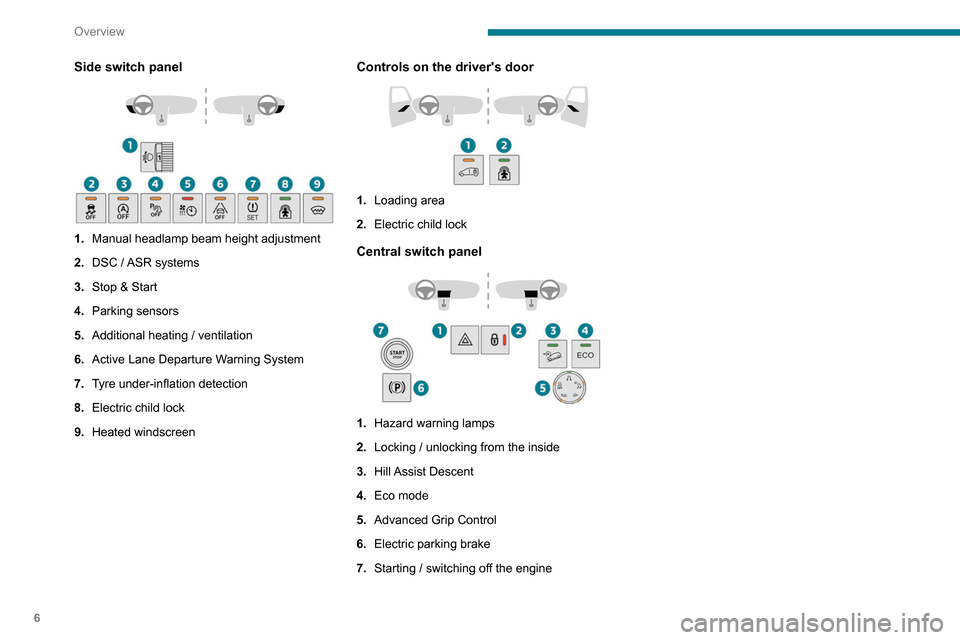
Side switch panel
1.Manual headlamp beam height adjustment
2. DSC / ASR systems
3. Stop & Start
4. Parking sensors
5. Additional heating / ventilation
6. Active Lane Departure Warning System
7. Tyre under-inflation detection
8. Electric child lock
9. Heated windscreen
Controls on the driver's door
1.Loading area
2. Electric child lock
Central switch panel
1.Hazard warning lamps
2. Locking / unlocking from the inside
3. Hill Assist Descent
4. Eco mode
5. Advanced Grip Control
6. Electric parking brake
7. Starting / switching off the engine
Page 26 of 260
24
Access
Electronic key with
remote control function
and built-in key,
Remote control key
This allows the central locking or unlocking of the
vehicle using the door lock or remotely.
It also allows the vehicle to be located, the fuel
filler cap to be removed and refitted and the
engine to be started or switched off, as well as
providing protection against theft.
The remote control buttons are not active with the ignition switched on.
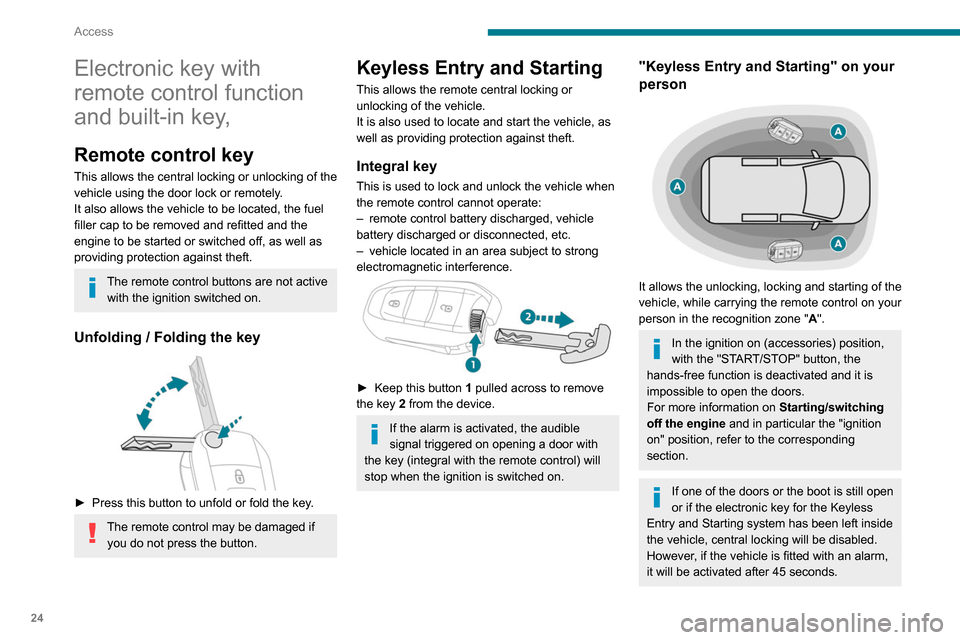
Unfolding / Folding the key
► Press this button to unfold or fold the key .
The remote control may be damaged if
you do not press the button.
Keyless Entry and Starting
This allows the remote central locking or
unlocking of the vehicle.
It is also used to locate and start the vehicle, as
well as providing protection against theft.
Integral key
This is used to lock and unlock the vehicle when
the remote control cannot operate:
–
remote control battery discharged, vehicle
battery discharged or disconnected, etc.
–
vehicle located in an area subject to strong
electromagnetic interference.
► Keep this button 1 pulled across to remove
the key 2 from the device.
If the alarm is activated, the audible
signal triggered on opening a door with
the key (integral with the remote control) will
stop when the ignition is switched on.
"Keyless Entry and Starting" on your
person
It allows the unlocking, locking and starting of the
vehicle, while carrying the remote control on your
person in the recognition zone " A".
In the ignition on (accessories) position,
with the "START/STOP" button, the
hands-free function is deactivated and it is
impossible to open the doors.
For more information on Starting/switching
off the engine and in particular the "ignition
on" position, refer to the corresponding
section.
If one of the doors or the boot is still open
or if the electronic key for the Keyless
Entry and Starting
system has been left inside
the vehicle, central locking will be disabled.
However
, if the vehicle is fitted with an alarm,
it will be activated after 45
seconds.
Page 31 of 260
29
Access
2Locking
Ensure that no person or object prevents
the correct closing of the windows.
Be particularly aware of children when
operating the windows.
If your vehicle is not fitted with an alarm,
the locking/deadlocking is signalled by
the fixed illumination of the direction
indicators for about two seconds.
Depending on your version, the door mirrors
fold at the same time.
With the key
► To lock the vehicle, insert the key in the lock
then turn it towards the rear of the vehicle.
With the remote control
► To lock the vehicle, press this button.
If your vehicle is so equipped, pressing
and holding this button closes the
windows. The window stops in position when
you release the button.
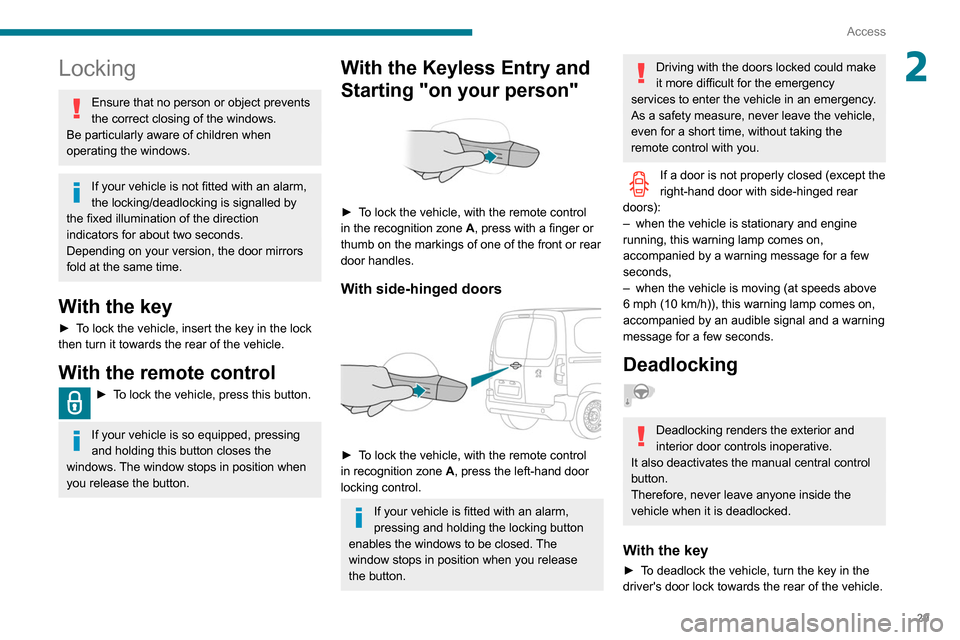
With the Keyless Entry and
Starting "on your person"
► To lock the vehicle, with the remote control
in the recognition zone A, press with a finger or
thumb on the markings of one of the front or rear
door handles.
With side-hinged doors
► To lock the vehicle, with the remote control
in recognition zone A, press the left-hand door
locking control.
If your vehicle is fitted with an alarm,
pressing and holding the locking button
enables the windows to be closed. The
window stops in position when you release
the button.
Driving with the doors locked could make
it more difficult for the emergency
services to enter the vehicle in an emergency.
As a safety measure, never leave the vehicle,
even for a short time, without taking the
remote control with you.
If a door is not properly closed (except the
right-hand door with side-hinged rear
doors):
–
when the vehicle is stationary and engine
running, this warning lamp comes on,
accompanied by a warning message for a few
seconds,
–
when the vehicle is moving (at speeds above
6 mph (10 km/h)), this warning lamp comes on,
accompanied by an audible signal and a warning
message for a few seconds.
Deadlocking
Deadlocking renders the exterior and
interior door controls inoperative.
It also deactivates the manual central control
button.
Therefore, never leave anyone inside the
vehicle when it is deadlocked.
With the key
► To deadlock the vehicle, turn the key in the
driver's door lock towards the rear of the vehicle.
Page 32 of 260
30
Access
► Then within five seconds , turn the key
towards the rear again.
With the remote control
► To deadlock the vehicle, press this
button.
►
Then press this button again within five
seconds after locking
.
At the same time, depending on version, the electric door mirrors fold in.
If your vehicle is fitted with an alarm,
pressing and holding the locking button
enables the windows to be closed. The
window stops in position when you release
the button.
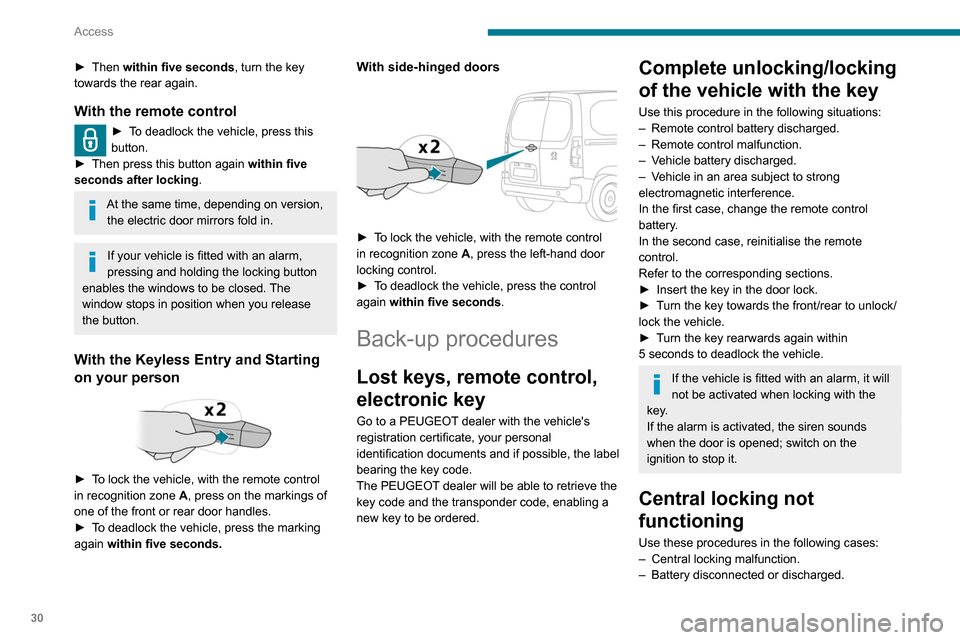
With the Keyless Entry and Starting
on your person
► To lock the vehicle, with the remote control
in recognition zone A, press on the markings of
one of the front or rear door handles.
►
T
o deadlock the vehicle, press the marking
again within five seconds.
With side-hinged doors
► To lock the vehicle, with the remote control
in recognition zone A, press the left-hand door
locking control.
►
T
o deadlock the vehicle, press the control
again within five seconds .
Back-up procedures
Lost keys, remote control,
electronic key
Go to a PEUGEOT dealer with the vehicle's
registration certificate, your personal
identification documents and if possible, the label
bearing the key code.
The PEUGEOT dealer will be able to retrieve the
key code and the transponder code, enabling a
new key to be ordered.
Complete unlocking/locking
of the vehicle with the key
Use this procedure in the following situations:
–
Remote control battery discharged.
–
Remote control malfunction.
–
V
ehicle battery discharged.
–
V
ehicle in an area subject to strong
electromagnetic interference.
In the first case, change the remote control
battery.
In the second case, reinitialise
the remote
control.
Refer to the corresponding sections.
►
Insert the key in the door lock.
►
T
urn the key towards the front/rear to unlock/
lock the vehicle.
►
T
urn the key rearwards again within
5
seconds to deadlock the vehicle.
If the vehicle is fitted with an alarm, it will
not be activated when locking with the
key.
If the alarm is activated, the siren sounds
when the door is opened; switch on the
ignition to stop it.
Central locking not
functioning
Use these procedures in the following cases:
– Central locking malfunction.
–
Battery disconnected or discharged.
Page 33 of 260
31
Access
2In the event of a malfunction of the
central locking system, the battery must
be disconnected to ensure that the vehicle is
locked fully.
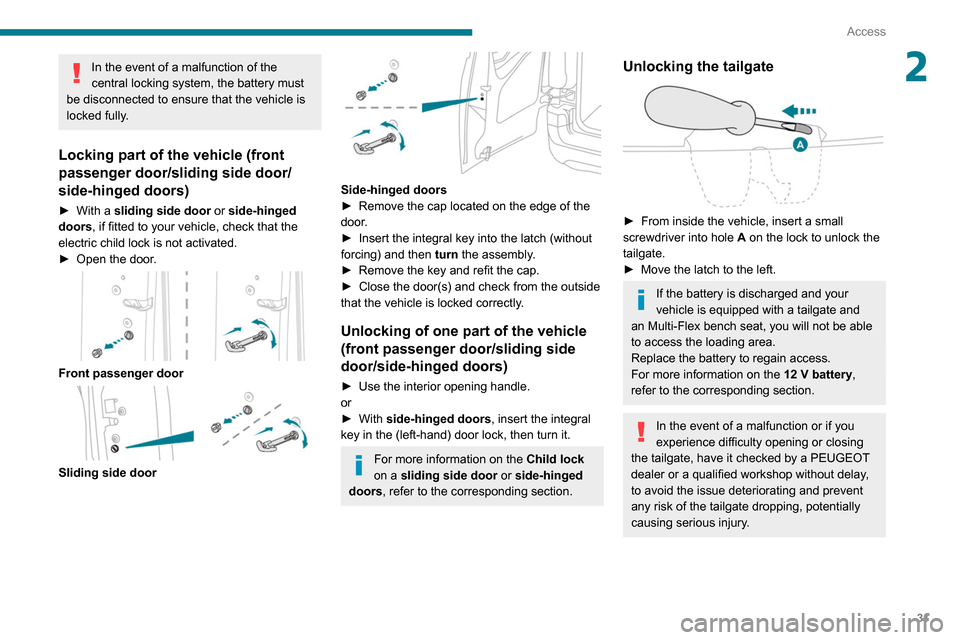
Locking part of the vehicle (front
passenger door/sliding side door/
side-hinged doors)
► With a sliding side door or side-hinged
doors, if fitted to your vehicle, check that the
electric child lock is not activated.
►
Open the door
.
Front passenger door
Sliding side door
Side-hinged doors
► Remove the cap located on the edge of the
door
.
►
Insert the integral key into the latch (without
forcing) and then turn
the assembly.
►
Remove the key and refit the cap.
►
Close the door(s) and check from the outside
that the vehicle is locked correctly
.
Unlocking of one part of the vehicle
(front passenger door/sliding side
door/side-hinged doors)
► Use the interior opening handle.
or
►
With
side-hinged doors , insert the integral
key in the (left-hand) door lock, then turn it.
For more information on the Child lock
on a sliding side door or side-hinged
doors, refer to the corresponding section.
Unlocking the tailgate
► From inside the vehicle, insert a small
screwdriver into hole A
on the lock to unlock the
tailgate.
►
Move the latch to the left.
If the battery is discharged and your
vehicle is equipped with a tailgate and
an
Multi-Flex bench seat, you will not be able
to access the loading area.
Replace the battery to regain access.
For more information on the 12 V battery,
refer to the corresponding section.
In the event of a malfunction or if you
experience difficulty opening or closing
the tailgate, have it checked by a PEUGEOT
dealer or a qualified workshop without delay,
to avoid the issue deteriorating and prevent
any risk of the tailgate dropping, potentially
causing serious injury.
Page 35 of 260
33
Access
2► Insert the mechanical key (incorporated into
the remote control) into the lock to open the
vehicle.
►
Place the electronic key against the back-up
reader on the steering column and hold it there
until the ignition is switched on.
►
Switch on the ignition by pressing the
"
START/STOP" button.
►
W
ith a manual gearbox, place the gear lever
in neutral then fully depress the clutch pedal.
►
W
ith an automatic gearbox, while in mode
P, depress the brake pedal.
If the fault persists after reinitialisation, contact
a PEUGEOT dealer or a qualified workshop
without delay.
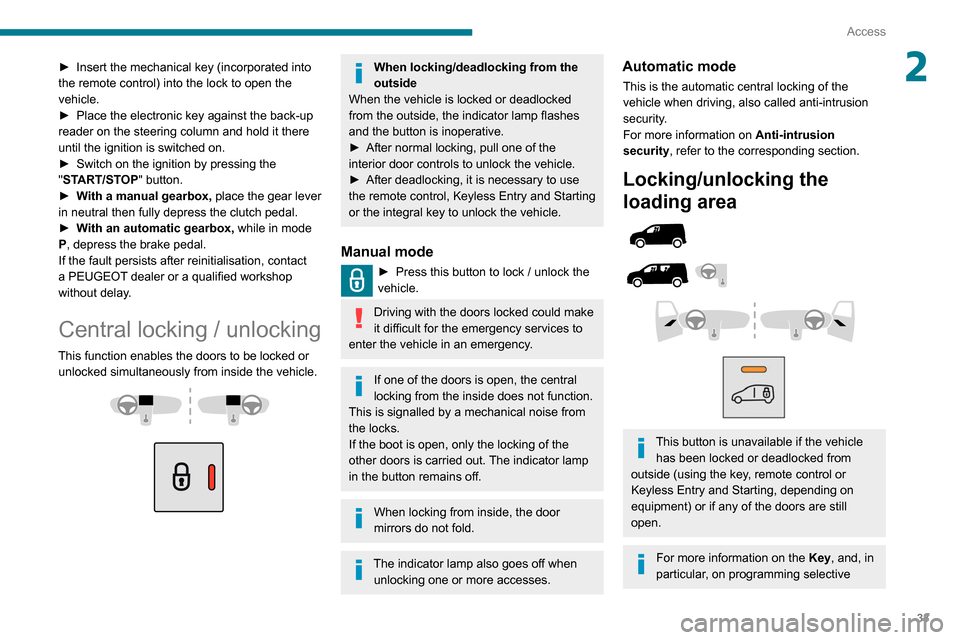
Central locking / unlocking
This function enables the doors to be locked or unlocked simultaneously from inside the vehicle.
When locking/deadlocking from the
outside
When the vehicle is locked or deadlocked
from the outside, the indicator lamp flashes
and the button is inoperative.
►
After normal locking, pull one of the
interior door controls to unlock the vehicle.
►
After deadlocking, it is necessary to use
the remote control, Keyless Entry and Starting
or the integral key to unlock the vehicle.
Manual mode
► Press this button to lock / unlock the
vehicle.
Driving with the doors locked could make
it difficult for the emergency services to
enter the vehicle in an emergency.
If one of the doors is open, the central
locking from the inside does not function.
This is signalled by a mechanical noise from
the locks.
If the boot is open, only the locking of the
other doors is carried out. The indicator lamp
in the button remains off.
When locking from inside, the door
mirrors do not fold.
The indicator lamp also goes off when unlocking one or more accesses.
Automatic mode
This is the automatic central locking of the
vehicle when driving, also called anti-intrusion
security.
For more information on Anti-intrusion
security, refer to the corresponding section.
Locking/unlocking the
loading area
This button is unavailable if the vehicle has been locked or deadlocked from
outside (using the key, remote control or
Keyless Entry and Starting, depending on
equipment) or if any of the doors are still
open.
For more information on the Key, and, in
particular, on programming selective
Page 36 of 260
34
Access
locking for the loading area, refer to the
corresponding section.
Manual mode
► With complete unlocking activated,
press this button to lock (indicator lamp
comes on)/unlock (indicator lamp goes off) the
vehicle
.
►
With selective unlocking activated, press this
button to lock (indicator lamp comes on)/unlock
(indicator lamp goes off) the loading area
.
Driving with the doors locked could make
it more difficult for the emergency
services to enter the vehicle in an emergency.
The indicator lamp goes off when unlocking one or more doors of the
loading area.
With the ignition off and the vehicle fully
locked, the indicator lamp goes off for energy
economy reasons.
Automatic mode
The loading area is always locked when driving.
To deactivate the automatic locking function, go to a PEUGEOT dealer or a
qualified workshop.
Anti-intrusion security
This system allows automatic simultaneous
locking of the doors and boot as soon as the
speed of the vehicle exceeds 6 mph (10 km/h).
Operation
If one of the doors or the boot is open, the
automatic central locking does not take place.
This is signalled by the sound of the locks rebounding, accompanied by illumination
of this warning lamp in the instrument panel, an
audible signal and the display of an alert
message.
Activation/Deactivation
You can activate or deactivate this function
permanently.
►
With the ignition on, press the central locking
button until an audible signal is triggered and
a corresponding message of confirmation is
displayed.
The state of the system stays in the memory
when the ignition is switched off.
Driving with the doors locked may render
access by the emergency services to the
interior difficult in an emergency.
Carrying long or voluminous objects
If you want to drive with the boot open,
you should press the central locking button
to lock the doors. Otherwise, every time the
speed of the vehicle exceeds 6 mph (10
km/h), the locks will rebound and the alerts
mentioned above will appear.
Pressing the central locking button unlocks
the vehicle.
Above 6 mph (10 km/h), this unlocking is
temporary.
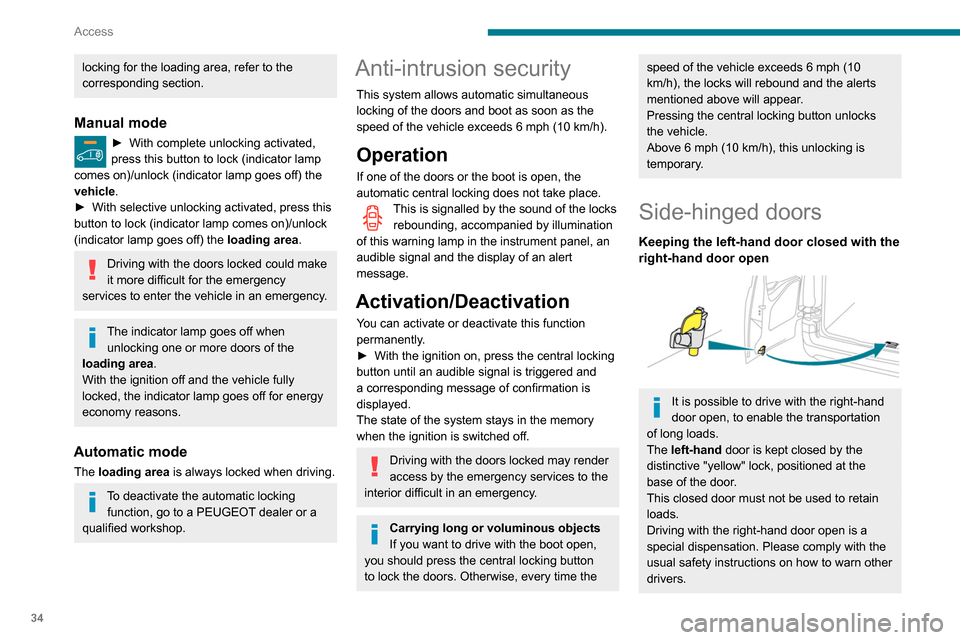
Side-hinged doors
Keeping the left-hand door closed with the
right-hand door open
It is possible to drive with the right-hand
door open, to enable the transportation
of long loads.
The left-hand door is kept closed by the
distinctive "yellow" lock, positioned at the
base of the door.
This closed door must not be used to retain
loads.
Driving with the right-hand door open is a
special dispensation. Please comply with the
usual safety instructions on how to warn other
drivers.
Page 45 of 260
43
Ease of use and comfort
3► Adjust the height and reach.
► Lower the control lever to lock the steering
wheel.
As a safety precaution, these operations must only be carried out while the vehicle
is stationary.
Mirrors
Door mirrors
Adjustment
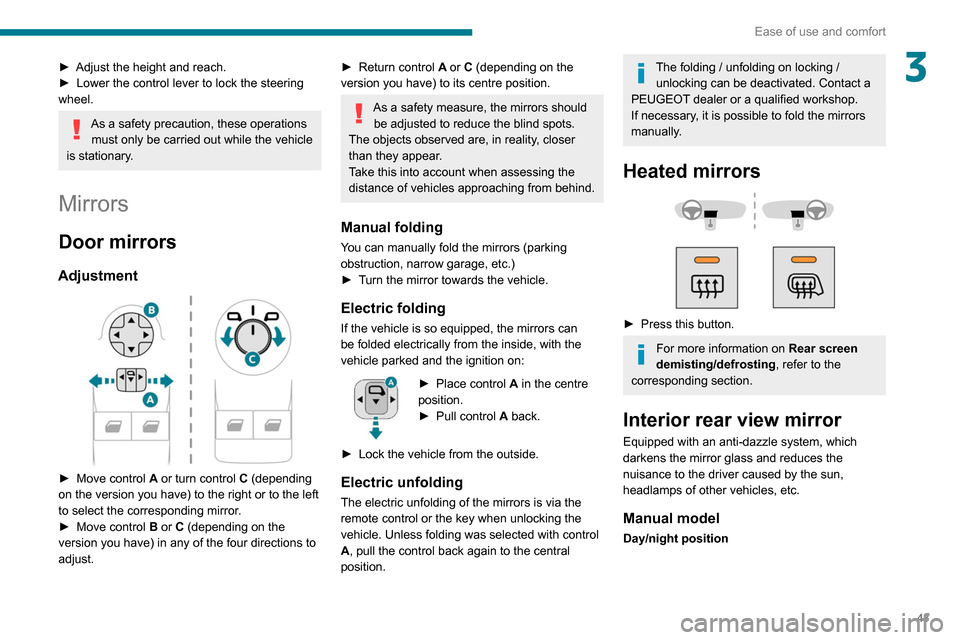
► Move control A or turn control C (depending
on the version you have) to the right or to the left
to select the corresponding mirror.
►
Move control
B or C (depending on the
version you have) in any of the four directions to
adjust.
► Return control A or C (depending on the
version you have) to its centre position.
As a safety measure, the mirrors should be adjusted to reduce the blind spots.
The objects observed are, in reality, closer
than they appear.
Take this into account when assessing the
distance of vehicles approaching from behind.
Manual folding
You can manually fold the mirrors (parking
obstruction, narrow garage, etc.)
►
T
urn the mirror towards the vehicle.
Electric folding
If the vehicle is so equipped, the mirrors can
be folded electrically from the inside, with the
vehicle parked and the ignition on:
► Place control A in the centre
position.
►
Pull control A
back.
►
Lock the vehicle from the outside.
Electric unfolding
The electric unfolding of the mirrors is via the
remote control or the key when unlocking the
vehicle. Unless folding was selected with control
A, pull the control back again to the central
position.
The folding / unfolding on locking / unlocking can be deactivated. Contact a
PEUGEOT dealer or a qualified workshop.
If necessary, it is possible to fold the mirrors
manually.
Heated mirrors
► Press this button.
For more information on Rear screen
demisting/defrosting , refer to the
corresponding section.
Interior rear view mirror
Equipped with an anti-dazzle system, which
darkens the mirror glass and reduces the
nuisance to the driver caused by the sun,
headlamps of other vehicles, etc.
Manual model
Day/night position
Page 47 of 260
45
Ease of use and comfort
3Storage compartment under seats
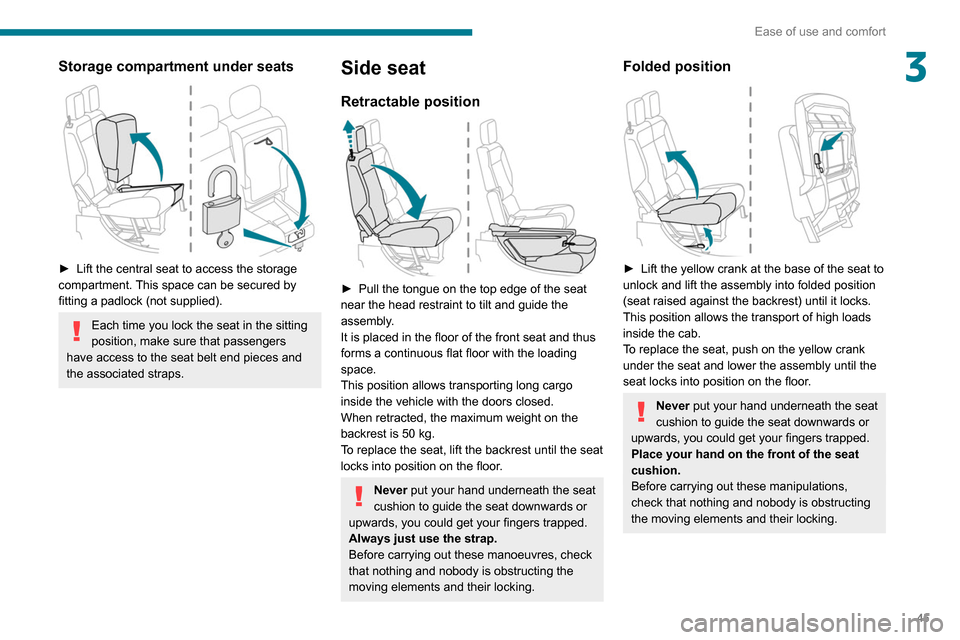
► Lift the central seat to access the storage
compartment. This space can be secured by
fitting a padlock (not supplied).
Each time you lock the seat in the sitting
position, make sure that passengers
have access to the seat belt end pieces and
the associated straps.
Side seat
Retractable position
► Pull the tongue on the top edge of the seat
near the head restraint to tilt and guide the
assembly
.
It is placed in the floor of the front seat and thus
forms a continuous flat floor with the loading
space.
This position allows transporting long cargo
inside the vehicle with the doors closed.
When retracted, the maximum weight on the
backrest is 50 kg.
To replace the seat, lift the backrest until the seat
locks into position on the floor.
Never put your hand underneath the seat
cushion to guide the seat downwards or
upwards, you could get your fingers trapped.
Always just use the strap.
Before carrying out these manoeuvres, check
that nothing and nobody is obstructing the
moving elements and their locking.
Folded position
► Lift the yellow crank at the base of the seat to
unlock and lift the assembly into folded position
(seat raised against the backrest) until it locks.
This position allows the transport of high loads
inside the cab.
T
o replace the seat, push on the yellow crank
under the seat and lower the assembly until the
seat locks into position on the floor.
Never put your hand underneath the seat
cushion to guide the seat downwards or
upwards, you could get your fingers trapped.
Place your hand on the front of the seat
cushion.
Before carrying out these manipulations,
check that nothing and nobody is obstructing
the moving elements and their locking.