lock Peugeot Partner Tepee 2011 User Guide
[x] Cancel search | Manufacturer: PEUGEOT, Model Year: 2011, Model line: Partner Tepee, Model: Peugeot Partner Tepee 2011Pages: 232, PDF Size: 7.4 MB
Page 24 of 232
22
Access
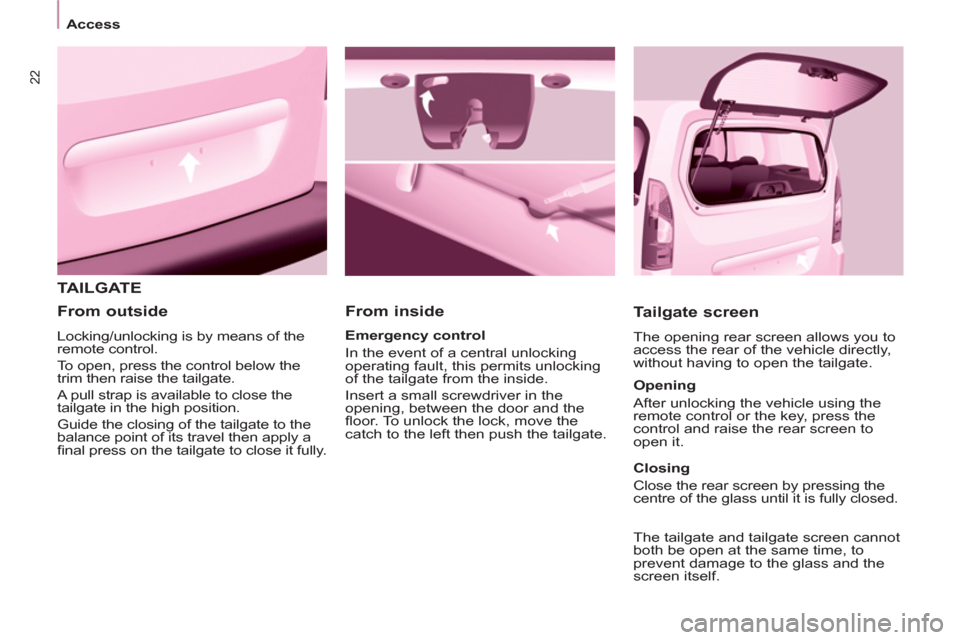
TAILGATE
From inside
Tailgate screen
The opening rear screen allows you to
access the rear of the vehicle directly,
without having to open the tailgate.
Emergency control
In the event of a central unlocking
operating fault, this permits unlocking
of the tailgate from the inside.
Insert a small screwdriver in the
opening, between the door and the
fl oor. To unlock the lock, move the
catch to the left then push the tailgate.
From outside
Locking/unlocking is by means of the
remote control.
To open, press the control below the
trim then raise the tailgate.
A pull strap is available to close the
tailgate in the high position.
Guide the closing of the tailgate to the
balance point of its travel then apply a
fi nal press on the tailgate to close it fully.
Opening
After unlocking the vehicle using the
remote control or the key, press the
control and raise the rear screen to
open it.
Closing
Close the rear screen by pressing the
centre of the glass until it is fully closed.
The tailgate and tailgate screen cannot
both be open at the same time, to
prevent damage to the glass and the
screen itself.
Page 25 of 232
23
Access
READY TO SET OFF
2
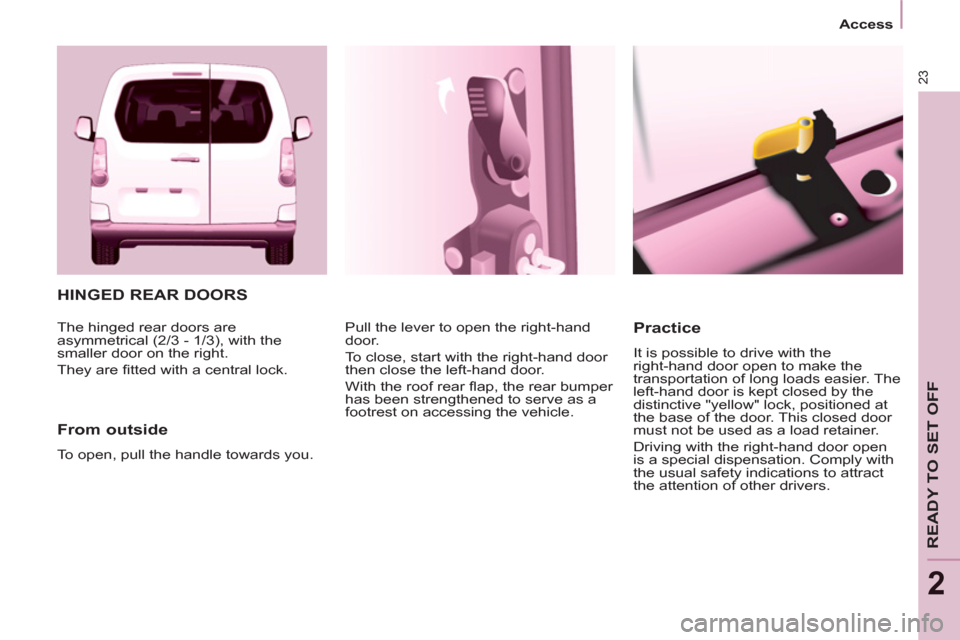
HINGED REAR DOORS
From outside
To open, pull the handle towards you. Pull the lever to open the right-hand
door.
To close, start with the right-hand door
then close the left-hand door.
With the roof rear fl ap, the rear bumper
has been strengthened to serve as a
footrest on accessing the vehicle.
Practice
It is possible to drive with the
right-hand door open to make the
transportation of long loads easier. The
left-hand door is kept closed by the
distinctive "yellow" lock, positioned at
the base of the door. This closed door
must not be used as a load retainer.
Driving with the right-hand door open
is a special dispensation. Comply with
the usual safety indications to attract
the attention of other drivers. The hinged rear doors are
asymmetrical (2/3 - 1/3), with the
smaller door on the right.
They are fi tted with a central lock.
Page 27 of 232
25
Access
READY TO SET OFF
2
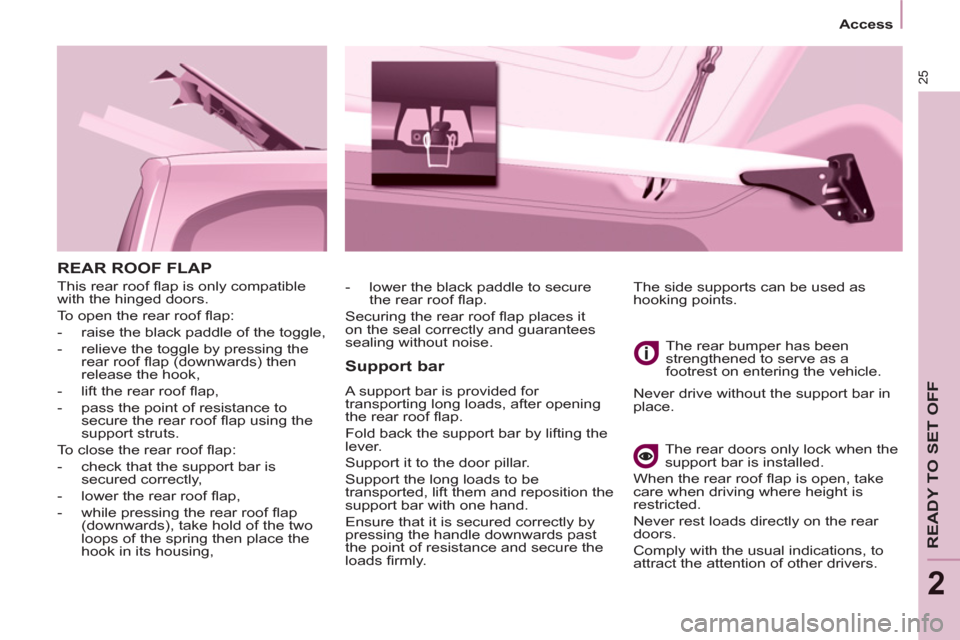
REAR ROOF FLAP
This rear roof fl ap is only compatible
with the hinged doors.
To open the rear roof fl ap:
- raise the black paddle of the toggle,
- relieve the toggle by pressing the
rear roof fl ap (downwards) then
release the hook,
- lift the rear roof fl ap,
- pass the point of resistance to
secure the rear roof fl ap using the
support struts.
To close the rear roof fl ap:
- check that the support bar is
secured correctly,
- lower the rear roof fl ap,
- while pressing the rear roof fl ap
(downwards), take hold of the two
loops of the spring then place the
hook in its housing,
Support bar
A support bar is provided for
transporting long loads, after opening
the rear roof fl ap.
Fold back the support bar by lifting the
lever.
Support it to the door pillar.
Support the long loads to be
transported, lift them and reposition the
support bar with one hand.
Ensure that it is secured correctly by
pressing the handle downwards past
the point of resistance and secure the
loads fi rmly. The rear bumper has been
strengthened to serve as a
footrest on entering the vehicle.
Never drive without the support bar in
place.
The rear doors only lock when the
support bar is installed.
When the rear roof fl ap is open, take
care when driving where height is
restricted.
Never rest loads directly on the rear
doors.
Comply with the usual indications, to
attract the attention of other drivers. The side supports can be used as
hooking points.
- lower the black paddle to secure
the rear roof fl ap.
Securing the rear roof fl ap places it
on the seal correctly and guarantees
sealing without noise.
Page 28 of 232
26
Access
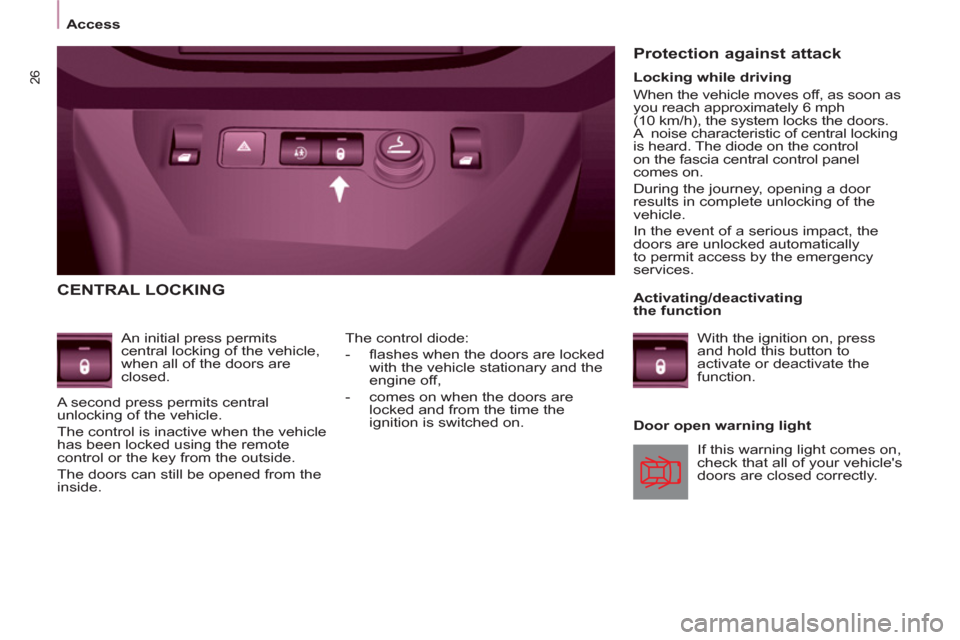
CENTRAL LOCKING
An initial press permits
central locking of the vehicle,
when all of the doors are
closed.
A second press permits central
unlocking of the vehicle.
The control is inactive when the vehicle
has been locked using the remote
control or the key from the outside.
The doors can still be opened from the
inside.
Door open warning light The control diode:
- fl ashes when the doors are locked
with the vehicle stationary and the
engine off,
- comes on when the doors are
locked and from the time the
ignition is switched on.
Protection against attack
If this warning light comes on,
check that all of your vehicle's
doors are closed correctly.
Locking while driving
When the vehicle moves off, as soon as
you reach approximately 6 mph
(10 km/h), the system locks the doors.
A noise characteristic of central locking
is heard. The diode on the control
on the fascia central control panel
comes on.
During the journey, opening a door
results in complete unlocking of the
vehicle.
In the event of a serious impact, the
doors are unlocked automatically
to permit access by the emergency
services.
Activating/deactivating
the function
With the ignition on, press
and hold this button to
activate or deactivate the
function.
Page 30 of 232
28
Instruments and controls
Centre console with display
Instrument panel without display
- turn to the right to increase the
hours (hold the button to the right
for rapid scrolling),
- turn to the left: 24 H or 12 H is
displayed,
- turn to the right to select 24 H or 12 H,
- turn to the left to complete the time
adjustment.
After approximately 30 seconds
without any action, the display returns
to the normal display.
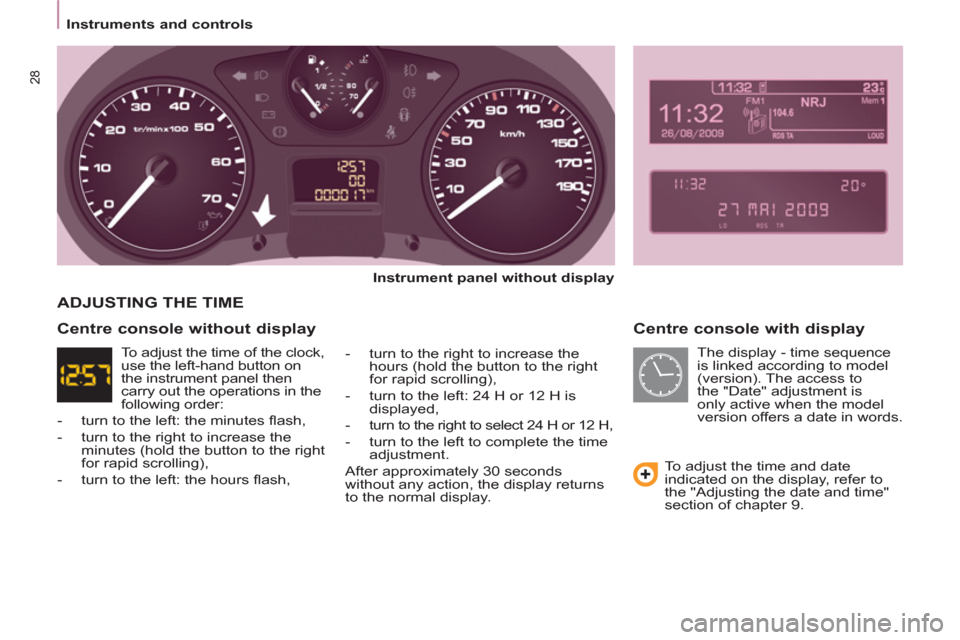
ADJUSTING THE TIME
To adjust the time and date
indicated on the display, refer to
the "Adjusting the date and time"
section of chapter 9.
Centre console without display
The display - time sequence
is linked according to model
(version). The access to
the "Date" adjustment is
only active when the model
version offers a date in words. To adjust the time of the clock,
use the left-hand button on
the instrument panel then
carry out the operations in the
following order:
- turn to the left: the minutes fl ash,
- turn to the right to increase the
minutes (hold the button to the right
for rapid scrolling),
- turn to the left: the hours fl ash,
Page 34 of 232
ABS
32
Instruments and controls
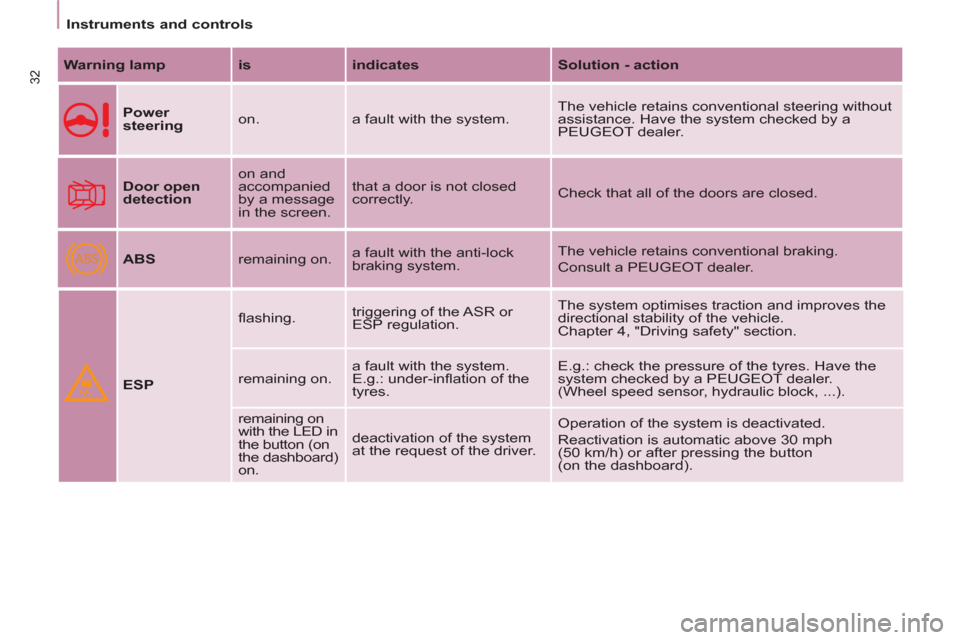
Warning lamp
is
indicates
Solution - action
Power
steering
on. a fault with the system. The vehicle retains conventional steering without
assistance. Have the system checked by a
PEUGEOT dealer.
Door open
detection
on and
accompanied
by a message
in the screen. that a door is not closed
correctly. Check that all of the doors are closed.
ABS
remaining on. a fault with the anti-lock
braking system. The vehicle retains conventional braking.
Consult a PEUGEOT dealer.
ESP
fl ashing. triggering of the ASR or
ESP regulation. The system optimises traction and improves the
directional stability of the vehicle.
Chapter 4, "Driving safety" section.
remaining on. a fault with the system.
E.g.: under-infl ation of the
tyres. E.g.: check the pressure of the tyres. Have the
system checked by a PEUGEOT dealer.
(Wheel speed sensor, hydraulic block, ...).
remaining on
with the LED in
the button (on
the dashboard)
on. deactivation of the system
at the request of the driver. Operation of the system is deactivated.
Reactivation is automatic above 30 mph
(50 km/h) or after pressing the button
(on the dashboard).
Page 35 of 232
33
READY TO SET OFF
22
Instruments and controls
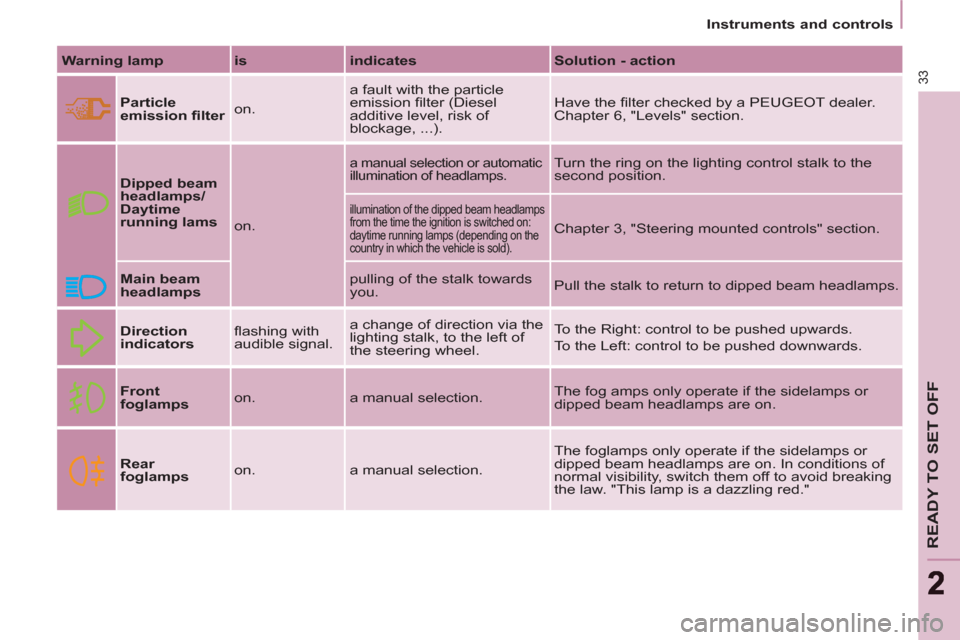
Warning lamp
is
indicates
Solution - action
Particle
emission fi lter
on. a fault with the particle
emission fi lter (Diesel
additive level, risk of
blockage, ...). Have the fi lter checked by a PEUGEOT dealer.
Chapter 6, "Levels" section.
Dipped beam
headlamps/
Daytime
running lams
on.
a manual selection or automatic
illumination of headlamps. Turn the ring on the lighting control stalk to the
second position.
illumination of the dipped beam headlamps
from the time the ignition is switched on:
daytime running lamps (depending on the
country in which the vehicle is sold).
Chapter 3, "Steering mounted controls" section.
Main beam
headlamps
pulling of the stalk towards
you. Pull the stalk to return to dipped beam headlamps.
Direction
indicators
fl ashing with
audible signal. a change of direction via the
lighting stalk, to the left of
the steering wheel. To the Right: control to be pushed upwards.
To the Left: control to be pushed downwards.
Front
foglamps
on. a manual selection. The fog amps only operate if the sidelamps or
dipped beam headlamps are on.
Rear
foglamps
on. a manual selection. The foglamps only operate if the sidelamps or
dipped beam headlamps are on. In conditions of
normal visibility, switch them off to avoid breaking
the law. "This lamp is a dazzling red."
Page 40 of 232
38
Instruments and controls
Trip recorder zero reset
button
After this operation, if you wish
to disconnect the battery, lock
the vehicle and wait for at least
fi ve minutes, otherwise the zero re-set
will not be registered.
Zero re-set
Your PEUGEOT dealer carries out this
operation after each service.
However, if you carry out the service
yourself, the re-set procedure is as
follows:
- switch off the ignition,
- press and hold the trip recorder
reset button,
- switch on the ignition.
The display begins a countdown.
When the display shows "=0" , release
the button; the spanner disappears.
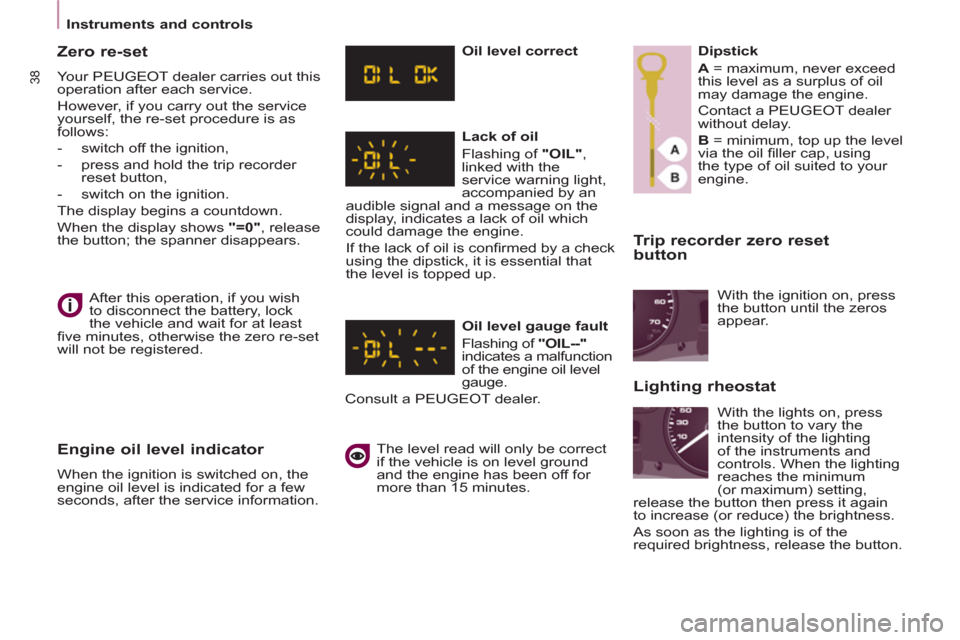
Engine oil level indicator
When the ignition is switched on, the
engine oil level is indicated for a few
seconds, after the service information.
Oil level correct
Lack of oil
Flashing of "OIL"
,
linked with the
service warning light,
accompanied by an
audible signal and a message on the
display, indicates a lack of oil which
could damage the engine.
If the lack of oil is confi rmed by a check
using the dipstick, it is essential that
the level is topped up.
Oil level gauge fault
Flashing of "OIL--"
indicates a malfunction
of the engine oil level
gauge.
Consult a PEUGEOT dealer.
The level read will only be correct
if the vehicle is on level ground
and the engine has been off for
more than 15 minutes.
Dipstick
A
= maximum, never exceed
this level as a surplus of oil
may damage the engine.
Contact a PEUGEOT dealer
without delay.
B
= minimum, top up the level
via the oil fi ller cap, using
the type of oil suited to your
engine.
Lighting rheostat
With the ignition on, press
the button until the zeros
appear.
With the lights on, press
the button to vary the
intensity of the lighting
of the instruments and
controls. When the lighting
reaches the minimum
(or maximum) setting,
release the button then press it again
to increase (or reduce) the brightness.
As soon as the lighting is of the
required brightness, release the button.
Page 44 of 232
42
Gearbox and steering wheel
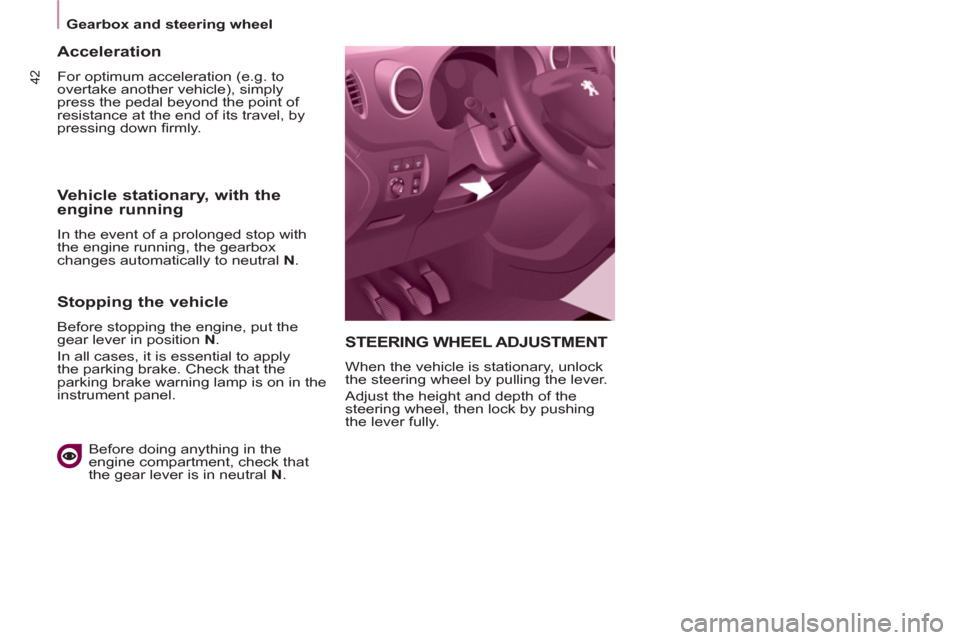
STEERING WHEEL ADJUSTMENT
When the vehicle is stationary, unlock
the steering wheel by pulling the lever.
Adjust the height and depth of the
steering wheel, then lock by pushing
the lever fully.
Acceleration
For optimum acceleration (e.g. to
overtake another vehicle), simply
press the pedal beyond the point of
resistance at the end of its travel, by
pressing down fi rmly.
Vehicle stationary, with the
engine running
In the event of a prolonged stop with
the engine running, the gearbox
changes automatically to neutral N
.
Stopping the vehicle
Before stopping the engine, put the
gear lever in position N
.
In all cases, it is essential to apply
the parking brake. Check that the
parking brake warning lamp is on in the
instrument panel.
Before doing anything in the
engine compartment, check that
the gear lever is in neutral N
.
Page 48 of 232
Starting and stopping
Good practice when stopping
Good practice when starting
Diesel pre-heating warning
light
If the temperature is high
enough, the warning light
comes on for less than one
second, you can start without
waiting.
In cold weather, wait for this warning
light to switch off then operate the
starter (Starting position) until the
engine starts.
Door or bonnet open
warning light
If this comes on, a door or the bonnet
is not closed correctly, check!
Minimise engine and gearbox wear
When switching off the ignition, let the
engine run for a few seconds to allow
the turbocharger (Diesel engine) to
return to idle.
Do not press the accelerator when
switching off the ignition.
There is no need to engage a gear
after parking the vehicle.
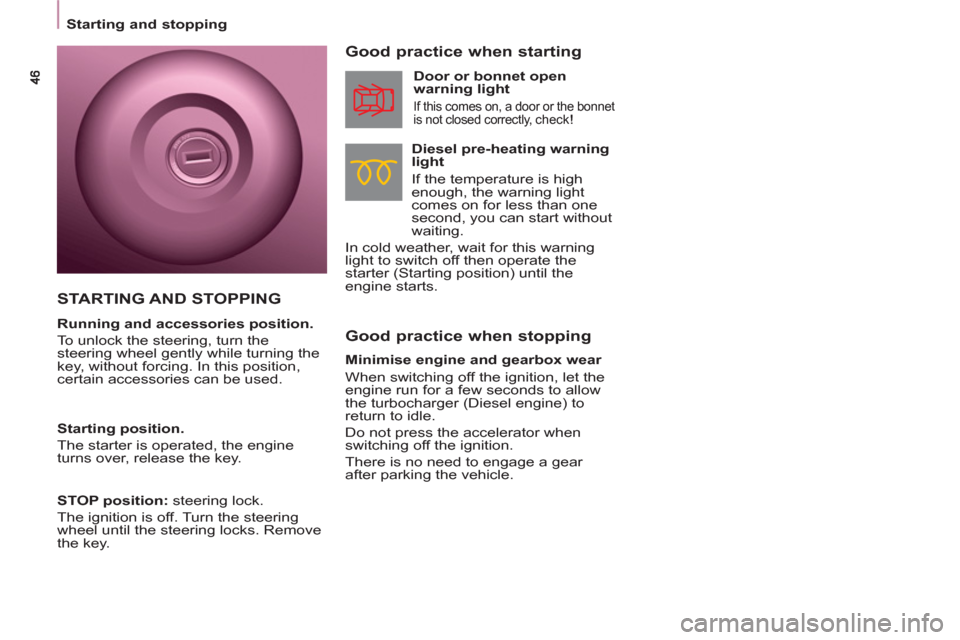
STARTING AND STOPPING
Running and accessories position.
To unlock the steering, turn the
steering wheel gently while turning the
key, without forcing. In this position,
certain accessories can be used.
Starting position.
The starter is operated, the engine
turns over, release the key.
STOP position:
steering lock.
The ignition is off. Turn the steering
wheel until the steering locks. Remove
the key.