ESP Peugeot Partner Tepee 2011 Owner's Guide
[x] Cancel search | Manufacturer: PEUGEOT, Model Year: 2011, Model line: Partner Tepee, Model: Peugeot Partner Tepee 2011Pages: 232, PDF Size: 7.4 MB
Page 155 of 232
153
QUICK HELP
7
Changing a fuse
CHANGING A FUSE
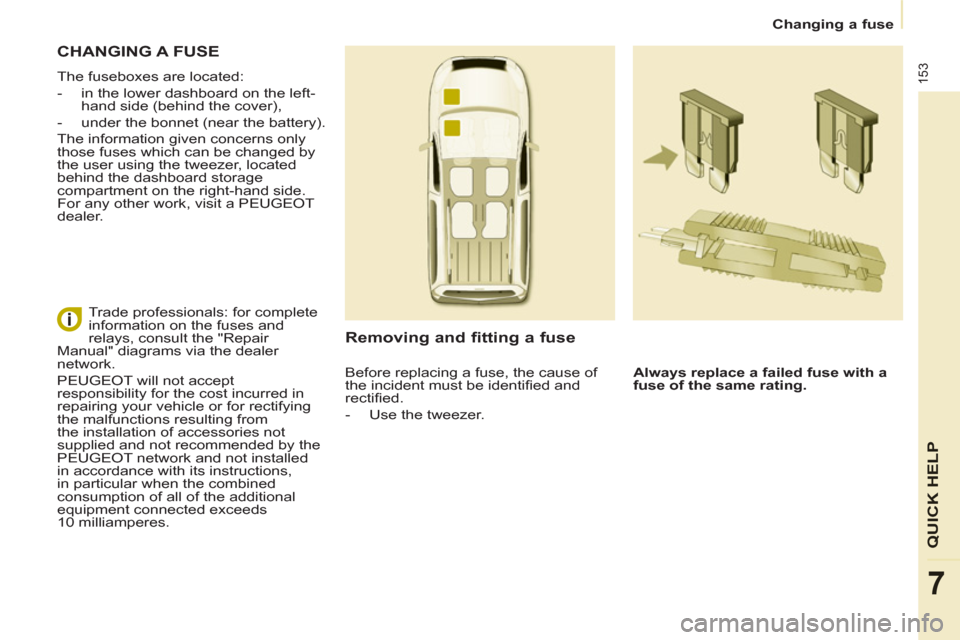
The fuseboxes are located:
- in the lower dashboard on the left-
hand side (behind the cover),
- under the bonnet (near the battery).
The information given concerns only
those fuses which can be changed by
the user using the tweezer, located
behind the dashboard storage
compartment on the right-hand side.
For any other work, visit a PEUGEOT
dealer.
Removing and fitting a fuse
Always replace a failed fuse with a
fuse of the same rating.
Trade professionals: for complete
information on the fuses and
relays, consult the "Repair
Manual" diagrams via the dealer
network.
PEUGEOT will not accept
responsibility for the cost incurred in
repairing your vehicle or for rectifying
the malfunctions resulting from
the installation of accessories not
supplied and not recommended by the
PEUGEOT network and not installed
in accordance with its instructions,
in particular when the combined
consumption of all of the additional
equipment connected exceeds
10 milliamperes.
Before replacing a fuse, the cause of
the incident must be identifi ed and
rectifi ed.
- Use the tweezer.
Page 158 of 232
156
Changing a fuse
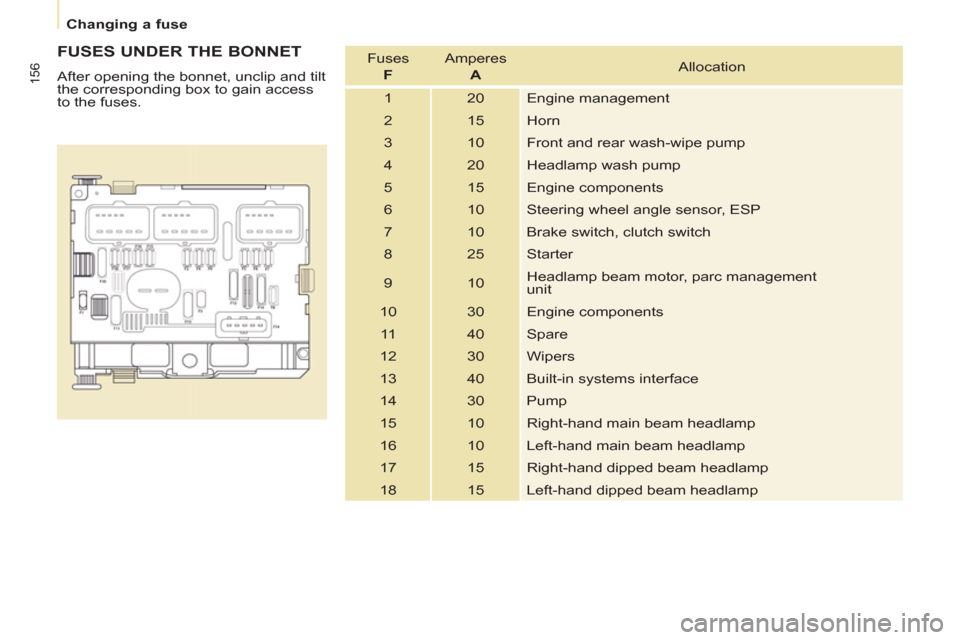
FUSES UNDER THE BONNET
After opening the bonnet, unclip and tilt
the corresponding box to gain access
to the fuses. Fuses
F
Amperes
A
Allocation
1 20 Engine management
2 15 Horn
3 10 Front and rear wash-wipe pump
4 20 Headlamp wash pump
5 15 Engine components
6 10 Steering wheel angle sensor, ESP
7 10 Brake switch, clutch switch
8 25 Starter
9 10 Headlamp beam motor, parc management
unit
10 30 Engine components
11 40 Spare
12 30 Wipers
13 40 Built-in systems interface
14 30 Pump
15 10 Right-hand main beam headlamp
16 10 Left-hand main beam headlamp
17 15 Right-hand dipped beam headlamp
18 15 Left-hand dipped beam headlamp
Page 187 of 232
9.19
06
3 2 1 1
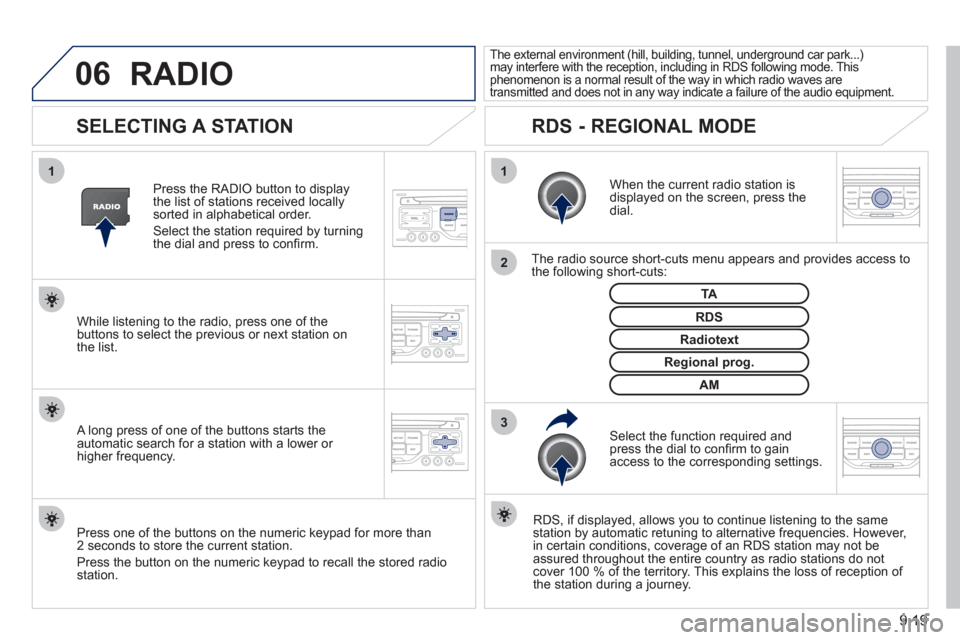
SELECTING A STATION
When the current radio station isdisplayed on the screen, press thedial.
The radio source short-cuts menu appears and provides access to
the following short-cuts:
Select the function re
quired and press the dial to confi rm to gain
access to the corresponding settings.
TA
RDS, if displayed, allows you to continue listening to the same station by automatic retuning to alternative frequencies. However,
in certain conditions, coverage of an RDS station may not be
assured throughout the entire country as radio stations do notcover 100 % of the territory. This explains the loss of reception of
the station during a journey.
The external environment (hill, building, tunnel, underground car park...)may interfere with the reception, including in RDS following mode. Thisphenomenon is a normal result of the way in which radio waves are
transmitted and does not in any way indicate a failure of the audio equipment.
RDS - REGIONAL MODE
Press the RADIO button to display
the list of stations received locally sorted in alphabetical order.
Select the station required by turningthe dial and press to confi rm.
Re
gional prog.
Radiotext
RDSWhile listening to the radio, press one of the
buttons to select the previous or next station on
the list.
Press one o
f the buttons on the numeric keypad for more than
2 seconds to store the current station.
Press the button on the numeric keypad to recall the stored radio
station.
AM
A long press of one of the buttons starts theautomatic search for a station with a lower or
higher frequency.
RADIO
Page 197 of 232
9.29
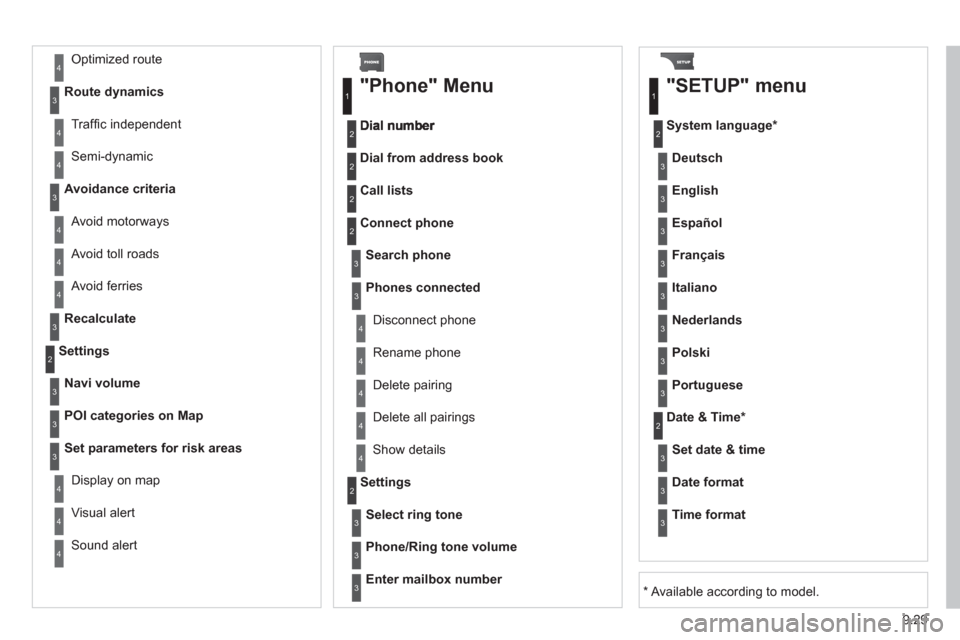
Avoid ferries
Recalculate
Settings
Navi volum
e
POI categories on Map
Set parameters for risk areas
Displa
y on map
Vi
sual alert
Sound alert
3
2
4
3
3
3
4
4
4
Dial from address book
"Phone" Menu
Search phone
Call lists
Connect phone
Select rin
g tone
Phone/Ring tone volume
Phones connected
Enter mailbox number
Settin
gs Disconnect phone
Rename phone
Delete pairing
Delete all pairings
Show details
"SETUP" menu
System language *
English
Español
Deutsch
Italiano
Français
Nederlands
Polski
Portuguese
Date & Time *
Set date & tim
e
Date format
Time format
1
2
2
2
2
3
3
4
4
4
4
4
2
3
3
3
1
2
3
3
3
3
3
3
3
3
3
3
3
2
Avoid motorways Route d
ynamics
Traffi c inde
pendent
Semi-d
ynamic
Avoidance criteria
Avoid toll roads
Optimized route
3
3
4
4
4
4
4
*
Available according to model.
Page 201 of 232
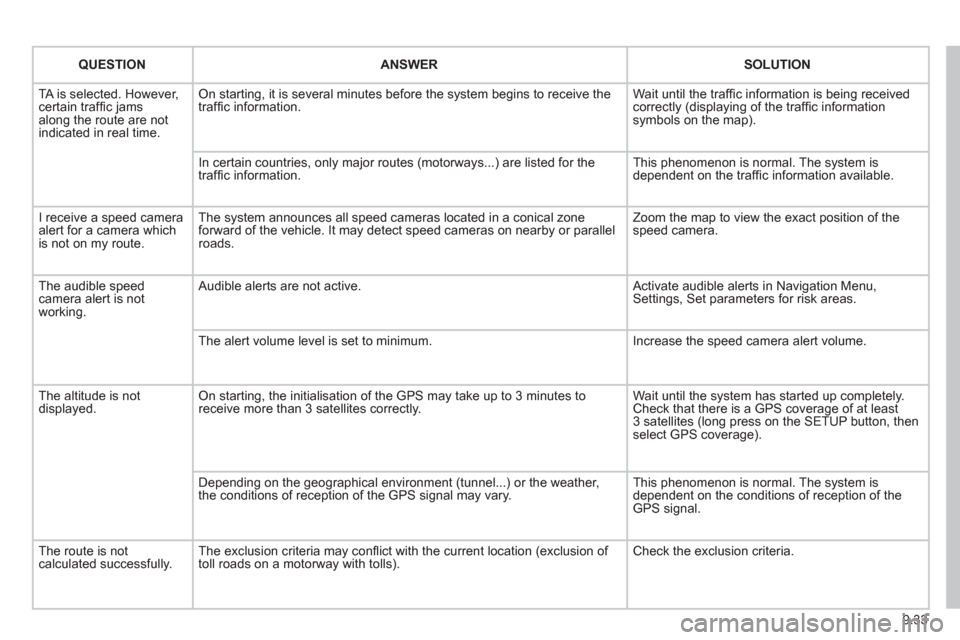
9.33
QUESTIONANSWER SOLUTION
TA is selected. However, certain traffi c jams
along the route are not
indicated in real time.
On starting, it is several minutes before the system begins to receive the
traffi c information. Wait until the traffi c information is being received correctly (displaying of the traffi c information symbols on the map).
In certain countries, onl
y major routes (motorways...) are listed for the
traffi c information. This phenomenon is normal. The system is
dependent on the traffi c information available.
I receive a speed camera
alert for a camera which
is not on my route.The s
ystem announces all speed cameras located in a conical zoneforward of the vehicle. It may detect speed cameras on nearby or parallel roads. Zoom the map to view the exact position o
f thespeed camera.
The audible speedcamera alert is not
working.
Audible alerts are not active. Activate audible alerts in Navigation Menu, Settings, Set parameters for risk areas.
Th
e alert volume level is set to minimum. Increase the speed camera alert volume.
The altitude is not displayed. On starting, the initialisation of the GPS may take up to 3 minutes toreceive more than 3 satellites correctly. Wait until the system has started up completely. Check that there is a GPS coverage of at least
3 satellites (long press on the SETUP button, then select GPS coverage).
Dependin
g on the geographical environment (tunnel...) or the weather,
the conditions of reception of the GPS signal may vary. This phenomenon is normal. The system is
dependent on the conditions of reception of the
GPS si
gnal.
Th
e route is notcalculated successfully.The exclusion criteria may confl ict with the current location (exclusion of
toll roads on a motorway with tolls). Check the exclusion criteria.
Page 218 of 232
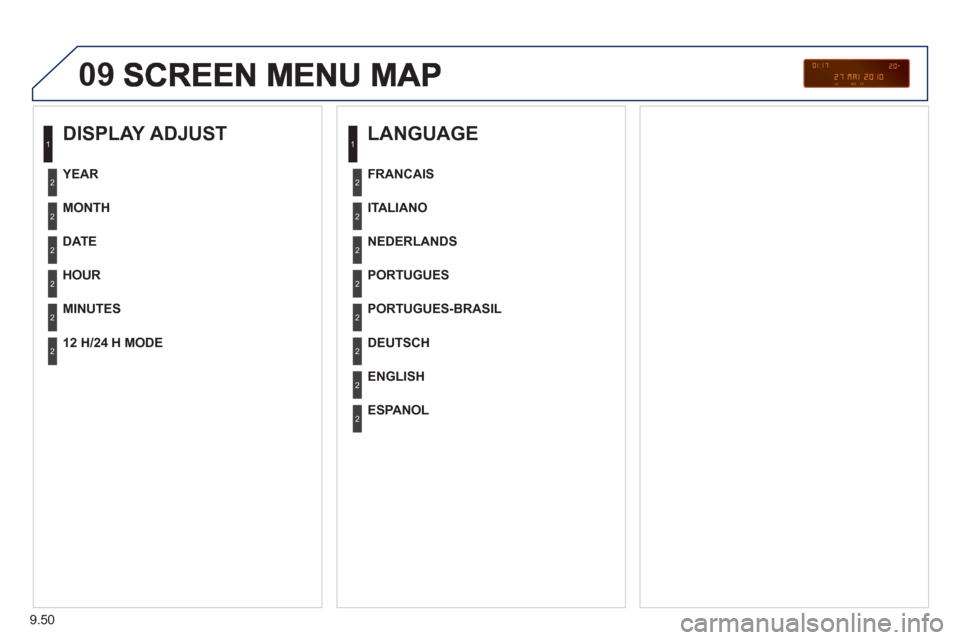
9.50
09
DISPLAY ADJUST
MONTH
DATE
HOUR
MINUTES
YEAR
12 H/24 H MODE
LANGUAGE
ITALIANO
NEDERLANDS
PORTUGUES
PORTUGUES-BRASIL
FRANCAIS
DEUTSCH
ENGLISH
ESPANOL
1
2
2
2
2
2
2
1
2
2
2
2
2
2
2
2
Page 225 of 232
167
Exterior
VISUAL SEARCH
10
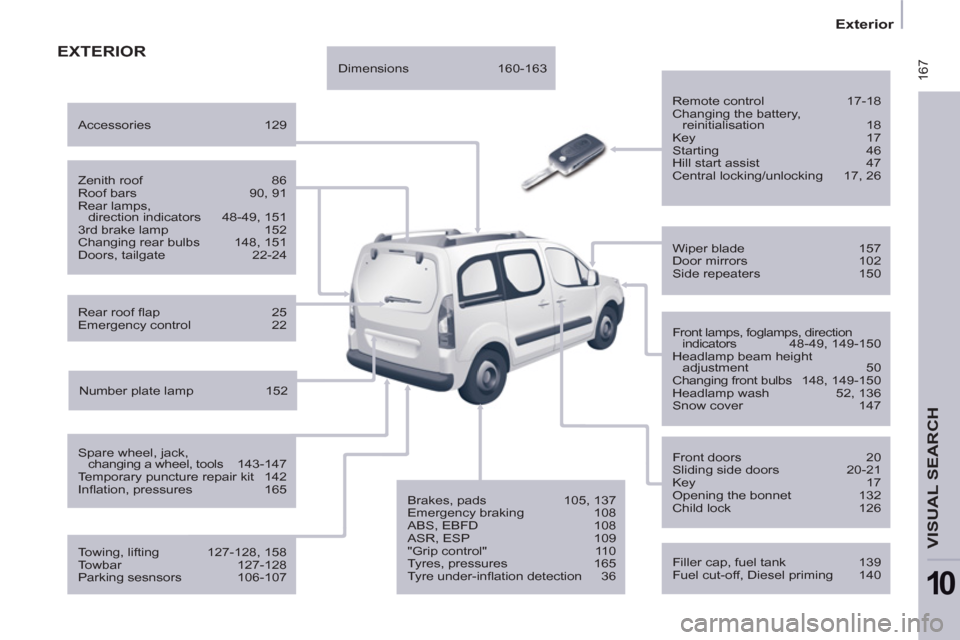
EXTERIOR
Remote control 17-18
Changing the battery,
reinitialisation 18
Key 17
Starting 46
Hill start assist 47
Central locking/unlocking 17, 26
Filler cap, fuel tank 139
Fuel cut-off, Diesel priming 140
Wiper blade 157
Door mirrors 102
Side repeaters 150
Front lamps, foglamps, direction
indicators 48-49, 149-150
Headlamp beam height
adjustment 50
Changing front bulbs 148, 149-150
Headlamp wash 52, 136
Snow cover 147
Front doors 20
Sliding side doors 20-21
Key 17
Opening the bonnet 132
Child lock 126
Towing, lifting 127-128, 158
Towbar 127-128
Parking sesnsors 106-107
Rear roof fl ap 25
Emergency control 22
Spare wheel, jack,
changing a wheel, tools 143-147
Temporary puncture repair kit 142
Infl ation, pressures 165
Zenith roof 86
Roof bars 90, 91
Rear lamps,
direction indicators 48-49, 151
3rd brake lamp 152
Changing rear bulbs 148, 151
Doors, tailgate 22-24
Accessories 129
Number plate lamp 152
Dimensions 160-163
Brakes, pads 105, 137
Emergency braking 108
ABS, EBFD 108
ASR, ESP 109
"Grip control" 110
Tyres, pressures 165
Tyre under-infl ation detection 36
Page 226 of 232
168
Instruments and controls
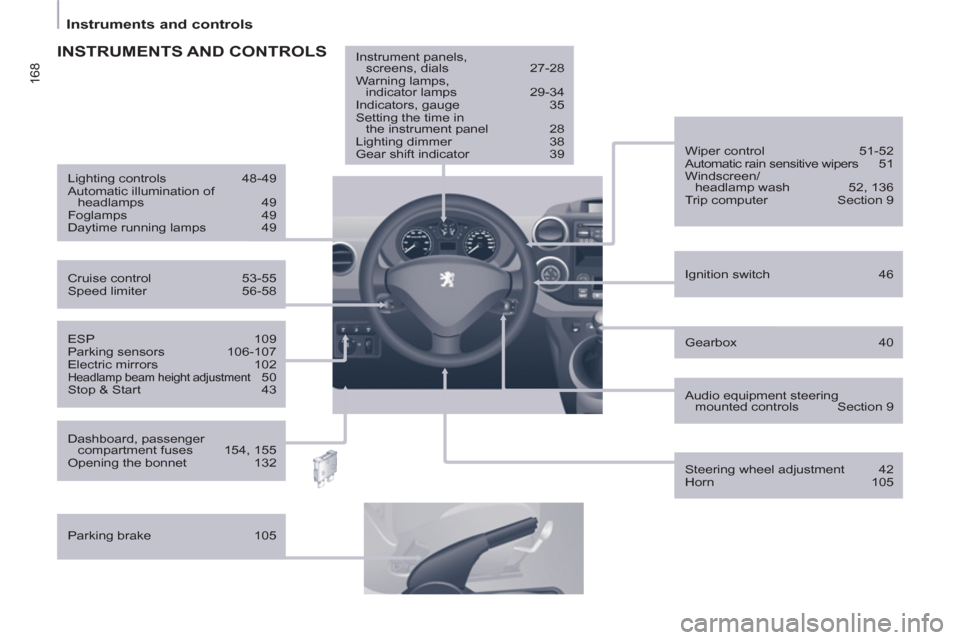
Gearbox 40
ESP 109
Parking sensors 106-107
Electric mirrors 102
Headlamp beam height adjustment 50
Stop & Start 43
Ignition switch 46
Wiper control 51-52
Automatic rain sensitive wipers 51
Windscreen/
headlamp wash 52, 136
Trip computer Section 9
Cruise control 53-55
Speed limiter 56-58
Lighting controls 48-49
Automatic illumination of
headlamps 49
Foglamps 49
Daytime running lamps 49
INSTRUMENTS AND CONTROLS
Dashboard, passenger
compartment fuses 154, 155
Opening the bonnet 132
Parking brake 105
Instrument panels,
screens, dials 27-28
Warning lamps,
indicator lamps 29-34
Indicators, gauge 35
Setting the time in
the instrument panel 28
Lighting dimmer 38
Gear shift indicator 39
Audio equipment steering
mounted controls Section 9
Steering wheel adjustment 42
Horn 105