battery Peugeot Partner Tepee 2011 Owner's Guide
[x] Cancel search | Manufacturer: PEUGEOT, Model Year: 2011, Model line: Partner Tepee, Model: Peugeot Partner Tepee 2011Pages: 232, PDF Size: 7.4 MB
Page 193 of 232
9.25
09
4 3 2 1
65
CONFIGURATION
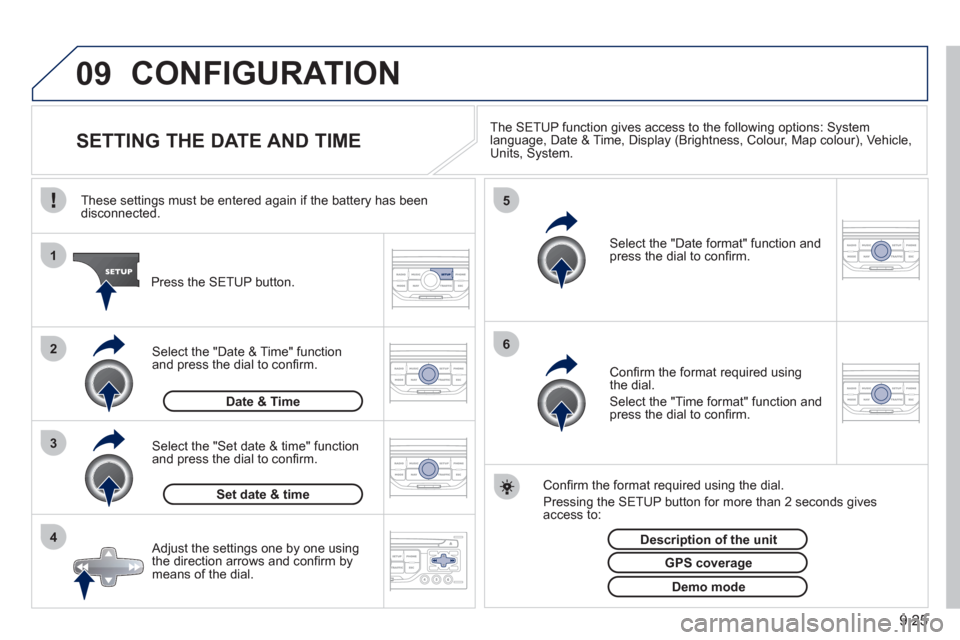
SETTING THE DATE AND TIME The SETUP function gives access to the following options: Systemlanguage, Date & Time, Display (Brightness, Colour, Map colour), Vehicle,Units, System.
Adjust the settings one by one usingthe direction arrows and confi rm bymeans of the dial.
Select the "Date format" function andpress the dial to confi rm.
Select the "Set date
& time" function
and press the dial to confi rm.
Confi rm the format required using the dial.
Pressing the
SETUP button for more than 2 seconds gives access to: These settin
gs must be entered again if the battery has been disconnected.
Pr
ess the SETUP button.
Confi rm the format required usingthe dial.
Select the "Time format" function and press the dial to confi rm.
Set date & tim
e
Select the "Date & Time" function
and press the dial to confi rm.
Demo mode
GPS coverage
Description of the unit
Date & Time
Page 200 of 232
9.32
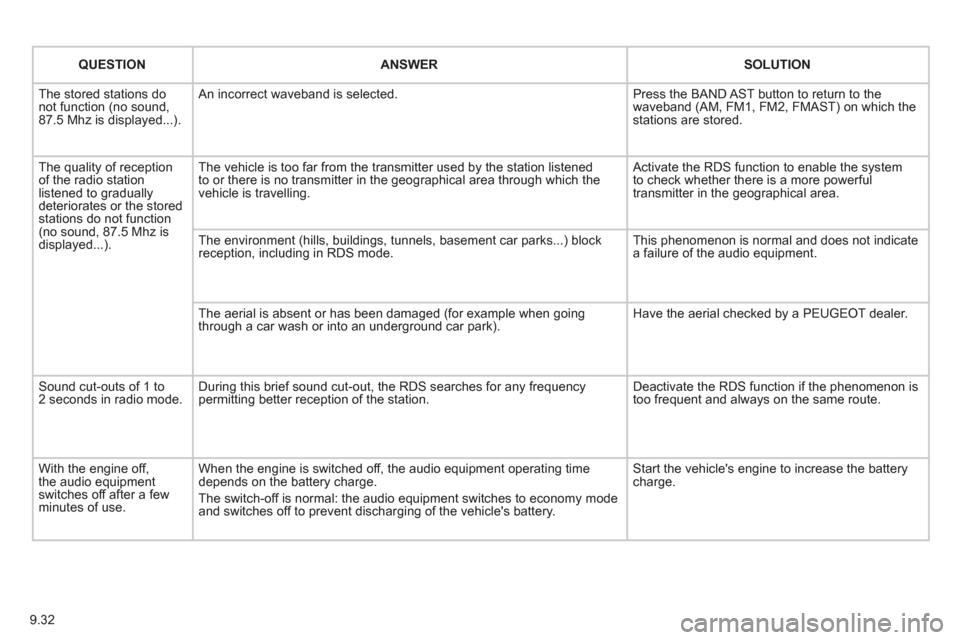
QUESTIONANSWERSOLUTION
The stored stations donot function (no sound, 87.5 Mhz is displayed...).
An incorrect waveband is selected.
Press the BAND AST button to return to the waveband (AM, FM1, FM2, FMAST) on which thestations are stored.
The quality of receptionof the radio station listened to graduallydeteriorates or the stored stations do not function(no sound, 87.5 Mhz is displayed...).
The vehicle is too far from the transmitter used by the station listenedto or there is no transmitter in the geographical area through which the vehicle is travelling.
Activate the RDS function to enable the system to check whether there is a more powerful transmitter in the geographical area.
The environment (hills, buildings, tunnels, basement car parks...) block reception, including in RDS mode.
This phenomenon is normal and does not indicate a failure of the audio equipment.
The aerial is absent or has been damaged (for example when goingthrough a car wash or into an underground car park).
Have the aerial checked by a PEUGEOT dealer.
Sound cut-outs of 1 to2 seconds in radio mode.During this brief sound cut-out, the RDS searches for any frequency permitting better reception of the station.
Deactivate the RDS function if the phenomenon is too frequent and always on the same route.
With the engine off, the audio equipment switches off after a few minutes of use.
When the engine is switched off, the audio equipment operating timedepends on the battery charge.
The switch-off is normal: the audio equipment switches to economy mode and switches off to prevent discharging of the vehicle's battery.
Start the vehicle's engine to increase the batterycharge.
Page 203 of 232
9.35
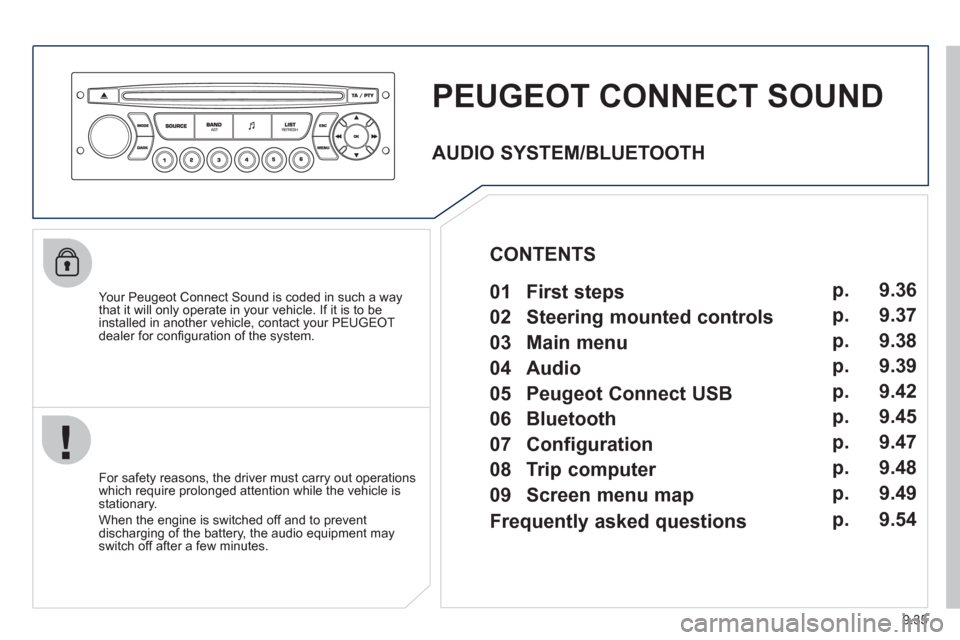
PEUGEOT CONNECT SOUND
Your Peugeot Connect Sound is coded in such a way
that it will only operate in your vehicle. If it is to be
installed in another vehicle, contact your PEUGEOT
dealer for confi guration of the system.
For safet
y reasons, the driver must carry out operations
which require prolonged attention while the vehicle is stationary.
When the en
gine is switched off and to prevent
discharging of the battery, the audio equipment mayswitch off after a few minutes.
AUDIO SYSTEM/BLUETOOTH
01 First steps
02 Steering mounted controls
03 Main menu
04 Audio
05 Peugeot Connect USB
06 Bluetooth
07 Configuration
08 Trip computer
09 Screen menu map p.
p.
p.
p.
p.
p.
p.
p.
p. 9.36
9.37
9.38
9.39
9.42
9.45
9.47
9.48
9.49
CONTENTS
Frequently asked questions p. 9.54
Page 222 of 232
9.54
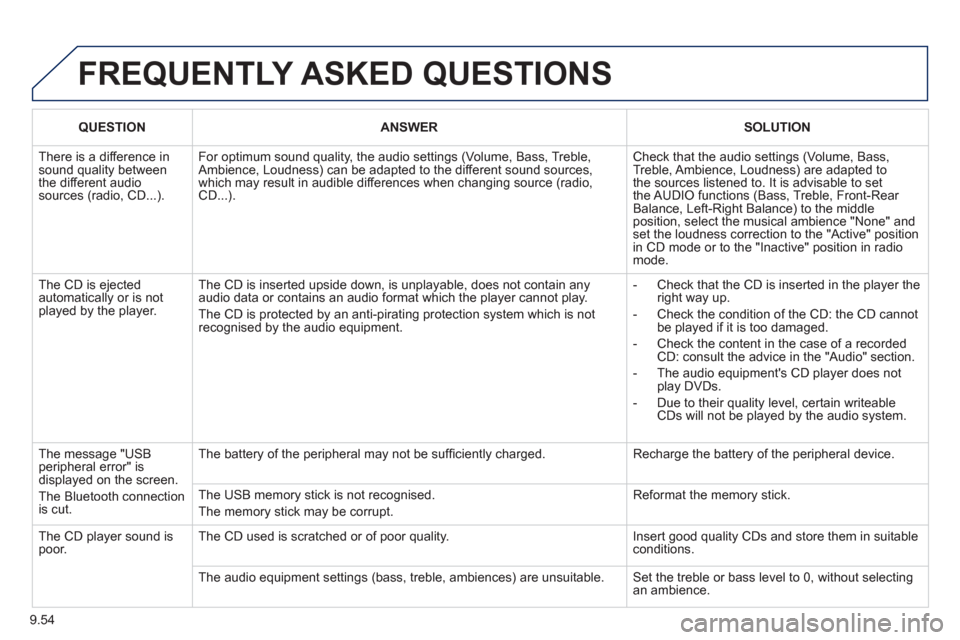
FREQUENTLY ASKED QUESTIONS
QUESTIONANSWERSOLUTION
There is a difference in sound quality betweenthe different audiosources (radio, CD...).
For optimum sound quality, the audio settings (Volume, Bass, Treble, Ambience, Loudness) can be adapted to the different sound sources,which may result in audible differences when changing source (radio,CD...).
Check that the audio settings (Volume, Bass, Treble, Ambience, Loudness) are adapted tothe sources listened to. It is advisable to setthe AUDIO functions (Bass, Treble, Front-Rear Balance, Left-Right Balance) to the middle position, select the musical ambience "None" and set the loudness correction to the "Active" position in CD mode or to the "Inactive" position in radio mode.
The CD is ejected automatically or is not played by the player.
The CD is inserted upside down, is unplayable, does not contain any audio data or contains an audio format which the player cannot play.
The CD is protected by an anti-pirating protection system which is not recognised by the audio equipment.
- Check that the CD is inserted in the player the right way up.
- Check the condition of the CD: the CD cannot be played if it is too damaged.
- Check the content in the case of a recordedCD: consult the advice in the "Audio" section.
- The audio equipment's CD player does notplay DVDs.
- Due to their quality level, certain writeableCDs will not be played by the audio system.
The message "USB peripheral error" isdisplayed on the screen.
The Bluetooth connectionis cut.
The battery of the peripheral may not be suffi ciently charged.
Recharge the battery of the peripheral device.
The USB memory stick is not recognised.
The memory stick may be corrupt.
Reformat the memory stick.
The CD player sound ispoor.The CD used is scratched or of poor quality.
Insert good quality CDs and store them in suitable conditions.
The audio equipment settings (bass, treble, ambiences) are unsuitable. Set the treble or bass level to 0, without selectingan ambience.
Page 223 of 232
9.55
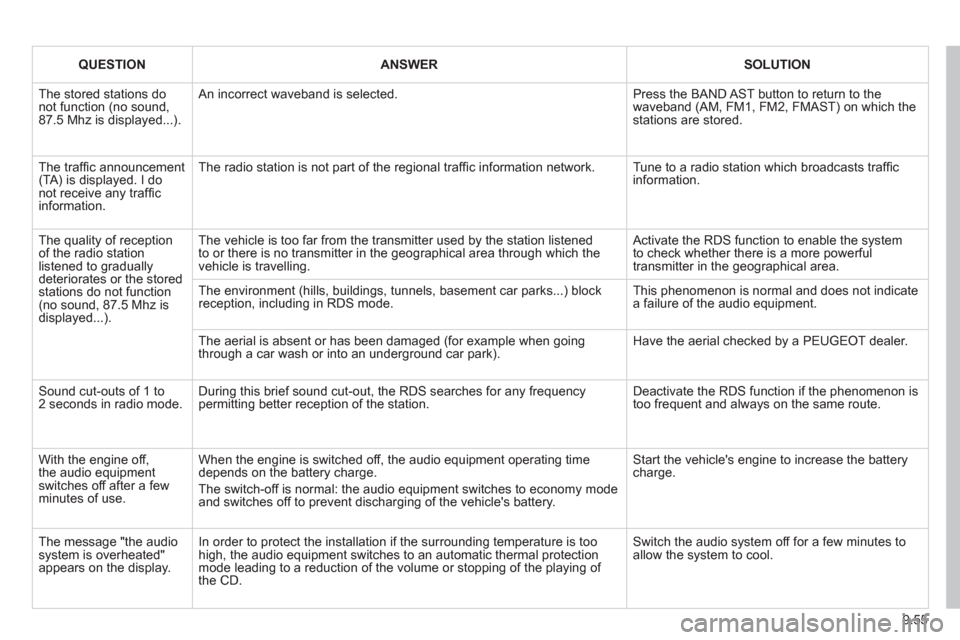
QUESTIONANSWERSOLUTION
The stored stations donot function (no sound, 87.5 Mhz is displayed...).
An incorrect waveband is selected.
Press the BAND AST button to return to the waveband (AM, FM1, FM2, FMAST) on which thestations are stored.
The traffi c announcement(TA) is displayed. I donot receive any traffi c information.
The radio station is not part of the regional traffi c information network.
Tune to a radio station which broadcasts traffi c information.
The quality of receptionof the radio station listened to graduallydeteriorates or the stored stations do not function(no sound, 87.5 Mhz is displayed...).
The vehicle is too far from the transmitter used by the station listenedto or there is no transmitter in the geographical area through which the vehicle is travelling.
Activate the RDS function to enable the system to check whether there is a more powerful transmitter in the geographical area.
The environment (hills, buildings, tunnels, basement car parks...) block reception, including in RDS mode. This phenomenon is normal and does not indicate a failure of the audio equipment.
The aerial is absent or has been damaged (for example when goingthrough a car wash or into an underground car park).
Have the aerial checked by a PEUGEOT dealer.
Sound cut-outs of 1 to2 seconds in radio mode.During this brief sound cut-out, the RDS searches for any frequency permitting better reception of the station.
Deactivate the RDS function if the phenomenon is too frequent and always on the same route.
With the engine off, the audio equipment switches off after a few minutes of use.
When the engine is switched off, the audio equipment operating timedepends on the battery charge.
The switch-off is normal: the audio equipment switches to economy mode and switches off to prevent discharging of the vehicle's battery.
Start the vehicle's engine to increase the batterycharge.
The message "the audio system is overheated" appears on the display.
In order to protect the installation if the surrounding temperature is toohigh, the audio equipment switches to an automatic thermal protectionmode leading to a reduction of the volume or stopping of the playing of the CD.
Switch the audio system off for a few minutes toallow the system to cool.
Page 225 of 232
167
Exterior
VISUAL SEARCH
10
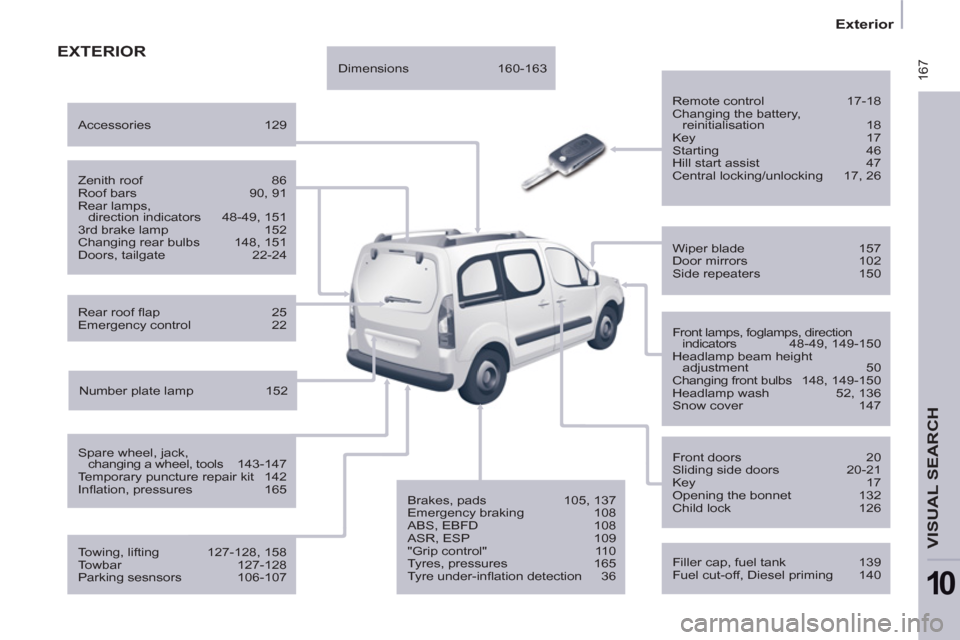
EXTERIOR
Remote control 17-18
Changing the battery,
reinitialisation 18
Key 17
Starting 46
Hill start assist 47
Central locking/unlocking 17, 26
Filler cap, fuel tank 139
Fuel cut-off, Diesel priming 140
Wiper blade 157
Door mirrors 102
Side repeaters 150
Front lamps, foglamps, direction
indicators 48-49, 149-150
Headlamp beam height
adjustment 50
Changing front bulbs 148, 149-150
Headlamp wash 52, 136
Snow cover 147
Front doors 20
Sliding side doors 20-21
Key 17
Opening the bonnet 132
Child lock 126
Towing, lifting 127-128, 158
Towbar 127-128
Parking sesnsors 106-107
Rear roof fl ap 25
Emergency control 22
Spare wheel, jack,
changing a wheel, tools 143-147
Temporary puncture repair kit 142
Infl ation, pressures 165
Zenith roof 86
Roof bars 90, 91
Rear lamps,
direction indicators 48-49, 151
3rd brake lamp 152
Changing rear bulbs 148, 151
Doors, tailgate 22-24
Accessories 129
Number plate lamp 152
Dimensions 160-163
Brakes, pads 105, 137
Emergency braking 108
ABS, EBFD 108
ASR, ESP 109
"Grip control" 110
Tyres, pressures 165
Tyre under-infl ation detection 36
Page 228 of 232
170
Interior
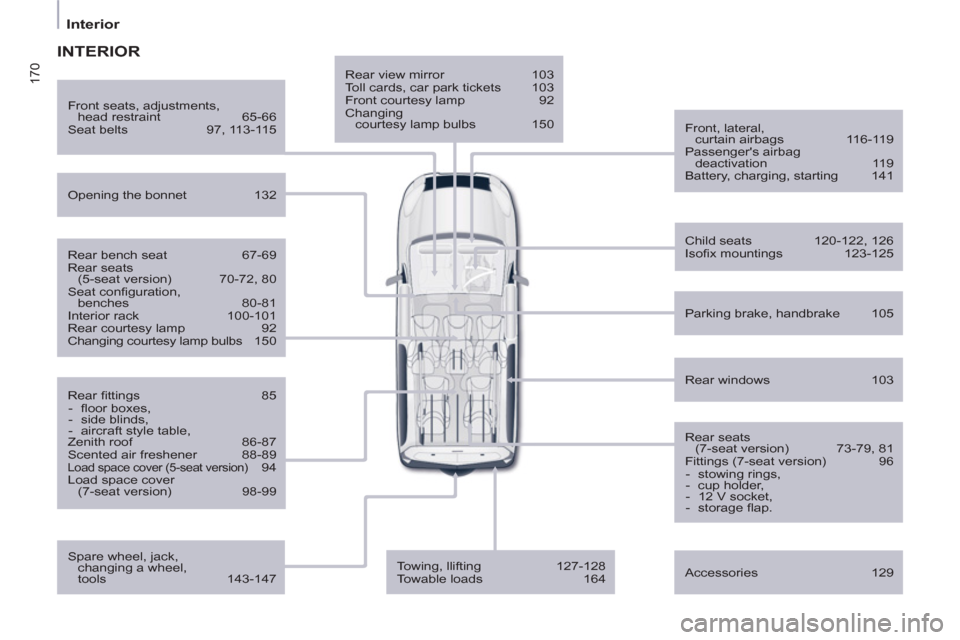
Rear view mirror 103
Toll cards, car park tickets 103
Front courtesy lamp 92
Changing
courtesy lamp bulbs 150
Front, lateral,
curtain airbags 116-119
Passenger's airbag
deactivation 119
Battery, charging, starting 141
Opening the bonnet 132
Rear windows 103
Front seats, adjustments,
head restraint 65-66
Seat belts 97, 113-115
Accessories 129
INTERIOR
Rear bench seat 67-69
Rear seats
(5-seat version) 70-72, 80
Seat confi guration,
benches 80-81
Interior rack 100-101
Rear courtesy lamp 92
Changing courtesy lamp bulbs 150
Rear fi ttings 85
- fl oor boxes,
- side blinds,
- aircraft style table,
Zenith roof 86-87
Scented air freshener 88-89
Load space cover (5-seat version) 94
Load space cover
(7-seat version) 98-99
Child seats 120-122, 126
Isofi x mountings 123-125
Parking brake, handbrake 105
Rear seats
(7-seat version) 73-79, 81
Fittings (7-seat version) 96
- stowing rings,
- cup holder,
- 12 V socket,
- storage fl ap.
Towing, llifting 127-128
Towable loads 164
Spare wheel, jack,
changing a wheel,
tools 143-147
Page 229 of 232
171
Technical data - Maintenance
VISUAL SEARCH
10
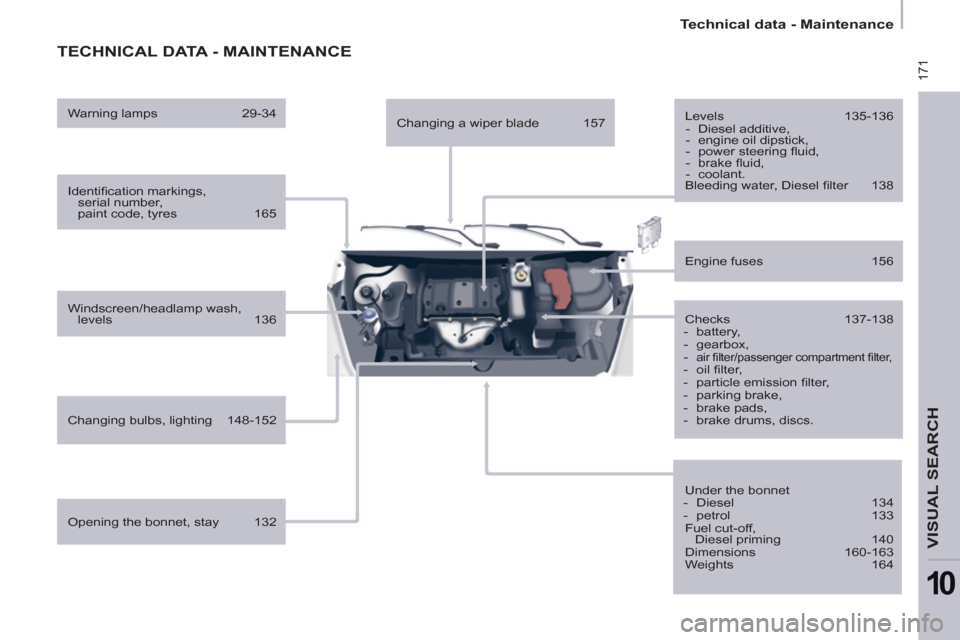
TECHNICAL DATA - MAINTENANCE
Identifi cation markings,
serial number,
paint code, tyres 165
Windscreen/headlamp wash,
levels 136
Changing bulbs, lighting 148-152
Checks 137-138
- battery,
- gearbox,
-
air fi lter/passenger compartment fi lter,
- oil fi lter,
- particle emission fi lter,
- parking brake,
- brake pads,
- brake drums, discs.
Engine fuses 156
Under the bonnet
- Diesel 134
- petrol 133
Fuel cut-off,
Diesel priming 140
Dimensions 160-163
Weights 164
Opening the bonnet, stay 132
Levels 135-136
- Diesel additive,
- engine oil dipstick,
- power steering fl uid,
- brake fl uid,
- coolant.
Bleeding water, Diesel fi lter 138
Warning lamps 29-34
Changing a wiper blade 157