engine Peugeot Partner Tepee 2015 Workshop Manual
[x] Cancel search | Manufacturer: PEUGEOT, Model Year: 2015, Model line: Partner Tepee, Model: Peugeot Partner Tepee 2015Pages: 276, PDF Size: 12.76 MB
Page 187 of 276
185
Partner_2_VP_en_Chap09_Caract-technique_ed02-2014
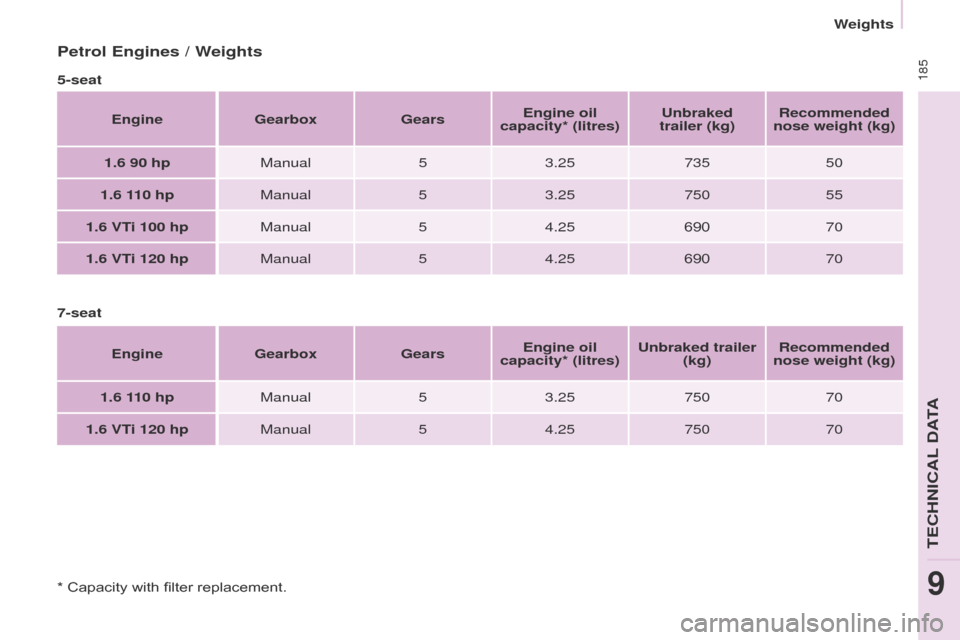
Petrol Engines / Weights
5-seatEngine Gearbox GearsEngine oil
capacity* (litres) Unbraked
trailer (kg) Recommended
nose weight (kg)
1.6 90 hp Manual 53.25 735 50
1.6 110 hp Manual53.25 750 55
1.6 VTi 100 hp Manual54.25 690 70
1.6 VTi 120 hp Manual54.25 690 70
7-seat Engine Gearbox GearsEngine oil
capacity* (litres) Unbraked trailer
(kg) Recommended
nose weight (kg)
1.6 110 hp Manual53.25 750 70
1.6 VTi 120 hp Manual54.25 750 70
* Capacity with filter replacement.
teCHNICAL DAtA
9
Weights
Page 188 of 276
186
Partner_2_VP_en_Chap09_Caract-technique_ed02-2014
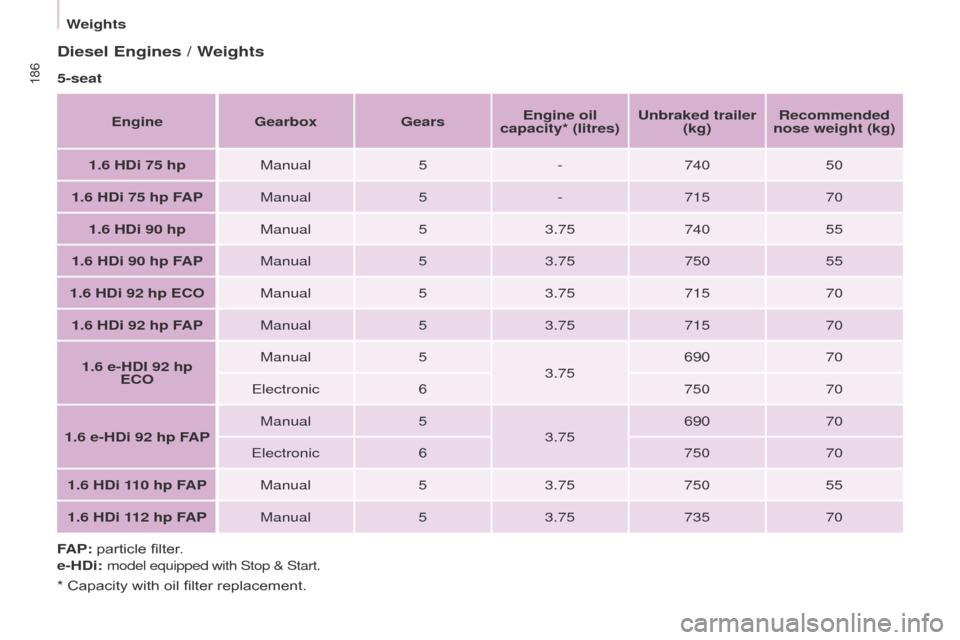
Diesel Engines / Weights
5-seatEngine Gearbox GearsEngine oil
capacity* (litres) Unbraked trailer
(kg) Recommended
nose weight (kg)
1.6 HDi 75 hp Manual5-740 50
1.6 HDi 75 hp FAP Manual5-715 70
1.6 HDi 90 hp Manual53.75 740 55
1.6 HDi 90 hp FAP Manual53.75 750 55
1.6 HDi 92 hp ECO Manual53.75 715 70
1.6 HDi 92 hp FAP Manual53.75 715 70
1.6 e-HDI 92 hp ECO Manual
5
3.75 690
70
e
lectronic6 75070
1.6 e-HDi 92 hp FAP Manual
5
3.75 690
70
e
lectronic6 75070
1.6 HDi 110 hp FAP Manual53.75 750 55
1.6 HDi 112 hp FAP Manual53.75 735 70
FAP: particle filter.
e-HDi:
model equipped with Stop & Start.
* Capacity with oil filter replacement.
Weights
Page 189 of 276
187
Partner_2_VP_en_Chap09_Caract-technique_ed02-2014
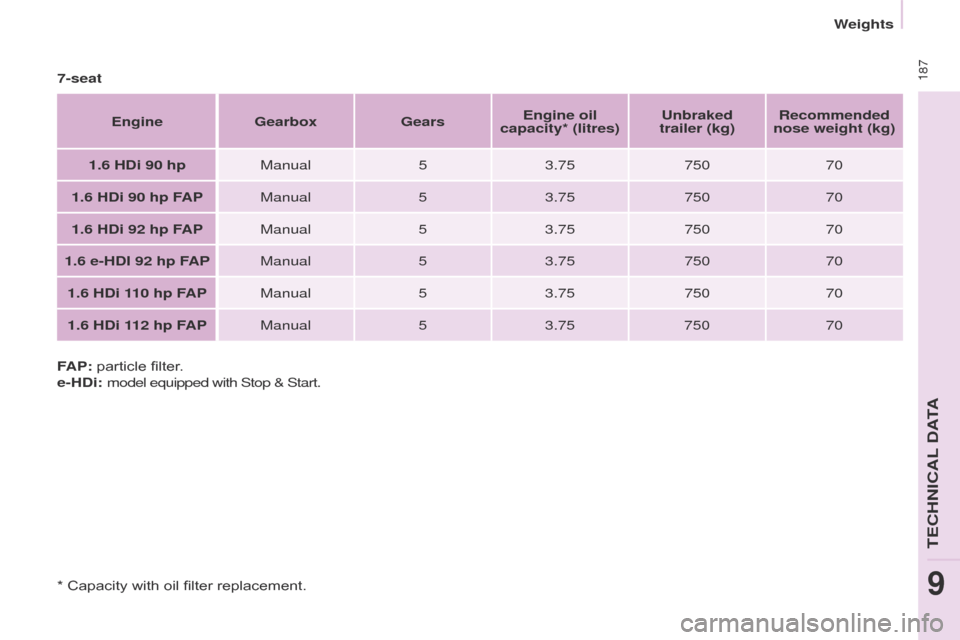
7-seatEngine Gearbox GearsEngine oil
capacity* (litres) Unbraked
trailer (kg) Recommended
nose weight (kg)
1.6 HDi 90 hp Manual53.75 750 70
1.6 HDi 90 hp FAP Manual53.75 750 70
1.6 HDi 92 hp FAP Manual53.75 750 70
1.6 e-HDI 92 hp FAP Manual53.75 750 70
1.6 HDi 110 hp FAP Manual53.75 750 70
1.6 HDi 112 hp FAP Manual53.75 750 70
FAP: particle filter.
e-HDi: model equipped with Stop & Start.
* Capacity with oil filter replacement.
teCHNICAL DAtA
9
Weights
Page 193 of 276
10.3
Partner_2_VP_en_Chap10b_RT6-2-8_ed02-2014
the system is protected in such a way that it will only
operate in your vehicle.
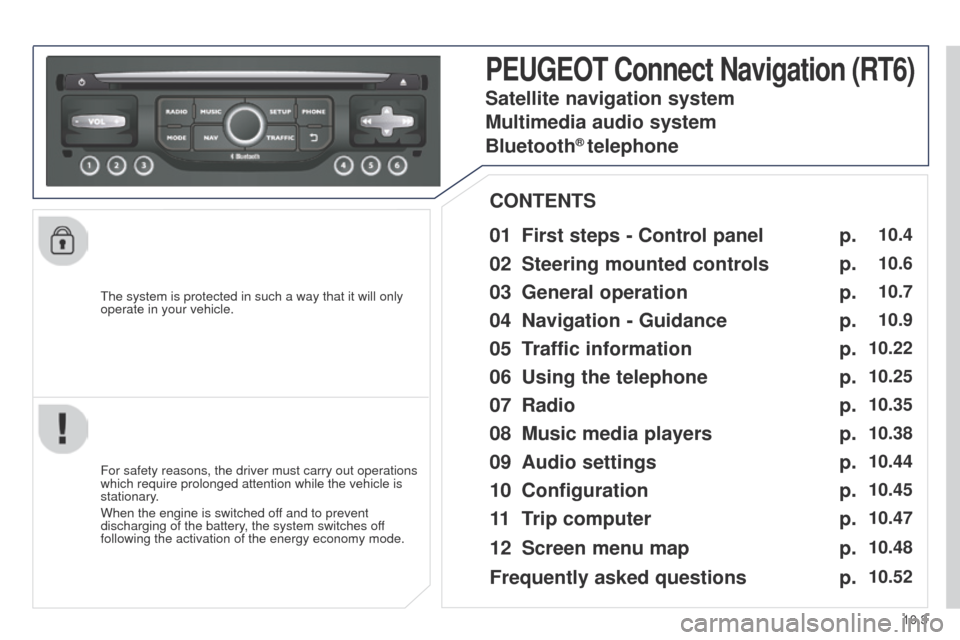
PEUGEOT Connect Navigation (RT6)
01 First steps - Control panel
For safety reasons, the driver must carry out operations
which require prolonged attention while the vehicle is
stationary.
When the engine is switched off and to prevent
discharging of the battery, the system switches off
following the activation of the energy economy mode.
CONTENTS
02
Steering mounted
controls
03
General operation
04
Navigation
- Guidance
05
T
raffic information
06
Using
the telephone
07
Radio
08
Music media players
09
Audio
settings
10
Configuration
11
T
rip computer
Satellite navigation system
Multimedia audio system
Bluetooth
® telephone
12
Screen menu
map
Frequently asked questions p.
p.
p.
p.
p.
p.
p.
p.
p.
p.
p.
p.
p.
10.4
10.6
10.7
10.9
10.22
10.25
10.35
10.38
10.44
10.45
10.47
10.48
10.52
Page 194 of 276
01
10.4
Partner_2_VP_en_Chap10b_RT6-2-8_ed02-2014
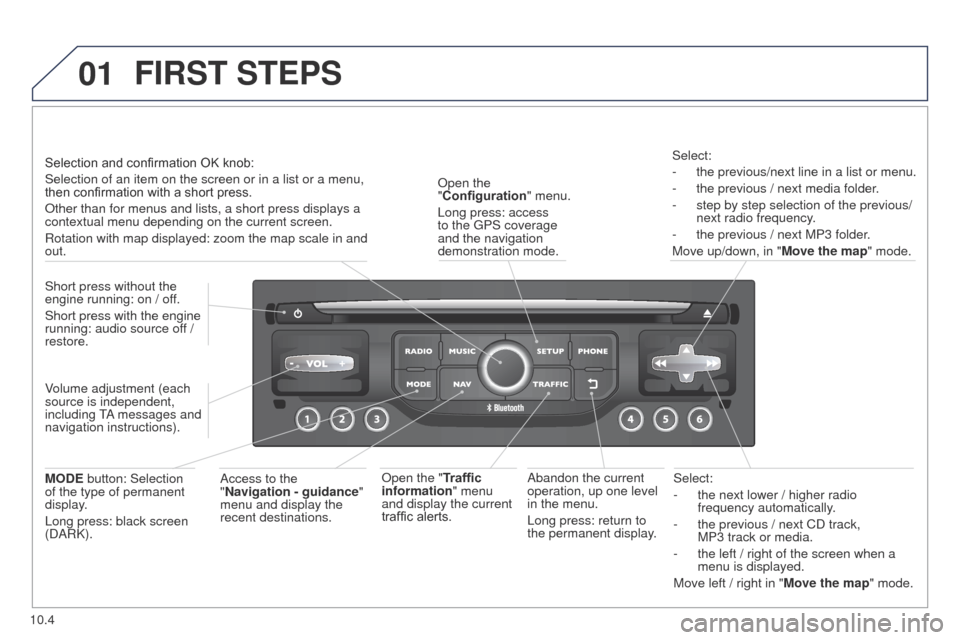
Select:
-
the next lower / higher radio
frequency automatically
.
-
the previous / next CD track,
MP3
track or media.
-
the left / right of the screen when a
menu is displayed.
Move left / right in "
Move the map" mode.
Abandon the current
operation, up one level
in the menu.
Long press: return to
the permanent display.
Open the
"Configuration
" menu.
Long press: access
to the
g
PS coverage
and the navigation
demonstration mode.
Open the "Traffic
information" menu
and display the current
traffic alerts. Select:
-
the previous/next line in a list or menu.
-
the previous / next media folder
.
-
step by step selection of the previous/
next radio frequency
.
-
the previous / next MP3 folder
.
Move up/down, in " Move the map" mode.
FIRST STEPS
Access to the
"Navigation - guidance "
menu and display the
recent destinations.
Short press without the
engine running: on / off.
Short press with the engine
running: audio source off
/
restore.
MODE button: Selection
of the type of permanent
display.
Long press: black screen
(DARK). Selection and confirmation OK knob:
Selection of an item on the screen or in a list or a menu,
then confirmation with a short press.
Other than for menus and lists, a short press displays a
contextual menu depending on the current screen.
Rotation with map displayed: zoom the map scale in and
out.
Volume adjustment (each
source is independent,
including
tA
messages and
navigation instructions).
Page 247 of 276
10.57
Partner_2_VP_en_Chap10b_RT6-2-8_ed02-2014
FREQUENTLY ASKED QUESTIONS
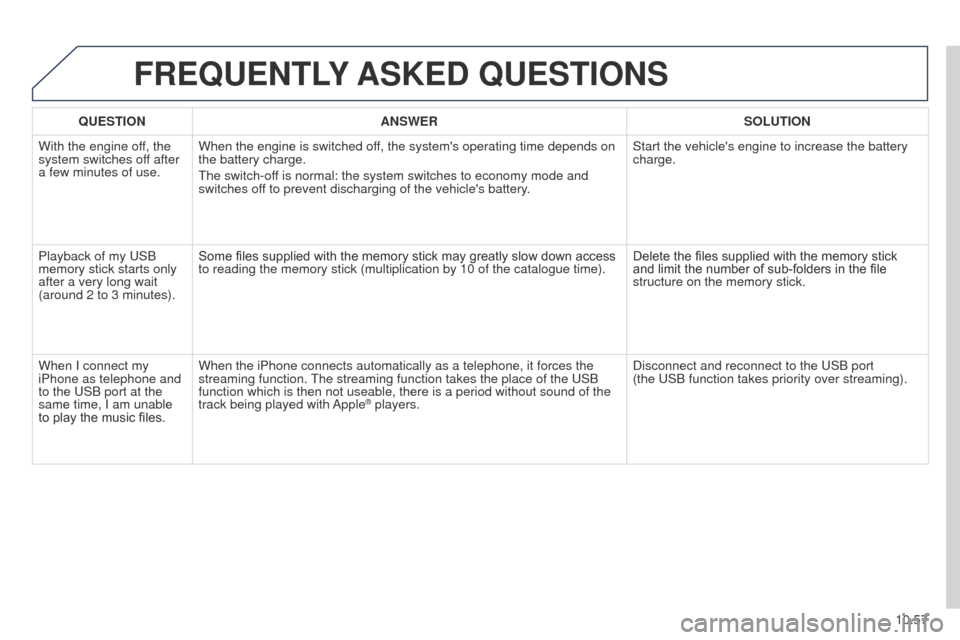
QUESTION ANSWER SOLUTION
With the engine off, the
system switches off after
a few minutes of use. When the engine is switched off, the system's operating time depends on
the battery charge.
t
he switch-off is normal: the system switches to economy mode and
switches off to prevent discharging of the vehicle's battery. Start the vehicle's engine to increase the battery
charge.
Playback of my
u SB
memory stick starts only
after a very long wait
(around 2 to 3 minutes). Some files supplied with the memory stick may greatly slow down access
to reading the memory stick (multiplication by 10 of the catalogue time\
).
Delete the files supplied with the memory stick
and limit the number of sub-folders in the file
structure on the memory stick.
When I connect my
iPhone as telephone and
to the
u SB port at the
same time, I am unable
to play the music files. When the iPhone connects automatically as a telephone, it forces the
streaming function.
t
he streaming function takes the place of the u SB
function which is then not useable, there is a period without sound of t\
he
track being played with Apple
® players. Disconnect and reconnect to the u SB port
(the u SB function takes priority over streaming).
Page 249 of 276
10.59
Partner_2_VP_en_Chap10c_RD45_ed02_2014
PEUGEOT Connect Sound
Your PeugeOt Connect Sound is coded in such a way
that it will only operate in your vehicle.
For safety reasons, the driver must carry out operations
which require prolonged attention while the vehicle is
stationary
.
When the engine is switched off and to prevent
discharging of the battery, the audio equipment may
switch off after a few minutes.
AUDIO SYSTEM / BLUETOOTH
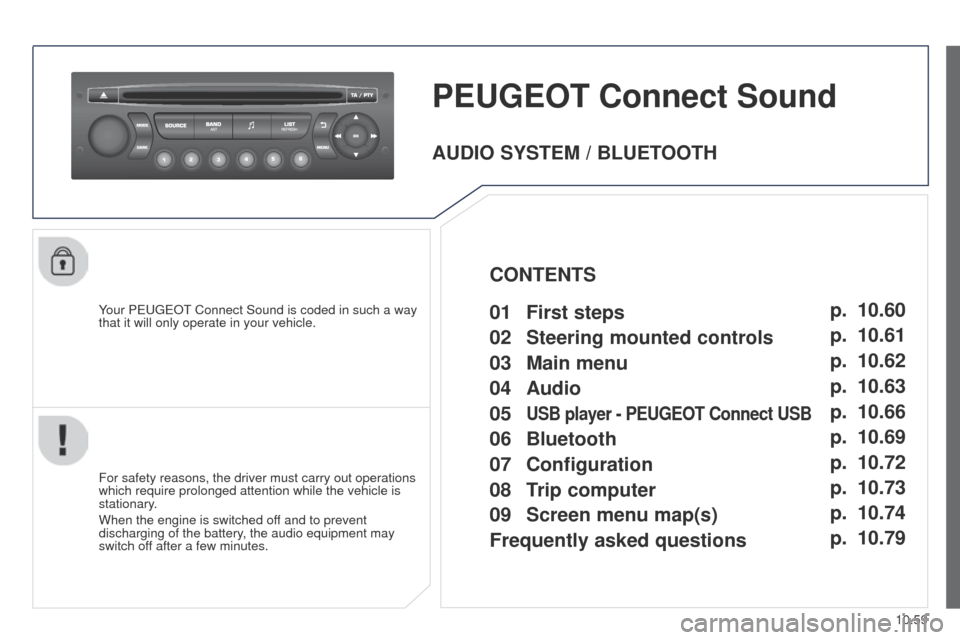
01
First steps
02
Steering mounted
controls
03
Main
menu
04
Audio
05
USB player - PEUGEOT Connect USB
06 Bluetooth
07 Configuration
09
Screen menu map(s)
08
T
rip computer
Frequently asked questions p.
p.
p.
p.
p.
p.
p.
p. p.
p.
10.60
10.61
10.62
10.63
10.66
10.69
10.72
10.74 10.73
10.79
CONTENTS
Page 271 of 276
10.81
Partner_2_VP_en_Chap10c_RD45_ed02_2014
FREQUENTLY ASKED QUESTIONS
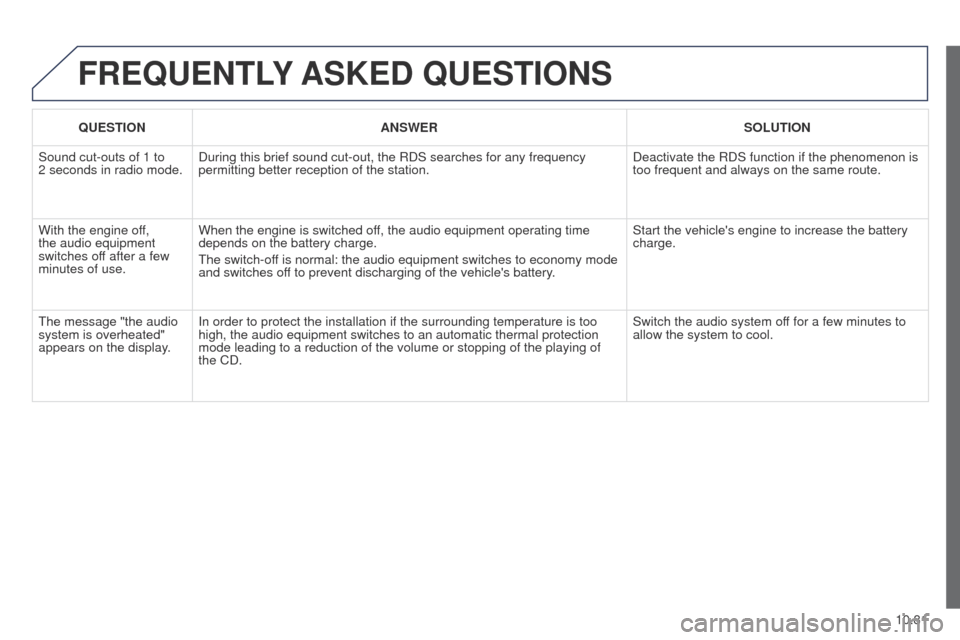
QUESTION ANSWER SOLUTION
Sound cut-outs of 1 to
2
seconds in radio mode. During this brief sound cut-out, the RDS searches for any frequency
permitting better reception of the station. Deactivate the RDS function if the phenomenon is
too frequent and always on the same route.
With the engine off,
the audio equipment
switches off after a few
minutes of use. When the engine is switched off, the audio equipment operating time
depends on the battery charge.
t
he switch-off is normal: the audio equipment switches to economy mode
and switches off to prevent discharging of the vehicle's battery. Start the vehicle's engine to increase the battery
charge.
t
he message "the audio
system is overheated"
appears on the display. In order to protect the installation if the surrounding temperature is t\
oo
high, the audio equipment switches to an automatic thermal protection
mode leading to a reduction of the volume or stopping of the playing of \
the CD. Switch the audio system off for a few minutes to
allow the system to cool.