radio Peugeot Partner Tepee 2015 Owner's Manual
[x] Cancel search | Manufacturer: PEUGEOT, Model Year: 2015, Model line: Partner Tepee, Model: Peugeot Partner Tepee 2015Pages: 276, PDF Size: 12.76 MB
Page 5 of 276
3
Partner_2_VP_en_Chap00a_Sommaire_ed02-2014
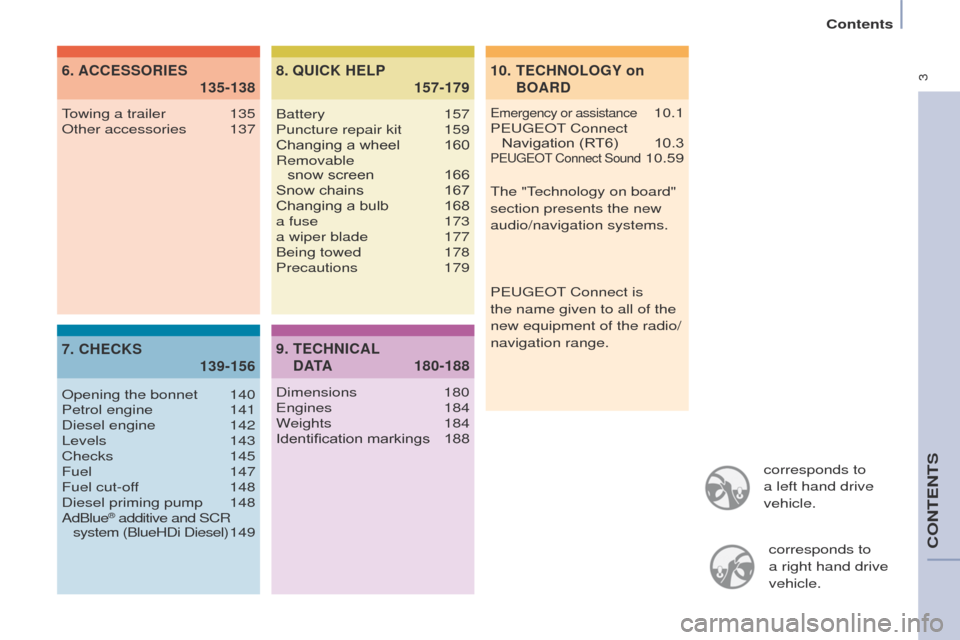
corresponds to
a left hand drive
vehicle.corresponds to
a
right hand drive
vehicle.
TECHNOLOGY on
BOARD
10.
ACCESSORIES
6.
135-138
CHECKS
7.
139-156 QUICK HELP
8.
157-179
emergency or assistance 10.1
Peuge
O
t Connect
Navigation (RT6)
10.3PeugeOt Connect Sound 10.59
towing a trailer
135
Other accessories
137
Opening the bonnet
140
Petrol engine
141
Diesel engine
142
Levels
143
Checks
145
Fuel
147
Fuel cut-off
148
Diesel priming pump
148
AdBlue® additive and SCR
system (BlueHDi Diesel) 1 49Battery
157
Puncture repair kit
159
Changing a wheel
160
Removable
snow screen
166
Snow chains
167
Changing a bulb
168
a fuse
173
a wiper blade
177
Being towed
178
Precautions
179
TECHNICAL
D ATA
9.
180-188
Dimensions 180e
ngines 184
Weights
184
Identification markings
188
t
he " t
echnology on board"
section presents the new
audio/navigation systems.
P
euge O t
Connect is
the name given to all of the
new equipment of the radio/
navigation range.
Contents
CONteNtS
Page 12 of 276
10
Partner_2_VP_en_Chap01_vue-ensemble_ed02-2014
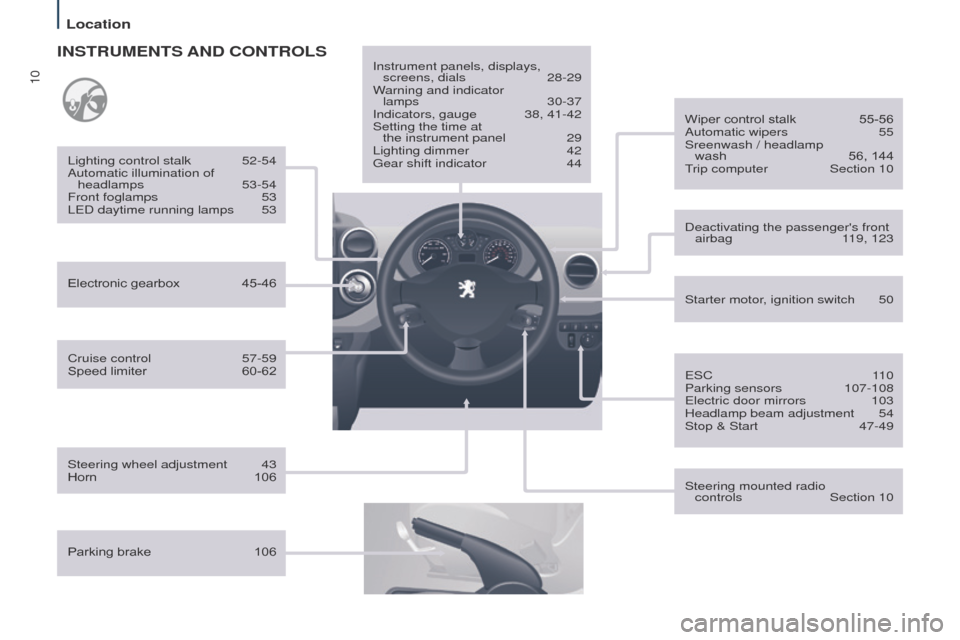
Cruise control 57-59
Speed limiter 60-62
Lighting control stalk
52-54
Automatic illumination of headlamps
53-54
Front foglamps
53
L
e D daytime running lamps
53
INSTRUMENTS AND CONTROLS
Parking brake 106Instrument panels, displays,
screens, dials
28-29
W
arning and indicator
lamps
30-37
Indicators, gauge
38, 41-42
Setting the time at
the instrument panel
29
Lighting dimmer
42g
ear shift indicator
44
Steering wheel adjustment
43
Horn
106 Starter motor
, ignition switch
50
Wiper control stalk
55-56
Automatic wipers
55
Sreenwash / headlamp
wash
56, 144trip computer
Section 10
Steering mounted radio
controls
Section 10
Deactivating the passenger's front
airbag
1
19, 123
e
SC
1
10
Parking sensors
107-108e
lectric door mirrors
103
Headlamp beam adjustment
54
Stop & Start
47-49
Electronic gearbox
45-46
Location
Page 139 of 276
137
Partner_2_VP_en_Chap06_Accessoire_ed02-2014
OTHER ACCESSORIES
these accessories and parts, having
been tested and approved for reliability
and safety
, are all adapted to your
vehicle. A wide range of recommended
accessories and genuine parts is
available.
A further range is also available,
structured around comfort, leisure and
maintenance:
Anti-theft alarm, window etching, first
aid kit, high visibility vest, front and
rear parking sensors, warning triangle,
security bolts for alloy wheels, ...
Seat covers compatible with airbags
for the front seats, bench seat, rubber
mats, carpet mats, snow chains, blinds,
tailgate bicycle carrier, ...
to prevent the mat from becoming
caught under the pedals:
-
ensure that the mat and its fixings
are positioned correctly
,
-
never fit one mat on top of another
.Audio equipment, hands-free kit,
speakers, CD changer, satellite
navigation system, u
SB box, Video kit, ...
Regardless of the audio and telematic
equipment offered on the market, the
technical constraints associated with
the fitting of equipment of these product
groups mean that the special features
of the equipment and its compatibility
with the capacities of your vehicle's
standard equipment must be taken into
account. Please ask a P
euge O t
dealer
for more information before fitting such
equipment.
Maximum weights on bars
-
t
ransverse bars on longitudinal
bars: 75 Kg (these bars are not
compatible with the Zénith roof). Installing radiocommunication
transmitters
Y
ou are advised to contact a
P
euge O t
dealer before installin
g
accessory radiocommunication
transmitters with external aerial on
your vehicle.
t
he P euge O t dealer network
will inform you of the specification
(frequency band, maximum output
power, aerial position, specific
conditions of installation) of the
transmitters which can be fitted, in
accordance with the Motor Vehicle
e
lectromagnetic Compatibility Directive
(2004/104/
e C).
Front mud flaps, rear mud flaps,
15/17 inch alloy wheels, wheelarch
trim, leather steering wheel, ...
Screenwash, interior and exterior
cleaning and maintenance products,
spare bulbs, ...
equipment
ACCeSSORIeS
6
Page 193 of 276
10.3
Partner_2_VP_en_Chap10b_RT6-2-8_ed02-2014
the system is protected in such a way that it will only
operate in your vehicle.
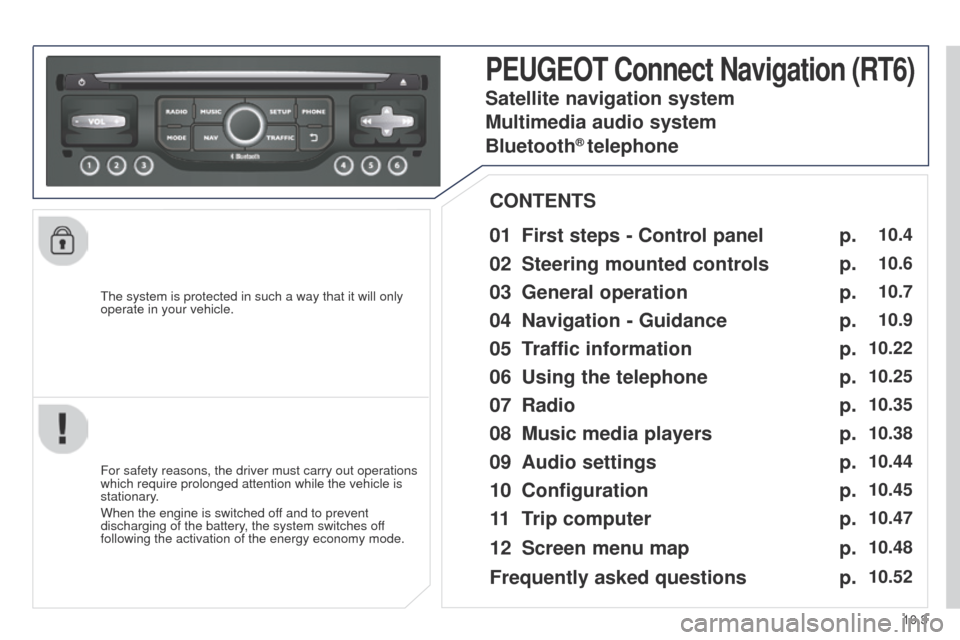
PEUGEOT Connect Navigation (RT6)
01 First steps - Control panel
For safety reasons, the driver must carry out operations
which require prolonged attention while the vehicle is
stationary.
When the engine is switched off and to prevent
discharging of the battery, the system switches off
following the activation of the energy economy mode.
CONTENTS
02
Steering mounted
controls
03
General operation
04
Navigation
- Guidance
05
T
raffic information
06
Using
the telephone
07
Radio
08
Music media players
09
Audio
settings
10
Configuration
11
T
rip computer
Satellite navigation system
Multimedia audio system
Bluetooth
® telephone
12
Screen menu
map
Frequently asked questions p.
p.
p.
p.
p.
p.
p.
p.
p.
p.
p.
p.
p.
10.4
10.6
10.7
10.9
10.22
10.25
10.35
10.38
10.44
10.45
10.47
10.48
10.52
Page 194 of 276
01
10.4
Partner_2_VP_en_Chap10b_RT6-2-8_ed02-2014
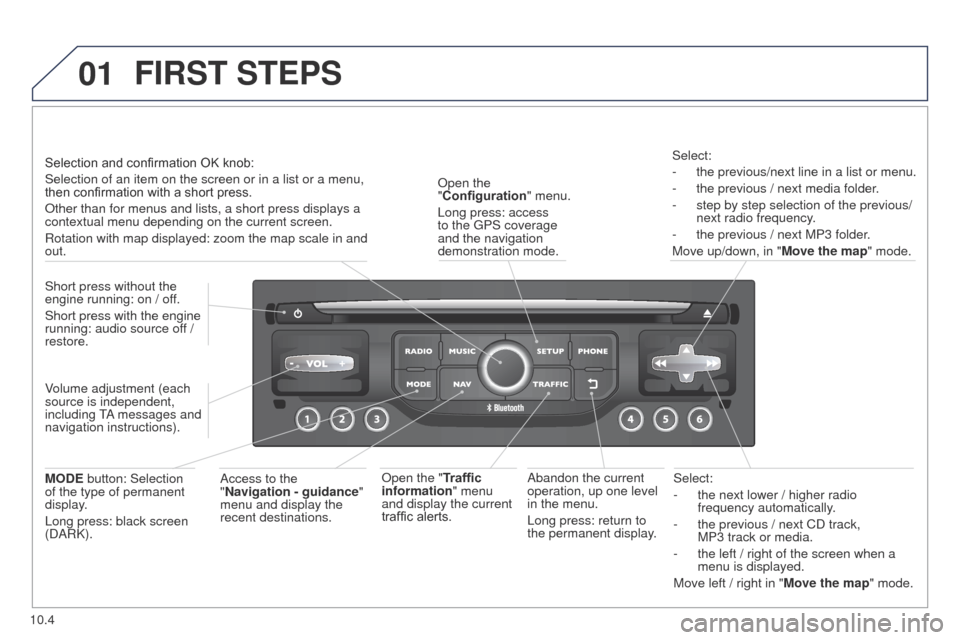
Select:
-
the next lower / higher radio
frequency automatically
.
-
the previous / next CD track,
MP3
track or media.
-
the left / right of the screen when a
menu is displayed.
Move left / right in "
Move the map" mode.
Abandon the current
operation, up one level
in the menu.
Long press: return to
the permanent display.
Open the
"Configuration
" menu.
Long press: access
to the
g
PS coverage
and the navigation
demonstration mode.
Open the "Traffic
information" menu
and display the current
traffic alerts. Select:
-
the previous/next line in a list or menu.
-
the previous / next media folder
.
-
step by step selection of the previous/
next radio frequency
.
-
the previous / next MP3 folder
.
Move up/down, in " Move the map" mode.
FIRST STEPS
Access to the
"Navigation - guidance "
menu and display the
recent destinations.
Short press without the
engine running: on / off.
Short press with the engine
running: audio source off
/
restore.
MODE button: Selection
of the type of permanent
display.
Long press: black screen
(DARK). Selection and confirmation OK knob:
Selection of an item on the screen or in a list or a menu,
then confirmation with a short press.
Other than for menus and lists, a short press displays a
contextual menu depending on the current screen.
Rotation with map displayed: zoom the map scale in and
out.
Volume adjustment (each
source is independent,
including
tA
messages and
navigation instructions).
Page 195 of 276
01
10.5
Partner_2_VP_en_Chap10b_RT6-2-8_ed02-2014
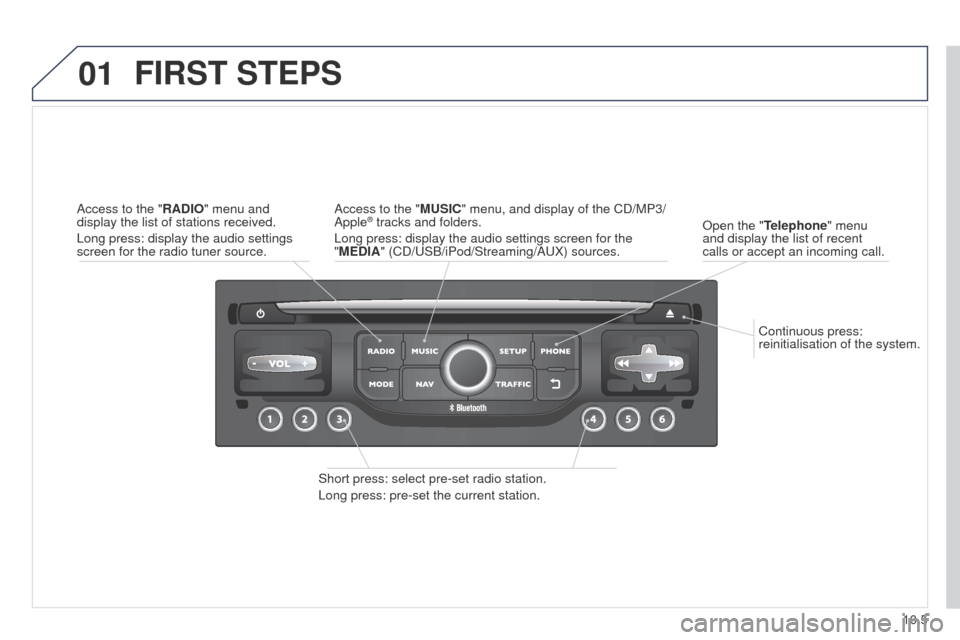
Continuous press:
reinitialisation of the system.
Open the "Telephone" menu
and display the list of recent
calls or accept an incoming call.
FIRST STEPS
Short press: select pre-set radio station.
Long press: pre-set the current station. Access to the "MUSIC" menu, and display of the CD/MP3/
Apple
® tracks and folders.
Long press: display the audio settings screen for the
"MEDIA" (CD/
u SB/iPod/Streaming/A u X) sources.
Access to the "RADIO" menu and
display the list of stations received.
Long press: display the audio settings
screen for the radio tuner source.
Page 196 of 276
02
10.6
Partner_2_VP_en_Chap10b_RT6-2-8_ed02-2014
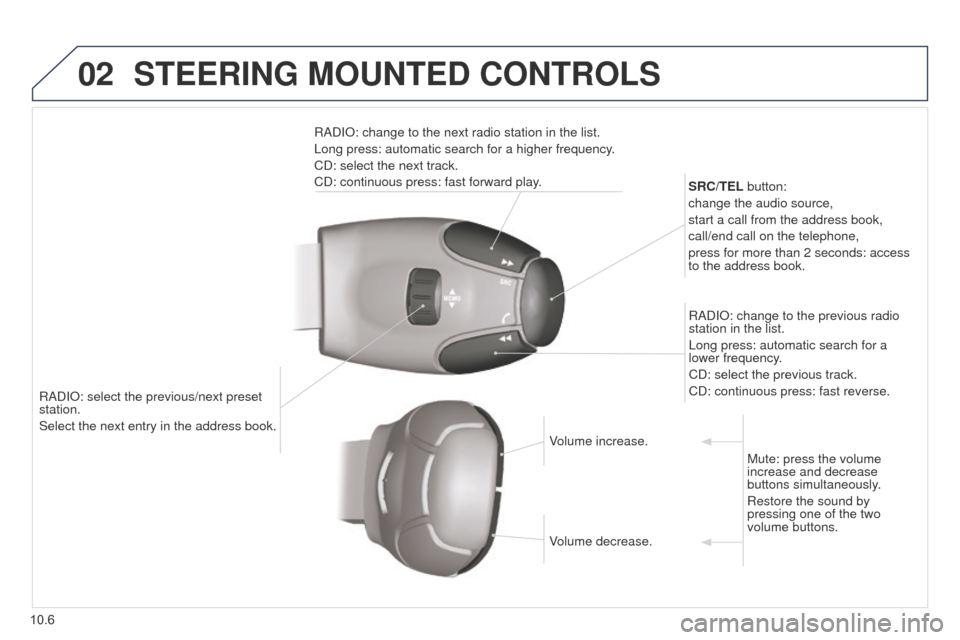
RADIO: select the previous/next preset
station.
Select the next entry in the address book.SRC/TEL button:
change the audio source,
start a call from the address book,
call/end call on the telephone,
press for more than 2 seconds: access
to the address book.
RADIO: change to the previous radio
station in the list.
Long press: automatic search for a
lower frequency.
CD: select the previous track.
CD: continuous press: fast reverse.
RADIO: change to the next radio station in the list.
Long press: automatic search for a higher frequency.
CD: select the next track.
CD: continuous press: fast forward play.
Volume increase.
Volume decrease.Mute: press the volume
increase and decrease
buttons simultaneously.
Restore the sound by
pressing one of the two
volume buttons.
STEERING MOUNTED CONTROLS
Page 197 of 276
03
10.7
Partner_2_VP_en_Chap10b_RT6-2-8_ed02-2014
For the details of the menus, refer to the "Screen menu map"
section.
For cleaning the screen, the use of a soft, non-abrasive cloth
(spectacles cloth) is recommended, with no additional product.
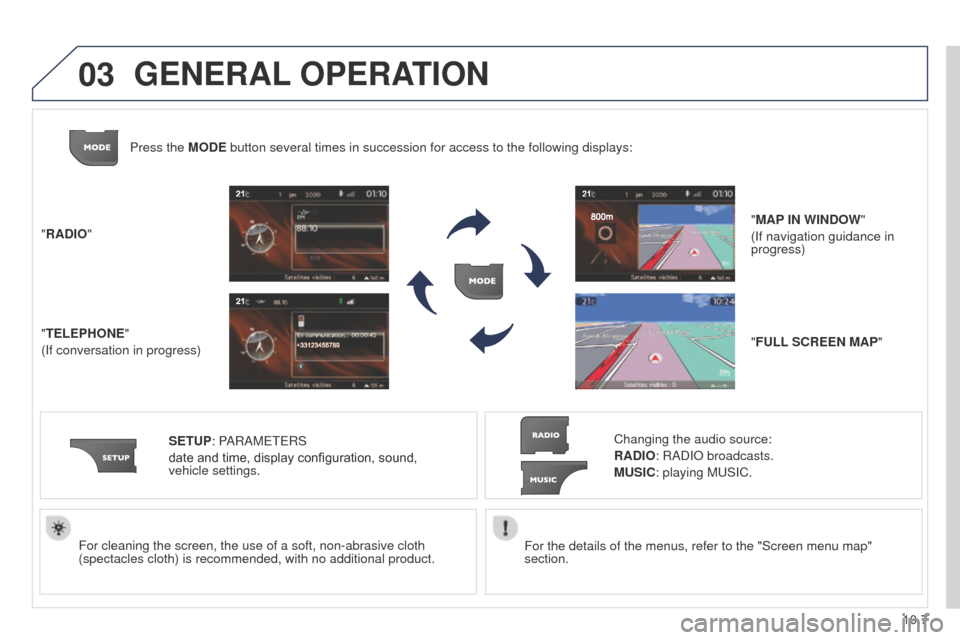
"RADIO"
"TELEPHONE"
(If conversation in progress)
SETUP: PARAM
ete
RS
date and time, display configuration, sound,
vehicle
settings.
Changing the audio source:
RADIO: RADIO broadcasts.
MUSIC: playing Mu SIC.
Press the MODE button several times in succession for access to the following displays\
:
"FULL SCREEN MAP" "MAP IN WINDOW"
(If navigation guidance in
progress)
GENERAL OPERATION
Page 198 of 276
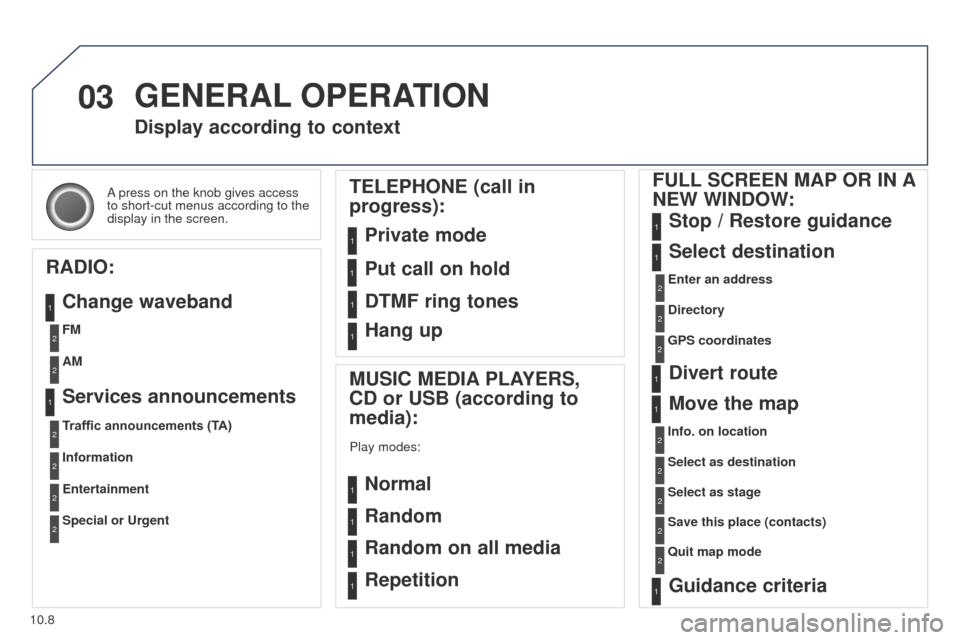
03
10.8
Partner_2_VP_en_Chap10b_RT6-2-8_ed02-2014
A press on the knob gives access
to short-cut menus according to the
display in the screen.
Display according to context
RADIO: Change waveband
MUSIC MEDIA PLAYERS,
CD or USB (according to
media):
Play modes:
Normal
Random
Random on all media
Repetition
TELEPHONE (call in
progress):
Private mode FULL SCREEN MAP OR IN A
NEW WINDOW:
Stop / Restore guidance
Select destination
Enter an address
Directory
GPS coordinates
Divert route
Move the map
Info. on location
Select as destination Select as stage
Save this place (contacts)
Quit map mode
Guidance criteria
Put call on hold
DTMF ring tones
Hang up
1
1
1
1
1
1
1
2
2
2
2
2
1
2
2
2
1
1
1
1
1
1FM
Traffic announcements (TA) AM
Information
Entertainment
Special or Urgent2
2
2
2
2
2
Services announcements1
GENERAL OPERATION
Page 214 of 276

05
10.24
Partner_2_VP_en_Chap10b_RT6-2-8_ed02-2014
Principal TMC symbols
Red and yellow triangle: traffic information, for example:
Black and blue triangle: general information, for example:
Weather reports
Modified signage
Risk of explosion Traffic reports
Narrow carriageway
Road closed
Wind
Slippery surface
Demonstration Fog
Accident
Danger
Parking
Delay
No entry Snow / ice
Roadworks
Traffic jam
Receiving TA messages
The TA (Traffic Announcement) function gives priority to TA alert
messages. to operate, this function needs good reception of a
radio station transmitting this type of message. When a traffic report
is transmitted, the current audio source (Radio, CD,
u SB, ...) is
interrupted automatically to play the
tA
message. Normal playback
of the audio source resumes at the end of the transmission of the
message.
Press RADIO to display the menu.
Select "Service announcements" then
confirm.
Activate or deactivate "TA " then confirm.
t
he volume setting for
tA
messages can be adjusted only during the
transmission of this type of alert.
Activate or deactivate the function at any time by pressing
the button.
During a message, press the button to interrupt it.
TRAFFIC INFORMATION