ESP Peugeot Partner Tepee 2016 Owner's Guide
[x] Cancel search | Manufacturer: PEUGEOT, Model Year: 2016, Model line: Partner Tepee, Model: Peugeot Partner Tepee 2016Pages: 296, PDF Size: 10.76 MB
Page 229 of 296
227
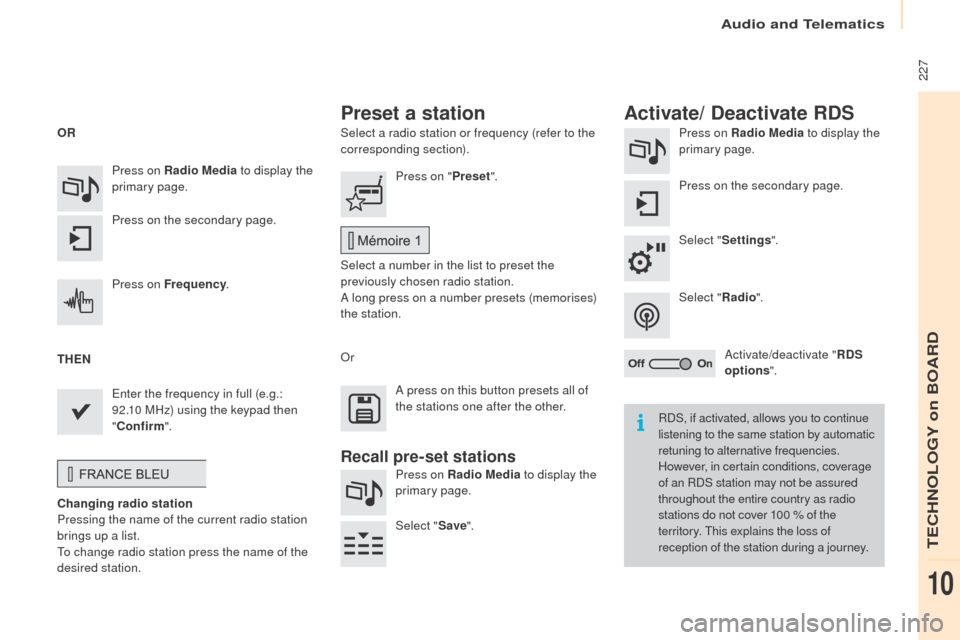
Select a radio station or frequency (refer to the
corresponding section).Press on Radio Media
to display the
primary page.
Press on the secondary page.
Select " Settings ".
Select " Radio".
Activate/deactivate " RDS
options ".
Press on Radio Media
to display the
primary page.
Press on the secondary page. Press on "
Preset".
Select a number in the list to preset the
previously chosen radio station.
A long press on a number presets (memorises)
the station.
Press on Frequency
.
en
ter the frequency in full (e.g.:
92.10 MHz) using the keypad then
" Confirm ".
Changing radio station
Pressing the name of the current radio station
brings up a list.
To change radio station press the name of the
desired station.
o
r Press on Radio Media to display the
primary page.
Select " Save".
Preset a station Activate/ Deactivate RDS
oR
t
H
eN A p
ress on this button presets all of
the stations one after the other.
Recall pre-set stations
RDS, if activated, allows you to continue
listening to the same station by automatic
retuning to alternative frequencies.
However, in certain conditions, coverage
of an RDS station may not be assured
throughout the entire country as radio
stations do not cover 100 % of the
territory. This explains the loss of
reception of the station during a journey.
Audio and Telematics
TeCHNoLogY on BoARD
10
Page 231 of 296
229
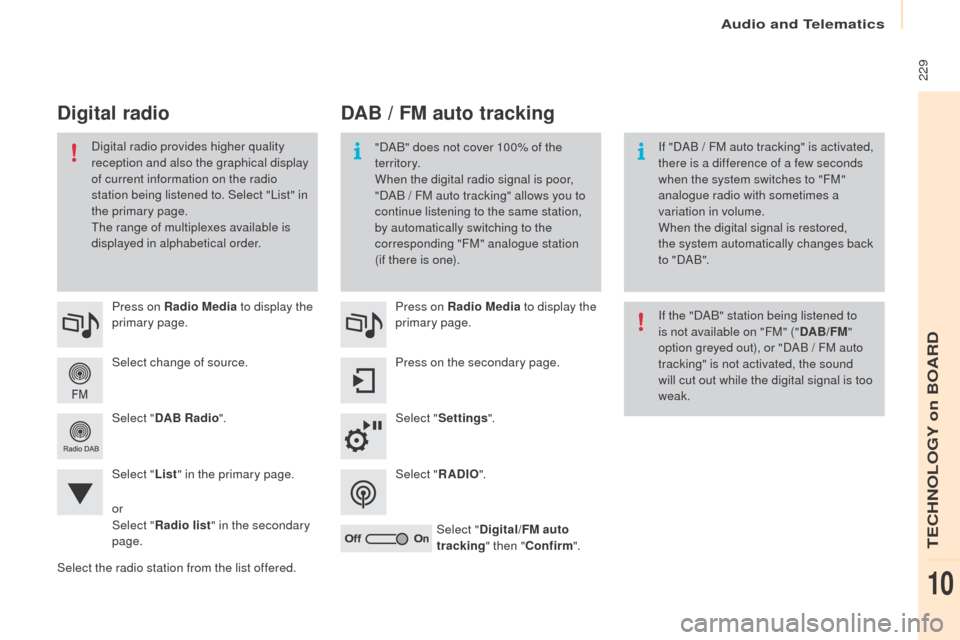
Select change of source. Press on Radio Media to display the
primary page.
Select " DAB Radio ".
Select " List" in the primary page.
Select the radio station from the list offered. Press on Radio Media
to display the
primary page.
Press on the secondary page.
Select " Settings ".
Select " RADI
o".
Sel
ect "Digital/FM auto
tracking " then "Confirm ".
DAB / FM auto tracking
Digital radio
"DAB" does not cover 100% of the
te r r i to r y.
When the digital radio signal is poor,
"DAB
/ FM auto tracking" allows you to
continue listening to the same station,
by automatically switching to the
corresponding "FM" analogue station
(if there is one). If "DAB
/ FM auto tracking" is activated,
there is a difference of a few seconds
when the system switches to "FM"
analogue radio with sometimes a
variation in volume.
When the digital signal is restored,
the system automatically changes back
to " DA B ".
Digital radio provides higher quality
reception and also the graphical display
of current information on the radio
station being listened to. Select "List" in
the primary page.
The range of multiplexes available is
displayed in alphabetical order.
If the "DAB" station being listened to
is not available on "FM" ("DAB/FM"
option greyed out), or "DAB / FM auto
tracking" is not activated, the sound
will cut out while the digital signal is too
weak.
or
Select " Radio list " in the secondary
page.
Audio and Telematics
TeCHNoLogY on BoARD
10
Page 242 of 296
240
Audio settings
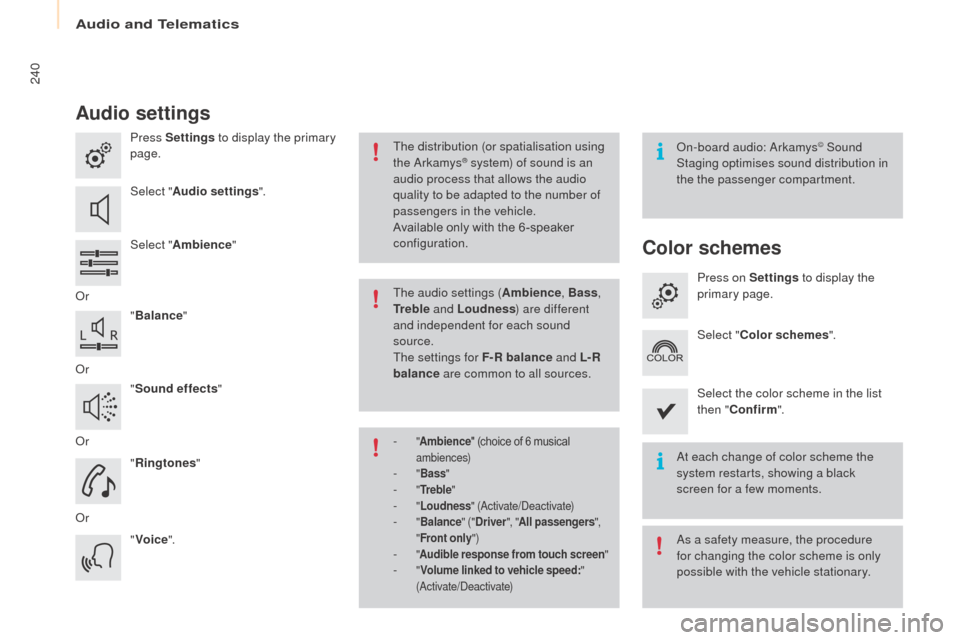
Press Settings to display the primary
page.
Select " Audio settings ".
Select " Ambience "
o
r "Balance "
o
r "Sound effects "
o
r "Ringtones "
o
r "Voice ".on
-board audio: Arkamys© Sound
Staging optimises sound distribution in
the the passenger compartment.
At each change of color scheme the
system restarts, showing a black
screen for a few moments.
The distribution (or spatialisation using
the Arkamys® system) of sound is an
audio process that allows the audio
quality to be adapted to the number of
passengers in the vehicle.
Available only with the 6 -speaker
configuration.
As a safety measure, the procedure
for changing the color scheme is only
possible with the vehicle stationary.
The audio settings (
Ambience, Bass,
tr
e b l e and Loudness ) are different
and independent for each sound
source.
The settings for F-R balance and L- R
balance are common to all sources.
-
" Ambience " (choice of 6 musical
ambiences)
- " Bass "- "tre b l e "- "Loudness " (Activate/Deactivate)- "Balance " ("Driver ", "All passengers ",
" Front only ")
- "Audible response from touch screen "- "Volume linked to vehicle speed: "
(Activate/Deactivate)
Color schemes
Press on Settings to display the
primary page.
Select " Color schemes ".
Select the color scheme in the list
then " Confirm ".
Audio and Telematics
Page 291 of 296
07-15
Printed in the
eu
A
nglais
Your vehicle will be fitted with some of this
equipment described in this document,
depending on its trim level, version and the
specification for the country in which it is sold. This handbook describes all of the equipment
available in the whole range.
The descriptions and illustrations are given
without any obligation. Automobiles P
e
ugeo
T
reserves the right to modify the technical
specifications, equipment and accessories without
having to update this edition of the handbook.
This document is an integral part of your
vehicle. It should be passed on to the new user
in the event of sale or transfer.
In addition, there are labels present in your
vehicle to warn you of the need for certain
precautions to take for your safety; don't
remove them, they will be useful again for a
new owner. Automobiles P
e
ugeo
T
declares, by
application of the provisions of the
e
u
ropean
regulation (Directive 2000/53) relating to
e
nd
of Life Vehicles, that it achieves the objectives
set by this regulation and that recycled
materials are used in the manufacture of the
products that it sells.
Reproduction or translation of all or part of
this document is prohibited without written
authorisation from Automobiles P
e
ugeo
T
.
We draw your attention to the following
points:
-
The fitting of electrical equipment or
accessories not listed by P
eugeo
T
may
cause faults and failures with the electrical
system of your vehicle. Contact a
P
eugeo
T dealer for information on the
range of recommended accessories.
-
As a safety measure, access to the
diagnostic socket, used for the vehicle's
electronic systems, is reserved strictly for
PEUGEOT
dealers or qualified workshops,
equipped with the special diagnostic
tool required (risk of malfunctions of the
vehicle's electronic systems that could
cause breakdowns or serious accidents).
The manufacturer cannot be held
responsible if this advice is not followed.
-
Any modification or adaptation not intended
or authorised by
Automobiles P
eugeo T
or carried out without meeting the technical
requirements defined by the manufacturer
would lead to the suspension of the legal
and contractual warranties.
The rear bodywork components of your vehicle
have been designed to minimise spray.