steering Peugeot Partner Tepee 2016 Service Manual
[x] Cancel search | Manufacturer: PEUGEOT, Model Year: 2016, Model line: Partner Tepee, Model: Peugeot Partner Tepee 2016Pages: 296, PDF Size: 10.76 MB
Page 173 of 296
171
The temporary tyre repair kit consists
of a compressor and a bottle
(containing a sealant).
using the kit
1. Tick the deflated wheel on the speed limitation sticker then affix
the sticker to the vehicle's steering
wheel to remind you that a wheel is
in temporary use.
2.
Clip the bottle
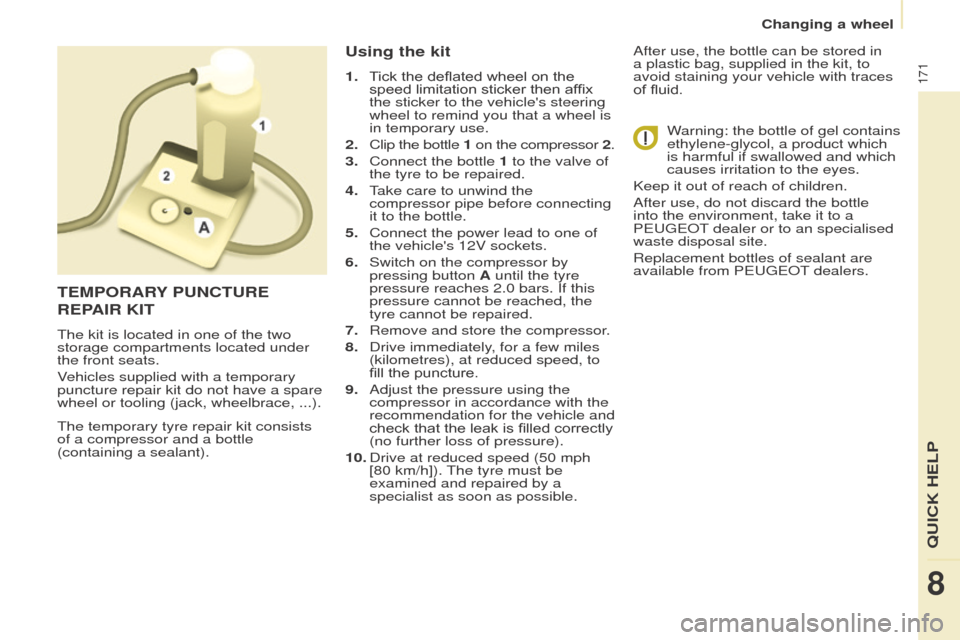
1 on the compressor
2.
3.
Connect the bottle
1 to the valve of
the tyre to be repaired.
4.
T
ake care to unwind the
compressor pipe before connecting
it to the bottle.
5.
Connect the power lead to one of
the vehicle's 12V sockets.
6.
Switch on the compressor by
pressing button
A until the tyre
pressure reaches 2.0 bars. If this
pressure cannot be reached, the
tyre cannot be repaired.
7.
Remove and store the compressor
.
8.
Drive immediately
, for a few miles
(kilometres), at reduced speed, to
fill the puncture.
9.
Adjust the pressure using the
compressor in accordance with the
recommendation for the vehicle and
check that the leak is filled correctly
(no further loss of pressure).
10.
Drive at reduced speed (50
mph
[80 km/h]). The tyre must be
examined and repaired by a
specialist as soon as possible. After use, the bottle can be stored in
a plastic bag, supplied in the kit, to
avoid staining your vehicle with traces
of fluid.
Warning: the bottle of gel contains
ethylene-glycol, a product which
is harmful if swallowed and which
causes irritation to the eyes.
Keep it out of reach of children.
After use, do not discard the bottle
into the environment, take it to a
P
eugeo T dealer or to an specialised
waste disposal site.
Replacement bottles of sealant are
available from P
eugeo T dealers.
teMPoRARY P u NC tu R e
R
e PAIR KI t
The kit is located in one of the two
storage compartments located under
the front seats.
Vehicles supplied with a temporary
puncture repair kit do not have a spare
wheel or tooling (jack, wheelbrace, ...).
8
QuICK HeLP
Changing a wheel
Page 191 of 296
189
Fuses under the bonnet
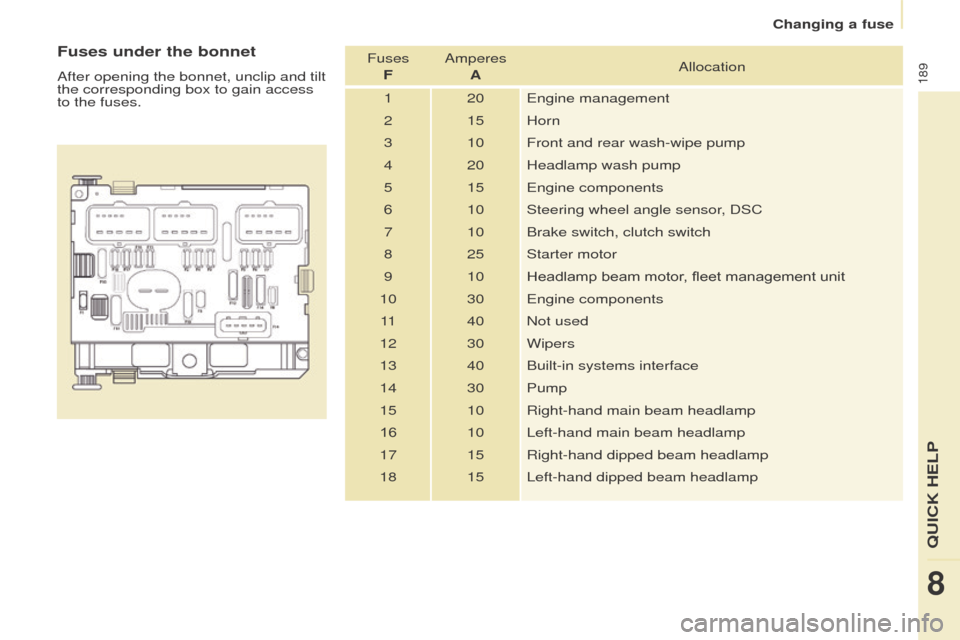
After opening the bonnet, unclip and tilt
the corresponding box to gain access
to the fuses.Fuses
F Amperes
A Allocation
1 20
e
ngine management
2 15 Horn
3 10 Front and rear wash-wipe pump
4 20 Headlamp wash pump
5 15
e
ngine components
6 10 Steering wheel angle sensor, DSC
7 10 Brake switch, clutch switch
8 25 Starter motor
9 10 Headlamp beam motor, fleet management unit
10 30
e
ngine components
11 40 Not used
12 30 Wipers
13 40 Built-in systems interface
14 30 Pump
15 10 Right-hand main beam headlamp
16 10 Left-hand main beam headlamp
17 15 Right-hand dipped beam headlamp
18 15 Left-hand dipped beam headlamp
8
QuICK HeLP
Changing a fuse
Page 193 of 296
191
Without lifting (4 wheels on the
road)
You should always use a towing arm.
BeINg toWeD
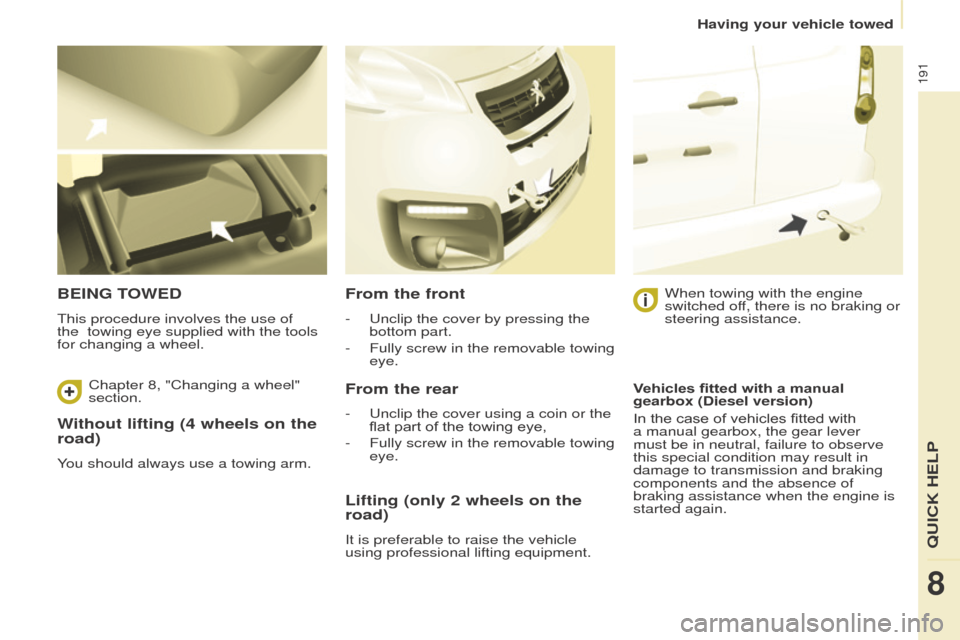
This procedure involves the use of
the towing eye supplied with the tools
for changing a wheel.
From the front
- unclip the cover by pressing the
bottom part.
-
Fully screw in the removable towing
eye.
From the rear
- unclip the cover using a coin or the
flat part of the towing eye,
-
Fully screw in the removable towing
eye. When towing with the engine
switched of
f, there is no braking or
steering assistance.
Lifting (only 2 wheels on the
road)
It is preferable to raise the vehicle
using professional lifting equipment. Vehicles fitted with a manual
gearbox (Diesel version)
In the case of vehicles fitted with
a manual gearbox, the gear lever
must be in neutral, failure to observe
this special condition may result in
damage to transmission and braking
components and the absence of
braking assistance when the engine is
started again.
Chapter 8, "Changing a wheel"
section.
8
QuICK HeLP
Having your vehicle towed
Page 203 of 296
2017-inch touch screen
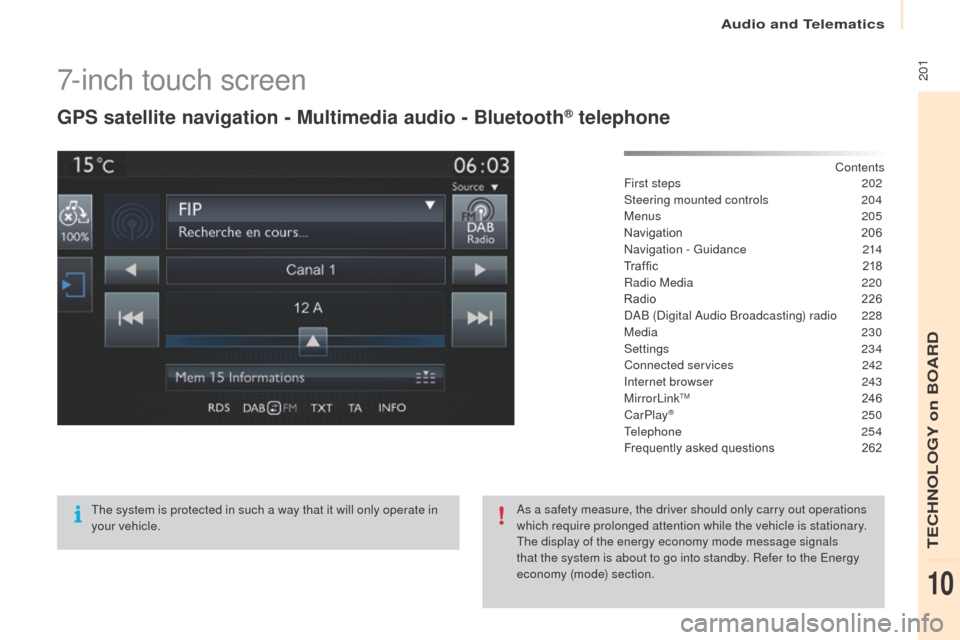
gPS satellite navigation - Multimedia audio - Bluetooth® telephone
Contents
First steps
2 02
Steering mounted controls
20
4
Menus
205
Navigation
2
06
Navigation -
g
u
idance
2
14
Tr a f fi c
2
18
Radio Media
2
20
Radio
2
26
DAB (Digital Audio Broadcasting) radio
2
28
Media
230
Settings
234
Connected services
2
42
Internet browser
2
43
MirrorLink
TM 24 6
CarPlay® 250
T
elephone
254
Frequently asked questions
2
62
The system is protected in such a way that it will only operate in
your vehicle. As a safety measure, the driver should only carry out operations
which require prolonged attention while the vehicle is stationary.
The display of the energy economy mode message signals
that the system is about to go into standby. Refer to the
e
n
ergy
economy (mode) section.
Audio and Telematics
TeCHNoLogY on BoARD
10
Page 206 of 296
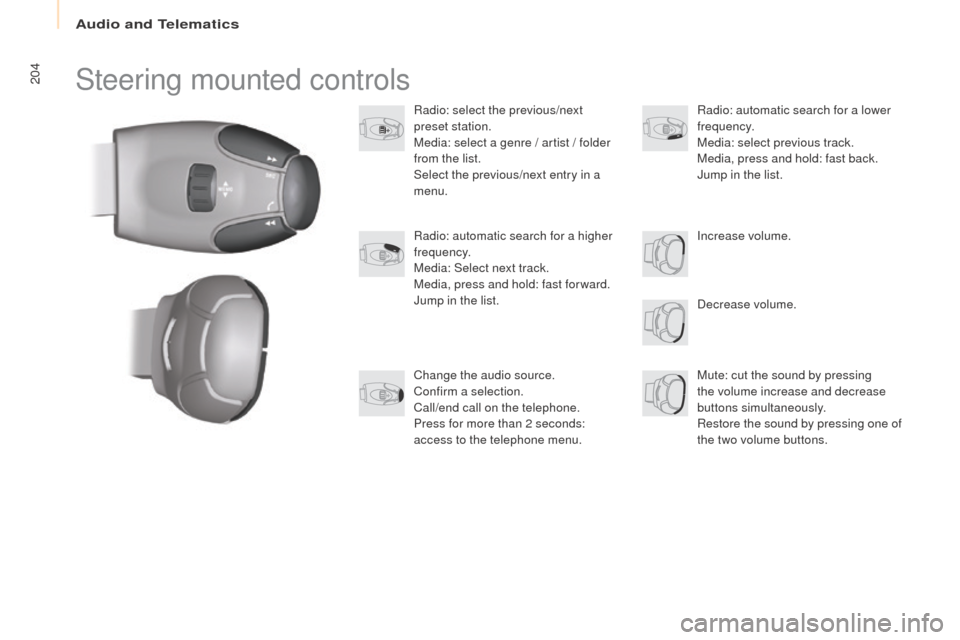
204Steering mounted controls
Radio: select the previous/next
preset station.
Media: select a genre / artist / folder
from the list.
Select the previous/next entry in a
menu.Decrease volume.
Radio: automatic search for a higher
frequency.
Media: Select next track.
Media, press and hold: fast for ward.
Jump in the list.
Mute: cut the sound by pressing
the volume increase and decrease
buttons simultaneously.
Restore the sound by pressing one of
the two volume buttons. Radio: automatic search for a lower
frequency.
Media: select previous track.
Media, press and hold: fast back.
Jump in the list.
Change the audio source.
Confirm a selection.
Call/end call on the telephone.
Press for more than 2 seconds:
access to the telephone menu. Increase volume.
Audio and Telematics
Page 232 of 296
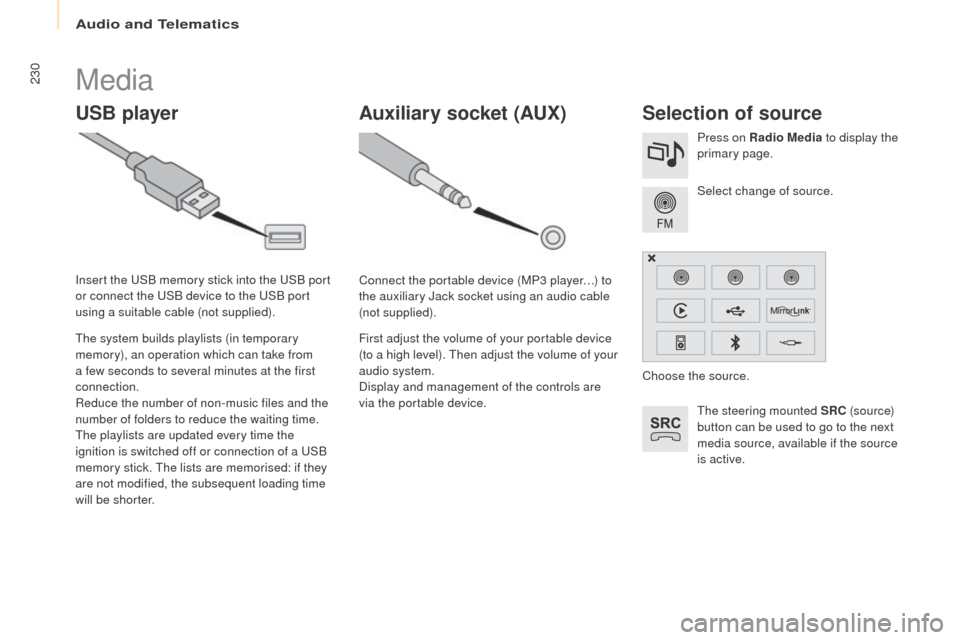
230Media
uSB playerSelection of source
The steering mounted SRC (s o u r c e)
button can be used to go to the next
media source, available if the source
is active. Select change of source. Press on Radio Media to display the
primary page.
The system builds playlists (in temporary
memory), an operation which can take from
a few seconds to several minutes at the first
connection.
Reduce the number of non-music files and the
number of folders to reduce the waiting time.
The playlists are updated every time the
ignition is switched off or connection of a
u
S
B
memory stick. The lists are memorised: if they
are not modified, the subsequent loading time
will be shorter. Insert the
u
S
B memory stick into the
u
S
B port
or connect the
u
S
B device to the
u
S
B port
using a suitable cable (not supplied).
Auxiliary socket (Au x)
Connect the portable device (MP3 player…) to
the auxiliary Jack socket using an audio cable
(not supplied).
First adjust the volume of your portable device
(to a high level). Then adjust the volume of your
audio system.
Display and management of the controls are
via the portable device. Choose the source.
Audio and Telematics
Page 262 of 296
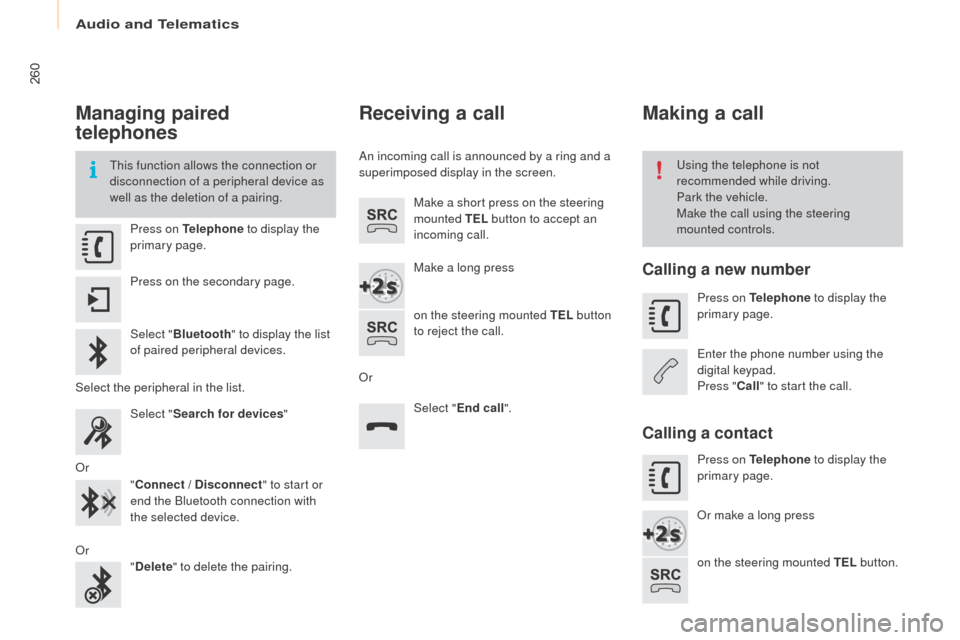
260
Managing paired
telephones
This function allows the connection or
disconnection of a peripheral device as
well as the deletion of a pairing.using the telephone is not
recommended while driving.
Park the vehicle.
Make the call using the steering
mounted controls.
Press on
t
el
ephone to display the
primary page.
Press on the secondary page.
Select " Bluetooth " to display the list
of paired peripheral devices.
Select the peripheral in the list. Select "Search for devices "
o
r "Connect / Disconnect " to start or
end the Bluetooth connection with
the selected device.
o
r "Delete " to delete the pairing.
Receiving a call
An incoming call is announced by a ring and a
superimposed display in the screen.
Make a short press on the steering
mounted
te
L b
utton to accept an
incoming call.
Make a long press
on the steering mounted
te
L b
utton
to reject the call.
o
r Select "
end
call".
Making a call
Calling a new number
Press on telephone to display the
primary page.
en
ter the phone number using the
digital keypad.
Press " Call" to start the call.
Calling a contact
Press on tel ephone to display the
primary page.
or m
ake a long press
on the steering mounted
te
L b
utton.
Audio and telematics
Page 271 of 296
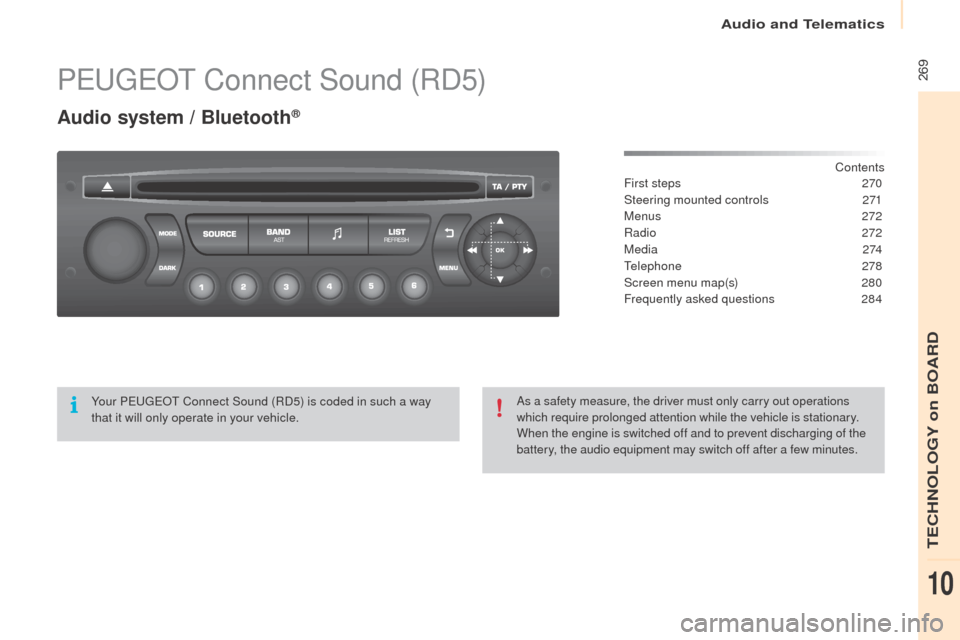
269PeugeoT Connect Sound (RD5)
Audio system / Bluetooth®
Contents
First steps
2 70
Steering mounted controls
2
71
Menus
2
72
Radio
272
M e d i a
2
74
Telephone
2
78
Screen menu map(s)
2
80
Frequently asked questions
2
84
Yo u r Peugeo
T
C
onnect Sound (RD5) is coded in such a way
that it will only operate in your vehicle. As a safety measure, the driver must only carry out operations
which require prolonged attention while the vehicle is stationary.
When the engine is switched off and to prevent discharging of the
battery, the audio equipment may switch off after a few minutes.
Audio and Telematics
TeCHNoLogY on BoARD
10
Page 273 of 296
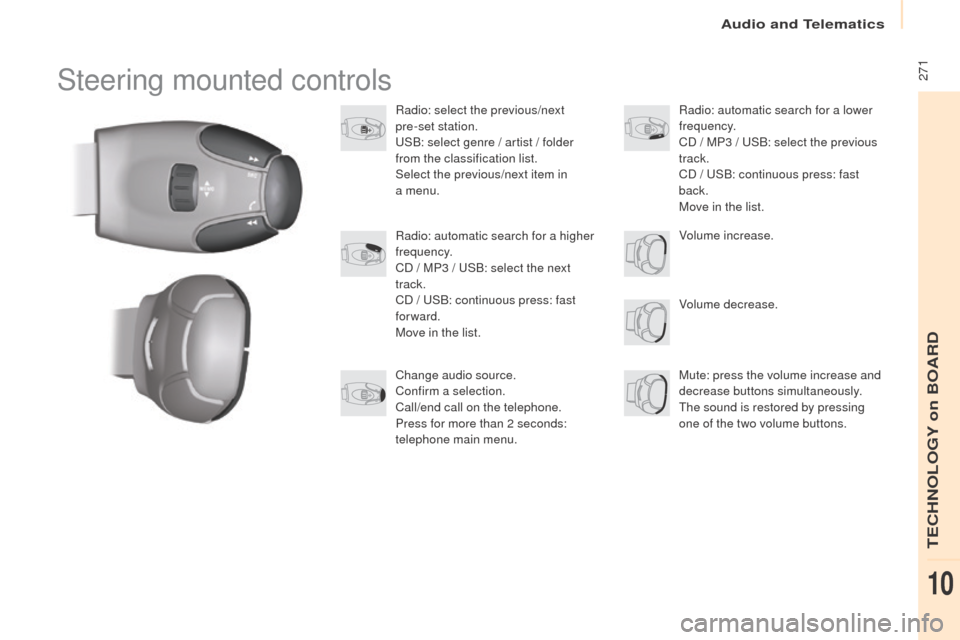
271Steering mounted controls
Radio: select the previous/next
pre-set station.
uS
B: select genre / artist / folder
from the classification list.
Select the previous/next item in
a
menu.
Volume decrease.
Radio: automatic search for a higher
frequency.
CD / MP3 /
u
S
B: select the next
track.
CD /
u
S
B: continuous press: fast
forward.
Move in the list.
Mute: press the volume increase and
decrease buttons simultaneously.
The sound is restored by pressing
one of the two volume buttons. Radio: automatic search for a lower
frequency.
CD / MP3 / u
S
B: select the previous
track.
CD /
u
S
B: continuous press: fast
back.
Move in the list.
Change audio source.
Confirm a selection.
Call/end call on the telephone.
Press for more than 2 seconds:
telephone main menu. Volume increase.
Audio and Telematics
TeCHNoLogY on BoARD
10
Page 279 of 296
277
use only uS B memory sticks formatted FAT32
(File Allocation Table).
It is recommended that you use
genuine Apple
® uSB cables for correct
operation.
*
I
n certain cases, play of the audio files must
be initiated from the keypad.
** If the telephone supports the function.
Bluetooth® audio streaming
Streaming allows music files on the telephone
to be played via the audio system.
Connect the telephone: see the "
tel
ephone"
section.
Select in the " Bluetooth:
t
e
lephone - Audio"
menu the telephone to be connected.
The audio system connects to a newly paired
telephone automatically.
Control of tracks to be played is via the buttons
on the audio system control panel and the
steering mounted controls**. The contextual
information can be displayed in the screen. Activate the streaming source by
pressing the S
o
u
RCe b
ut to n*.
Connecting Apple® players
Connect the Apple® player to the uSB port
using a suitable cable (not supplied).
Play starts automatically.
Control is via the audio system.
The classifications available are those of the
portable device connected (artists / albums /
genres / playlists / audiobooks / podcasts).
The version of software in the audio system
may not be compatible with the generation of
your Apple
® p l aye r.
Audio and Telematics
TeCHNoLogY on BoARD
10