lock Peugeot Partner Tepee 2017 Service Manual
[x] Cancel search | Manufacturer: PEUGEOT, Model Year: 2017, Model line: Partner Tepee, Model: Peugeot Partner Tepee 2017Pages: 292, PDF Size: 10.49 MB
Page 163 of 292
161
Partner2VP_en_Chap07_Verification_ed02-2016Partner2VP_en_Chap07_Verification_ed02-2016
REFUELLING
Low fuel level
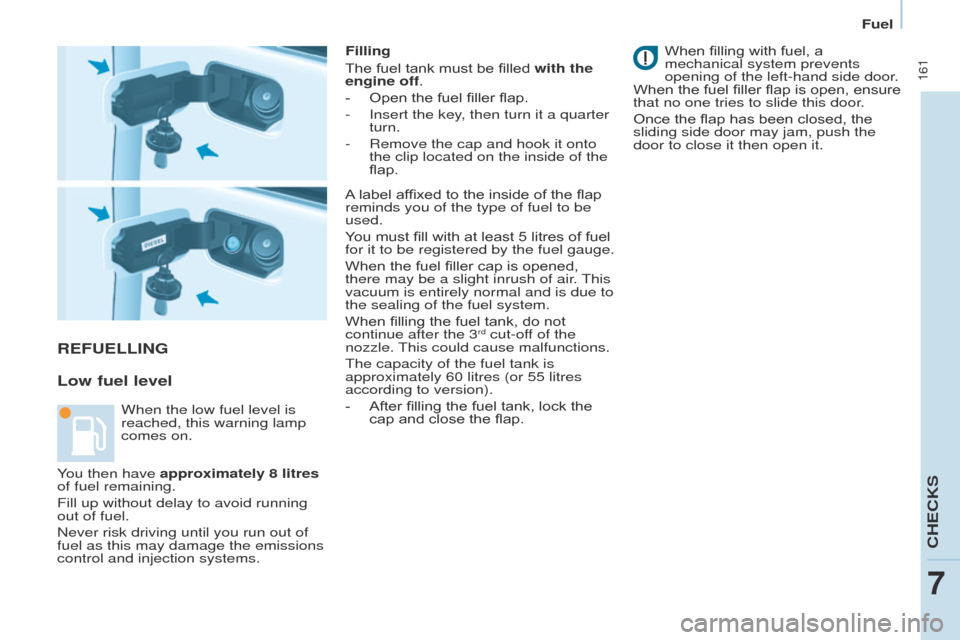
Filling
The fuel tank must be filled with the
engine off.
-
Open the fuel filler flap.
-
Insert the key
, then turn it a quarter
turn.
-
Remove the cap and hook it onto
the clip located on the inside of the
flap. When fillin
g with fuel, a
mechanical system prevents
opening of the left-hand side door.
When the fuel filler flap is open, ensure
that no one tries to slide this door.
Once the flap has been closed, the
sliding side door may jam, push the
door to close it then open it.
When the low fuel level is
reached, this warning lamp
comes on. A label affixed to the inside of the flap
reminds you of the type of fuel to be
used.
You must fill with at least 5 litres of fuel
for it to be registered by the fuel gauge.
When the fuel filler cap is opened,
there may be a slight inrush of air. This
vacuum is entirely normal and is due to
the sealing of the fuel system.
When filling the fuel tank, do not
continue after the 3
rd cut-off of the
nozzle. This could cause malfunctions.
The capacity of the fuel tank is
approximately 60 litres (or 55 litres
according to version).
-
After fillin
g the fuel tank, lock the
cap and close the flap.
You then have approximately 8 litres
of fuel remaining.
Fill up without delay to avoid running
out of fuel.
Never risk driving until you run out of
fuel as this may damage the emissions
control and injection systems.
CHECKS
7
Fuel
Page 183 of 292
181
Partner2VP_en_Chap08_Aide-rapide_ed02-2016Partner2VP_en_Chap08_Aide-rapide_ed02-2016
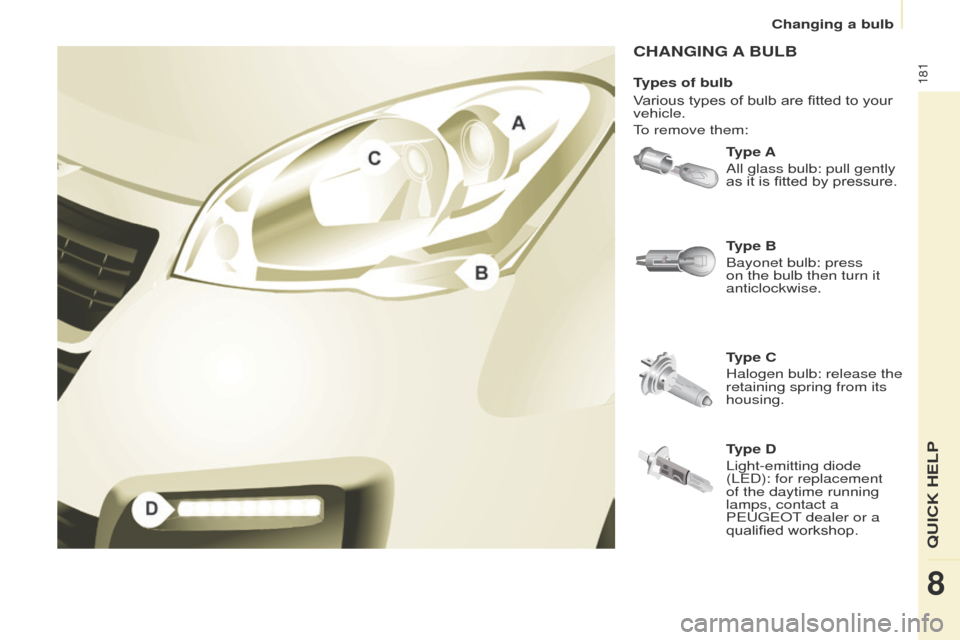
CHANGING A BULB
Type A
All glass bulb: pull gently
as it is fitted by pressure.
Type C
Halogen bulb: release the
retaining spring from its
housing. Type B
Bayonet bulb: press
on the bulb then turn it
anticlockwise.
Types of bulb
Various types of bulb are fitted to your
vehicle.
To remove them:
Type D
Light-emitting diode
(LED): for replacement
of the daytime running
lamps, contact a
PEUGEOT dealer or a
qualified workshop.
QUICK HELP
8
Changing a bulb
Page 185 of 292
183
Partner2VP_en_Chap08_Aide-rapide_ed02-2016Partner2VP_en_Chap08_Aide-rapide_ed02-2016
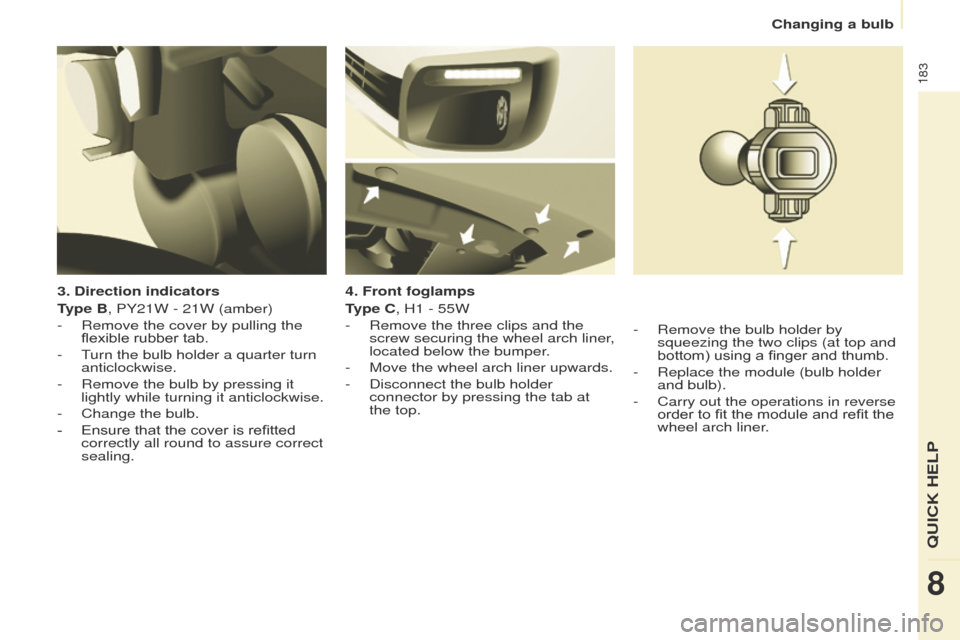
3. Direction indicators
Type B, PY21W - 21W (amber)
-
Remove the cover by pullin
g the
flexible rubber tab.
-
T
urn the bulb holder a quarter turn
anticlockwise.
-
Remove the bulb by pressing it
lightly while turning it anticlockwise.
-
Change the bulb.
-
Ensure that the cover is refitted
correctly all round to assure correct
sealing. 4. Front foglamps
T
ype C, H1 - 55W
-
Remove the three clips and the
screw securing the wheel arch liner
,
located below the bumper.
-
Move the wheel arch liner upwards.
-
Disconnect the bulb holder
connector by pressing the tab at
the top.-
Remove the bulb holder by
squeezing the two clips (at top and
bottom) using a finger and thumb.
-
Replace the module (bulb holder
and bulb).
-
Carry out the operations in reverse
order to fit the module and refit the
wheel arch liner
.
QUICK HELP
8
Changing a bulb
Page 187 of 292
185
Partner2VP_en_Chap08_Aide-rapide_ed02-2016Partner2VP_en_Chap08_Aide-rapide_ed02-2016
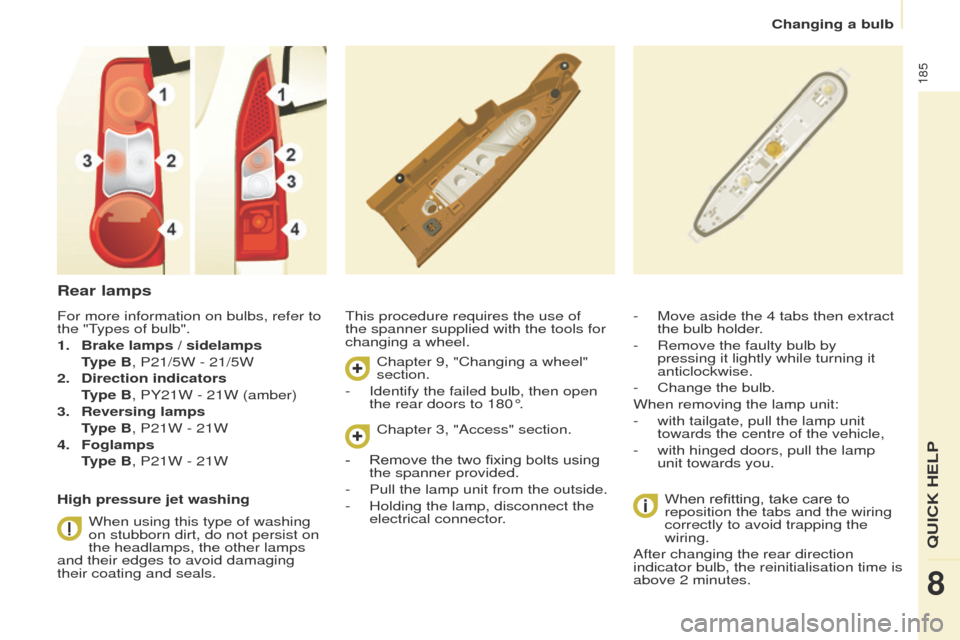
Rear lamps
This procedure requires the use of
the spanner supplied with the tools for
changing a wheel.When refitting, take care to
reposition the tabs and the wiring
correctly to avoid trapping the
wiring.
After changing the rear direction
indicator bulb, the reinitialisation time is
above 2 minutes. - Move aside the 4 tabs then extract
the bulb holder
.
-
Remove the faulty bulb by
pressing it lightly while turning it
anticlockwise.
-
Change the bulb.
When removing the lamp unit:
-
with tailgate, pull the lamp unit
towards the centre of the vehicle,
-
with hinged doors, pull the lamp
unit towards you.
For more information on bulbs, refer to
the "T
ypes of bulb".
1.
Brake lamps / sidelamps
T
ype B, P21/5W - 21/5W
2.
Direction indicators
T
ype B, PY21W - 21W (amber)
3.
Reversing lamps
T
ype B, P21W - 21W
4.
Foglamps
T
ype B, P21W - 21W
High pressure jet washing When using this type of washing
on stubborn dirt, do not persist on
the headlamps, the other lamps
and their edges to avoid damaging
their coating and seals. Chapter 9, "Changing a wheel"
section.
-
Identify the failed bulb, then open
the rear doors to 180°. Chapter 3, "Access" section.
-
Remove the two fixing bolts using
the spanner provided.
-
Pull the lamp unit from the outside.
-
Holding the lamp, disconnect the
electrical connector
.
QUICK HELP
8
Changing a bulb
Page 188 of 292
186
Partner2VP_en_Chap08_Aide-rapide_ed02-2016Partner2VP_en_Chap08_Aide-rapide_ed02-2016
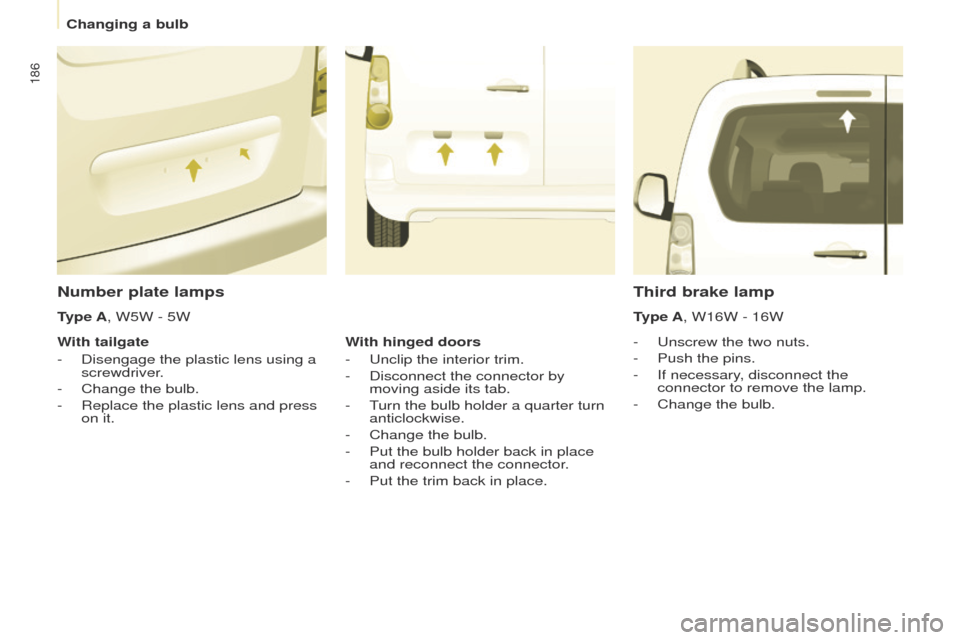
Number plate lamps
- Unscrew the two nuts.
-
Push the pins.
-
If necessary
, disconnect the
connector to remove the lamp.
-
Change the bulb.
Third brake lamp
Type A, W16W - 16W
Type A, W5W - 5W
With tailgate
-
Disengage the plastic lens using a
screwdriver
.
-
Change the bulb.
-
Replace the plastic lens and press
on it. W
ith hinged doors
-
Unclip the interior trim.
-
Disconnect the connector by
moving aside its tab.
-
T
urn the bulb holder a quarter turn
anticlockwise.
-
Change the bulb.
-
Put the bulb holder back in place
and reconnect the connector
.
-
Put the trim back in place.
Changing a bulb
Page 190 of 292
188
Partner2VP_en_Chap08_Aide-rapide_ed02-2016Partner2VP_en_Chap08_Aide-rapide_ed02-2016
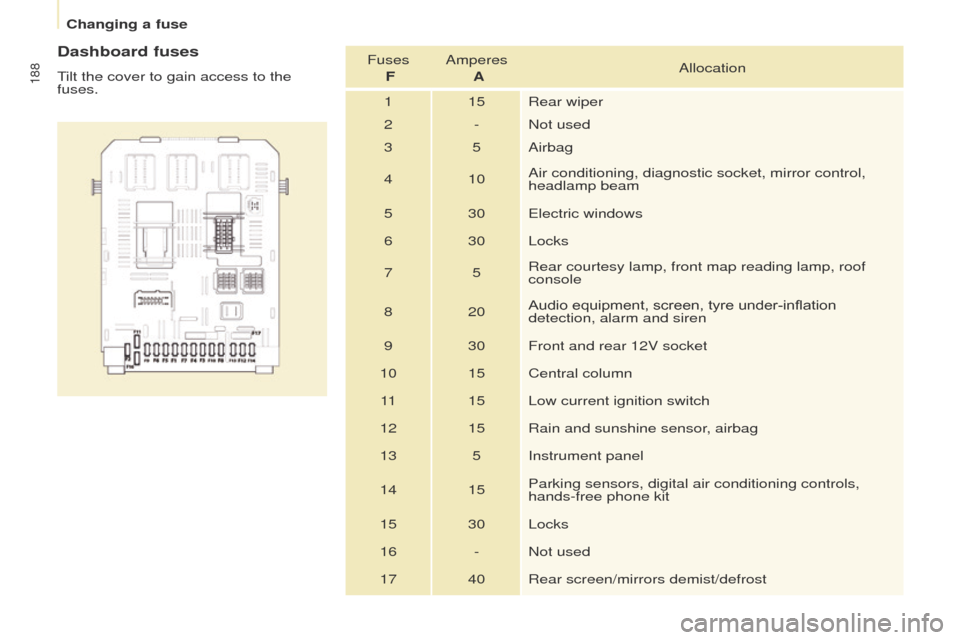
Dashboard fuses
Tilt the cover to gain access to the
fuses.Fuses
F Amperes
A Allocation
1 15 Rear wiper
2 - Not used
3 5 Airbag
4 10 Air conditioning, diagnostic socket, mirror control,
headlamp beam
5 30 Electric windows
6 30 Locks
7 5Rear courtesy lamp, front map reading lamp, roof
console
8 20 Audio equipment, screen, tyre under-inflation
detection, alarm and siren
9 30 Front and rear 12V socket
10 15 Central column 11 15 Low current ignition switch
12 15 Rain and sunshine sensor, airbag
13 5 Instrument panel
14 15 Parking sensors, digital air conditioning controls,
hands-free phone kit
15 30 Locks
16 - Not used
17 40 Rear screen/mirrors demist/defrost
Changing a fuse
Page 245 of 292
243
Partner2VP_en_Chap10a_SMEGplus_ed02-2016
As a safety measure and because it
requires sustained attention by the
driver, using a smartphone when
driving is prohibited.
All operations must be done with the
vehicle stationary.
The synchronisation of a
smartphone allows applications on a
smartphone that are adapted to the
MirrorLink
TM technology to be displayed
i
n the vehicle's screen.
The principles and standards
are constantly evolving. For the
communication process between the
smartphone and the system to work
correctly, the smartphone must be
unlocked; update the operating system
of your smartphone as well as the date
and time in the smartphone and the
system.
For the list of eligible smartphones,
connect to the brand's internet website
in your country. As a safety measure, applications
can only be viewed with the vehicle
stationary; display is interrupted once
the vehicle is moving.When connecting a smartphone to
the system, it is recommended that
Bluetooth
® be started on the smartphone.
Start the application on the
smartphone (optional, depending
on the smartphone and operating
syste m).
Access to the different audio sources remains
accessible in the margin of the MirrorLink
TM
display, using touch buttons in the upper bar.
Access to the menus for the system is possible
at any time using the dedicated buttons During the procedure, several screen
pages relating to certain functions
are displayed.
Accept to start and end the
connection.
Connect a USB cable. The
smartphone charges when
connected by a USB cable. Press on " MirrorLink
TM" to
start the application in the
system. Once connection is established, an page
is displayed with the applications already
downloaded to your smartphone and adapted
to MirrorLink
TM technology.
If only one application has been downloaded to
the smartphone, it starts automatically.
MirrorLinkTM smartphone
connection
Press the end of the lighting control stalk to
start voice recognition of your smartphone via
the system.
Voice recognition requires a compatible
smartphone connected to the vehicle by
Bluetooth
®.
Voice recognition
Please note:
-
i f your smartphone is supported, to
make it "MirrorLink
TM" compatible,
some phone manufacturers
nevertheless invite you to first
download a dedicated application.
From the system, press on
" Connected services " to display the
primary page.
Audio and Telematics
TECHNOLOGY on BOARD
10
Page 260 of 292
258
Partner2VP_en_Chap10a_SMEGplus_ed02-2016
Radio
QUESTIONANSWER SOLUTION
The quality of reception of
the radio station listened
to gradually deteriorates
or the stored stations do
not function (no sound,
87.5
Mhz is displayed...). The vehicle is too far from the transmitter used by the station
listened to or there is no transmitter in the geographical area
through which the vehicle is travelling.
Activate the "RDS" function by means of the
short-cut menu to enable the system to check
whether there is a more power ful transmitter in
the geographical area.
The environment (hills, buildings, tunnels, basement car parks...)
block reception, including in RDS mode. This phenomenon is normal and does not indicate
a fault with the audio system.
The aerial is absent or has been damaged (for example when going
through a car wash or into an underground car park). Have the aerial checked by a PEUGEOT dealer.
I cannot find some radio
stations in the list of
stations received. The station is not received or its name has changed in the list. Press on the "Update list" function in the system
to update the list of stations received.
Some radio stations send other information in place of their name
(the title of the song for example).
The system interprets this information as the name of the station.
The name of the radio
station changes.
Audio and Telematics
Page 271 of 292
269
Partner2VP_en_Chap10b_RD45_ed02-2016
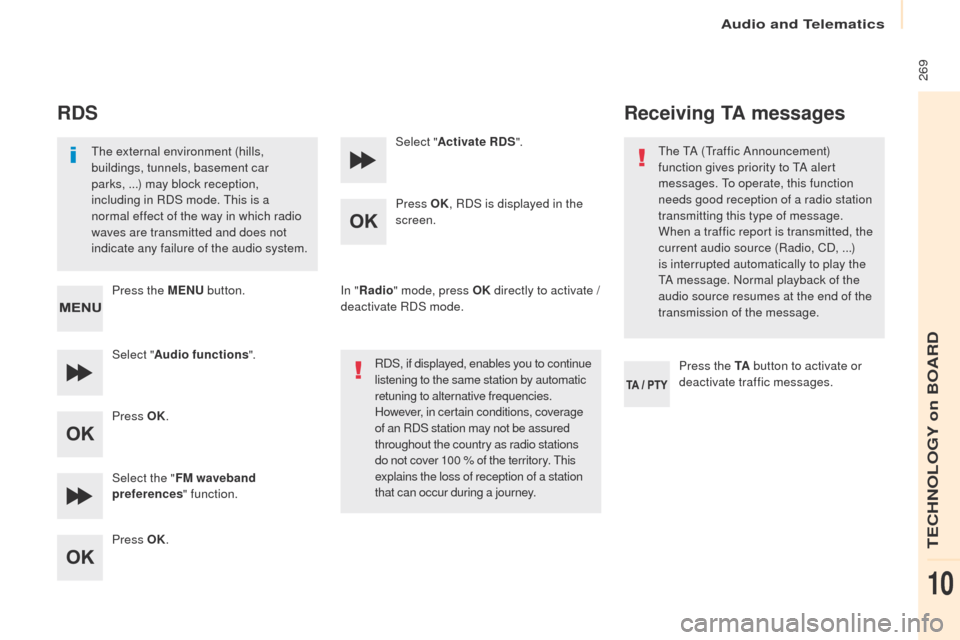
RDS
The external environment (hills,
buildings, tunnels, basement car
parks, ...) may block reception,
including in RDS mode. This is a
normal effect of the way in which radio
waves are transmitted and does not
indicate any failure of the audio system.
Press the MENU button.
Select " Audio functions ".
Press OK.
Select the " FM waveband
preferences " function.
Press OK. Select "
Activate RDS ".
Press OK , RDS is displayed in the
screen.
In " Radio " mode, press OK directly to activate /
deactivate RDS mode.
RDS, if displayed, enables you to continue
listening to the same station by automatic
retuning to alternative frequencies.
However, in certain conditions, coverage
of an RDS station may not be assured
throughout the country as radio stations
do not cover 100 % of the territory. This
explains the loss of reception of a station
that can occur during a journey.
Receiving TA messages
Press the TA button to activate or
deactivate traffic messages.
The TA (Traffic Announcement)
function gives priority to TA alert
messages. To operate, this function
needs good reception of a radio station
transmitting this type of message.
When a traffic report is transmitted, the
current audio source (Radio, CD, ...)
is interrupted automatically to play the
TA message. Normal playback of the
audio source resumes at the end of the
transmission of the message.
Audio and Telematics
TECHNOLOGY on BOARD
10
Page 283 of 292
281
Partner2VP_en_Chap10b_RD45_ed02-2016
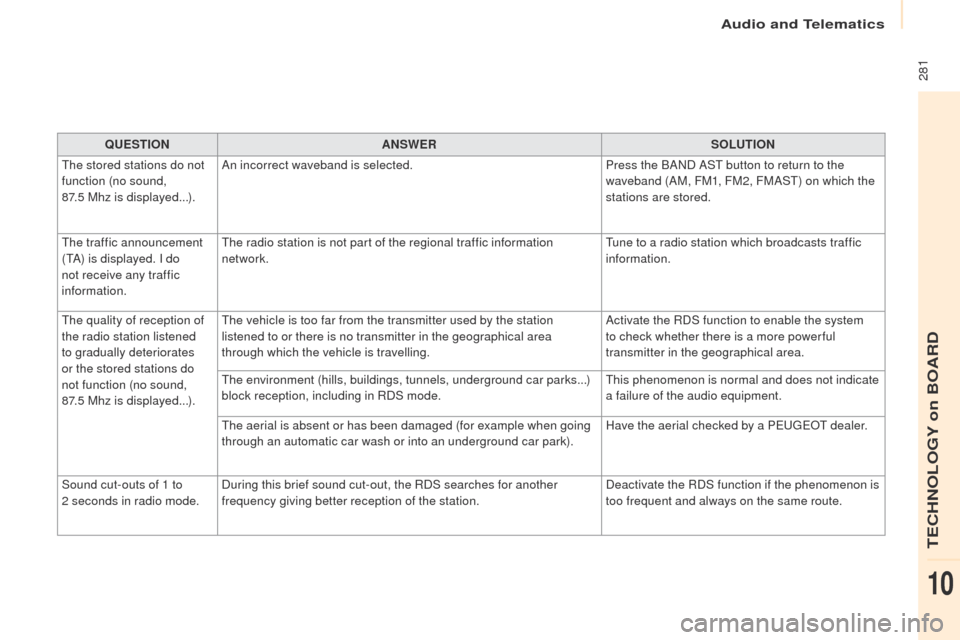
QUESTIONANSWER SOLUTION
The stored stations do not
function (no sound,
87.5 Mhz is displayed...). An incorrect waveband is selected.
Press the BAND AST button to return to the
waveband (AM, FM1, FM2, FMAST) on which the
stations are stored.
The traffic announcement
(TA) is displayed. I do
not receive any traffic
information. The radio station is not part of the regional traffic information
network.
Tune to a radio station which broadcasts traffic
information.
The quality of reception of
the radio station listened
to gradually deteriorates
or the stored stations do
not function (no sound,
87.5
Mhz is displayed...). The vehicle is too far from the transmitter used by the station
listened to or there is no transmitter in the geographical area
through which the vehicle is travelling.
Activate the RDS function to enable the system
to check whether there is a more power ful
transmitter in the geographical area.
The environment (hills, buildings, tunnels, underground car parks...)
block reception, including in RDS mode. This phenomenon is normal and does not indicate
a failure of the audio equipment.
The aerial is absent or has been damaged (for example when going
through an automatic car wash or into an underground car park). Have the aerial checked by a PEUGEOT dealer.
Sound cut-outs of 1 to
2
seconds in radio mode. During this brief sound cut-out, the RDS searches for another
frequency giving better reception of the station. Deactivate the RDS function if the phenomenon is
too frequent and always on the same route.
Audio and Telematics
TECHNOLOGY on BOARD
10