change time PEUGEOT PARTNER TEPEE 2020 User Guide
[x] Cancel search | Manufacturer: PEUGEOT, Model Year: 2020, Model line: PARTNER TEPEE, Model: PEUGEOT PARTNER TEPEE 2020Pages: 216, PDF Size: 8.46 MB
Page 188 of 216
12
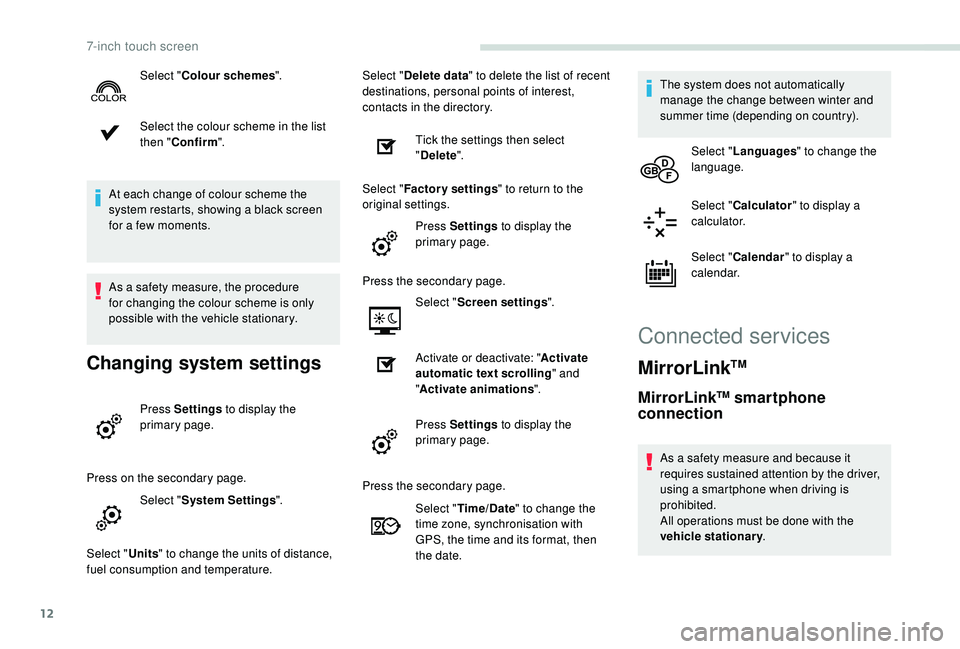
Select the colour scheme in the list
then "Confirm ".
At each change of colour scheme the
system restarts, showing a black screen
for a few moments.
As a safety measure, the procedure
for changing the colour scheme is only
possible with the vehicle stationary.
Changing system settings
Press Settings to display the
primary page.
Press on the secondary page. Select "System Settings ".
Select " Units" to change the units of distance,
fuel consumption and temperature. Select "
Delete data " to delete the list of recent
destinations, personal points of interest,
contacts in the directory.
Tick the settings then select
"Delete ".
Select " Factory settings " to return to the
original settings.
Press Settings to display the
primary page.
Press the secondary page. Select "Screen settings ".
Activate or deactivate: " Activate
automatic text scrolling " and
" Activate animations ".
Press Settings to display the
primary page.
Select "
Colour schemes ".
Press the secondary page.Select "Time/Date " to change the
time zone, synchronisation with
GPS, the time and its format, then
the date. The system does not automatically
manage the change between winter and
summer time (depending on country).
Select " Languages " to change the
language.
Select " Calculator " to display a
calculator.
Select " Calendar " to display a
calendar.
Connected services
MirrorLinkTM
MirrorLinkTM smartphone
connection
As a safety measure and because it
requires sustained attention by the driver,
using a smartphone when driving is
prohibited.
All operations must be done with the
vehicle stationary .
7-inch touch screen
Page 191 of 216
15
Procedure from the system
Activate the Bluetooth® function on the
telephone and ensure that it is "visible to all"
(telephone configuration).
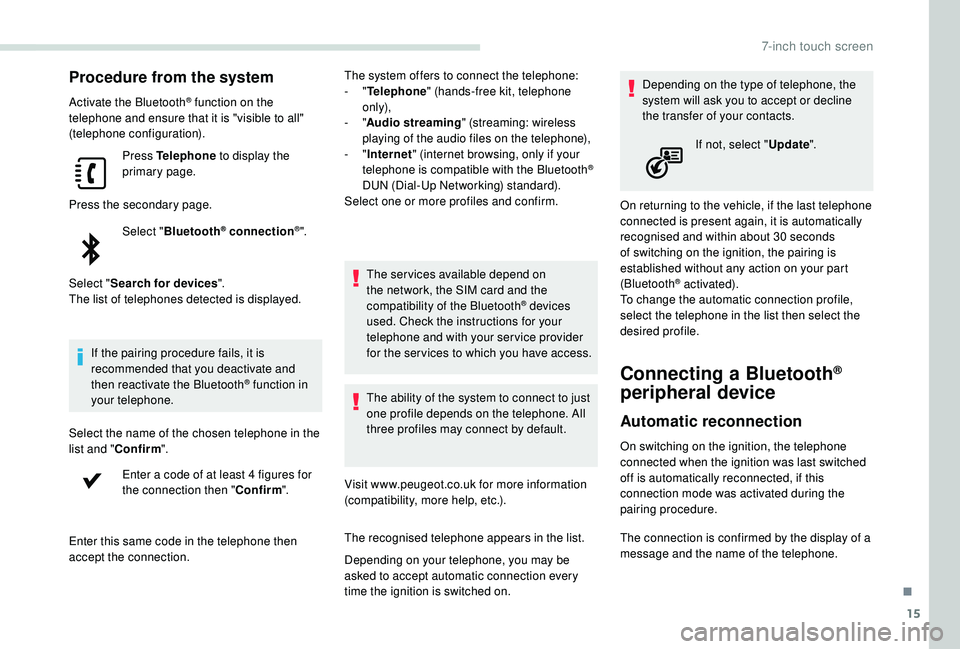
Press Telephone to display the
primary page.
Press the secondary page. Select "Bluetooth
® connection®".
Select " Search for devices ".
The list of telephones detected is displayed.
If the pairing procedure fails, it is
recommended that you deactivate and
then reactivate the Bluetooth
® function in
your telephone.
Select the name of the chosen telephone in the
list and " Confirm ".
Enter a code of at least 4 figures for
the connection then " Confirm".
Enter this same code in the telephone then
accept the connection. The system offers to connect the telephone:
-
"
Telephone " (hands-free kit, telephone
only),
- "
Audio streaming " (streaming: wireless
playing of the audio files on the telephone),
- "
Internet " (internet browsing, only if your
telephone is compatible with the Bluetooth
®
DUN (Dial-Up Networking) standard).
Select one or more profiles and confirm.
The services available depend on
the network, the SIM card and the
compatibility of the Bluetooth
® devices
used. Check the instructions for your
telephone and with your service provider
for the ser vices to which you have access.
The ability of the system to connect to just
one profile depends on the telephone. All
three profiles may connect by default.
Visit www.peugeot.co.uk for more information
(compatibility, more help, etc.).
The recognised telephone appears in the list.
Depending on your telephone, you may be
asked to accept automatic connection every
time the ignition is switched on. Depending on the type of telephone, the
system will ask you to accept or decline
the transfer of your contacts.
On returning to the vehicle, if the last telephone
connected is present again, it is automatically
recognised and within about 30 seconds
of switching on the ignition, the pairing is
established without any action on your part
(Bluetooth
® activated).
To change the automatic connection profile,
select the telephone in the list then select the
desired profile.
Connecting a Bluetooth®
peripheral device
Automatic reconnection
On switching on the ignition, the telephone
connected when the ignition was last switched
off is automatically reconnected, if this
connection mode was activated during the
pairing procedure. If not, select "
Update".
The connection is confirmed by the display of a
message and the name of the telephone.
.
7-inch touch screen
Page 194 of 216
18
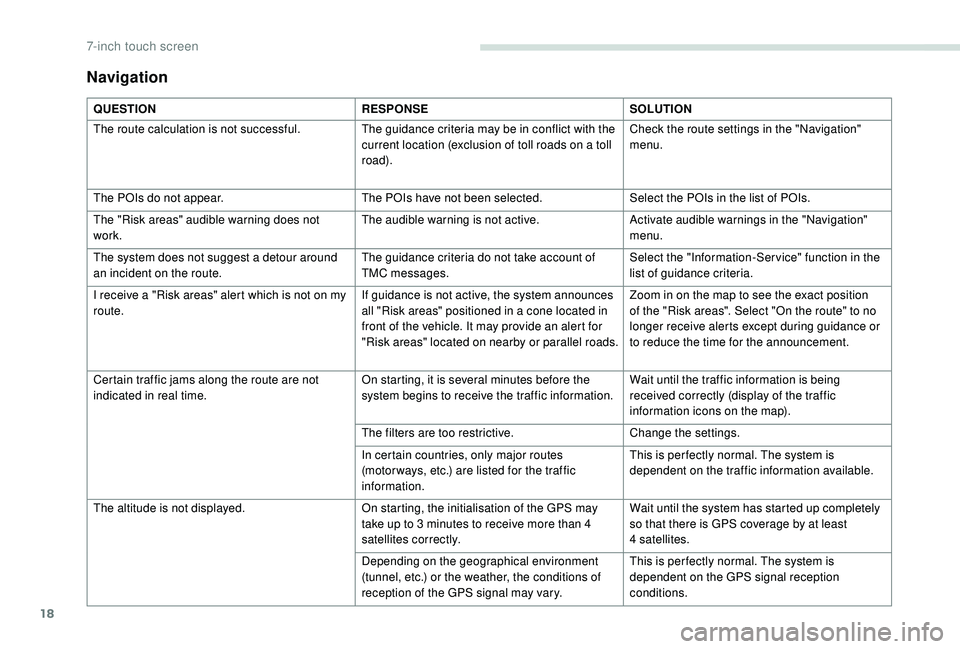
Navigation
QUESTIONRESPONSESOLUTION
The route calculation is not successful. The guidance criteria may be in conflict with the
current location (exclusion of toll roads on a toll
road).Check the route settings in the "Navigation"
menu.
The POIs do not appear. The POIs have not been selected.Select the POIs in the list of POIs.
The "Risk areas" audible warning does not
work. The audible warning is not active.
Activate audible warnings in the "Navigation"
menu.
The system does not suggest a detour around
an incident on the route. The guidance criteria do not take account of
TMC messages.Select the "Information-Ser vice" function in the
list of guidance criteria.
I receive a "Risk areas" alert which is not on my
route. If guidance is not active, the system announces
all "Risk areas" positioned in a cone located in
front of the vehicle. It may provide an alert for
"Risk areas" located on nearby or parallel roads.Zoom in on the map to see the exact position
of the "Risk areas". Select "On the route" to no
longer receive alerts except during guidance or
to reduce the time for the announcement.
Certain traffic jams along the route are not
indicated in real time. On starting, it is several minutes before the
system begins to receive the traffic information.Wait until the traffic information is being
received correctly (display of the traffic
information icons on the map).
The filters are too restrictive. Change the settings.
In certain countries, only major routes
(motor ways, etc.) are listed for the traffic
information. This is per fectly normal. The system is
dependent on the traffic information available.
The altitude is not displayed. On starting, the initialisation of the GPS may
take up to 3
minutes to receive more than 4
satellites correctly. Wait until the system has started up completely
so that there is GPS coverage by at least
4
satellites.
Depending on the geographical environment
(tunnel, etc.) or the weather, the conditions of
reception of the GPS signal may vary. This is per fectly normal. The system is
dependent on the GPS signal reception
conditions.
7-inch touch screen
Page 197 of 216
21
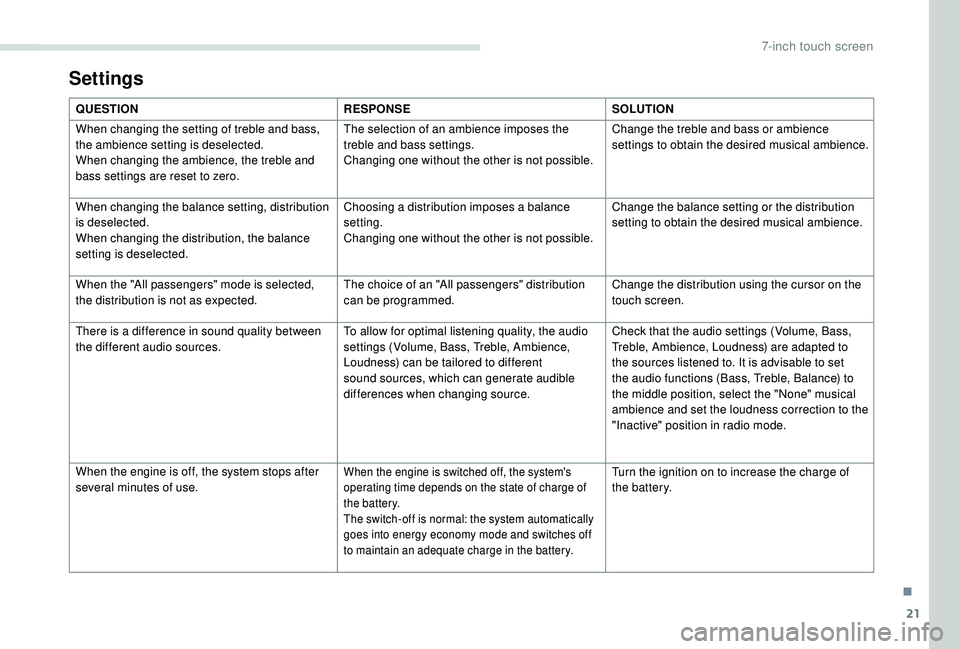
Settings
QUESTIONRESPONSESOLUTION
When changing the setting of treble and bass,
the ambience setting is deselected.
When changing the ambience, the treble and
bass settings are reset to zero. The selection of an ambience imposes the
treble and bass settings.
Changing one without the other is not possible.
Change the treble and bass or ambience
settings to obtain the desired musical ambience.
When changing the balance setting, distribution
is deselected.
When changing the distribution, the balance
setting is deselected. Choosing a distribution imposes a balance
setting.
Changing one without the other is not possible.
Change the balance setting or the distribution
setting to obtain the desired musical ambience.
When the "All passengers" mode is selected,
the distribution is not as expected. The choice of an "All passengers" distribution
can be programmed.Change the distribution using the cursor on the
touch screen.
There is a difference in sound quality between
the different audio sources. To allow for optimal listening quality, the audio
settings (Volume, Bass, Treble, Ambience,
Loudness) can be tailored to different
sound sources, which can generate audible
differences when changing source.Check that the audio settings (Volume, Bass,
Treble, Ambience, Loudness) are adapted to
the sources listened to. It is advisable to set
the audio functions (Bass, Treble, Balance) to
the middle position, select the "None" musical
ambience and set the loudness correction to the
"Inactive" position in radio mode.
When the engine is off, the system stops after
several minutes of use.
When the engine is switched off, the system's
operating time depends on the state of charge of
the battery.
The switch-off is normal: the system automatically
goes into energy economy mode and switches off
to maintain an adequate charge in the battery.Turn the ignition on to increase the charge of
the battery.
.
7-inch touch screen