clock PONTIAC BONNEVILLE 1993 Owners Manual
[x] Cancel search | Manufacturer: PONTIAC, Model Year: 1993, Model line: BONNEVILLE, Model: PONTIAC BONNEVILLE 1993Pages: 322, PDF Size: 16.31 MB
Page 85 of 322
Features & Controls
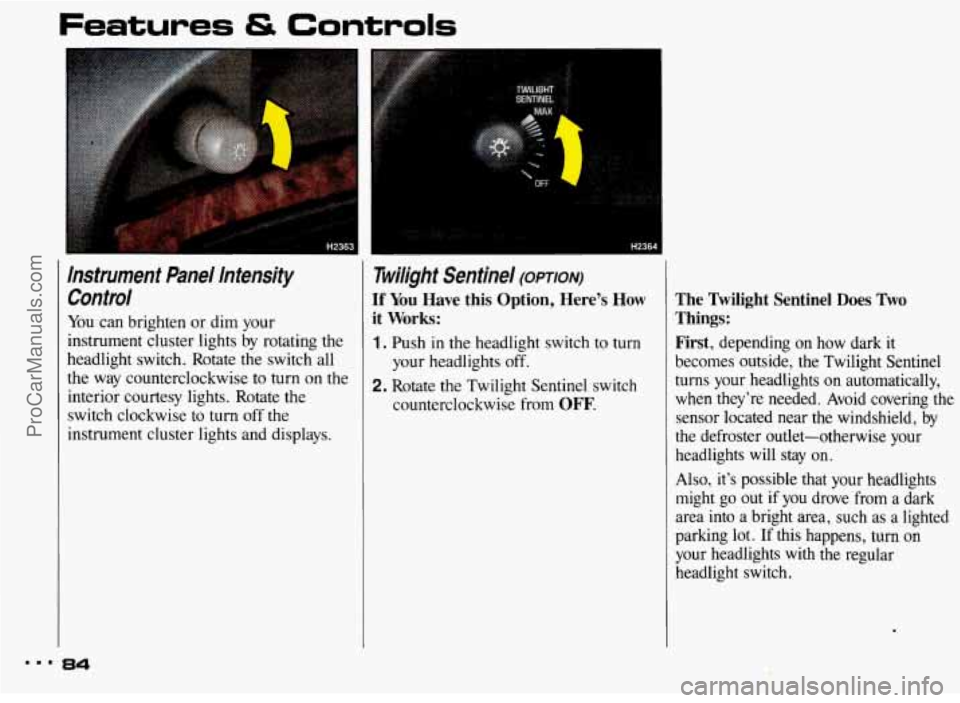
Instrument Panel Intensity Control
You can brighten or dim your
instrument cluster lights by rotating the
headlight switch. Rotate the switch all
the way counterclockwise to turn on the
interior courtesy lights. Rotate the
switch clockwise to turn off the
instrument cluster lights and displays.
~ Twilight Sentinel (opTIoN)
If You Have this Option, Here’s How
1. Push in the headlight switch to turn
2. Rotate the Twilight Sentinel switch
l it Works:
your headlights off.
counterclockwise from
OFF.
The Twilight Sentinel Does Two
Things: First,
depending on how dark it
becomes outside, the Twilight Sentinel
turns your headlights on automatically,
when they’re needed. Avoid covering the
sensor located near the windshield, by
the defroster outlet-otherwise your
headlights will
stay on.
Also, it’s possible that your headlights might go out if you drove from a dark
area into
a bright area, such as a lighted
parking lot. If this happens, turn on
your headlights with the regular
headlight switch.
mmm 84
ProCarManuals.com
Page 120 of 322
In this part you’ll find out how to
operate the comfort control systems
and audio systems offered with your
Pontiac. Be sure to read about the
particular system supplied with your
vehicle.
Part 3
Comfort Controls &
Audio Systems n
..................................... Standard Climate Control. .l20
Electronic Climate Control 123
AM/FM Stereo Radio .128
AM/FM Stereo with Cassette Player and Graphic Equalizer ................ 131
.........................................
................................. Setting the Clock .............. .E7
AMlFM Stereo with Cassette Player ................................. .I29
AM/FM Stereo with Compact Disc Player ............................ .134
Steering Wheel Controls for Audio System ............................ .139
Understanding Radio Reception
..................................... .140
Care of Your Cassette Tape Player ................................... .141
............................................
Gaincontrol .................................................... 140
.......................................
.............................................
........................................
Care of Your Compact Discs .141
Fixed Mast Antenna.
.I42
Power Antenna Mast Care .I42
119 = =
ProCarManuals.com
Page 128 of 322
Before you add any sound equipment to your vehicle-like a
tape player, CB radio, mobile
telephone or two-way radio-be
sure you can add what
you want. If
you can, it’s very important to do it
properly. Added sound equipment
may interfere with the operation
of
your vehicle’s engine, Delco@ radio
or other systems, and can even
damage them. And, your vehicle’s systems may interfere with the
operation of sound equipment that
has been added improperly.
So, before adding sound
equipment, check with your dealer and be sure to check federal rules
covering mobile radio and
telephone units.
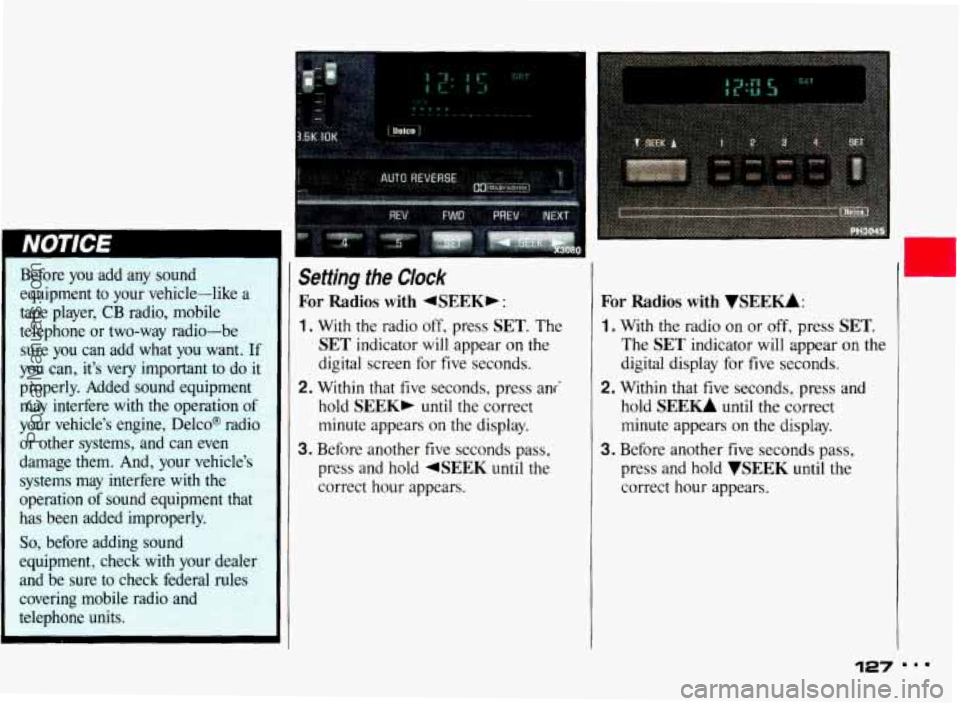
Setting the Clock
For Radios with 4SEEKb :
1. With the radio off, press SET. The
SET indicator will appear on the
digital screen for five seconds.
2. Within that five seconds, press ani
hold
SEEK, until the correct
minute appears
on the display.
3. Before another five seconds pass,
press and hold
4SEEK until the
correct hour appears.
For Radios with VSEEU:
1. With the radio on or off, press SET.
The SET indicator will appear on the
digital display for five seconds.
2. Within that five seconds, press and
hold
SEE- until the correct
minute appears
on the display.
3. Before another five seconds pass,
press and hold
WEEK until the
correct hour appears.
127 ...
ProCarManuals.com
Page 137 of 322
Comfort Controls & Audio Systems
Compact Disc Controk (CONI)
While a disc is playing, the CD indi-
cator is displayed on the digital screen,
as is the clock.
RCL (Recall): Press once to see which
track
is playing. Press again while the
track number
is displayed to see how
long your selection has been playing.
The track number also will be displayed
when the volume is changed
or a new
track starts to play.
COMP (Compression): Depressing this
button makes
soft and loud passages
more equal in volume. Press again to
resume
normal play.
RDM (Random): Press to play
random order.
-
tracks in
REV (Reverse): Press and hold to
rapidly back up to a favorite passage.
Release
to resume playing.
FWD (Fast Forward): Press and hold
to rapidly advance the disc. Release to
resume playing.
PREV (Previous): Press to play a track
again.
If you keep pressing the PREV
button, the disc will keep backing up to
previous tracks.
NEXT Press when you want to hear the
next track. If you keep pressing the
NEXT button, the disc will keep
advancing to other tracks.
When Finished with the Compact
Disc Player:
If you press PWR or turn off the
ignition, the disc will stay in the player
and
start again when you turn on the
ignition or power switch. The disc will
begin playing at
the point where it had
been stopped.
ST/PL (Stop/Play): Press to stop the
disc player; the radio will play. Press
again to play the disc (the player will
start playing the disc where
it was
stopped earlier).
EJECT Press to eject the disc; the
radio will play. After eject, if you turn
the ignition
off with the disc part-way
out, the player will pull the disc back in
after about
30 seconds. When the player
is turned on, it will begin play on the
first track.
4 ProCarManuals.com
Page 140 of 322
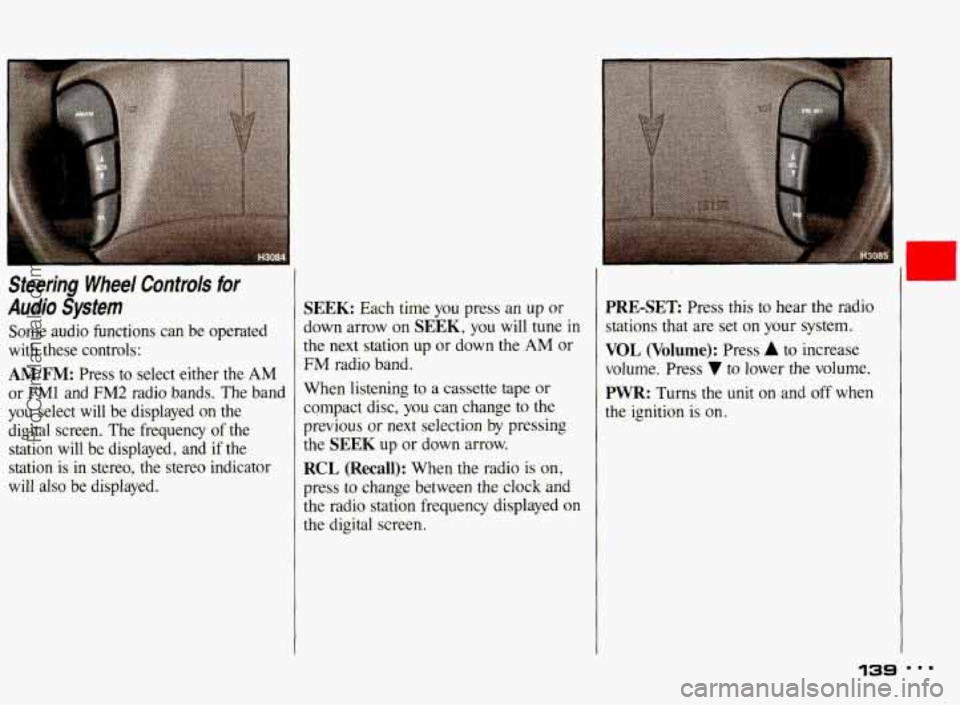
Steering Wheel Controls for
Audio System
Some audio functions can be operated
with these controls:
AM/FM: Press to select either the AM
or FMl and FM2 radio bands. The band
you select will
be displayed on the
digital screen. The frequency of the
station will be displayed, and
if the
station is in stereo, the stereo indicator
will also
be displayed.
SEEK: Each time you press an up or
down arrow on SEEK, you will tune in
the next station up or down the
AM or
FM radio band.
When listening
to a cassette tape or
compact disc, you can change to the
previous
or next selection by pressing
the
SEEK up or down arrow.
RCL (Recall): When the radio is on,
press
to change between the clock and
the radio station frequency displayed on
the digital screen.
I
PRE-SET Press this to hear the radio
stations that are set on your system.
VOL (Volume): Press A to increase
volume. Press
7 to lower the volume.
PWR: Turns the unit on and off when
the ignition is on.
139
t ProCarManuals.com
Page 163 of 322
‘Your Driving and the Road
Steering in Emergencies (CONI)
An emergency like this requires close
attention and a quick decision.
If you
are holding the steering wheel at the
recommended
9 and 3 o’clock positions,
you can turn it a full
180 degrees very
quickly without removing either hand.
But you have
to act fast, steer quickly,
and just as quickly straighten the wheel
once you have avoided the object. You
must then be prepared to steer back to
your original lane and then brake
to a
controlled stop.
Depending
on your speed, this can be
rather violent for an unprepared driver.
This is one of the reasons driving
experts recommend that you use
your
safety belts and keep both hands on the
steering wheel.
The fact that such emergency situations
are always possible is a good reason to
practice defensive driving at all times.
162
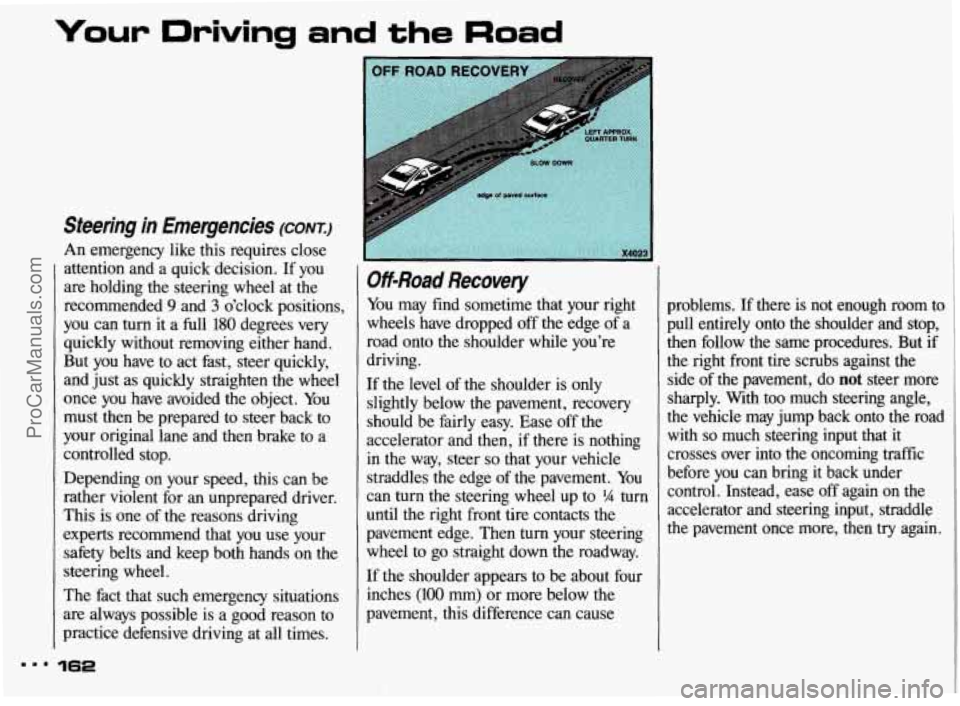
Off-Road Recovery
You may find sometime that your right
wheels have dropped off the edge
of a
road onto the shoulder while you’re
driving.
If the level of the shoulder is
only
slightly below the pavement, recovery
should be fairly easy. Ease off the
accelerator and then, if there is nothing
in
the way, steer so that your vehicle
straddles the edge of the pavement. You
can turn the steering wheel up to
5/4 turn
until the right front tire contacts the
pavement edge. Then
turn your steering
wheel to go straight down the roadway.
If the shoulder appears
to be about four
inches
(100 mm) or more below the
pavement, this difference can cause problems.
If there is
not enough room to
pull entirely onto the shoulder and stop, then follow the same procedures. But if
the right front tire scrubs against the side of the pavement, do
not steer more
sharply. With too much steering angle,
the vehicle may jump back onto the road
with
so much steering input that it
crosses over into the oncoming traffic
before you can bring it back under
control. Instead, ease off again on the
accelerator and steering input, straddle
the pavement once more, then
try again.
ProCarManuals.com
Page 212 of 322
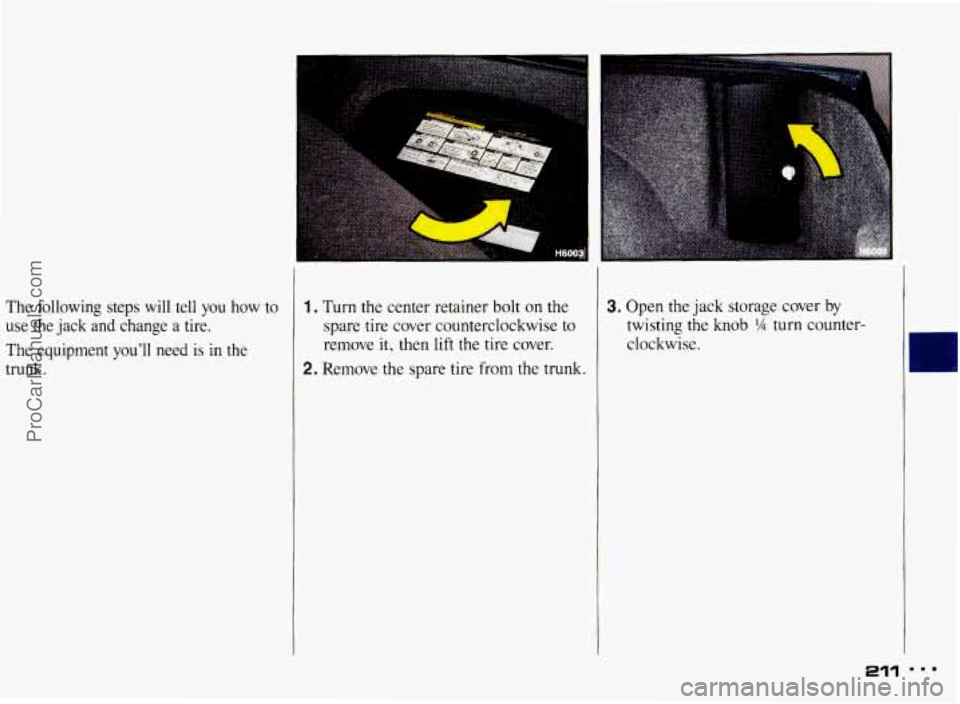
The following steps will tell you how to
use the jack and change a tire.
The equipment
you’ll need is in the
trunk.
1. Turn the center retainer bolt on the
spare tire cover counterclockwise
to
remove it, then lift the tire cover.
2. Remove the spare tire from the trunk.
3. Open the jack storage cover by
twisting the knob % turn counter-
clockwise.
211 m..
ProCarManuals.com
Page 214 of 322
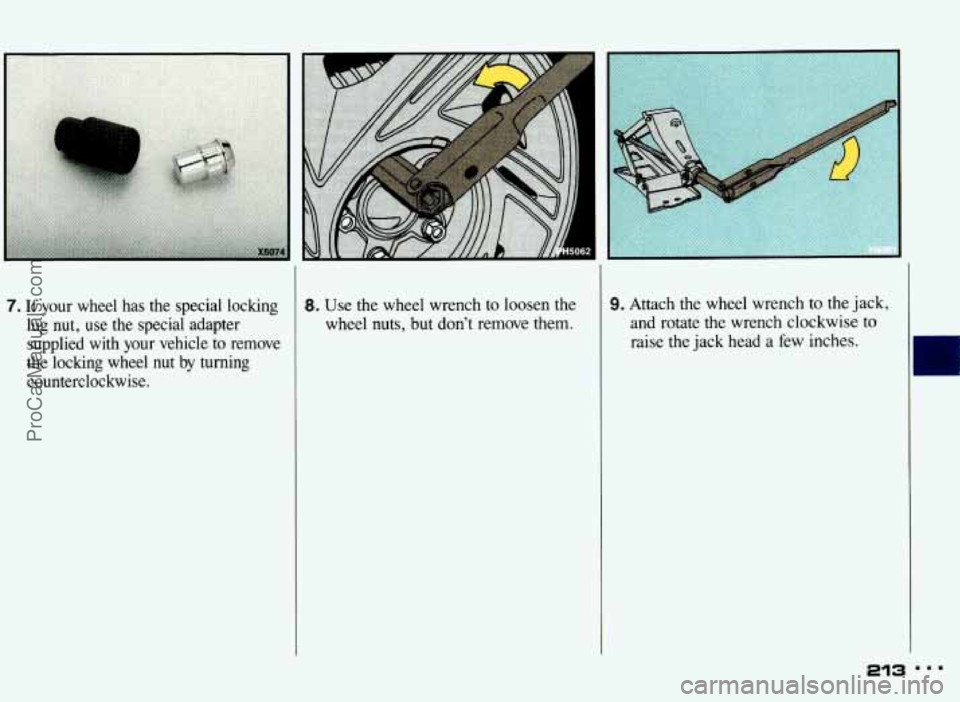
7. If your wheel has the special locking
lug nut, use the special adapter
supplied with your vehicle to remove
the locking wheel
nut by turning
counterclockwise.
8. Use the wheel wrench to loosen the
wheel nuts, but don’t remove them. 9. Attach the wheel wrench to the jack,
and rotate the wrench clockwise to
raise the jack head a few inches.
ProCarManuals.com
Page 215 of 322
Problems on the Road
I
Changing a Flat lire (CONT.:)
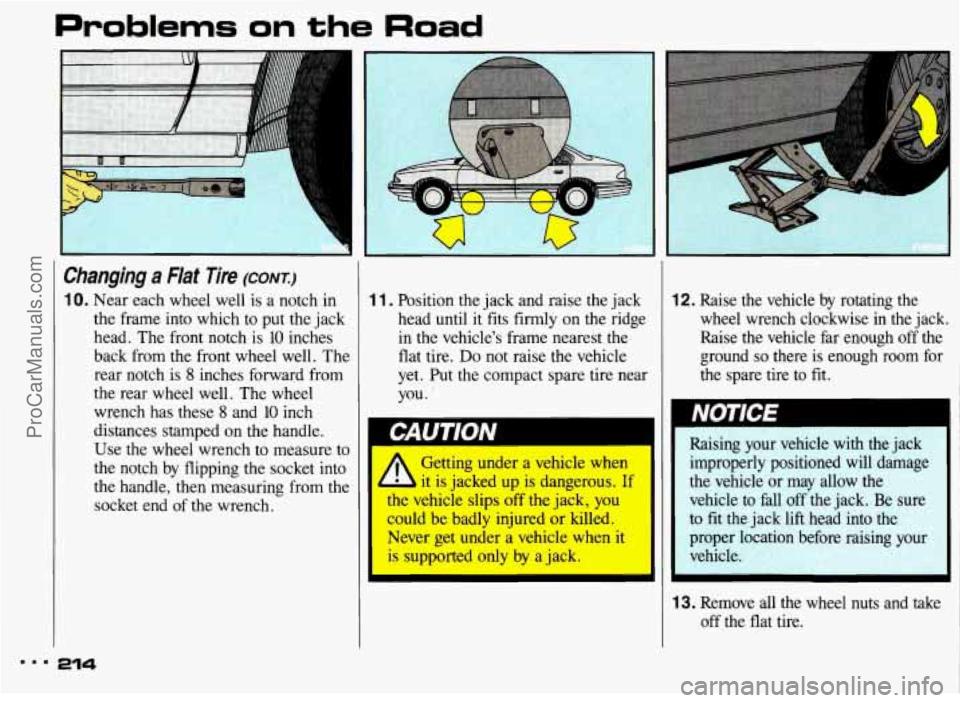
10. Near each wheel well is a notch in
the frame into which
to put the jack
head. The front notch
is 10 inches
back from the front wheel well. The
rear notch
is 8 inches forward from
the rear wheel well. The wheel
wrench has these
8 and 10 inch
distances stamped on the handle.
Use the wheel wrench to measure to
the notch by flipping the socket into
the handle, then measuring from the
socket end of the wrench.
1 1. Position the jack and raise the jack
head until
it fits firmly on the ridge
in the vehicle's frame nearest the
flat tire.
Do not raise the vehicle
yet. Put the compact spare tire near
you.
1
I
I
1
2. Raise the vehicle by rotating the
wheel wrench clockwise in the jack.
Raise the vehicle far enough off the
ground
so there is enough room for
the spare tire to fit.
Raising your vehicle with the jack
improperly positioned will damage
the vehicle or may allow the
vehicle to fall
off the jack. Be sure
to fit the jack lift head into the
proper location before raising your vehicle.
3. Remove all the wheel nuts and take off the flat tire.
ProCarManuals.com
Page 217 of 322
Problems on the Road
Changing a Flat Tire (CONI)
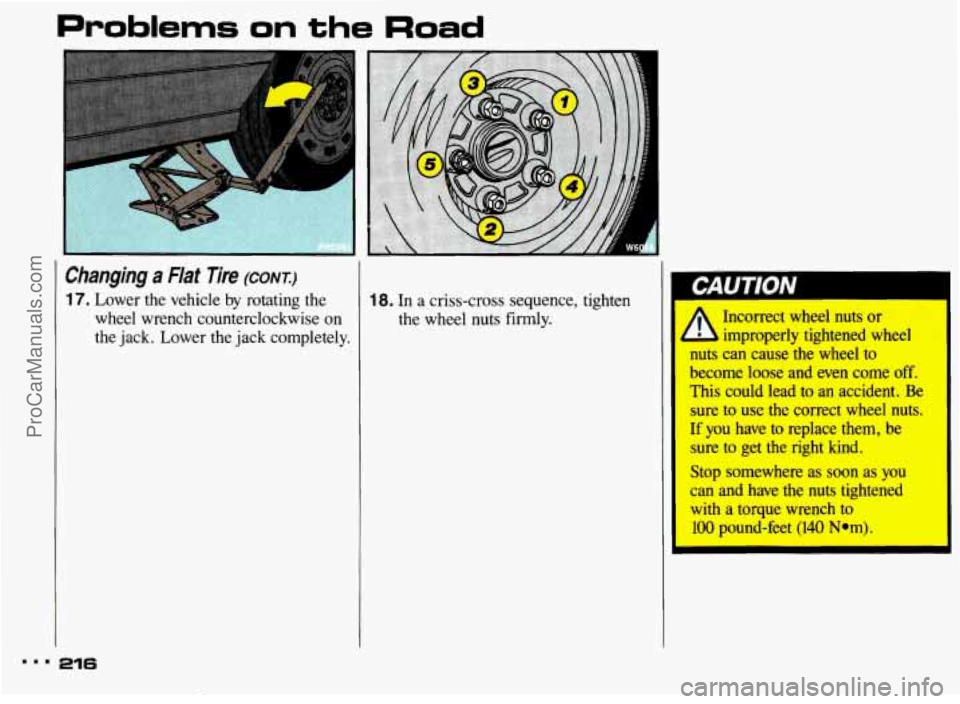
17. Lower the vehicle by rotating the 18. In a criss-cross sequence, tighten
wheel wrench counterclockwise
on the wheel nuts firmly.
the jack. Lower the jack completely. Incorrect wheel nuts
or
improperly tightened wheel
nuts can cause the wheel to
become loose and even come off.
This could lead to an accident.
Be
sure to use the correct wheel nuts.
If you have to replace them, be
sure to get the right
kind.
Stop somewhere as soon as you
can and have the nuts tightened
with a torque wrench to
100 pound-feet (140 Nom).
mmm 216
ProCarManuals.com