door lock PONTIAC BONNEVILLE 2003 Owners Manual
[x] Cancel search | Manufacturer: PONTIAC, Model Year: 2003, Model line: BONNEVILLE, Model: PONTIAC BONNEVILLE 2003Pages: 418, PDF Size: 20.24 MB
Page 2 of 418
The 2003 Pontiac Bonneville Owner Manual
Seats and Restraint Systems ........................... 1-1
Front Seats
............................................... 1-2
Safety Belts
.............................................. 1-7
Child Restraints
....................................... 1-27
Air Bag Systems
...................................... 1-47
Restraint System Check
............................ 1-56
Features and Controls ..................................... 2-1
Keys
........................................................ 2-3
Doors and Locks
...................................... 2-10
Windows
................................................. 2-1 9
Theft-Deterrent Systems
............................ 2-21
Starting and Operating Your Vehicle
........... 2-25
Mirrors
.................................................... 2-38
OnStap
.................................................. 2-40
HomeLink@ Transmitter
............................. 2-42
Storage Areas
......................................... 2-46
SlJnroof
................................................. 2-47
Vehicle Personalization
............................. 2-48
Instrument Panel ............................................. 3-1
Instrument Panel Overview
.......................... 3-4
Climate Controls
...................................... 3-25
Warning Lights, Gages and Indicators
......... 3-34
Systems Monitor
...................................... 3-55
Driver Information Center (DIC)
.................. 3-57 Secondary
Information Center (SIC)
............ 3-68
Audio System(s)
....................................... 3-71
Driving Your Vehicle ....................................... 4-1
Your Driving, the Road, and Your Vehicle
..... 4-2
Towing
................................................... 4-32
Service
..................................................... 5-3
Fuel
......................................................... 5-5
Checking Things Under the Hood
............... 5-12
Headlamp Aiming
..................................... 5-52
Bulb Replacement
.................................... 5-56
Windshield Wiper Blade Replacement
......... 5-61
Tires
...................................................... 5-62
Appearance Care
..................................... 5-82
Vehicle Identification
................................. 5-90
Electrical System
...................................... 5-91
C8pa.citigs
and Specifications ......... 5-100
Normal Maintenance Replacement Parts .... 5-101
Maintenance Schedule
................................ 6-2
Customer Assistance Information .................... 7-1
Customer Assistance Information
.................. 7-2
Reporting Safety Defects
............................ 7-8
index ................................................................ 1
Service and Appearance Care .......................... 5-1
Maintenance Schedule ..................................... 6-1
Page 19 of 418

Q: If I’m a good driver, and I never drive far from
At You may be an excellent driver, but if you’re in an
accident
- even one that isn’t your fault - you and
your passengers can be hurt. Being a good
driver doesn’t protect you from things beyond your
control, such as bad drivers.
Most accidents occur within
25 miles (40 km) of
home. And the greatest number of serious injuries
and deaths occur at speeds of less than
40 mph (65 km/h).
Safety belts are for everyone.
home, why should I wear safety belts?
How to Wear Safety Belts Properly
This part is only for people of adult size.
Be aware that there are special things to know about
safety belts and children. And there are different
rules for smaller children and babies.
If a child will be
riding in your vehicle, see
Older Children on page 7-27
or lnfants and Young Children on page 1-29. Follow
those rules for everyone’s protection.
First, you’ll want to know which restraint systems your
vehicle has.
We’ll start with the driver position.
Driver Position
This part describes the driver’s restraint system.
Lap-Shoulder Belt
The driver has a lap-shoulder belt. Here’s how to wear it
properly.
1. Close and lock the door.
2. Adjust the seat so you can sit up straight. To see
how, see “Seats’’ in the Index.
1-12
Page 58 of 418
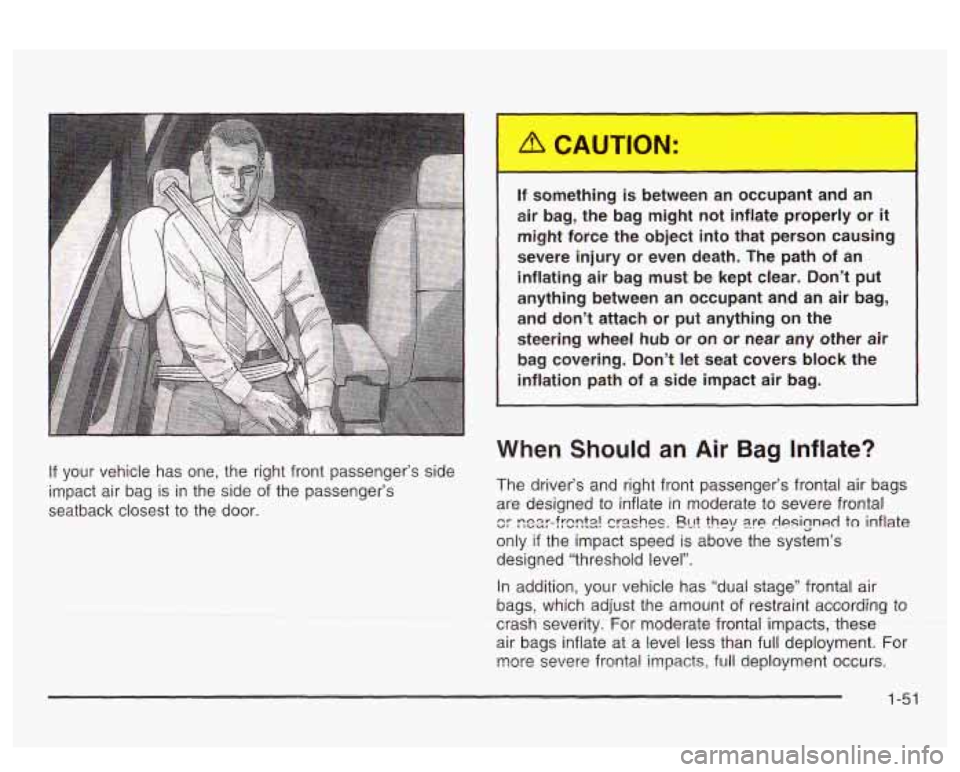
If your vehicle has one, the right front passenger’s side
impact air bag is in the side
of the passenger’s
seatback closest to the door.
r
If something is between an occupant and an
air bag, the bag might not inflate properly or
it
might force the object into that person causing
severe injury or even death. The path of an
inflating air bag must be kept clear. Don’t
put
anything between an occupant and an air bag,
and don’t attach or put anything on the
steering wheel
hub or on or near any other air
bag covering. Don’t let seat covers block the
inflation path of a side impact air bag.
When Should an Air Bag Inflate?
The driver’s and right front passenger’s frontal air bags
are designed to inflate in moderate to severe frontal
cr ~ear-frsnta! crashes. En? ?hey are designed to inflate
only
if the impact speed is above the system’s
designed “threshold level”.
In addition, your vehicle
has “dual stage” frontal air
bags, which adjust the amount of restraint according to
CEEKsewrty.
For rnodemtefrourtatimpacts-tt-tese ~
air bags inflate at a level less than full deployment. For
more severe frontal impacts, full deployment occurs.
1-51
Page 60 of 418
But the frontal air bags would not help you in many
types of collisions, including rollovers, rear impacts, and
many side impacts, primarily because an occupant’s
motion is not toward the air bag. Side impact air bags
would not help you in many types of collisions,
including frontal or near frontal collisions, rollovers, and
rear impacts, primarily because an occupant’s motion
is not toward those air bags. Air bags should never
be regarded as anything more than a supplement to
safety belts, and then only in moderate to severe frontal
or near-frontal collisions for the driver’s and right front
passenger’s frontal air bags, and only in moderate
to severe side collisions for vehicle’s with a driver’s and
right front passenger‘s side impact air bag.
What Will You See After an Air Bag
Inflates?
After the air bag inflates, it quickly deflates, so quickly
that some people may not even realize the air bag
inflated. Some components of the air bag module will be
hot for a short time. These components include the
steering wheel hub for the driver’s frontal air bag and the
instrument panel for the right front passenger’s frontal
air bag. For vehicles with side impact air bags, the side
of the seatback closest to the driver’s and/or right
front passenger’s
door will be hot. The parts of the bag
that come into contact with you may be warm, but
not too hot
to touch. There will be some smoke and dust coming
from the vents in the deflated air bags. Air bag
inflation doesn’t prevent the driver from seeing or
being able to steer the vehicle, nor does it stop people
from leaving the vehicle.
When an air bag inflates, there is dust in the
air. This dust could cause breathing problems
for people with a history of asthma or other
breathing trouble.
To avoid this, everyone in
the vehicle should get out as soon as it is safe
to do
so. If you have breathing problems but
can’t get out
of the vehicle after an air bag
inflates, then get fresh air by opening a
window or a door.
If you experience breathing
problems following an air bag deployment, you
should seek medical attention.
Your vehicle has a feature that will automatically unlock
the doors and turn the interior lamps on when the air
bags inflate (if battery power is available). You can lock
the doors again and turn the interior lamps
off by
using the door Imk and interior !amp contro!s.
1-53
Page 66 of 418
Section 2 Features and Controls
Keys ............................................................... 2.3
Remote Keyless Entry System
......................... 2.5
Remote Keyless Entry System Operation
........... 2.6
Doors and Locks ............................................ 2.10
Door Locks
.................................................. 2.10
Central Door Unlocking System
...................... 2-1 1
Power Door Locks ........................................ 2-11
Programmable Automatic
Delayed Locking
........................................... 2-12
Door Locks
................................. ....... 2-13
Rear Door Security Locks
.............................. 2-15
Lockout Protection
........................................ 2-15
Leaving Your Vehicle
.................................... 2-16
Trunk
.......................................................... 2-16
Windows ........................................................ 2-19
Power Windows
............................................ 2-20
Sun Visors
.......... .............................. 2.20
Theft-Deterrent Systems .................. .... 2.21
Universal Theft-Deterrent
............................... 2.21
Content Theft-Deterrent
................................. 2.22
PASS-Key@
I I I Operation ............................... 2-23
Starting and Operating Your Vehicle ................ 2-25
New Vehicle Break-In
................................... -2-25
Ignition Positions
.......................................... 2-25
Starting Your Engine
.................. ............ 2-26
Engine Coolant Heater
........... ........... -2-27
Automatic Transaxle Operation
....................... 2-28
Parking Brake
.............................................. 2-31
Shifting Into Park (P)
..................................... 2-32
Engine Exhaust
............................................ 2-36
Running Your Engine While You Are Parked
.... 2-36
PASS-Key@
Ill .............................................. 2-22
Shifting Out
of Park (P) ................................. 2-35
Parking Over Things That Burn
....................... 2-35
2-
1
Page 69 of 418
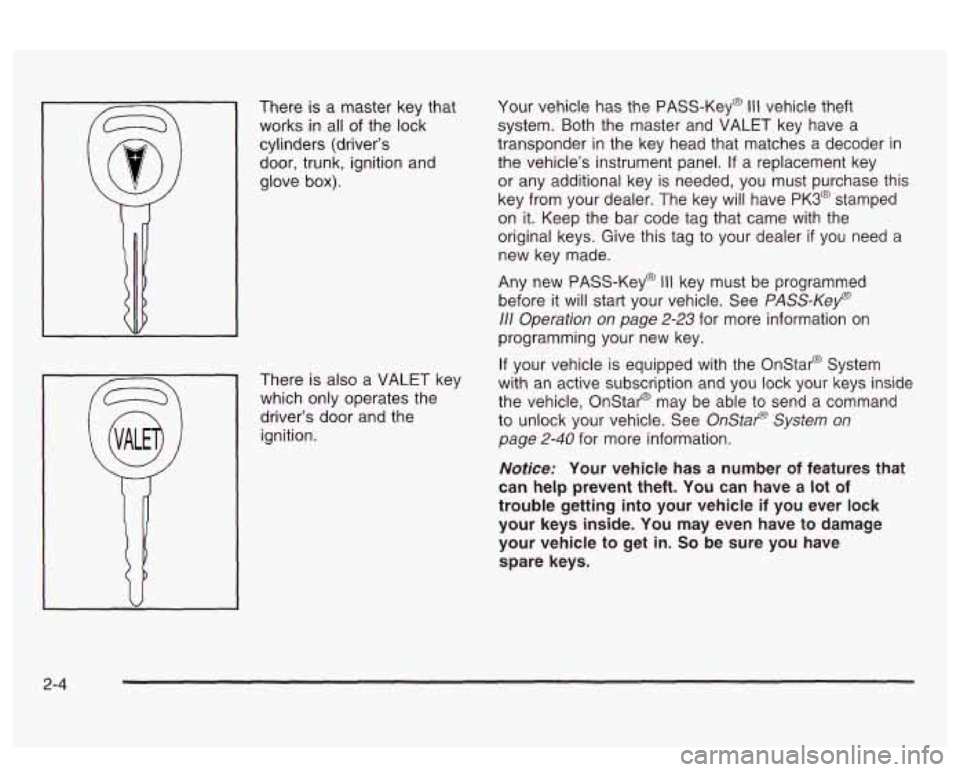
There is a master key that
works in all of the lock
cylinders (driver’s door, trunk, ignition and
glove
box).
There is also a VALET key
which only operates the
driver’s door and the
ignition. Your
vehicle has the PASS-Key@
Ill vehicle theft
system. Both the master and VALET key have a
transponder
in the key head that matches a decoder in
the vehicle’s instrument panel.
If a replacement key
or any additional key is needed, you must purchase this
key from your dealer. The key will have
PK3@ stamped
on it. Keep the bar code tag that came with the
original keys. Give this tag to your dealer
if you need a
new key made.
Any new PASS-Key@
Ill key must be programmed
before it will start your vehicle. See
PASS-Kef)
111 Operation on page 2-23 for more information on
programming your new key.
If your vehicle is equipped with the Onstar@ System
with an active subscription and you lock your keys inside
the vehicle, Onstar@ may be able to send a command
to unlock your vehicle. See
OnStap System on
page
2-40 for more information.
Notice: Your vehicle has a number of features that
can help prevent theft. You can have a lot of
trouble getting into your vehicle
if you ever lock
your keys inside. You may even have to damage
your vehicle to get in.
So be sure you have
spare keys.
2-4
Page 71 of 418
Remote Keyless Entry System
Operation
If your vehicle has this feature, you can lock and unlock
your doors or unlock your trunk from about
3 feet (1 m) up
to
30 feet (9 m) away using the remote keyless entry
transmitter supplied with your vehicle.
The numbers on the back
of the transmitters correspond
to DRIVER
#1 and DRIVER #2 on the DIC (if equipped).
See
Driver Information Center (DIC) on page 3-57 for
more information.
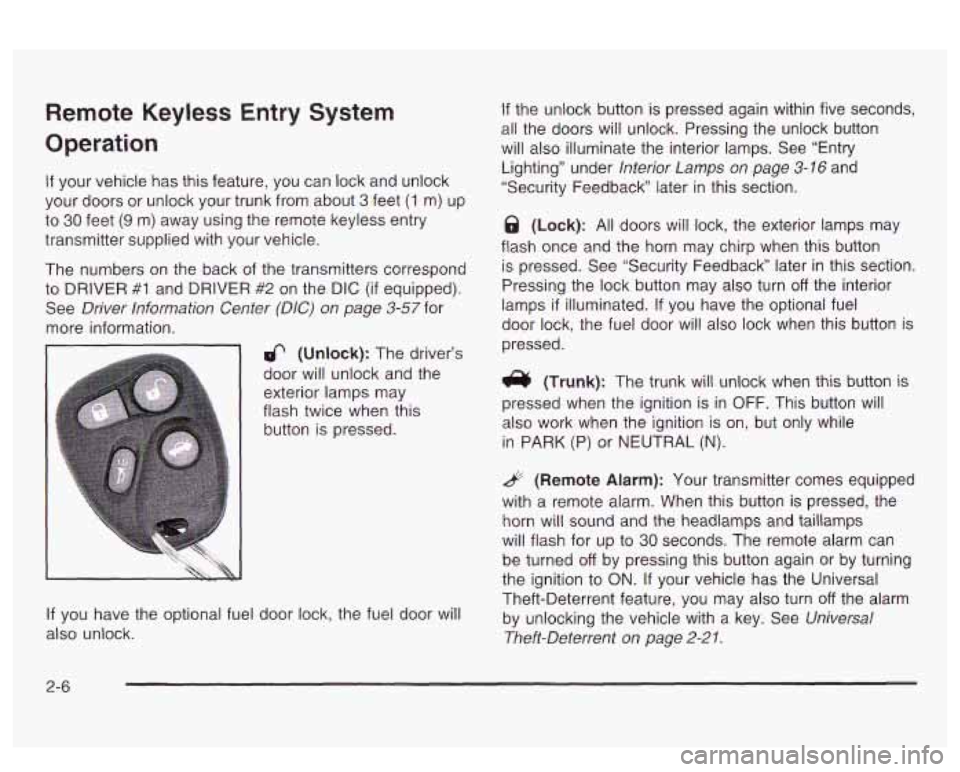
6 (Unlock): The driver’s
door will unlock and the
exterior lamps may
flash twice when this
button is pressed.
If you have the optional fuel door lock, the fuel door will
also unlock.
If the unlock button is pressed again within five seconds,
all the doors will unlock. Pressing the unlock button
will also illuminate the interior lamps. See “Entry
Lighting” under
Interior Lamps on page 3-16 and
“Security Feedback later in this section.
@ (Lock): All doors will lock, the exterior lamps may
flash once and the horn may chirp when this button
is pressed. See “Security Feedback” later in this section.
Pressing the lock button may also turn
off the interior
lamps
if illuminated. If you have the optional fuel
door lock, the fuel door will also lock when this button is
pressed.
(Trunk): The trunk will unlock when this button is
pressed when the ignition is in
OFF. This button will
also work when the ignition is on, but only while
in
PARK (P) or NEUTRAL (N).
& (Remote Alarm): Your transmitter comes equipped
with a remote alarm. When this button
is pressed, the
horn will sound and the headlamps and taillamps
will flash for up to
30 seconds. The remote alarm can
be turned
off by pressing this button again or by turning
the ignition to ON. If your vehicle has the Universal
Theft-Deterrent feature, you may also turn
off the alarm
by unlocking the vehicle with a key. See
Universal
Theft-Deterrent on page
2-21.
2-6
Page 72 of 418
Personalization Features
The following features, if available on your vehicle, can
be programmed to each driver’s preference for each
of the remote keyless entry transmitters:
Programmable Automatic Door Locks
Security Feedback
Delayed Locking
Perimeter Lighting
Seat and Mirror Recall
If your vehicle is equipped with the Driver Information
Center (DIC), you must program these features through
the DIC. See
DIC Vehicle Personalization on page 3-62.
Security Feedback
This feature provides feedback to the driver when the
vehicle receives a command from the remote keyless
entry transmitter. Feedback is only provided
if all doors
?.re clnseci, the isnition is off and the Retained
Accessory Power (RAP) is inactive.
If your vehicle is equipped with the Driver Information
Center (DIC), you must program this feature through the
DIC. See
DIC Vehicle Personalization on page 3-62.
The following modes may be selected:
Mode 1: No feedback when locking or unlocking
vehicle.
Mode 2: Parking lamps and the daytime running
lamps will flash twice when unlocking the vehicle
and will flash once when locking the vehicle.
0 Mode 3: Horn will chirp when all doors are unlocked
(second unlock button press) and when locking the
vehicle.
Mode 4: Parking lamps and the daytime running
lamps will flash twice each time the button with
the unlock symbol is pressed; the horn will
chirp when all doors are unlocked. Parking lamps
and the exterior lamps will flash once and the
horn will chirp when locking the vehicle.
2-7
Page 73 of 418
To change to another mode, do the following:
the ignition on throughout this procedure.
in LOCK through Step
4.
1. Keep all doors closed, the vehicle in PARK (P) and
2. Press and hold the driver’s power door lock switch
3. Press the button with the trunk symbol on the
transmitter. The transmitter will remain in its
current mode and the horn will chirp as feedback.
4. Press the button with the trunk symbol again. Each
time the transmitter’s trunk button is pressed, the
mode will advance by one, going from Mode
2 to 3
to 4, etc. and the horn will chirp as feedback.
5. Release the power door lock switch. The security
feedback will remain in the most recent mode
selected.
This procedure changes the mode for the transmitter
used
to change this setting. The procedure will need to
be repeated for the second transmitter.
To verify the mode selected, remove the key from the
ignition and close all
of the doors after you’ve exited the
vehicle. Press the lock button
on the transmitter to be
verified and confirm the appropriate feedback. Repeat with the unlock button.
Matching Transmitter(s) to Your
Vehicle
Each remote keyless entry transmitter is coded to
prevent another transmitter from unlocking your vehicle.
If a transmitter is lost or stolen, a replacement can
be purchased through your dealer. Remember
to bring
any remaining transmitters with you when you go
to
your dealer. When the dealer matches the replacement
transmitter
to your vehicle, any remaining transmitters
must also be matched. Once your dealer has coded the
new transmitter, the lost transmitter will not unlock
your vehicle. Each vehicle can have a maximum of four
transmitters matched
to it.
See your dealer
to match additional transmitters to your
vehicle.
2-8
Page 75 of 418
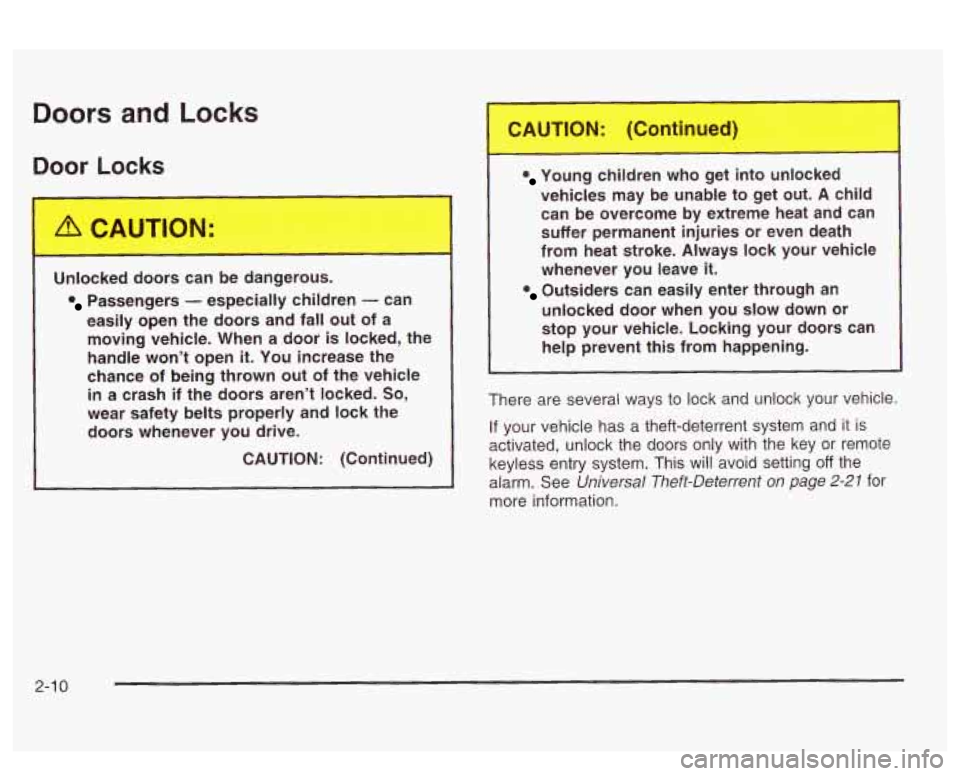
Doors and Locks
Door Locks
Unlc,.
easily open the doors and fall out of a moving vehicle. When a door
is locked, the
handle won’t open
it. You increase the
chance of being thrown out of the vehicle
in a crash if the doors aren’t locked. So,
wear safety belts properly and lock the
doors whenever you drive.
CAUTION: (Continued)
Young children who get into unlocked
vehicles may be unable to get out.
A child
can be overcome by extreme heat and can
suffer permanent injuries or even death
from heat stroke. Always lock your vehicle
whenever you leave
it.
unlocked door when you slow down or
stop your vehicle. Locking your doors can
help prevent this from happening.
Outsiders can easily enter through an
There are several ways to lock and unlock your vehicle.
If your vehicle has a theft-deterrent system and it is
activated, unlock the doors only with the key or remote
keyless entry system. This will avoid setting
off the
alarm. See
Universal Theft-Deterrent on page 2-27 for
more information.
2-1 0