charging PONTIAC FIERO 1988 Service User Guide
[x] Cancel search | Manufacturer: PONTIAC, Model Year: 1988, Model line: FIERO, Model: PONTIAC FIERO 1988Pages: 1825, PDF Size: 99.44 MB
Page 92 of 1825
R-4 AIR CONDITIONING COMPRESSOR OVERHAUL 101-13.
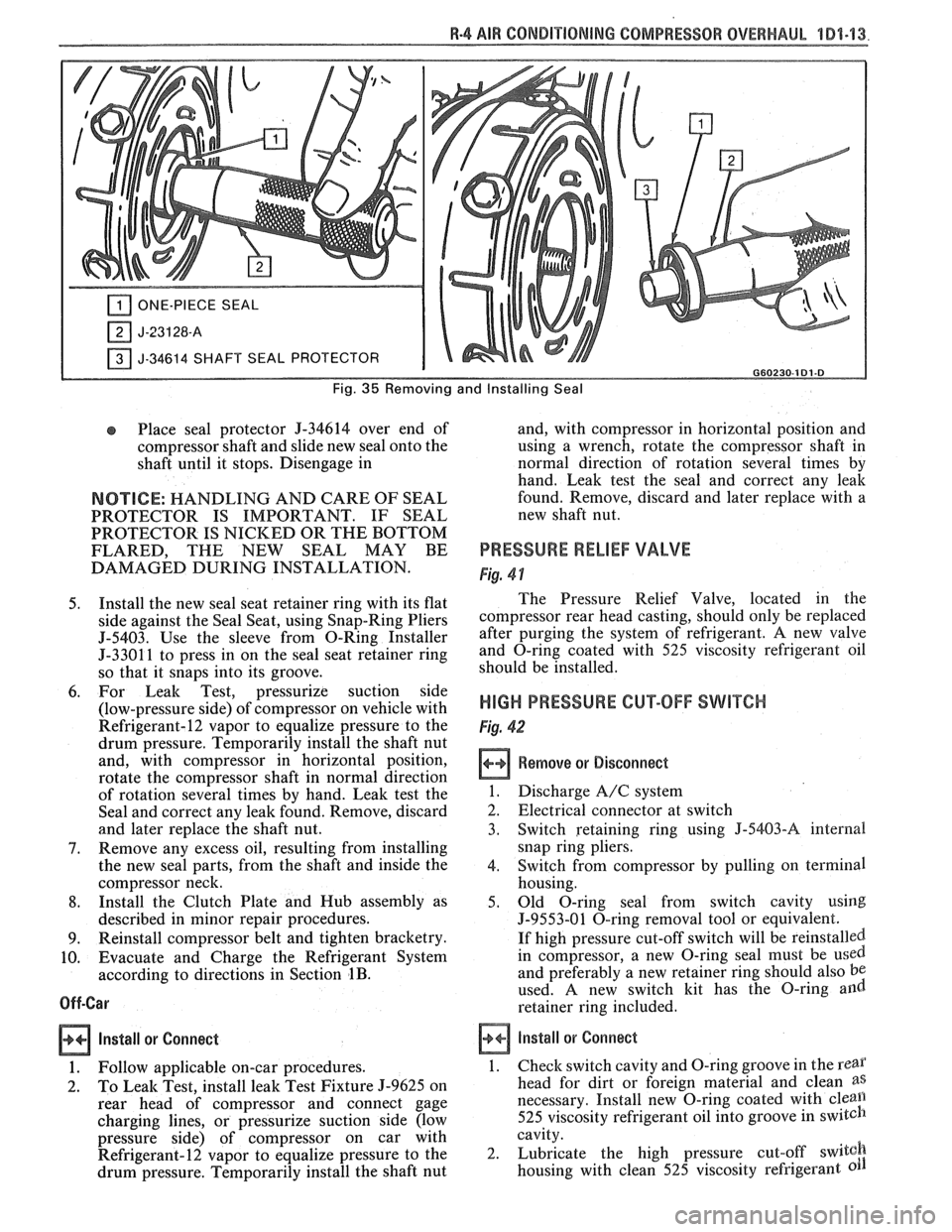
ONE-PIECE SEAL
J-34614 SHAFT SEAL PROTECTOR I G60230-181.8
Fig. 35 Removing and Installing Seal
Place seal protector 9-34614 over end of
compressor shaft and slide new seal onto the
shaft until it stops. Disengage in
NOTICE: HANDLING AND CARE OF SEAL
PROTECTOR IS IMPORTANT. IF SEAL
PROTECTOR IS NICKED OR THE BOTTOM
FLARED, THE NEW SEAL
MAY BE
DAMAGED DURING INSTALLATION.
5. Install the new seal seat retainer ring with its flat
side against the Seal Seat, using Snap-Ring Pliers
5-5403. Use the sleeve from O-Ring Installer
5-3301 1 to press in on the seal seat retainer ring
so that it snaps into its groove.
6. For Leak Test, pressurize suction side
(low-pressure side) of compressor on vehicle with
Refrigerant-12 vapor to equalize pressure to the
drum pressure. Temporarily install the shaft nut
and, with compressor in horizontal position,
rotate the compressor shaft in normal direction
of rotation several times by hand. Leak test the
Seal and correct any leak found. Remove, discard
and later replace the shaft nut.
7. Remove any excess oil, resulting from installing
the new seal parts, from the shaft and inside the
compressor neck.
8. Install the Clutch Plate and Hub assembly as
described in minor repair procedures.
9. Reinstall compressor belt and tighten bracketry.
10. Evacuate and Charge the Refrigerant System
according to directions in Section
1B.
Off-Car
Install or
Connect
1. Follow applicable on-car procedures.
2. To Leak Test, install leak Test Fixture 5-9625 on
rear head of compressor and connect gage
charging lines, or pressurize suction side (low
pressure side) of compressor on car with
Refrigerant-12 vapor to equalize pressure to the
drum pressure. Temporarily install the shaft nut and,
with compressor in horizontal position and
using a wrench, rotate the compressor shaft in
normal direction of rotation several times by
hand.
Leak test the seal and correct any leak
found. Remove, discard and later replace with a
new shaft nut.
PRESSURE RELIEF VALVE
Fig. 4 1
The Pressure Relief Valve, located in the
compressor rear head casting, should only be replaced
after purging the system of refrigerant,
A new valve
and O-ring coated with 525 viscosity refrigerant oil
should be installed.
HIGH PRESSURE CUT-OFF SWITCH
Fig. 42
Remove or Disconnect
1. Discharge A/C system
2. Electrical connector at switch
3. Switch retaining ring using
J-5403-A internal
snap ring pliers.
4. Switch from compressor by pulling on terminal
housing.
5. Old O-ring seal from switch cavity using
J-9553-01 O-ring removal tool or equivalent.
If high pressure cut-off switch will be reinstalled.
in compressor, a new O-ring seal must be
used
and preferably a new retainer ring should also be
used. A new switch kit has the O-ring and
retainer ring included.
install or Connect
1.
Check switch cavity and O-ring groove in the rear
head for dirt or foreign material and clean as
necessary. Install new O-ring coated with cleall
525 viscosity refrigerant oil into groove in switch
cavity.
2. Lubricate the high pressure cut-off
switgh
housing with clean 525 viscosity refrigerant
Page 98 of 1825
R-4 818 CONDITIONING COMPRESSOR OVERHAUL 1D1-19
retainers are to be removed, remove two sets and
then rotate compressor and Holding Fixture
J-25008-A in vise for access to the remaining two
valve plates and retainers.
Install or Connect
1. Install Discharge Valve Plates and/or Retainers.
Reposition compressor and Holding Fixture in
vise as necessary for access.
Valve plates must
be tight
following retainer assembly.
2. Reinstall compressor Shell as described in
SHELL AND O-RINGS replacement
procedures.
3. Evacuate and charge the refrigerant system
according to the directions in Section
1B.
CYLINDER AND SHAFT ASSSEMBLY
Remove or Disconnect
Discharge the refrigerant system according to the
directions in Section
1B.
Remove the Clutch Plate and Hub assembly as
described in CLUTCH PLATE AND HUB
removal procedure.
Perform Steps
1 through 4 of CLUTCH ROTOR
AND BEARING removal procedure but do not
loosen or remove the pulley rim mounting screws.
Remove the Clutch Rotor and Bearing, Clutch
Coil and Pulley Rim as an assembly. Be careful
not to drop the Puller Guide J-25031, when
removing the assembly.
Remove the shaft seal as described in SHAFT
SEAL removal procedure.
Remove the front head as described in FRONT
HEAD REMOVAL procedure.
Remove the thrust and belleville washers as
described in THRUST AND BELLEVILLE
WASHERS removal procedures.
Remove the compressor shell as described in
SHELL removal procedure.
Remove the discharge valve plate and retainer as
described in DISCHARGE VALVE PLATE
AND RETAINER removal procedure.
Remove the high pressure relief valve as
described in
HIGH PRESSURE RELIEF
VALVE REMOVAL PROCEDURE.
L
Install or Connect
1. Replace above parts in opposite order.
2. Evacuate and charge the refrigerant system
according to the directions in Section
1B.
LEAK TESVING (EXTERNAL AND INTERNAL)
Bench-Check Procedure
1. Install Test Plate J-9625-A on Rear Head of
compressor.
2. Attach center hose of Manifold Gage Set on
Charging Station to a refrigerant drum standing
in an upright position and open valve on drum.
3. Connect Charging Station high and low pressure
lines to corresponding fittings on Test Plate J-9625-A, using
5-5420 Gage
Adapters if hoses
are not equipped with valve depressors.
Suction port (low-side) of compressor has
large internal opening. Discharge port
(hi-side) has smaller internal opening into
compressor.
Open low-pressure control, high-pressure control
and refrigerant control on Charging Station to
allow refrigerant vapor to flow into compressor.
Using a Leak Detector, check for leaks at
Pressure Relief Valve, compressor shell to
cylinder, compressor front head seal, and
compressor Shaft Seal. After checking, shut off
low pressure control and high pressure control on
Charging Station.
If an external leak is present, perform the
necessary corrective measures and recheck for
leaks to make certain the leak has been corrected.
Loosen the Manifold Gage hose connections to
the Gage Adapters J-5420 connected to the low
and high sides and allow the vapor pressure to
release from the compressor.
Disconnect both Gage Adapters
5-5420 from the
Test Plate J-9625-A.
Rotate the complete compressor assembly (not
the crankshaft or drive plate hub) slowly several
turns to distribute oil to all cylinder and piston
areas.
Install a shaft nut on the compressor crankshaft
if the drive plate and clutch assembly are not
installed.
Using a box-end wrench or socket and handle,
rotate the compressor crankshaft or clutch drive
plate on the crankshaft several turns to ensure
piston assembly to cylinder wall lubrication.
Connect the Charging Station high pressure line
or a high pressure gage and Gage Adapter J-5420
to the Test Plate J-9625-A high side connector.
Attach an Adapter
9-5420 to the suction or low
pressure port of the Test Plate
J-9625-19 to open
the Schrader-type valve.
Oil will drain out of the compressor suction port
adapter if the compressor is positioned with the
suction port downward.
Attach the compressor to the Holding Fixture
J-25008-A using metric mounting screws. Clamp
the compressor Holding Fixture in a vise so that
the compressor can be manually turned with a
wrench.
Using a wrench, rotate the compressor crankshaft
or drive plate hub ten complete revolutions at a
speed of approximately one-revolution per
second.
Turning the compressor at less than
one-revolution per second can result in a lower
pump-up pressure and disqualify a good pumping
compressor.
Observe the reading on HIGH pressure gage at
the completion of the tenth revolution of the
compressor. The pressure reading for a good
pumping compressor should be 344.75
kPa (50 p.
s.i.) or above. A pressure reading of less than 3 10.
275 kPa (45 p.s.i.) would indicate one or more
Page 444 of 1825
BATTERY 6D1.1
SECTION 6Dl
BATTERY
CONTENTS
.......................... .. General Description ................................ 6D1- 1 Battery Charging ...... 6D 1-2
Battery .......................... ... ....................... 6D 1 - 1 Charging Completely Discharged
.................................................... ............................. Ratings .................... ... 6D 1 - 1 Battery 6D 1-3
........................................... Reserve Capacity ..................................... 6D 1 - 1 Jump Starting 6D
1-4
Cranking ............a*............ 6D1-1 On-Gar Service ...................................... 6Dl-5 .................................. Built-In Hydrometer 6D 1-2 Battery Cable Routing ............................... 6D 1-5 Diagnosis ................................................... 6Dl-2
Specifications .............................................. 6D 1-7 ............................. Service Procedures ..... 6D 1-2
GENERAL DESCRIPTION
The engine electrical system includes the battery,
ignition (primary and secondary), starter (and related
wiring) and the generator (and related wiring).
Diagnostic charts (see Section 6D) will aid in
trouble-shooting system faults. When a fault is traced
to a particular component, refer to that components'
section of the service manual.
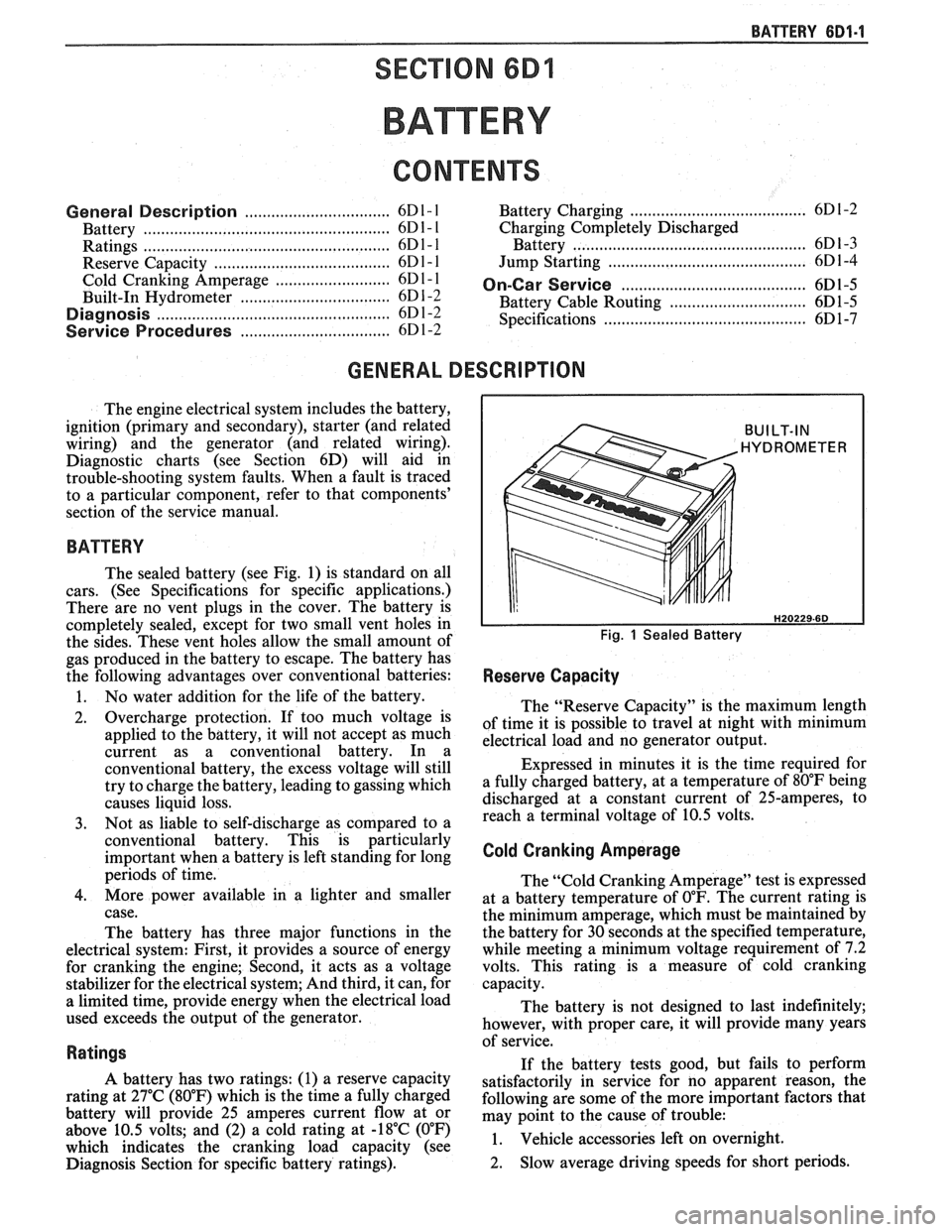
BATTERY
The sealed battery (see Fig. 1) is standard on all
cars. (See Specifications for specific applications.)
There are no vent plugs in the cover. The battery is
completely sealed, except for two small vent holes in
the sides. These vent holes allow the small amount of
gas produced in the battery to escape. The battery has
the following advantages over conventional batteries:
1. No water addition for the life of the battery.
2. Overcharge protection. If too much voltage is
applied to the battery, it will not accept as much
current as a conventional battery. In a
conventional battery, the excess voltage will still
try to charge the battery, leading to gassing which
causes liquid loss.
3. Not as liable to self-discharge as compared to a
conventional battery. This is particularly
important when a battery is left standing for long
periods of time.
4. More power available in a lighter and smaller
case.
The battery has three major functions in the
electrical system: First, it provides a source of energy
for cranking the engine; Second, it acts as a voltage
stabilizer for the electrical system; And third, it can, for
a limited time, provide energy when the electrical load
used exceeds the output of the generator.
Ratings
A battery has two ratings: (1) a reserve capacity
rating at 27°C (80°F) which is the time a fully charged
battery will provide 25 amperes current flow at or
above 10.5 volts; and (2) a cold rating at -18°C (0°F)
which indicates the cranking load capacity (see
Diagnosis Section for specific battery ratings).
BUILT-IN
HYDROMETER
Fig. 1 Sealed Battery
Reserve Capacity
The "Reserve Capacity" is the maximum length
of time it is possible to travel at night with minimum
electrical load and no generator output.
Expressed in minutes it is the time required for
a fully charged battery, at a temperature of 80°F being
discharged at a constant current of 25-amperes, to
reach a terminal voltage of 10.5 volts.
Cold Cranking Amperage
The "Cold Cranking Amperage" test is expressed
at a battery temperature of
0°F. The current rating is
the minimum amperage, which must be maintained by
the battery for 30 seconds at the specified temperature,
while meeting a minimum voltage requirement of 7.2
volts. This rating is a measure of cold cranking
capacity.
The battery is not designed to last indefinitely;
however, with proper care, it will provide many years
of service.
If the battery tests good, but fails to perform
satisfactorily in service for no apparent reason, the
following are some of the more important factors that
may point to the cause of trouble:
1. Vehicle
accessories left on overnight.
2. Slow
average driving speeds for short periods.
Page 445 of 1825
6D1-2 BA'TTERY
3. The
vehicle's electrical load is more than the
generator output, particularly with the addition
of aftermarket equipment.
4. Defects in the charging system such as electrical
shorts, slipping fan belt, faulty generator, or
faulty voltage regulator.
5. Battery abuse, including failure to keep the
battery cable terminals clean and tight, or loose
battery hold-down. See "Service Procedures" for
torque specifications.
6. Mechanical problems in the electrical system,
such as shorted or pinched wires.
Electrolyte Freezing
The freezing point of electrolyte depends on its
specific gravity. Since freezing may ruin a battery, it
should be protected against freezing by keeping it in a
charged condition.
Carrier and Hold-Down
The battery carrier and hold-down clamp should
be clean and free from corrosion before installing
battery.
The carrier should be in sound condition, to hold
the battery securely and keep it level. Make certain
there are no parts in the carrier before installing
battery.
To prevent the battery from shaking
in its carrier,
the hold-down bolts should be tight, but not
overtightened.
Built-In Hydrometer
The sealed battery has a built-in, temperature
compensated hydrometer in the top of the battery. This
hydrometer is to be used with the following diagnostic
procedure.
When observing the hydrometer, make sure that
the battery has a clean top. A light may be required,
if the lighting is poor.
Under normal operation, two indications can be
observed (see Fig.
4).
1. GREEN DOT VISIBLE
Any green appearance is interpreted as a "green
dot" and the battery
is ready for testing.
2. DARK; GREEN DOT NOT VISIBLE
If there is a cranking complaint, the battery
should be tested as described in the "Diagnosis"
section. The charging and electrical system
should also be checked at this time.
Occasionally, a third condition may appear:
3. CLEAR OR LIGHT YELLOW
This means the fluid level is below the bottom of
the hydrometer. This may have been caused by
excessive or prolonged charging, a broken case,
excessive tipping, or normal battery
wearout.
Finding a battery in this condition may indicate
high charging voltages caused by a faulty
charging system. Therefore, the charging and
electrical systems may need to be checked. If a
cranking complaint exists and is caused by the
battery, it should be replaced.
BATTERY
1. VISUAL INSPECTION
Check for obvious damage, such as cracked or
broken case or cover, that could permit loss of
electrolyte. If obvious damage is noted, replace
the battery. Determine cause of damage and
correct as needed. If not, proceed to step 2.
2. HYDROMETER CHECK
a. GREEN
DOT VISIBLE
- Go To Step 3
b. DARK;
GREEN DOT NOT VISIBLE -
Charge the battery as outlined under
"Charging Procedure" section and proceed
to Step 3.
3. LOAD TEST
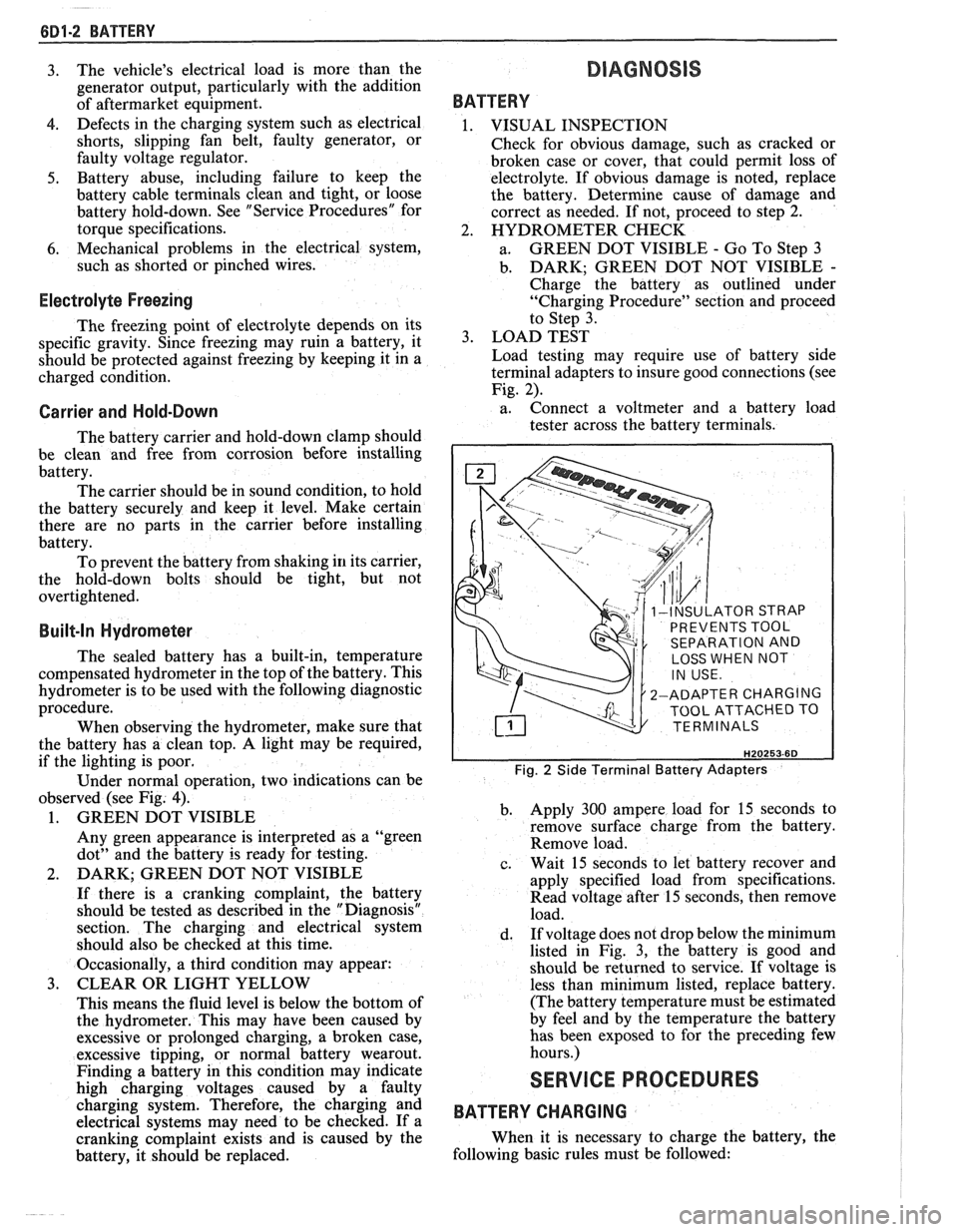
Load testing may require use of battery side
terminal adapters to insure good connections (see
Fig. 2).
a. Connect
a voltmeter and a battery load
tester across the battery terminals.
INSULATOR STRAP
PREVENTS TOOL
SEPARATION AND
LOSS WHEN NOT
2-ADAPTER CHARGING
TOOL ATTACHED TO
TERMINALS
Fig. 2 Side Terminal Battery Adapters
b. Apply 300 ampere load for 15 seconds
to
remove surface charge from the battery.
Remove load.
c. Wait
15 seconds to let battery recover and
apply specified load from specifications.
Read voltage after 15 seconds, then remove
load.
d. If
voltage does not drop below the minimum
listed in Fig. 3, the battery is good and
should be returned to service. If voltage is
less than minimum listed, replace battery.
(The battery temperature must be estimated
by feel and by the temperature the battery
has been exposed to for the preceding few
hours.)
SERVICE PROCEDURES
BATTERY CHARGING
When it is necessary to charge the battery, the
following basic rules must be followed:
Page 446 of 1825
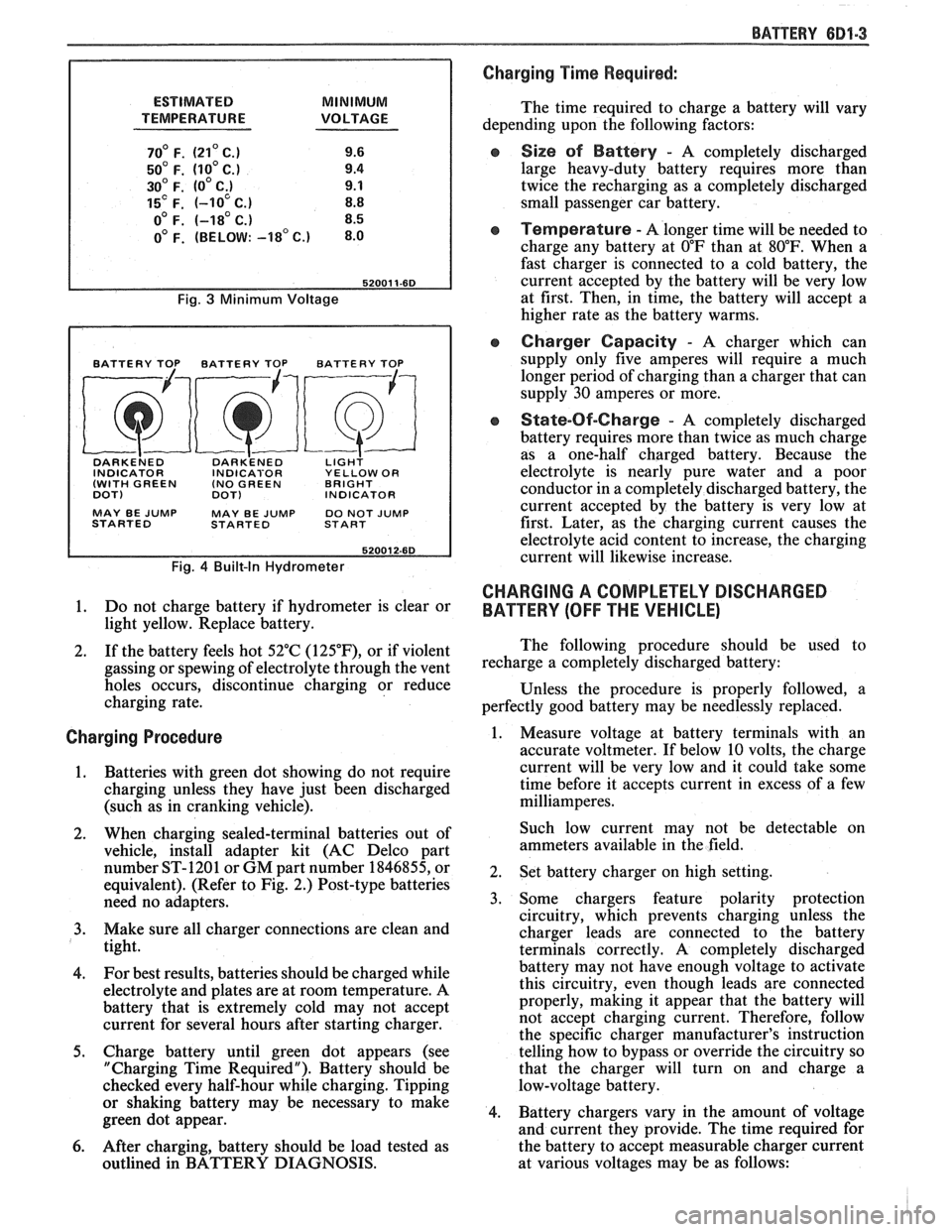
ESTIMATED MINIMUM
TEMPERATURE VOLTAGE
70' F. (21' C.) 9.6
50' F. (10' C.) 9.4
30' F. (0' C;) 9.1
15' F. (-10 C.) 8.8
o0 F. (-18' C.) 8.5
0' F. (BELOW: -18' c.) 8.0
Fig. 3 Minimum Voltage
BATTERY TOP BATTERY TOP BATTERY TOP
DARKE~ED DARK'ENED LIGH? INDICATOR INDICABOR YELLOW OR
(WITH GREEN (NO
GREEN BRIGHT
DOT)
DOT) INDICATOR
MAY BE
JUMP MAY BE JUMP DO NOT JUMP
STARTED STARTED START
Fig. 4 Built-In Hydrometer
1. Do not charge battery if hydrometer is clear or
light yellow. Replace battery.
2. If the battery feels hot 52°C
(125"F), or if violent
gassing or spewing of electrolyte through the vent
holes occurs, discontinue charging or reduce
charging rate.
Charging Procedure
1. Batteries with green
dot showing do not require
charging unless they have just been discharged
(such as in cranking vehicle).
2. When charging sealed-terminal batteries out of
vehicle, install adapter kit (AC Delco part
number ST-1201 or GM part number 1846855, or
equivalent). (Refer to Fig. 2.) Post-type batteries
need no adapters.
3. Make sure all charger connections are clean and
tight.
4. For
best results, batteries should be charged while
electrolyte and plates are at room temperature. A
battery that is extremely cold may not accept
current for several hours after starting charger.
5. Charge battery until green dot appears (see
"Charging Time Required"). Battery should be
checked every half-hour while charging. Tipping
or shaking battery may be necessary to make
green dot appear.
6. After charging, battery should be load tested as
outlined in BATTERY DIAGNOSIS.
BATTERY 681-3
Charging Time Required:
The time required to charge a battery will vary
depending upon the following factors:
e Size sf Battery - A completely discharged
large heavy-duty battery requires more than
twice the recharging as a completely discharged
small passenger car battery.
Temperature - A longer time will be needed to
charge any battery at
O"F than at 80°F. When a
fast charger is connected to a cold battery, the
current accepted by the battery will be very low
at first. Then, in time, the battery will accept a
higher rate as the battery warms.
Charger Capacity - A charger which can
supply only five amperes will require a much
longer period of charging than a charger that can
supply
30 amperes or more.
e State-Of-Charge - A completely discharged
battery requires more than twice as much charge
as a one-half charged battery. Because the
electrolyte is nearly pure water and a poor
conductor in a completely discharged battery, the
current accepted by the battery is very low at
first. Later, as the charging current causes the
electrolyte acid content to increase, the charging
current will likewise increase.
CHARGING A COMPLETELY DISCHARGED
BATTERY
(OFF THE VEHICLE)
The following procedure should be used to
recharge a completely discharged battery:
Unless the procedure is properly followed, a
perfectly good battery may be needlessly replaced.
1. Measure voltage at battery terminals with an
accurate voltmeter. If below 10 volts, the charge
current will be very low and it could take some
time before it accepts current in excess of a few
milliamperes.
Such low current may not be detectable on
ammeters available in the field.
2. Set battery charger on high setting.
3. Some chargers feature polarity protection
circuitry, which prevents charging unless the
charger leads are connected to the battery
terminals correctly. A completely discharged
battery may not have enough voltage to activate
this circuitry, even though leads are connected
properly, making it appear that the battery will
not accept charging current. Therefore, follow
the specific charger manufacturer's instruction
telling how to bypass or override the circuitry so
that the charger will turn on and charge a
low-voltage battery.
4. Battery chargers vary in the amount of voltage
and current they provide. The time required for
the battery to accept measurable charger current
at various voltages may be as follows:
Page 447 of 1825
6D1-4 BATTERY
VOLTAGE
A. 16.0 or more
B. 14.0
- 15.9
C. 13.9 or less HOURS
1. Set parking brake and place automatic
Up to 4 Hours transmission in "PARK" (NEUTRAL for
Up to 8 Hours manual transmission.) Turn off the ignition,
Up to 16 Hours turn off lights, and all other electrical
If the charge current is still not
measurable
at the end of the above charging
times, the battery should be replaced.
If the charge current is measurable during
the charging time, the battery is considered to be
good and charging should be completed in the
normal manner.
5. It
is important to remember that a completely
discharged battery must be recharged for a
sufficient number of ampere hours (AH) to
restore it to a usable state. As a general rule of
thumb, using the reserve capacity rating (RC) of
the battery as the number of ampere hours of
charge will usually bring the green dot into view.
For example, if battery is rated at 75 RC minutes,
it would be completely recharged as follows:
10 ampere charge x 7-1/2 hours
= 75 AH
25 ampere charge x 3 hours = 75 AH, etc.
6. It
is recommended that any battery recharged by
this procedure be
LOAD TESTED to establish
serviceability.
JUMP STARTING IN CASE OF EMERGENCY
WITH AUXILIARY (BOOSTER) BAVEEWY
NOTICE: Do not push or tow the vehicle to start.
Damage to the emission system, or to other parts
of the vehicle may result.
Both booster and discharged battery should be
treated carefully when using jumper cables. Follow the
procedure outlined below, being careful not to cause
sparks:
CAUTION: Departure from these
conditions or the procedure below
could result in:
(1) Serious personal
injury (particularly to eyes) or property
damage from such causes as battery
explosion, battery acid, or electrical
burns; and/or
(2) damage to electronic
components of either vehicle.
Never expose battery to open flame or electric
spark
- batteries generate a gas which is flammable and
explosive.
Remove rings, watches, and other jewelry. Wear
approved eye protection.
Do not allow battery fluid to contact eyes, skin,
fabrics, or painted surfaces
- fluid is a corrosive acid.
Flush any contacted area with water immediately and
thoroughly. Be careful that metal tools or jumper
cables do not contact the positive battery terminal (or
metal in contact with it) and any other metal on the
car, because a short circuit could occur. Batteries
should always be kept out of the reach of children.
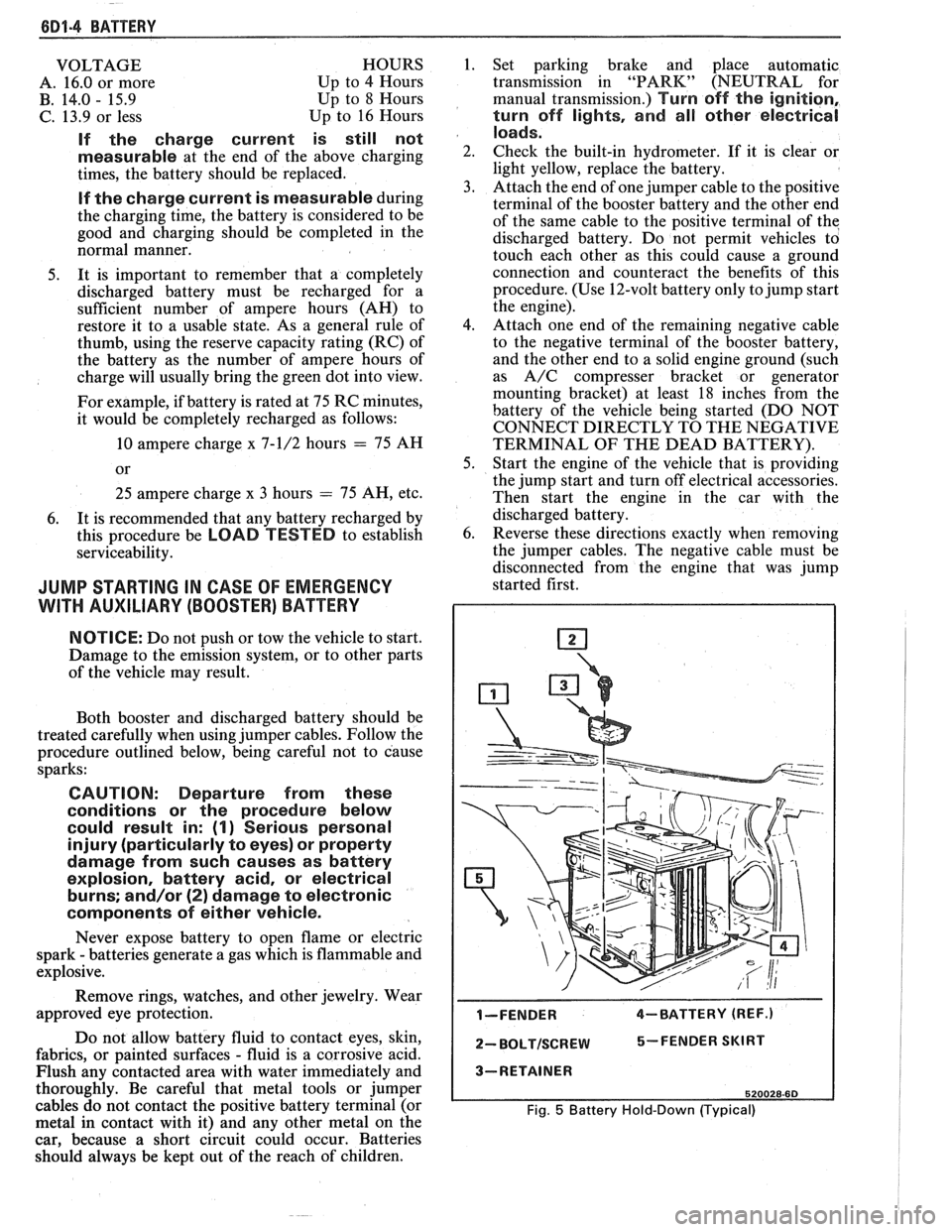
loads.
2. Check the built-in hydrometer. If it is clear or
light yellow, replace the battery.
3. Attach the end of one jumper cable to the positive
terminal of the booster battery and the other end
of the same cable to the positive terminal of the
discharged battery. Do not permit vehicles to
touch each other as this could cause a ground
connection and counteract the benefits of this
procedure. (Use 12-volt battery only to jump start
the engine).
4. Attach one end of the remaining negative cable
to the negative terminal of the booster battery,
and the other end to a solid engine ground (such
as
A/C compresser bracket or generator
mounting bracket) at least 18 inches from the
battery of the vehicle being started (DO NOT
CONNECT DIRECTLY TO THE NEGATIVE
TERMINAL OF THE DEAD BATTERY).
5. Start the engine of the vehicle that is providing
the jump start and turn off electrical accessories.
Then start the engine in the car with the
discharged battery.
6. Reverse these directions exactly when removing
the jumper cables. The negative cable must be
disconnected from the engine that was jump
started first.
I-FENDER 4-BATTERY (REF.)
2- BOLTISCREW 5-FENDER SKIRT
3-RETAINER
520028-60
Fig. 5 Battery Hold-Down (Typical)
Page 464 of 1825
CHARGING SYSTEM 6D3-1
SECTION 6D3
CHARG NG SYSTEM
CONTENTS
General Description ................................. 6D3- 1 Charging System ........................................ 6D3- 1
.......................................... Charging System - CS ............................... 6D3- 1 On-Car Service 6D3-2
................................................... Diagnosis .. 6D3- 1 Generator 6D3-3 ...................... ......................... ............................................. 6D3- 1 Specifications 6D3-3 Service Procedures .................................. Unit Repair .. 6D3-4-6 ............................... ............
GENERAL DESCRIPTION
The engine electrical system includes the battery,
ignition (primary and secondary), starter (and related
wiring) and the generator (and related wiring).
Diagnostic charts (see Section 6D) will aid in
trouble-shooting system faults. When a fault is traced
to a particular component, refer to that components'
section of the service manual.
CHARGING SYSTEM-CS
The CS Charging System has several sizes
available, including the CS-130 and CS-144. The
number (130 or 144) denotes the
OD in mm of the
stator laminations.
CS generators use a new type regulator and a
diode trio is not used. A delta stator, rectifier bridge,
and rotor with slip rings and brushes are electrically
similar to earlier generators. A conventional pulley and
fan is used and, on the CS-130, an internal fan cools the
slip ring end frame, rectifier bridge and regulator.
Unlike three-wire generators, the CS-130 and
CS-144 may be used with only two connections
-
battery positive and an "L" terminal to the charge
indicator bulb. Use of "P",
"F", and "S" terminals is
optional. The "P" terminal is connected to the stator,
and may be connected externally to
a tachometer or other
device. The
"F" terminal is connected internally
to field positive, and may be used as a fault indicator.
The "S" terminal may be connected externally to a
voltage, such as battery voltage, to sense voltage to be
controlled.
As on other charging systems, the charge
indicator lights when the switch is closed, and goes out
when the engine is running. If the charge indicator is
on with the engine running, a charging system defect
is indicated. For all kinds of defects, the indicator will
glow at full brilliance, not "half lit". Also, the charge
indicator will be on with the engine running if system
voltage is too high or too low. The regulator voltage
setting varies with temperature, and limits system
voltage by controlling rotor field current.
This regulator switches rotor field current on and
off at a fixed frequency of about 400 cycles per second.
By varying the on-off time, correct average field
current for proper system voltage control is obtained.
At high speeds, the on-time may be 10% and the
off-time 90%. At low speeds, with high electrical loads,
on-off time may be 90% and
lo%, respectively.
No periodic maintenance on the generator is
required.
DIAGNOSIS
SERVICE PROCEDURES
CHARGING SYSTEM
The generator does not require periodic
lubrication. The rotor shaft is mounted on ball bearings
at the drive end and roller bearings at the slip ring end.
Each contains a permanent grease supply. At periodic
intervals, check mounting bolts for tightness and adjust
belt tension (see Section
6B), if applicable.
e When adjusting belt tension, apply pressure at
center of generator, never against either end
frame.
GENERATOR BENCH CHECK-CS
To check generator in a test stand, remove as
specified in On-Car Service and proceed as follows: 1.
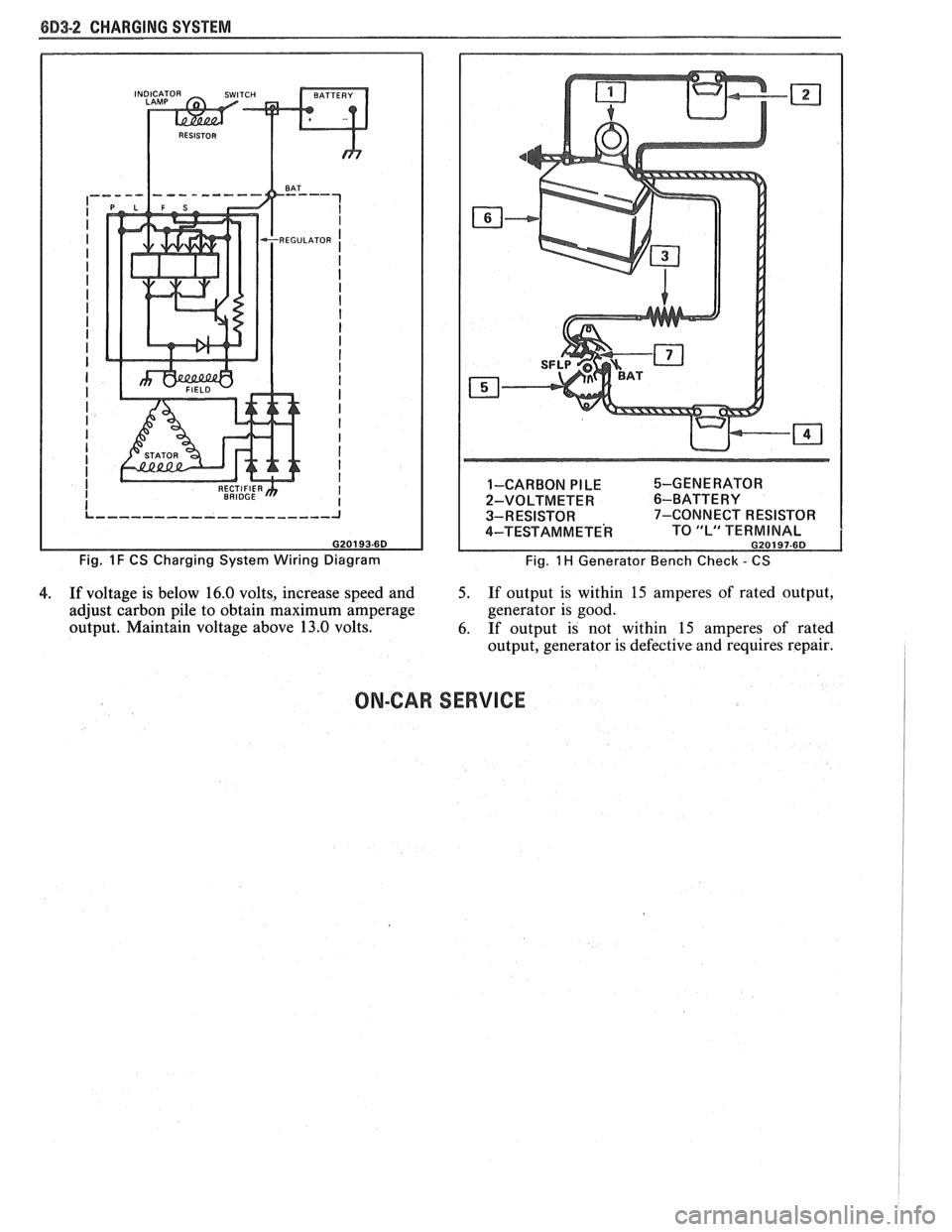
Make connections as shown in Figure
lH, except
leave the carbon pile disconnected. The ground
polarity of generator and battery must be the
same. The battery must be fully charged. Use a
30-500
OHM resistor between battery and "L"
terminal.
2. Slowly increase generator speed and observe
voltage.
3. If the voltage is uncontrolled and increases above
16.0 volts, the rotor field is shorted, the regulator
is defective, or both.
A shorted rotor field coil can
cause the regulator to become defective. NOTE:
The battery must be fully charged when making
this test.
Page 465 of 1825
8D3-2 CHARGING SYSTEM
Fig. 1 F CS Charging System Wiring Diagram 1-CARBON
PILE %-GENERATOR
2-VOLTMETER
6-BATTERY
3-RESISTOR 7-CONNECT RESISTOR
4-TEST AM METE^ TO "L" TERMINAL G20197-6D
Fig. 1 H Generator Bench Check - CS
4. If voltage is below 16.0 volts, increase speed and 5. If output is within 15 amperes of rated output,
adjust carbon pile to obtain maximum amperage generator
is good.
output. Maintain voltage above 13.0 volts.
6. If output is not within
15 amperes of rated
output, generator is defective and requires repair.
ON-CAR SERVICE
Page 466 of 1825
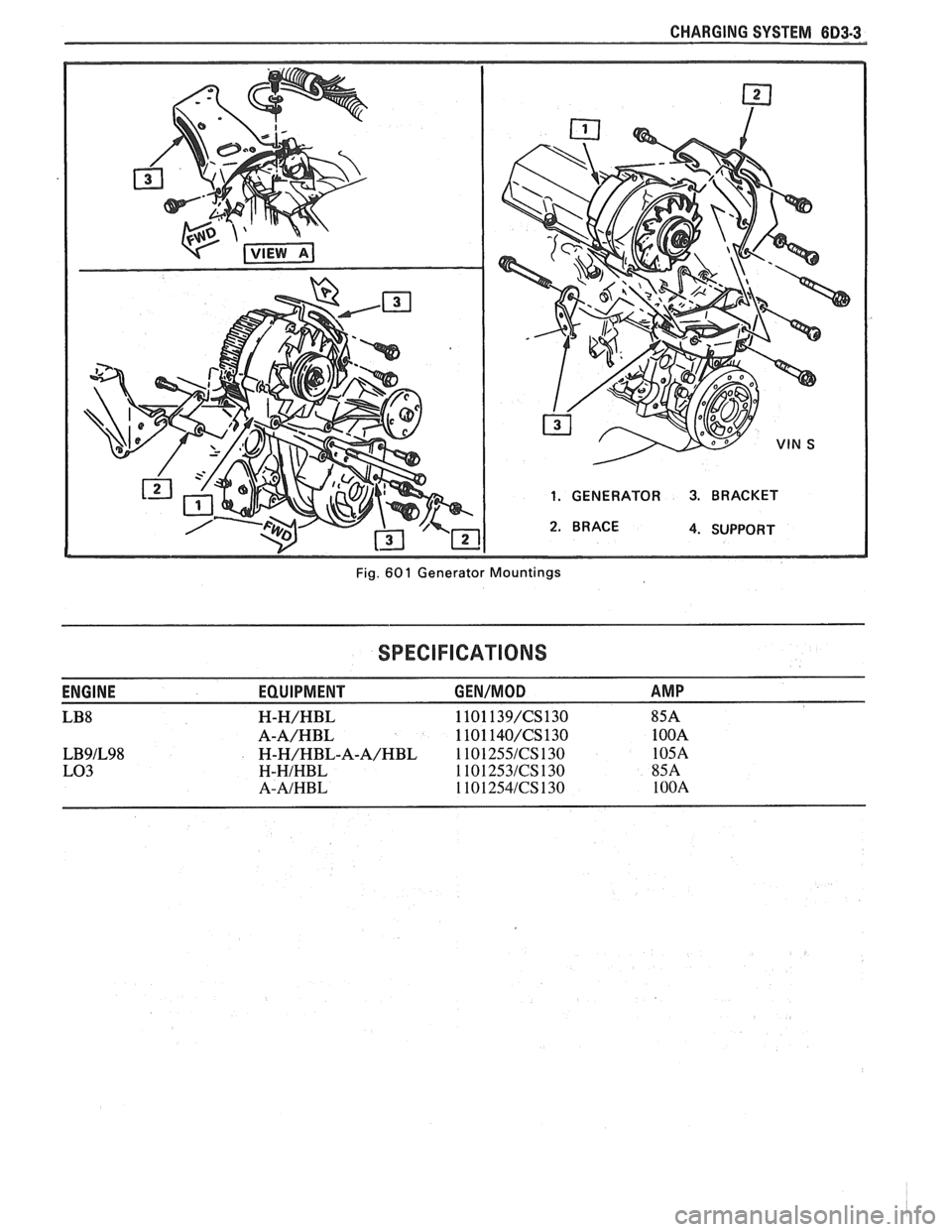
CHARGING SYSTEM 6D3-3
1. GENERATOR 3. BRACKET
4. SUPPORT
Fig.
60 1 Generator Mountings
SPECIFICATIONS
ENGINE EQUIPMENT GEN/MOD AMP
LB8 H-H/HBL 1101 139/CS130 85A
A-A/HBL 1101 140/CS130 1 OOA
LB9lL98 H-H/HBL-A-A/HBL 1 101 255lCS 130 105A
LO3 H-HIHBL 1101253lCS130 85A
A-AIHBL 1101254lCS130 1 OOA
Page 467 of 1825
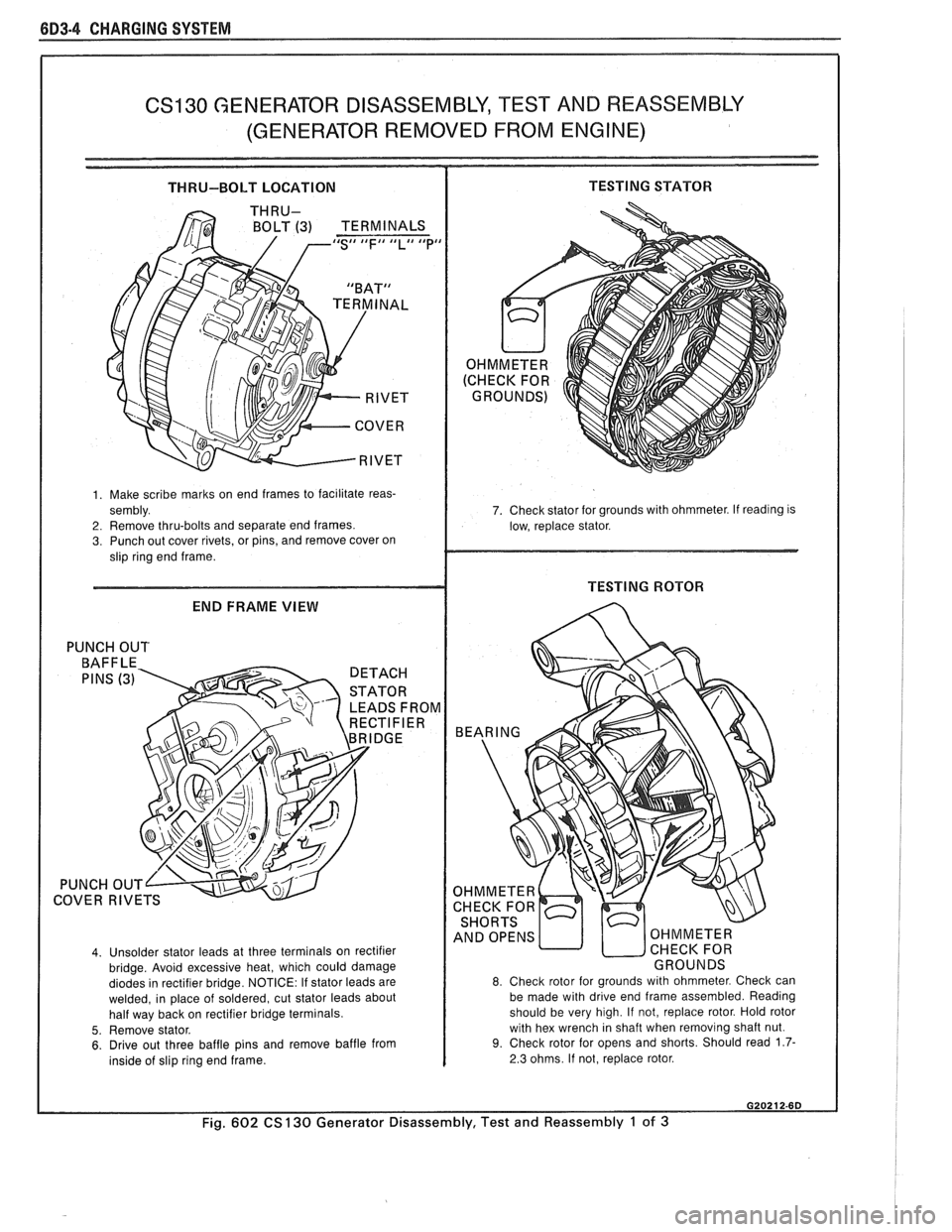
6D3-4 CHARGING SYSTEM
CS130 GENERATOR DISASSEMBLY, TEST AND REASSEMBLY
(GENERATOR REMOVED FROM ENGINE)
THRU-BOLT LOCATION TESTING STATOR
BOLT (3) TERMINALS IdS## tdFI# llLll Idpd
1. Make scribe marks on end frames to facilitate reas-
sembly.
2. Remove thru-bolts and separate end frames. 3. Punch out cover rivets, or pins, and remove cover on
slip ring end frame.
END FRAME VIEW
PUNCH OUT
LEADS FROM
COVER
RIVE
4. Unsolder stator leads at three terminals on rectifier
bridge. Avoid excessive heat, which could damage
diodes in rectifier bridge. NOTICE: If stator leads are
welded, in place of soldered, cut stator leads about
half way back on rectifier bridge terminals.
5. Remove stator. 6. Drive out three baffle pins and remove baffle from
inside of slip ring end frame. 7. Check stator
for grounds with ohmmeter. If
readlng IS
low, replace stator.
8. Check rotor for grounds with ohmmeter. Check can
be made with drive end frame assembled. Reading
should be very high. If not, replace rotor. Hold rotor
with hex wrench in shaft when removing shaft nut.
9. Check rotor for opens and shorts. Should read 1.7-
2.3 ohms. If not, replace rotor.
Fig. 602 CS 130 Generator Disassembly, Test and Reassembly 1 of 3