audio PONTIAC G3 2010 User Guide
[x] Cancel search | Manufacturer: PONTIAC, Model Year: 2010, Model line: G3, Model: PONTIAC G3 2010Pages: 368, PDF Size: 3.94 MB
Page 187 of 368

Setting the EQ
SOUND (Equalization) :Press to select an
equalization setting.
Setting the EQ
To set the EQ:
1. Press SOUND.
2. Press the pushbutton below the P.EQ tab on the display. The Pop, Rock, Ctry, Voice, Jazz, Clas
tabs appear on the display.
3. Press the pushbutton below the desired selection to set the EQ. Pressing the same pushbutton again
cancels the EQ setting.
XM Satellite Radio Service
XM is a satellite radio service that is based in the
48 contiguous United States and 10 Canadian
provinces. XM Satellite Radio has a wide variety
of programming and commercial-free music,
coast-to-coast, and in digital-quality sound. A service
fee is required to receive the XM service. For more
information, contact XM at www.xmradio.com or call
1-800-929-2100 in the U.S. and www.xmradio.ca or
call 1-877-438-9677 in Canada.
Radio Messages for XM Only
See XM Radio Messageson page 4‑51later in this
section for further detail.
Playing a CD
Insert a CD partway into the slot, label side up. The
player pulls it in and the CD begins playing. A CD can
be loaded while the ignition is in the OFF position.
When the CD is inserted, CDP appears on the display.
As the CD is loading, LOADING appears on the display.
As each new track starts to play, the track number
displays.
If the ignition or radio is turned off with a CD in the
player, it will stay in the player. When a CD is in the
player and the ignition is in the ON/RUN position, the
radio must be turned on before the CD will start playing.
When the ignition and radio are turned on, the CD will
start playing where it stopped, if it was the last selected
audio source.
The CD player can play the smaller 8 cm (3 in) single
CDs with an adapter ring. Full-size CDs and the smaller
CDs are loaded in the same manner.
[TUNE (Next Track): Press[TUNE to go to the
next track. The track number will appear on the display.
The player will continue moving forward through the CD
with each press of
[TUNE.
4-45
Page 188 of 368

rTUNE (Previous Track):Press to go to the start of
the current track. The track number will appear on the
display. The player will continue moving backward
through the CD with each press of
rTUNE.
BAND : Press to listen to the radio while a CD is
playing. The CD remains inside the radio for future
listening.
CD/AUX : Press to play a CD when listening to the
radio. CDP appears on the display when the CD player
has been selected. The CD symbol will appear on the
display when a CD is loaded.
Press CD/AUX while a CD is playing to pause the CD.
PAUSE flashes on the display. Press CD/AUX again to
start playing the CD.
Press CD/AUX to play a CD when listening to the audio
contents from other device (AUX mode). CDP appears
on the display when the CD player has been selected.
The CD symbol will appear on the display when a CD is
loaded.
EJECT : Press to eject a CD. The CD can be ejected
when the ignition or the radio is turned off.
INFO/DISP (Information/Display): : Press to display
additional text information related to the current MP3/
WMA song. A choice of additional information such
as: Song Title , Album Title, Artist, Bit rate may appear. RPT (Repeat) :
Press the pushbutton under the RPT
tab on the display to repeat the current track, RPT
appears on the display. Press the pushbutton again to
stop repeat.
RDM (Random) : Press the pushbutton below the
RDM tab on the display to play tracks in random, rather
than sequential order, RDM appears on the display.
Press the pushbutton again to stop random play.
INT (Scan) : Press the pushbutton below the INT tab
on the display to listen to the first few seconds of each
track on the CD, INTRO appears on the display. Press
the pushbutton again to stop scanning and the current
track begins to play.
Playing an MP3/WMA CD-R Disc
The radio has the MP3/WMA CD-R disc capability. For
more information, see Using an MP3on page 4‑48later in this section.
CD Messages
CHECK CD :If this message displays and/or the CD
comes out, it could be for one of the following reasons:
.It is very hot. When the temperature returns to
normal, the CD should play.
.The road is very rough. When the road becomes
smoother, the CD should play.
.The CD is dirty, scratched, wet, or upside down.
4-46
Page 190 of 368

Using the Auxiliary Input Jack
The radio system has a 3.5 mm (1/8 in) auxiliary input
jack located on the lower right side of the faceplate.
This is not an audio output; do not plug the headphone
set into the front auxiliary input jack. An external audio
device such as an iPod, laptop computer, MP3 player,
CD changer, etc. can be connected to the 3.5 mm
(1/8 in) auxiliary input jack for use as another audio
source.
Drivers are encouraged to set up any auxiliary device
while the vehicle is in P (Park). SeeDefensive Driving
on page 5‑2for more information on driver distraction.
To use a portable audio player, connect a 3.5 mm
(1/8 in) cable to the radio's front auxiliary input jack.
When a device is connected, press the radio CD/AUX
button to begin playing audio from the device over the
vehicle speakers.
O(Power/Volume) : Turn to adjust the volume.
Additional volume adjustments may have to be made
from the portable device if the volume is too quiet or
too loud.
CD/AUX (Auxiliary) : Press to play a CD while a
portable audio device is playing. Press CD/AUX a
second time for the system to begin playing audio from
the connected portable audio player. The portable audio
device continues playing until it is turned off.
Using an MP3
MP3/WMA CD-R Disc
MP3 Format
If you burn your own MP3/WMA disc on a personal
computer:
.Make sure the MP3/WMA files are recorded on a
CD-R disc.
.Do not mix standard audio and MP3/WMA files on
one disc.
.Make sure each MP3/WMA file has a .m3u or
.wma extension, other file extensions might
not work.
.Files can be recorded with a variety of fixed or
variable bit rates. Song title, artist name, and
album are available for display by the radio when
recorded using ID3 tags version 1 and 2.
.Make sure to finalize the disc when burning an
MP3/WMA disc, using multiple sessions. It is
usually better to burn the disc all at once.
The player is able to read and play a maximum of
50 folders, five sessions, and 999 files. Long file names
and folder names can use more disc memory space
than necessary. To conserve space on the disc,
minimize the length of the file and folder names.
4-48
Page 191 of 368

An MP3/WMA CD that was recorded using no file
folders can also be played. The system can support
up to eight folders in depth, though, keep the depth of
the folders to a minimum in order to keep down the
complexity and confusion in trying to locate a particular
folder during playback. If a CD contains more than the
maximum of 50 folders, five sessions, and 999 files,
the player lets you access and navigate up to the
maximum, but all items over the maximum are ignored.
Root Directory
The root directory is treated as a folder. If the root
directory has compressed audio files, the directory is
displayed as ROOT. All files contained directly under
the root directory are accessed prior to any other
directory.
Empty Directory or Folder
If a root directory or a folder exists somewhere in the
file structure that contains only folders/subfolders and
no compressed files directly beneath them, the player
advances to the next folder in the file structure that
contains compressed audio files. The empty folder
does not display.
No Folder
When a CD contains only compressed files, the files are
located under the root folder. The next and previous
folder function does not function on a CD that was
recorded without folders or playlists. When displaying
the name of the folder the radio displays ROOT.
When a CD contains only compressed audio files, but
no folders, all files are located under the root folder.
When the radio displays the name of the folder, the
radio displays ROOT.
Order of Play
The player play will begin from the first track under the
root directory. When all tracks from the root directory
have been played, play will continue from files
according to their numerical listing. After playing the last
track from the last folder, the player will begin playing
again at the first track of the first folder or root directory.
File System and Naming
The song name in the ID3 tag is displayed. If the song
name is not present in the ID3 tag, then the radio
displays the file name without the extension (such as
MP3/WMA) instead.
Track names longer than 32 characters or four pages
are shortened. Parts of words on the last page of text
and the extension of the filename does not display.
4-49
Page 192 of 368

Playing an MP3/WMA
With the ignition in the ON/RUN position, insert a CD
partway into the slot, label side up. The player pulls the
disc in. The CD should begin playing. As each new
track starts to play, the track number, and the song
name will appear on the display. If the ignition or radio
is turned off with a CD in the player, it will stay in the
player. When a CD is in the player and the ignition is
turned on, the radio must be turned on before the CD
will start playback. When the ignition and radio are
turned on, the CD will start playing where it stopped, if it
was the last selected audio source.
The CD player can play the smaller 8 cm (3 in) single
CDs with an adapter ring. Full-size CDs and the smaller
CDs are loaded in the same manner.
Sound quality may be reduced due to CD-R quality, the
method of recording, the quality of the music that has
been recorded, and the way the CD-R has been
handled.
DIR (Directory) :Press to repeat the tracks in the
current directory. DIR displays.
Press DIR again to repeat the tracks in all of the
directories. ALL displays.
Press DIR again to turn off repeat play.
uSEEKt(Next/Previous Folder) (in MP3/WMA
Mode): Press to change the folder. If CD-R does not
have any folders, “ROOT”flashes on the display for a
short time.
[TUNE (Next Track): Press the up TUNE arrow to
go to the next track. The track number displays. The
player continues moving forward through the CD each
time TUNE is pressed.
rTUNE (Previous Track): Press the down TUNE
arrow to go to the start of the current track. The track
number displays. The player continues moving
backward through the CD each time TUNE is pressed.
INFO/DISP (Information/Display) : Press to display
additional text information related to the current
MP3/WMA song. A choice of additional information
such as: Song Title, Album Title, and Artist. Bit rate
might also display.
When information is not available, No Info displays.
Press this button for longer than two seconds to change
display mode.
SCROLL (MP3/WMA Mode Only) : Press the SOUND
button for longer than two seconds. The song title or
other available information of a song scrolls on/off.
The offset is scroll on. The scroll mode can be changed
only when the SOUND button is pressed for longer than
two seconds.
4-50
Page 193 of 368
XM Radio Messages
UPDATING :The encryption code in the receiver is
being updated, and no action is required. This process
should take no longer than 30 seconds.
NO SIGNAL : The system is functioning correctly, but
the vehicle is in a location that is blocking the XM™
signal. When the vehicle is moved into an open area,
the signal should return.
LOADING : The audio system is acquiring and
processing audio and text data. No action is needed.
This message should disappear shortly.
OFF AIR : This channel is not currently in service.
Tune in to another channel.
CH UNAVAILABLE : This previously assigned channel
is no longer assigned. Tune to another station. If this
station was one of the presets, choose another station
for that preset button.
RADIO ID : If tuned to channel 0, this message
alternates with the XM™ Radio 8 digit radio ID label.
This label is needed to activate the service.
CHECK XM TUNER : If this message does not clear
within a short period of time, the receiver could have a
fault. Consult with your dealer/retailer.
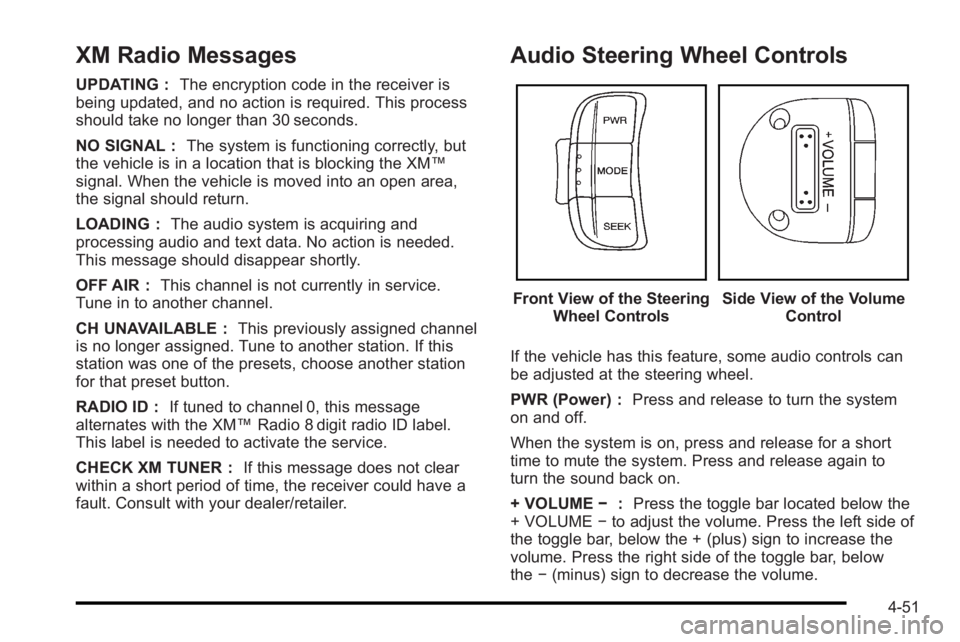
Audio Steering Wheel Controls
Front View of the Steering Wheel ControlsSide View of the Volume Control
If the vehicle has this feature, some audio controls can
be adjusted at the steering wheel.
PWR (Power) : Press and release to turn the system
on and off.
When the system is on, press and release for a short
time to mute the system. Press and release again to
turn the sound back on.
+ VOLUME −:Press the toggle bar located below the
+ VOLUME −to adjust the volume. Press the left side of
the toggle bar, below the + (plus) sign to increase the
volume. Press the right side of the toggle bar, below
the −(minus) sign to decrease the volume.
4-51
Page 194 of 368

MODE :Press and release this button multiple times
to cycle through the audio playback options that are
available on the vehicle. Options may include FM, AM,
XM, CD, and AUX.
SEEK : Press and release to go to the next preset
station.
Press and hold for a long time to go to the next AM, FM,
or XM station. The radio seeks stations only with a
strong signal that are in the selected band.
When playing a CD, press and release to go to the next
track. Press and hold to fast forward through the tracks.
Radio Reception
Frequency interference and static can occur during
normal radio reception if items such as cell phone
chargers, vehicle convenience accessories, and
external electronic devices are plugged into the
accessory power outlet. If there is interference or static,
unplug the item from the accessory power outlet.
AM
The range for most AM stations is greater than for FM,
especially at night. The longer range can cause station
frequencies to interfere with each other. For better radio
reception, most AM radio stations boost the power
levels during the day, and then reduce these levels
during the night. Static can also occur when things like
storms and power lines interfere with radio reception.
When this happens, try reducing the treble on the radio.
FM Stereo
FM signals only reach about 10 to 40 miles
(16 to 65 km). Although the radio has a built-in electronic
circuit that automatically works to reduce interference,
some static can occur, especially around tall buildings
or hills, causing the sound to fade in and out.
XM™ Satellite Radio Service
XM Satellite Radio Service gives digital radio reception
from coast-to-coast in the 48 contiguous United States,
and in Canada. Just as with FM, tall buildings or hills
can interfere with satellite radio signals, causing the
sound to fade in and out. In addition, traveling or
standing under heavy foliage, bridges, garages,
or tunnels may cause loss of the XM signal for a period
of time.
4-52
Page 312 of 368
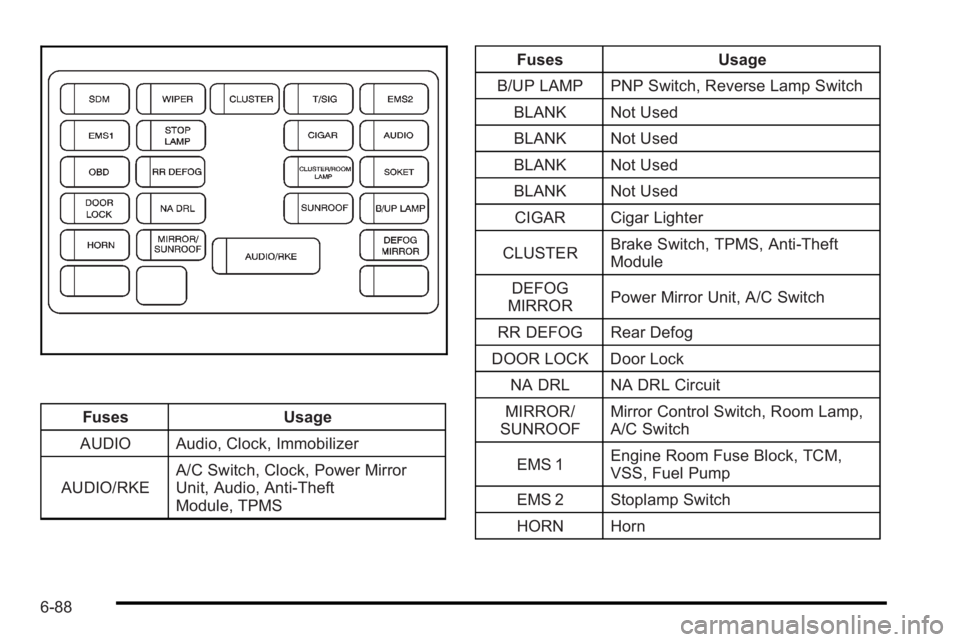
FusesUsage
AUDIO Audio, Clock, Immobilizer
AUDIO/RKE A/C Switch, Clock, Power Mirror
Unit, Audio, Anti-Theft
Module, TPMS Fuses
Usage
B/UP LAMP PNP Switch, Reverse Lamp Switch BLANK Not Used
BLANK Not Used
BLANK Not Used
BLANK Not Used
CIGAR Cigar Lighter
CLUSTER Brake Switch, TPMS, Anti‐Theft
Module
DEFOG
MIRROR Power Mirror Unit, A/C Switch
RR DEFOG Rear Defog
DOOR LOCK Door Lock NA DRL NA DRL Circuit
MIRROR/
SUNROOF Mirror Control Switch, Room Lamp,
A/C Switch
EMS 1 Engine Room Fuse Block, TCM,
VSS, Fuel Pump
EMS 2 Stoplamp Switch
HORN Horn
6-88
Page 356 of 368

Ashtray . . . . . . . . . . . . . . . . . . . . . . . . . . . . . . . . . . . . . . . . . . . . 4-14
Assistance Program, Roadside . . . . . . . . . . . . . . . . . . . . . .8-6
Audio System . . . . . . . . . . . . . . . . . . . . . . . . . . . . . . . . . . . . . . 4-36Audio Steering Wheel Controls . . . . . . . . . . . . . . . . . . . 4-51
Radio Reception . . . . . . . . . . . . . . . . . . . . . . . . . . . . . . . . . . 4-52
Radio with CD . . . . . . . . . . . . . . . . . . . . . . . . . . . . . . . . . . . . 4-41
Automatic Transmission
Fluid . . . . . . . . . . . . . . . . . . . . . . . . . . . . . . . . . . . . . . . . . . . . . . 6-21
Operation . . . . . . . . . . . . . . . . . . . . . . . . . . . . . . . . . . . . . . . . . 3-22
B
Backglass Antenna . . . . . . . . . . . . . . . . . . . . . . . . . . . . . . . . 4-53
Battery . . . . . . . . . . . . . . . . . . . . . . . . . . . . . . . . . . . . . . . . . . . . 6-37Inadvertent Power Saver . . . . . . . . . . . . . . . . . . . . . . . . . 4-13
Belt Routing, Engine . . . . . . . . . . . . . . . . . . . . . . . . . . . . . . . 7-15
Brake Emergencies . . . . . . . . . . . . . . . . . . . . . . . . . . . . . . . . . . . . . . 5-5
Brakes . . . . . . . . . . . . . . . . . . . . . . . . . . . . . . . . . . . . . . . . . . . . . 6-34
Antilock . . . . . . . . . . . . . . . . . . . . . . . . . . . . . . . . . . . . . . . . . . . . 5-4
Parking . . . . . . . . . . . . . . . . . . . . . . . . . . . . . . . . . . . . . . . . . . . 3-28
System Warning Light . . . . . . . . . . . . . . . . . . . . . . . . . . . . 4-26
Braking . . . . . . . . . . . . . . . . . . . . . . . . . . . . . . . . . . . . . . . . . . . . . .5-3
Braking in Emergencies . . . . . . . . . . . . . . . . . . . . . . . . . . . . .5-5 Break-In, New Vehicle . . . . . . . . . . . . . . . . . . . . . . . . . . . . . 3-17
Bulb Replacement . . . . . . . . . . . . . . . . . . . . . . . . . . . . . . . . . 6-49
Center High-Mounted Stoplamp(CHMSL) . . . . . . . . . . . . . . . . . . . . . . . . . . . . . . . . . . 6-46, 6-47
Fog Lamps . . . . . . . . . . . . . . . . . . . . . . . . . . . . . . . . . . . . . . . 4-12
Front Turn Signal, Sidemarker and Parking Lamps . . . . . . . . . . . . . . . . . . . . . . . . . . . . . . . . . . . . . . . . . . 6-45
Halogen Bulbs . . . . . . . . . . . . . . . . . . . . . . . . . . . . . . . . . . . . 6-43
Headlamp Aiming . . . . . . . . . . . . . . . . . . . . . . . . . . . . . . . . . 6-42
Headlamps . . . . . . . . . . . . . . . . . . . . . . . . . . . . . . . . . . . . . . . 6-43
License Plate Lamps . . . . . . . . . . . . . . . . . . . . . . . . . . . . . 6-48
Taillamps, Turn Signal, Sidemarker, Stoplamps, and Back-Up Lamps . . . . . . . . . . . . . . . . 6-47
Buying New Tires . . . . . . . . . . . . . . . . . . . . . . . . . . . . . . . . . . 6-63
C
California Perchlorate Materials Requirements . . . . . . . . . . . . . . . 6-4
Warning . . . . . . . . . . . . . . . . . . . . . . . . . . . . . . . . . . . . . . . . . . . 6-4
California Fuel . . . . . . . . . . . . . . . . . . . . . . . . . . . . . . . . . . . . . . .6-6
Canadian Owners . . . . . . . . . . . . . . . . . . . . . . . . . . . . . . . . . . . . iii
Capacities and Specifications . . . . . . . . . . . . . . . . . . . . . . 6-93
i - 2
Page 366 of 368

Specifications and Capacities . . . . . . . . . . . . . . . . . . . . . . 6-93
Speedometer . . . . . . . . . . . . . . . . . . . . . . . . . . . . . . . . . . . . . . 4-22
Starting the Engine . . . . . . . . . . . . . . . . . . . . . . . . . . . . . . . . 3-19
Steering . . . . . . . . . . . . . . . . . . . . . . . . . . . . . . . . . . . . . . . . . . . . .5-5
Steering Wheel Controls, Audio . . . . . . . . . . . . . . . . . . . 4-51
Steering Wheel, Tilt Wheel . . . . . . . . . . . . . . . . . . . . . . . . . .4-3
Storage Areas . . . . . . . . . . . . . . . . . . . . . . . . . . . . . . . . . . . . . 3-36Cupholders . . . . . . . . . . . . . . . . . . . . . . . . . . . . . . . . . . . . . . . 3-36
Glove Box . . . . . . . . . . . . . . . . . . . . . . . . . . . . . . . . . . . . . . . . 3-36
Stuck in Sand, Mud, Ice, or Snow . . . . . . . . . . . . . . . . . 5-13
Sun Visors . . . . . . . . . . . . . . . . . . . . . . . . . . . . . . . . . . . . . . . . . 3-14
Sunroof . . . . . . . . . . . . . . . . . . . . . . . . . . . . . . . . . . . . . . . . . . . . 3-37
T
Tachometer . . . . . . . . . . . . . . . . . . . . . . . . . . . . . . . . . . . . . . . . 4-22
Taillamps Turn Signal, Sidemarker, Stoplamps, andBack-Up Lamps . . . . . . . . . . . . . . . . . . . . . . . . . . . . . . . . . 6-47
Text Telephone (TTY) Users . . . . . . . . . . . . . . . . . . . . . . . . .8-5
Theft-Deterrent Systems . . . . . . . . . . . . . . . . . . . . . . . . . . . 3-14 Content Theft-Deterrent . . . . . . . . . . . . . . . . . . . . . . . . . . 3-15
Immobilizer . . . . . . . . . . . . . . . . . . . . . . . . . . . . . . . . . . . . . . . 3-14
Tilt Wheel . . . . . . . . . . . . . . . . . . . . . . . . . . . . . . . . . . . . . . . . . . . .4-3
Time . . . . . . . . . . . . . . . . . . . . . . . . . . . . . . . . . . . . . . . . . . . . . . . 4-15 Tires . . . . . . . . . . . . . . . . . . . . . . . . . . . . . . . . . . . . . . . . . . . . . . . 6-50
Aluminum Wheels, Cleaning . . . . . . . . . . . . . . . . . . . . . . 6-84
Buying New Tires . . . . . . . . . . . . . . . . . . . . . . . . . . . . . . . . . 6-63
Chains . . . . . . . . . . . . . . . . . . . . . . . . . . . . . . . . . . . . . . . . . . . . 6-68
Changing a Flat Tire . . . . . . . . . . . . . . . . . . . . . . . . . . . . . . 6-70
Cleaning . . . . . . . . . . . . . . . . . . . . . . . . . . . . . . . . . . . . . . . . . . 6-84
Compact Spare . . . . . . . . . . . . . . . . . . . . . . . . . . . . . . . . . . . 6-78
Different Size . . . . . . . . . . . . . . . . . . . . . . . . . . . . . . . . . . . . . 6-65
If a Tire Goes Flat . . . . . . . . . . . . . . . . . . . . . . . . . . . . . . . . 6-69
Inflation - Tire Pressure . . . . . . . . . . . . . . . . . . . . . . . . . . . 6-57
Inspection and Rotation . . . . . . . . . . . . . . . . . . . . . . . . . . 6-61
Installing the Spare Tire . . . . . . . . . . . . . . . . . . . . . . . . . . 6-73
Pressure Light . . . . . . . . . . . . . . . . . . . . . . . . . . . . . . . . . . . . 4-28
Pressure Monitor Operation . . . . . . . . . . . . . . . . . . . . . . 6-59
Pressure Monitor System . . . . . . . . . . . . . . . . . . . . . . . . . 6-58
Removing the Flat Tire . . . . . . . . . . . . . . . . . . . . . . . . . . . 6-73
Removing the Spare Tire and Tools . . . . . . . . . . . . . . . 6-71
Sidewall Labeling . . . . . . . . . . . . . . . . . . . . . . . . . . . . . . . . . 6-51
Storing a Flat or Spare Tire and Tools . . . . . . . . . . . . 6-78
Terminology and Definitions . . . . . . . . . . . . . . . . . . . . . . 6-54
Uniform Tire Quality Grading . . . . . . . . . . . . . . . . . . . . . 6-65
Wheel Alignment and Tire Balance . . . . . . . . . . . . . . . 6-67
Wheel Replacement . . . . . . . . . . . . . . . . . . . . . . . . . . . . . . 6-67
When It Is Time for New Tires . . . . . . . . . . . . . . . . . . . . 6-63
i - 12