audio PONTIAC G3 2010 Owners Manual
[x] Cancel search | Manufacturer: PONTIAC, Model Year: 2010, Model line: G3, Model: PONTIAC G3 2010Pages: 368, PDF Size: 3.94 MB
Page 1 of 368
2010 Pontiac G3 Owner ManualM
In Brief. . . . . . . . . . . . . . . . . . . . . . . . . . . . . . . . . . . . . . . . . . . . 1-1
Instrument Panel . . . . . . . . . . . . . . . . . . . . . . . . . . . . . . . . . 1-2
Initial Drive Information . . . . . . . . . . . . . . . . . . . . . . . . . . . 1-3
Vehicle Features . . . . . . . . . . . . . . . . . . . . . . . . . . . . . . . . 1-16
Performance and Maintenance . . . . . . . . . . . . . . . . . . 1-20
Seats and Restraint System . . . . . . . . . . . . . . . . . . . . . . 2-1
Head Restraints . . . . . . . . . . . . . . . . . . . . . . . . . . . . . . . . . . 2-2
Front Seats . . . . . . . . . . . . . . . . . . . . . . . . . . . . . . . . . . . . . . . 2-4
Rear Seats . . . . . . . . . . . . . . . . . . . . . . . . . . . . . . . . . . . . . . . 2-8
Safety Belts . . . . . . . . . . . . . . . . . . . . . . . . . . . . . . . . . . . . . 2-15
Child Restraints . . . . . . . . . . . . . . . . . . . . . . . . . . . . . . . . . 2-33
Airbag System . . . . . . . . . . . . . . . . . . . . . . . . . . . . . . . . . . 2-57
Restraint System Check . . . . . . . . . . . . . . . . . . . . . . . . . 2-72
Features and Controls . . . . . . . . . . . . . . . . . . . . . . . . . . . . 3-1
Keys . . . . . . . . . . . . . . . . . . . . . . . . . . . . . . . . . . . . . . . . . . . . . 3-2
Doors and Locks . . . . . . . . . . . . . . . . . . . . . . . . . . . . . . . . . 3-6
Windows . . . . . . . . . . . . . . . . . . . . . . . . . . . . . . . . . . . . . . . . 3-12 Theft-Deterrent Systems . . . . . . . . . . . . . . . . . . . . . . . . 3-14
Starting and Operating Your Vehicle . . . . . . . . . . . . . 3-17
Mirrors . . . . . . . . . . . . . . . . . . . . . . . . . . . . . . . . . . . . . . . . . . 3-34
Storage Areas . . . . . . . . . . . . . . . . . . . . . . . . . . . . . . . . . . . 3-36
Sunroof . . . . . . . . . . . . . . . . . . . . . . . . . . . . . . . . . . . . . . . . . 3-37
Instrument Panel . . . . . . . . . . . . . . . . . . . . . . . . . . . . . . . . . 4-1
Instrument Panel Overview . . . . . . . . . . . . . . . . . . . . . . . 4-3
Climate Controls . . . . . . . . . . . . . . . . . . . . . . . . . . . . . . . . 4-15
Warning Lights, Gages, and Indicators . . . . . . . . . . 4-20
Audio System(s) . . . . . . . . . . . . . . . . . . . . . . . . . . . . . . . . 4-36
Driving Your Vehicle . . . . . . . . . . . . . . . . . . . . . . . . . . . . . . 5-1
Your Driving, the Road, and the Vehicle . . . . . . . . . . 5-2
Towing . . . . . . . . . . . . . . . . . . . . . . . . . . . . . . . . . . . . . . . . . . 5-25
Service and Appearance Care . . . . . . . . . . . . . . . . . . . 6-1
Service . . . . . . . . . . . . . . . . . . . . . . . . . . . . . . . . . . . . . . . . . . . 6-3
Fuel . . . . . . . . . . . . . . . . . . . . . . . . . . . . . . . . . . . . . . . . . . . . . . 6-5
Checking Things Under the Hood . . . . . . . . . . . . . . . 6-11
Page 4 of 368
Safety Warnings and Symbols
Warning messages found on vehicle labels and in this
manual describe hazards and what to do to avoid or
reduce them.
Dangerindicates a hazard with a high level of risk
which will result in serious injury or death.
Warning orCaution indicates a hazard that could result
in injury or death.
{WARNING:
These mean there is something that could hurt
you or other people.
Notice: This means there is something that could
result in property or vehicle damage. This would not
be covered by the vehicle's warranty.
A circle with a slash
through it is a safety
symbol which means
“Do Not,” “Do not do
this,” or“Do not let this
happen.”
Vehicle Symbols
The vehicle has components and labels that use
symbols instead of text. Symbols are shown along with
the text describing the operation or information relating
to a specific component, control, message, gage,
or indicator.
M: This symbol is shown when you need to see your
owner manual for additional instructions or information.
*: This symbol is shown when you need to see a
service manual for additional instructions or information.
Vehicle Symbol Chart
Here are some additional symbols that may be found on
the vehicle and what they mean. For more information
on the symbol, refer to the index.
9: Airbag Readiness Light
#:Air Conditioning
!:Antilock Brake System (ABS)
g:Audio Steering Wheel Controls or OnStar®
$: Brake System Warning Light
":Charging System
I:Cruise Control
B: Engine Coolant Temperature
O:Exterior Lamps
iv
Page 7 of 368
Section 1 In Brief
Instrument Panel. . . . . . . . . . . . . . . . . . . . . . . . . . . . . . . . . . . 1-2
Initial Drive Information . . . . . . . . . . . . . . . . . . . . . . . . . . . 1-3
Remote Keyless Entry (RKE) System . . . . . . . . . . . 1-3
Door Locks . . . . . . . . . . . . . . . . . . . . . . . . . . . . . . . . . . . . . 1-4
Liftgate . . . . . . . . . . . . . . . . . . . . . . . . . . . . . . . . . . . . . . . . . . 1-4
Trunk Release . . . . . . . . . . . . . . . . . . . . . . . . . . . . . . . . . . 1-5
Windows . . . . . . . . . . . . . . . . . . . . . . . . . . . . . . . . . . . . . . . . 1-5
Seat Adjustment . . . . . . . . . . . . . . . . . . . . . . . . . . . . . . . . 1-6
Second Row Seats . . . . . . . . . . . . . . . . . . . . . . . . . . . . . 1-8
Head Restraint Adjustment . . . . . . . . . . . . . . . . . . . . . . 1-8
Safety Belt . . . . . . . . . . . . . . . . . . . . . . . . . . . . . . . . . . . . . . 1-9
Sensing System for Passenger Airbag . . . . . . . . . . 1-9
Mirror Adjustment . . . . . . . . . . . . . . . . . . . . . . . . . . . . . . 1-10
Steering Wheel Adjustment . . . . . . . . . . . . . . . . . . . . 1-11
Interior Lighting . . . . . . . . . . . . . . . . . . . . . . . . . . . . . . . . 1-11
Exterior Lighting . . . . . . . . . . . . . . . . . . . . . . . . . . . . . . . 1-12
Windshield Wiper/Washer . . . . . . . . . . . . . . . . . . . . . . 1-12
Climate Controls . . . . . . . . . . . . . . . . . . . . . . . . . . . . . . . 1-14
Transmission . . . . . . . . . . . . . . . . . . . . . . . . . . . . . . . . . . 1-15 Vehicle Features
. . . . . . . . . . . . . . . . . . . . . . . . . . . . . . . . . . 1-16
Radio(s) . . . . . . . . . . . . . . . . . . . . . . . . . . . . . . . . . . . . . . . 1-16
Satellite Radio . . . . . . . . . . . . . . . . . . . . . . . . . . . . . . . . . 1-17
Portable Audio Devices . . . . . . . . . . . . . . . . . . . . . . . . 1-18
Steering Wheel Controls . . . . . . . . . . . . . . . . . . . . . . . 1-18
Cruise Control . . . . . . . . . . . . . . . . . . . . . . . . . . . . . . . . . 1-19
Power Outlets . . . . . . . . . . . . . . . . . . . . . . . . . . . . . . . . . 1-19
Sunroof . . . . . . . . . . . . . . . . . . . . . . . . . . . . . . . . . . . . . . . . 1-19
Performance and Maintenance . . . . . . . . . . . . . . . . . .1-20
Tire Pressure Monitor . . . . . . . . . . . . . . . . . . . . . . . . . . 1-20
Engine Oil Life System . . . . . . . . . . . . . . . . . . . . . . . . 1-20
Hood Release . . . . . . . . . . . . . . . . . . . . . . . . . . . . . . . . . 1-21
Driving for Better Fuel Economy . . . . . . . . . . . . . . . 1-22
Roadside Assistance Program . . . . . . . . . . . . . . . . . 1-22
OnStar
®. . . . . . . . . . . . . . . . . . . . . . . . . . . . . . . . . . . . . . . 1-23
1-1
Page 9 of 368
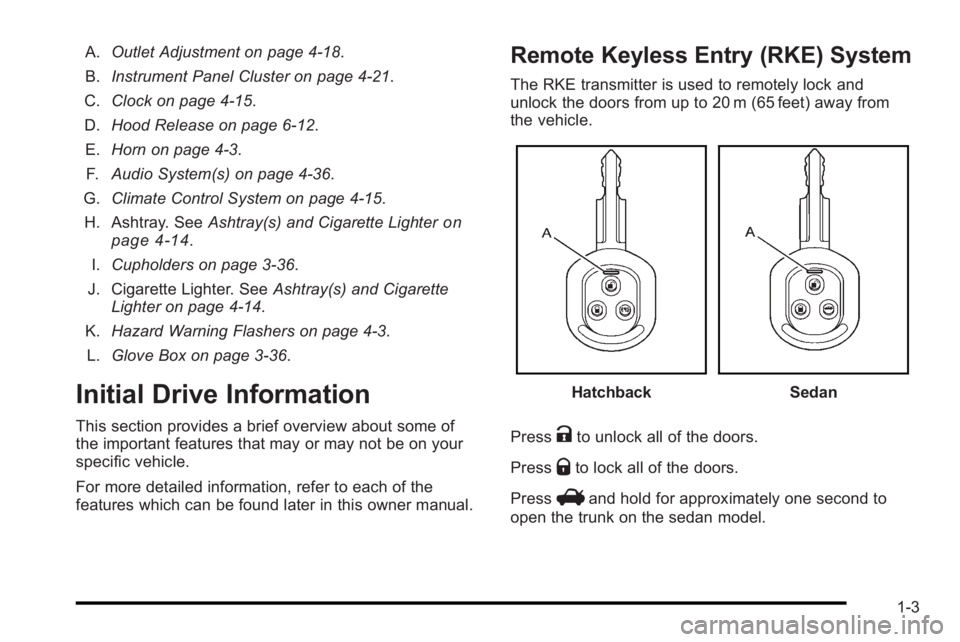
A.Outlet Adjustment on page 4‑18.
B. Instrument Panel Cluster on page 4‑21.
C. Clock on page 4‑15.
D. Hood Release on page 6‑12.
E. Horn on page 4‑3.
F. Audio System(s) on page 4‑36.
G. Climate Control System on page 4‑15.
H. Ashtray. See Ashtray(s) and Cigarette Lighter
on
page 4‑14.
I. Cupholders on page 3‑36.
J. Cigarette Lighter. See Ashtray(s) and Cigarette
Lighter on page 4‑14.
K. Hazard Warning Flashers on page 4‑3.
L. Glove Box on page 3‑36.
Initial Drive Information
This section provides a brief overview about some of
the important features that may or may not be on your
specific vehicle.
For more detailed information, refer to each of the
features which can be found later in this owner manual.
Remote Keyless Entry (RKE) System
The RKE transmitter is used to remotely lock and
unlock the doors from up to 20 m (65 feet) away from
the vehicle.
HatchbackSedan
Press
Kto unlock all of the doors.
Press
Qto lock all of the doors.
Press
Vand hold for approximately one second to
open the trunk on the sedan model.
1-3
Page 23 of 368
BAND :Press to choose FM, AM, or XM™
(if equipped).
uSEEK: Press to seek the next radio station with a
strong signal in the selected band.
tSEEK: Press to seek the previous radio station with
a strong signal in the selected band.
[TUNE: Press to go to the next station manually.
rTUNE: Press to go to the previous station manually.
SCAN/AST : Press to scan radio stations. Press and
hold to use Auto Store.
CD/AUX : Press to play a CD when listening to the
radio. CDP appears on the display when the CD player
has been selected. The CD symbol will appear on the
display when a CD is loaded. Press CD/AUX while a
CD is playing to pause the CD. PAUSE flashes on the
display. Press CD/AUX again to start playing the CD.
Press CD/AUX to play a CD when listening to the audio
contents from other device (AUX mode). CDP appears
on the display when the CD player has been selected.
The CD symbol will appear on the display when a CD is
loaded.
Press to play a CD while a portable audio device is
playing. Press CD/AUX a second time for the system to
begin playing audio from the connected portable audio
player. The portable audio device continues playing
until it is turned off. For more information about these and other radio
features, see
Audio System(s) on page 4‑36.
Storing a Favorite Station
A maximum of 36 stations can be programmed as
favorites using the six pushbuttons positioned below
the radio station frequency labels and by using
the radio favorites page button (FAV button).
Press the FAV button to go through up to six pages of
favorites, each having six favorite stations available per
page. If Automatic Store is used, then four pages of
favorites are available. Each page of favorites can
contain any combination of AM, FM, or XM™ (if
equipped) stations.
See “Storing a Favorite Station” underAM-FM Radio
on
page 4‑37and Radio with CD on page 4‑41.
Satellite Radio
XM is a satellite radio service that is based in the
48 contiguous United States and 10 Canadian
provinces. XM satellite radio has a wide variety of
programming and commercial-free music,
coast-to-coast, and in digital-quality sound.
A fee is required to receive the XM service.
For more information, refer to:
.www.xmradio.com or call 1-800-929-2100 (U.S.)
.www.xmradio.ca or call 1-877-438-9677 (Canada)
1-17
Page 24 of 368

See“XM Satellite Radio Service” underAM-FM Radioon page 4‑37andRadio with CD on page 4‑41.
Portable Audio Devices
This vehicle may have a 3.5 mm (1/8 in) auxiliary input
jack, located on the lower right side of the audio
faceplate. External devices such as iPod
®, laptop
computers, MP3 players, etc. can be connected to the
3.5 mm (1/8 in) auxiliary input jack using a 3.5 mm
(1/8 in) input jack cable.
See “Using the Auxiliary Input Jack” underAM-FM
Radio
on page 4‑37and Radio with CD on page 4‑41.
Steering Wheel Controls
Front View of the Steering
Wheel ControlsSide View of the Volume Control If the vehicle has this feature, some audio controls can
be adjusted at the steering wheel.
PWR :
Press and release to turn the system on
and off.
When the system is on, press and release for a short
time to mute the system. Press and release again to
turn the sound back on.
+ VOLUME −:Press the toggle bar located below the
+ VOLUME −to adjust the volume.
MODE : Press and release this button multiple times
to cycle through the audio playback options that are
available on the vehicle.
SEEK : Press and release to go to the next preset
station, or CD track. Press and hold for a long time to
go to the next AM, FM, or XM station, or to fast forward
through CD tracks.
For more information, see Audio Steering Wheel
Controls on page 4‑51.
1-18
Page 144 of 368
Section 4 Instrument Panel
Oil Pressure Light . . . . . . . . . . . . . . . . . . . . . . . . . . . . . 4-31
Change Engine Oil Light . . . . . . . . . . . . . . . . . . . . . . . 4-32
Fog Lamp Light . . . . . . . . . . . . . . . . . . . . . . . . . . . . . . . . 4-33
Cruise Control Light . . . . . . . . . . . . . . . . . . . . . . . . . . . 4-33
Highbeam On Light . . . . . . . . . . . . . . . . . . . . . . . . . . . . 4-33
Daytime Running Lamps (DRL) IndicatorLight . . . . . . . . . . . . . . . . . . . . . . . . . . . . . . . . . . . . . . . . . 4-33
Door Ajar Light . . . . . . . . . . . . . . . . . . . . . . . . . . . . . . . . 4-34
Fuel Gage . . . . . . . . . . . . . . . . . . . . . . . . . . . . . . . . . . . . . 4-34
Low Fuel Warning Light . . . . . . . . . . . . . . . . . . . . . . . . 4-35 Audio System(s)
. . . . . . . . . . . . . . . . . . . . . . . . . . . . . . . . . . 4-36
AM-FM Radio . . . . . . . . . . . . . . . . . . . . . . . . . . . . . . . . . . 4-37
Radio with CD . . . . . . . . . . . . . . . . . . . . . . . . . . . . . . . . . 4-41
Using an MP3 . . . . . . . . . . . . . . . . . . . . . . . . . . . . . . . . . 4-48
XM Radio Messages . . . . . . . . . . . . . . . . . . . . . . . . . . . 4-51
Audio Steering Wheel Controls . . . . . . . . . . . . . . . . 4-51
Radio Reception . . . . . . . . . . . . . . . . . . . . . . . . . . . . . . . 4-52
Fixed Mast Antenna (Hatchback) . . . . . . . . . . . . . . 4-53
Backglass Antenna (Sedan) . . . . . . . . . . . . . . . . . . . 4-53
Multi-Band Antenna . . . . . . . . . . . . . . . . . . . . . . . . . . . . 4-54
4-2
Page 178 of 368
Audio System(s)
Determine which radio the vehicle has and read the
following pages to become familiar with its features.
{WARNING:
Taking your eyes off the road for extended periods
could cause a crash resulting in injury or death to
you or others. Do not give extended attention to
entertainment tasks while driving.
This system provides access to many audio and non
audio listings. To minimize taking your eyes off the road while driving,
do the following while the vehicle is parked:
.Become familiar with the operation and controls of
the audio system.
.Set up the tone, speaker adjustments, and preset
radio stations.
For more information, see Defensive Driving
on
page 5‑2.
Notice: Contact your dealer/retailer before adding
any equipment.
Adding audio or communication equipment could
interfere with the operation of the vehicle's engine,
radio, or other systems, and could damage them.
Follow federal rules covering mobile radio and
telephone equipment.
4-36
Page 182 of 368
Adjusting the Fade
To adjust the fade:1. Press SOUND.
2. Press the pushbutton below the Fad tab on the display.
3. Turn
Oto adjust the setting.
4. The settings are saved after five seconds.
Setting the EQ
SOUND (Equalization) : Press to select an
equalization setting.
Setting the EQ
To set the EQ:
1. Press SOUND.
2. Press the pushbutton below the P.EQ tab on the display. The Pop, Rock, Ctry, Voice, Jazz, Clas
tabs appear on the display.
3. Press the pushbutton below the desired selection to set the EQ. Pressing the same pushbutton again
cancels the EQ setting.
XM Satellite Radio Service
XM is a satellite radio service that is based in the
48 contiguous United States and 10 Canadian
provinces. XM Satellite Radio has a wide variety
of programming and commercial-free music,
coast-to-coast, and in digital-quality sound. A service
fee is required to receive the XM service. For more
information, contact XM at www.xmradio.com or call
1-800-929-2100 in the U.S. and www.xmradio.ca or
call 1-877-438-9677 in Canada.
Radio Messages for XM Only
See XM Radio Messageson page 4‑51later in this
section for further detail.
Using the Auxiliary Input Jack
The radio system has a 3.5 mm (1/8 in) auxiliary input
jack located on the lower right side of the faceplate.
This is not an audio output; do not plug headphones
into the 3.5 mm (1/8 in) auxiliary input jack. An external
audio device such as an iPod
®, laptop computer,
MP3 player, CD changer, etc. can be connected to the
3.5 mm (1/8 in) auxiliary input jack for use as another
audio source.
4-40
Page 183 of 368
Drivers are encouraged to set up any auxiliary device
while the vehicle is in P (Park). SeeDefensive Driving
on page 5‑2for more information on driver distraction.
To use a portable audio player, connect a 3.5 mm
(1/8 in) cable to the radio's 3.5 mm (1/8 in) auxiliary
input jack. When a device is connected, press the radio
AUX button to begin playing audio from the device over
the vehicle speakers.
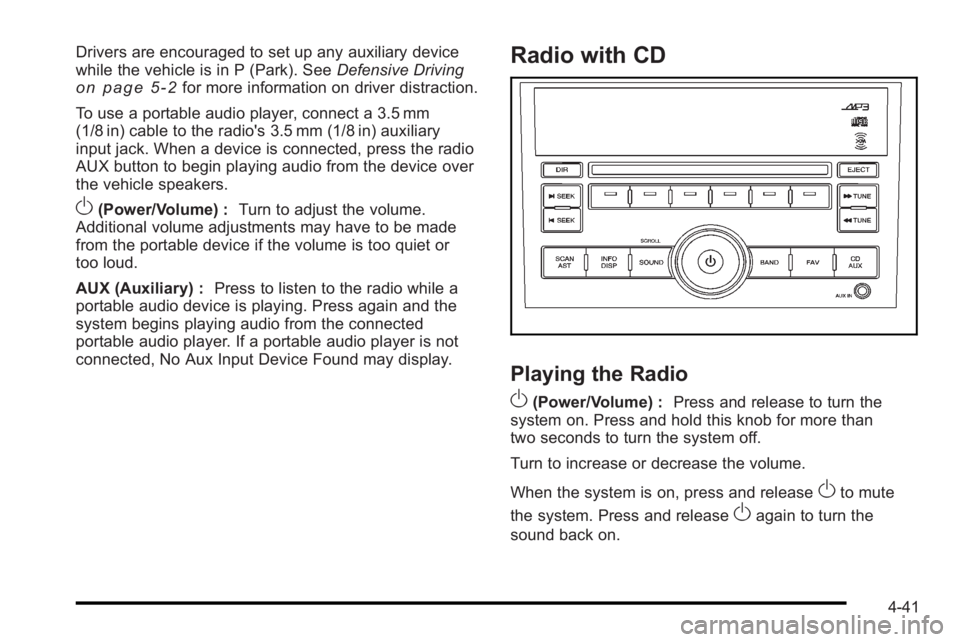
O(Power/Volume) : Turn to adjust the volume.
Additional volume adjustments may have to be made
from the portable device if the volume is too quiet or
too loud.
AUX (Auxiliary) : Press to listen to the radio while a
portable audio device is playing. Press again and the
system begins playing audio from the connected
portable audio player. If a portable audio player is not
connected, No Aux Input Device Found may display.
Radio with CD
Playing the Radio
O
(Power/Volume) : Press and release to turn the
system on. Press and hold this knob for more than
two seconds to turn the system off.
Turn to increase or decrease the volume.
When the system is on, press and release
Oto mute
the system. Press and release
Oagain to turn the
sound back on.
4-41