lock PONTIAC G3 2010 User Guide
[x] Cancel search | Manufacturer: PONTIAC, Model Year: 2010, Model line: G3, Model: PONTIAC G3 2010Pages: 368, PDF Size: 3.94 MB
Page 21 of 368

Transmission
Automatic Transmission
Hold Mode
If the vehicle's transmission has hold mode, you can
select this mode to allow the automatic transmission to
stay in a specific gear range. Select hold mode to help
the vehicle maintain traction on slippery road surfaces,
such as snow, mud, or ice.
Press the HOLD button on the shift lever console to turn
on hold mode. Press the button again to turn off hold
mode, and return to normal automatic transmission
operation.
When Hold Mode is selected in D4 (Drive), the
transmission is held in 3 (Third) gear, which locks out
D4 (Drive). This allows for engine braking when slowing
from higher speeds.
When Hold Mode is selected in 2 (Second), the
transmission will start in 2 (Second) gear instead of
1 (First), helping to reduce wheel spin when starting out
on slippery surface such as snow, mud or ice.
Since selecting Hold Mode in D4 (Drive) locks the
transmission in 3 (Third), and prevents downshifts to
2 (Second) or 1 (First), acceleration from a stop or near
stop on dry pavement will be slower than expected.
Hold Mode should not be selected during these
situations.
SeeAutomatic Transmission Operation on page 3‑22.
Cold Weather Shifting
When operating the vehicle in severe cold conditions,
the transmission may be prevented from shifting into
D4 gear until the transmission fluid has warmed up to
it's operational temperature.
1-15
Page 22 of 368
Five-Speed Manual Transmission
Up‐Shift Light
Vehicles equipped with a
manual transmission may
have an up-shift light.
This light indicates when
to shift to the next higher
gear for better fuel
economy.
For the best fuel economy, accelerate slowly and shift
when the light comes on, if weather, road, and traffic
conditions allow.
It is normal for the light to go on and off if the
accelerator position changes quickly. Ignore the
light during downshifts.
Reverse Lockout
The manual transmission is equipped with a lock
ring to prevent shifting into R (Reverse). To shift into
R (Reverse), press down the clutch pedal, lift up the ring
on the shift lever and shift into R (Reverse). Let up on
the clutch pedal slowly while pressing the accelerator
pedal.
See Manual Transmission Operation on page 3‑26.
Vehicle Features
Radio(s)
Radio with CD shown
O:Press and release to turn the system on. Press
and hold this knob for more than two seconds to turn
the system off.
Turn to increase or decrease the volume.
When the system is on, press and release
Oto mute
the system. Press and release
Oagain to turn the
sound back on.
1-16
Page 26 of 368
To fully open the sunroof, press and hold the passenger
side switch. The sunshade will open with the sunroof.
To close, press the driver side switch. Manually close
the sunshade.
For more information seeSunroof on page 3‑37.
Performance and Maintenance
Tire Pressure Monitor
This vehicle may have a Tire Pressure Monitor
System (TPMS).
The Tire Pressure Monitor
alerts you when a
significant reduction in
pressure occurs in one or
more of the vehicle’s tires
by illuminating the low tire
pressure warning light on
the instrument cluster.
The warning light will remain on until the tire pressure is
corrected. The proper tire pressures for your vehicle are
listed on the Tire and Loading Information label located
on the driver side center pillar (B pillar). See Loading
the Vehicle
on page 5‑14. You may notice during cooler conditions that the low tire
pressure warning light will appear when the vehicle is
first started and then turn off as you drive. This may be
an early indicator that your tire pressures are getting
low and the tires need to be inflated to the proper
pressure.
Note:
The Tire Pressure Monitor can alert you about
low tire pressure, but it does not replace normal monthly
tire maintenance. It is the driver ’s responsibility to
maintain correct tire pressures.
See Tire Pressure Monitor System
on page 6‑58and
Tire Pressure Monitor Operation on page 6‑59.
Engine Oil Life System
The engine oil life system calculates engine oil life
based on vehicle use and displays a change engine
oil light when it is necessary to change the engine oil
and filter.
Resetting the Oil Life System
1. Turn the ignition to ON/RUN, with the engine off.
2. Fully press and release the accelerator pedal three times within five seconds.
3. Turn the key to LOCK/OFF.
See Engine Oil Life System on page 6‑18.
1-20
Page 29 of 368

OnStar®
OnStar®uses several innovative technologies and live
advisors to provide a wide range of safety, security,
navigation, diagnostics, and calling services.
Automatic Crash Response
In a crash, built in sensors can automatically alert an
OnStar advisor who is immediately connected to the
vehicle to see if you need help.
How OnStar Service Works
Q
: This blue button connects you to a specially
trained OnStar advisor to verify your account
information and to answer questions.
]: Push this red emergency button to get priority help
from specially trained OnStar emergency advisors.
X: Push this button for hands‐free, voice‐activated
calling and to give voice commands for turn‐by‐turn
navigation. Crisis Assist, Stolen Vehicle Assistance, Vehicle
Diagnostics, Remote Door Unlock, Roadside
Assistance, Turn‐by‐Turn Navigation and Hands‐Free
Calling are available on most vehicles. Not all OnStar
services are available on all vehicles. For more
information see the OnStar Owner's Guide or visit
www.onstar.com (U.S.) or www.onstar.ca (Canada),
contact OnStar at 1-888-4-ONSTAR (1‐888‐466‐7827)
or TTY 1‐877‐248‐2080, or press
Qto speak with an
OnStar advisor 24 hours a day, 7 days a week.
For a full description of OnStar services and system
limitations, see the OnStar Owner's Guide in the
glove box.
OnStar service is subject to the OnStar terms and
conditions included in the OnStar Subscriber
Information.
OnStar service cannot work unless the vehicle is in a
place where OnStar has an agreement with a wireless
service provider for service in that area. OnStar service
also cannot work unless the vehicle is in a place where
the wireless service provider OnStar has hired for that
area has coverage, network capacity and reception
when the service is needed, and technology that is
compatible with the OnStar service. Not all services are
available everywhere, particularly in remote or enclosed
areas, or at all times.
1-23
Page 33 of 368
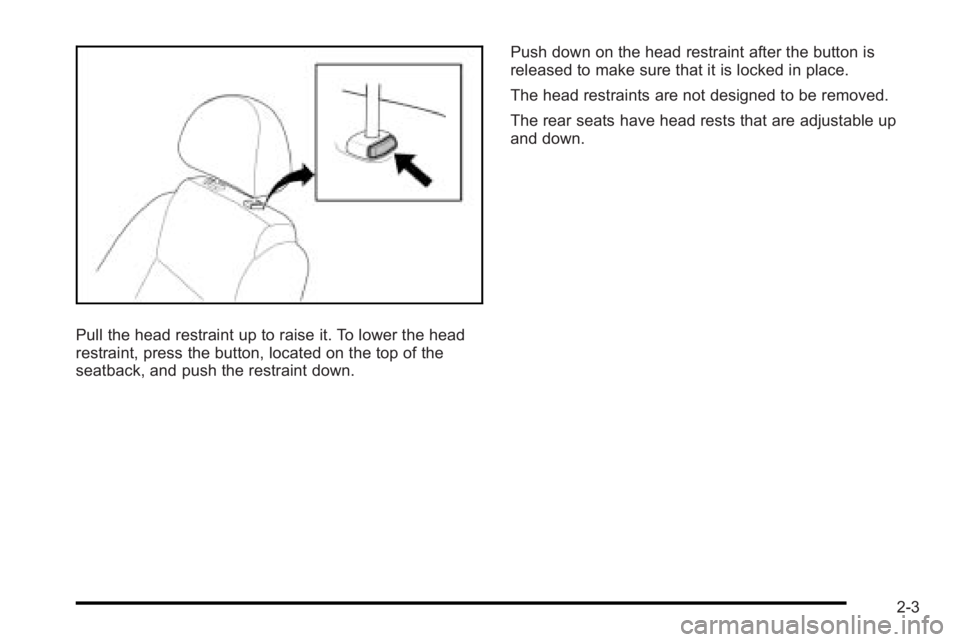
Pull the head restraint up to raise it. To lower the head
restraint, press the button, located on the top of the
seatback, and push the restraint down.Push down on the head restraint after the button is
released to make sure that it is locked in place.
The head restraints are not designed to be removed.
The rear seats have head rests that are adjustable up
and down.
2-3
Page 34 of 368
Front Seats
Manual Seats
{WARNING:
You can lose control of the vehicle if you try to
adjust a manual driver's seat while the vehicle is
moving. The sudden movement could startle and
confuse you, or make you push a pedal when you
do not want to. Adjust the driver's seat only when
the vehicle is not moving.
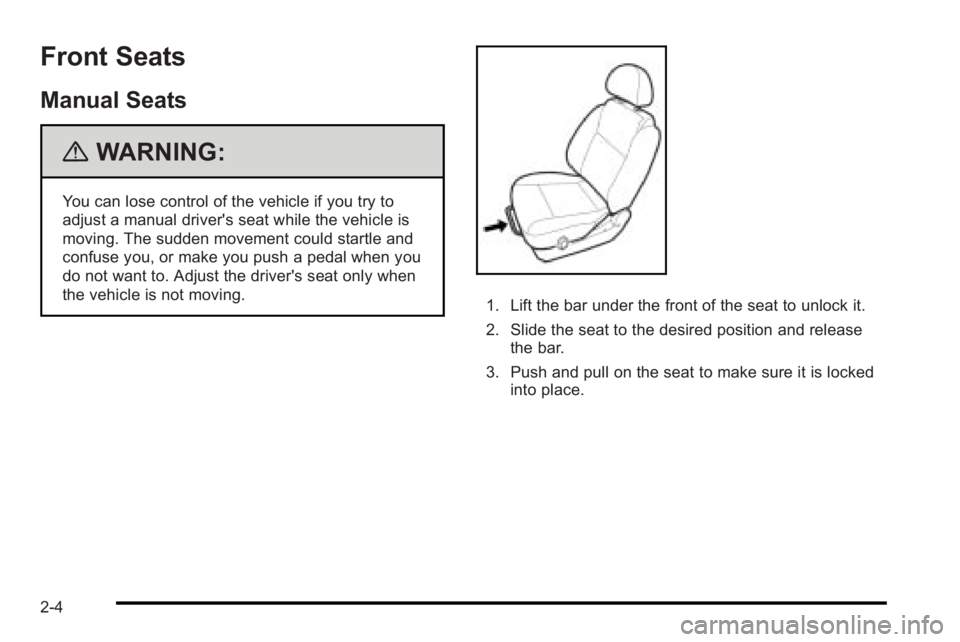
1. Lift the bar under the front of the seat to unlock it.
2. Slide the seat to the desired position and releasethe bar.
3. Push and pull on the seat to make sure it is locked into place.
2-4
Page 36 of 368

Reclining Seatbacks
{WARNING:
You can lose control of the vehicle if you try to
adjust a manual driver's seat while the vehicle is
moving. The sudden movement could startle and
confuse you, or make you push a pedal when you
do not want to. Adjust the driver's seat only when
the vehicle is not moving.
{WARNING:
If either seatback is not locked, it could move
forward in a sudden stop or crash. That could
cause injury to the person sitting there. Always
push and pull on the seatbacks to be sure they
are locked.
The seats have manual reclining seatbacks. The lever
is located on the outboard side of the seats.
To recline the seatback: 1. Lift the recline lever.
2. Move the seatback to the desired position, then release the lever to lock the seatback in place.
3. Push and pull on the seatback to make sure it is locked in place.
To return the seatback to an upright position: 1. Lift the lever fully without applying pressure to the seatback and the seatback will return to the upright
position.
2. Push and pull on the seatback to make sure it is locked.
2-6
Page 40 of 368
Unfolding the Seatbacks
To return the seatback to the upright position:1. Hook the safety belts into the safety belt guide.
2. Lift the seatback up and push it to its original position.
{WARNING:
If either seatback is not locked, it could move
forward in a sudden stop or crash. That could
cause injury to the person sitting there. Always
push and pull on the seatbacks to be sure they
are locked.
3. Push down and rearward firmly on the top of the seatbacks until it latches securely in the fully
upright position.
4. To reattach the center seat safety belt to the mini buckle, pull it from the retractor.
5. Push the latch plate at the end of the safety belt strap into the mini-buckle until the mechanism
clicks. Make sure the strap is not twisted. The
sliding latch plate will face the front of the vehicle.
{WARNING:
A safety belt that is improperly routed, not
properly attached, or twisted will not provide the
protection needed in a crash. The person wearing
the belt could be seriously injured. After raising
the rear seatback, always check to be sure that
the safety belts are properly routed and attached,
and are not twisted.
6. Insert the safety belt strap back into the safety belt guide.
Rear Seat Operation (Hatchback)
Folding the Rear Seats
The rear seats can be folded to increase cargo space.
To fold the rear seats:
1. Lower the head restraints completely.
2. Unlatch the center safety belt by pressing the red button on the buckle.
2-10
Page 42 of 368
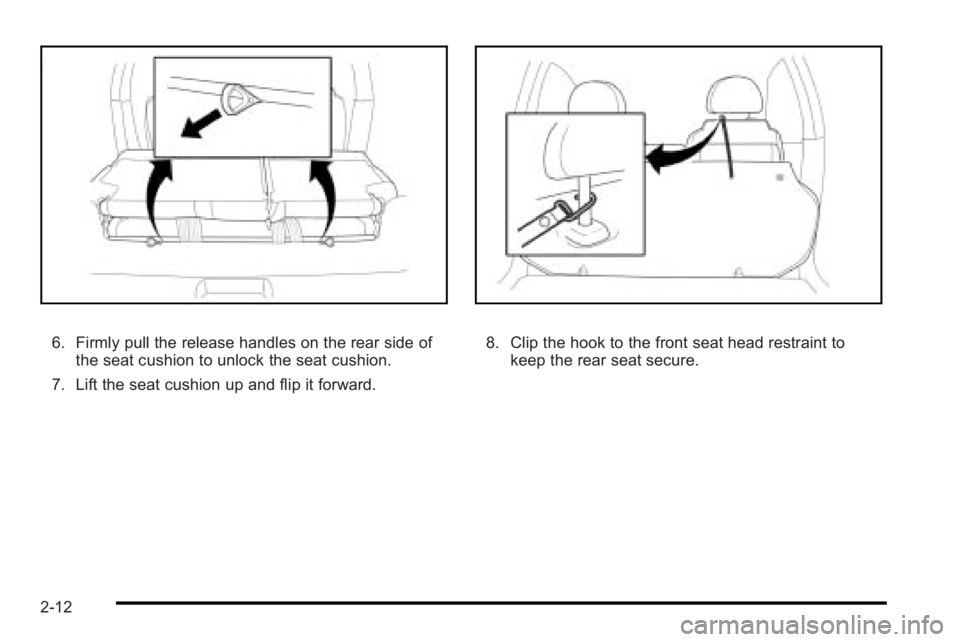
6. Firmly pull the release handles on the rear side ofthe seat cushion to unlock the seat cushion.
7. Lift the seat cushion up and flip it forward.8. Clip the hook to the front seat head restraint to keep the rear seat secure.
2-12
Page 43 of 368
Unfolding the Seats
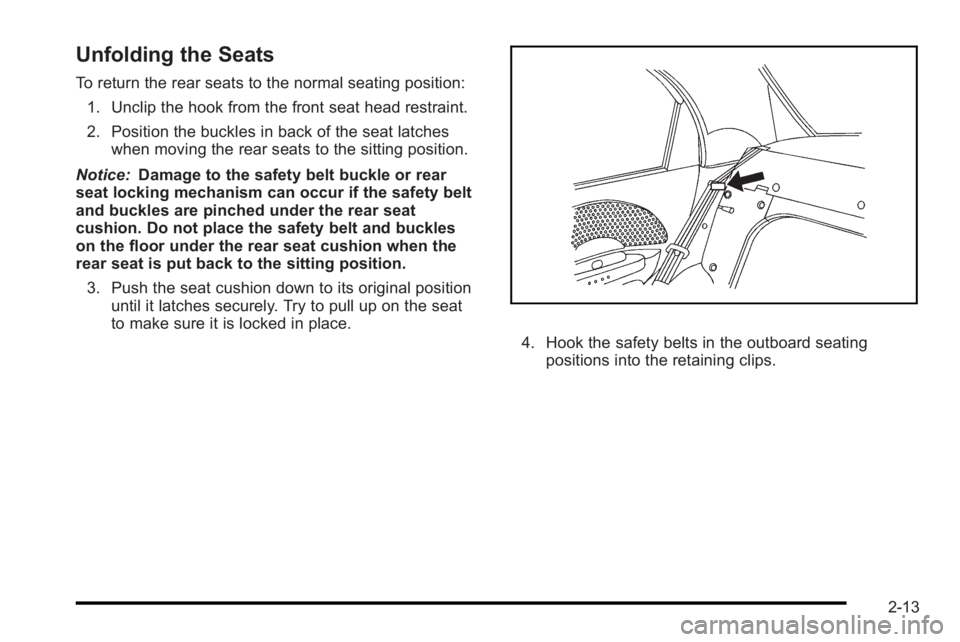
To return the rear seats to the normal seating position:1. Unclip the hook from the front seat head restraint.
2. Position the buckles in back of the seat latches when moving the rear seats to the sitting position.
Notice: Damage to the safety belt buckle or rear
seat locking mechanism can occur if the safety belt
and buckles are pinched under the rear seat
cushion. Do not place the safety belt and buckles
on the floor under the rear seat cushion when the
rear seat is put back to the sitting position.
3. Push the seat cushion down to its original position until it latches securely. Try to pull up on the seat
to make sure it is locked in place.
4. Hook the safety belts in the outboard seatingpositions into the retaining clips.
2-13