reset PONTIAC G3 2010 User Guide
[x] Cancel search | Manufacturer: PONTIAC, Model Year: 2010, Model line: G3, Model: PONTIAC G3 2010Pages: 368, PDF Size: 3.94 MB
Page 184 of 368

Finding a Station
BAND :Press to choose FM, AM, or XM™
(if equipped). The display will show the selection.
uSEEK: Press to seek the next radio station with a
strong signal in the selected band.
tSEEK: Press to seek the previous radio station with
a strong signal in the selected band.
[TUNE: Press to go to the next station manually.
rTUNE: Press to go to the previous station manually.
SCAN/AST : Press to scan radio stations. The radio
goes to a station, plays for a few seconds, then goes to
the next station. The radio only scans stations with a
strong signal in the selected band. Press SCAN/AST
again to stop scanning.
Press and hold SCAN/AST to use Auto Store.
The radio only scans stations with a strong signal in
the selected band.
AST (Automatic Store) : Twelve preset stations with
the strongest reception in the area can be automatically
stored. The radio will only scan stations with a strong
signal that are in the selected AM or FM band. If the
Automatic Store function is started in the FM band, only
FM stations are stored in preset pages A1 and A2. If the Automatic Store function is started in the AM band, only
AM stations are stored in A1 and A2. A combination of
AM, FM and XM (if equipped) stations can be stored
manually into the other four favorite pages.
To use Automatic Store:
1. Press and hold SCAN/AST to use Auto Store mode.
2. Press the pushbutton below the ON tab on the radio display.
3. Automatic Store searches for radio stations with a strong signal and automatically set presets A1 and
A2 with new stations.
4. After all stations are set, press the pushbutton below the arrow tab on the radio display to return
to the main radio screen
To reset the automatically stored radio stations, press
and hold SCAN/AST. Then press the pushbutton below
the RESE tab on the radio display. If no stations are
stored on preset pages A1 and A2, the RESE option
does not appear in the radio display. When the
Automatic Store function is used, any stations that were
previously set will be deleted and replaced with new
stations.
4-42
Page 193 of 368
XM Radio Messages
UPDATING :The encryption code in the receiver is
being updated, and no action is required. This process
should take no longer than 30 seconds.
NO SIGNAL : The system is functioning correctly, but
the vehicle is in a location that is blocking the XM™
signal. When the vehicle is moved into an open area,
the signal should return.
LOADING : The audio system is acquiring and
processing audio and text data. No action is needed.
This message should disappear shortly.
OFF AIR : This channel is not currently in service.
Tune in to another channel.
CH UNAVAILABLE : This previously assigned channel
is no longer assigned. Tune to another station. If this
station was one of the presets, choose another station
for that preset button.
RADIO ID : If tuned to channel 0, this message
alternates with the XM™ Radio 8 digit radio ID label.
This label is needed to activate the service.
CHECK XM TUNER : If this message does not clear
within a short period of time, the receiver could have a
fault. Consult with your dealer/retailer.
Audio Steering Wheel Controls
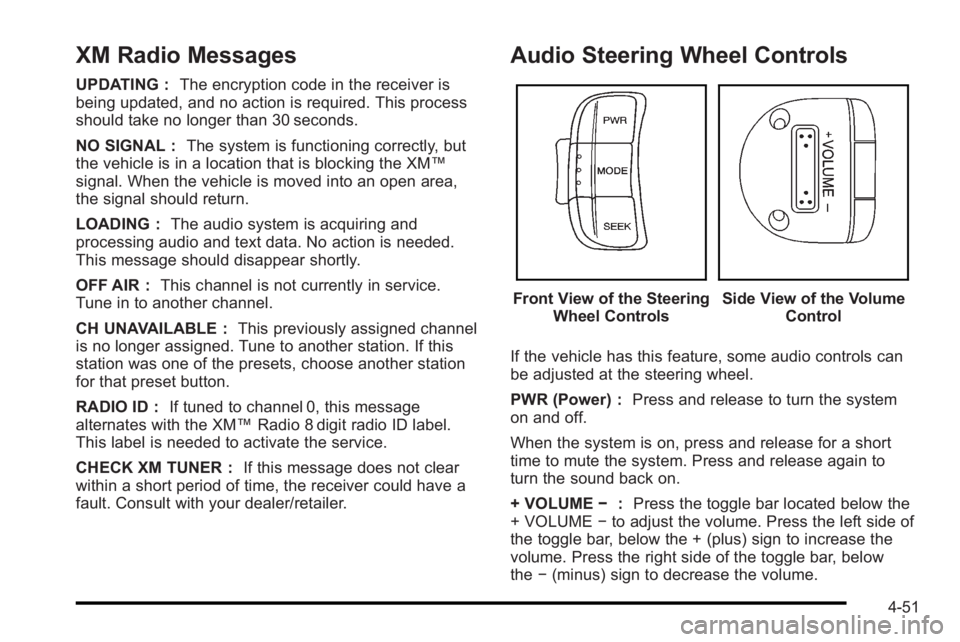
Front View of the Steering Wheel ControlsSide View of the Volume Control
If the vehicle has this feature, some audio controls can
be adjusted at the steering wheel.
PWR (Power) : Press and release to turn the system
on and off.
When the system is on, press and release for a short
time to mute the system. Press and release again to
turn the sound back on.
+ VOLUME −:Press the toggle bar located below the
+ VOLUME −to adjust the volume. Press the left side of
the toggle bar, below the + (plus) sign to increase the
volume. Press the right side of the toggle bar, below
the −(minus) sign to decrease the volume.
4-51
Page 194 of 368

MODE :Press and release this button multiple times
to cycle through the audio playback options that are
available on the vehicle. Options may include FM, AM,
XM, CD, and AUX.
SEEK : Press and release to go to the next preset
station.
Press and hold for a long time to go to the next AM, FM,
or XM station. The radio seeks stations only with a
strong signal that are in the selected band.
When playing a CD, press and release to go to the next
track. Press and hold to fast forward through the tracks.
Radio Reception
Frequency interference and static can occur during
normal radio reception if items such as cell phone
chargers, vehicle convenience accessories, and
external electronic devices are plugged into the
accessory power outlet. If there is interference or static,
unplug the item from the accessory power outlet.
AM
The range for most AM stations is greater than for FM,
especially at night. The longer range can cause station
frequencies to interfere with each other. For better radio
reception, most AM radio stations boost the power
levels during the day, and then reduce these levels
during the night. Static can also occur when things like
storms and power lines interfere with radio reception.
When this happens, try reducing the treble on the radio.
FM Stereo
FM signals only reach about 10 to 40 miles
(16 to 65 km). Although the radio has a built-in electronic
circuit that automatically works to reduce interference,
some static can occur, especially around tall buildings
or hills, causing the sound to fade in and out.
XM™ Satellite Radio Service
XM Satellite Radio Service gives digital radio reception
from coast-to-coast in the 48 contiguous United States,
and in Canada. Just as with FM, tall buildings or hills
can interfere with satellite radio signals, causing the
sound to fade in and out. In addition, traveling or
standing under heavy foliage, bridges, garages,
or tunnels may cause loss of the XM signal for a period
of time.
4-52
Page 242 of 368

Engine Oil Life System
When to Change Engine Oil
This vehicle has the Engine Oil Life System, a computer
system that indicates when to change the engine oil
and filter. This is based on engine revolutions and
engine temperature, and not on mileage. Based on
driving conditions, the mileage at which an oil change is
indicated can vary considerably. For the oil life system
to work properly, the system must be reset every time
the oil is changed.
When the system has calculated that oil life has been
diminished, it indicates that an oil change is necessary.
A change engine oil light displays. Change the oil as
soon as possible within the next 1 000 km (600 miles).
It is possible that, if driving under the best conditions,
the oil life system might not indicate that an oil change
is necessary for over a year. However, the engine oil
and filter must be changed at least once a year and at
this time the system must be reset. Your dealer/retailer
has trained service people who will perform this work
using genuine parts and reset the system. It is also
important to check the oil regularly and keep it at the
proper level.
If the system is ever reset accidentally, the oil must be
changed at 5 000 km (3,000 miles) since the last oil
change. Remember to reset the oil life system
whenever the oil is changed.
How to Reset the Engine Oil Life
System
The Engine Oil Life System calculates when to change
your engine oil and filter based on vehicle use.
Whenever the oil is changed, reset the system so it can
calculate when the next oil change is required. If a
situation occurs where the oil is changed prior to a
change engine oil light being turned on, reset the
system.
After changing the engine oil, the system must be reset:1. With the engine off, turn the ignition key to ON/RUN.
2. Fully press and release the accelerator pedal slowly three times within five seconds.
3. Turn the key to LOCK/OFF, then start the vehicle.
If the change engine oil light comes back on when the
vehicle is started, the engine oil life system has not
reset. Repeat the reset procedure.
6-18
Page 266 of 368

Notice:If the jumper cables are connected or
removed in the wrong order, electrical shorting may
occur and damage the vehicle. The repairs would
not be covered by the vehicle warranty. Always
connect and remove the jumper cables in the
correct order, making sure that the cables do not
touch each other or other metal.
Jumper Cable Removal
A. Heavy, Unpainted Metal Engine Part or Remote Negative (–) Terminal
B. Good Battery or Remote Positive (+) and Remote Negative (−) Terminals
C. Dead Battery or Remote Positive (+) Terminal To disconnect the jumper cables from both vehicles, do
the following:
1. Disconnect the black negative (−) cable from the vehicle that had the dead battery.
2. Disconnect the black negative (−) cable from the vehicle with the good battery.
3. Disconnect the red positive (+) cable from the vehicle with the good battery.
4. Disconnect the red positive (+) cable from the other vehicle.
Headlamp Aiming
Headlamp aim has been preset at the factory and
should need no further adjustment.
However, if your vehicle is damaged in a crash, the
headlamp aim may be affected. Aim adjustment to the
low-beam headlamps may be necessary if oncoming
drivers flash their high-beam headlamps at you (for
vertical aim).
If the headlamps need to be re-aimed, it is
recommended that you take the vehicle to your dealer/
retailer for service.
6-42
Page 321 of 368

The proper replacement parts, fluids, and lubricants to
use are listed inRecommended Fluids and Lubricants
on page 7‑12andMaintenance Replacement Partson
page 7‑14. We recommend the use of genuine parts
from your dealer/retailer.
Rotation of New Tires
To maintain ride, handling, and performance of the
vehicle, it is important that the first rotation service for
new tires be performed when they have 8 000 to
13 000 km (5,000 to 8,000 miles). See Tire Inspection
and Rotation on page 6‑61.
Scheduled Maintenance
When the Change Engine Oil Light
Displays
Change engine oil and filter. See Engine Oilon
page 6‑15. An Emission Control Service.
When the change engine oil light displays, service is
required for the vehicle as soon as possible, within the
next 1 000 km/600 miles. If driving under the best
conditions, the engine oil life system might not indicate
the need for vehicle service for more than a year. The engine oil and filter must be changed at least once a
year and the oil life system must be reset. Your dealer/
retailer has trained service technicians who will perform
this work and reset the system. If the engine oil life
system is reset accidentally, service the vehicle within
5 000 km/3,000 miles since the last service. Reset the
oil life system whenever the oil is changed. See
Engine
Oil Life System on page 6‑18.
When the change engine oil light displays, certain
services, checks, and inspections are required. The
services described for Maintenance Ishould be
performed at every engine oil change. The services
described for Maintenance IIshould be
performed when:
.Maintenance Iwas performed the last time the
engine oil was changed.
.It has been 10 months or more since the change
engine oil light has displayed or since the last
service.
7-3
Page 326 of 368
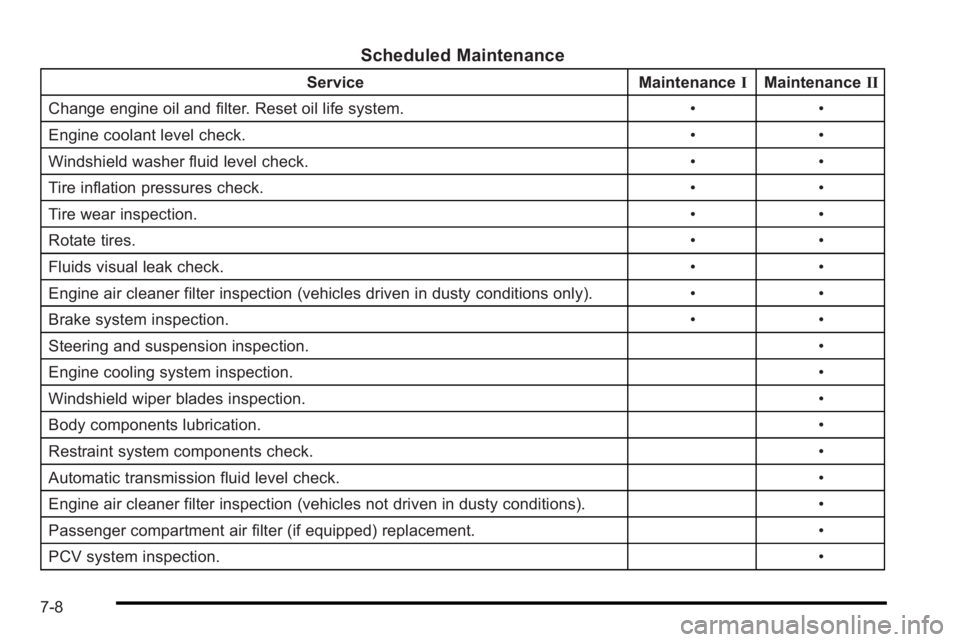
Scheduled Maintenance
ServiceMaintenanceIMaintenance II
Change engine oil and filter. Reset oil life system. ••
Engine coolant level check. ••
Windshield washer fluid level check. ••
Tire inflation pressures check. ••
Tire wear inspection. ••
Rotate tires. ••
Fluids visual leak check. ••
Engine air cleaner filter inspection (vehicles driven in dusty conditions only). ••
Brake system inspection. ••
Steering and suspension inspection. •
Engine cooling system inspection. •
Windshield wiper blades inspection. •
Body components lubrication. •
Restraint system components check. •
Automatic transmission fluid level check. •
Engine air cleaner filter inspection (vehicles not driven in dusty conditions). •
Passenger compartment air filter (if equipped) replacement. •
PCV system inspection. •
7-8