ignition PONTIAC G3 2010 Owner's Manual
[x] Cancel search | Manufacturer: PONTIAC, Model Year: 2010, Model line: G3, Model: PONTIAC G3 2010Pages: 368, PDF Size: 3.94 MB
Page 135 of 368

4. Insert the key into the shift lock slot and press andhold the key.
5. Shift to N (Neutral).
6. Remove the key from the slot, insert the key into the ignition and start the engine.
7. Replace the shift-lock release slot cover.
8. Apply and hold the brake pedal fully and release the parking brake.
9. Shift to the gear you want.
10. Have the vehicle fixed as soon as you can.
Parking the Vehicle
(Manual Transmission)
Before leaving the vehicle, do the following:
1. Hold the brake pedal down and firmly apply the parking brake.
2. Fully press in the clutch pedal and place the shift lever into the gear position as stated below:
.When parking on level ground, place the shift
lever into N (Neutral).
.When parking downhill, place the shift lever in
R (Reverse).
.When parking uphill, place the shift lever in
1 (First).
3. After shifting, turn the ignition to LOCK/OFF, remove the key and release the clutch.
3-31
Page 139 of 368
Outside Power Mirrors
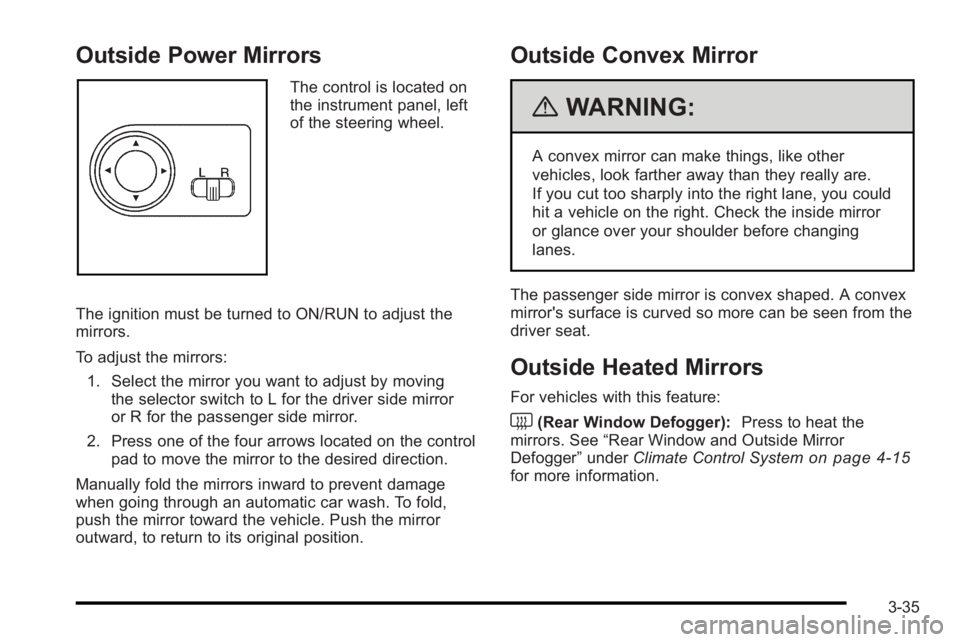
The control is located on
the instrument panel, left
of the steering wheel.
The ignition must be turned to ON/RUN to adjust the
mirrors.
To adjust the mirrors: 1. Select the mirror you want to adjust by moving the selector switch to L for the driver side mirror
or R for the passenger side mirror.
2. Press one of the four arrows located on the control pad to move the mirror to the desired direction.
Manually fold the mirrors inward to prevent damage
when going through an automatic car wash. To fold,
push the mirror toward the vehicle. Push the mirror
outward, to return to its original position.
Outside Convex Mirror
{WARNING:
A convex mirror can make things, like other
vehicles, look farther away than they really are.
If you cut too sharply into the right lane, you could
hit a vehicle on the right. Check the inside mirror
or glance over your shoulder before changing
lanes.
The passenger side mirror is convex shaped. A convex
mirror's surface is curved so more can be seen from the
driver seat.
Outside Heated Mirrors
For vehicles with this feature:
<(Rear Window Defogger): Press to heat the
mirrors. See “Rear Window and Outside Mirror
Defogger” underClimate Control System
on page 4‑15for more information.
3-35
Page 141 of 368
Sunroof
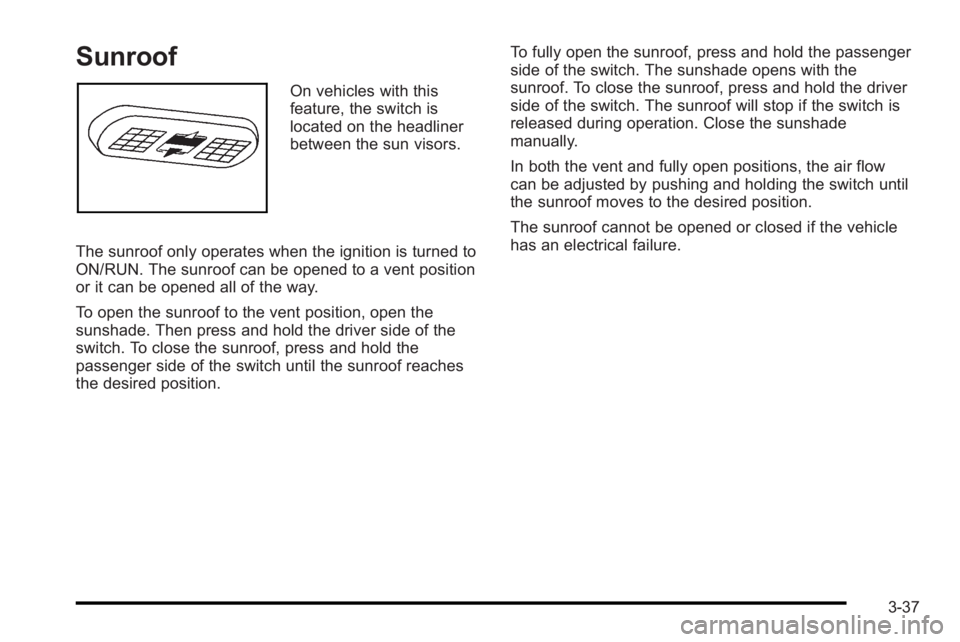
On vehicles with this
feature, the switch is
located on the headliner
between the sun visors.
The sunroof only operates when the ignition is turned to
ON/RUN. The sunroof can be opened to a vent position
or it can be opened all of the way.
To open the sunroof to the vent position, open the
sunshade. Then press and hold the driver side of the
switch. To close the sunroof, press and hold the
passenger side of the switch until the sunroof reaches
the desired position. To fully open the sunroof, press and hold the passenger
side of the switch. The sunshade opens with the
sunroof. To close the sunroof, press and hold the driver
side of the switch. The sunroof will stop if the switch is
released during operation. Close the sunshade
manually.
In both the vent and fully open positions, the air flow
can be adjusted by pushing and holding the switch until
the sunroof moves to the desired position.
The sunroof cannot be opened or closed if the vehicle
has an electrical failure.
3-37
Page 147 of 368
As you signal a turn or a lane change, if the arrows
flash rapidly, a signal bulb may be burned out and other
drivers will not see your turn signal.
If a bulb is burned out, replace it to help avoid an
accident. If the arrows do not go on at all when you
signal a turn, check for burned-out bulbs and then
check the fuse. SeeFuses and Circuit Breakers
on
page 6‑87.
Headlamp High/Low-Beam Changer
The headlamps must be on for this feature to work.
Push the turn signal lever away from you to turn the
high beams on. This instrument panel cluster light
3comes on while
the high beams are on and the ignition is turned to
ON/RUN.
Pull the lever towards you to return to low beams.
Flash-to-Pass
This feature is used to signal to the vehicle ahead that
you want to pass.
Pull the turn signal/multifunction lever towards you until
the high-beam headlamps come on, then release the
lever to turn them off.
4-5
Page 148 of 368

Windshield Wipers
Sedan shown
Hatchback shownThe lever is located on the right side of the steering
column. The ignition must be turned to ON/RUN to
operate the windshield wipers.
Move the lever to one of the following positions:
HI (High Speed) :
Fast wipes.
LO (Low Speed) : Slow wipes.
INT (Intermittent) : Move to this position for a delayed
wiping cycle. Turn the band on the windshield wiper
toward FAST or SLOW for a shorter or longer delay
between wipes. The wiper speed can only be adjusted
when the lever is in the INT position.
OFF : Turns the windshield wipers off.
Misting Function
Move the lever toward INT for a single wiping cycle.
Hold it there until the windshield wipers start; then let
go. The windshield wipers will stop after one wipe.
If more wipes are needed, hold the band toward INT
longer.
Clear ice and snow from the wiper blades before using
them. If frozen to the windshield, carefully loosen or
thaw them. Damaged wiper blades should be replaced.
SeeWindshield Wiper Blade Replacement
on
page 6‑49.
Heavy snow or ice can overload the wipers. A circuit
breaker stops them until the motor cools.
4-6
Page 149 of 368
Windshield Washer
To use this feature, the ignition must be turned to
ON/RUN. Pull the windshield washer/wiper lever
toward you to spray washer fluid on the windshield.
The spray continues until the lever is released.
The wipers will run a few times and either stop or
will resume at the speed being used previously.
SeeWindshield Washer Fluid
on page 6‑33for
information on filling the windshield washer fluid.
{WARNING:
In freezing weather, do not use your washer until
the windshield is warmed. Otherwise the washer
fluid can form ice on the windshield, blocking your
vision.
Rear Window Wiper/Washer
{WARNING:
In freezing weather, do not use your washer until
the windshield is warmed. Otherwise the washer
fluid can form ice on the windshield, blocking your
vision.
The vehicle may have a rear window wiper/washer.
Turn the rear wiper/washer band to operate the rear
window wiper/washer.
OFF : Turns the rear window wiper/washer off.
Z:Turns the rear wiper on for intermittent wipes.
Y: Sprays washer fluid onto the rear window and the
wiper operates continuously.
The windshield washer reservoir is used for the
windshield and rear window. Check the fluid level if
either washer is not working. See Windshield Washer
Fluid on page 6‑33.
4-7
Page 152 of 368
Reducing Speed While Using Cruise
Control
There are two ways to reduce the vehicle speed while
using cruise control:
.Press the SET−button until the lower speed
desired is reached, then release it.
.To slow down in small amounts, briefly press the
SET− button. Each time this is done, the vehicle
goes about 1.6 km/h (1 mph) slower.
Passing Another Vehicle While Using
Cruise Control
Use the accelerator pedal to increase the vehicle
speed. When you take your foot off the pedal, the
vehicle slows down to the cruise control speed set
earlier.
Using Cruise Control on Hills
How well the cruise control works on hills depends upon
the vehicle speed, load, and the steepness of the hills.
When going up steep hills, you might have to step on
the accelerator pedal to maintain the vehicle's speed.
When going downhill, you might have to brake or shift
to a lower gear to keep the vehicle's speed down.
When the brakes are applied the cruise control turns off.
Ending Cruise Control
There are two ways to turn off the cruise control:
.Step lightly on the brake pedal, or press the clutch
pedal, if you have a manual transmission.
.PressI/Oon the cruise control pad.
Erasing Speed Memory
The cruise control set speed memory is erased when
the cruise control or the ignition is turned off.
4-10
Page 153 of 368

Exterior Lamps
Uplevel shown, Base similar
The lever on the left side of the steering column
operates the exterior lamps.
The exterior lamp band has three positions:
3 (Headlamps) : Turns on the headlamps, together
with the following:
.Taillamps
.License Plate Lamp
.Instrument Panel Lights
.Parking Lamps
The headlamps automatically turn off when the ignition
key is turned to LOCK/OFF or ACC/ACCESSORY. ;
(Parking Lamps) : Turns on the parking lamps,
together with the taillamps, license plate lamp, and
instrument panel lights.
OFF : Turns all the lamps off, except the Daytime
Running Lamps (DRL).
Daytime Running Lamps (DRL)
Daytime Running Lamps (DRL) can make it easier for
others to see the front of your vehicle during the day.
Fully functional daytime running lamps are required on
all vehicles first sold in Canada.
The DRL system makes the headlamps come on when
the following conditions are met:
.The ignition is on.
.The exterior lamp band is in OFF or in the parking
lamp position.
.The parking brake is released.
An indicator light on instrument panel cluster comes on
when the DRL system is on.
When the DRL system is on, the taillamps, sidemarker
lamps, parking lamps and instrument panel lights do not
come on unless the exterior lamps control is turned to
the parking lamp or headlamp position.
4-11
Page 154 of 368

The DRL system turns off when one of the following
conditions are met:
.The ignition is off.
.The parking brake is on.
.The high-beam headlamps are on.
.The low-beam headlamps are on.
.The flash-to-pass feature is used.
The regular headlamp system should be used when
needed.
Fog Lamps
For vehicles with fog lamps, they are controlled by
the
#band located on the middle of the turn signal/
multifunction lever.
To use the fog lamps, the ignition must be turned to
ON/RUN and the low-beam headlamps or parking
lamps must be on.
Turn the band to
#to turn the fog lamps on. The band
automatically returns to its starting position when
released. The fog lamp indicator light comes on in the
instrument panel cluster. See Fog Lamp Light
on
page 4‑33.
To turn the fog lamps off, turn the band to
#again.
The fog lamp indicator light will go off. The fog lamps will also turn off when the high-beam
headlamps are turned on. When the high-beam
headlamps are turned off, the fog lamps will turn on
again.
Some localities have laws that require the headlamps to
be on along with the fog lamps.
Instrument Panel Brightness
This feature controls the brightness of the instrument
panel lights.
The thumbwheel for this feature is located on the
instrument panel to the left of the steering column.
Turn the thumbwheel to brighten or dim the lights.
4-12
Page 155 of 368
Dome Lamp
The vehicle has a dome lamp located in the overhead
console.
Move the switch to the following positions:
ON :The light comes on and stays on.
O (Door) : The light comes on when a door is opened.
The light turns off when all the doors are closed.
OFF : The light remains off even when a door is
opened.
Be sure all doors and trunk lid or hatch are completely
closed or the battery may drain.
Inadvertent Power Battery Saver
This feature is designed to protect the vehicle's battery
against drainage. If the exterior lamps control is left in
the
;or2position, the key is removed and the driver
door is opened, the lights will turn off automatically.
If the key is removed and the driver door is opened
while the dome lamp is on, the dome lamp will not
turn off automatically.
Accessory Power Outlet(s)
Accessory power outlets can be used to plug in
auxiliary electrical equipment, such as a cellular phone.
The accessory power outlet is located next to the
parking brake on the center console.
To use the accessory power outlet, remove the
protective cap. When not in use, always cover the
outlet with the protective cap. The accessory power
outlet is operational when the ignition is turned to
ACC/ACCESSORY or ON/RUN.
Notice: Leaving electrical equipment on for
extended periods will drain the battery. Always turn
off electrical equipment when not in use and do not
plug in equipment that exceeds the
maximum amperage rating.
Certain electrical accessories may not be compatible
with the accessory power outlet and could result in
blown vehicle or adapter fuses. If you experience a
problem, see your dealer/retailer for additional
information on accessory power outlets.
4-13