light PONTIAC G3 2010 Workshop Manual
[x] Cancel search | Manufacturer: PONTIAC, Model Year: 2010, Model line: G3, Model: PONTIAC G3 2010Pages: 368, PDF Size: 3.94 MB
Page 174 of 368
The oil light could also come on in three other
situations:
.When the ignition is on but the engine is not
running, the light will come on as a test to show it
is working. It goes out when the ignition is turned
on. If it does not come on with the ignition on,
there may be a problem with the fuse or bulb.
Have it fixed right away.
.If the vehicle comes to a hard stop, the light may
come on for a moment. This is normal.
{WARNING:
Do not keep driving if the oil pressure is low.
The engine can become so hot that it catches fire.
Someone could be burned. Check the oil as soon
as possible and have the vehicle serviced.
Notice: Lack of proper engine oil maintenance can
damage the engine. The repairs would not be
covered by the vehicle warranty. Always follow the
maintenance schedule in this manual for changing
engine oil.
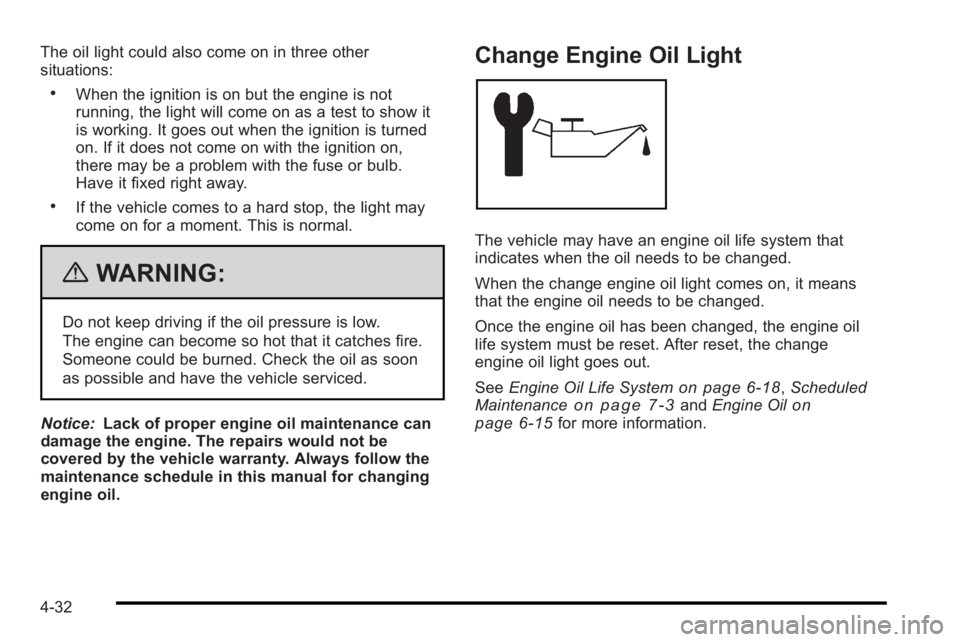
Change Engine Oil Light
The vehicle may have an engine oil life system that
indicates when the oil needs to be changed.
When the change engine oil light comes on, it means
that the engine oil needs to be changed.
Once the engine oil has been changed, the engine oil
life system must be reset. After reset, the change
engine oil light goes out.
See Engine Oil Life System
on page 6‑18,Scheduled
Maintenanceon page 7‑3and Engine Oilon
page 6‑15for more information.
4-32
Page 175 of 368

Fog Lamp Light
If the vehicle has this
feature, the fog lamps
light will come on when
the fog lamps are in use.
The light will go out when the fog lamps are turned off.
See Fog Lamps
on page 4‑12for more information.
Cruise Control Light
If the vehicle has cruise
control, this light comes
on whenever the cruise
control is set
The light will go out when the cruise control is turned
off. See Cruise Control
on page 4‑8for more
information.
Highbeam On Light
This light comes on when
the high-beam headlamps
are in use.
See Headlamp High/Low-Beam Changer
on page 4‑5for more information.
Daytime Running Lamps (DRL)
Indicator Light
This light turns on
whenever the Daytime
Running Lamps are on.
See Daytime Running Lamps (DRL)
on page 4‑11for
more information.
4-33
Page 176 of 368

Door Ajar Light
This light comes on and
stays on until all doors,
trunk and liftgate are
closed and completely
latched.
If the key is in the ignition while the driver's door is
open, a warning chime sounds.
Fuel Gage
United StatesCanada
The fuel gage tells about how much fuel is left when the
ignition is turned to ON/RUN.
An arrow on the fuel gage indicates the side of the
vehicle the fuel door is on.
When the fuel tank is near empty, the low fuel warning
light comes on. There is still a little fuel left, but the
vehicle's fuel tank should be filled soon.
4-34
Page 177 of 368

Here are four things that some owners ask about. None
of these show a problem with the fuel gage:
.At the service station, the gas pump shuts off
before the vehicle's fuel gage reads full.
.It takes a little more or less fuel to fill up than the
fuel gage indicated. For example, the gage may
have indicated the fuel tank was half full, but it
actually took a little more or less than half the
tank's capacity to fill the tank.
.The indicator moves a little when the vehicle turns
a corner or accelerates.
.The fuel gage indicator goes back to empty when
the ignition is turned off.
Low Fuel Warning Light
This light comes on when
the vehicle is low on fuel.
The low fuel warning light comes on when there is
approximately 1.7 gallons (6.0 liters) of fuel remaining in
the tank.
To turn the light off, add fuel to the fuel tank. See Filling
the Tank on page 6‑8.
4-35
Page 189 of 368

.The air is very humid. If so, wait about an hour and
try again.
.The format of the CD might not be compatible.
SeeUsing an MP3on page 4‑48later in this
section.
.There could have been a problem while burning
the CD.
.The label could be caught in the CD player.
If the CD is not playing correctly, for any other reason,
try a known good CD.
If any error occurs repeatedly or if an error cannot be
corrected, contact your dealer/retailer. If the radio
displays an error message, write it down and provide it
to your dealer/retailer when reporting the problem.
Care of CDs
If playing a CD-R, the sound quality can be reduced
due to CD-R quality, the method of recording, the
quality of the music that has been recorded, and the
way the CD-R or CD-RW has been handled. Handle
them carefully. Store CD-R(s) in their original cases or
other protective cases and away from direct sunlight
and dust. The CD player scans the bottom surface of
the disc. If the surface of a CD is damaged, such as
cracked, broken, or scratched, the CD does not play properly or not at all. Do not touch the bottom side of a
CD while handling it; this could damage the surface.
Pick up CDs by grasping the outer edges or the edge of
the hole and the outer edge.
If the surface of a CD is soiled, clean it with a soft,
lint free cloth or dampen a clean, soft cloth in a mild,
neutral detergent solution mixed with water. Make sure
the wiping process starts from the center to the edge.
Care of the CD Player
Do not add labels to a CD, it could get caught in the
CD player. Use a marking pen to write on the top of
the CD if a description is needed.
Do not use CD lens cleaners, they could damage the
CD player.
Notice:
If a label is added to a CD, or more than
one CD is inserted into the slot at a time, or an
attempt is made to play scratched or damaged CDs,
the CD player could be damaged. While using the
CD player, use only CDs in good condition without
any label, load one CD at a time, and keep the CD
player and the loading slot free of foreign materials,
liquids, and debris.
If an error displays, see “CD Messages”earlier in this
section.
4-47
Page 195 of 368
Cellular Phone Usage
Cellular phone usage may cause interference with the
vehicle's radio. This interference may occur when
making or receiving phone calls, charging the
phone's battery, or simply having the phone on.
This interference causes an increased level of static
while listening to the radio. If static is received while
listening to the radio, unplug the cellular phone and
turn it off.
Fixed Mast Antenna (Hatchback)
Vehicles without OnStar®have a fixed mast antenna
that can withstand most car washes without being
damaged. If the mast should ever become slightly bent,
straighten it out by hand. If the mast is badly bent,
replace it.
Check occasionally to make sure the mast is still
tightened to the antenna base located on the roof of the
vehicle. If tightening is required, tighten by hand.
Backglass Antenna (Sedan)
Vehicles without OnStar®have the AM-FM antenna
integrated with the rear window defogger, located in the
rear window. Make sure that the inside surface of the
rear window is not scratched and that the lines on
the glass are not damaged. If the inside surface is
damaged, it could interfere with radio reception. Also,
for proper radio reception, the antenna connector at the
top-center of the rear window needs to be properly
attached to the post on the glass.
Notice: Using a razor blade or sharp object to clear
the inside rear window can damage the rear window
antenna and/or the rear window defogger. Repairs
would not be covered by the vehicle warranty. Do
not clear the inside rear window with sharp objects.
Notice: Do not apply aftermarket glass tinting with
metallic film. The metallic film in some tinting
materials will interfere with or distort the incoming
radio reception. Any damage caused to your
backglass antenna due to metallic tinting materials
will not be covered by the vehicle warranty.
Because this antenna is built into the rear window, there
is a reduced risk of damage caused by car washes and
vandals.
4-53
Page 199 of 368

For persons under 21, it is against the law in every
U.S. state to drink alcohol. There are good medical,
psychological, and developmental reasons for
these laws.
The obvious way to eliminate the leading highway
safety problem is for people never to drink alcohol
and then drive.
Medical research shows that alcohol in a person's
system can make crash injuries worse, especially
injuries to the brain, spinal cord, or heart. This means
that when anyone who has been drinking—driver or
passenger —is in a crash, that person's chance of
being killed or permanently disabled is higher than if
the person had not been drinking.
Control of a Vehicle
The following three systems help to control the vehicle
while driving —brakes, steering, and accelerator. At
times, as when driving on snow or ice, it is easy to ask
more of those control systems than the tires and road
can provide. Meaning, you can lose control of the
vehicle.
Adding non‐dealer/non‐retailer accessories can affect
vehicle performance. See Accessories and
Modifications on page 6‑3.
Braking
See Brake System Warning Light on page 4‑26.
Braking action involves perception time and reaction
time. Deciding to push the brake pedal is perception
time. Actually doing it is reaction time.
Average reaction time is about three‐fourths of a
second. But that is only an average. It might be less
with one driver and as long as two or three seconds or
more with another. Age, physical condition, alertness,
coordination, and eyesight all play a part. So do alcohol,
drugs, and frustration. But even in three‐fourths of a
second, a vehicle moving at 100 km/h (60 mph) travels
20 m (66 feet). That could be a lot of distance in an
emergency, so keeping enough space between the
vehicle and others is important.
And, of course, actual stopping distances vary greatly
with the surface of the road, whether it is pavement or
gravel; the condition of the road, whether it is wet, dry,
or icy; tire tread; the condition of the brakes; the weight
of the vehicle; and the amount of brake force applied.
Avoid needless heavy braking. Some people drive in
spurts, heavy acceleration followed by heavy braking,
rather than keeping pace with traffic. This is a mistake.
5-3
Page 200 of 368

The brakes might not have time to cool between hard
stops. The brakes will wear out much faster with a lot
of heavy braking. Keeping pace with the traffic and
allowing realistic following distances eliminates a lot
of unnecessary braking. That means better braking
and longer brake life.
If the engine ever stops while the vehicle is being
driven, brake normally but do not pump the brakes.
If the brakes are pumped, the pedal could get harder
to push down. If the engine stops, there will still be
some power brake assist but it will be used when the
brake is applied. Once the power assist is used up,
it can take longer to stop and the brake pedal will be
harder to push.
Adding non‐dealer/non‐retailer accessories can affect
vehicle performance. SeeAccessories and
Modifications on page 6‑3.
Antilock Brake System (ABS)
The vehicle might have the Antilock Brake
System (ABS), an advanced electronic braking
system that helps prevent a braking skid.
If the vehicle has ABS,
this warning light comes
on briefly when the
vehicle is started.
The warning light is on the instrument panel cluster.
See Antilock Brake System (ABS) Warning Light
on
page 4‑27.
Let us say the road is wet and you are driving safely.
Suddenly, an animal jumps out in front of you. You slam
on the brakes and continue braking. Here is what
happens with ABS:
A computer senses that the wheels are slowing down.
If one of the wheels is about to stop rolling, the
computer will separately work the brakes at each wheel.
ABS can change the brake pressure to each wheel, as
required, faster than any driver could. This can help the
driver steer around the obstacle while braking hard.
As the brakes are applied, the computer keeps
receiving updates on wheel speed and controls braking
pressure accordingly.
5-4
Page 201 of 368

Remember: ABS does not change the time needed to
get a foot up to the brake pedal or always decrease
stopping distance. If you get too close to the vehicle in
front of you, there will not be enough time to apply the
brakes if that vehicle suddenly slows or stops. Always
leave enough room up ahead to stop, even with ABS.
Using ABS
Do not pump the brakes. Just hold the brake pedal
down firmly and let antilock work. A slight brake pedal
pulsation might be felt or some noise might be heard,
but this is normal.
Braking in Emergencies
At some time, nearly every driver gets into a situation
that requires hard braking.
If the vehicle has ABS, it allows the driver to steer and
brake at the same time. However, if the vehicle does
not have ABS, the first reaction—to hit the brake pedal
hard and hold it down —might be the wrong thing to do.
The wheels can stop rolling. Once they do, the vehicle
cannot respond to the driver's steering. Momentum will
carry it in whatever direction it was headed when the
wheels stopped rolling. That could be off the road, into
the very thing the driver was trying to avoid, or into
traffic. If the vehicle does not have ABS, use a
“squeeze”
braking technique. This gives maximum braking while
maintaining steering control. Do this by pushing on the
brake pedal with steadily increasing pressure.
In an emergency, you will probably want to squeeze the
brakes hard without locking the wheels. If you hear or
feel the wheels sliding, ease off the brake pedal. This
helps retain steering control. With ABS, it is different.
See Antilock Brake System (ABS) on page 5‑4.
In many emergencies, steering can help more than
even the very best braking.
Steering
Power Steering
If power steering assist is lost because the engine stops
or the system is not functioning, the vehicle can be
steered but it will take more effort.
Steering Tips
It is important to take curves at a reasonable speed.
Traction in a curve depends on the condition of the tires
and the road surface, the angle at which the curve is
banked, and vehicle speed. While in a curve, speed is
the one factor that can be controlled.
5-5
Page 203 of 368
Off-Road Recovery
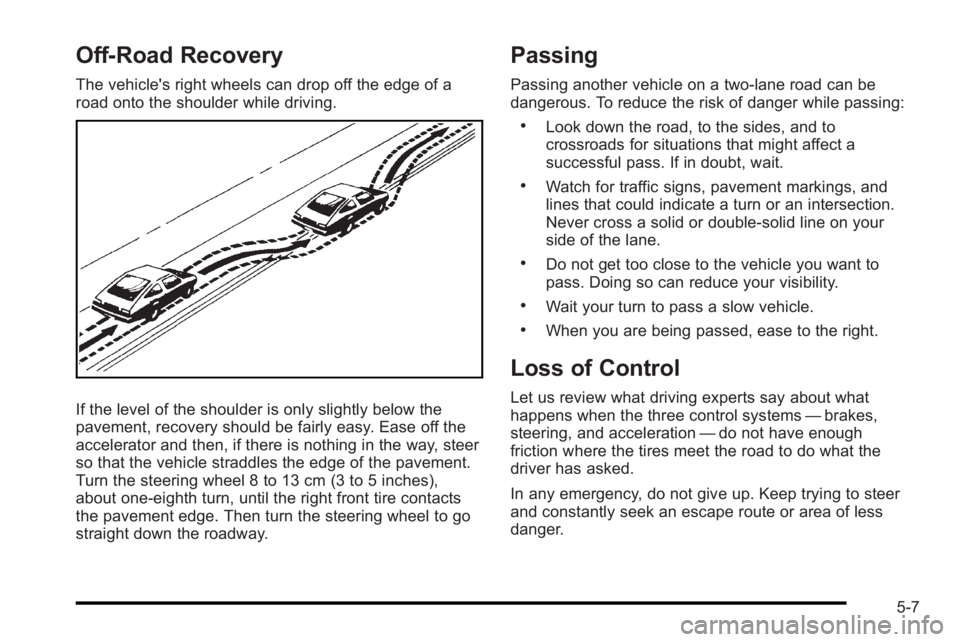
The vehicle's right wheels can drop off the edge of a
road onto the shoulder while driving.
If the level of the shoulder is only slightly below the
pavement, recovery should be fairly easy. Ease off the
accelerator and then, if there is nothing in the way, steer
so that the vehicle straddles the edge of the pavement.
Turn the steering wheel 8 to 13 cm (3 to 5 inches),
about one-eighth turn, until the right front tire contacts
the pavement edge. Then turn the steering wheel to go
straight down the roadway.
Passing
Passing another vehicle on a two-lane road can be
dangerous. To reduce the risk of danger while passing:
.Look down the road, to the sides, and to
crossroads for situations that might affect a
successful pass. If in doubt, wait.
.Watch for traffic signs, pavement markings, and
lines that could indicate a turn or an intersection.
Never cross a solid or double‐solid line on your
side of the lane.
.Do not get too close to the vehicle you want to
pass. Doing so can reduce your visibility.
.Wait your turn to pass a slow vehicle.
.When you are being passed, ease to the right.
Loss of Control
Let us review what driving experts say about what
happens when the three control systems—brakes,
steering, and acceleration —do not have enough
friction where the tires meet the road to do what the
driver has asked.
In any emergency, do not give up. Keep trying to steer
and constantly seek an escape route or area of less
danger.
5-7