brake PONTIAC G3 2010 Owners Manual
[x] Cancel search | Manufacturer: PONTIAC, Model Year: 2010, Model line: G3, Model: PONTIAC G3 2010Pages: 368, PDF Size: 3.94 MB
Page 4 of 368
Safety Warnings and Symbols
Warning messages found on vehicle labels and in this
manual describe hazards and what to do to avoid or
reduce them.
Dangerindicates a hazard with a high level of risk
which will result in serious injury or death.
Warning orCaution indicates a hazard that could result
in injury or death.
{WARNING:
These mean there is something that could hurt
you or other people.
Notice: This means there is something that could
result in property or vehicle damage. This would not
be covered by the vehicle's warranty.
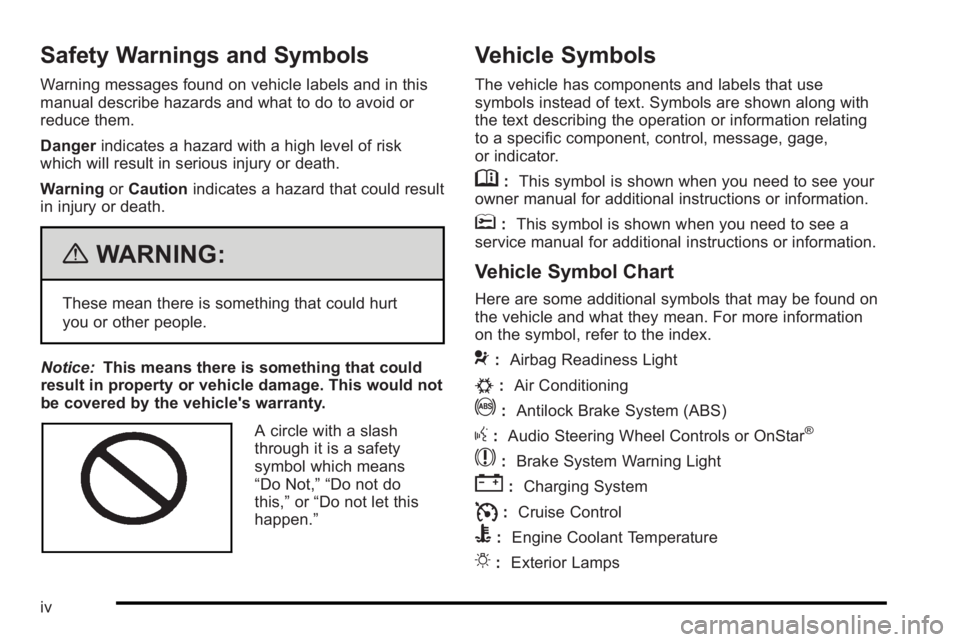
A circle with a slash
through it is a safety
symbol which means
“Do Not,” “Do not do
this,” or“Do not let this
happen.”
Vehicle Symbols
The vehicle has components and labels that use
symbols instead of text. Symbols are shown along with
the text describing the operation or information relating
to a specific component, control, message, gage,
or indicator.
M: This symbol is shown when you need to see your
owner manual for additional instructions or information.
*: This symbol is shown when you need to see a
service manual for additional instructions or information.
Vehicle Symbol Chart
Here are some additional symbols that may be found on
the vehicle and what they mean. For more information
on the symbol, refer to the index.
9: Airbag Readiness Light
#:Air Conditioning
!:Antilock Brake System (ABS)
g:Audio Steering Wheel Controls or OnStar®
$: Brake System Warning Light
":Charging System
I:Cruise Control
B: Engine Coolant Temperature
O:Exterior Lamps
iv
Page 25 of 368
Cruise Control
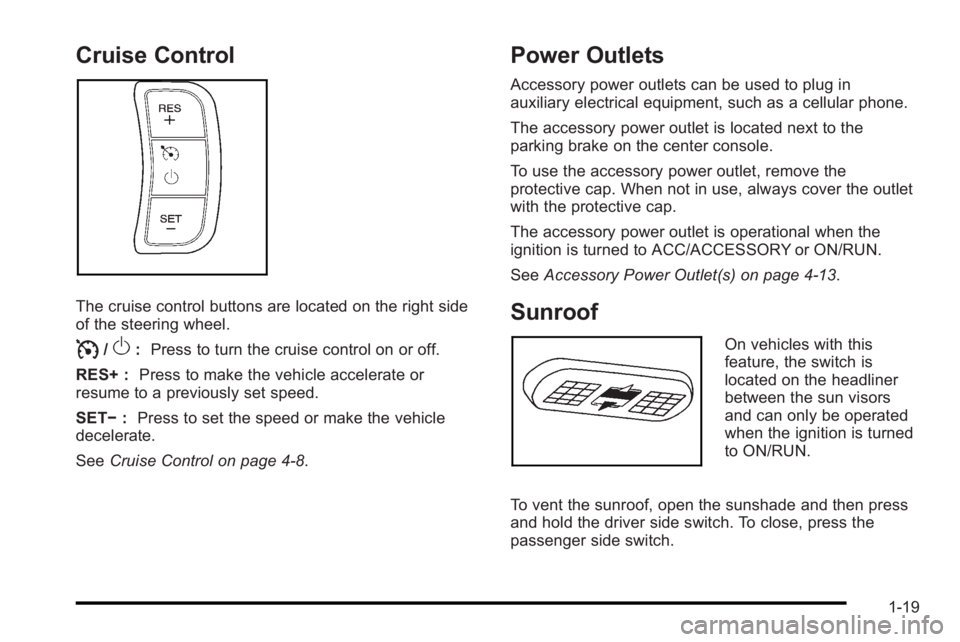
The cruise control buttons are located on the right side
of the steering wheel.
I/O:Press to turn the cruise control on or off.
RES+ : Press to make the vehicle accelerate or
resume to a previously set speed.
SET− :Press to set the speed or make the vehicle
decelerate.
See Cruise Control on page 4‑8.
Power Outlets
Accessory power outlets can be used to plug in
auxiliary electrical equipment, such as a cellular phone.
The accessory power outlet is located next to the
parking brake on the center console.
To use the accessory power outlet, remove the
protective cap. When not in use, always cover the outlet
with the protective cap.
The accessory power outlet is operational when the
ignition is turned to ACC/ACCESSORY or ON/RUN.
SeeAccessory Power Outlet(s) on page 4‑13.
Sunroof
On vehicles with this
feature, the switch is
located on the headliner
between the sun visors
and can only be operated
when the ignition is turned
to ON/RUN.
To vent the sunroof, open the sunshade and then press
and hold the driver side switch. To close, press the
passenger side switch.
1-19
Page 28 of 368
Driving for Better Fuel Economy
Driving habits can affect fuel mileage. Here are some
driving tips to get the best fuel economy possible.
.Avoid fast starts and accelerate smoothly.
.Brake gradually and avoid abrupt stops.
.Avoid idling the engine for long periods of time.
.When road and weather conditions are
appropriate, use cruise control, if equipped.
.Always follow posted speed limits or drive more
slowly when conditions require.
.Keep vehicle tires properly inflated.
.Combine several trips into a single trip.
.Replace the vehicle's tires with the same TPC
Spec number molded into the tire's sidewall near
the size.
.Follow recommended scheduled maintenance.
Roadside Assistance Program
U.S.:1-800-ROADSIDE (762-3743)
TTY Users: 1-888-889-2438
Canada: 1-800-268-6800
As the owner of a new Pontiac, you are automatically
enrolled in the Roadside Assistance program. This
program provides technically trained advisors who are
available 24 hours a day, 365 days a year, minor repair
information or towing arrangements.
Roadside Assistance and OnStar
If you have a current OnStar subscription, press the
OnStar button and the current GPS location will be sent
to an OnStar Advisor who will assess your problem,
contact Roadside Assistance, and relay exact location
to get you the help you need.
Online Owner Center
The Online Owner Center is a complimentary service
that includes online service reminders, vehicle
maintenance tips, online owner manual, special
privileges and more.
Sign up today at: www.gmownercenter.com/pontiac
(U.S.) or www.gm.ca (Canada).
1-22
Page 94 of 368
What Will You See After an Airbag
Inflates?
After the frontal and seat-mounted side impact airbags
inflate, they quickly deflate, so quickly that some
people may not even realize the airbags inflated.
Some components of the airbag module may be hot for
several minutes. For location of the airbag modules,
seeWhat Makes an Airbag Inflate? on page 2‑63.
The parts of the airbag that come into contact with you
may be warm, but not too hot to touch. There may be
some smoke and dust coming from the vents in the
deflated airbags. Airbag inflation does not prevent the
driver from seeing out of the windshield or being able to
steer the vehicle, nor does it prevent people from
leaving the vehicle.
{WARNING:
When an airbag inflates, there may be dust in the
air. This dust could cause breathing problems for
people with a history of asthma or other breathing
trouble. To avoid this, everyone in the vehicle
should get out as soon as it is safe to do so.
If you have breathing problems but cannot get out
of the vehicle after an airbag inflates, then get (Continued)
WARNING: (Continued)
fresh air by opening a window or a door. If you
experience breathing problems following an airbag
deployment, you should seek medical attention.
The vehicle has a feature that may automatically unlock
the doors, turn the interior lamps on, turn on the hazard
warning flashers, and shut off the fuel system after the
airbags inflate. You can lock the doors, turn the interior
lamps off, and turn the hazard warning flashers off by
using the controls for those features.
{WARNING:
A crash severe enough to inflate the airbags may
have also damaged important functions in the
vehicle, such as the fuel system, brake and
steering systems, etc. Even if the vehicle appears
to be drivable after a moderate crash, there may
be concealed damage that could make it difficult
to safely operate the vehicle.
Use caution if you should attempt to restart the
engine after a crash has occurred.
2-64
Page 105 of 368

Section 3 Features and Controls
Keys. . . . . . . . . . . . . . . . . . . . . . . . . . . . . . . . . . . . . . . . . . . . . . . . 3-2
Remote Keyless Entry (RKE) System . . . . . . . . . . . 3-3
Remote Keyless Entry (RKE) System Operation . . . . . . . . . . . . . . . . . . . . . . . . . . . . . . . . . . . . . 3-4
Doors and Locks . . . . . . . . . . . . . . . . . . . . . . . . . . . . . . . . . . 3-6
Door Locks . . . . . . . . . . . . . . . . . . . . . . . . . . . . . . . . . . . . . 3-6
Central Door Unlocking System . . . . . . . . . . . . . . . . . 3-7
Door Ajar Reminder . . . . . . . . . . . . . . . . . . . . . . . . . . . . . 3-7
Rear Door Security Locks . . . . . . . . . . . . . . . . . . . . . . . 3-7
Trunk . . . . . . . . . . . . . . . . . . . . . . . . . . . . . . . . . . . . . . . . . . . 3-8
Liftgate (Hatchback) . . . . . . . . . . . . . . . . . . . . . . . . . . . 3-11
Windows . . . . . . . . . . . . . . . . . . . . . . . . . . . . . . . . . . . . . . . . . . 3-12
Manual Windows . . . . . . . . . . . . . . . . . . . . . . . . . . . . . . 3-13
Power Windows . . . . . . . . . . . . . . . . . . . . . . . . . . . . . . . 3-13
Sun Visors . . . . . . . . . . . . . . . . . . . . . . . . . . . . . . . . . . . . . 3-14
Theft-Deterrent Systems . . . . . . . . . . . . . . . . . . . . . . . . .3-14
Immobilizer . . . . . . . . . . . . . . . . . . . . . . . . . . . . . . . . . . . . 3-14
Immobilizer Operation . . . . . . . . . . . . . . . . . . . . . . . . . 3-14
Content Theft-Deterrent . . . . . . . . . . . . . . . . . . . . . . . . 3-15
Starting and Operating Your Vehicle . . . . . . . . . . . .3-17
New Vehicle Break-In . . . . . . . . . . . . . . . . . . . . . . . . . . 3-17
Ignition Positions . . . . . . . . . . . . . . . . . . . . . . . . . . . . . . 3-18 Starting the Engine . . . . . . . . . . . . . . . . . . . . . . . . . . . . 3-19
Engine Heater . . . . . . . . . . . . . . . . . . . . . . . . . . . . . . . . . 3-20
Automatic Transmission Operation . . . . . . . . . . . . . 3-22
Manual Transmission Operation . . . . . . . . . . . . . . . 3-26
Parking Brake . . . . . . . . . . . . . . . . . . . . . . . . . . . . . . . . . 3-28
Shifting Into Park (Automatic Transmission) . . . 3-29
Shifting Out of Park . . . . . . . . . . . . . . . . . . . . . . . . . . . . 3-30
Parking the Vehicle (Manual Transmission) . . . . 3-31
Parking Over Things That Burn . . . . . . . . . . . . . . . . 3-32
Engine Exhaust . . . . . . . . . . . . . . . . . . . . . . . . . . . . . . . . 3-32
Running the Vehicle While Parked . . . . . . . . . . . . . 3-33
Mirrors . . . . . . . . . . . . . . . . . . . . . . . . . . . . . . . . . . . . . . . . . . . . 3-34
Manual Rearview Mirror . . . . . . . . . . . . . . . . . . . . . . . . 3-34
Outside Manual Mirrors . . . . . . . . . . . . . . . . . . . . . . . . 3-34
Outside Power Mirrors . . . . . . . . . . . . . . . . . . . . . . . . . 3-35
Outside Convex Mirror . . . . . . . . . . . . . . . . . . . . . . . . . 3-35
Outside Heated Mirrors . . . . . . . . . . . . . . . . . . . . . . . . 3-35
Storage Areas . . . . . . . . . . . . . . . . . . . . . . . . . . . . . . . . . . . . 3-36
Glove Box . . . . . . . . . . . . . . . . . . . . . . . . . . . . . . . . . . . . . 3-36
Cupholders . . . . . . . . . . . . . . . . . . . . . . . . . . . . . . . . . . . . 3-36
Sunroof . . . . . . . . . . . . . . . . . . . . . . . . . . . . . . . . . . . . . . . . . . . 3-37
3-1
Page 121 of 368
How the System Alarm is Activated
If a door or the trunk or liftgate is opened without using
the key or the remote keyless entry transmitter, the horn
will sound and the lamps will flash for up to 30 seconds.
How to Turn Off the System Alarm
If the system alarm is active, it can be deactivated using
one of the following methods:
.Press one of the buttons on the remote keyless
entry transmitter.
.Unlock the driver's or passenger's front door using
the key.
Otherwise, the alarm will automatically stop after
30 seconds. The system will then lock the doors and
rearm the theft-deterrent system.
How to Detect a Tamper Condition
If the hazard warning lamps flash once when you press
the lock button on the remote keyless entry transmitter,
the theft-deterrent system alarm was activated while
you were away.
Starting and Operating
Your Vehicle
New Vehicle Break-In
Notice: The vehicle does not need an elaborate
break-in. But it will perform better in the long run if
you follow these guidelines:
.Do not drive at any one constant speed,
fast or slow, for the first 805 km (500 miles).
Do not make full-throttle starts. Avoid
downshifting to brake or slow the vehicle.
.Avoid making hard stops for the first 322 km
(200 miles) or so. During this time the new
brake linings are not yet broken in. Hard
stops with new linings can mean premature
wear and earlier replacement. Follow this
breaking-in guideline every time you get new
brake linings.
Following break‐in, engine speed and load can be
gradually increased.
3-17
Page 123 of 368

Starting the Engine
Automatic Transmission
Move the shift lever to P (Park) or N (Neutral).
The engine will not start in any other position.
To restart the engine when the vehicle is already
moving, use N (Neutral) only.
Notice:Do not try to shift to P (Park) if the vehicle
is moving. If you do, you could damage the
transmission. Shift to P (Park) only when the
vehicle is stopped.
Manual Transmission
The shift lever should be in N (Neutral) and the parking
brake engaged. Hold the clutch pedal to the floor and
start the engine. The vehicle will not start if the clutch
pedal is not all the way down.
Starting Procedure
1. With your foot off the accelerator pedal, turn the ignition to START. When the engine starts, let go of
the key. The idle speed will go down as the engine
gets warm.
Notice: Holding the key in START for longer than
15 seconds at a time will cause the battery to be
drained much sooner. And the excessive heat can
damage the starter motor. Wait about 15 seconds
between each try to help avoid draining the battery
or damaging the starter.
2. If the engine does not start, wait about 15 seconds and try again. Wait about 15 seconds between
each try.
When the engine has run about 10 seconds to
warm up, the vehicle is ready to be driven. Do not
run the engine at high speed when it is cold.
If the weather is below freezing (32°F or 0°C), let
the engine run for a few minutes to warm up.
3-19
Page 127 of 368

{WARNING:
It is dangerous to get out of the vehicle if the shift
lever is not fully in P (Park) with the parking brake
firmly set. The vehicle can roll.
Do not leave the vehicle when the engine is
running unless you have to. If you have left the
engine running, the vehicle can move suddenly.
You or others could be injured. To be sure the
vehicle will not move, even when you are on fairly
level ground, always set the parking brake and
move the shift lever to P (Park). SeeShifting Into
Park (Automatic Transmission) on page 3‑29.
Ensure that the shift lever is fully in P (Park) before
starting the engine. The vehicle has an automatic
transmission shift lock control system. You have to
apply the brake pedal before you can shift from P (Park)
when the key is in ON/RUN. If you cannot shift out of
P (Park) while holding the brake pedal down, see
Shifting Out of Park on page 3‑30.
R (Reverse) : Use this gear to back up.
When shifting from N (Neutral) to R (Reverse), you need
to apply the brake pedal and push the release button on
the front of the shifter. Notice:
Shifting to R (Reverse) while the vehicle is
moving forward could damage the transmission.
The repairs would not be covered by the vehicle
warranty. Shift to R (Reverse) only after the vehicle
is stopped.
To rock the vehicle back and forth to get out of snow,
ice or sand without damaging the transmission, see If
Your Vehicle is Stuck in Sand, Mud, Ice, or Snow
on
page 5‑13.
N (Neutral) : In this position, the engine does not
connect with the wheels. To restart the engine while the
vehicle is already moving, use N (Neutral) only. Also,
use N (Neutral) when the vehicle is being towed.
{WARNING:
Shifting into a drive gear while the engine is
running at high speed is dangerous. Unless your
foot is firmly on the brake pedal, the vehicle could
move very rapidly. You could lose control and hit
people or objects. Do not shift into a drive gear
while the engine is running at high speed.
3-23
Page 128 of 368

Notice:Shifting out of P (Park) or N (Neutral) with
the engine running at high speed may damage the
transmission. The repairs would not be covered by
the vehicle warranty. Be sure the engine is not
running at high speed when shifting the vehicle.
D4 (Automatic Overdrive) : This position is for normal
driving.
When operating the vehicle in severe cold conditions,
the transmission may be prevented from shifting into
D4 gear until the transmission fluid has warmed up to
it's operational temperature.
Notice: If the vehicle seems to start up rather
slowly or not shift gears when you go faster, and
you continue to drive the vehicle that way, you
could damage the transmission. Have the vehicle
serviced right away. You can drive in 2 (Second)
when you are driving less than 35 mph (55 km/h)
and D4 (Automatic Overdrive) for higher speeds
until then.
2 (Second) : This position gives you more power but
lower fuel economy. You can use 2 (Second) on hills.
It can help control vehicle speed as you go down steep
mountain roads, while using the brakes off and on. Notice:
Do not drive in 2 (Second) at speeds over
65 mph (105 km/h), or you can damage the
transmission. Use D4 (Automatic Overdrive) as
much as possible. Do not shift into 2 (Second)
unless you are going slower than 65 mph (105 km/h)
or you can damage the engine.
1 (First) : This position gives you even more power but
lower fuel economy than 2 (Second). You can use it on
very steep hills, or in deep snow or mud. If the shift
lever is put in 1 (First), the transmission will not shift into
first gear until the vehicle is going slowly enough.
Notice: Spinning the tires or holding the vehicle in
one place on a hill using only the accelerator pedal
may damage the transmission. The repair will not be
covered by the vehicle warranty. If you are stuck, do
not spin the tires. When stopping on a hill, use the
brakes to hold the vehicle in place.
If there is a malfunction with the automatic transmission,
the malfunction indicator lamp (MIL) or the HOLD
indicator light will turn on or flash. See Malfunction
Indicator Lamp on page 4‑29.
Have the vehicle fixed as soon as possible.
3-24
Page 130 of 368

Manual Transmission Operation
Five-Speed
This is your shift pattern.
1 (First) :Press the clutch pedal and shift into 1 (First).
Then, slowly let up on the clutch pedal as you press the
accelerator pedal. You can shift into 1 (First) when you are going less than
20 mph (32 km/h). If you have come to a complete stop
and it is hard to shift into 1 (First), put the shift lever in
N (Neutral) and let up on the clutch. Press the clutch
pedal back down. Then shift into 1 (First).
2 (Second) :
Press the clutch pedal as you let up on
the accelerator pedal and shift into 2 (Second). Then,
slowly let up on the clutch pedal as you press the
accelerator pedal.
3 (Third), 4 (Fourth) and 5 (Fifth) : Shift into 3 (Third),
4 (Fourth) and 5 (Fifth), the same way you do for
2 (Second). Slowly let up on the clutch pedal as you
press the accelerator pedal.
To stop, let up on the accelerator pedal and press the
brake pedal. Just before the vehicle stops, press the
clutch pedal and the brake pedal, and shift to
N (Neutral).
N (Neutral) : Use this position when you start or idle
the engine.
3-26