cruise control PONTIAC G3 2010 Owners Manual
[x] Cancel search | Manufacturer: PONTIAC, Model Year: 2010, Model line: G3, Model: PONTIAC G3 2010Pages: 368, PDF Size: 3.94 MB
Page 4 of 368
Safety Warnings and Symbols
Warning messages found on vehicle labels and in this
manual describe hazards and what to do to avoid or
reduce them.
Dangerindicates a hazard with a high level of risk
which will result in serious injury or death.
Warning orCaution indicates a hazard that could result
in injury or death.
{WARNING:
These mean there is something that could hurt
you or other people.
Notice: This means there is something that could
result in property or vehicle damage. This would not
be covered by the vehicle's warranty.
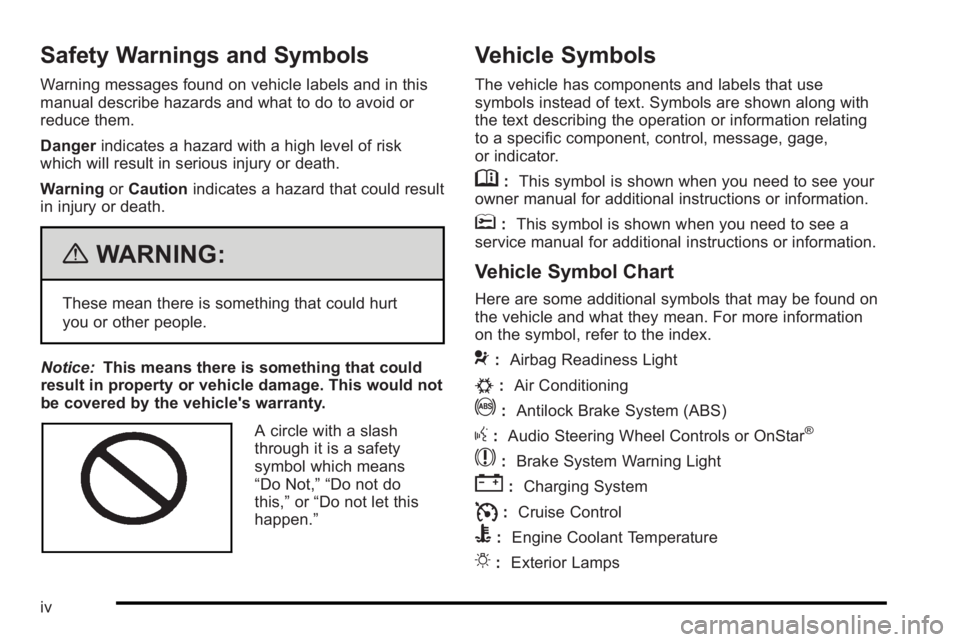
A circle with a slash
through it is a safety
symbol which means
“Do Not,” “Do not do
this,” or“Do not let this
happen.”
Vehicle Symbols
The vehicle has components and labels that use
symbols instead of text. Symbols are shown along with
the text describing the operation or information relating
to a specific component, control, message, gage,
or indicator.
M: This symbol is shown when you need to see your
owner manual for additional instructions or information.
*: This symbol is shown when you need to see a
service manual for additional instructions or information.
Vehicle Symbol Chart
Here are some additional symbols that may be found on
the vehicle and what they mean. For more information
on the symbol, refer to the index.
9: Airbag Readiness Light
#:Air Conditioning
!:Antilock Brake System (ABS)
g:Audio Steering Wheel Controls or OnStar®
$: Brake System Warning Light
":Charging System
I:Cruise Control
B: Engine Coolant Temperature
O:Exterior Lamps
iv
Page 7 of 368
Section 1 In Brief
Instrument Panel. . . . . . . . . . . . . . . . . . . . . . . . . . . . . . . . . . . 1-2
Initial Drive Information . . . . . . . . . . . . . . . . . . . . . . . . . . . 1-3
Remote Keyless Entry (RKE) System . . . . . . . . . . . 1-3
Door Locks . . . . . . . . . . . . . . . . . . . . . . . . . . . . . . . . . . . . . 1-4
Liftgate . . . . . . . . . . . . . . . . . . . . . . . . . . . . . . . . . . . . . . . . . . 1-4
Trunk Release . . . . . . . . . . . . . . . . . . . . . . . . . . . . . . . . . . 1-5
Windows . . . . . . . . . . . . . . . . . . . . . . . . . . . . . . . . . . . . . . . . 1-5
Seat Adjustment . . . . . . . . . . . . . . . . . . . . . . . . . . . . . . . . 1-6
Second Row Seats . . . . . . . . . . . . . . . . . . . . . . . . . . . . . 1-8
Head Restraint Adjustment . . . . . . . . . . . . . . . . . . . . . . 1-8
Safety Belt . . . . . . . . . . . . . . . . . . . . . . . . . . . . . . . . . . . . . . 1-9
Sensing System for Passenger Airbag . . . . . . . . . . 1-9
Mirror Adjustment . . . . . . . . . . . . . . . . . . . . . . . . . . . . . . 1-10
Steering Wheel Adjustment . . . . . . . . . . . . . . . . . . . . 1-11
Interior Lighting . . . . . . . . . . . . . . . . . . . . . . . . . . . . . . . . 1-11
Exterior Lighting . . . . . . . . . . . . . . . . . . . . . . . . . . . . . . . 1-12
Windshield Wiper/Washer . . . . . . . . . . . . . . . . . . . . . . 1-12
Climate Controls . . . . . . . . . . . . . . . . . . . . . . . . . . . . . . . 1-14
Transmission . . . . . . . . . . . . . . . . . . . . . . . . . . . . . . . . . . 1-15 Vehicle Features
. . . . . . . . . . . . . . . . . . . . . . . . . . . . . . . . . . 1-16
Radio(s) . . . . . . . . . . . . . . . . . . . . . . . . . . . . . . . . . . . . . . . 1-16
Satellite Radio . . . . . . . . . . . . . . . . . . . . . . . . . . . . . . . . . 1-17
Portable Audio Devices . . . . . . . . . . . . . . . . . . . . . . . . 1-18
Steering Wheel Controls . . . . . . . . . . . . . . . . . . . . . . . 1-18
Cruise Control . . . . . . . . . . . . . . . . . . . . . . . . . . . . . . . . . 1-19
Power Outlets . . . . . . . . . . . . . . . . . . . . . . . . . . . . . . . . . 1-19
Sunroof . . . . . . . . . . . . . . . . . . . . . . . . . . . . . . . . . . . . . . . . 1-19
Performance and Maintenance . . . . . . . . . . . . . . . . . .1-20
Tire Pressure Monitor . . . . . . . . . . . . . . . . . . . . . . . . . . 1-20
Engine Oil Life System . . . . . . . . . . . . . . . . . . . . . . . . 1-20
Hood Release . . . . . . . . . . . . . . . . . . . . . . . . . . . . . . . . . 1-21
Driving for Better Fuel Economy . . . . . . . . . . . . . . . 1-22
Roadside Assistance Program . . . . . . . . . . . . . . . . . 1-22
OnStar
®. . . . . . . . . . . . . . . . . . . . . . . . . . . . . . . . . . . . . . . 1-23
1-1
Page 25 of 368
Cruise Control
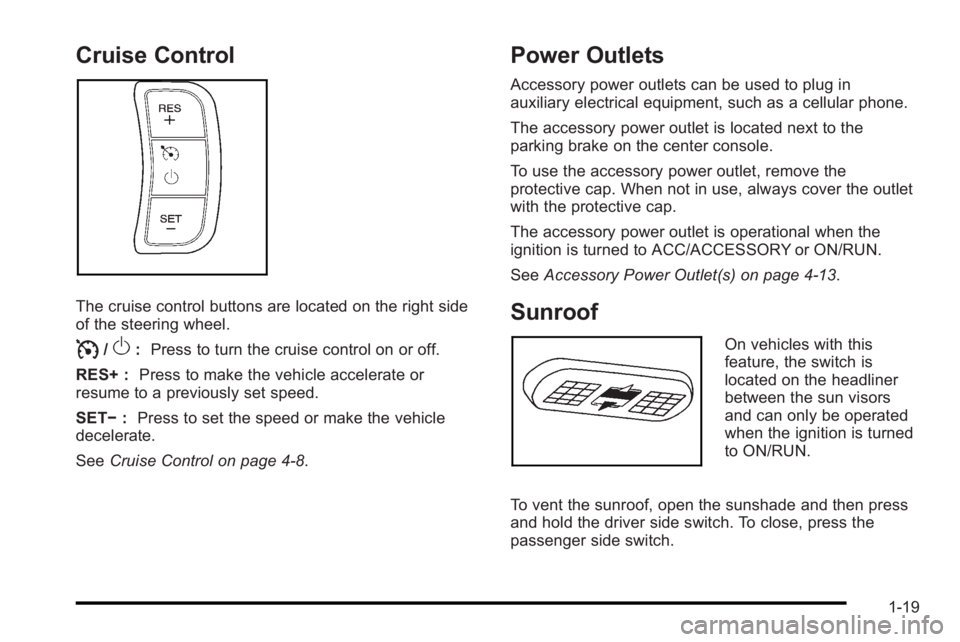
The cruise control buttons are located on the right side
of the steering wheel.
I/O:Press to turn the cruise control on or off.
RES+ : Press to make the vehicle accelerate or
resume to a previously set speed.
SET− :Press to set the speed or make the vehicle
decelerate.
See Cruise Control on page 4‑8.
Power Outlets
Accessory power outlets can be used to plug in
auxiliary electrical equipment, such as a cellular phone.
The accessory power outlet is located next to the
parking brake on the center console.
To use the accessory power outlet, remove the
protective cap. When not in use, always cover the outlet
with the protective cap.
The accessory power outlet is operational when the
ignition is turned to ACC/ACCESSORY or ON/RUN.
SeeAccessory Power Outlet(s) on page 4‑13.
Sunroof
On vehicles with this
feature, the switch is
located on the headliner
between the sun visors
and can only be operated
when the ignition is turned
to ON/RUN.
To vent the sunroof, open the sunshade and then press
and hold the driver side switch. To close, press the
passenger side switch.
1-19
Page 28 of 368
Driving for Better Fuel Economy
Driving habits can affect fuel mileage. Here are some
driving tips to get the best fuel economy possible.
.Avoid fast starts and accelerate smoothly.
.Brake gradually and avoid abrupt stops.
.Avoid idling the engine for long periods of time.
.When road and weather conditions are
appropriate, use cruise control, if equipped.
.Always follow posted speed limits or drive more
slowly when conditions require.
.Keep vehicle tires properly inflated.
.Combine several trips into a single trip.
.Replace the vehicle's tires with the same TPC
Spec number molded into the tire's sidewall near
the size.
.Follow recommended scheduled maintenance.
Roadside Assistance Program
U.S.:1-800-ROADSIDE (762-3743)
TTY Users: 1-888-889-2438
Canada: 1-800-268-6800
As the owner of a new Pontiac, you are automatically
enrolled in the Roadside Assistance program. This
program provides technically trained advisors who are
available 24 hours a day, 365 days a year, minor repair
information or towing arrangements.
Roadside Assistance and OnStar
If you have a current OnStar subscription, press the
OnStar button and the current GPS location will be sent
to an OnStar Advisor who will assess your problem,
contact Roadside Assistance, and relay exact location
to get you the help you need.
Online Owner Center
The Online Owner Center is a complimentary service
that includes online service reminders, vehicle
maintenance tips, online owner manual, special
privileges and more.
Sign up today at: www.gmownercenter.com/pontiac
(U.S.) or www.gm.ca (Canada).
1-22
Page 143 of 368

Section 4 Instrument Panel
Instrument Panel Overview. . . . . . . . . . . . . . . . . . . . . . . .4-3
Hazard Warning Flashers . . . . . . . . . . . . . . . . . . . . . . . 4-3
Horn . . . . . . . . . . . . . . . . . . . . . . . . . . . . . . . . . . . . . . . . . . . . 4-3
Tilt Wheel . . . . . . . . . . . . . . . . . . . . . . . . . . . . . . . . . . . . . . . 4-3
Turn Signal/Multifunction Lever . . . . . . . . . . . . . . . . . . 4-4
Turn and Lane-Change Signals . . . . . . . . . . . . . . . . . 4-4
Headlamp High/Low-Beam Changer . . . . . . . . . . . . 4-5
Flash-to-Pass . . . . . . . . . . . . . . . . . . . . . . . . . . . . . . . . . . . 4-5
Windshield Wipers . . . . . . . . . . . . . . . . . . . . . . . . . . . . . . 4-6
Windshield Washer . . . . . . . . . . . . . . . . . . . . . . . . . . . . . 4-7
Rear Window Wiper/Washer . . . . . . . . . . . . . . . . . . . . 4-7
Cruise Control . . . . . . . . . . . . . . . . . . . . . . . . . . . . . . . . . . 4-8
Exterior Lamps . . . . . . . . . . . . . . . . . . . . . . . . . . . . . . . . . 4-11
Daytime Running Lamps (DRL) . . . . . . . . . . . . . . . . 4-11
Fog Lamps . . . . . . . . . . . . . . . . . . . . . . . . . . . . . . . . . . . . 4-12
Instrument Panel Brightness . . . . . . . . . . . . . . . . . . . 4-12
Dome Lamp . . . . . . . . . . . . . . . . . . . . . . . . . . . . . . . . . . . 4-13
Inadvertent Power Battery Saver . . . . . . . . . . . . . . . 4-13
Accessory Power Outlet(s) . . . . . . . . . . . . . . . . . . . . . 4-13
Ashtray(s) and Cigarette Lighter . . . . . . . . . . . . . . . 4-14
Clock . . . . . . . . . . . . . . . . . . . . . . . . . . . . . . . . . . . . . . . . . . 4-15 Climate Controls
. . . . . . . . . . . . . . . . . . . . . . . . . . . . . . . . . . 4-15
Climate Control System . . . . . . . . . . . . . . . . . . . . . . . . 4-15
Outlet Adjustment . . . . . . . . . . . . . . . . . . . . . . . . . . . . . . 4-18
Passenger Compartment Air Filter . . . . . . . . . . . . . 4-18
Warning Lights, Gages, and Indicators . . . . . . . . . .4-20
Instrument Panel Cluster . . . . . . . . . . . . . . . . . . . . . . . 4-21
Speedometer and Odometer . . . . . . . . . . . . . . . . . . . 4-22
Trip Odometer . . . . . . . . . . . . . . . . . . . . . . . . . . . . . . . . . 4-22
Tachometer . . . . . . . . . . . . . . . . . . . . . . . . . . . . . . . . . . . . 4-22
Safety Belt Reminders . . . . . . . . . . . . . . . . . . . . . . . . . 4-23
Airbag Readiness Light . . . . . . . . . . . . . . . . . . . . . . . . 4-23
Passenger Airbag Status Indicator . . . . . . . . . . . . . 4-24
Charging System Light . . . . . . . . . . . . . . . . . . . . . . . . 4-25
Up-Shift Light . . . . . . . . . . . . . . . . . . . . . . . . . . . . . . . . . . 4-26
Brake System Warning Light . . . . . . . . . . . . . . . . . . . 4-26
Antilock Brake System (ABS) Warning Light . . . 4-27
Hold Mode Light . . . . . . . . . . . . . . . . . . . . . . . . . . . . . . . 4-27
Engine Coolant Temperature Gage . . . . . . . . . . . . 4-28
Tire Pressure Light . . . . . . . . . . . . . . . . . . . . . . . . . . . . 4-28
Malfunction Indicator Lamp . . . . . . . . . . . . . . . . . . . . 4-29
4-1
Page 144 of 368
Section 4 Instrument Panel
Oil Pressure Light . . . . . . . . . . . . . . . . . . . . . . . . . . . . . 4-31
Change Engine Oil Light . . . . . . . . . . . . . . . . . . . . . . . 4-32
Fog Lamp Light . . . . . . . . . . . . . . . . . . . . . . . . . . . . . . . . 4-33
Cruise Control Light . . . . . . . . . . . . . . . . . . . . . . . . . . . 4-33
Highbeam On Light . . . . . . . . . . . . . . . . . . . . . . . . . . . . 4-33
Daytime Running Lamps (DRL) IndicatorLight . . . . . . . . . . . . . . . . . . . . . . . . . . . . . . . . . . . . . . . . . 4-33
Door Ajar Light . . . . . . . . . . . . . . . . . . . . . . . . . . . . . . . . 4-34
Fuel Gage . . . . . . . . . . . . . . . . . . . . . . . . . . . . . . . . . . . . . 4-34
Low Fuel Warning Light . . . . . . . . . . . . . . . . . . . . . . . . 4-35 Audio System(s)
. . . . . . . . . . . . . . . . . . . . . . . . . . . . . . . . . . 4-36
AM-FM Radio . . . . . . . . . . . . . . . . . . . . . . . . . . . . . . . . . . 4-37
Radio with CD . . . . . . . . . . . . . . . . . . . . . . . . . . . . . . . . . 4-41
Using an MP3 . . . . . . . . . . . . . . . . . . . . . . . . . . . . . . . . . 4-48
XM Radio Messages . . . . . . . . . . . . . . . . . . . . . . . . . . . 4-51
Audio Steering Wheel Controls . . . . . . . . . . . . . . . . 4-51
Radio Reception . . . . . . . . . . . . . . . . . . . . . . . . . . . . . . . 4-52
Fixed Mast Antenna (Hatchback) . . . . . . . . . . . . . . 4-53
Backglass Antenna (Sedan) . . . . . . . . . . . . . . . . . . . 4-53
Multi-Band Antenna . . . . . . . . . . . . . . . . . . . . . . . . . . . . 4-54
4-2
Page 150 of 368
Cruise Control
For vehicles with cruise control, a speed of about
39 km/h (24 mph) or more can be maintained without
keeping your foot on the accelerator. Cruise control
does not work at speeds below 39 km/h (24 mph).
When the brakes are applied, or the clutch pedal if you
have a manual transmission, the cruise control turns off.
{WARNING:
Cruise control can be dangerous where you
cannot drive safely at a steady speed. So, do not
use the cruise control on winding roads or in
heavy traffic.
Cruise control can be dangerous on slippery
roads. On such roads, fast changes in tire traction
can cause excessive wheel slip, and you could
lose control. Do not use cruise control on slippery
roads.
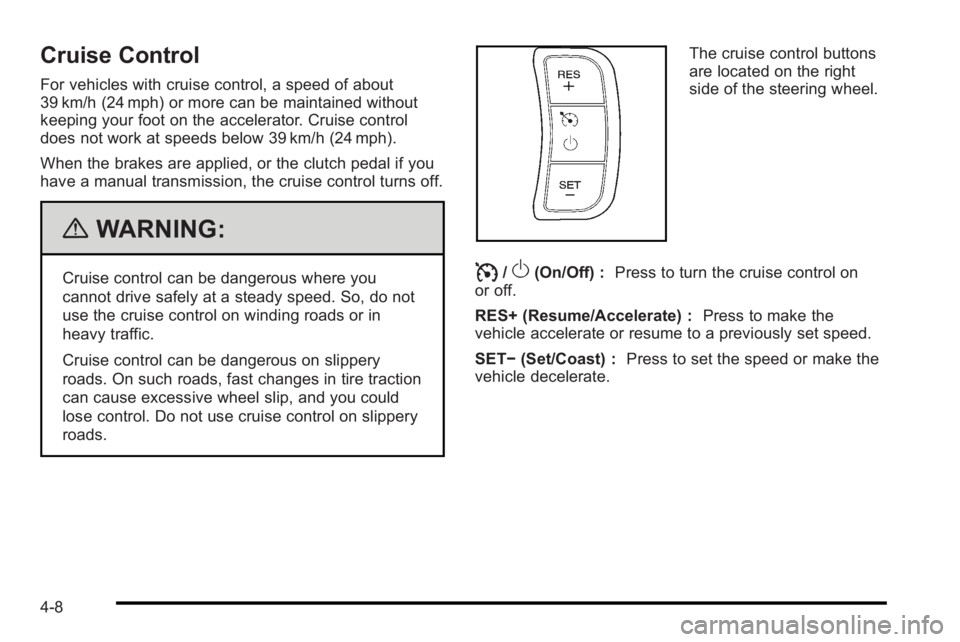
The cruise control buttons
are located on the right
side of the steering wheel.
I/O(On/Off) :Press to turn the cruise control on
or off.
RES+ (Resume/Accelerate) : Press to make the
vehicle accelerate or resume to a previously set speed.
SET− (Set/Coast) : Press to set the speed or make the
vehicle decelerate.
4-8
Page 151 of 368
Setting Cruise Control
{WARNING:
If you leave your cruise control on when you are
not using cruise, you might hit a button and go
into cruise when you do not want to. You could be
startled and even lose control. Keep the cruise
control switch off until you want to use cruise
control.
1. Press
I/Oto turn cruise control on.
2. Accelerate to the speed desired.
3. Press the SET− button and release it. The cruise
control light comes on in the instrument panel
cluster to show that the cruise control is on.
4. Take your foot off the accelerate pedal.
Resuming a Set Speed
If the cruise control is set to a desired speed and then
the brakes are applied, or the clutch pedal if you have a
manual transmission, the cruise control shuts off. But it
does not need to be reset. Once the vehicle is going about 39 km/h (24 mph) or
more, briefly press the RES+ button. The vehicle
returns to the previously set speed and stays there.
If the RES+ button is held, the vehicle speed will
continue to increase until the button is released or the
brake pedal is applied. Do not hold in the RES+ button,
unless you want the vehicle to go faster.
Increasing Speed While Using Cruise
Control
There are two ways to go to a higher speed.
.Use the accelerator pedal to get to a higher speed.
Press the SET−
button, then release the button
and the accelerator pedal.
.Press the RES+ button. Hold it there until the
desired speed is reached, and then release it.
To increase the vehicle speed in small amounts,
briefly press the RES+ button and then release it.
Each time this is done, the vehicle goes about
1.6 km/h (1 mph) faster.
The accelerate feature only works after the cruise
control is turned on by pressing the SET− button.
4-9
Page 152 of 368
Reducing Speed While Using Cruise
Control
There are two ways to reduce the vehicle speed while
using cruise control:
.Press the SET−button until the lower speed
desired is reached, then release it.
.To slow down in small amounts, briefly press the
SET− button. Each time this is done, the vehicle
goes about 1.6 km/h (1 mph) slower.
Passing Another Vehicle While Using
Cruise Control
Use the accelerator pedal to increase the vehicle
speed. When you take your foot off the pedal, the
vehicle slows down to the cruise control speed set
earlier.
Using Cruise Control on Hills
How well the cruise control works on hills depends upon
the vehicle speed, load, and the steepness of the hills.
When going up steep hills, you might have to step on
the accelerator pedal to maintain the vehicle's speed.
When going downhill, you might have to brake or shift
to a lower gear to keep the vehicle's speed down.
When the brakes are applied the cruise control turns off.
Ending Cruise Control
There are two ways to turn off the cruise control:
.Step lightly on the brake pedal, or press the clutch
pedal, if you have a manual transmission.
.PressI/Oon the cruise control pad.
Erasing Speed Memory
The cruise control set speed memory is erased when
the cruise control or the ignition is turned off.
4-10
Page 175 of 368

Fog Lamp Light
If the vehicle has this
feature, the fog lamps
light will come on when
the fog lamps are in use.
The light will go out when the fog lamps are turned off.
See Fog Lamps
on page 4‑12for more information.
Cruise Control Light
If the vehicle has cruise
control, this light comes
on whenever the cruise
control is set
The light will go out when the cruise control is turned
off. See Cruise Control
on page 4‑8for more
information.
Highbeam On Light
This light comes on when
the high-beam headlamps
are in use.
See Headlamp High/Low-Beam Changer
on page 4‑5for more information.
Daytime Running Lamps (DRL)
Indicator Light
This light turns on
whenever the Daytime
Running Lamps are on.
See Daytime Running Lamps (DRL)
on page 4‑11for
more information.
4-33