light PONTIAC G3 2010 Owners Manual
[x] Cancel search | Manufacturer: PONTIAC, Model Year: 2010, Model line: G3, Model: PONTIAC G3 2010Pages: 368, PDF Size: 3.94 MB
Page 1 of 368
2010 Pontiac G3 Owner ManualM
In Brief. . . . . . . . . . . . . . . . . . . . . . . . . . . . . . . . . . . . . . . . . . . . 1-1
Instrument Panel . . . . . . . . . . . . . . . . . . . . . . . . . . . . . . . . . 1-2
Initial Drive Information . . . . . . . . . . . . . . . . . . . . . . . . . . . 1-3
Vehicle Features . . . . . . . . . . . . . . . . . . . . . . . . . . . . . . . . 1-16
Performance and Maintenance . . . . . . . . . . . . . . . . . . 1-20
Seats and Restraint System . . . . . . . . . . . . . . . . . . . . . . 2-1
Head Restraints . . . . . . . . . . . . . . . . . . . . . . . . . . . . . . . . . . 2-2
Front Seats . . . . . . . . . . . . . . . . . . . . . . . . . . . . . . . . . . . . . . . 2-4
Rear Seats . . . . . . . . . . . . . . . . . . . . . . . . . . . . . . . . . . . . . . . 2-8
Safety Belts . . . . . . . . . . . . . . . . . . . . . . . . . . . . . . . . . . . . . 2-15
Child Restraints . . . . . . . . . . . . . . . . . . . . . . . . . . . . . . . . . 2-33
Airbag System . . . . . . . . . . . . . . . . . . . . . . . . . . . . . . . . . . 2-57
Restraint System Check . . . . . . . . . . . . . . . . . . . . . . . . . 2-72
Features and Controls . . . . . . . . . . . . . . . . . . . . . . . . . . . . 3-1
Keys . . . . . . . . . . . . . . . . . . . . . . . . . . . . . . . . . . . . . . . . . . . . . 3-2
Doors and Locks . . . . . . . . . . . . . . . . . . . . . . . . . . . . . . . . . 3-6
Windows . . . . . . . . . . . . . . . . . . . . . . . . . . . . . . . . . . . . . . . . 3-12 Theft-Deterrent Systems . . . . . . . . . . . . . . . . . . . . . . . . 3-14
Starting and Operating Your Vehicle . . . . . . . . . . . . . 3-17
Mirrors . . . . . . . . . . . . . . . . . . . . . . . . . . . . . . . . . . . . . . . . . . 3-34
Storage Areas . . . . . . . . . . . . . . . . . . . . . . . . . . . . . . . . . . . 3-36
Sunroof . . . . . . . . . . . . . . . . . . . . . . . . . . . . . . . . . . . . . . . . . 3-37
Instrument Panel . . . . . . . . . . . . . . . . . . . . . . . . . . . . . . . . . 4-1
Instrument Panel Overview . . . . . . . . . . . . . . . . . . . . . . . 4-3
Climate Controls . . . . . . . . . . . . . . . . . . . . . . . . . . . . . . . . 4-15
Warning Lights, Gages, and Indicators . . . . . . . . . . 4-20
Audio System(s) . . . . . . . . . . . . . . . . . . . . . . . . . . . . . . . . 4-36
Driving Your Vehicle . . . . . . . . . . . . . . . . . . . . . . . . . . . . . . 5-1
Your Driving, the Road, and the Vehicle . . . . . . . . . . 5-2
Towing . . . . . . . . . . . . . . . . . . . . . . . . . . . . . . . . . . . . . . . . . . 5-25
Service and Appearance Care . . . . . . . . . . . . . . . . . . . 6-1
Service . . . . . . . . . . . . . . . . . . . . . . . . . . . . . . . . . . . . . . . . . . . 6-3
Fuel . . . . . . . . . . . . . . . . . . . . . . . . . . . . . . . . . . . . . . . . . . . . . . 6-5
Checking Things Under the Hood . . . . . . . . . . . . . . . 6-11
Page 4 of 368
Safety Warnings and Symbols
Warning messages found on vehicle labels and in this
manual describe hazards and what to do to avoid or
reduce them.
Dangerindicates a hazard with a high level of risk
which will result in serious injury or death.
Warning orCaution indicates a hazard that could result
in injury or death.
{WARNING:
These mean there is something that could hurt
you or other people.
Notice: This means there is something that could
result in property or vehicle damage. This would not
be covered by the vehicle's warranty.
A circle with a slash
through it is a safety
symbol which means
“Do Not,” “Do not do
this,” or“Do not let this
happen.”
Vehicle Symbols
The vehicle has components and labels that use
symbols instead of text. Symbols are shown along with
the text describing the operation or information relating
to a specific component, control, message, gage,
or indicator.
M: This symbol is shown when you need to see your
owner manual for additional instructions or information.
*: This symbol is shown when you need to see a
service manual for additional instructions or information.
Vehicle Symbol Chart
Here are some additional symbols that may be found on
the vehicle and what they mean. For more information
on the symbol, refer to the index.
9: Airbag Readiness Light
#:Air Conditioning
!:Antilock Brake System (ABS)
g:Audio Steering Wheel Controls or OnStar®
$: Brake System Warning Light
":Charging System
I:Cruise Control
B: Engine Coolant Temperature
O:Exterior Lamps
iv
Page 7 of 368
Section 1 In Brief
Instrument Panel. . . . . . . . . . . . . . . . . . . . . . . . . . . . . . . . . . . 1-2
Initial Drive Information . . . . . . . . . . . . . . . . . . . . . . . . . . . 1-3
Remote Keyless Entry (RKE) System . . . . . . . . . . . 1-3
Door Locks . . . . . . . . . . . . . . . . . . . . . . . . . . . . . . . . . . . . . 1-4
Liftgate . . . . . . . . . . . . . . . . . . . . . . . . . . . . . . . . . . . . . . . . . . 1-4
Trunk Release . . . . . . . . . . . . . . . . . . . . . . . . . . . . . . . . . . 1-5
Windows . . . . . . . . . . . . . . . . . . . . . . . . . . . . . . . . . . . . . . . . 1-5
Seat Adjustment . . . . . . . . . . . . . . . . . . . . . . . . . . . . . . . . 1-6
Second Row Seats . . . . . . . . . . . . . . . . . . . . . . . . . . . . . 1-8
Head Restraint Adjustment . . . . . . . . . . . . . . . . . . . . . . 1-8
Safety Belt . . . . . . . . . . . . . . . . . . . . . . . . . . . . . . . . . . . . . . 1-9
Sensing System for Passenger Airbag . . . . . . . . . . 1-9
Mirror Adjustment . . . . . . . . . . . . . . . . . . . . . . . . . . . . . . 1-10
Steering Wheel Adjustment . . . . . . . . . . . . . . . . . . . . 1-11
Interior Lighting . . . . . . . . . . . . . . . . . . . . . . . . . . . . . . . . 1-11
Exterior Lighting . . . . . . . . . . . . . . . . . . . . . . . . . . . . . . . 1-12
Windshield Wiper/Washer . . . . . . . . . . . . . . . . . . . . . . 1-12
Climate Controls . . . . . . . . . . . . . . . . . . . . . . . . . . . . . . . 1-14
Transmission . . . . . . . . . . . . . . . . . . . . . . . . . . . . . . . . . . 1-15 Vehicle Features
. . . . . . . . . . . . . . . . . . . . . . . . . . . . . . . . . . 1-16
Radio(s) . . . . . . . . . . . . . . . . . . . . . . . . . . . . . . . . . . . . . . . 1-16
Satellite Radio . . . . . . . . . . . . . . . . . . . . . . . . . . . . . . . . . 1-17
Portable Audio Devices . . . . . . . . . . . . . . . . . . . . . . . . 1-18
Steering Wheel Controls . . . . . . . . . . . . . . . . . . . . . . . 1-18
Cruise Control . . . . . . . . . . . . . . . . . . . . . . . . . . . . . . . . . 1-19
Power Outlets . . . . . . . . . . . . . . . . . . . . . . . . . . . . . . . . . 1-19
Sunroof . . . . . . . . . . . . . . . . . . . . . . . . . . . . . . . . . . . . . . . . 1-19
Performance and Maintenance . . . . . . . . . . . . . . . . . .1-20
Tire Pressure Monitor . . . . . . . . . . . . . . . . . . . . . . . . . . 1-20
Engine Oil Life System . . . . . . . . . . . . . . . . . . . . . . . . 1-20
Hood Release . . . . . . . . . . . . . . . . . . . . . . . . . . . . . . . . . 1-21
Driving for Better Fuel Economy . . . . . . . . . . . . . . . 1-22
Roadside Assistance Program . . . . . . . . . . . . . . . . . 1-22
OnStar
®. . . . . . . . . . . . . . . . . . . . . . . . . . . . . . . . . . . . . . . 1-23
1-1
Page 9 of 368
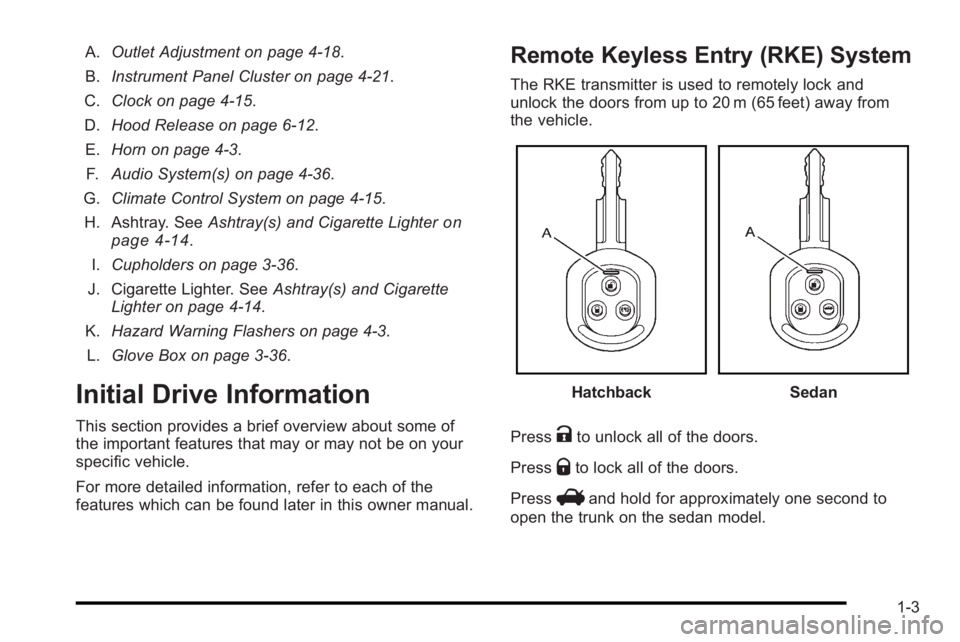
A.Outlet Adjustment on page 4‑18.
B. Instrument Panel Cluster on page 4‑21.
C. Clock on page 4‑15.
D. Hood Release on page 6‑12.
E. Horn on page 4‑3.
F. Audio System(s) on page 4‑36.
G. Climate Control System on page 4‑15.
H. Ashtray. See Ashtray(s) and Cigarette Lighter
on
page 4‑14.
I. Cupholders on page 3‑36.
J. Cigarette Lighter. See Ashtray(s) and Cigarette
Lighter on page 4‑14.
K. Hazard Warning Flashers on page 4‑3.
L. Glove Box on page 3‑36.
Initial Drive Information
This section provides a brief overview about some of
the important features that may or may not be on your
specific vehicle.
For more detailed information, refer to each of the
features which can be found later in this owner manual.
Remote Keyless Entry (RKE) System
The RKE transmitter is used to remotely lock and
unlock the doors from up to 20 m (65 feet) away from
the vehicle.
HatchbackSedan
Press
Kto unlock all of the doors.
Press
Qto lock all of the doors.
Press
Vand hold for approximately one second to
open the trunk on the sedan model.
1-3
Page 10 of 368
Press3to sound the panic alarm on the hatchback
model. Press any of the buttons on the transmitter to
turn off the alarm.
The LED light (A) on the transmitter flashes when the
buttons on the transmitter are pressed. If the light does
not flash the transmitter battery needs to be replaced.
See Keys
on page 3‑2andRemote Keyless Entry
(RKE) System Operation on page 3‑4.
Door Locks
From the outside, lock or unlock the door using the key
or the Remote Keyless Entry (RKE) transmitter.
From the inside, all of the doors can be locked and
unlocked by pushing or pulling the manual door lock on
each door.
On vehicles equipped with the central door unlocking
system, lock or unlock all the doors from the inside
using the driver door lock switch.
For more information see:
.Door Locks on page 3‑6.
.Central Door Unlocking System on page 3‑7.
Liftgate
To unlock the liftgate on the hatchback model from
outside the vehicle, use the key in the lock cylinder or
use the RKE transmitter, if equipped.
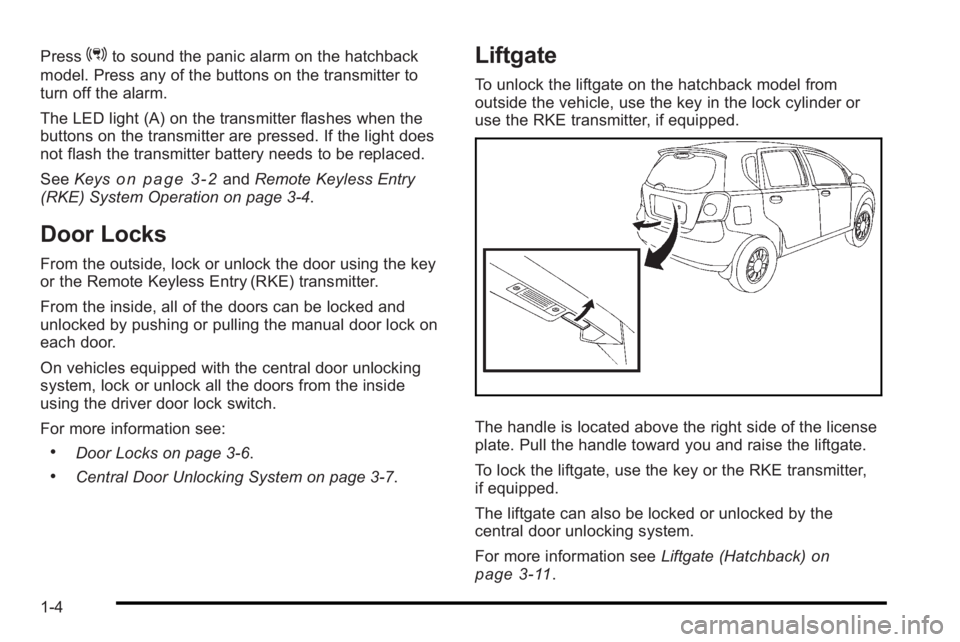
The handle is located above the right side of the license
plate. Pull the handle toward you and raise the liftgate.
To lock the liftgate, use the key or the RKE transmitter,
if equipped.
The liftgate can also be locked or unlocked by the
central door unlocking system.
For more information see Liftgate (Hatchback)
on
page 3‑11.
1-4
Page 17 of 368

Interior Mirror
Hold the mirror in the center to move it up or down and
side to side. Adjust the mirror to avoid glare from the
headlamps behind you. Push the tab forward for
daytime use and pull it for nighttime use.
SeeManual Rearview Mirror on page 3‑34.
Steering Wheel Adjustment
The tilt wheel lever is
located under the steering
column, slightly to the left.
To adjust the steering wheel: 1. Pull the lever down.
2. Move the steering wheel up or down into a comfortable position.
3. Pull the lever up to lock the wheel in place.
See Tilt Wheel on page 4‑3.
Interior Lighting
Dome Lamp
The vehicle has a dome lamp located in the overhead
console.
Move the switch to the following positions:
ON : The light comes on and stays on.
O :The light comes on when a door is opened.
The light turns off when all the doors are closed.
OFF : The light remains off even when a door is
opened.
Be sure all doors and trunk lid or hatch are completely
closed or the battery may drain.
For more information about interior lighting, see:
.Dome Lamp on page 4‑13.
1-11
Page 18 of 368

Exterior Lighting
Uplevel shown, Base similar
The lever on the left side of the steering column
operates the exterior lamps.
3 :Turns on the headlamps and other exterior lamps.
The headlamps automatically turn off when the ignition
key is turned to LOCK/OFF or ACC/ACCESSORY.
; :Turns on the parking lamps, together with the
taillamps, license plate lamp, and instrument panel
lights.
OFF : Turns all the lamps off, except the Daytime
Running Lamps (DRL). For more information, see:
.Exterior Lamps on page 4‑11.
.Daytime Running Lamps (DRL) on page 4‑11.
.Fog Lamps on page 4‑12.
Windshield Wiper/Washer
Sedan shown
1-12
Page 22 of 368
Five-Speed Manual Transmission
Up‐Shift Light
Vehicles equipped with a
manual transmission may
have an up-shift light.
This light indicates when
to shift to the next higher
gear for better fuel
economy.
For the best fuel economy, accelerate slowly and shift
when the light comes on, if weather, road, and traffic
conditions allow.
It is normal for the light to go on and off if the
accelerator position changes quickly. Ignore the
light during downshifts.
Reverse Lockout
The manual transmission is equipped with a lock
ring to prevent shifting into R (Reverse). To shift into
R (Reverse), press down the clutch pedal, lift up the ring
on the shift lever and shift into R (Reverse). Let up on
the clutch pedal slowly while pressing the accelerator
pedal.
See Manual Transmission Operation on page 3‑26.
Vehicle Features
Radio(s)
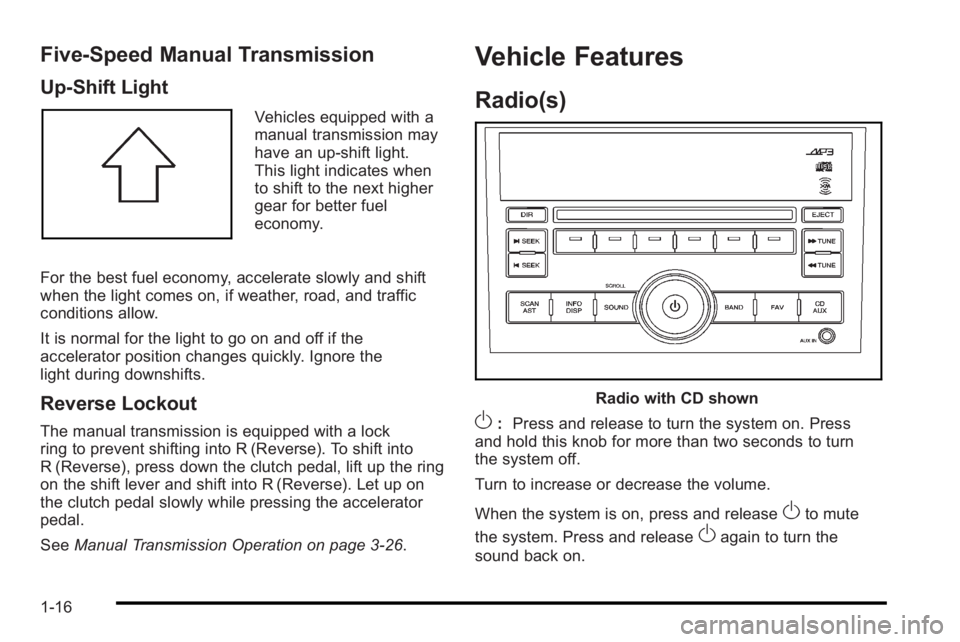
Radio with CD shown
O:Press and release to turn the system on. Press
and hold this knob for more than two seconds to turn
the system off.
Turn to increase or decrease the volume.
When the system is on, press and release
Oto mute
the system. Press and release
Oagain to turn the
sound back on.
1-16
Page 26 of 368
To fully open the sunroof, press and hold the passenger
side switch. The sunshade will open with the sunroof.
To close, press the driver side switch. Manually close
the sunshade.
For more information seeSunroof on page 3‑37.
Performance and Maintenance
Tire Pressure Monitor
This vehicle may have a Tire Pressure Monitor
System (TPMS).
The Tire Pressure Monitor
alerts you when a
significant reduction in
pressure occurs in one or
more of the vehicle’s tires
by illuminating the low tire
pressure warning light on
the instrument cluster.
The warning light will remain on until the tire pressure is
corrected. The proper tire pressures for your vehicle are
listed on the Tire and Loading Information label located
on the driver side center pillar (B pillar). See Loading
the Vehicle
on page 5‑14. You may notice during cooler conditions that the low tire
pressure warning light will appear when the vehicle is
first started and then turn off as you drive. This may be
an early indicator that your tire pressures are getting
low and the tires need to be inflated to the proper
pressure.
Note:
The Tire Pressure Monitor can alert you about
low tire pressure, but it does not replace normal monthly
tire maintenance. It is the driver ’s responsibility to
maintain correct tire pressures.
See Tire Pressure Monitor System
on page 6‑58and
Tire Pressure Monitor Operation on page 6‑59.
Engine Oil Life System
The engine oil life system calculates engine oil life
based on vehicle use and displays a change engine
oil light when it is necessary to change the engine oil
and filter.
Resetting the Oil Life System
1. Turn the ignition to ON/RUN, with the engine off.
2. Fully press and release the accelerator pedal three times within five seconds.
3. Turn the key to LOCK/OFF.
See Engine Oil Life System on page 6‑18.
1-20
Page 30 of 368
![PONTIAC G3 2010 Owners Manual The OnStar system can record and transmit vehicle
information. This information is automatically sent to an
OnStar call center when
Qis pressed,]is pressed,
or if the airbags or ACR system deploy. Thi](/img/50/40815/w960_40815-29.png "PONTIAC G3 2010 Owners Manual The OnStar system can record and transmit vehicle
information. This information is automatically sent to an
OnStar call center when
Qis pressed,]is pressed,
or if the airbags or ACR system deploy. Thi")
The OnStar system can record and transmit vehicle
information. This information is automatically sent to an
OnStar call center when
Qis pressed,]is pressed,
or if the airbags or ACR system deploy. This information
usually includes the vehicle's GPS location and, in the
event of a crash, additional information regarding the
crash that the vehicle was involved in (e.g. the direction
from which the vehicle was hit). When the virtual
advisor feature of OnStar hands-free calling is used, the
vehicle also sends OnStar the vehicle's GPS location
so they can provide services where it is located.
Location information about the vehicle is only available
if the GPS satellite signals are unobstructed and
available.
The vehicle must have a working electrical system,
including adequate battery power, for the OnStar
equipment to operate. There are other problems OnStar
cannot control that may prevent OnStar from providing
OnStar service at any particular time or place. Some
examples are damage to important parts of the vehicle
in a crash, hills, tall buildings, tunnels, weather or
wireless phone network congestion.
Your Responsibility
Increase the volume of the radio if the OnStar advisor
cannot be heard.
If the light next to the OnStar buttons is red, the system
may not be functioning properly. Press
Qand request a
vehicle diagnostic. If the light appears clear (no light is
appearing), your OnStar subscription has expired and
all services have been deactivated. Press
Qto confirm
that the OnStar equipment is active.
1-24