phone PONTIAC G3 2010 Owners Manual
[x] Cancel search | Manufacturer: PONTIAC, Model Year: 2010, Model line: G3, Model: PONTIAC G3 2010Pages: 368, PDF Size: 3.94 MB
Page 25 of 368
Cruise Control
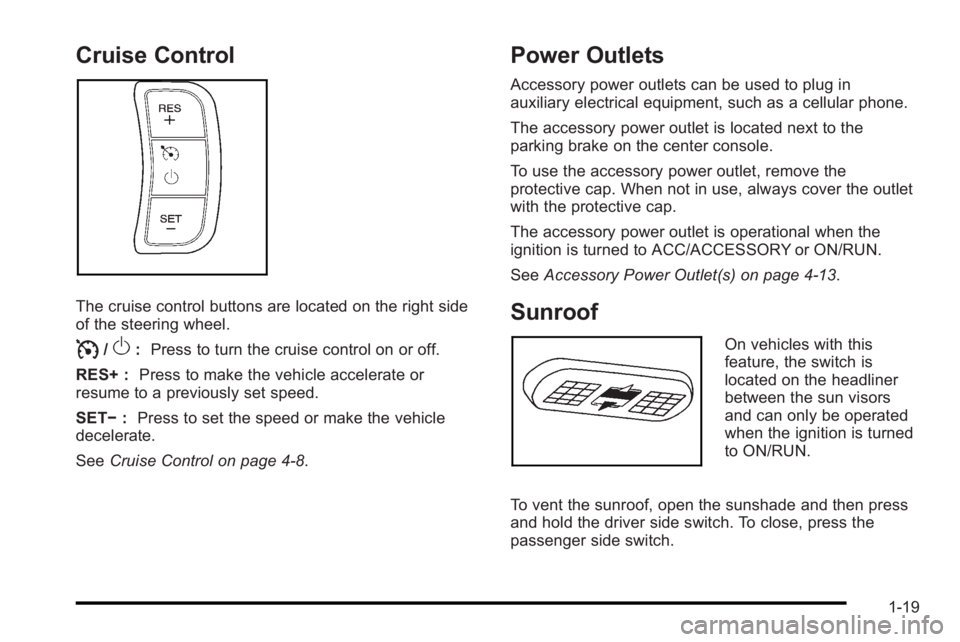
The cruise control buttons are located on the right side
of the steering wheel.
I/O:Press to turn the cruise control on or off.
RES+ : Press to make the vehicle accelerate or
resume to a previously set speed.
SET− :Press to set the speed or make the vehicle
decelerate.
See Cruise Control on page 4‑8.
Power Outlets
Accessory power outlets can be used to plug in
auxiliary electrical equipment, such as a cellular phone.
The accessory power outlet is located next to the
parking brake on the center console.
To use the accessory power outlet, remove the
protective cap. When not in use, always cover the outlet
with the protective cap.
The accessory power outlet is operational when the
ignition is turned to ACC/ACCESSORY or ON/RUN.
SeeAccessory Power Outlet(s) on page 4‑13.
Sunroof
On vehicles with this
feature, the switch is
located on the headliner
between the sun visors
and can only be operated
when the ignition is turned
to ON/RUN.
To vent the sunroof, open the sunshade and then press
and hold the driver side switch. To close, press the
passenger side switch.
1-19
Page 30 of 368
![PONTIAC G3 2010 Owners Manual The OnStar system can record and transmit vehicle
information. This information is automatically sent to an
OnStar call center when
Qis pressed,]is pressed,
or if the airbags or ACR system deploy. Thi](/img/50/40815/w960_40815-29.png "PONTIAC G3 2010 Owners Manual The OnStar system can record and transmit vehicle
information. This information is automatically sent to an
OnStar call center when
Qis pressed,]is pressed,
or if the airbags or ACR system deploy. Thi")
The OnStar system can record and transmit vehicle
information. This information is automatically sent to an
OnStar call center when
Qis pressed,]is pressed,
or if the airbags or ACR system deploy. This information
usually includes the vehicle's GPS location and, in the
event of a crash, additional information regarding the
crash that the vehicle was involved in (e.g. the direction
from which the vehicle was hit). When the virtual
advisor feature of OnStar hands-free calling is used, the
vehicle also sends OnStar the vehicle's GPS location
so they can provide services where it is located.
Location information about the vehicle is only available
if the GPS satellite signals are unobstructed and
available.
The vehicle must have a working electrical system,
including adequate battery power, for the OnStar
equipment to operate. There are other problems OnStar
cannot control that may prevent OnStar from providing
OnStar service at any particular time or place. Some
examples are damage to important parts of the vehicle
in a crash, hills, tall buildings, tunnels, weather or
wireless phone network congestion.
Your Responsibility
Increase the volume of the radio if the OnStar advisor
cannot be heard.
If the light next to the OnStar buttons is red, the system
may not be functioning properly. Press
Qand request a
vehicle diagnostic. If the light appears clear (no light is
appearing), your OnStar subscription has expired and
all services have been deactivated. Press
Qto confirm
that the OnStar equipment is active.
1-24
Page 101 of 368
Adding Equipment to Your
Airbag-Equipped Vehicle
Q: Is there anything I might add to or change aboutthe vehicle that could keep the airbags from
working properly?
A: Yes. If you add things that change your vehicle's
frame, bumper system, height, front end or side
sheet metal, they may keep the airbag system from
working properly. Changing or moving any parts of
the front seats, safety belts, the airbag sensing and
diagnostic module, steering wheel, instrument panel,
front sensors, or airbag wiring can affect the
operation of the airbag system.
In addition, the vehicle has a passenger sensing
system for the right front passenger position, which
includes sensors that are part of the passenger seat.
The passenger sensing system may not operate
properly if the original seat trim is replaced with
non-GM covers, upholstery or trim, or with GM
covers, upholstery or trim designed for a different
vehicle. Any object, such as an aftermarket seat
heater or a comfort enhancing pad or device,
installed under or on top of the seat fabric, could
also interfere with the operation of the passenger sensing system. This could either prevent proper
deployment of the passenger airbag(s) or prevent
the passenger sensing system from properly turning
off the passenger airbag(s). See
Passenger Sensing
System on page 2‑65.
If you have any questions about this, you should
contact Customer Assistance before you modify
your vehicle. The phone numbers and addresses
for Customer Assistance are in Step Two of the
Customer Satisfaction Procedure in this manual.
See Customer Satisfaction Procedure on page 8‑2.
Q: Because I have a disability, I have to get my vehicle modified. How can I find out whether this
will affect my airbag system?
A: If you have questions, call Customer Assistance.
The phone numbers and addresses for Customer
Assistance are in Step Two of the Customer
Satisfaction Procedure in this manual. See
Customer Satisfaction Procedure on page 8‑2.
In addition, your dealer/retailer and the service manual
have information about the location of the airbag
sensors, sensing and diagnostic module and airbag
wiring.
2-71
Page 155 of 368
Dome Lamp
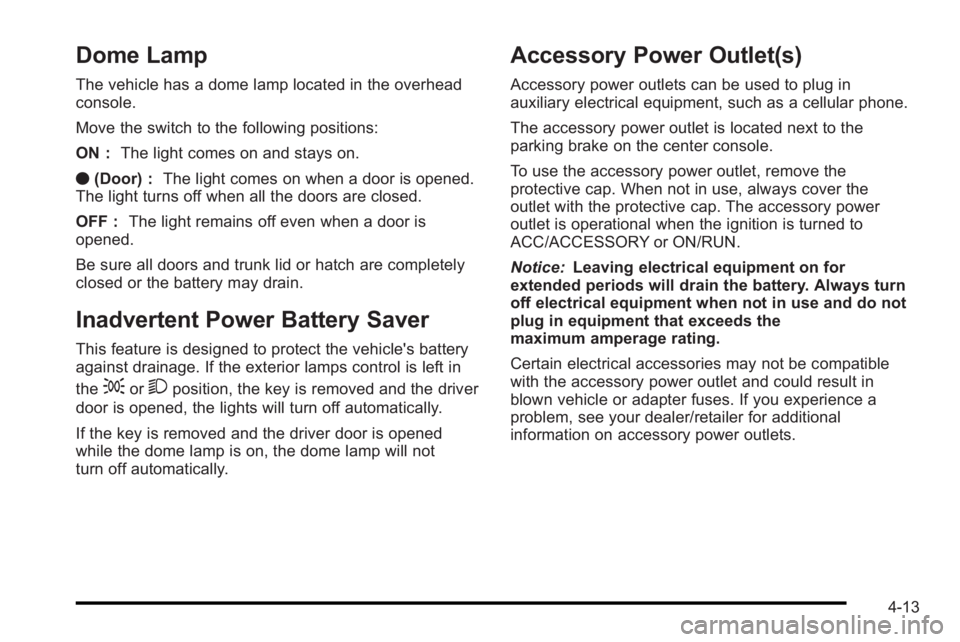
The vehicle has a dome lamp located in the overhead
console.
Move the switch to the following positions:
ON :The light comes on and stays on.
O (Door) : The light comes on when a door is opened.
The light turns off when all the doors are closed.
OFF : The light remains off even when a door is
opened.
Be sure all doors and trunk lid or hatch are completely
closed or the battery may drain.
Inadvertent Power Battery Saver
This feature is designed to protect the vehicle's battery
against drainage. If the exterior lamps control is left in
the
;or2position, the key is removed and the driver
door is opened, the lights will turn off automatically.
If the key is removed and the driver door is opened
while the dome lamp is on, the dome lamp will not
turn off automatically.
Accessory Power Outlet(s)
Accessory power outlets can be used to plug in
auxiliary electrical equipment, such as a cellular phone.
The accessory power outlet is located next to the
parking brake on the center console.
To use the accessory power outlet, remove the
protective cap. When not in use, always cover the
outlet with the protective cap. The accessory power
outlet is operational when the ignition is turned to
ACC/ACCESSORY or ON/RUN.
Notice: Leaving electrical equipment on for
extended periods will drain the battery. Always turn
off electrical equipment when not in use and do not
plug in equipment that exceeds the
maximum amperage rating.
Certain electrical accessories may not be compatible
with the accessory power outlet and could result in
blown vehicle or adapter fuses. If you experience a
problem, see your dealer/retailer for additional
information on accessory power outlets.
4-13
Page 178 of 368
Audio System(s)
Determine which radio the vehicle has and read the
following pages to become familiar with its features.
{WARNING:
Taking your eyes off the road for extended periods
could cause a crash resulting in injury or death to
you or others. Do not give extended attention to
entertainment tasks while driving.
This system provides access to many audio and non
audio listings. To minimize taking your eyes off the road while driving,
do the following while the vehicle is parked:
.Become familiar with the operation and controls of
the audio system.
.Set up the tone, speaker adjustments, and preset
radio stations.
For more information, see Defensive Driving
on
page 5‑2.
Notice: Contact your dealer/retailer before adding
any equipment.
Adding audio or communication equipment could
interfere with the operation of the vehicle's engine,
radio, or other systems, and could damage them.
Follow federal rules covering mobile radio and
telephone equipment.
4-36
Page 182 of 368
Adjusting the Fade
To adjust the fade:1. Press SOUND.
2. Press the pushbutton below the Fad tab on the display.
3. Turn
Oto adjust the setting.
4. The settings are saved after five seconds.
Setting the EQ
SOUND (Equalization) : Press to select an
equalization setting.
Setting the EQ
To set the EQ:
1. Press SOUND.
2. Press the pushbutton below the P.EQ tab on the display. The Pop, Rock, Ctry, Voice, Jazz, Clas
tabs appear on the display.
3. Press the pushbutton below the desired selection to set the EQ. Pressing the same pushbutton again
cancels the EQ setting.
XM Satellite Radio Service
XM is a satellite radio service that is based in the
48 contiguous United States and 10 Canadian
provinces. XM Satellite Radio has a wide variety
of programming and commercial-free music,
coast-to-coast, and in digital-quality sound. A service
fee is required to receive the XM service. For more
information, contact XM at www.xmradio.com or call
1-800-929-2100 in the U.S. and www.xmradio.ca or
call 1-877-438-9677 in Canada.
Radio Messages for XM Only
See XM Radio Messageson page 4‑51later in this
section for further detail.
Using the Auxiliary Input Jack
The radio system has a 3.5 mm (1/8 in) auxiliary input
jack located on the lower right side of the faceplate.
This is not an audio output; do not plug headphones
into the 3.5 mm (1/8 in) auxiliary input jack. An external
audio device such as an iPod
®, laptop computer,
MP3 player, CD changer, etc. can be connected to the
3.5 mm (1/8 in) auxiliary input jack for use as another
audio source.
4-40
Page 190 of 368

Using the Auxiliary Input Jack
The radio system has a 3.5 mm (1/8 in) auxiliary input
jack located on the lower right side of the faceplate.
This is not an audio output; do not plug the headphone
set into the front auxiliary input jack. An external audio
device such as an iPod, laptop computer, MP3 player,
CD changer, etc. can be connected to the 3.5 mm
(1/8 in) auxiliary input jack for use as another audio
source.
Drivers are encouraged to set up any auxiliary device
while the vehicle is in P (Park). SeeDefensive Driving
on page 5‑2for more information on driver distraction.
To use a portable audio player, connect a 3.5 mm
(1/8 in) cable to the radio's front auxiliary input jack.
When a device is connected, press the radio CD/AUX
button to begin playing audio from the device over the
vehicle speakers.
O(Power/Volume) : Turn to adjust the volume.
Additional volume adjustments may have to be made
from the portable device if the volume is too quiet or
too loud.
CD/AUX (Auxiliary) : Press to play a CD while a
portable audio device is playing. Press CD/AUX a
second time for the system to begin playing audio from
the connected portable audio player. The portable audio
device continues playing until it is turned off.
Using an MP3
MP3/WMA CD-R Disc
MP3 Format
If you burn your own MP3/WMA disc on a personal
computer:
.Make sure the MP3/WMA files are recorded on a
CD-R disc.
.Do not mix standard audio and MP3/WMA files on
one disc.
.Make sure each MP3/WMA file has a .m3u or
.wma extension, other file extensions might
not work.
.Files can be recorded with a variety of fixed or
variable bit rates. Song title, artist name, and
album are available for display by the radio when
recorded using ID3 tags version 1 and 2.
.Make sure to finalize the disc when burning an
MP3/WMA disc, using multiple sessions. It is
usually better to burn the disc all at once.
The player is able to read and play a maximum of
50 folders, five sessions, and 999 files. Long file names
and folder names can use more disc memory space
than necessary. To conserve space on the disc,
minimize the length of the file and folder names.
4-48
Page 194 of 368

MODE :Press and release this button multiple times
to cycle through the audio playback options that are
available on the vehicle. Options may include FM, AM,
XM, CD, and AUX.
SEEK : Press and release to go to the next preset
station.
Press and hold for a long time to go to the next AM, FM,
or XM station. The radio seeks stations only with a
strong signal that are in the selected band.
When playing a CD, press and release to go to the next
track. Press and hold to fast forward through the tracks.
Radio Reception
Frequency interference and static can occur during
normal radio reception if items such as cell phone
chargers, vehicle convenience accessories, and
external electronic devices are plugged into the
accessory power outlet. If there is interference or static,
unplug the item from the accessory power outlet.
AM
The range for most AM stations is greater than for FM,
especially at night. The longer range can cause station
frequencies to interfere with each other. For better radio
reception, most AM radio stations boost the power
levels during the day, and then reduce these levels
during the night. Static can also occur when things like
storms and power lines interfere with radio reception.
When this happens, try reducing the treble on the radio.
FM Stereo
FM signals only reach about 10 to 40 miles
(16 to 65 km). Although the radio has a built-in electronic
circuit that automatically works to reduce interference,
some static can occur, especially around tall buildings
or hills, causing the sound to fade in and out.
XM™ Satellite Radio Service
XM Satellite Radio Service gives digital radio reception
from coast-to-coast in the 48 contiguous United States,
and in Canada. Just as with FM, tall buildings or hills
can interfere with satellite radio signals, causing the
sound to fade in and out. In addition, traveling or
standing under heavy foliage, bridges, garages,
or tunnels may cause loss of the XM signal for a period
of time.
4-52
Page 195 of 368
Cellular Phone Usage
Cellular phone usage may cause interference with the
vehicle's radio. This interference may occur when
making or receiving phone calls, charging the
phone's battery, or simply having the phone on.
This interference causes an increased level of static
while listening to the radio. If static is received while
listening to the radio, unplug the cellular phone and
turn it off.
Fixed Mast Antenna (Hatchback)
Vehicles without OnStar®have a fixed mast antenna
that can withstand most car washes without being
damaged. If the mast should ever become slightly bent,
straighten it out by hand. If the mast is badly bent,
replace it.
Check occasionally to make sure the mast is still
tightened to the antenna base located on the roof of the
vehicle. If tightening is required, tighten by hand.
Backglass Antenna (Sedan)
Vehicles without OnStar®have the AM-FM antenna
integrated with the rear window defogger, located in the
rear window. Make sure that the inside surface of the
rear window is not scratched and that the lines on
the glass are not damaged. If the inside surface is
damaged, it could interfere with radio reception. Also,
for proper radio reception, the antenna connector at the
top-center of the rear window needs to be properly
attached to the post on the glass.
Notice: Using a razor blade or sharp object to clear
the inside rear window can damage the rear window
antenna and/or the rear window defogger. Repairs
would not be covered by the vehicle warranty. Do
not clear the inside rear window with sharp objects.
Notice: Do not apply aftermarket glass tinting with
metallic film. The metallic film in some tinting
materials will interfere with or distort the incoming
radio reception. Any damage caused to your
backglass antenna due to metallic tinting materials
will not be covered by the vehicle warranty.
Because this antenna is built into the rear window, there
is a reduced risk of damage caused by car washes and
vandals.
4-53
Page 196 of 368
If static is heard on the radio, when the rear window
defogger is turned on, it could mean that a defogger
grid line has been damaged. If this is true, the grid line
must be repaired.
If adding a cellular telephone to the vehicle, and the
antenna needs to be attached to the glass, make sure
that the grid lines for the AM-FM antenna are not
damaged. There is enough space between the grid
lines to attach a cellular telephone antenna without
interfering with radio reception.Multi-Band Antenna
Vehicles with OnStar®have a multi-band antenna that is
located on the roof of the vehicle. The antenna is used
for the AM/FM radio, OnStar
®and the XM™ Satellite
Radio Service System. Keep the antenna clear of
obstructions for clear reception. If the vehicle has a
sunroof, the performance of the AM/FM radio, OnStar
®,
and the XM system may be affected if the sunroof
is open.
4-54