fuel PONTIAC G5 2007 User Guide
[x] Cancel search | Manufacturer: PONTIAC, Model Year: 2007, Model line: G5, Model: PONTIAC G5 2007Pages: 428, PDF Size: 2.46 MB
Page 175 of 428

Information Modes
q
(Information):Press this button to scroll
through the following vehicle information modes:
Outside Air Temperature and Odometer
Press the information button until the outside air
temperature and the odometer are displayed. This
mode shows the temperature outside of the vehicle
in either degrees Fahrenheit (°F) or degrees
Celsius (°C) and the total distance the vehicle has
been driven in either miles (mi) or kilometers (km).
The outside air temperature will appear on the left
side of the DIC display and the odometer will
appear on the right side of the display.
To change the DIC display to English or metric
units, see “UNITS” underDIC Vehicle
Personalization on page 179.
TRIP A or TRIP B
Press the information button until TRIP A or TRIP B
is displayed. These modes show the current
distance traveled since the last reset for each trip
odometer in either miles (mi) or kilometers (km).
Both odometers can be used at the same time.
Each trip odometer can be reset to zero separately
by pressing and holding the reset button for a
few seconds while the desired trip odometer
is displayed.
FUEL RANGE
Press the information button until FUEL RANGE is
displayed. This mode shows the remaining distance
you can drive without refueling in either miles (mi)
or kilometers (km). It is based on fuel economy and
the fuel remaining in the tank.
When the fuel level is low, FUEL RANGE LOW
will display.
The fuel economy data used to determine fuel
range is an average of recent driving conditions.
As your driving conditions change, this data is
gradually updated. The FUEL RANGE mode
cannot be reset.
175
Page 176 of 428

ECON (Economy)
Press the information button until ECON is
displayed. This mode shows how many miles per
gallon (mpg) or liters per 100 kilometers (L/100 km)
your vehicle is getting based on current and past
driving conditions.
Press and hold the reset button while ECON is
displayed to reset the average fuel economy.
Average fuel economy will then be calculated
starting from that point. If the average fuel economy
is not reset, it will be continually updated each time
you drive.
AV (Average) SPEED
Press the information button until AV SPEED is
displayed. This mode shows the vehicle’s average
speed in miles per hour (mph) or kilometers per
hour (km/h).
Press and hold the reset button while AV SPEED
is displayed to reset the average vehicle speed.
OIL LIFE
Press the information button until OIL LIFE is
displayed. The engine oil life system shows an
estimate of the oil’s remaining useful life. It will
show 100% when the system is reset after an oil
change. It will alert you to change your oil on a
schedule consistent with your driving conditions.
In addition to the engine oil life system monitoring
the oil life, additional maintenance is recommended
in the Maintenance Schedule in this manual.
SeeEngine Oil on page 279andScheduled
Maintenance on page 375.
Always reset the engine oil life system after an oil
change. See “How to Reset the Engine Oil Life
System” underEngine Oil Life System on
page 282.
COOLANT
Press the information button until COOLANT is
displayed. This mode shows the temperature of the
engine coolant in either degrees Fahrenheit (°F) or
degrees Celsius (°C).
176
Page 177 of 428

DIC Warnings and Messages
These messages appear if there is a problem
detected in one of your vehicle’s systems.
A message will clear when the vehicle’s condition
is no longer present. To acknowledge a message
and clear it from the display, press and hold
any of the DIC buttons. If the condition is still
present, the warning message will come back on
the next time the vehicle is turned off and back
on. With most messages, a warning chime sounds
when the message displays. Your vehicle may
have other warning messages.
AUTO (Automatic) LIGHTS OFF
This message displays if the automatic headlamp
system is disabled with the headlamp switch.
AUTO (Automatic) LIGHTS ON
This message displays if the automatic headlamp
system is enabled with the headlamp switch.
BRAKE FLUID
This message displays to inform the driver that the
brake uid level is low while the ignition is on.
The brake system warning light on the instrument
panel cluster also comes on. SeeBrake System
Warning Light on page 165for more information.
Have the brake system serviced by your dealer
as soon as possible.
CHANGE OIL SOON
This message displays when the life of the engine
oil has expired and it should be changed.
When you acknowledge the CHANGE OIL SOON
message by clearing it from the display, you still
must reset the engine oil life system separately.
SeeEngine Oil Life System on page 282and
Scheduled Maintenance on page 375for more
information.
CHECK GAS CAP
This message displays if the fuel cap has not been
fully tightened. Recheck the fuel cap to make sure
that it is on properly. A few driving trips with the cap
properly installed should turn the message off.
177
Page 179 of 428
LOW FUEL
This message displays when your vehicle is low
on fuel. Rell the fuel tank as soon as possible.
SeeFuel Gage on page 173,Fuel on page 270,
andFilling the Tank on page 274for more
information.
LOW TRACTION
This message displays when the Enhanced
Traction System (ETS) is actively limiting wheel
spin. Slippery road conditions may exist if this
message displays, so adjust your driving
accordingly. SeeEnhanced Traction System (ETS)
on page 226for more information.
PARKING BRAKE
This message displays if the parking brake is left
engaged. SeeParking Brake on page 118for
more information.
POWER STEERING
This message displays if a problem has been
detected with the electric power steering. Have
your vehicle serviced by your dealer immediately.
SERVICE AIR BAG
This message displays when there is a problem
with the airbag system. Have your vehicle serviced
by your dealer immediately.
TRUNK AJAR
This message displays when the trunk lid is not
closed completely. Make sure that the trunk
lid is closed completely. SeeTrunk on page 98.
DIC Vehicle Personalization
Your vehicle has personalization capabilities that
allow you to program certain features to a preferred
setting. All of the features listed may not be
available on your vehicle. Only the features
available will be displayed on the DIC.
The default settings for the features were set
when your vehicle left the factory, but may have
been changed from their default state since
that time.
179
Page 180 of 428

To change feature settings, use the following
procedure:
Entering Personalization Menu
1. Turn the ignition on while the vehicle is
stopped.
To avoid excessive drain on the battery, it is
recommended that the headlamps are
turned off.
2. Press and hold the information and
reset buttons at the same time for
one second, then release to enter the
personalization menu.
If the vehicle speed is greater than 2 mph
(3 km/h), only the UNITS menu will be
accessible.
3. Press the information button to scroll through
the available personalization menu modes.
Press the reset button to scroll through
the available settings for each mode.
If you do not make a selection within
ten seconds, the display will go back to the
previous information displayed.
Personalization Menu Modes
OIL LIFE RESET
When this feature is displayed, you can reset the
engine oil life system. To reset the system, see
Engine Oil Life System on page 282. See “OIL
LIFE” underDIC Operation and Displays on
page 174for more information.
UNITS
This feature allows you to select the units of
measurement in which the DIC will display the
vehicle information. When UNITS appears on the
display, press and hold the reset button for at
least one second to scroll through the available
settings:
ENGLISH (default in United States):All
information will be displayed in English units.
For example, distance will be shown in miles (mi)
and fuel economy in miles per gallon (mpg).
METRIC (default in Canada):All information will
be displayed in metric units. For example, distance
will be shown in kilometers (km) and fuel economy
in liters per 100 kilometers (L/100 km).
180
Page 240 of 428

Once you are moving on the freeway, make
certain you allow a reasonable following distance.
Expect to move slightly slower at night.
When you want to leave the freeway, move to the
proper lane well in advance. If you miss your
exit, do not, under any circumstances, stop and
back up. Drive on to the next exit.
The exit ramp can be curved, sometimes quite
sharply. The exit speed is usually posted. Reduce
your speed according to your speedometer, not
to your sense of motion. After driving for any
distance at higher speeds, you may tend to think
you are going slower than you actually are.
Before Leaving on a Long Trip
Make sure you are ready. Try to be well rested.
If you must start when you are not fresh — such as
after a day’s work — do not plan to make too
many miles that rst part of the journey. Wear
comfortable clothing and shoes you can easily
drive in.
Is your vehicle ready for a long trip? If you keep it
serviced and maintained, it is ready to go. If it
needs service, have it done before starting out.Of course, you will nd experienced and able
service experts in GM dealerships all across
North America. They will be ready and willing to
help if you need it.
Here are some things you can check before a trip:
Windshield Washer Fluid:Is the reservoir
full? Are all windows clean inside and outside?
Wiper Blades:Are they in good shape?
Fuel, Engine Oil, Other Fluids:Have you
checked all levels?
Lamps:Are they all working? Are the lenses
clean?
Tires:They are vitally important to a safe,
trouble-free trip. Is the tread good enough
for long-distance driving? Are the tires
all inated to the recommended pressure?
Weather Forecasts:What is the weather
outlook along your route? Should you
delay your trip a short time to avoid a major
storm system?
Maps:Do you have up-to-date maps?
240
Page 247 of 428

{CAUTION:
Snow can trap exhaust gases under your
vehicle. This can cause deadly CO
(carbon monoxide) gas to get inside.
CO could overcome you and kill you.
You cannot see it or smell it, so you might
not know it is in your vehicle. Clear away
snow from around the base of your
vehicle, especially any that is blocking
your exhaust pipe. And check around
again from time to time to be sure snow
does not collect there.
Open a window just a little on the side of
the vehicle that is away from the wind.
This will help keep CO out.Run the engine only as long as you must. This
saves fuel. When you run the engine, make it go a
little faster than just idle. That is, push the
accelerator slightly. This uses less fuel for the
heat that you get and it keeps the battery charged.
You will need a well-charged battery to restart
the vehicle, and possibly for signaling later on with
the headlamps. Let the heater run for a while.
Then, shut the engine off and close the window
almost all the way to preserve the heat. Start
the engine again and repeat this only when you
feel really uncomfortable from the cold. But do it as
little as possible. Preserve the fuel as long as
you can. To help keep warm, you can get out of
the vehicle and do some fairly vigorous exercises
every half hour or so until help comes.
247
Page 252 of 428
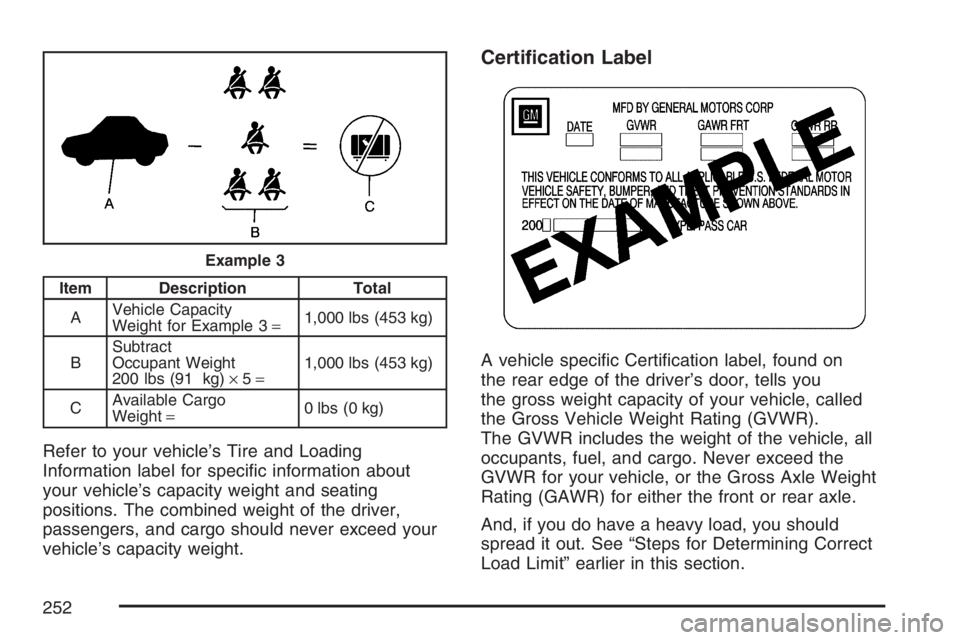
Item Description Total
AVehicle Capacity
Weight for Example 3=1,000 lbs (453 kg)
BSubtract
Occupant Weight
200 lbs (91 kg)×5=1,000 lbs (453 kg)
CAvailable Cargo
Weight=0 lbs (0 kg)
Refer to your vehicle’s Tire and Loading
Information label for specic information about
your vehicle’s capacity weight and seating
positions. The combined weight of the driver,
passengers, and cargo should never exceed your
vehicle’s capacity weight.
Certication Label
A vehicle specic Certication label, found on
the rear edge of the driver’s door, tells you
the gross weight capacity of your vehicle, called
the Gross Vehicle Weight Rating (GVWR).
The GVWR includes the weight of the vehicle, all
occupants, fuel, and cargo. Never exceed the
GVWR for your vehicle, or the Gross Axle Weight
Rating (GAWR) for either the front or rear axle.
And, if you do have a heavy load, you should
spread it out. See “Steps for Determining Correct
Load Limit” earlier in this section.
Example 3
252
Page 257 of 428

Towing a Trailer
(Automatic Transaxle)
{CAUTION:
If you do not use the correct equipment
and drive properly, you can lose control
when you pull a trailer. For example, if the
trailer is too heavy, the brakes may not
work well — or even at all. You and your
passengers could be seriously injured.
You may also damage your vehicle; the
resulting repairs would not be covered by
your warranty. Pull a trailer only if you have
followed all the steps in this section. Ask
your dealer for advice and information
about towing a trailer with your vehicle.Your vehicle can tow a trailer if it is equipped with
an automatic transaxle and the proper trailer towing
equipment. If your vehicle is not equipped as stated
previously, do not tow a trailer. To identify the
trailering capacity of your vehicle, you should read
the information in “Weight of the Trailer” that
appears later in this section. Trailering is different
than just driving your vehicle by itself. Trailering
means changes in handling, acceleration, braking,
durability and fuel economy. Successful, safe
trailering takes correct equipment, and it has to be
used properly.
That is the reason for this part. In it are many
time-tested, important trailering tips and safety
rules. Many of these are important for your safety
and that of your passengers. So please read
this section carefully before you pull a trailer.
Load-pulling components such as the engine,
transaxle, wheel assemblies and tires are forced
to work harder against the drag of the added
weight. The engine is required to operate
at relatively higher speeds and under greater
loads, generating extra heat. Also, the trailer adds
considerably to wind resistance, increasing the
pulling requirements.
257
Page 265 of 428
Service........................................................ 268
Accessories and Modications................... 268
California Proposition 65 Warning.............. 269
Doing Your Own Service Work.................. 269
Adding Equipment to the Outside of
Your Vehicle.......................................... 270
Fuel............................................................. 270
Gasoline Octane........................................ 270
Gasoline Specications.............................. 271
California Fuel........................................... 271
Additives................................................... 272
Fuels in Foreign Countries........................ 273
Filling the Tank......................................... 274
Filling a Portable Fuel Container............... 276
Checking Things Under the Hood.............. 276
Hood Release........................................... 277
Engine Compartment Overview.................. 278
Engine Oil................................................. 279
Engine Oil Life System.............................. 282
Engine Air Cleaner/Filter............................ 284
Automatic Transaxle Fluid......................... 286
Manual Transaxle Fluid............................. 286
Hydraulic Clutch........................................ 286Engine Coolant.......................................... 287
Coolant Surge Tank Pressure Cap............ 290
Engine Overheating................................... 290
Cooling System......................................... 292
Windshield Washer Fluid........................... 297
Brakes...................................................... 298
Battery...................................................... 303
Jump Starting............................................ 304
Headlamp Aiming........................................ 309
Bulb Replacement....................................... 312
Halogen Bulbs........................................... 312
Headlamps, Front Turn Signal,
Sidemarker, and Parking Lamps............. 313
Center High-Mounted Stoplamp
(CHMSL)................................................ 315
Taillamps and Turn Signal Lamps
(Coupe)................................................. 316
Taillamps, Turn Signal, Stoplamps and
Back-up Lamps (Sedan)......................... 316
Back-Up Lamps (Coupe)........................... 317
License Plate Lamp................................... 318
Replacement Bulbs................................... 318
Section 5 Service and Appearance Care
265