ignition PONTIAC G5 2009 Owners Manual
[x] Cancel search | Manufacturer: PONTIAC, Model Year: 2009, Model line: G5, Model: PONTIAC G5 2009Pages: 402, PDF Size: 2.22 MB
Page 68 of 402
If the passenger seat gets wet, dry the seat immediately.
If the airbag readiness light is lit, do not install a child
restraint or allow anyone to occupy the seat. SeeAirbag
Readiness Light on page 3-26for important safety
information.
The on indicator may be lit if an object, such as a
briefcase, handbag, grocery bag, laptop or other
electronic device, is put on an unoccupied seat.
If this is not desired, remove the object from the seat.
{CAUTION:
Stowing of articles under the passenger seat or
between the passenger seat cushion and seatback
may interfere with the proper operation of the
passenger sensing system.
Servicing Your Airbag-Equipped
Vehicle
Airbags affect how the vehicle should be serviced. There
are parts of the airbag system in several places around
the vehicle. Your dealer/retailer and the service manual
have information about servicing the vehicle and the
airbag system. To purchase a service manual, see
Service Publications Ordering Information on page 7-16.
{CAUTION:
For up to 10 seconds after the ignition is turned off
and the battery is disconnected, an airbag can still
inate during improper service. You can be injured
if you are close to an airbag when it inates. Avoid
yellow connectors. They are probably part of the
airbag system. Be sure to follow proper service
procedures, and make sure the person performing
work for you is qualied to do so.
1-64
Page 73 of 402
Keys...............................................................2-2
Remote Keyless Entry (RKE) System................2-3
Remote Keyless Entry (RKE) System
Operation...................................................2-3
Remote Vehicle Start......................................2-6
Doors and Locks.............................................2-8
Door Locks....................................................2-8
Power Door Locks..........................................2-9
Delayed Locking.............................................2-9
Automatic Door Lock.....................................2-10
Programmable Automatic Door Unlock.............2-10
Rear Door Security Locks (Sedan)..................2-10
Lockout Protection........................................2-11
Trunk..........................................................2-12
Windows........................................................2-14
Manual Windows..........................................2-15
Power Windows............................................2-15
Sun Visors...................................................2-16
Theft-Deterrent Systems..................................2-16
Content Theft-Deterrent.................................2-16
PASS-Key
®III+ Electronic Immobilizer.............2-18
PASS-Key®III+ Electronic Immobilizer
Operation.................................................2-19
Starting and Operating Your Vehicle................2-20
New Vehicle Break-In....................................2-20
Ignition Positions..........................................2-21Retained Accessory Power (RAP)...................2-23
Starting the Engine.......................................2-24
Engine Coolant Heater..................................2-25
Automatic Transmission Operation...................2-26
Manual Transmission Operation......................2-28
Parking Brake..............................................2-30
Shifting Into Park (Automatic Transmission)......2-31
Shifting Out of Park (Automatic Transmission) . . .2-33
Parking the Vehicle (Manual Transmission).......2-33
Parking Over Things That Burn.......................2-34
Engine Exhaust............................................2-34
Running the Vehicle While Parked..................2-35
Mirrors...........................................................2-36
Manual Rearview Mirror.................................2-36
Outside Remote Control Mirror.......................2-36
Outside Power Mirrors...................................2-36
Outside Convex Mirror...................................2-37
OnStar
®System.............................................2-37
Storage Areas................................................2-41
Glove Box...................................................2-41
Cupholders..................................................2-41
Center Console Storage.................................2-41
Driver Storage Compartment..........................2-41
Convenience Net..........................................2-41
Sunroof.........................................................2-42
Section 2 Features and Controls
2-1
Page 74 of 402
Keys
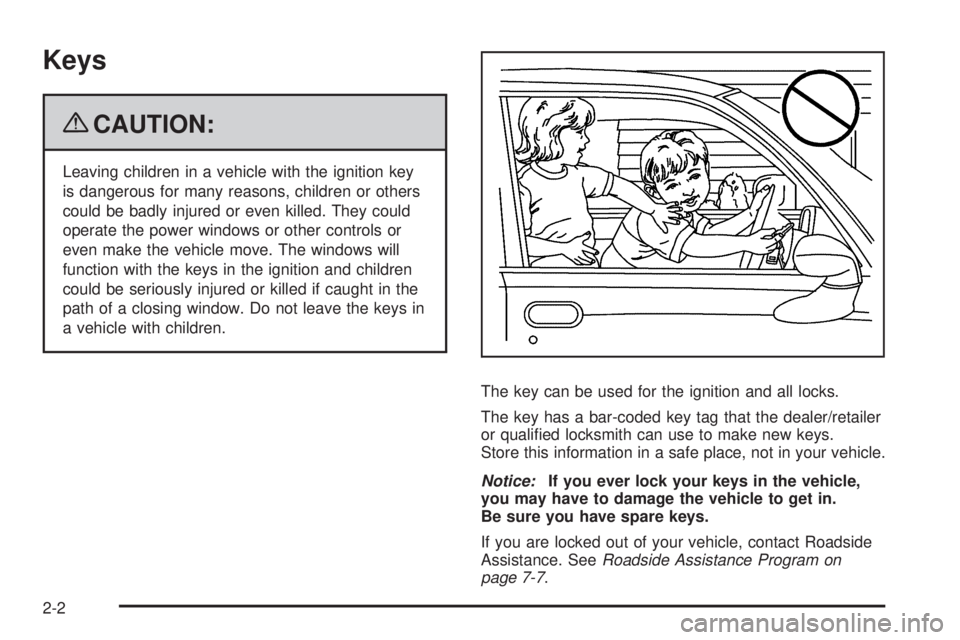
{CAUTION:
Leaving children in a vehicle with the ignition key
is dangerous for many reasons, children or others
could be badly injured or even killed. They could
operate the power windows or other controls or
even make the vehicle move. The windows will
function with the keys in the ignition and children
could be seriously injured or killed if caught in the
path of a closing window. Do not leave the keys in
a vehicle with children.
The key can be used for the ignition and all locks.
The key has a bar-coded key tag that the dealer/retailer
or qualied locksmith can use to make new keys.
Store this information in a safe place, not in your vehicle.
Notice:If you ever lock your keys in the vehicle,
you may have to damage the vehicle to get in.
Be sure you have spare keys.
If you are locked out of your vehicle, contact Roadside
Assistance. SeeRoadside Assistance Program on
page 7-7.
2-2
Page 76 of 402

/(Remote Vehicle Start):For vehicles with this
feature, press to operate the remote start feature.
SeeRemote Vehicle Start on page 2-6.
Q(Lock):Press to lock all the doors. The interior
lamps turn off after all of the doors are closed. If enabled
through the Driver Information Center (DIC), the remote
lock feedback can be programmed to have the horn
chirp and/or the turn signals ash to conrm locking.
See “LOCK HORN” and “LIGHT FLASH” underDIC
Vehicle Personalization on page 3-47.Pressing
Qmay also arm the content theft-deterrent
system. SeeContent Theft-Deterrent on page 2-16.
K(Unlock):Press to unlock the driver door. IfKis
pressed again within ve seconds, all remaining doors
unlock. The interior lamps turn on and stay on for
20 seconds or until the ignition is turned on. If enabled
through the DIC, the remote unlock feedback can be
programmed to have the horn chirp and/or the turn
signals ash to conrm unlocking. See “UNLOCK HORN”
and “LIGHT FLASH” underDIC Vehicle Personalization
on page 3-47.
The high-beam headlamps, parking lamps, and
back-up lamps may turn on when
Kis pressed.
See “EXT (Exterior) LIGHTS” underDIC Vehicle
Personalization on page 3-47.
Pressing
Kon the RKE transmitter disarms the content
theft-deterrent system. SeeContent Theft-Deterrent on
page 2-16.
V(Remote Trunk Release):Press and hold for
approximately one second to open the trunk. The trunk
will open using the transmitter when the vehicle
speed is less than 2 mph (3 km/h), when the ignition is
off, or when the vehicle shift lever is in P (Park). With Remote Start
Shown, Without Remote
Start Similar
2-4
Page 78 of 402

Remote Vehicle Start
Your vehicle may have a remote start feature.
This feature allows you to start the engine from outside
the vehicle. It may also start the vehicle’s heating or
air conditioning systems. When you start your vehicle
using the remote start feature, the climate control
system will come on and adjust the interior to the
temperature settings that you left it set to when
you turned the vehicle off.
Laws in some communities may restrict the use of
remote starters. For example, some laws may require
a person using remote start to have the vehicle in
view when doing so. Check local regulations for
any requirements on remote starting of vehicles.
Do not use the remote start feature if your vehicle is low
on fuel. Your vehicle may run out of fuel.
The remote start feature provides two separate starts
per ignition cycle, each with 10 minutes of engine
running time.
After your vehicle’s engine has been started two times
using the remote vehicle start button, the vehicle’s
ignition switch must be turned to ON/RUN and then
back to LOCK/OFF using the key before the remote start
procedure can be used again. SeeIgnition Positions on
page 2-21for information regarding the ignition positions
on your vehicle.If your vehicle has the remote start feature, the RKE
transmitter functions will have an increased range
of operation. However, the range may be less while
the vehicle is running.
There are other conditions which can affect the
performance of the transmitter, seeRemote Keyless
Entry (RKE) System on page 2-3for additional
information.
/(Remote Start):This button will be on the RKE
transmitter if you have remote start.
To start the vehicle using the remote start feature, do
the following:
1. Aim the transmitter at the vehicle.
2. Press and release the transmitter’s lock button,
then immediately press and hold the transmitter’s
remote start button until the vehicle’s turn signal
lamps ash.
When the vehicle starts, the parking lamps will turn
on and remain on while the engine is running.
3. If it is the rst remote start since the vehicle has
been driven, repeat these steps, while the engine
is running, to extend the time by 10 minutes for the
engine to continue to run.
After entering the vehicle after a remote start, insert and
turn the key to ON/RUN to drive the vehicle.
2-6
Page 79 of 402
The engine will shut off automatically after 10 minutes,
unless a time extension has been done or the
vehicle’s key is inserted into the ignition switch and
turned to ON/RUN.
To manually shut off a remote start, do any of the
following. The parking lamps will turn off to indicate
the engine is off.
Aim the RKE transmitter at the vehicle and press
and release the remote start button.
Turn on the hazard warning ashers.
Turn the ignition switch to ON/RUN and then
LOCK/OFF.
Your vehicle’s engine can be started two times, per
ignition cycle, using the transmitter’s remote start
feature.
If the remote start procedure is used again before
the rst 10 minute time frame has ended, the rst
10 minutes will immediately expire and the second
10 minute time frame will start.The remote vehicle start feature will not operate if any
of the follow occur:
The remote start system is disabled through
the DIC.
The vehicle’s key is in the ignition.
The vehicle’s hood is open.
The hazard warning ashers are on.
The check engine light is on. SeeMalfunction
Indicator Lamp on page 3-33.
The engine coolant temperature is too high.
The oil pressure is low.
Two remote vehicle starts have already been
provided for that ignition cycle.
Vehicles that have the remote vehicle start feature are
shipped from the factory with the remote start system
enabled. The system may be enabled or disabled
through the DIC. See “REMOTE START” underDIC
Vehicle Personalization on page 3-47for additional
information.
2-7
Page 81 of 402
Power Door Locks
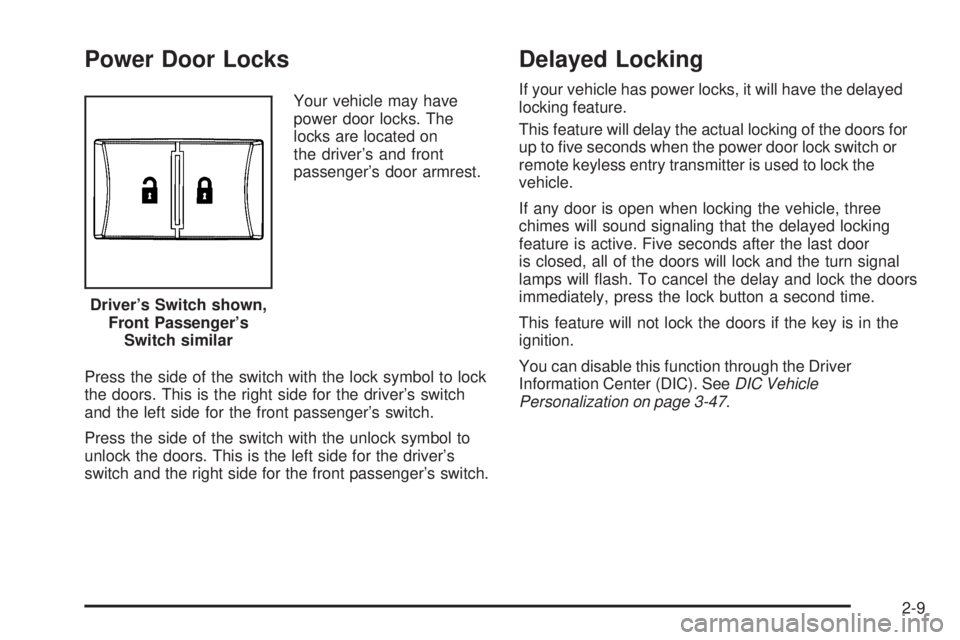
Your vehicle may have
power door locks. The
locks are located on
the driver’s and front
passenger’s door armrest.
Press the side of the switch with the lock symbol to lock
the doors. This is the right side for the driver’s switch
and the left side for the front passenger’s switch.
Press the side of the switch with the unlock symbol to
unlock the doors. This is the left side for the driver’s
switch and the right side for the front passenger’s switch.
Delayed Locking
If your vehicle has power locks, it will have the delayed
locking feature.
This feature will delay the actual locking of the doors for
up to ve seconds when the power door lock switch or
remote keyless entry transmitter is used to lock the
vehicle.
If any door is open when locking the vehicle, three
chimes will sound signaling that the delayed locking
feature is active. Five seconds after the last door
is closed, all of the doors will lock and the turn signal
lamps will ash. To cancel the delay and lock the doors
immediately, press the lock button a second time.
This feature will not lock the doors if the key is in the
ignition.
You can disable this function through the Driver
Information Center (DIC). SeeDIC Vehicle
Personalization on page 3-47. Driver’s Switch shown,
Front Passenger’s
Switch similar
2-9
Page 83 of 402
To set the locks, do the following:
1. Insert the key into the security lock slot and turn it
so the slot is in the horizontal position.
2. Close the door.
When you want to open a rear door when the security
lock is on, do the following:
1. Unlock the door using the remote keyless entry
transmitter, if the vehicle has one, the power door
lock switch, or by lifting the rear door manual lock.
2. Open the door from the outside.
To cancel the rear door security lock, do the following:
1. Unlock the door and open it from the outside.
2. Insert the key into the security lock slot and turn it
so the slot is in the vertical position.Lockout Protection
If your vehicle has power door locks, it will have this
feature. If you press the power door lock switch
when the key is in the ignition and any door is open,
all the doors will lock and the driver’s door will unlock.
Be sure to remove the key from the ignition when
locking your vehicle.
The lockout protection can be overridden by pressing
and holding the power door lock in the lock position for
three seconds.
2-11
Page 85 of 402
Remote Trunk Release
To open the trunk from
inside the vehicle, press
the remote trunk release
button. It is located
inside the driver storage
compartment on the lower
left side of the instrument
panel.
SeeInstrument Panel Overview on page 3-4orDriver
Storage Compartment on page 2-41.
On a manual transmission equipped vehicle, the remote
trunk release works when the ignition is either off or
in ACC/ACCESSORY, or the vehicle speed is less than
2 mph (3 km/h).
On an automatic transmission equipped vehicle, the
remote trunk release works when the shifter is in
P (Park).
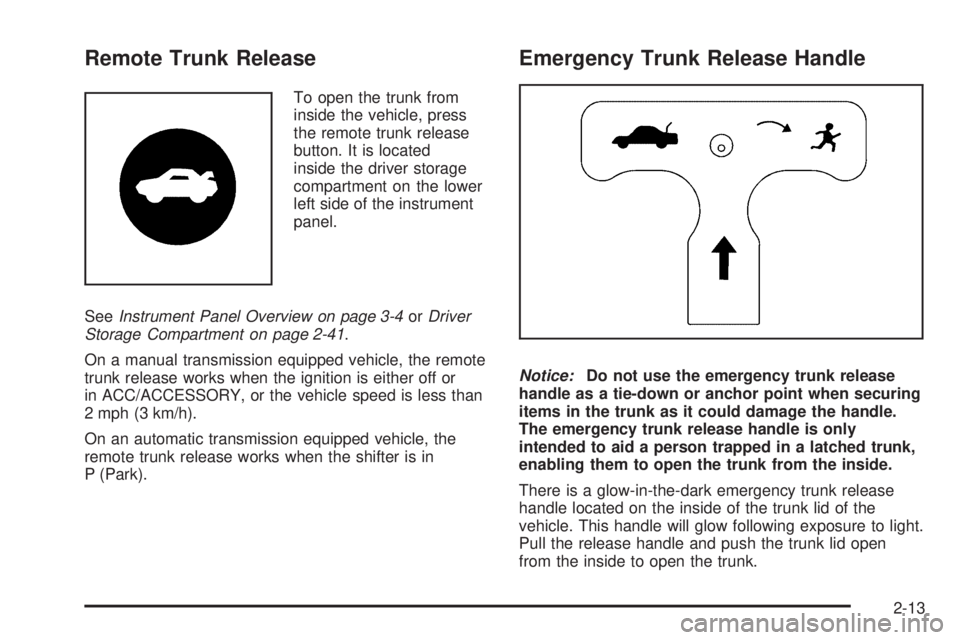
Emergency Trunk Release Handle
Notice:Do not use the emergency trunk release
handle as a tie-down or anchor point when securing
items in the trunk as it could damage the handle.
The emergency trunk release handle is only
intended to aid a person trapped in a latched trunk,
enabling them to open the trunk from the inside.
There is a glow-in-the-dark emergency trunk release
handle located on the inside of the trunk lid of the
vehicle. This handle will glow following exposure to light.
Pull the release handle and push the trunk lid open
from the inside to open the trunk.
2-13
Page 89 of 402
Arming the System
With the ignition off, you can arm the system by
pressing the remote keyless entry transmitter lock
button.
The system will arm after either of these things occur:
Thirty seconds after all the doors are closed.
Sixty seconds with any door open.
If you press the lock button on the transmitter a second
time while all the doors are closed, the system will
arm immediately. The system will still arm in 60 seconds
if a door is open. When the open door is closed, it will
also become armed.
The security light, located on the instrument panel
cluster, will turn on to indicate that arming has been
initiated. Once the system is armed, the security light
will ash once every three seconds.
If the security light is ashing twice per second, this
means that a door is open.
If you do not want to arm the system, you may lock the
car with the manual lock knobs, or the power door
lock switch, if equipped, on the doors.
Disarming the System
You can disarm the system by doing any one of the
following:
Press the remote keyless entry transmitter unlock
button.
Turn the ignition on.
If the system is armed and the trunk is opened using the
trunk release button on the transmitter, the system will
temporarily disarm itself and re-arm when the trunk has
been closed. This allows you to exit the vehicle, lock the
doors using the transmitter, and open the trunk using the
transmitter without having to disarm and re-arm the
system.
Once the system is disarmed, the security light will stop
ashing.
How the System Alarm is Activated
If the system is armed, it can be activated by either:
Opening the driver’s door or trunk. This will
cause a ten second pre-alarm chirp followed by a
thirty second full alarm of horn and lights.
Opening any other door. This will immediately cause
a full alarm of horn and lights for thirty seconds.
When an alarm event has nished, the system will
re-arm itself automatically.
2-17